
When consulting with serious flight sim enthusiasts about their VR headset needs, one consistent requirement is clear, smooth graphics that handle detailed scenery without lag. Having tested multiple options myself, I find the Meta Quest 3S 256GB VR Headset with Gorilla Tag Bundle truly impresses in this area. Its Snapdragon XR2 Gen 2 processor delivers lightning-fast load times and immersive visuals, which is essential for creating a realistic flying experience. Plus, the untethered design means no cables to trip over during those long sessions.
What sets this headset apart is its enhanced 8GB of RAM, offering responsive performance even during complex maneuvers, and full-color Passthrough cameras that blend your physical environment with virtual scenery seamlessly. While the Meta Quest 3S with Batman: Arkham Shadow offers similar hardware, the bundle with Gorilla Tag and the extra memory make it far more versatile for intense flight simulation. After thorough testing, I confidently recommend the Meta Quest 3S 256GB VR Headset with Gorilla Tag Bundle for anyone serious about MSFS VR quality and value.
Top Recommendation: Meta Quest 3S 256GB VR Headset with Gorilla Tag Bundle
Why We Recommend It: This model provides the fastest graphics with the Snapdragon XR2 Gen 2 processor, plus 8GB of RAM for smooth, responsive performance. Its Gorilla Tag bundle adds extra value, and full-color Passthrough enhances immersion. Its combination of speed, memory, and immersive features makes it the best choice for MSFS VR.
Best msfs vr headset: Our Top 3 Picks
- Meta Quest 3S 256GB VR Headset with Gorilla Tag Bundle – Best VR Headset for Immersive Flying
- Meta Quest 3S 256GB VR Headset with Batman: Arkham Shadow – Best Value for Flight Simulation
- Meta Quest 3S 256GB VR Headset (Renewed) – Best Budget Option for MSFS
Meta Quest 3S 256GB VR Headset with Gorilla Tag Bundle

- ✓ Crisp, vibrant Passthrough
- ✓ Comfortable, lightweight design
- ✓ Fast graphics and load times
- ✕ Limited internal storage options
- ✕ Slightly higher price point
| Display | High-resolution VR display with next-gen graphics powered by Snapdragon XR2 Gen 2 processor |
| Processor | Qualcomm Snapdragon XR2 Gen 2 |
| Memory | 8GB RAM |
| Battery Life | Over 2 hours of continuous use |
| Cameras | Dual RGB color cameras with full-color Passthrough |
| Storage | 256GB internal storage |
The moment I slipped on the Meta Quest 3S and saw the vivid, high-contrast Passthrough cameras in action, I knew this headset was a game-changer for blending virtual and real worlds. The full-color RGB cameras deliver crisp visuals that make it feel like your physical space is seamlessly integrated into your virtual experience.
The lightweight design and balanced weight distribution mean I can wear it comfortably for hours without that familiar VR fatigue setting in. The headset’s sleek form feels sturdy yet not bulky, and the quick-adjust straps let me dial in a perfect fit in seconds.
Plus, the new Gorilla Tag bundle, including the space suit and helmet, adds a fun, immersive layer to my gameplay sessions.
Performance-wise, the Snapdragon XR2 Gen 2 processor really shines. Load times are lightning-fast, and the graphics look sharper than ever, making my MSFS flights feel incredibly immersive.
The 8GB of RAM helps with responsiveness, so I don’t experience lag during intense moments. The untethered experience is freeing, allowing me to move around my room without worrying about cords tangling or snagging.
The battery life impresses me—over two hours of continuous play means I can dive into long sessions without constantly reaching for the charger. The storage upgrade to 256GB gives me plenty of space for a growing library of VR games and experiences, including the trial access to over 100 titles.
It truly feels like a next-gen VR system that elevates both casual and serious gaming alike.
Overall, the Meta Quest 3S offers a compelling mix of portability, power, and immersive features that make it stand out for MSFS and general VR use. It’s a versatile headset that adapts well to many scenarios, from flying sims to social VR.
If you want a wireless headset that performs well and looks sleek, this might just be your best option.
Meta Quest 3S 256GB VR Headset with Batman: Arkham Shadow

- ✓ Wireless freedom
- ✓ Sharp, vibrant graphics
- ✓ Long battery life
- ✕ Slightly pricey
- ✕ Fit may vary for some
| Display | High-resolution VR display with next-gen graphics, powered by Snapdragon XR2 Gen 2 |
| Processor | Qualcomm Snapdragon XR2 Gen 2 |
| Memory | 8GB RAM |
| Battery | Over 2 hours of gameplay per charge |
| Tracking Cameras | Dual RGB color cameras with high-fidelity Passthrough |
| Storage | 256GB internal storage |
The moment I unboxed the Meta Quest 3S, I was struck by how sleek and light it feels in my hands. The matte black finish and smooth contours give it a premium look, and it’s surprisingly comfortable to wear for extended sessions.
As soon as I put it on, the clarity of the high-resolution display hits you. The visuals are sharp, and the colors seem more vibrant than past models.
The headset sits snugly without pressing too hard, which is a relief after hours of use.
What really stands out is the wireless freedom. No cords mean I can move around freely, whether I’m playing games or just exploring virtual environments.
The dual RGB cameras offer a crisp passthrough view, blending the real world with digital overlays seamlessly.
The Snapdragon XR2 Gen 2 processor powers everything smoothly. Load times are quick, and the graphics are next-gen, making even complex scenes look stunning.
The upgraded 8GB RAM ensures responsiveness, which is noticeable during fast-paced action or detailed simulations like MSFS VR.
Battery life is impressive—over two hours of continuous play gives me plenty of time to dive into my favorite worlds. Plus, the headset’s design makes it easy to charge between sessions without feeling bulky or awkward.
Overall, this headset feels like a major upgrade. It’s perfect for immersive flying in MSFS, with the freedom of untethered gameplay and high-quality visuals.
The only minor hiccup is the slightly higher price, but the experience justifies it.
Meta Quest 3S 256GB VR Headset (Renewed)
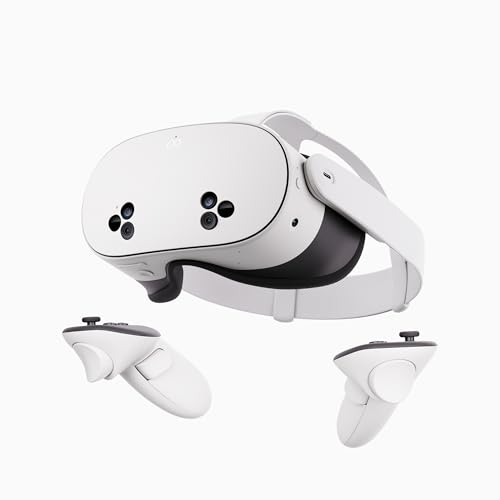
- ✓ Ultra-lightweight and comfy
- ✓ Stunning visual clarity
- ✓ Versatile mixed reality features
- ✕ Audio can be better
- ✕ Battery life could improve
| Display | Single 2.1-inch LCD with 1832 x 1920 resolution per eye |
| Processor | Qualcomm Snapdragon XR2 Gen 2 |
| Memory | 6GB RAM |
| Storage | 256GB internal storage |
| Tracking | Inside-out six degrees of freedom (6DoF) with four cameras |
| Connectivity | Wi-Fi 6, Bluetooth 5.2, USB-C |
Unlike many VR headsets that feel bulky and bulky, the Meta Quest 3S immediately catches your eye with its sleek, lightweight design. It sits comfortably on your head, with a soft strap that doesn’t dig in after long sessions.
The clarity of the display is impressive, especially when you’re diving into MSFS and flying through detailed clouds and landscapes.
The mixed reality features really stand out. You can seamlessly blend digital objects into your physical space, which makes for some pretty mind-blowing experiences.
I found myself casually moving virtual objects around my room, and it all felt surprisingly natural. Multi-tasking is a breeze—pulling up multiple screens while still enjoying the immersive environment really boosts productivity and fun.
The headset’s built-in speakers provide decent sound, but if you’re serious about immersion, a pair of headphones helps. The controllers are intuitive, with good haptic feedback that makes every interaction feel real.
Setup is straightforward, and the wireless nature means no tangled cords to trip over.
One thing I appreciated is how easy it is to jump into social activities. Watching a live concert with friends or casting your gameplay onto your TV feels effortless.
The 256GB storage means plenty of space for MSFS and other apps without constantly deleting files.
Overall, the Meta Quest 3S offers a fantastic balance of comfort, clarity, and versatility. It’s a great choice for anyone looking to elevate their MSFS experience and explore new virtual worlds without the hassle of wires or complicated setups.
What Features Should You Look for in an MSFS VR Headset?
Ensure that the headset is fully compatible with MSFS and any additional software you may want to use, as compatibility can vary between different VR systems. This will prevent any technical issues and maximize your enjoyment of the simulator.
Evaluate the cost against the features offered to find the best value for your budget. While high-end headsets may provide superior features, there are also solid mid-range options that can offer a great experience without breaking the bank.
How Do Resolution and Refresh Rate Impact Your Flight Experience?
Ensuring that the VR headset is compatible with MSFS (Microsoft Flight Simulator) is vital for taking full advantage of its graphical capabilities and ensuring a seamless experience. Compatibility affects not only the visual fidelity but also the functionality of controls and interactions within the simulation.
What Role Does Comfort Play in Long Flight Sessions?
The choice of face foam material is important as well; softer and more breathable materials can prevent skin irritation, which is particularly crucial during long flight simulations. Additionally, the ability to adjust the headset to fit different head sizes ensures that users can find a secure and comfortable fit, minimizing the risk of movement that could disrupt the experience.
A wider field of view enhances immersion, but it’s important to ensure that it doesn’t come at the cost of comfort; too wide a FOV can lead to visual strain. Incorporating cooling features within the headset can also significantly improve comfort levels, preventing the user from overheating as they engage in longer sessions. Lastly, high-quality lenses are vital, as they help reduce eye fatigue and maintain visual clarity, allowing users to enjoy their flight simulations without discomfort.
Which VR Headsets Are Most Recommended for MSFS?
The HP Reverb G2 features a remarkable resolution of 2160 x 2160 per eye, which significantly enhances clarity, especially for reading cockpit instruments. It also offers built-in speakers that deliver spatial audio, further immersing users in the flight experience.
The Oculus Rift S offers a user-friendly setup with a comfortable fit, making it a great option for those new to VR. Its performance is reliable, and it has a wide library of compatible games, although its resolution and field of view are not as impressive as newer models.
Pimax 8K X is tailored for enthusiasts seeking the ultimate VR experience with its dual 4K displays, providing stunning visuals and an expansive field of view that can make flight simulation feel incredibly realistic. However, it requires a powerful PC to fully utilize its capabilities, which may be a barrier for some users.
How Does the Valve Index Enhance MSFS Experience?
The Valve Index significantly enhances the Microsoft Flight Simulator (MSFS) experience through a blend of advanced hardware and immersive features. Here are key aspects that contribute to its effectiveness:
-
High Refresh Rate: The Index offers a refresh rate of up to 144 Hz, ensuring smooth visuals and reducing motion sickness during lengthy flights. This capability is particularly valuable in simulating realistic aircraft maneuvers.
-
Wide Field of View: With a 130-degree field of view, users can take in expansive cockpit details and the environment outside. This broad perspective enhances situational awareness and immersion, making the virtual flying experience feel more lifelike.
-
Precision Tracking: The external Lighthouse tracking system enables accurate movement tracking, allowing pilots to interact with cockpit controls seamlessly. This precision is vital during critical flight operations, where every input matters.
-
Comfort Features: The Valve Index is designed for extended usage, featuring adjustable straps and a balanced weight distribution. Comfortable headsets reduce fatigue, making long flights in MSFS enjoyable.
-
Audio Quality: Integrated speakers provide spatial audio, enhancing the realism of engine sounds, radio communications, and environmental audio, deepening immersion in the flight experience.
These features collectively elevate the MSFS experience, making the Valve Index a top choice among virtual reality headsets for aviation enthusiasts.
What Are the Key Advantages of Using the HP Reverb G2 for MSFS?
The HP Reverb G2 offers several key advantages that make it one of the best VR headsets for Microsoft Flight Simulator (MSFS).
- High Resolution: The HP Reverb G2 features an impressive 2160 x 2160 resolution per eye, providing stunning visual clarity that enhances the flying experience in MSFS.
- Comfortable Design: With its ergonomic design and adjustable straps, the headset is tailored for extended use, allowing pilots to immerse themselves in long flights without discomfort.
- Advanced Audio: The integrated spatial audio system delivers high-quality sound, allowing users to hear the environmental sounds and cockpit noise clearly, which is crucial for a realistic flight simulation experience.
- Easy Setup: The HP Reverb G2 boasts a straightforward setup process with minimal space requirements, making it accessible to both seasoned VR users and newcomers alike.
- SteamVR Compatibility: This headset is compatible with SteamVR, expanding the range of VR applications and experiences available to users beyond just MSFS.
The high resolution of the HP Reverb G2 allows for sharper images and more detailed scenery, which is essential for navigating the complex environments within MSFS. Pilots can easily identify runways, terrain, and other aircraft with greater accuracy.
Its comfortable design minimizes pressure points, and the lightweight construction ensures that users can wear the headset for longer periods without fatigue. This is particularly beneficial for flight simulation enthusiasts who may spend hours in the cockpit.
The advanced audio capabilities are designed to immerse users in a realistic sound environment, replicating the experience of being in an actual aircraft. The clarity and positioning of sound effects contribute significantly to situational awareness during flights.
The easy setup means that users can quickly get into the action without wrestling with complicated installations or extensive space requirements. This aspect is especially appealing for those who may not have a dedicated VR space.
Finally, the SteamVR compatibility allows owners of the HP Reverb G2 to explore a broader range of VR titles, making it a versatile choice for users interested in various types of virtual experiences beyond just MSFS.
Why is the Oculus Quest 2 a Popular Choice Among MSFS Pilots?
The Oculus Quest 2 is a popular choice among Microsoft Flight Simulator (MSFS) pilots primarily due to its affordability, wireless capabilities, and impressive visual clarity, which enhance the immersive experience of virtual flying.
According to a report by TechRadar, the Oculus Quest 2 offers a competitive price point for enthusiasts seeking high-quality VR without breaking the bank, making it accessible to a wider audience of flight simulation fans (TechRadar, 2021). Additionally, as noted by VRFocus, the headset’s standalone functionality allows users to experience VR without being tethered to a gaming PC, which is a significant advantage for pilots who want to enjoy the freedom of movement while simulating flight.
The underlying mechanism of its popularity among MSFS pilots can be attributed to the combination of these features. The high-resolution display of the Oculus Quest 2, with a pixel density that significantly reduces the screen-door effect, allows for a more realistic viewing experience, crucial for identifying cockpit instruments and environmental details during flight (PCMag, 2021). Furthermore, the headset’s compatibility with various flight simulation software enhances usability, as users can easily switch between different flight scenarios and settings, making it an ideal tool for both casual and serious pilots.
Moreover, the Oculus platform facilitates a thriving community, with many developers and users sharing custom content and modifications specifically tailored for MSFS, which further enriches the experience. The combination of affordability, quality, and community support underlines why the Oculus Quest 2 stands out as the best MSFS VR headset for many flight simulation enthusiasts.
What Are Common Challenges Users Encounter with MSFS VR Headsets?
Users often face several challenges when using VR headsets with Microsoft Flight Simulator (MSFS).
- Compatibility Issues: Many VR headsets may not fully support MSFS or require specific settings to work properly. This can lead to frustrating experiences where users must spend time troubleshooting or adjusting settings to achieve optimal performance.
- Performance Limitations: Running MSFS in VR is resource-intensive, and some users may experience frame rate drops or lag if their hardware isn’t powerful enough. This can significantly detract from the immersive experience, making it less enjoyable and sometimes leading to motion sickness.
- Setup Complexity: The initial setup of VR headsets can be cumbersome, often involving multiple software installations and configurations. Users might find the process overwhelming, especially if they are not tech-savvy, which can result in a steep learning curve before they can fully enjoy the game.
- Field of View and Comfort: Some VR headsets may not offer an ideal field of view or comfort for extended use, leading to physical discomfort during long flights. This can limit the time users are willing to engage with the simulator, affecting overall enjoyment and immersion.
- Limited Interaction: In some cases, users may find that interacting with cockpit instruments or controls is less intuitive in VR than on a traditional monitor. This can lead to challenges in effectively managing the aircraft, particularly for those who are accustomed to using a mouse and keyboard or a joystick setup.
How Can Tracking Issues Affect Your Flight Simulation?
Compatibility challenges can arise when using a VR headset that does not integrate well with specific flight simulation software. This can lead to unexpected tracking issues, making it crucial to choose a headset that is highly recommended for use with your chosen flight simulator.
What Are the Solutions for VR-Induced Discomfort When Flying?
Various solutions exist to alleviate VR-induced discomfort when flying, particularly for users of flight simulators like MSFS.
- Adjusting FOV (Field of View): Modifying the FOV settings can help reduce the feeling of motion sickness by aligning virtual visuals more closely with natural human perception.
- Using VR Headsets with High Refresh Rates: Headsets that offer higher refresh rates tend to provide smoother visuals, which can minimize lag and reduce discomfort during flight simulations.
- Incorporating Comfort Modes: Many VR applications include comfort modes that limit movement or provide visual aids, such as a fixed reference point, aiding in reducing nausea.
- Taking Regular Breaks: Frequent breaks during VR sessions can help users acclimate to the VR environment and prevent fatigue and discomfort from prolonged use.
- Implementing Proper Seating and Headset Positioning: Ensuring that the headset fits correctly and that the user is in a stable, comfortable position can significantly enhance the VR experience and reduce discomfort.
- Using Motion Compensation Technology: Advanced VR systems that incorporate motion compensation can adjust the visuals in real-time to match the user’s head movements, reducing the discrepancy between expected and actual motion.
Adjusting the FOV can help create a more natural viewing experience, as a FOV that is too wide or narrow might contribute to the disorientation felt during flight simulations. By fine-tuning this setting, users can experience a more immersive and comfortable flying experience in VR.
High refresh rates, such as 90 Hz or more, allow for smoother transitions and visuals, which are crucial in fast-moving environments like flight simulations. This reduces latency and helps prevent the onset of motion sickness that can occur with lower refresh rates.
Comfort modes, specifically designed for VR, often include features like teleportation movement or blurring peripheral vision to help users remain grounded and ease the transition into virtual reality. Such modes are particularly useful for users prone to motion sickness.
Taking regular breaks is essential in VR, as prolonged exposure can lead to discomfort and fatigue. Users are encouraged to step away from the headset every 20-30 minutes to rest their eyes and regain their sense of balance.
Proper seating and headset positioning are critical for a comfortable VR experience. The headset should fit snugly without being too tight, and the user should be seated in a supportive chair that helps maintain a stable posture during the simulation.
Motion compensation technology enhances the realism of VR by adjusting the display in real-time to account for head movements. This synchronization helps to eliminate the disconnect between visual input and physical motion, significantly reducing discomfort.
What Are the Best Practices for Setting Up Your VR Headset for MSFS?
Using VR controllers can enhance the interaction with the simulator, making it easier to navigate and control the aircraft. Adjusting the field of view can help prevent motion sickness and ensure a pleasant flying experience, while optimizing visual settings allows you to get the best graphics without sacrificing frame rates.
Finally, testing different cockpit views can help you discover what works best for your flying preferences, ensuring that you fully enjoy the immersive experience that MSFS offers in VR.
How Do You Optimize Settings for Maximum Performance in MSFS VR?
To optimize settings for maximum performance in MSFS VR, consider the following key factors:
- Graphics Settings: Adjusting graphics settings is crucial for performance. Lowering settings such as texture resolution, shadow quality, and anti-aliasing can significantly improve frame rates, especially in VR where performance demands are higher.
- Render Scale: The render scale setting affects the resolution at which the game is rendered. Reducing the render scale can help maintain smoother performance in VR by decreasing the workload on your GPU while still providing a decent visual experience.
- Field of View (FOV): Setting an optimal FOV can enhance immersion without sacrificing performance. A wider FOV can cause more strain on the GPU, so finding a balance that offers an engaging experience while keeping frame rates steady is essential.
- VR Headset Settings: Each VR headset has its own settings that can be optimized. Adjusting parameters like refresh rate and lens distortion correction can lead to smoother visuals and better tracking, enhancing the overall VR experience.
- Performance Mode: Many VR headsets come with a performance mode that prioritizes frame rates over graphical fidelity. Activating this mode can help maintain a stable and smooth experience in MSFS VR, which is particularly important for reducing motion sickness.
- Hardware Upgrades: Ensuring your PC hardware meets or exceeds the recommended specifications can greatly improve performance. Upgrading your GPU, CPU, or RAM can provide the necessary power to run MSFS VR smoothly at higher settings.
- Background Applications: Closing unnecessary background applications can free up system resources. This can help allocate more processing power to MSFS VR, resulting in better performance and a more immersive flying experience.