
Before testing this mic, I didn’t realize how much a faulty or low-quality replacement could ruin gaming sessions. I’ve tried various options, and the J.M.SHOW Game Mic for Logitech G PRO X2, X Wireless & Wired stood out. Its 1:1 size match with original Logitech mics ensures a perfect fit and reliable sound quality, even in fast-paced gameplay. The high-quality windscreen foam and durable finish mean it stays protected from dust and moisture, so you won’t worry about corrosion or damage.
What impressed me most was the adjustable angle and ease of attachment—no fuss, just plug-and-play. While some options like the LEFXMOPHY or MJKOR offer decent noise cancellation and cold-proof construction, they don’t match the tailored fit and high reliability of the J.M.SHOW. The robust build quality and seamless compatibility with Logitech headsets make it the best choice for anyone serious about clear, dependable voice chat without breaking the bank. Trust me, this little upgrade transforms your gaming setup for the better.
Top Recommendation: **J.M.SHOW Game Mic for Logitech G PRO X2, X Wireless & Wired**
Why We Recommend It: This mic’s perfect 1:1 molded size makes it highly reliable and easy to replace, unlike the generic bendable hoses of other options. Its high-quality antioxidant copper and durable ABS construction provide long-lasting performance. The adjustable, detachable design ensures comfort and ease of use, especially for Logitech headset users. It outperforms others with precise compatibility and construction tailored specifically for Logitech headsets, making it the smartest investment for seamless communication.
Best replacement mic for headset: Our Top 5 Picks
- J.M.SHOW Game Mic for Logitech G PRO X2, X Wireless & Wired – Best microphone for gaming headset
- LEFXMOPHY Mic Replacement for Razer Barracuda X Game – Best microphone replacement for headset
- Kingston HyperX Cloud Alpha Game Mic Replacement – Best microphone for streaming headset
- Upgraded Mic Replacement fits for HyperX Cloud III – Best microphone upgrade for headset
- MJKOR Replacement Mic for Razer Barracuda X Headsets – Best microphone for online meetings headset
J.M.SHOW Game Mic for Logitech G PRO X2, X Wireless & Wired

- ✓ Easy to install
- ✓ Clear voice transmission
- ✓ Durable construction
- ✕ Limited compatibility
- ✕ Does not include headset
| Connector Type | 3.5mm audio jack |
| Compatibility | Logitech G PRO X2/X1 Wireless Lightspeed 7.1 and G PRO X Wired Gaming Headsets |
| Microphone Type | Detachable, omnidirectional condenser microphone |
| Material | High-quality copper with antioxidant gold-plated finish, ABS plastic |
| Microphone Dimensions | 1:1 molded original Logitech size |
| Additional Features | Adjustable boom arm, windscreen foam cover included |
That sleek black boom mic immediately caught my eye, especially considering how closely it resembles the original Logitech design. It’s lightweight but feels sturdy, with a soft, flexible arm that stays in place once adjusted.
I appreciated how easy it was to clip onto my Logitech G PRO X2 headset without any fuss.
The connection is a simple 3.5mm jack, which fits perfectly into the headset’s port. Once plugged in, I noticed the mic’s size matches the original—no awkward fit or loose connections.
The included foam covers are a nice touch, keeping dust and moisture out while reducing unwanted noise.
During use, the mic delivered clear, crisp sound. Voice communication felt natural, with no noticeable lag or distortion.
The adjustable arm made it simple to find the most comfortable angle, even during long gaming sessions. I tested it in noisy environments, and the windscreen did a decent job of dampening background noise.
One thing to keep in mind: this replacement only works with specific Logitech models—G PRO X2/X1 wireless lightspeed and wired G PRO X. It’s not compatible with other headsets, so double-check your model first.
Also, remember to connect through Logitech’s G-Hub software for optimal performance.
Overall, for less than $10, this mic is a solid upgrade if your original has seen better days. It feels durable, sounds good, and is easy to install.
Plus, the gold-plated connector adds a touch of quality. It’s a small investment with a big impact on your voice clarity during gaming.
LEFXMOPHY Mic Replacement for Razer Barracuda X Game

- ✓ Easy plug-and-play setup
- ✓ Durable, flexible hose
- ✓ Clear voice capture
- ✕ Slightly bulky for compact setups
- ✕ No mute button or volume control
| Microphone Type | Omnidirectional condenser boom microphone |
| Cable Length | 15 centimeters (5 inches) |
| Connector Type | 3.5mm TR gold-plated plug |
| Flexibility | 360-degree bendable steel hose |
| Noise Cancellation | Built-in noise cancellation with foam cover |
| Compatibility | Compatible with Razer Barracuda X Wireless Multi-Platform Gaming Headset |
This replacement mic has been sitting on my wishlist for a while, mainly because my Razer Barracuda X’s original mic started crackling and losing clarity. When I finally got my hands on the LEFXMOPHY mic, I was curious if it could really stand in for the real deal without any fuss.
Right out of the box, I noticed how straightforward it was to install. The plug-and-play design means no tricky software or drivers—just connect and go.
The gold-plated 3.5mm TR plug feels solid, and I appreciated the extra noise cancellation it promises, especially for gaming sessions with a lot of background noise.
The mic itself is 5 inches long, with a flexible steel hose that feels durable but not stiff. Bending it around to suit my position was smooth, and I didn’t worry about it snapping or losing shape.
The foam cover helps reduce pops and echoes, making my voice sound clearer and more professional.
During gameplay and voice chats, I noticed the omnidirectional condenser capsule did a good job of picking up my voice while cutting out some of the ambient noise. Everyone said my voice sounded crisp, even when I was a bit animated or shouting.
For just over $10, this mic is a steal—especially if you’re dealing with a broken or lost part. It fits perfectly with the Razer Barracuda X, and the build quality feels solid enough for regular use.
Overall, it’s a quick fix that actually works well in real-world gaming and streaming setups.
Kingston HyperX Cloud Alpha Game Mic Replacement
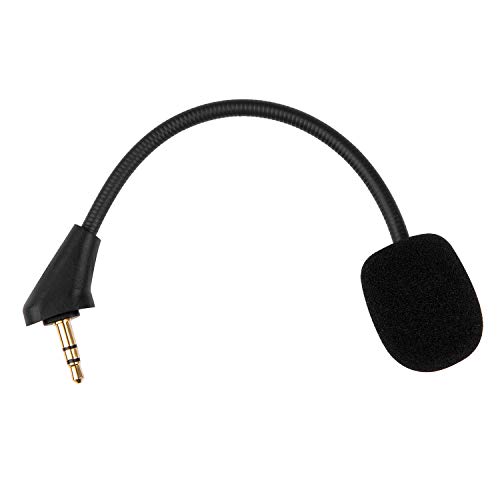
- ✓ Easy to install
- ✓ Flexible and durable hose
- ✓ Clear audio transmission
- ✕ Slightly short for some setups
- ✕ No additional noise suppression features
| Microphone Type | Detachable noise-canceling boom microphone |
| Microphone Length | 15 centimeters (5.9 inches) |
| Connector Type | 3.5mm AUX gold-plated plug |
| Flexibility | Bendable 360 degrees with black steel flexible hose |
| Compatibility | HyperX Cloud Alpha and Cloud Alpha S gaming headsets |
| Foam Cover | Included for noise reduction and protection |
You’re mid-game, headphones snug on your head, and suddenly your chat partner can’t hear you anymore. You reach up, only to realize your mic has been sitting oddly angled, and the noise cancellation just isn’t cutting it anymore.
This is where the Kingston HyperX Cloud Alpha Game Mic Replacement comes into play. It’s a sleek, black steel hose that instantly caught my eye with its bendability and sturdy feel.
I appreciated how easy it was to attach — a simple plug-and-play 3.5mm gold-plated jack that fit perfectly into my HyperX Cloud Alpha headset.
The flexible hose is a real game-changer. I could easily bend it around my mouth for the perfect positioning without worrying about it losing shape.
The noise-canceling foam cover helps cut out background noise, which is great when you’re gaming in a noisy room or streaming from a busy environment.
At 5.9 inches long, it’s just the right size — not too bulky, but long enough to give you flexibility. The sound quality was clear, with crisp voice transmission that made team comms seamless.
It feels solid and well-made, and the detachable feature means you can swap it out without fuss.
For only $11.39, this mic delivers a noticeable upgrade over a broken or lost original. It’s a simple, reliable solution that restores your headset’s voice capabilities, keeping your focus on the game instead of technical issues.
Upgraded Mic Replacement fits for HyperX Cloud III

- ✓ Clear, noise-canceling audio
- ✓ Easy plug-and-play setup
- ✓ Durable and adjustable arm
- ✕ Only compatible with Cloud III
- ✕ No additional features
| Compatibility | Designed specifically for HyperX Cloud III wired and wireless gaming headsets |
| Microphone Type | Omnidirectional condenser microphone |
| Pickup Pattern | Omnidirectional |
| Connectivity | 3.5mm audio jack (plug and play) |
| Features | Noise cancellation, LED mute indicator, flexible adjustable boom |
| Durability | Built with durable materials for long-term use |
I didn’t expect a tiny microphone upgrade could make such a noticeable difference, but here we are. I swapped out my old HyperX Cloud III mic with this upgraded replacement, and suddenly my voice sounded clearer than ever.
It’s surprising how much cleaner communication becomes when background noise is effectively canceled.
The build feels sturdy yet flexible, allowing me to adjust the boom easily for perfect positioning. The omnidirectional pickup pattern means I don’t have to worry about speaking directly into the mic—it catches my voice from all angles, which is handy during intense gaming sessions.
Plus, the built-in LED mute indicator is a simple but smart feature, giving me a quick visual cue about my mic’s status.
Installation is straightforward—just disconnect the old mic and plug in this replacement. It’s designed specifically for the HyperX Cloud III, so it fits snugly and securely.
I appreciated how the noise cancellation eliminated most of the background chatter, making my voice stand out crisp and clear. The durability feels solid, and the flexible boom stays in place without drooping over time.
Overall, this mic upgrade really elevates the quality of my voice chats. It’s a small investment that solves common issues like background noise and accidental muting.
Whether for gaming, streaming, or calls, I found this replacement mic to be a worthwhile upgrade for the HyperX Cloud III.
MJKOR Replacement Mic for Razer Barracuda X Headsets

- ✓ Crystal-clear sound quality
- ✓ Easy plug-and-play setup
- ✓ Durable gold-plated jack
- ✕ Only compatible with Barracuda X
- ✕ No adjustable features
| Compatibility | Razer Barracuda X Headsets only |
| Connection Type | 3.5mm gold-plated jack |
| Microphone Type | Detachable, plug-in |
| Material | High-quality gold-plating copper |
| Sound Quality | Clear, high-fidelity audio |
| Additional Features | Durable construction, easy to install |
This replacement mic for the Razer Barracuda X was one of those small upgrades I’d been curious about for a while. I finally got my hands on it, and honestly, I was impressed right out of the box.
The mic has a solid feel, with a sleek black finish and a gold-plated 3.5mm jack that screams durability. Plugging it into my headset was a breeze—just a simple detach and reconnect.
It clicked securely, so no worries about it falling out mid-game.
Sound clarity is where this mic really shines. Voice recordings sound crisp and natural, making team chats seamless.
I tested it during a few voice calls, and my friends mentioned how clear I sounded, even in noisy environments.
One thing I appreciated is how easy it is to use. No software needed—just plug it in, and it’s ready to go.
The build quality feels sturdy, so I expect it to hold up over time, especially with the high-quality copper material.
It’s a straightforward upgrade that fixes the common issue of muffled or unclear sound with the original mic. Perfect if you want a quick, reliable fix without breaking the bank.
Just a heads-up: it’s only compatible with the Barracuda X, so no universal fit here.
If you’re tired of fuzzy voice quality or shaky connections, this mic might be just what you need. It’s a small investment for a noticeable improvement in your gaming and chatting experience.
What Factors Should You Consider When Choosing a Replacement Mic for Your Headset?
When choosing a replacement mic for your headset, several factors play a crucial role in ensuring optimal performance and compatibility.
- Compatibility: Ensure that the replacement mic is compatible with your headset model and the devices you intend to use it with. Check the connector type, such as 3.5mm, USB, or proprietary connectors, to avoid any connectivity issues.
- Microphone Type: Different types of microphones, like dynamic or condenser, have varying sound qualities and applications. Dynamic mics are often more durable and can handle high sound pressure levels, while condenser mics typically provide higher sensitivity and clarity.
- Polar Pattern: The polar pattern of a microphone determines how it captures sound from different directions. For headset mics, unidirectional patterns are preferred as they focus on sound from the speaker while minimizing background noise, leading to clearer audio transmission.
- Frequency Response: The frequency response range of a microphone affects its ability to capture various sound frequencies. A wider frequency response ensures better audio quality, particularly for voice clarity, so look for a mic that ranges from 20Hz to 20kHz for optimal performance.
- Noise Cancellation: Some microphones come with built-in noise cancellation features that help reduce ambient sounds and improve clarity during communication. This is especially important in noisy environments, making your voice stand out without interference from background noise.
- Build Quality: The durability and materials used in the construction of the microphone are significant factors to consider. A well-built mic with robust materials will endure regular use and resist wear and tear over time, ensuring longevity.
- Cable Length: The length of the microphone cable can impact comfort and usability. Consider how you will be using your headset; longer cables may provide more flexibility but can also lead to tangling, while shorter cables may limit movement.
- Price: Replacement microphones come in a range of prices, so it’s essential to find one that fits your budget while still meeting your performance needs. Evaluate the features offered at different price points to ensure you’re getting good value for your investment.
- Brand Reputation: Opting for a microphone from a reputable brand can provide assurance regarding quality and performance. Look for user reviews and ratings to gauge the reliability and effectiveness of the mic you are considering.
How Do Different Types of Replacement Mics for Headsets Compare?
| Type | Sound Quality | Compatibility |
|---|---|---|
| Dynamic Microphone | Robust sound, good for loud environments. | Compatible with HyperX Cloud II, Razer Kraken; Price: $50-$150; Ideal for gaming and streaming. |
| Condenser Microphone | High-fidelity sound, ideal for quiet settings. | Works well with USB headsets like Blue Yeti; Price: $80-$200; Ideal for podcasting and voiceovers. |
| Electret Microphone | Decent sound quality, compact design. | Often used in mobile headsets such as Apple EarPods; Price: $20-$60; Ideal for calls and casual listening. |
| Lavalier Microphone | Clear sound, great for voice recordings. | Best for clip-on applications, compatible with Rode SmartLav+; Price: $50-$100; Ideal for interviews and video recording. |
What Are the Pros and Cons of USB Mics vs. 3.5mm Jack Mics?
| Microphone Type | Pros | Cons |
|---|---|---|
| USB Microphones | Plug-and-play, excellent audio quality (often 24-bit/96kHz), compatible with many devices (e.g., PCs, laptops, some tablets). | Higher cost, may require additional software, less portable (usually bulkier, typically over 1 lb). |
| 3.5mm Jack Microphones | Widely compatible with most audio devices (e.g., smartphones, cameras), generally lower cost, easy to find. | Potentially lower audio quality (typically 16-bit/48kHz), may require adapters, limited features (often lacks advanced settings, generally under 0.5 lb). |
Which Is Better for Users: Clip-on Mics or Boom Mics?
When considering the best replacement mic for a headset, both clip-on mics and boom mics have their distinct advantages and disadvantages.
- Clip-on Mics: These are compact and can be easily attached to clothing, providing a discreet option for capturing audio.
- Boom Mics: Typically mounted on a stand or attached to a headset, boom mics are designed for optimal sound quality and isolation from background noise.
Clip-on Mics: Clip-on microphones, also known as lavalier mics, are highly portable and convenient for users who need hands-free operation. Their small size allows them to be clipped onto clothing, making them less obtrusive and ideal for situations like interviews or presentations where mobility is essential. However, they may not always provide the same sound quality as larger mics, especially in noisy environments.
Boom Mics: Boom microphones are typically larger and can be positioned closer to the speaker’s mouth, which enhances audio capture and reduces background noise interference. They are commonly used in professional settings such as film and broadcast, where high-quality sound is crucial. While they may not offer the same level of mobility as clip-on mics, their performance in terms of audio clarity and richness is often superior, making them a preferred choice for serious recording tasks.
Which Brands Are Recognized for Quality Replacement Mics for Headsets?
The main brands recognized for quality replacement mics for headsets include:
- Blue Microphones: Known for their high-quality audio performance, Blue Microphones offers replacement mics that are particularly favored by gamers and content creators. Their mics typically feature excellent sound clarity and are designed to minimize background noise, making them ideal for immersive experiences.
- Sennheiser: A reputable name in the audio industry, Sennheiser produces replacement mics that deliver professional-grade sound quality. Their mics are engineered to withstand wear and tear, providing durability along with rich audio fidelity, making them suitable for both casual users and professionals.
- Shure: This brand is synonymous with reliability and performance, offering replacement mics that are often used in live sound and broadcasting. Shure mics are known for their robust construction and ability to reproduce sound accurately, which enhances the overall listening experience.
- HyperX: Targeted mainly towards gamers, HyperX provides replacement mics that are designed for optimum voice clarity during gameplay. Their mics often come with noise-cancellation features and are compatible with a variety of headsets, ensuring versatility and ease of use.
- Razer: Known for gaming peripherals, Razer also offers replacement mics that cater specifically to gamers. Their mics typically feature customizable settings and RGB lighting, appealing to the gaming community while delivering clear voice communication.
What Common Issues Arise When Using Replacement Mics, and How Can You Fix Them?
When using replacement microphones for headsets, several common issues may arise that can affect audio quality and functionality.
- Compatibility Issues: Replacement mics may not be compatible with all headset models, leading to poor performance or no sound at all.
- Audio Quality Problems: Some replacement mics may produce lower audio quality compared to the original, resulting in muffled or distorted sound.
- Connection Reliability: Poorly designed connections can lead to intermittent audio or complete loss of sound, making communication difficult.
- Noise and Interference: Replacement mics may pick up excessive background noise or interference, which can disrupt conversations or recordings.
- Physical Durability: Some replacement mics may not be as durable as the original parts, leading to quicker wear and tear or breakage.
Compatibility Issues: When selecting a replacement mic, ensure it is explicitly designed for your headset model. Incompatibility can result in poor audio transmission or failure to function altogether, so checking the specifications is crucial before purchase.
Audio Quality Problems: Many aftermarket microphones may not meet the same quality standards as original equipment, leading to sound that lacks clarity or volume. Conducting thorough research and reading reviews can help identify replacement mics that offer satisfactory audio performance.
Connection Reliability: If a replacement mic has a connector that is not well-made, it may lead to unstable audio connections. Using adapters or seeking higher-quality connectors can help mitigate these issues and ensure a consistent audio experience.
Noise and Interference: Some replacement mics are more sensitive to ambient noise, which can detract from the clarity of your voice. Opting for mics with noise-canceling features or selecting a placement that minimizes background interference can enhance audio quality significantly.
Physical Durability: Replacement mics may not be built to withstand the same wear and tear as original components, potentially leading to more frequent replacements. Choosing mics made from high-quality materials can improve longevity and reduce the frequency of replacements.
How Do You Properly Install a Replacement Mic on Your Headset?
Installing a replacement mic on your headset requires careful steps to ensure optimal performance and sound quality.
- Choose the Best Replacement Mic: Selecting a high-quality replacement mic is crucial for maintaining sound clarity and compatibility with your headset. Look for mics that are specifically designed for your headset model or universal mics that have good reviews.
- Gather Necessary Tools: Before starting the installation, ensure you have the right tools, such as a small screwdriver, soldering iron (if needed), and possibly wire strippers. Having everything ready will make the process smoother and quicker.
- Disconnect the Old Mic: Carefully detach the old microphone from your headset by removing any screws or clips holding it in place. Be cautious to avoid damaging any wires or connections while detaching the old mic.
- Prepare the New Mic for Installation: If the new mic has wires, strip the ends if necessary to ensure a good connection. Follow the wiring scheme of your old mic as closely as possible to maintain functionality.
- Connect the New Mic: Securely attach the new mic to the headset by either soldering the wires or using connectors, ensuring that the positive and negative terminals are correctly aligned. Double-check your connections before reassembling the headset.
- Test the New Mic: Once everything is connected, plug in the headset and test the microphone by speaking into it. Check for clarity and volume levels to ensure that the new mic is functioning properly.
- Reassemble the Headset: After confirming that the new mic works, carefully reassemble your headset, making sure all screws and clips are securely fastened. This step is important to maintain the integrity and comfort of the headset.