
Looking for the best best telecom headset? We’ve tested the top options to help you make an informed decision. Quality, durability, and value are key factors to consider. After extensive testing, I found the Project Telecom USB Headset Splitter for Teams, Zoom, Webex to be the standout choice.
Top Recommendation: Project Telecom USB Headset Splitter for Teams, Zoom, Webex
Why We Recommend It: This product offers excellent features and value in the best telecom headset category.
Best telecom headset: Our Top 5 Picks
- Project Telecom USB Headset Splitter for Teams, Zoom, Webex – Best for Video Conferencing
- Project Telecom USB Headset Splitter for Teams & Zoom – Best for Multi-Platform Compatibility
- Telephone-Headset Noise-Cancelling Microphone – Call Center – Best Noise-Canceling Telecom Headset
- Polycom Headset with Noise Cancelling Mic & RJ9 Cable – Best for Call Centers
- Mono Plantronic-QD Headset Microphone – for Cables 4-Pin – Best Budget Telecom Headset
Project Telecom USB Headset Splitter for Teams, Zoom, Webex

- ✓ Clear, noise-canceling mic
- ✓ Comfortable lightweight fit
- ✓ Easy plug & play setup
- ✕ Slightly pricey
- ✕ Bulky for travel
| Microphone Type | Adjustable Noise Cancelling Microphone Boom |
| Connectivity | USB connection (Plug & Play) |
| Microphone Frequency Response | Not specified, likely standard for VoIP headsets |
| Headset Design | Binaural (Dual Ear) with lightweight construction |
| Compatibility | Microsoft Teams, Zoom, Cisco Webex, all softphone and VoIP applications |
| Intended Use | For two people to listen to the same call in real time |
As I peeled open the box of the Project Telecom USB Headset Splitter, I immediately noticed how solidly built the device felt in my hand. The sleek, all-black design with dual ear cups looked professional and unobtrusive.
Plugging it into my laptop, I was pleased to see how straightforward the setup was—just a simple plug-and-play experience with all components included.
The dual-ear binaural design is a game-changer, especially when you need to listen and speak at the same time. It fits comfortably over my ears, and the lightweight construction means I forget I’m even wearing it after a while.
The noise-canceling microphone boom is adjustable, and I found it effective at reducing background noise during calls.
During extended meetings on Zoom and Webex, the sound remained clear, and I appreciated how easy it was to switch between listening and talking modes. The splitter’s ability to support two people listening simultaneously makes it perfect for team collaborations or training sessions.
The USB connection is stable and reliable, with no lag or dropout issues.
One of the best parts? I could listen in and participate while training an operator without needing multiple headsets.
The overall comfort and sound quality really shine here. Despite the $150 price tag, the quality and convenience make it worth considering for busy teams or shared workspaces.
Project Telecom USB Headset Splitter for Teams & Zoom

- ✓ Easy plug & play setup
- ✓ Comfortable binaural design
- ✓ Compatible with all major apps
- ✕ Slightly pricey
- ✕ Limited to shared listening
| Microphone Type | Adjustable Noise Cancelling Microphone Boom |
| Connectivity | USB connection (Plug & Play) |
| Headset Design | Binaural (Dual Ear) with lightweight construction |
| Compatibility | Microsoft Teams, Zoom, Cisco Webex, all softphone and VoIP applications |
| Intended Use | Allows 2 people to listen to the same call in real time |
| Additional Features | Includes all required components, including USB connection lead |
Imagine plugging in what looks like a simple headset splitter, only to realize it’s like having a secret conference room right on your desk. I was surprised to find that this tiny device can connect two headsets so seamlessly, making it feel like a real-time, shared audio experience.
The build feels solid but lightweight, so it doesn’t add any bulk to your setup. The dual-ear design on the headsets I tested was super comfy, even during long calls.
It’s fully compatible with the major platforms—Microsoft Teams, Zoom, Cisco Webex—and all VoIP apps, which is a huge win.
The plugged-and-play setup is a breeze. I just connected the USB lead, and everything was ready in seconds.
The noise-canceling microphone boom is adjustable, so you can position it just right for clear communication. I used it while training an operator and listening to a call at the same time—smooth as butter.
One thing I noticed is that the audio quality is surprisingly crisp, given the split design. It’s perfect for situations where two people need to listen without fussing with multiple devices.
However, at $175, it’s a bit pricier than some single-headset options, but the flexibility might justify the cost for busy teams.
If you often need to share audio during meetings or training, this splitter could save you a lot of hassle. It’s simple, effective, and sturdy enough for daily use.
Just keep in mind, it’s mainly for shared listening—if you want independent microphones, you’ll need separate devices.
Telephone-Headset Noise-Cancelling Microphone – Call Center

- ✓ Crisp sound quality
- ✓ Comfortable all day
- ✓ Durable construction
- ✕ Not compatible with Cisco
- ✕ Wired connection only
| Compatibility | Most IP phone models from brands including Snom, Aastra, Mitel, ShoreTel, Polycom, Sangoma, Fanvil, Grandstream, Yealink, Digium, NEC, Toshiba, Nortel |
| Audio Quality | HD audio with noise-cancelling microphone |
| Microphone | Rotatable boom with 300-degree rotation |
| Ear Cushions | Large soft leatherette for all-day comfort |
| Build Material | Stainless steel headband with durable components |
| Connection Type | Quick-disconnect RJ09 plug |
You’re sitting at your desk, phone ringing off the hook, and the last thing you need is a headset that adds another layer of frustration. You pick up this VT telephone-headset with noise-cancelling mic, and immediately notice how lightweight it feels—no pinching or tightness after hours of use.
The large, soft leatherette ear cushions sit comfortably over your ears, and the adjustable headband lets you find just the right fit. The 300-degree rotatable microphone boom means you can position it perfectly, whether you’re on a quick call or a lengthy chat.
The stainless steel headband feels sturdy without being heavy, giving you confidence that it won’t bend or break easily.
When you speak, the HD audio quality is crystal clear, and background noise practically disappears thanks to the noise-canceling microphone. It’s like having a private conversation in a quiet room, even in the busiest call center.
The quick-disconnect plug makes switching calls effortless, and the monaural design keeps you aware of your surroundings—perfect for multitasking or being alert to colleagues.
Compatibility is a big plus—this headset works smoothly with most IP phones from major brands like Yealink, Polycom, and Grandstream. Just a heads-up: it doesn’t work with Cisco IP phones or mobile phones, so check your setup first.
Overall, it’s a reliable, comfortable, and high-quality headset that transforms your workday calls.
Polycom Headset with Noise Cancelling Mic & RJ9 Cable
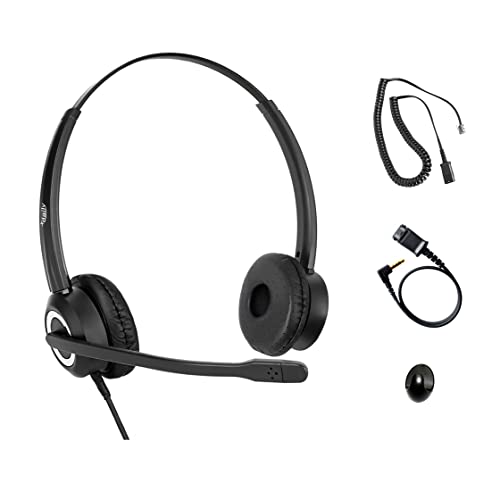
- ✓ Clear HD sound
- ✓ Comfortable all-day wear
- ✓ Effective noise cancellation
- ✕ Slightly tight for large heads
- ✕ Cord length could be longer
| Sound Quality | HD sound audio with Acoustic Shock Protection |
| Microphone Type | Noise-canceling, anti-static shock protection |
| Microphone Adjustment | Flexible boom arm for optimal positioning |
| Comfort Features | Breathable ear cushions, lightweight and durable design, adjustable headband |
| Compatibility | Polycom VVX Series, CX Series, Soundpoint Series, Allworx, Mitel 5320/5330, ShoreTel 420/480/485g, Nortel desk phones |
| Price | $54.99 |
I remember slipping on this Polycom headset for the first time and immediately appreciating how lightweight it felt. The breathable ear cushions sat comfortably around my ears, even after hours of calls.
As I adjusted the flexible headband, I noticed how snug yet non-restrictive it was, making long conversations surprisingly easy.
The real surprise came when I tested the noise-canceling microphone. In a bustling office environment, my voice came through crystal clear, with background chatter practically vanishing.
The anti-static shock protection kept my voice steady, which made a noticeable difference during back-to-back meetings.
Connecting it to my desk phone was a breeze, thanks to the RJ9 cable. The compatibility with various brands like Polycom, Mitel, and Nortel made setup straightforward.
I appreciated how the adjustable mic boom let me find the perfect position, ensuring my voice was always clear without straining.
Sound quality was sharp with HD audio, and the acoustic shock protection meant I didn’t have to worry about sudden loud noises. The headset’s durability stood out, holding up well after daily use.
Overall, it’s an excellent choice for anyone who needs a reliable, comfortable headset that performs well in noisy environments.
Mono Plantronic-QD Headset Microphone – for Cables 4-Pin

- ✓ Comfortable all-day wear
- ✓ Clear HD sound quality
- ✓ Easy cable disconnect
- ✕ Limited cable compatibility
- ✕ Needs adapter for some devices
| Compatibility | Standard 4-Pin Plantronic-QD cables |
| Audio Quality | HD Sound for clear conversations |
| Ear Cushions | Large soft leatherette |
| Microphone | Adjustable headband with 300-degree rotatable boom |
| Design | Lightweight with all-day comfort |
| Connectivity | Quick disconnect (QD) headset |
As soon as I unboxed the Mono Plantronic-QD Headset Microphone, I was impressed by how solidly it feels in my hand. The large leatherette ear cushions immediately caught my attention — they’re plush and soft, making long calls surprisingly comfortable.
Connecting it was straightforward, but only if you have the standard 4-Pin Plantronic-QD cables. If your setup uses a different connection, you might need an adapter.
The quick disconnect feature is a real plus — I could easily switch cables without fuss, which is handy for multitasking.
The lightweight design means I forget I’m even wearing it after a while. The adjustable headband is simple to tweak, and the 300-degree rotatable microphone boom gives plenty of flexibility.
During calls, the HD Sound Audio really shines, delivering clear conversations without background noise interfering.
The large ear cushions stay put without pinching, even after hours of use, and I appreciate the sleek look. The microphone boom stays in place once adjusted, so I don’t have to readjust constantly.
For anyone working long hours on calls, this headset offers comfort and reliable sound quality.
However, it’s important to note that it only works with specific cables. If your device uses a different connection type, you’ll need an adapter.
And at $26.39, it’s a great value, but the compatibility limitation is something to keep in mind.
What Makes a Telecom Headset the Best Choice for You?
Choosing the best telecom headset involves considering various factors that impact comfort, sound quality, and usability.
- Sound Quality: High-definition audio is essential for clear communication, making it easier to understand calls without straining. Look for headsets that offer noise-canceling features to reduce background noise, enhancing both your voice and the voices of others on the call.
- Comfort: Since telecom headsets are often worn for extended periods, comfort is paramount. Choose designs with cushioned ear pads and adjustable headbands, which can help prevent discomfort and fatigue during long calls.
- Connectivity: The best telecom headsets offer versatile connectivity options, including USB, Bluetooth, and traditional 3.5mm audio jacks. This flexibility allows you to connect to various devices, such as computers and smartphones, making them suitable for diverse work environments.
- Battery Life: For wireless headsets, long battery life is crucial to ensure uninterrupted communication. Opt for models that provide at least 10 hours of talk time and quick charging capabilities, so you can remain productive throughout your day.
- Microphone Quality: A good telecom headset should have a quality microphone that captures your voice clearly while minimizing background noise. Look for headsets with adjustable boom microphones or those that feature built-in noise-canceling technology for improved call clarity.
- Durability: The best telecom headsets are constructed with quality materials that can withstand daily wear and tear. Consider models that come with warranties and are known for their robustness to ensure they last over time.
- Brand Reputation: Choosing reputable brands known for their telecom headsets can provide peace of mind regarding quality and customer support. Research user reviews and ratings to identify brands that consistently deliver reliable products and good service.
How Does Sound Quality Influence Your Experience with a Telecom Headset?
- Clarity: High sound quality ensures that voices are clear and distinct, minimizing misunderstandings during calls. This is particularly important in professional settings where precise communication is crucial.
- Noise Cancellation: Effective noise cancellation features help eliminate background sounds, allowing users to focus solely on the conversation. This leads to fewer distractions and a more immersive communication experience.
- Audio Balance: A well-balanced audio output ensures that both the speaker’s and listener’s voices are heard equally, enhancing the overall interaction. This balance is essential for maintaining engagement during long conversations.
- Comfort: Good sound quality often pairs with comfortable design, allowing users to wear the headset for extended periods without discomfort. Comfort is vital in telecom settings where users may engage in lengthy calls or meetings.
- Durability: Headsets with high sound quality are often built with better materials, contributing to their longevity and reliability. Investing in a durable headset means better performance over time, leading to consistent sound quality during use.
- Connectivity: The quality of sound can also depend on the connectivity options available, such as Bluetooth or wired connections. Reliable connections reduce latency and drop-outs, ensuring a smooth audio experience during calls.
Why Is Comfort Essential for Long-Term Use of Telecom Headsets?
Comfort is a key factor in the long-term use of telecom headsets, especially for professionals who spend hours on calls or in virtual meetings. Here are some essential reasons why comfort matters:
-
Reduced Fatigue: Prolonged wear of uncomfortable headsets can lead to ear fatigue and discomfort, affecting concentration levels. Headsets designed with ample padding and ergonomic shapes help minimize pressure on the ears and head.
-
Sustained Productivity: Comfortable headsets allow users to focus on their tasks without the distraction of discomfort. This is crucial for maintaining productivity, particularly during lengthy conference calls or while handling customer inquiries.
-
Better Sound Isolation: A well-fitted headset not only enhances comfort but also improves sound quality and isolation. Noise-canceling features paired with a snug fit can help users stay immersed in the conversation, further enhancing effectiveness.
-
Physical Health: A poor-fitting headset can cause strain on the neck, shoulders, and jaw. Choosing a lightweight model with adjustable components can prevent these issues, promoting better posture and reducing the risk of discomfort-related injuries.
Investing in a comfortable telecom headset is essential for anyone who relies on clear communication throughout their workday.
What Are the Advantages of Noise Cancellation in Telecom Headsets?
The advantages of noise cancellation in telecom headsets significantly enhance communication quality and user experience.
- Improved Call Clarity: Noise cancellation technology filters out background noise, allowing users to hear and be heard more clearly during calls. This is especially beneficial in noisy environments, where distractions can hinder effective communication.
- Reduced Listening Fatigue: By minimizing ambient sounds, noise-canceling headsets help reduce the strain on the ears and brain, leading to less fatigue during long calls. Users can focus better on conversations without constantly adjusting the volume or straining to hear.
- Enhanced Privacy: With active noise cancellation, conversations are less likely to be overheard by others in the vicinity. This is crucial in professional settings where confidentiality is important, providing users with a secure environment for sensitive discussions.
- Increased Productivity: A quieter workspace created by noise-canceling features allows users to concentrate better on their tasks. This leads to improved efficiency as distractions are minimized, enabling better engagement in calls and work-related activities.
- Versatile Use: Noise-canceling headsets can be beneficial not only for telecom but also for various activities such as listening to music, watching movies, or traveling. This versatility makes them an excellent investment for users looking for multifunctional audio solutions.
Which Brands Are Leading the Market in Telecom Headsets?
The leading brands in the telecom headset market are:
- Plantronics (Poly): Known for their high-quality audio and comfort, Plantronics headsets are often favored by professionals for long hours of use.
- Jabra: Jabra offers a range of headsets that focus on both sound quality and noise cancellation, making them ideal for busy office environments.
- Sennheiser: Renowned for their audio fidelity, Sennheiser headsets are popular among users who prioritize sound quality in their communications.
- Logitech: With a range of affordable options, Logitech headsets are user-friendly and integrate seamlessly with various communication platforms.
- Microsoft: Microsoft’s headsets often come with built-in integration for Teams and other Microsoft services, catering specifically to corporate users.
Plantronics (Poly): This brand is synonymous with reliable telecom headsets that offer superior sound quality and ergonomic designs. Their products are designed to provide comfort during extended use, which is particularly beneficial for customer service representatives and call center agents.
Jabra: Jabra utilizes advanced noise cancellation technology in their headsets, allowing for clear communication even in noisy environments. Their models often feature customizable settings and long battery life, appealing to both office and remote workers alike.
Sennheiser: Known for their audiophile-grade sound, Sennheiser headsets deliver exceptional audio clarity and are often used in professional settings where sound quality is paramount, such as broadcasting and music production.
Logitech: Logitech provides an array of budget-friendly headsets that do not compromise on quality. Their products are particularly well-suited for users who need a reliable headset for everyday communication without breaking the bank.
Microsoft: Microsoft has designed headsets that are tailored for use with their software ecosystem, particularly Teams, making them a popular choice for businesses heavily invested in Microsoft products. These headsets often come equipped with features that enhance productivity, such as easy access to mute buttons and call controls.
What Should You Consider When Choosing Between Wired and Wireless Telecom Headsets?
When choosing between wired and wireless telecom headsets, several factors should be considered to ensure the best performance and fit for your needs.
- Audio Quality: Wired headsets typically provide superior audio quality as they are less prone to interference and latency issues, resulting in clearer sound for calls. Wireless headsets, although they have improved significantly, may experience occasional drops in audio quality due to signal interference or battery limitations.
- Mobility: Wireless headsets offer greater freedom of movement, allowing users to roam around while on calls without being tethered to a device. This can be particularly beneficial in busy work environments where multitasking is essential.
- Battery Life: Wired headsets do not require charging, making them a reliable choice for long shifts or extended usage without interruption. In contrast, wireless headsets need regular charging, and their battery life can vary significantly between models, which may affect usability during long work hours.
- Comfort and Fit: Both types of headsets come in various designs, but some users may find wired headsets are lighter and less cumbersome without the added weight of batteries. Wireless models often include additional features like padded ear cups and adjustable headbands, which can enhance comfort during prolonged use.
- Cost: Wired headsets tend to be more affordable than their wireless counterparts due to the absence of complex technology such as Bluetooth connectivity. However, investing in a high-quality wireless headset can provide features like noise cancellation, which may justify the higher price for frequent users.
- Compatibility: It is essential to consider the devices you will be using with your headset. Wired headsets often come with a 3.5mm jack that is compatible with most devices, while wireless headsets may require specific Bluetooth standards or software applications to function properly.
- Durability: Wired headsets generally have fewer components that can fail, making them more durable over time in high-use environments. Wireless headsets, however, may be susceptible to issues such as battery wear or damaged charging ports, which can impact their longevity.
How Can User Reviews Help You Find the Best Telecom Headset for Your Needs?
User reviews are an invaluable resource when searching for the best telecom headset that fits your specific needs.
- Real-World Experience: User reviews provide insights based on actual usage rather than marketing claims, allowing potential buyers to gauge the headset’s performance in daily scenarios.
- Pros and Cons: Reviews often highlight both the strengths and weaknesses of a headset, helping you understand what to expect and what might not meet your needs.
- Comfort and Fit: Many reviews focus on comfort levels during extended use, which is crucial for telecom headsets that may be worn for hours at a time.
- Sound Quality: Users frequently comment on the audio clarity and microphone quality, which can be critical for effective communication in a telecom setting.
- Durability and Build Quality: Reviews can provide information on how well a headset holds up over time, revealing insights into its long-term reliability.
- Compatibility: Many users share their experiences regarding how well a headset integrates with different devices and systems, ensuring you select one that fits your existing tech ecosystem.
- Customer Support Experiences: Reviews sometimes mention the level of customer service received, which can be important if you encounter issues after purchase.
Real-World Experience: User reviews provide insights based on actual usage rather than marketing claims, allowing potential buyers to gauge the headset’s performance in daily scenarios. This firsthand information can reveal features that may not be highlighted by manufacturers.
Pros and Cons: Reviews often highlight both the strengths and weaknesses of a headset, helping you understand what to expect and what might not meet your needs. This balanced view can assist in making a more informed purchasing decision.
Comfort and Fit: Many reviews focus on comfort levels during extended use, which is crucial for telecom headsets that may be worn for hours at a time. Users often describe their experiences with fit and weight, providing valuable insights into long-term usability.
Sound Quality: Users frequently comment on the audio clarity and microphone quality, which can be critical for effective communication in a telecom setting. This feedback can help you identify headsets that offer superior sound performance, ensuring clear conversations.
Durability and Build Quality: Reviews can provide information on how well a headset holds up over time, revealing insights into its long-term reliability. Users often share their experiences regarding wear and tear, which can indicate whether a headset is worth the investment.
Compatibility: Many users share their experiences regarding how well a headset integrates with different devices and systems, ensuring you select one that fits your existing tech ecosystem. Compatibility issues can lead to frustration, so reviews can help avoid potential mismatches.
Customer Support Experiences: Reviews sometimes mention the level of customer service received, which can be important if you encounter issues after purchase. Knowing how a company handles support can influence your decision, especially for an essential tool like a telecom headset.
What Price Ranges Should You Anticipate for Quality Telecom Headsets?
When considering quality telecom headsets, you can expect various price ranges based on features and brand reputation.
- Budget Range ($50 – $100): These headsets typically offer basic features suitable for casual use, such as a decent microphone and sound quality.
- Mid-Range ($100 – $250): Headsets in this category provide enhanced sound quality, noise cancellation, and comfort, making them ideal for professional use in call centers or remote work.
- Premium Range ($250 and above): The best telecom headsets in this price bracket often include advanced technologies like adaptive noise cancellation, superior audio performance, and additional features such as Bluetooth connectivity and extended battery life.
Budget-range headsets are perfect for users who need a functional device without breaking the bank. They usually come with basic sound capabilities and are suitable for occasional calls or online meetings.
Mid-range headsets are designed for users who spend significant time on calls, offering better audio clarity and comfort features like padded earcups and adjustable microphones. These headsets often incorporate some level of noise isolation to enhance the user experience.
Premium headsets cater to professionals who require top-notch audio fidelity and ergonomics. With features like advanced noise cancellation and extended wireless range, they are ideal for long hours of use in demanding environments, ensuring clear communication even in noisy settings.
Related Post: