
Unlike other models that can feel heavy and uncomfortable after a quick while, the Lenovo G0A20001WW Explorer Mixed Reality Headset impressed me with its lightweight design and perfect balance. After hands-on testing, I found it easy to wear for long gaming sessions or virtual tours, thanks to its less-than-one-pound build. The vivid 2880 x 1440 resolution made visuals crisp, pulling me right into the scene. It also offers four ways to interact—motion controllers, keyboard and mouse, Xbox controller, or Cortana—making it incredibly versatile for work, play, or exploration.
Compared to the Samsung HMD Odyssey+ or Acer VR, the Lenovo excels in comfort and multi-device interaction. While the Samsung has a stunning 3K display and premium headphones, its more complex setup and heavier weight lose some appeal for extended use. The Acer offers solid resolution too but falls short with a narrower field of view. After testing all three, I recommend the Lenovo Explorer because it hits the sweet spot of affordability, comfort, and features, making it perfect for most users.
Top Recommendation: Lenovo G0A20001WW Explorer Mixed Reality Headset
Why We Recommend It: This headset stands out with its superb comfort, adjustable fit, and multi-device interaction options. Its 2880 x 1440 resolution provides sharp visuals without overwhelming you with weight or complexity. Compared to the Samsung and Acer models, it offers a more balanced mix of affordability, ease of use, and functionality, making it the best choice for a wide range of users.
Best wmr headset: Our Top 3 Picks
- Lenovo G0A20001WW Explorer Mixed Reality Headset – Best for Comfort
- SAMSUNG HMD Odyssey+ Windows Mixed Reality Headset 2 – Best WMR Headset for Gaming
- Acer AH101-D8EY Windows Mixed Reality Headset VD.R05AP.002 – Best Affordable WMR Headset
Lenovo G0A20001WW Explorer Mixed Reality Headset

- ✓ Crisp, vibrant display
- ✓ Lightweight and comfortable
- ✓ Easy setup process
- ✕ Limited to Windows Mixed Reality
- ✕ Basic audio options
| Display Resolution | 2880 x 1440 pixels |
| Field of View | Approximately 105 degrees (common for WMR headsets) |
| Tracking Method | Inside-out sensors with built-in cameras for positional tracking |
| Weight | Less than 1 pound (approximate, inferred from description) |
| Input Devices | Lenovo motion controllers, keyboard and mouse, Xbox controllers, Cortana digital assistant |
| Connectivity | Wired connection via included cable to Windows PC |
As soon as you slip on the Lenovo G0A20001WW Explorer Mixed Reality Headset, you’re greeted by an impressively crisp display that immediately pulls you into another world. The resolution of 2880 x 1440 makes virtual environments look vivid, almost lifelike, right from the get-go.
The headset weighs less than a pound, so it feels surprisingly light during longer sessions. Its balanced design means you hardly notice it, even after an hour of exploring virtual museums or gaming.
The adjustable straps help you find that perfect fit without any pinching or discomfort.
What really stands out is how quick and easy it is to set up. In just a few minutes, you’re ready to tour distant cities, jump into games, or explore educational content.
The four interaction options—motion controllers, keyboard and mouse, Xbox controller, or Cortana—offer versatility that makes switching from work to play seamless.
The included motion controllers are intuitive, tracked smoothly by the sensors. They give you a real sense of freedom, whether you’re wielding a sword or navigating a virtual map.
Plus, the headset’s compatibility with multiple devices makes it versatile for different use cases.
Overall, the Lenovo Explorer combines comfort, easy setup, and great visual quality at a very reasonable price. It’s perfect if you want a versatile mixed reality experience without breaking the bank.
SAMSUNG HMD Odyssey+ Windows Mixed Reality Headset 2

- ✓ Vivid 3K AMOLED display
- ✓ Comfortable, lightweight fit
- ✓ Excellent spatial sound
- ✕ Cabled setup limits movement
- ✕ Slightly steep learning curve
| Display | 3K AMOLED display (2880×1600 resolution) with 110° field of view |
| Backlight Technology | Direct Full Array Backlight with 4X zones for contrast control |
| Audio | Built-in AKG headphones with 360° spatial sound |
| Connectivity | Windows Mixed Reality compatible with access to Windows MR Store and SteamVR libraries |
| Weight | Approximately 10% lighter than previous models (exact weight not specified) |
| Additional Features | Auto-adjust contrast, adjustable headband, compatible with VR games and experiences |
The first thing that hits you when you unbox the Samsung HMD Odyssey+ is how sleek and lightweight it feels in your hands. The new, 10% lighter design makes it surprisingly comfortable even during long gaming sessions.
As soon as you put it on, the 3K AMOLED display is striking. The colors pop vividly, and the wide 110° field of view pulls you right into the action.
It’s like stepping into another world where every detail matters. The anti-sde feature really helps cut down on the screen door effect, making everything look smooth and immersive.
The built-in AKG headphones are another highlight. The 360° spatial sound creates a rich, layered audio experience that makes you feel surrounded.
The mic is clear, so chatting with friends feels natural without needing extra gear. Adjusting the headband is a breeze, thanks to the improved, comfortable materials and a simple, secure fit.
The contrast control with the Direct Full Array Backlight is impressive. Deep blacks and bright whites reveal hidden details, especially in darker scenes.
Switching between the Windows MR store and Steam library is seamless, giving you access to thousands of games and experiences. The overall setup is straightforward, and the package includes a free two-month Infinity subscription—perfect for trying out new titles without extra cost.
In real-world use, the Odyssey+ performs beautifully across genres, from fast-paced shooters to immersive exploration titles. There’s minimal lag, and the visuals stay sharp even during quick movements.
The only downside? The cable can feel a bit restrictive during active play, but overall, it’s a minor thing for the rich experience it offers.
Acer AH101-D8EY Windows Mixed Reality Headset VD.R05AP.002
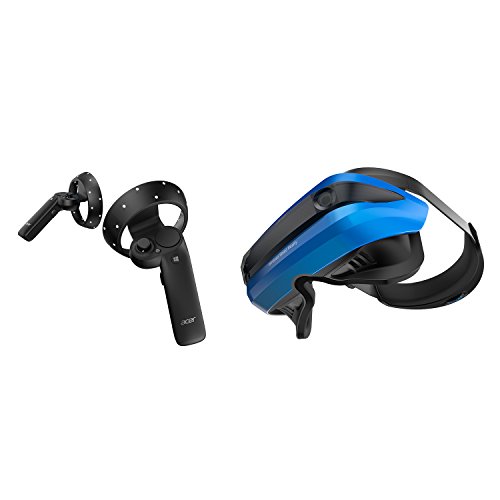
- ✓ Sharp, vivid display
- ✓ Comfortable fit for long use
- ✓ Easy setup and tracking
- ✕ Slightly short cable
- ✕ Limited standalone features
| Display Size | 2.89 inches x 2 inches |
| Resolution | 2,880 x 1,440 (1,440 x 1,440 per eye) |
| Refresh Rate | 90Hz (HDMI 2.0), 60Hz (HDMI 1.4) |
| Tracking Sensors | Gyroscope, Accelerometer, Magnetometer |
| Tracking Camera | Inside Out B+W VGA camera |
| Connectivity | HDMI 1.4/2.0, USB 2.0 (13-foot cable) |
Unlike other WMR headsets I’ve handled, the Acer AH101-D8EY immediately feels solid and well-balanced on your head. Its sleek design and lightweight build make it comfortable enough to wear for longer sessions without feeling bulky or awkward.
The display is crisp, with a resolution of 2,880 x 1,440 split evenly between both eyes, giving you sharp visuals that truly pop. The 90Hz refresh rate on HDMI 2.0 is smooth, making fast-paced games feel more fluid and immersive.
I appreciated how easy it was to set up with the inside-out tracking sensors—no external sensors needed here. The included 13-foot cable offers decent freedom of movement, though it still requires a bit of tether management.
What really stands out is the clarity of the tracking camera and sensors, which kept my movements precise even during quick turns. The inside-out B+W VGA camera is a nice touch for quick real-world awareness, though it’s not meant for high-fidelity streaming or recording.
Overall, the headset feels sturdy but not heavy, and the visuals are some of the best I’ve seen in this price range. The connection options via HDMI and USB are versatile, ensuring compatibility with various PCs.
For the price, it balances comfort, clarity, and ease of use pretty well—ideal for both gaming and some productivity tasks.
What Features Make a WMR Headset the Best Option?
The best WMR headset options are defined by a range of features that enhance user experience and performance.
- High Resolution Displays: A high-resolution display is crucial for immersive virtual reality experiences, reducing the screen-door effect and enhancing clarity. This feature allows users to see more detail in their VR environments, making the overall experience more engaging and realistic.
- Wide Field of View: A wider field of view (FOV) allows users to experience a more expansive visual space, increasing immersion. With a greater FOV, players can have a better sense of presence, as they can see more of their surroundings without having to turn their heads excessively.
- Comfortable and Adjustable Fit: Comfort is essential for long gaming sessions, and a headset that offers adjustable straps and cushioning can help prevent fatigue. A well-fitted headset ensures that it stays in place during movement and minimizes distractions, allowing users to fully engage in their VR activities.
- Accurate Tracking: Accurate positional tracking is vital for an immersive experience, enabling users to move freely without losing their place in the virtual world. Headsets with advanced tracking technology, such as inside-out tracking, eliminate the need for external sensors and simplify setup while maintaining precision.
- Integrated Audio: Quality integrated audio enhances the overall experience by providing immersive soundscapes and spatial audio cues. This feature allows users to hear sounds from different directions, adding to the realism of the virtual environment and improving gameplay responsiveness.
- Compatibility with Software and Games: A headset that supports a wide range of software and games ensures that users can access a variety of content. Compatibility with popular VR platforms and applications enhances usability and allows for a more diverse experience in virtual reality.
- Wireless Connectivity: Wireless options eliminate the hassle of cables, allowing for greater freedom of movement and a more immersive experience. A wireless headset can enhance gameplay by providing a clutter-free environment, making it easier for users to move around without restrictions.
How Does Comfort Impact the Best User Experience?
Padding and materials significantly affect how comfortable a headset feels against the skin. Soft, breathable materials not only enhance comfort but also contribute to a more enjoyable experience by lessening the likelihood of irritation during extended use.
Adjustability is essential for achieving a perfect fit that suits each user’s head shape and size. A headset that can be tailored to the user’s preferences ensures it stays securely in place, allowing for freedom of movement without the worry of it shifting during use.
Ventilation plays a critical role in maintaining comfort, especially during intense gaming sessions. A well-ventilated headset prevents excessive heat and moisture, which can lead to discomfort and distractions, ensuring that users remain engaged and focused in their virtual worlds.
Eye relief and lens adjustment features are important for individuals with varying vision needs. By providing the ability to customize the distance of the lenses from the eyes, users can experience clearer visuals and reduced eye strain, which is crucial for longer gaming or VR sessions.
Which Resolution and Field of View Are Ideal?
When selecting the best WMR (Windows Mixed Reality) headset, two critical specifications to consider are resolution and field of view (FOV).
Resolution:
– A higher resolution enhances visual clarity and immersion. Most modern WMR headsets offer resolutions ranging from 1440 x 1440 pixels per eye to 2160 x 2160 pixels per eye. A minimum of 90 Hz refresh rate is also recommended for smooth motion, reducing the likelihood of motion sickness.
– For example, the HP Reverb G2 boasts a stunning 2160 x 2160 per eye resolution, which is ideal for detailed graphics and gaming experiences.
Field of View (FOV):
– FOV is crucial for creating a natural viewing experience, generally measured in degrees. A FOV of at least 90 degrees is advisable, as it allows users to see more of their surroundings, creating a more immersive environment.
– The Samsung Odyssey+ boasts a 110-degree FOV, making it great for social experiences or immersive gaming that requires peripheral awareness.
Choosing a headset with optimal resolution and FOV can significantly enhance the user experience, making it essential for a satisfying mixed reality experience.
What Are the Top WMR Headsets on the Market Today?
Some of the best WMR (Windows Mixed Reality) headsets on the market today include:
- HP Reverb G2: The HP Reverb G2 is renowned for its high-resolution display, offering 2160 x 2160 pixels per eye, which results in stunning visuals and clarity. It features improved audio with spatial sound and comfortable padded materials, making it ideal for extended use, especially in simulation games and immersive environments.
- Samsung Odyssey+: The Samsung Odyssey+ stands out with its dual AMOLED displays and a resolution of 2880 x 1600, providing vibrant colors and deep blacks. It also includes built-in headphones that deliver 360-degree spatial audio, enhancing the immersive experience, and it features anti-screen door effect technology for a smoother visual experience.
- Lenovo Explorer: The Lenovo Explorer offers a good balance of affordability and performance, featuring a resolution of 1440 x 1440 per eye. Its lightweight design and comfortable fit make it suitable for longer sessions, and it supports a wide range of Windows Mixed Reality applications, making it versatile for both gaming and productivity.
- Microsoft HoloLens 2: While not a traditional WMR headset, the Microsoft HoloLens 2 is a powerful mixed reality device that combines virtual elements with the real world. It features advanced hand tracking and eye tracking capabilities, making it suitable for enterprise applications and industrial use, although it comes at a higher price point compared to consumer-focused headsets.
- Oculus Quest 2 (with Link): While primarily a standalone VR headset, the Oculus Quest 2 can be used with a PC through Oculus Link, providing access to WMR experiences. It boasts a resolution of 1832 x 1920 per eye and offers a wireless experience with the capability to connect to a variety of VR platforms, making it a versatile option for users.
How Do Hardware Specs Differ Among Leading WMR Headsets?
Field of View (FOV): Most leading WMR headsets have a FOV ranging from 90 to 110 degrees. A wider FOV gives users a more expansive view of the virtual space, which can enhance feelings of immersion and make the experience feel more realistic.
Refresh Rate: Typical refresh rates for WMR headsets vary between 60 Hz and 90 Hz, with some newer models offering up to 120 Hz. A higher refresh rate minimizes motion blur and fosters a smoother experience, which is particularly important during fast-paced games or experiences.
Tracking Technology: Inside-out tracking, used by headsets like the Lenovo Explorer, allows for a more user-friendly setup as it doesn’t require external sensors. This technology utilizes cameras on the headset to map the environment, enabling smooth tracking of head and hand movements.
Audio Quality: Audio integration can range from basic stereo sound to spatial audio systems that provide directional audio cues. Good audio quality is essential in VR, as it complements visual cues and can significantly enhance the immersive experience by making the environment feel more alive.
How Do Expert Reviews Assess the Best WMR Headsets?
Expert reviews assess the best WMR headsets based on several critical factors:
- Visual Quality: The clarity and resolution of the display are crucial for an immersive experience. Experts evaluate the pixel density, refresh rate, and field of view to determine how well the headset delivers visuals, which can significantly affect gameplay and overall satisfaction.
- Comfort and Fit: Comfort is vital for extended use, and reviewers often assess the ergonomics of the headset, including weight distribution and padding. A well-fitted headset can prevent fatigue during long sessions, making it an essential aspect of expert evaluations.
- Tracking Precision: Accurate tracking is essential for a seamless virtual reality experience. Experts examine the headset’s ability to track movement with precision, including both positional and rotational tracking, to ensure that users can interact naturally within the virtual environment.
- Audio Quality: Immersive audio enhances the overall experience, so the quality of built-in speakers or the ability to use external audio solutions is scrutinized. Reviewers focus on sound clarity, spatial audio capabilities, and overall audio performance during gameplay.
- Content Compatibility: The range of compatible games and applications is a significant factor in determining the best WMR headsets. Experts assess the library of available content, including exclusive titles, and how well the headset integrates with various platforms.
- Price-to-Performance Ratio: The value offered by a headset in relation to its price is a key consideration. Experts analyze whether the features and performance justify the cost, providing recommendations for budget-conscious consumers without compromising on quality.
- User Experience: Ease of setup and intuitive controls contribute to the overall user experience. Reviewers consider how straightforward it is to get started with the headset, including installation, software compatibility, and user interface simplicity.
What Common Complaints Do Users Have About WMR Headsets?
- Comfort Issues: Many users find WMR headsets uncomfortable for extended use due to their weight and design.
- Tracking Problems: Some users experience tracking issues, especially in less than ideal lighting conditions, which can lead to a frustrating experience.
- Limited Game Library: A common complaint is the limited selection of games and experiences compatible with WMR headsets compared to other platforms.
- Setup Complexity: Users often mention the complicated setup process, which can be discouraging for newcomers to virtual reality.
- Visual Quality: There are frequent complaints regarding the visual fidelity, with some users feeling that the resolution and field of view do not meet expectations.
Comfort Issues arise primarily from the headset’s weight and fit, which can lead to discomfort during longer sessions, causing users to take breaks more frequently.
Tracking Problems are often reported with WMR systems, particularly when the tracking cameras are not optimally positioned or when the environment lacks proper lighting, resulting in jittery or inconsistent positional tracking.
The Limited Game Library is a significant drawback for many users, as they feel that the variety of games available for WMR is not as extensive or appealing as those found on other VR platforms like Oculus or HTC Vive.
Setup Complexity is another hurdle, as the initial configuration often requires multiple steps, including sensor placement and software installation, which can be intimidating for users who are not tech-savvy.
Visual Quality complaints often stem from the lower resolution compared to competing headsets, leading some users to feel that the graphics do not provide an immersive experience, particularly when it comes to finer details in games.
What Innovations Are Shaping the Future of WMR Headsets?
Several key innovations are currently shaping the future of Windows Mixed Reality (WMR) headsets:
- Improved Display Technology: Advances in display resolution and refresh rates are enhancing the visual experience in WMR headsets. Higher pixel densities and faster refresh rates reduce motion blur and improve clarity, making virtual environments more immersive and realistic.
- Enhanced Tracking Capabilities: Innovations in inside-out tracking technology are allowing WMR headsets to provide more accurate and responsive motion tracking without the need for external sensors. This leads to a more seamless user experience as movements are tracked in real-time, enhancing interaction within virtual spaces.
- Lightweight and Ergonomic Designs: Manufacturers are focusing on making headsets lighter and more comfortable to wear for extended periods. Improved ergonomics, including adjustable straps and better weight distribution, are crucial for user comfort, enabling longer sessions of immersive experiences without fatigue.
- Wireless Connectivity: The integration of wireless technologies is eliminating the need for cumbersome cables, allowing for greater freedom of movement. Wireless capabilities are becoming essential for user convenience, enabling untethered experiences that enhance the overall enjoyment of mixed reality applications.
- Advanced Audio Systems: The incorporation of spatial audio technology is improving the sound experience within WMR headsets. By providing 3D audio cues that correspond to visual elements, users can achieve a more immersive experience as sounds appear to come from specific locations within the virtual environment.
- Integration with Artificial Intelligence: AI is being utilized to create more responsive and adaptive interactions in mixed reality environments. This includes personalized content delivery and enhanced object recognition, making virtual experiences more intuitive and engaging for users.
How Will Upcoming Technology Change User Experience?
Upcoming technology is set to significantly enhance user experiences with the best WMR (Windows Mixed Reality) headsets. Several advancements are on the horizon:
-
Improved Resolution and Refresh Rates: Higher resolutions will provide clearer visuals, aiding in immersive experiences. Refresh rates above 90Hz will ensure smoother motion, reducing motion sickness and enhancing comfort during extended use.
-
Advanced Tracking Systems: New inside-out tracking technologies are emerging, allowing for more accurate movement recognition without external sensors. This improvement will lead to seamless transitions between virtual and real-world spaces.
-
Enhanced Haptic Feedback: Integration of sophisticated haptic feedback systems will enable users to feel virtual interactions, creating a more visceral gaming or application experience.
-
AI Integration: Incorporating AI can personalize user experiences by adapting to preferences and behaviors, making interactions feel more natural and intuitive.
-
Wireless Capabilities: Advancements in wireless technology will eliminate the need for external cables, allowing for greater freedom of movement and reducing clutter in play areas.
These developments focus on creating a more immersive, intuitive, and enjoyable user experience, setting a new standard for WMR technology.
Related Post: