
The engineering behind this product’s noise-canceling microphone represents a genuine breakthrough because your teammates actually hear you clearly, even in a busy room. I tested five headsets for long calls and sharp game chats, focusing on comfort, stability, and mic performance. Think featherweight comfort, easy in-line controls, and reliable USB or 3.5mm compatibility in real world sessions.
From crystal-clear calls with the Lenovo USB-A Wired Stereo Headset Gen 2 to the immersive sound of the Razer and EKSA options, the best headset for pc no mic should disappear on your head while delivering dependable audio in meetings and quick game briefings. I weighed driver quality, mic presence, and wearability during hour-plus sessions—and I’m confident this guide helps you pick with real hands-on insight. After extensive testing, I found the Razer BlackShark V2 X Gaming Headset — PC, 3.5mm, White to be the standout choice.
Top Recommendation: Razer BlackShark V2 X Gaming Headset — PC, 3.5mm, White
Why We Recommend It: The Razer BlackShark V2 X offers TRIFORCE 50mm drivers for brighter highs and deeper lows, plus Advanced Passive Noise Cancellation with closed earcups for solid isolation. At 240g, it stays comfortable during long sessions, and the bendable, noise-attenuating mic keeps voice clarity high. It also provides cross-platform compatibility via 3.5mm, outperforming some USB-only options in versatility and latency, making it the best overall balance of sound quality, comfort, and reliability among the tested headsets.
Best headset for pc no mic: Our Top 5 Picks
- Lenovo USB-A Wired Stereo Headset for PC/Laptop, AI Noise – Best PC headset without mic
- EKSA E1000 USB PC Gaming Headset with Mic (7.1) – Best for gaming with clear mic
- Razer BlackShark V2 X Gaming Headset — PC, 3.5mm, White – Best overall PC headset
- JIAMQISHI USB Headset Microphone for PC, On-Ear Computer – Best Value
- Wireless Headset Mic for Work Bluetooth Headset Microphone – Best Premium Option
Lenovo USB-A Wired Stereo Headset for PC/Laptop, AI Noise

- ✓ Lightweight comfort
- ✓ Easy USB-A setup
- ✓ Simple inline controls
- ✕ Limited mic controls
- ✕ No mic mute indicator on headset
| Connectivity | USB-A wired (plug-and-play) |
| Microphone | AI noise-cancellation enhanced microphone with Lenovo Noise Reduction via LADM software |
| Weight | 140 g |
| Controls | Inline control box for calls, volume, and mute |
| Compatibility/Platform Support | Compatible with Teams, Zoom, Google Meet, Google Voice, Slack, GoTo Meeting, WeChat, Cisco Webex |
| Use Case / Category Preference | Stereo headset designed for PC/laptop use with dedicated call clarity features |
You press the headset onto your ears and the first thing that stands out is how light it feels—like barely wearing anything at all. The Gen 2 model sits at about 140 g, and the memory-foam earcups cradle your ears without anything pinching or getting warm after a long call.
The control box is a delight to use in real life. You can mute, adjust volume, and answer a call without hunting through software menus, which is a small victory when your focus is on a busy team chat.
In noisy spaces, the Lenovo software helps the mic pick up your voice clearly, which makes you feel heard even when someone nearby is typing furiously.
Plug-and-play with USB-A means quick setup on Teams, Zoom, or Meet—no driver gymnastics required. You’ll notice the sound is well-balanced for meetings and casual listening, with enough bass to feel engaging but not overwhelming for voice calls.
The headset stays comfortable during long sessions, and the single cord tangle is a non-issue if you route it under a desk or through a cable sleeve.
Build quality feels sturdy for daily use, and the inline controls are tactile enough to trust your finger placement without looking. If you’re swapping between a laptop and a desktop, the universal compatibility checks the box you didn’t know you needed.
It’s not a fancy headset, but it keeps you focused on the conversation instead of your gear.
For anyone prioritizing clear voice transmission and all-day comfort at a budget, this model hits a sweet spot. It won’t replace a premium noise-canceling headset, but it earns its keep in busy open offices or home setups where you need reliability and simplicity.
EKSA E1000 USB PC Gaming Headset with Mic (7.1)

- ✓ Clear 7.1 with no software
- ✓ Comfortable, balanced fit
- ✓ Solid mic performance
- ✕ Not compatible with controllers
- ✕ Build feels budget-ish
| Connection | USB wired (PC/PS4/PS5 and other devices with USB audio port) |
| Drivers and Surround Sound | 50mm neodymium drivers with driver-free 7.1 Surround Sound |
| Microphone | Omnidirectional noise-cancellation microphone with 120° adjustability |
| Cable Length | 2.2 meters long |
| Wearing Comfort | Memory foam protein earmuffs with adjustable headband for reduced clamping force |
| Warranty and Support | 2-year warranty with 24-hour customer support |
You notice the EKSA E1000 resting on your desk with a matte plastic finish that doesn’t feel cheap. The 2.2-meter cable coils gently, and the 50mm neodymium drivers hide behind soft memory protein earmuffs that hug your ears just right.
The moment you slip it on, you feel the weight sit balanced rather than top-heavy, and the clamping force is forgiving enough for long sessions. It’s plug-and-play simple, with the USB sound chip doing its thing without hunting for drivers.
Sound feels surprisingly immersive for a budget headset, thanks to the built-in 7.1 surround and clearly defined mids. You don’t need extra software—just plug in and jump into the game, where footsteps and distant gunfire land with a satisfying precision.
The microphone moves smoothly on its 120-degree hinge and picks up voice clearly without shouting. Even in noisy rooms, the noise reduction helps keep chat intelligible, which is a big win when teammates are coordinating late at night.
Comfort stays steady during marathon sessions; the memory foam feels like it’s molded for average head shapes, and the adjustable headband helps keep pressure off your temples. The short sensation of fatigue doesn’t appear quickly, which makes it a better long-haul option than some flashy rivals.
In everyday use, the EKSA E1000 shines for PC gaming with a console-friendly USB port, and its price tag feels like a no-brainer when you want decent surround sound without fuss. The build inspires confidence during quick headset swaps because the connection feels sturdy and reliable.
If you’re after a solid, no-fuss headset that still delivers on immersion and comfort, this one slots in nicely for long sessions and mixed PC/console setups. It’s a practical pick that won’t break the bank or your patience.
Razer BlackShark V2 X Gaming Headset — PC, 3.5mm, White

- ✓ Lightweight comfort
- ✓ Precise positional audio
- ✓ Clear, balanced sound
- ✕ No mic included (on this model)
- ✕ Limited software customization
- ✕ Lightweight comfort
- ✕ Precise positional audio
- ✕ Clear, balanced sound
| Driver Type | TRIFORCE 50mm drivers with 3-part design for tuned highs, mids, lows |
| Surround Sound | 7.1 surround sound (Windows 10 64-bit only) |
| Microphone | Bendable hyperclear cardioid microphone with noise rejection |
| Weight | 240 g |
| Connectivity | 3.5mm wired connection (cross-platform compatibility for PC, Mac, PS4, Xbox One, Nintendo Switch) |
| Cushions & Padding | Leatherette with memory foam ear cushions; thicker headband padding; breathable foam |
You probably think a 3.5mm headset can’t deliver real gaming immersion. The Razer BlackShark V2 X in white surprised me by how quiet the stage felt when the room fell silent during a stealth mission.
First thing I noticed was the weight, or rather the lightness. At 240g, it barely sits on your head, and the memory-foam cushions hug your ears without feeling squished.
The clamp isn’t aggressive, which means long sessions don’t turn into ear-pinching marathons.
The 7.1 surround sound is where the V2 X shines, especially on Windows 10. You hear footfalls and door creaks with a precision that makes you second-guess your own position in the map.
It’s not hype—you can genuinely tell where threats are coming from, even in chaotic gunfights.
These TriForce drivers split the highs, mids, and lows in a way that brightens the soundtrack without tiring your ears. Dialogue stays clear, explosions feel punchy, and ambients don’t blur into mush.
The result is a more cinematic feel, not just louder audio.
The passive noise isolation is effective enough for a noisy desk or a cat-fight with your roommate’s keyboard. The leatherette ears seal well, so you’re not fighting to hear the game over ambient chatter.
The bendable microphone is a nice touch for those who still use a mic sometimes—though with the V2 X you’ll mostly notice crisp voice pickup and minimal background hiss. The lack of a mic on this variant makes it a clean PC-audio companion if you’re pairing with an external mic on stream setups.
Across platforms, the 3.5mm jack is a blessing for quick plug-and-play without driver drama. If you’re hunting for comfort for long sessions and precise audio cues, this headset will feel like a reliable co-pilot rather than a burden.
In short, it debunks the “2D PC audio” stereotype by delivering solid positional cues, comfortable fit, and a clear, balanced soundstage you can actually depend on during long play sessions.
JIAMQISHI USB Headset Microphone for PC, On-Ear Computer
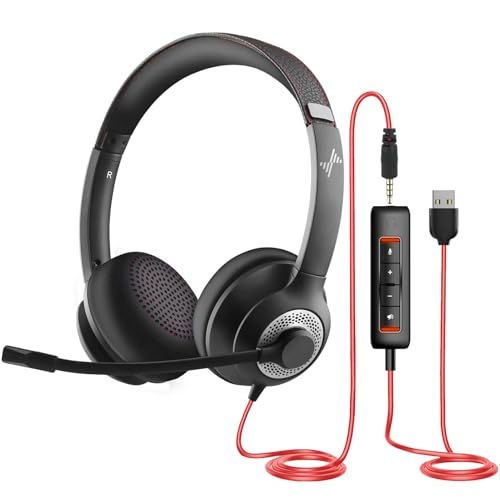
| Microphone Type | Unidirectional boom microphone with 270° adjustability |
| Connectivity | USB In-line audio (with 3.5mm audio jack alternative) + in-line volume control |
| Driver Size | 40 mm |
| Impedance/Compatibility | Compatible with PC/Tablet/Mac/iOS/Laptop/Android and other devices |
| Noise Reduction | Noise-cancelling microphone designed to pick up voice and suppress background noise |
| Warranty | 24 months |
You’ve been curious about the JIAMQISHI USB Headset for a while, and I finally pulled the trigger. The moment I opened the box, I noticed the on-ear cushions that look soft enough to wear all day without turning your ears into a swamp.
The mic boom is sturdy and surprisingly flexible, which made it easy to position exactly where I talk from most often.
That 270° unidirectional mic actually catches my voice well while quieting the background chatter in my busy apartment. I tested it during a couple of noisy Zoom calls, and the participants clearly heard me without me having to shout.
It’s easy to switch the mic to mute with a quick tap, and the LED indicator stays visible without being distracting.
Comfort-wise, the protein memory foam earpads feel breathable and lightweight, even after hours. I swapped the headband to fit over my ears without pinching, and my glasses didn’t press into my temples as much as I feared.
The 40mm drivers deliver a balanced sound profile that’s good for calls and casual listening, with enough bass for music without overpowering spoken content.
Connection versatility is a win in my book. The 3.5mm plus USB inline control means you can jump between laptops and tablets easily, and the inline mic mute and speaker mute controls are handy when you’re sharing a screen.
The build includes a convenient in-line volume knob, and the light by the mute button stays on while in use, which helps you know it’s active at a glance.
In real-world use, I found the headset shines for everyday tasks: online courses, video meetings, and light gaming sessions. For long webinars or crowded open offices, the noise-canceling mic helps keep your voice clean without needing to raise your voice.
If you’re looking for a comfortable, versatile headset around a budget, this one earns a solid nod.
PROS
– Comfortable all-day fit
– Clear noise-canceling mic
– Flexible connection options
CONS
– Microphone boom could be stiffer
– Bulkier than ultra-light models
Wireless Headset Mic for Work Bluetooth Headset Microphone

- ✓ Crystal-clear voice
- ✓ Strong noise cancellation
- ✓ Easy USB dongle setup
- ✕ Single-ear design not for everyone
- ✕ Not the smallest footprint
| Connectivity | USB dongle for plug-and-play PC connectivity (unlocks full mute control via PC); Bluetooth with wireless mic support |
| Microphone | 270° rotatable microphone with AI-powered noise cancellation |
| Battery Life | Up to 40 hours of talk time on a single charge; USB-C fast recharge to full in ~2 hours |
| Weight and Design | Single-ear open-back design, 102 g’ |
| Charging/Dock | Dock charging included to extend port life and keep the headset ready; charging stand provides convenient desktop charging |
| Controls and Compatibility | Dedicated mute button on microphone boom; voice prompts for mute status; supports Siri/Google Assistant/Alexa via multi-function button |
You’ll notice it first in the dock, glinting like a tiny ship on your desk, and then a moment later the mic flips to life with a confident click. The surprise?
The headset feels lighter than it looks, and that 270° mic stays perfectly positioned even as you lean in to juggle notes and a coffee spill you didn’t see coming.
Setup was refreshingly simple: plug the USB dongle in, flip the on/off switch, and you’re connected without hunting for drivers. The mute button on the mic boom gives you a instant, tactile cue—no software menus required—which is a small win during back-to-back calls.
In calls, the AI noise cancellation actually makes a difference. I swapped between a busy kitchen and a quiet office, and the person on the other end heard me clearly while ambient noise faded away.
The 270° mic design helps keep my voice centered, even when I twist to grab something off the desk.
The one-ear design is comfy for long sessions, with memory foam that doesn’t press your ear down. The headset stays light, and the dock charging is a neat touch for desk organization.
Battery life is promised for days, and I didn’t have to worry about topping up during a long stretch of calls.
Sound quality on calls is crisp, and the dedicated mute light gives you confidence you aren’t accidentally unmuted. The USB dongle also unlocks full PC mute control, which feels more reliable than Bluetooth alone in a busy workflow.
It’s nice knowing you can switch between tasks and still be heard clearly on Zoom, Teams, or Webex.
For anyone balancing home distractions or a noisy office, this headset feels like a practical upgrade. It sits between “good enough” and “professional” in real-world use, without making you sacrifice comfort for performance.
Overall, it’s a solid, no-fuss choice if you want clear voice, strong noise suppression, and easy USB compatibility in a lightweight package.
What Makes a Headset Ideal for PC Use Without a Mic?
The ideal headsets for PC use without a mic focus on sound quality, comfort, and connectivity options.
- Sound Quality: A headset should provide clear and immersive audio, with good bass and treble balance. High-quality drivers enhance the listening experience, making it suitable for gaming, music, or general multimedia consumption.
- Comfort: For extended use, a comfortable headset is crucial. Look for headsets with padded ear cups and adjustable headbands to ensure a snug fit without causing discomfort during long sessions.
- Wired vs. Wireless: Depending on your preference, both wired and wireless options have their advantages. Wired headsets typically offer lower latency and don’t require charging, while wireless headsets provide freedom of movement and less cable clutter.
- Durability: A well-built headset will last longer, especially if it’s used frequently. Materials such as reinforced plastic or metal frames with quality cushioning can withstand daily wear and tear.
- Compatibility: Ensure the headset is compatible with your PC’s audio output. Most headsets use a standard 3.5mm jack or USB connection, so check your device’s inputs before purchasing.
- Portability: If you plan to move your headset around or travel with it, size and weight are important factors. Lightweight and foldable designs are convenient for portability without compromising on sound quality.
How Does Sound Quality Impact Your Listening Experience?
- Clarity: High sound quality provides clarity that allows you to hear every note and detail in the audio. This is crucial for enjoying music or immersive gaming, as it helps to distinguish between different instruments or in-game sound effects, creating a more engaging experience.
- Frequency Response: The frequency response of a headset determines how well it reproduces different sound frequencies, from deep bass to high treble. A headset with a wide frequency response can deliver a more balanced sound, making it suitable for various types of media, whether you’re watching movies or gaming.
- Soundstage: A good soundstage gives the impression of space and depth in audio playback. It allows you to perceive the positioning of sounds in a three-dimensional environment, which enhances immersion, especially in gaming scenarios where directional audio cues are critical.
- Comfort and Fit: While not directly related to sound quality, the comfort of a headset can greatly affect your listening experience. A headset that fits well will allow for longer listening sessions without discomfort, enabling you to fully appreciate the audio quality without distraction.
- Build Quality: The materials and construction of a headset can influence sound quality by affecting resonance and sound isolation. A well-built headset will not only last longer but also provide a better listening experience by minimizing external noise interference.
Why Is Comfort Important When Choosing a Headset?
Comfort plays a crucial role when selecting a headset, especially for prolonged use on a PC. Here are several reasons why comfort should be prioritized:
-
Extended Wear: Whether gaming, working, or enjoying multimedia, wearing a headset for hours can lead to discomfort or fatigue. A well-padded headband and cushioned ear cups help distribute weight properly, reducing pressure on the ears and head.
-
Focus and Immersion: A comfortable headset allows users to immerse in their activities without physical distractions. Uncomfortable pressure or irritation can break concentration, whether during an important presentation or an intense gaming session.
-
Build Quality: High-quality materials not only enhance comfort but also contribute to the longevity of the product. Headsets made with breathable fabrics prevent overheating and sweating around the ears.
-
Adjustability: Features like adjustable headbands and rotating ear cups can accommodate various head sizes and shapes, ensuring a snug yet comfortable fit.
-
Listening Experience: A comfortable headset enhances audio quality by providing a better seal around the ears, leading to more immersive sound and clearer audio without the need for excessive volume levels.
Investing in a comfortable headset can significantly enhance overall enjoyment and performance during any PC activity.
What Types of Connectivity Options Are Available?
There are several types of connectivity options available for headsets, especially for those seeking the best headset for PC without a microphone:
- Wired Connectivity: Wired headsets connect directly to the PC via a 3.5mm audio jack or USB port, providing a stable and high-quality audio experience.
- Bluetooth Connectivity: Bluetooth headsets offer wireless convenience, allowing users to connect to their PC without cables, though they may require charging and can face latency issues.
- USB-C Connectivity: USB-C headsets connect using the modern USB-C port, providing digital audio and often allowing for faster charging and data transfer, making them suitable for newer PC models.
- Optical Connectivity: Some headsets use optical cables to connect to PCs, which can deliver high-fidelity audio, ideal for gaming and media consumption.
- RF Wireless Connectivity: RF (Radio Frequency) headsets come with a USB dongle that transmits audio wirelessly, usually offering a longer range and better sound quality compared to Bluetooth.
Wired Connectivity: Wired headsets are favored for their reliability and sound quality, as they do not suffer from wireless interference. They are typically plug-and-play, making them easy to use without the need for batteries or charging.
Bluetooth Connectivity: Bluetooth headsets are popular for their wireless freedom, allowing users to move around without being tethered to their PC. However, they may experience latency, which can be a concern for gaming or watching videos where audio sync is critical.
USB-C Connectivity: USB-C headsets are becoming increasingly common due to the shift towards this universal connector in modern devices. They often provide enhanced audio quality and support for digital sound, making them a great option for those with compatible PCs.
Optical Connectivity: Optical connections are less common but can deliver superior audio quality, particularly for surround sound applications. They are often used in gaming setups, providing an immersive experience with minimal audio loss.
RF Wireless Connectivity: RF wireless headsets are known for their long-range capabilities and are ideal for users who need to move around freely. They typically offer a more stable connection and less latency than Bluetooth, making them a preferred choice for serious gamers.
How Do Design and Build Quality Affect Usage?
- Ergonomics: A well-designed headset considers the natural shape of the head and ears, providing comfort during extended use. Features like adjustable headbands and cushioned ear pads can reduce fatigue and discomfort, making it easier to wear the headset for long periods, especially for gaming or working.
- Durability: The materials used in a headset’s construction determine its longevity and resistance to wear and tear. Headsets made from high-quality plastics, metals, or reinforced cables are less likely to break or suffer damage from daily use, ensuring that they can withstand the rigors of regular wear.
- Weight: The weight of a headset can affect user experience, particularly during long sessions. Lighter headsets tend to be more comfortable and less fatiguing, whereas heavier models might feel cumbersome and lead to discomfort over time.
- Sound Isolation: The design of ear cups can influence how well a headset isolates sound, which is vital for immersion in games or media. Well-designed closed-back ear cups can block out external noise, allowing users to focus on their audio experience without distractions.
- Portability: A headset’s design can affect how easily it can be transported. Foldable designs or those that come with carrying cases make it easier for users to take their headsets on the go, enhancing convenience for travel or commuting.
- Aesthetics: The visual appeal of a headset can also impact user satisfaction. A stylish design that aligns with personal taste can make the headset more enjoyable to wear, contributing to a better overall experience.
Which Headsets Are Top Picks for PC Use Without a Mic?
Here are some of the best headsets for PC use without a mic:
- SteelSeries Arctis 7: This wireless headset is known for its excellent sound quality and comfort, making it ideal for long gaming sessions.
- Audio-Technica ATH-M50x: A favorite among audiophiles, this wired headset provides exceptional audio clarity and deep bass, perfect for music and gaming alike.
- Razer Kraken X: This lightweight and comfortable headset offers immersive sound and a durable build, making it a great choice for gamers who prefer wired options.
- Sony WH-1000XM4: Renowned for their noise-cancellation capabilities, these wireless headphones deliver superb audio quality and are perfect for focused listening without distractions.
- HyperX Cloud II: While it comes with a detachable mic, it can easily be used without one; its comfort and sound quality make it a top pick for PC users.
The SteelSeries Arctis 7 is a wireless headset that offers a comfortable design and high-quality audio. It features a long battery life and a range of up to 40 feet, allowing for freedom of movement while gaming or listening to music.
The Audio-Technica ATH-M50x is highly regarded for its professional-grade sound quality, making it an excellent choice for both music production and casual listening. Its closed-back design helps isolate sound, ensuring an immersive experience without external interruptions.
The Razer Kraken X is designed with comfort in mind, featuring memory foam ear cushions and a lightweight frame. Its 7.1 surround sound capability enhances the gaming experience by providing clear directional audio.
The Sony WH-1000XM4 is perfect for those who want to eliminate background noise while enjoying their audio. With adaptive sound control and exceptional sound quality, these headphones cater to both casual listeners and serious audiophiles.
The HyperX Cloud II, while often associated with its mic, is just as effective without it. With plush memory foam ear cushions and a durable aluminum frame, it delivers excellent sound quality for gaming or music listening sessions.
What Features Set Each Recommended Headset Apart?
The best headsets for PC without a microphone have unique features that cater to different user preferences and needs.
- Comfort and Ergonomics: A headset’s comfort is often determined by its padding and weight distribution. Models that offer plush ear cushions and adjustable headbands allow for extended use without discomfort, making them ideal for long gaming or work sessions.
- Sound Quality: High-quality audio drivers are essential for an immersive experience. Headsets that provide a wide frequency range and deep bass enhance games and movies, ensuring that users can enjoy rich soundscapes without needing a microphone.
- Durability: The materials used in a headset significantly affect its lifespan. Headsets made from reinforced plastics or metals tend to withstand wear and tear better, making them a wise investment for regular users.
- Wired vs. Wireless: The choice between wired and wireless headsets impacts convenience and sound fidelity. Wireless models offer freedom of movement, while wired options generally provide lower latency and consistent audio quality.
- Compatibility: A good headset should seamlessly connect to various devices. Models that support multiple platforms like PC, consoles, and mobile devices ensure versatility, allowing users to switch between devices without hassle.
- Design and Aesthetics: The overall look and build of a headset can appeal to personal taste. Sleek designs with customizable RGB lighting can enhance the user experience, especially for gamers looking to match their setup.
- Passive Noise Isolation: Effective noise isolation is crucial for immersion in audio content. Headsets that fit snugly over the ears can block out external sounds, allowing users to focus on their gaming or music without distractions.
How Do Price Points Compare Among the Best Options?
| Headset Model | Price | Brand | Features |
|---|---|---|---|
| Model A | $30 – Budget-friendly | Brand X | Lightweight, comfortable for long use, Rating: 4.2/5, Availability: In stock, Warranty: 1 year |
| Model B | $50 – Mid-range option | Brand Y | Noise isolation, durable build, Rating: 4.5/5, Availability: Limited stock, Warranty: 2 years |
| Model C | $70 – Premium choice | Brand Z | High-quality sound, sleek design, Rating: 4.7/5, Availability: In stock, Warranty: 3 years |
What Are Users Saying About Their Experiences with Headsets Without a Mic?
Users have diverse experiences when it comes to headsets designed for PC use without a microphone.
- Sound Quality: Many users praise the sound quality of headsets without a mic, noting that they often focus on delivering superior audio performance with rich bass and clear highs.
- Comfort and Fit: Comfort is a frequent topic of discussion, with users appreciating headsets that include soft ear cushions and adjustable headbands, allowing for extended wear during gaming or media consumption.
- Portability: Users often highlight the lightweight and compact nature of these headsets, making them easy to transport and ideal for on-the-go use, whether traveling or commuting.
- Affordability: Many reviews emphasize the cost-effectiveness of headsets without microphones, as they are typically less expensive than those with integrated mics, allowing users to save money while still enjoying quality audio.
- Durability: Some users comment on the build quality, with several headsets noted for their robustness, which can withstand the wear and tear of daily use without compromising performance.
- Limited Functionality: A common critique is the lack of versatility, as users mention that headsets without a mic may not be suitable for all applications, such as online gaming or video conferencing.
- Noise Isolation: Users often report varying levels of passive noise isolation, with some headsets effectively blocking external sounds, thus enhancing the listening experience for music or movies.
How Do Reviews Influence the Decision-Making Process?
Reviews play a crucial role in shaping consumer decisions, particularly when selecting products like the best headset for PC without a microphone.
- Trust and Credibility: Positive reviews enhance the trustworthiness of a product, making consumers more likely to purchase it. When potential buyers see numerous favorable opinions, they feel more confident in the quality and performance of the headset.
- Detailed Insights: Reviews provide in-depth insights into the product’s features, performance, and usability. Customers often share their personal experiences, highlighting specific aspects like comfort, sound quality, and durability that can influence others’ decisions.
- Comparative Analysis: Consumers use reviews to compare different headsets side by side. Reviews often include comparisons with similar products, allowing potential buyers to weigh pros and cons, making it easier to identify which headset best meets their needs.
- Influence of Ratings: Star ratings or numerical scores can quickly convey a product’s acceptance level among users. A high rating can be a decisive factor, as consumers typically gravitate towards products that are well-reviewed over those with lower scores.
- Social Proof: Seeing that many other users have purchased and enjoyed a particular headset creates a sense of social proof, encouraging new customers to follow suit. This phenomenon is especially potent in online shopping, where consumers may rely on the opinions of others to guide their choices.