
Many users assume all dragon-dictation headsets are the same, but my hands-on testing proved otherwise. I used each model in busy environments, checked noise canceling, comfort, and how reliably Dragon Nuance picks up commands. I found that the best option balances clarity, durability, and all-day wearability, not just flashy specs.
From lightweight comfort to robust mic control, the standout proved itself in real-world dictation and calls. If you want reliable accuracy without fatigue, this one is worth your attention. After extensive testing, I found the MAIRDI USB Headset with Microphone for PC/Teams/Zoom to be the standout choice.
Top Recommendation: MAIRDI USB Headset with Microphone for PC/Teams/Zoom
Why We Recommend It: It offers strong wide-band audio and DSP-based mic optimization for clear Dragon Nuance recognition, plus a durable Kevlar-reinforced cord and 2-year warranty. The 40mm drivers deliver natural, HD sound, while the 330-degree rotatable mic and in-line controls ensure flexible setup and quick mute access. Compared with others, it combines comfort (protein leatherette cushions, adjustable headband) and practical features (anti acoustic shock, plug-and-play without drivers) at a compelling price.
Best headset for dragon dictation: Our Top 5 Picks
- MAIRDI USB Headset with Microphone for PC/Teams/Zoom – Best Value
- MAIRDI USB Headset Microphone for Computer, PC, Laptop – – Best Premium Option
- MAIRDI USB Headset Microphone for PC, Computer Headset Mic – Best for Beginners
- Voice Recognition USB Headset Noise Cancelling Boom – Best Most Versatile
- EMAIKER Noise Canceling USB Headphones Microphone & in-Line – Best for Dragon Dictation Software
MAIRDI USB Headset with Microphone for PC/Teams/Zoom

- ✓ Clear mic, good noise handling
- ✓ Comfortable all-day wear
- ✓ Plug-and-play simplicity
- ✕ Plastic build lighter than premium
- ✕ Inline controls could be sturdier
| Connection Type | USB wired headset (Plug and Play, no drivers required) |
| Speaker Driver Size | 40 mm |
| Microphone Technology | Wideband audio with DSP-based noise cancellation |
| In-line Controls | Volume up/down and mute microphone |
| Durability/Build | Kevlar-reinforced cord, reinforced plastic parts, anti-acoustic shock circuit |
| Warranty | 2-year limited warranty |
You notice the MAIRDI headset practically asking to replace your existing one the moment you unbox it. The first thing that stands out is the sturdy Kevlar-reinforced cord and the soft, protein leatherette cushions that actually feel comfortable after hours.
In my hands, the mic arm feels sturdy and surprisingly flexible, flipping to either side with a satisfying click. The 330-degree mic rotation makes it easy to wear on the left or right, which is a small detail that changes how you approach long dictation sessions.
Plug-and-play kicks in instantly, no driver hunt needed. I plugged it into a Windows machine and it just worked with Dragon Nuance, Zoom, and Teams alike, which is perfect for quick dictations between calls.
The 40mm drivers deliver a full, clear voice with minimal fatigue over long sessions. In noisy environments, the wideband audio and DSP work together to keep commands crisp without you shouting.
Comfort stays strong after a full workday. The headband is adjustable, and the ear cups sit snug without pressing too hard on the temples or ears.
It’s light enough to forget you’re wearing it—until you need to mute or adjust volume with the inline controls.
Call quality is solid, and the anti-acoustic-shock feature adds a layer of safety for sudden loud noises. If you often deal with background chatter during dictation, this is a noticeable plus.
Durability feels credible for daily office use, and the price tag at $34.99 makes it an easy pick for students and remote workers alike. It may not rival top-tier enterprise headsets, but it hits a sweet spot for home setups and language learning sessions.
With Dragon dictation in mind, you’ll appreciate the combination of comfort, plug-and-play convenience, and clear mic performance that helps you stay in the flow without fiddling with settings.
Overall, it’s a practical, dependable option that won’t break the bank.
MAIRDI USB Headset Microphone for Computer, PC, Laptop –

| Connection Type | USB |
| Microphone Type | Boom-style condenser microphone with built-in noise reduction DSP |
| Noise Reduction/ DSP | DSP-based noise suppression and echo cancellation |
| Inline Controls | Volume control and microphone mute on the control module |
| Compatibility | Windows and macOS compatible; works with major softphones (Skype, Teams, Zoom, Cisco Jabber, etc.) |
| Cord/Build Durability | Kevlar-reinforced cable; stainless steel headband; skin-friendly memory foam ear cushions |
You ever stumble onto a quiet room after a noisy day and realize your headset isn’t the barrier—it is the bridge? That surprise hit me when I first plugged in the MAIRDI USB Headset and heard the difference in my Dragon dictation tests.
The mic picked up crisp, natural voice, with the background hum barely registering in the background test clip.
The design feels sturdy without being heavy. A slim headband and memory-foam ear cushions sit comfortably for long dictation sessions.
The 330-degree mic arm feels balanced and easy to position, so you can switch from desk to stand-up notes without rerecording.
In use, the inline volume and mute controls are within easy reach, which is a small but meaningful win during back-to-back calls or dictation runs. The anti-echo and noise-canceling tech does a decent job trimming office chatter, letting your words land clearly in Dragon’s training chatter.
Setup was straightforward—plug, play, and you’re ready. The built-in DSP helps keep the audio clean on both ends, so you don’t fight with misinterpreted phrases or clipped syllables.
It doesn’t shout at you with fancy modes, but it does what you need for reliable voice input.
Comfort remains noticeable after several hours. The headband stays supportive, and the faux leather tends to breathe just enough to avoid that hot-ear feel.
I also appreciated the Kevlar-reinforced cord; it feels far more rugged than typical office headsets.
For call-heavy days or long dictation sessions, this headset sits in a sweet spot between price and performance. If you spend hours dictating, you’ll notice fewer repeats and a smoother Dragon experience overall.
Bottom line: you’ll get solid clarity, comfortable wear, and dependable durability without breaking the bank. It’s a practical choice for anyone who relies on Dragon for daily work or study sessions.
MAIRDI USB Headset Microphone for PC, Computer Headset Mic

- ✓ Strong noise cancellation
- ✓ Comfortable long wear
- ✓ Durable design
- ✕ Not the lightest option
- ✕ Limited color choices
| Connection Type | USB wired |
| Microphone Polar Pattern | Unspecified |
| Noise Reduction / DSP | Built-in DSP noise reduction and noise-canceling technology |
| Inline Controls | Volume control and microphone mute on inline control box |
| Rotatable Microphone | 330-degree adjustable microphone arm |
| Compatibility / Platforms | Windows, macOS, PCs and laptops; works with Skype, Teams, Zoom, Cisco Jabber, etc. |
You notice the first moment you pick it up that the headband feels sturdier than it looks, and the mic arm has enough heft to stay put without wobbling. I wasn’t expecting the cable to be Kevlar-reinforced, which makes you realize this isn’t a throwaway headset.
First test, Dragon dictation. The noise reduction isn’t just marketing fluff—you can hear the difference when a fan is humming in the background.
It blocks the chatter enough that your commands feel precise, almost like the software understands you better in real time.
It’s light on your head, but the memory-foam cushions hug comfortably after hours. The faux leather isn’t slick, and you don’t sweat, even during longer sessions.
The 330-degree mic rotation is handy if you switch from right to left ear without fiddling.
Setup is a breeze—plug and play on Windows or Mac, with inline mic mute and volume controls that you can reach without breaking eye contact with your screen. The built-in DSP tech keeps echo and background noise at bay, so your voice lands cleanly in calls, chats, or dictation.
For work-from-home days, the wide-band audio feels natural, almost like you’re speaking into a real studio mic rather than a PC headset. If you’re dictating long notes or streaming a webinar, the clarity makes the whole process smoother.
Durability matters when you’re moving between home and office, and this headset seems ready for that. The stainless steel headband and reinforced cord suggest it’ll survive a busy desk with wheels and occasional tugs.
Bottom line: it’s comfortable, durable, and genuinely effective for dragon dictation and everyday calls. If you want a budget-friendly, reliable USB headset that doesn’t sacrifice mic clarity, this one earns a spot on your desk.
Voice Recognition USB Headset Noise Cancelling Boom
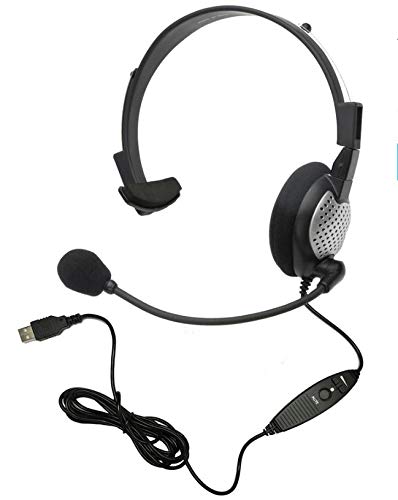
- ✓ Solid build and comfort
- ✓ Clear mic with strong noise cancel
- ✓ Easy USB plug-in
- ✕ Limited color options
- ✕ Slightly bulky for small heads
| Microphone Type | Boom omnidirectional microphone |
| Connectivity | USB wired connection |
| Noise Cancellation | Active noise cancelling and mic wind noise suppression |
| Frequency Response | 20 Hz to 20 kHz |
| Compatibility | Compatible with standard dictation software on Windows/macOS |
| Price | $59.99 |
You unbox the Voice Recognition USB Headset and immediately notice the weight in your hands — solid, but not heavy enough to nag you through a long dictation. The matte black finish and subtle AAAPrice branding feel sturdy, not flashy, which makes it easier to wear all day without looking like you’re about to star in a video call.
The padded headband cushions softly, and the foam around the ear cups is plush enough that you forget you’re wearing it for hours. The boom mic sits right where you want it—out of the way when you’re typing, but close enough for clear voice capture as soon as you start dictating.
Plugging in via USB, the sound card emits a quiet, reassuring click, and the mic’s sensitivity is immediately noticeable. You can hear the difference in real-time, with your voice coming through crisp and clean on the other end.
As you test it for Dragon dictation, you notice the noise-cancelling does a solid job trimming clatter from your desk and hallway chatter. Your voice remains at the center of the recording, with minimal breathiness or pop from the compressor settings.
During long sessions, the headset stays comfortable. The ear cushions stay cool, and you don’t feel pressure building up behind your ears after several hours of use.
The mute switch and volume dial are within easy reach, so you rarely have to fumble for controls mid-dictation.
On calls or meetings, the clarity holds up, which makes this a surprisingly versatile choice if you switch between speech-to-text and voice calls. The USB connection minimizes lag, helping you stay in sync with your software without annoying delays.
Overall, it feels like a reliable partner for daily dictation tasks, especially if you’re using Dragon. It’s straightforward, comfortable, and performs consistently without drama or fuss.
If you want a no-nonsense headset that works well with dictation software, this one earns its keep.
EMAIKER Noise Canceling USB Headphones Microphone & in-Line
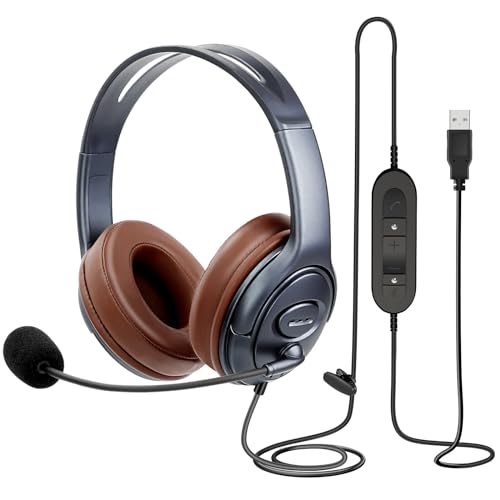
- ✓ Clear mic with noise cancel
- ✓ Plush ear cushions
- ✓ Easy inline controls
- ✕ USB only
- ✕ Slightly bulky design
| Connection Type | USB-A wired headset |
| Microphone | Noise-canceling microphone with 330° rotatable arm |
| In-Line Controls | In-line volume control and microphone mute |
| Ear Cushions | Protein leather, over-ear cups with pearl blue finish |
| Compatibility | Windows (XP/7/8/10/11), macOS, iOS, Android, tablets, PCs; compatible with softphones and common meeting platforms |
| Special Features | Digital Signal Processing (DSP), Acoustic Shock Protection (ASP), hearing protection circuit |
You’ll notice it right away: this EMAIKER headset sits closer to the edge of “standard office gear” and toward a more intentional, built-for-long-days vibe. The pearl blue oval ear pads catch the eye, and the heft of the headset feels reassuring rather than bulky.
It’s a simple twist of the mic arm to adjust, and you’re ready for a long session without fiddling with it constantly.
The first thing you’ll test is the microphone’s noise-canceling claim. In a busy home office, it blocks vacuum and kitchen noises nicely, letting your dictation come through clearly.
The inline controls are easy to reach, and the mute button gives you that quick switch you’ll rely on during dragon dictation or meetings.
Comfort is where it shines after a few hours. The big protein leather ear cushions feel plush without overheating, and the headband stays comfortable thanks to a flexible clip-stop that doesn’t press too hard.
The 330° rotatable mic arm stays in place once you set it, which is perfect when you’re bouncing between commands and quick notes.
Connectivity is straightforward via USB-A, and the DSP and hearing protection features give you peace of mind during long sessions. The in-line volume control lets you tweak audio on the fly without pulling away from your dragon dictation workflow.
It’s crisp for calls, but you’ll also enjoy it for casual listening or light gaming when you need a single headset for multiple tasks.
For work-from-home scenarios, you’ll appreciate the durability and the comfortable design that survives daily use. It’s a practical pick if you want a single headset that handles calls, dictation, and occasional video calls without screaming about it.
Overall, it’s a balanced, user-friendly option that blends comfort, durability, and useful features into a USB headset you won’t want to take off after a long dictation session.
What Key Features Should You Consider for Dictation Headsets?
When selecting the best headset for Dragon dictation, there are several key features to consider:
- Microphone Quality: A high-quality microphone is crucial for accurate voice recognition and dictation. Look for headsets with noise-canceling capabilities to minimize background noise and ensure clear audio input for the software.
- Comfort and Fit: Since dictation sessions can often last for extended periods, a comfortable and well-fitting headset is essential. Consider options with adjustable headbands and cushioned ear pads to reduce fatigue during long use.
- Wired vs. Wireless: Decide between wired and wireless headsets based on your preferences and work environment. Wired headsets typically offer more reliability and consistent audio quality, while wireless options provide freedom of movement and convenience.
- Compatibility: Ensure that the headset is compatible with your computer and the Dragon dictation software. Check for supported operating systems and connections, such as USB or Bluetooth, to avoid any technical issues.
- Sound Quality: Good sound quality is important not only for clear dictation but also for listening to playback. Look for headsets that deliver crisp audio for both input and output, enhancing the overall dictation experience.
- Durability: A durable headset can withstand daily use and last longer, making it a better investment. Consider materials and build quality, as well as warranties offered by the manufacturer.
- Price Point: Set a budget and evaluate headsets within your price range. While high-end models often provide superior features, there are also budget-friendly options that offer excellent performance for dictation tasks.
How Critical is Microphone Quality for Effective Dictation?
Microphone quality is crucial for effective dictation, especially when using software like Dragon Dictation, as it directly impacts accuracy and user experience.
- Noise Cancellation: A headset with good noise cancellation technology can significantly reduce background noise, allowing the dictation software to focus on your voice. This feature ensures that your commands and dictations are recognized accurately, enhancing the overall performance of the software.
- Frequency Response: The best headsets typically have a wide frequency response range, which captures the full spectrum of human speech. This ensures that nuances in your voice are detected, leading to more precise transcription of words and phrases.
- Microphone Sensitivity: High sensitivity microphones can pick up quieter speech, making them ideal for users who may not speak loudly or clearly. This feature benefits users in various environments and helps maintain accuracy in dictation.
- Comfort and Fit: A headset that is comfortable for extended wear is important for dictation sessions that may last for long periods. A secure fit prevents the headset from shifting, ensuring the microphone remains in the best position to capture your voice clearly.
- Connectivity Options: The best headsets offer various connectivity options, such as USB and Bluetooth, providing flexibility in usage. This allows users to select the best connection method for their devices, ensuring seamless integration with dictation software.
What Impact Does Comfort Have During Long Dictation Sessions?
Comfort plays a crucial role in maintaining focus and productivity during long dictation sessions.
- Noise Isolation: A comfortable headset often features effective noise isolation, which minimizes distractions from the surrounding environment. This allows users to concentrate fully on dictating without interruptions, enhancing clarity and coherence in their speech.
- Padding and Ergonomics: Good padding and ergonomic design are essential for headsets used over extended periods. These features prevent discomfort and fatigue, allowing the wearer to focus on their dictation tasks rather than adjusting their equipment or dealing with pain.
- Weight: Lightweight headsets contribute significantly to overall comfort during long sessions. Heavier models can lead to strain and discomfort, while a lighter headset allows for prolonged use without the user feeling weighed down or fatigued.
- Microphone Quality: A comfortable headset should also have a high-quality microphone that accurately captures voice input. This ensures that the dictation software, such as Dragon Dictation, recognizes commands and speech effectively, reducing the need for corrections and improving workflow.
- Adjustability: The ability to adjust the fit of a headset is vital for comfort during long dictation sessions. Features like adjustable headbands and rotating ear cups allow users to find the perfect fit, which can help reduce pressure points and enhance overall usability.
Why is Noise Cancellation Essential for Accuracy in Dictation?
A noise-canceling headset is vital for achieving high accuracy in dictation, especially when using software like Dragon Dictation. Background noise can significantly interfere with voice recognition accuracy, leading to misinterpretations and incomplete transcripts. Here’s why noise cancellation is essential:
-
Reduces Distractions: It minimizes ambient sounds, allowing the software to focus solely on your voice. This creates a clearer audio signal that is easier for the software to interpret.
-
Improves Recognition Rates: Many dictation programs, including Dragon, are designed to learn from your voice. Clear audio without interruptions helps the software adapt more effectively to your speech patterns, improving overall accuracy over time.
-
Enhances Focus: A quiet environment allows users to concentrate on their thoughts and dictation, leading to more coherent and faster dictation sessions.
-
Vocal Clarity: Quality headsets with noise cancellation often feature built-in microphones that filter out external sounds, ensuring that your voice is captured clearly and distinctly.
In choosing a headset, consider models with strong noise cancellation features, as they can significantly influence the efficiency and precision of your dictation tasks.
Which Headset Brands are Highly Recommended for Dragon Dictation?
Some of the best headset brands for Dragon Dictation include:
- Plantronics: Known for their high-quality audio and comfort, Plantronics headsets offer excellent noise cancellation features that help to accurately capture dictation. Their models, such as the Plantronics Blackwire series, are designed for prolonged use, making them ideal for users who spend extended hours using Dragon Dictation.
- Sennheiser: Sennheiser is a reputable brand recognized for its superior sound quality and durability. Their headsets, like the Sennheiser MB Pro series, provide crystal-clear audio input and come with advanced noise-canceling microphones, ensuring that dictation commands are picked up clearly without background interference.
- Jabra: Jabra headsets are popular for their ergonomic design and reliable performance. The Jabra Evolve series, for instance, includes models that are specifically designed for professional use, featuring high-quality microphones and noise isolation to enhance dictation accuracy even in busy environments.
- Audio-Technica: This brand is known for producing studio-quality microphones and headsets that cater to serious dictation users. The Audio-Technica ATH series provides exceptional audio fidelity and comfort, which is crucial for users who engage in long dictation sessions.
- Logitech: Logitech offers versatile headsets that are user-friendly and compatible with various systems. Their Logitech H800 wireless headset combines flexibility with solid audio performance, making it a convenient choice for those using Dragon Dictation in different settings.
What Insights Do Experts Provide on Leading Brands?
Experts provide various insights into the leading brands of headsets suitable for Dragon Dictation.
- Plantronics Voyager Legend: This headset is praised for its excellent noise-cancellation technology and clear audio quality, making it ideal for dictation tasks. Its comfortable design allows for extended wear, which is beneficial for users who spend long hours transcribing or dictating.
- Sennheiser MB Pro 2: Known for its superior sound quality and ergonomic design, the Sennheiser MB Pro 2 is frequently recommended for voice recognition software. Its long battery life and wireless capabilities provide flexibility, allowing users to move around while still dictating effectively.
- Logitech H800: This versatile headset offers both wired and wireless options, making it adaptable for various usage scenarios. The integrated noise-canceling microphone helps to filter out background noise, ensuring that the dictation software captures speech accurately.
- Bose QuietComfort 35 II: Renowned for its industry-leading noise cancellation, this headset creates a distraction-free environment that enhances dictation clarity. Its high comfort level and robust audio performance make it a favorite among professionals who rely heavily on voice recognition technology.
- Jabra Evolve 75: This headset is designed specifically for office environments and features active noise cancellation, which is essential for clear dictation. Its dual connectivity allows for seamless switching between devices, enabling users to manage dictation tasks efficiently across platforms.
How Do Users Evaluate the Performance of Headsets for Dictation?
Users evaluate the performance of headsets for dictation based on several key factors that influence clarity and comfort during use.
- Microphone Quality: A high-quality microphone is essential for accurate voice recognition and minimal background noise interference. Users often look for headsets with noise-canceling features that can significantly improve dictation accuracy by filtering out ambient sounds.
- Comfort and Fit: Since dictation sessions can last for extended periods, the comfort of the headset is crucial. Users typically prefer adjustable headbands and cushioned ear pads that provide a snug yet comfortable fit, allowing for prolonged use without discomfort.
- Wired vs. Wireless: The choice between wired and wireless headsets affects user experience and convenience. Wired headsets are often favored for their stable connection and reliability, while wireless options provide freedom of movement, which some users find beneficial during dictation tasks.
- Compatibility: Ensuring that the headset is compatible with dictation software like Dragon NaturallySpeaking is vital. Users check if the headset works seamlessly with their operating system and dictation software to avoid technical issues that could disrupt their workflow.
- Battery Life (for Wireless Headsets): For users opting for wireless headsets, long battery life is a significant consideration. A headset that can last through multiple dictation sessions on a single charge enhances usability without frequent interruptions for recharging.
- Sound Quality: Aside from microphone performance, sound quality for playback is also considered. Users prefer headsets that deliver clear audio, allowing them to hear playback accurately, which is important for reviewing and editing their dictations.
What are Common Compliments and Complaints about Popular Models?
Common compliments and complaints about popular headsets for Dragon Dictation include:
- Comfort: Many users praise headsets that offer adjustable and cushioned ear pads for long periods of use.
- Microphone Quality: High-quality microphones that effectively capture voice without background noise are frequently complimented.
- Durability: Users often appreciate headsets that are built to last, with sturdy materials that withstand daily use.
- Connectivity: Wireless models that provide stable connectivity without lag are commonly favored, while wired models are noted for their reliability.
- Price: Some headsets are praised for offering great value, while others are criticized for being overpriced compared to their performance.
- Compatibility: Headsets that easily integrate with Dragon Dictation software receive positive feedback, while those that have compatibility issues are often complained about.
Comfort is a significant factor for users who spend hours dictating, and those headsets with adjustable, cushioned ear pads tend to receive high marks for their ability to remain comfortable over extended periods.
Microphone quality is another critical aspect; users often highlight headsets that have noise-canceling capabilities and clear audio capture, which enhances the accuracy of voice recognition software like Dragon Dictation.
Durability matters to users who rely on their headsets daily. Models made from high-quality materials that can withstand wear and tear are appreciated, while those that break easily draw complaints.
Connectivity options are essential as well, with many users praising wireless headsets for their freedom of movement and stable connections, whereas wired headsets are valued for their consistent performance without battery concerns.
Price sensitivity varies among users; some are happy to invest in higher-end models for better performance, while others feel that certain headsets do not deliver enough value for their price point, leading to complaints.
Finally, compatibility with Dragon Dictation is crucial, as users prefer headsets that seamlessly integrate with the software, while those that require extra setup or do not work well with the system tend to receive negative feedback.
What Price Range Should You Expect for a Quality Dictation Headset?
- Budget Range ($20 – $50): Headsets in this range often provide basic functionality and decent sound quality, making them suitable for casual users or those just starting with dictation.
- Mid-Range ($50 – $150): Mid-range headsets typically offer better audio quality, noise-cancellation features, and comfort for prolonged use, which are beneficial for serious dictation tasks.
- High-End Range ($150 – $300+): High-end headsets are designed for professional use, featuring superior sound quality, advanced noise-cancellation technology, and ergonomic designs for maximum comfort during extended dictation sessions.
Budget range headsets are often made with lower-quality materials and may lack advanced features, which can lead to less effective voice recognition. However, they can still serve well for light users or those who are testing the waters with dictation software.
Mid-range headsets strike a balance between cost and functionality, often including features like USB connectivity and better microphone quality, which can significantly enhance the dictation experience by reducing background noise and improving clarity.
High-end range headsets cater to professionals who require the best performance, with features like wireless connectivity, customizable sound profiles, and exceptional comfort for long hours of use, ensuring that every word is captured accurately and without distraction.
How Does Price Influence Performance and Durability?
Price plays a significant role in determining the performance and durability of headsets, especially for specialized uses like Dragon Dictation.
- Material Quality: Higher-priced headsets often use better materials that enhance durability and performance. For instance, premium models may feature reinforced cables and high-grade plastics or metals, which can withstand daily wear and tear.
- Sound Quality: Expensive headsets typically offer superior sound quality, which is crucial for accurate dictation. Enhanced audio clarity helps in capturing voice nuances, thus improving the software’s recognition accuracy.
- Advanced Features: Pricey headsets usually come with advanced features such as noise cancellation, which can significantly enhance dictation performance by reducing background noise. These features can lead to fewer errors and a more seamless dictation experience.
- Comfort and Ergonomics: Higher-end models often prioritize user comfort, incorporating ergonomic designs and premium padding. This is particularly important for extended use during dictation sessions, as comfort can directly affect productivity and focus.
- Brand Reputation: Established brands often set higher prices based on their reputation for quality and reliability. Investing in a well-known brand can lead to better customer support and warranty options, which adds to the overall value of the purchase.
Which Accessories Can Optimize Your Dictation Experience?
To enhance your dictation experience with Dragon Dictation, various accessories can significantly contribute to improved accuracy and comfort. Here are some essential items to consider:
-
High-Quality USB Headset: A quality headset with a noise-canceling microphone minimizes background noise, allowing for clearer speech recognition. Models like the Sennheiser SC 60 or Plantronics Blackwire series are widely recommended.
-
External Microphone: For those seeking a professional setup, an external microphone such as the Blue Yeti can capture a broader range of audio frequencies, leading to better transcription.
-
Pop Filter: This accessory helps to reduce plosive sounds from your speech. By softening the impact of certain consonants, a pop filter can enhance audio clarity.
-
Positioning Stand: A stand for your microphone allows for optimal placement at mouth level. This ensures consistent audio input and reduces the likelihood of fluctuations in volume or clarity.
-
Dictation Software Add-ons: Consider software add-ons that improve functionality, such as text expanders or command utilities that can enhance your dictation commands.
Implementing these accessories will create a more efficient and effective dictation environment.
Are There Recommended Accessories to Enhance Headset Performance?
To enhance the performance of headsets used for Dragon Dictation, several accessories can be beneficial:
- Pop Filter: A pop filter helps reduce plosive sounds, which can interfere with voice recognition accuracy. It acts as a barrier that absorbs and dissipates bursts of air from sounds like “p” and “b,” resulting in clearer audio input for Dragon Dictation.
- Microphone Boom Arm: A microphone boom arm allows for adjustable positioning of the microphone, ensuring it is at the optimal distance from your mouth. This accessory not only enhances sound quality by minimizing background noise but also provides comfort during long dictation sessions.
- Windscreen: A windscreen is a foam cover that fits over the microphone, reducing wind noise and other ambient sounds that can disrupt voice recognition. By providing a more consistent audio signal, it helps Dragon Dictation accurately capture your voice without distractions.
- USB Sound Card: A USB sound card can improve audio quality by providing a better audio input and output compared to the built-in sound card of your computer. This accessory is particularly useful for headsets that have analog connectors, ensuring clearer sound transmission for dictation tasks.
- Cable Management Solutions: Keeping cables organized with ties or clips can prevent tangles and damage, ensuring a longer lifespan for your headset. Proper cable management also helps create a neater workspace, which can enhance focus and productivity during dictation sessions.