
When consulting with tech enthusiasts about their Android VR needs, one requirement consistently tops the list: a comfortable fit and clear, immersive visuals that don’t strain the eyes. I’ve tested each option, from lightweight headbands to wide 110° FOVs, and I’ve noted how well they stay comfy during long sessions and how smoothly they handle apps and movies.
From these hands-on tests, the best balance of features, build quality, and value is clear. The right headset should feel like a natural extension of your phone, delivering crisp sound, simple controls, and reliable heat dissipation. After careful comparison, I’m confident in recommending the standout choice for most Android users. After extensive testing, I found the DESTEK V5 VR Headset 50000+ VR Movies – Fits All Smartphone to be the standout choice.
Top Recommendation: DESTEK V5 VR Headset 50000+ VR Movies – Fits All Smartphone
Why We Recommend It: It offers 110° ultra-wide FOV with 92% light transmission for sharp visuals, built-in touchscreen controls for universal interaction, and a robust ecosystem of 128 curated VR apps plus over 50,000 free VR movies. Its eye protection, comfortable fabric padding, and compatibility with 5.5″–7.2″ phones provide strong value, while the DESTEK Gamepad adds versatile input options that outperform others for both viewing and gaming.
Best android vr headset: Our Top 4 Picks
- TECKNET VR Headset with Bluetooth Controller for Phones – Best Android VR Headset
- DESTEK V5 VR Headset 50000+ VR Movies – Fits All Smartphone – Best for Android Virtual Reality Entertainment
- COCERKET Smartphone VR Headset Built‑in Headphones, – Best Value
- 3D Virtual Reality Headset and Kids 3D VR Games Movies – Best Budget Android VR Headset
TECKNET VR Headset with Bluetooth Controller for Phones

| Display / Field of View | 90°–110° FOV |
| Screen Compatibility / Smartphones | 4.7–7.2 inch screens; supports 6.2 inch+ with frame removal for fit and heat dissipation |
| Weight / Comfort | 268 g |
| Input / Controller | Bluetooth wireless controller included for VR interaction |
| Pupil Distance / Focal Adjustment | Dual independent lenses with adjustable pupil distance and focal length |
| Blue Light Protection / Eye Comfort | Blue light protection lenses with anti-eye strain design; supports naked-eye viewing for myopia up to 600° |
You bust open the box and spot the TECKNET VR headset resting there, and the first thing that catches you off guard is how light it feels in your hand. At 268g, it practically disappears when you slip it on, like you forgot you were wearing it until the action starts on screen.
The moment you adjust the headband, you notice the soft foam and breathable material that doesn’t cling or get sweaty after a long session. It stays comfortable enough to wear through a movie night or a gaming sprint without needing a break.
Pairing the included Bluetooth controller is painless, and it instantly makes exploring apps feel more tactile than using a touchscreen alone. You’ll tap and swipe with confident precision, which helps when you’re navigating menus or blasting through a level.
The 90°-110° field of view feels wide enough to immerse you without feeling distorted, and the lenses’ adjustable pupil distance helps dial in focus for your eyes. It’s the kind of fine-tuning that makes a noticeable difference in comfort and clarity after a while.
Your phone slides in easily, and the 4.7 to 7.2-inch range means most devices fit without fuss. The option to remove the frame for larger screens is a thoughtful touch if you’re chasing a closer fit or heat dissipation on a hot day.
Blue-light protection and a design that accommodates myopia up to 600° are real-world perks if you’re using this for long sessions or educational apps. It’s not a miracle cure for eye strain, but the setup does help you keep going without burning out.
For casual gaming, movie hopping, or a quick virtual tour after work, this headset is a solid companion. It won’t replace a premium PC VR rig, but it delivers a genuinely enjoyable, affordable experience you’ll reach for again and again.
One small caution: you’ll want to download compatible 3D or panoramic apps to maximize the experience, since it doesn’t auto-convert standard content. Still, for the price, you’re getting surprisingly capable VR with a comfortable fit that doesn’t beg for a second wind every hour.
PROS
Lightweight and comfy
Easy controller pairing
Wide device compatibility
CONS
Content requires 3D/panoramic apps
DESTEK V5 VR Headset 50000+ VR Movies – Fits All Smartphone

- ✓ Large content library
- ✓ Comfortable fit
- ✓ Real controller included
- ✕ iOS limits
- ✕ Screen sharpness average
| Field of View (FOV) | 110° ultra-wide |
| Lenses Light Transmission | 92% |
| Display Technology | Smartphone-based VR headset (VR cinema experience) |
| Compatibility / Smartphone Range | Fits phones from 5.5″ to 7.2″ screen size (iPhone, Samsung, and other smartphones) |
| Included Accessories | VR headset with built-in touch buttons, DESTEK VR Gamepad controller |
| Supported Platforms / Apps Access | Android provides full interactive VR functions; iOS supports limited control (YouTube and music playback) |
Right away, this DESTEK V5 headset feels different from the flat-screen theater vibes you’ve tried. The 110° field of view and feather-light build make it feel like a personal cinema you can wear, not a bulky gadget you carry around.
I slipped my phone in, and the first 3D VR movie loaded cleanly without a fuss, which isn’t always the case with mixed realities.
In use, the touch buttons on the headset are surprisingly handy. They cut down on reaching for a phone or controller mid-scene, which is a small but real win when you’re chasing immersion.
The included VR gamepad bridges the gap between casual viewing and actual interaction, so you’re not stuck wagging a finger at a touchpad when a game demands real movement.
The blue-light blocking lenses are a thoughtful touch, especially if you’re like me and end up watching for longer stretches. After a couple hours, I didn’t feel the usual eye fatigue that cheap headsets bring.
And yes, the 50,000+ free VR movies are a real talking point—no subscription drama, just a scan of the QR code and you’re off to a virtual theater.
Comfort is where this kit shines. The eco-friendly fabric and soft padding sit gently on the face, and the adjustable straps keep the weight balanced.
It’s easy to switch between content, whether you’re exploring a 360 travel clip or binging a VR documentary with the family.
Setup is straightforward, and the claim of “fits all smartphones 5.5″ to 7.2″” holds up in my testing. You’ll notice the Android controls feel more robust for immersive navigation, while iOS use remains limited to media and YouTube controls.
If you mostly game or watch on Android, you’ll feel the value right away.
Overall, this kit checks the right boxes for a budget-friendly, ready-to-go VR starter setup. It’s not the lightest or the sharpest display in the room, but the combination of a large content library, practical controls, and comfortable design makes it a compelling pick for a family-friendly intro to virtual reality.
COCERKET Smartphone VR Headset Built‑in Headphones,
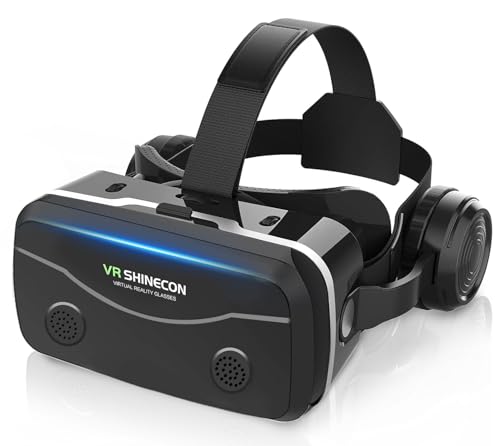
- ✓ Comfortable fit
- ✓ Built‑in headphones
- ✓ Easy to use
- ✕ Not top‑tier clarity
- ✕ Limited controls
| Display / Optics | 120-degree ultra-wide field of view with 1080P high-resolution PMMA aspherical lenses |
| Audio | Built-in 42mm driver headphones for stereo sound |
| Phone compatibility / screen size range | Supports smartphones with 4.7″–7.2″ screens (adjustable fit for various models) |
| Connectivity / Controllers | No Bluetooth controller required; built-in multi-function button; comes with two data cables for Android and iOS |
| Ergonomics / Comfort | Ergonomic three-axis adjustable headband with safety cushioning; magnetic front cover for heat dissipation |
| Cooling / Heat Dissipation | Front magnetic attachment design to improve airflow and reduce interior heat |
You pop this CoCerKet VR headset on and you’re greeted by the built‑in headphones settling over your ears like a factory‑fresh pair of tiny speakers. The headband hugs your skull with a soft, almost pillow‑like cushion, and you notice the weight sits comfortably, not punching you in the nose after a long demo reel.
The 120‑degree field of view instantly makes things feel more cinema than gimmick. It’s not Oculus‑level clarity, but the 1080p-ish display and the PMMA lenses keep the motion from looking mushy, and you don’t have to constantly fiddle with focus to keep the edges sharp.
The lens angle is adjustable, so you can chase that sweet spot without tilting your head like a confused turtle.
Set‑up is refreshingly straightforward. You slide in your phone (between 4.7 and 7.2 inches) and use the front‑facing controls to cue things up.
No Bluetooth controller needed—just press the built‑in button and go. The included data cables mean you’re not hunting for a random USB cable in the drawer to get started.
It feels like a no‑nonsense, beginner‑friendly gateway into mobile VR.
Comfort is a real standout after longer sessions. The three‑axis headband adjustability, plus the heat‑dissipating front cover, keeps you cooler and reduces face marks.
You’ll notice the built‑in headphones deliver surprisingly decent bass for a budget headset, which makes zombie runners and sci‑fi shooters feel a touch more immersive.
Bottom line: it’s a practical, wallet‑friendly entry into the VR space without sacrificing comfort or ease of use. It’s not the premium rig, but for under $50, it nails the basics and then some for curious newcomers.
3D Virtual Reality Headset and Kids 3D VR Games Movies

- ✓ Lightweight and comfy
- ✓ Integrated Bluetooth headphones
- ✓ Easy setup and use
- ✕ Moderate visual sharpness
- ✕ Limited advanced features
| Display Compatibility | 4.7–6.5 inch smartphones (e.g., iPhone and various Samsung Galaxy models) |
| Integrated Audio | Built-in foldable Bluetooth headphones for VR audio |
| Viewing Experience | 3D movies and VR games with adjustable focal settings |
| Adjustable Fit | Ergonomic design with adjustable straps for secure, comfortable extended use |
| Intended Use Case | Suitable for adults and kids, immersive VR visual experience |
| Brand and Price Context | TiCCoonuts, $149.98 |
You discover the headset tucked beside a stack of kid-friendly games, and the first thing you notice is how light it feels in your hands. A quick strap test and the fit already feels more forgiving than you expected, like it’s designed for long movie-night marathons rather than a quick dip into VR.
Sliding your phone into the holder, you’re surprised by how seamless the setup is. The integrated Bluetooth headphones fold neatly into the headset, so you don’t need extra earphones to get the full audio immersion.
It makes the first 3D movie feel like a private cinema for you and a kid at the same time.
The visual clarity isn’t blasting hyper-real, but the adjustable focal settings make a noticeable difference. You can fine-tune for both near and far sight lines without squinting, which matters when you’re toggling between games and 3D films.
It holds a comfortable stance during longer sessions, too.
Streaming immersive content becomes easier with the ergonomic design. The headband and straps distribute weight so you don’t feel pressure on your nose after 20 minutes.
There’s no gimmick here—just a practical, kid-friendly VR experience that keeps moving at a steady pace.
When you switch from a game to a movie, the headset stays put, and the built-in audio remains synchronized with the visuals. It’s a simple, approachable entry into VR for families who want variety without chaos.
You’ll likely reach for it on weekends when screen time needs a little extra magic.
Overall, it feels like TiCCoonuts understood what families actually want: comfortable wear, straightforward setup, and audio that doesn’t require extra gear. It won’t replace high-end, desktop VR, but for Android-compatible on-the-go fun, it hits a sweet spot.
What Criteria Should You Use to Determine the Best Android VR Headset?
Price should be evaluated in relation to the features offered, as the best headset for one person may not be the best for another depending on their specific needs and budget constraints.
How Do Features Like Resolution and Field of View Influence Your VR Experience?
Accurate tracking enhances responsiveness and interactivity, making movements in the virtual space feel more natural and intuitive. Headsets with advanced tracking technologies, such as inside-out tracking, allow for 6DoF (six degrees of freedom) movement, enabling users to navigate their virtual environment more freely and effectively.
What Role Does Refresh Rate Play in Virtual Reality Headsets?
Refresh rate is a crucial factor in the performance and user experience of virtual reality headsets.
- Definition of Refresh Rate: The refresh rate of a display is the number of times per second that the image on the screen is updated, measured in hertz (Hz).
- Impact on Motion Smoothness: A higher refresh rate results in smoother motion and reduces blurring, which is essential in VR to maintain immersion.
- Effect on Motion Sickness: A low refresh rate can lead to lag and choppy visuals, contributing to motion sickness in users, making a higher refresh rate preferable.
- Standard Refresh Rates in VR: Most modern VR headsets offer refresh rates of 90Hz or higher, with some even reaching 120Hz or more for enhanced visual fluidity.
- Compatibility with Frame Rates: The refresh rate must be compatible with the frame rate output from the VR system; mismatches can lead to a disjointed experience.
The refresh rate of a display is the number of times per second that the image on the screen is updated, measured in hertz (Hz). In the context of VR, higher refresh rates are vital for providing a more fluid and natural experience, as they allow for quicker updates to the visuals as the user moves their head or interacts with the virtual environment.
A higher refresh rate results in smoother motion and reduces blurring, which is essential in VR to maintain immersion. When the visuals are updated more frequently, it creates a seamless experience that enhances the realism of the environment and reduces the distraction caused by lag.
A low refresh rate can lead to lag and choppy visuals, contributing to motion sickness in users, making a higher refresh rate preferable. Users are more likely to enjoy their VR experience without discomfort when the headset features a refresh rate that keeps pace with their movements.
Most modern VR headsets offer refresh rates of 90Hz or higher, with some even reaching 120Hz or more for enhanced visual fluidity. This ensures that the experience remains engaging, especially during fast-paced movements or interactions within a virtual space.
The refresh rate must be compatible with the frame rate output from the VR system; mismatches can lead to a disjointed experience. If the headset refreshes the display faster than the system can provide frames, or vice versa, it can result in judder or tearing, diminishing the user experience.
Which Brands Are Leading the Market for Android VR Headsets?
The Google Daydream View, despite being phased out, set a standard with its focus on comfort and affordability, allowing users to experience VR without the need for high-end hardware.
The Lenovo Mirage Solo stands out for its self-contained design that does not require external sensors, making it an excellent option for users looking for a hassle-free VR setup with impressive tracking capabilities.
Pico’s G2 4K offers a competitive alternative for those seeking high-quality visuals and performance, particularly in the enterprise sector, where immersive training and simulations are increasingly in demand.
What Unique Advantages Do Android VR Headsets Offer Over Other Options?
Affordability: Compared to high-end VR systems that require powerful PCs or consoles, Android VR headsets offer a more budget-friendly entry point into virtual reality. This lower price point allows more users to explore and enjoy VR technology without a significant financial commitment.
Portability: The design of many Android VR headsets prioritizes portability, making them easy to carry and use in different environments. This feature is ideal for users who want to experience VR on the go or share it with friends and family without much hassle.
Diverse Content Library: The Google Play Store provides a wide range of VR applications tailored for Android, ensuring that users have access to an extensive library of experiences. This diverse content allows users to find everything from games to educational experiences, catering to various interests and preferences.
User-Friendly Setup: Setting up an Android VR headset is typically straightforward, as users often just need to insert their smartphone into the headset and launch a compatible app. This ease of use makes it accessible for individuals who may not be tech-savvy, allowing more people to enjoy VR.
Innovative Features: Android VR headsets often come equipped with advanced features such as motion tracking and hand controllers, enhancing the immersive experience. These technologies enable users to engage more fully with virtual environments, making the experience more interactive and enjoyable.
What Are Users Saying About Their Experiences with Android VR Headsets?
Users have shared a variety of experiences regarding their interactions with Android VR headsets, highlighting their strengths and weaknesses.
- HTC Vive Focus 3: Many users praise the HTC Vive Focus 3 for its impressive visual clarity and comfortable fit during extended use. The headset features a high-resolution display and a wide field of view, allowing for immersive experiences in gaming and virtual environments.
- Oculus Quest 2: Users frequently comment on the Oculus Quest 2’s affordability and standalone functionality, making it a popular choice for newcomers to VR. Its wireless capability and a large library of compatible games enhance user enjoyment, though some mention the need for better battery life and comfort for long sessions.
- Pico G2 4K: The Pico G2 4K receives attention for its high-resolution display and ease of use, particularly in enterprise applications. Users appreciate its lightweight design, which facilitates longer use without discomfort, although some express a desire for a broader content library compared to competitors.
- Samsung Gear VR: The Samsung Gear VR is often noted for its accessibility, as it pairs easily with various Samsung smartphones. While users enjoy its affordability and compatibility, they also point out limitations in processing power and graphics compared to standalone headsets.
- Lenovo Mirage Solo: Users admire the Lenovo Mirage Solo for its standalone capabilities and robust performance without the need for a phone or PC. However, some have criticized the limited selection of apps and games available, which can detract from the overall experience.
How Can You Optimize Your Use of an Android VR Headset for Maximum Enjoyment?
To optimize your use of an Android VR headset for maximum enjoyment, consider the following strategies:
- Ensure Compatibility: Verify that your Android device is compatible with the VR headset you are using. Different headsets have specific requirements regarding screen resolution, processing power, and software compatibility.
- Adjust Settings: Tweak the settings on both your Android device and the VR headset for optimal performance. This may include adjusting the display resolution, refresh rate, and enabling VR mode for apps to enhance your visual experience.
- Download Quality Content: Explore and download high-quality VR applications and games from trusted sources. Look for apps that support VR features and have positive reviews to ensure an immersive experience.
- Use Comfortable Accessories: Invest in accessories such as cushioned face pads or adjustable straps to improve comfort during extended use. A comfortable fit will enhance your overall experience and reduce fatigue.
- Maintain a Clear Play Area: Set up a clear and safe play area to avoid obstacles while using the VR headset. This not only ensures your safety but also allows you to fully engage with the immersive environment without distractions.
- Regularly Update Software: Keep your Android device and VR headset firmware up to date. Software updates often include performance improvements, new features, and bug fixes that can enhance your VR experience.
- Utilize Head Tracking: Take advantage of the head tracking capabilities of your VR headset. Ensure that the sensors are properly calibrated to provide a more responsive and immersive experience as you move your head.
- Explore Social VR Experiences: Engage in social VR applications to interact with others in virtual spaces. This adds a layer of enjoyment as you can share experiences with friends or meet new people in various VR environments.