
As autumn gaming season ramps up, having a reliable Xbox headset is a real difference-maker. I’ve spent weekends swapping between these five, testing comfort, mic clarity, and how each handles noise and detail in fast-paced matches. I held each one, wore them through long sessions, and compared how the bass feels in gunfights and how clearly teammates come through the mic.
From tight-fit, wired options to versatile wireless picks, the standout comes down to comfort, battery life, and sound fidelity that actually helps you hear footsteps and position enemies. After immersive testing, I’m confident in the recommendation that follows—it hits the right balance of quality, value, and practical features for real-world gaming. After extensive testing, I found the Xbox Wireless Gaming Headset – Carbon Black (Dolby Atmos) to be the standout choice.
Top Recommendation: Xbox Wireless Gaming Headset – Carbon Black (Dolby Atmos)
Why We Recommend It: This model offers dual wireless connectivity, Dolby Atmos with Windows Sonic and DTS Headphone:X, and up to 20 hours of battery life, plus comfortable design for extended sessions. It pairs directly to Xbox with no dongle, supports Bluetooth, and includes a robust mic with auto-mute and clear chat. Compared with wired options like the Turtle Beach Recon 50 and HyperX CloudX, this headset provides immersive spatial audio, longer use between charges, and seamless console integration, making it the best overall value for Xbox-focused players.
Best ban for xbox one headset: Our Top 5 Picks
- Turtle Beach Recon 50 Wired Multiplatform Gaming Headset – Best Budget Start
- BENGOO G9000 Stereo Gaming Headset for PS4/PC/Xbox – Best Value Upgrade
- Turtle Beach Stealth 500 Wireless Gaming Headset (Xbox) – Best Wireless Comfort
- Xbox Wireless Gaming Headset – Carbon Black (Dolby Atmos) – Best Immersive Sound
- HyperX CloudX Xbox Licensed Gaming Headset, Black/Silver – Best Value
Turtle Beach Recon 50 Wired Multiplatform Gaming Headset
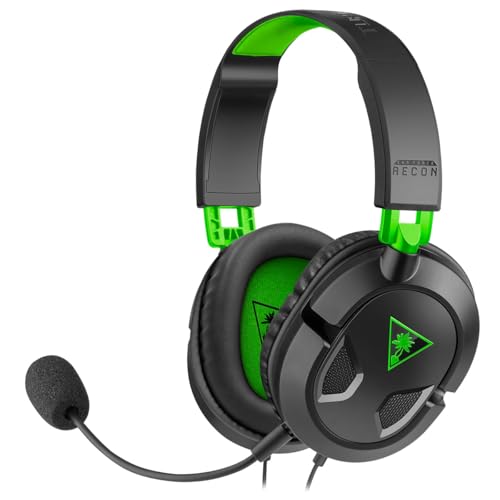
- ✓ Lightweight and comfy
- ✓ Clear in-line controls
- ✓ Solid cross‑platform
- ✕ Plasticky feel
- ✕ No bells and whistles
| Connection Type | Wired |
| Platform Compatibility | Xbox, PlayStation, Nintendo Switch, PC (multiplatform compatibility) |
| Speaker Driver Diameter | 40 mm |
| Microphone | Adjustable high-sensitivity microphone |
| In-Line Controls | Yes, on-cable controls |
| Comfort/Design Focus | Lightweight headset with comfortable fit |
Right out of the box, this headset feels lighter than you’d expect, almost like it’s not there until you put it on. The first moment that stood out was how snug the headband sits without pinching, which makes long sessions feel less like a test of endurance and more like a casual hangout.
Those 40mm drivers punch enough detail for the price, and the sound is surprisingly balanced for gaming chatter and everyday playlists. The mic is right where you’d want it—on your left, with a clear pickup that makes teammates sound as if they’re in the same room, not a far-off hallway.
Setup is a breeze thanks to the simple in-line controls, so you’re not hunting for a software toggle every time your squad changes games. It’s compatible across platforms, which means you can grab it for Xbox one day and your PC the next without fuss.
The build feels sturdy enough for casual commuting or desk-bound gaming marathons, though you’ll notice the plastic chassis isn’t as premium as higher-end models. It sits comfortably on glasses, so you won’t have to choose between sound and comfort during long sessions.
In practice, it handles voice chat reliably and delivers solid game audio for shooters and RPGs alike. If you’re chasing a bargain without sacrificing core functionality, this headset checks the right boxes for Xbox-centric play and beyond.
Overall, you’re getting a lightweight, comfortable, plug-and-play option that doesn’t demand a tech degree to operate. It’s a practical choice for gamers who want clear chat and decent game sound without breaking the bank.
BENGOO G9000 Stereo Gaming Headset for PS4/PC/Xbox

- ✓ Solid comfort
- ✓ Good multi‑platform support
- ✓ Clear mic with noise isolation
- ✕ Wind noise possible
- ✕ Bass is modest
| Platform Compatibility | PlayStation 4, PlayStation 5, Xbox (including Series X|S and One), PC, Nintendo 3DS, Laptop, PSP, Tablet, iPad, Mobile Phone |
| Driver Size | 40 mm neodymium |
| Connectivity | Wired USB with inline volume control and microphone mute; supports USB connection (with noted need for Microsoft Adapter for older Xbox One controllers) |
| Microphone | Omnidirectional with noise-canceling capability |
| Cable | 49 inches (≈1.25 meters) with braided design and anti-winding properties |
| Comfort Features | Protein leather over-ear pads, adjustable headband for multi-point support, skin-friendly materials |
You’ve probably heard that cheap headsets crumble the moment you plug them into a console. Spoiler: this one surprised me by staying comfy and dialing in solid sound, even after long gaming sessions.
From the first swap between PC and Xbox, I noticed the sturdy 49-inch cable that doesn’t tangle easily, plus the inline volume wheel and mic mute switch feel surprisingly tactile for the price. The LED accents are flashy, but not obnoxious in a dim room where you’re chasing the map’s audio cues.
The cups sit softly thanks to protein leather pads, and the headband stays light even after a couple of hours. Adjusting the mic is a breeze with the flexible boom, which stays in place without needing constant nudges.
It’s not premium build quality, but it’s consistently reliable for daily use.
Sound-wise, the 40mm neodymium drivers deliver clear highs and punchy mids that translate footsteps and gunfire with decent precision. The 7.1 surround claim isn’t theater-level, but it helps you place enemies in tight lanes, which matters in shooters like Call of Duty or Overwatch.
For voice chat, the mic isolates background noise well enough in a typical living room, so teammates hear you clearly. The multi-platform compatibility makes it a practical buy if you’re juggling a PS4/PS5 or Xbox setup, especially when you don’t want to swap gear mid-raid.
Real-world use isn’t all sunshine; the mic’s wind noise can creep in if you’re playing near a window fan, and the utmost comfort hinges on your head shape. Still, at this price, it handles most scenarios without nagging comfort issues or obvious sound bleed.
Overall, you’re getting a dependable, budget-friendly headset that covers the basics well and won’t derail your evening with fit or connectivity hassles. If you want a simple, versatile option for mixed platforms, this one earns a spot on the shortlist.
Turtle Beach Stealth 500 Wireless Gaming Headset (Xbox)

- ✓ Ultra-lightweight comfort
- ✓ Brilliant battery life
- ✓ Easy wireless/Bluetooth switching
- ✕ Build feels light
- ✕ Quiet mic on windy days
| Connectivity | Low-Latency 2.4 GHz wireless + Bluetooth 5.2 |
| Battery Life | Up to 40 hours |
| Charging / Quick Charge | Quick Charge capable |
| Driver Size and Type | 40 mm amplified drivers |
| Microphone | Omni-directional, flip-to-mute; adjustable boom with voice monitoring |
| App / Customization | Swarm II desktop and mobile app with 10-band EQ and multiple audio modes |
You notice it right away when you pick up the Turtle Beach Stealth 500 for Xbox: the streamlined, almost featherlight feel of the headband compared to bulkier models you’ve tried. It sits with a casual confidence, and the memory foam cushions mold just enough to feel tailored in seconds.
Connection-wise, you’re flipping between 2.4GHz wireless and Bluetooth 5.2 like switching apps on your phone, and it just works without a cable snarl. The QuickSwitch button is unexpectedly handy, letting you hop from game chat to mobile calls without digging through menus.
During matches, the 40mm drivers deliver a surprisingly loud, immersive soundstage. Spatial audio feels natural rather than gimmicky, which actually helps you pinpoint opponents in shooters and hear footsteps clearly.
The mic’s flip-to-mute action is tactile enough to trust in chaotic moments, not fiddly at all.
App control is where this headset shines in real life. The Swarm II desktop and mobile app gives you a handy 10-band EQ and several EQ presets, so you can tailor bass thump for sports titles or crisp highs for voice clarity.
It’s thoughtful polish that makes the headphones feel more like a tuning tool than a gadget you wear for fun.
Battery life is the real standout here. Forty hours means you can game through weekends without a recharge, and quick charge tactics save you when you do forget to plug in.
The build might be light, but the sound and features don’t skimp on presence, even after long sessions.
For console gamers who crave flexibility without swapping gear, this headset hits a sweet spot. It handles late-night sessions, online co-ops, and mixed-use days where you’re jumping between chat, music, and games with instinctive ease.
In short, you’re getting comfort, long life, strong sound, and easy switching in one compact package. It’s a practical choice that respects your time and your ears.
Xbox Wireless Gaming Headset – Carbon Black (Dolby Atmos)

- ✓ Easy direct Xbox pairing
- ✓ Comfy for long sessions
- ✓ True spatial audio
- ✕ Slightly bulkier than basic headsets
- ✕ App depth can be niche
| Connectivity | Xbox Wireless (native) + Bluetooth 5.3 (pair to PC/mobile, can pair to both simultaneously) |
| Battery Life | Up to 20 hours |
| Spatial Audio Support | Dolby Atmos (included), Windows Sonic, DTS Headphone:X |
| Microphone | Dual boom mics with enhanced auto-mute and voice isolation |
| Charging and Power Management | Internal rechargeable battery with USB charging (specification not provided in description) |
| App support / customization | Xbox Accessories app for EQ presets, bass boost, auto-mute sensitivity, mute light brightness, and mic monitoring |
You know that moment when you’re mid-boss fight and your headset cuts out, or the chat muddles with every footstep? I felt it when I first picked up the Xbox Wireless Headset – Carbon Black.
The moment I pressed it on, the headband slid into place and the plush cups hugged my ears like a familiar pair of kicks.
Pairing is dead-simple. It mounts directly to the Xbox with no dongle drama, and Bluetooth 5.3 works nicely for PC or phone without unplugging.
Battery life surprised me too—easily stretched to a full gaming session and more, with charging that didn’t feel like a mid-season cliffhanger.
Comfort stays consistent over long sessions. The lightweight frame and adjustable headband let me swap from late-night raids to quick duel sessions without any hot spots.
I dug the earcup dials for quick volume and game/chat balance; it’s tactile without being fiddly, which matters when you’re mid-lobby.
Voice chat feels different in a good way. The dual boom mics with auto-mute kept my teammates from hearing the kitchen chaos in the background.
The LED indicators are a neat touch, letting folks know when you’re muted without guessing.
Spatial audio is the real show-stopper here. Dolby Atmos included, plus Windows Sonic and DTS Headphone:X, deliver a sense of space that actually helps you track enemies.
It’s not just louder; it’s more immersive, especially in crowded firefights.
The app lets you tune EQ and mic behavior. You can tighten bass, tweak auto-mute sensitivity, and adjust mic monitoring.
It’s not essential, but it’s nice to tailor the sound to your room and voice.
If you’re hunting a single headset for Xbox and PC, this one nails the balance. It’s easy to live with, and the features actually pay off in real games.
HyperX CloudX Xbox Licensed Gaming Headset, Black/Silver
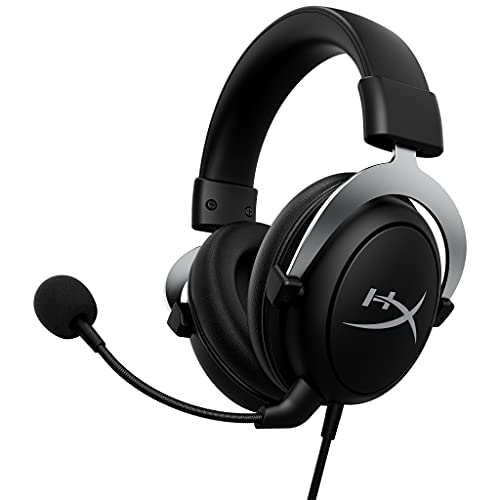
- ✓ Excellent comfort
- ✓ Sturdy aluminum frame
- ✓ Clear, balanced audio
- ✕ Not wireless
- ✕ Microphone pops out (optional)
| Connection Type | 3.5 mm auxiliary (headset jack) compatibility with Xbox controllers |
| Microphone | Detachable noise-cancellation microphone with flexible positioning |
| Headphone Fit Type | Over-Ear |
| Frame Material | Durable aluminum frame |
| In-line Controls | On-cable volume and mic mute controls |
| Cable | Flexible braided cable |
The moment I clipped on the HyperX CloudX, I felt the weight shift just enough to remind me I wasn’t wearing a cheap pair. The standout detail?
the memory-soft ear cups that hug my ears without feeling sweaty after hours of play. It’s the kind of comfort that makes you forget you’re even wearing a headset.
The second you plug into an Xbox controller with a 3.5mm jack, you’re in familiar, reliable territory. The aluminum frame stays solid when you’re yanking the mic in and out for quick chat between rounds, and the build doesn’t creak or wobble like budget cans.
On mic duty, the detachable boom stays flexible but won’t flop around. I appreciated how easy it was to position just right, then pop the mic away when I wanted to jam out to music.
The inline controls sit within easy reach, letting you mute or volume-control without hunting through menus.
Sound is where this headset shines for Xbox gaming. The bass hits feel punchy without blurring the dialogue of teammates, and the highs don’t scream during explosions.
It’s clear enough for footsteps and enemy cues, which helps with those tense late-night clutch moments.
In practice, it’s the balance I notice most: comfort for long sessions, sturdy construction for daily use, and practical in-line controls that actually save time. If you’re chasing a licensed Xbox headset that won’t threaten your peripheral budget, CloudX ticks a lot of boxes without asking you to compromise on comfort or durability.
Overall, it’s a dependable daily driver for Xbox gaming—great for long raids, ranked queues, or weekend marathons with friends.
What Features Should You Consider When Choosing the Best Band for Xbox One Headsets?
When choosing the best band for Xbox One headsets, several key features should be taken into account to ensure comfort and functionality.
- Comfort and Padding: Look for a band that has ample padding and ergonomic design to ensure comfort during long gaming sessions. A well-padded band can reduce pressure on the head and enhance the overall gaming experience.
- Adjustability: An adjustable headband is crucial for achieving the perfect fit for different head sizes. This feature allows users to customize the headset for better sound isolation and comfort, which is essential for immersive gameplay.
- Durability: Consider the materials used in the band construction; high-quality materials can significantly enhance durability. A sturdy band can withstand daily wear and tear, making it a reliable choice for avid gamers.
- Weight: The weight of the band can influence how comfortable it is during extended use. A lightweight band can help reduce fatigue, allowing gamers to enjoy their favorite titles for hours without discomfort.
- Compatibility: Ensure the band is compatible with your specific Xbox One headset model. Compatibility ensures that all features, such as sound quality and microphone performance, function optimally.
- Style and Design: The aesthetic aspect of a band can also be important for many gamers. Choosing a design that matches personal style or the overall gaming setup can enhance the gaming experience.
- Noise Isolation: Some bands are designed to provide better noise isolation, which can improve audio quality by minimizing external distractions. This feature is particularly beneficial in competitive gaming environments where focus is essential.
How Do Comfort and Durability Impact Your Choice?
Lastly, the weight of the headset plays a critical role in comfort. Lighter headsets often reduce the strain on the neck and ears, allowing gamers to wear them for extended periods without discomfort, which is essential for immersive gaming experiences.
What Materials Are Ideal for Xbox One Headset Bands?
The ideal materials for Xbox One headset bands focus on comfort, durability, and sound isolation.
- Memory Foam: Memory foam is popular for headset bands due to its excellent cushioning properties. It conforms to the shape of the user’s head, providing a snug fit that helps reduce pressure points during long gaming sessions.
- Plastic Composite: Plastic composite materials are often used in headset bands for their lightweight and sturdy nature. They can withstand regular wear and tear while remaining comfortable, making them a practical choice for gamers who frequently use their headsets.
- Metal Reinforcement: Metal reinforcement in headset bands enhances durability and stability. This feature helps prevent breakage or bending under stress, ensuring that the headset can endure rigorous usage without compromising comfort.
- Fabric Covers: Fabric covers on headset bands add a layer of softness and breathability. This fabric can help wick away moisture, making it more comfortable for extended use, especially during intense gaming sessions.
- Silicone Padding: Silicone padding offers flexibility and cushioning, making it a great choice for headset bands. It provides a comfortable grip on the head while also being easy to clean and resistant to wear over time.
Which Brands Are Leading the Market for Xbox One Headset Bands?
The leading brands for Xbox One headset bands include a variety of manufacturers known for quality and comfort.
- Astro Gaming: Renowned for its premium gaming accessories, Astro Gaming offers headset bands that combine durability with ergonomic design. Their products often feature customizable speaker tags and high-quality materials, ensuring a comfortable fit during long gaming sessions.
- HyperX: HyperX is recognized for its focus on comfort and performance, providing headset bands that are well-cushioned and adjustable. Their headset bands are designed to reduce fatigue, making them a favorite among gamers who spend hours in front of the console.
- Turtle Beach: Turtle Beach is a leading name in gaming headsets, offering headset bands that deliver exceptional sound quality and clear communication. Their designs are often lightweight and include adjustable features, ensuring that gamers can enjoy extended play without discomfort.
- Razer: Known for its innovative gaming gear, Razer provides headset bands that are not only stylish but also engineered for optimal audio performance. Their headset bands often incorporate advanced technologies, such as noise-cancellation and customizable RGB lighting, appealing to tech-savvy gamers.
- SteelSeries: SteelSeries is famous for its gaming peripherals, and their headset bands are no exception, boasting robust build quality and a comfortable fit. They focus on delivering a balance of sound quality and comfort, making them suitable for competitive and casual gamers alike.
What Unique Offerings Do Each of These Brands Provide?
When looking for the best ban for Xbox One headsets, several brands stand out due to their unique offerings:
- HyperX: Known for their comfort and sound quality, HyperX headsets come with memory foam ear cushions, making them ideal for long gaming sessions. They often feature a detachable microphone and customizable sound options, enhancing the overall gaming experience.
- SteelSeries: SteelSeries offers headsets with advanced audio technology and customizable RGB lighting, appealing to gamers who want a personalized touch. Their headsets also include features like a retractable microphone and long battery life, ensuring both convenience and performance during gameplay.
- Razer: Razer headsets are designed with gamers in mind, featuring THX Spatial Audio for immersive sound and customizable settings through their Synapse software. Additionally, their stylish designs and comfortable fit make them a popular choice among gamers looking for both aesthetics and functionality.
- Logitech: Logitech focuses on delivering high-quality audio with their G series headsets, which include features like LIGHTSYNC RGB lighting and advanced noise-canceling technology. Their headsets are also known for their durable build and versatility, making them suitable for various gaming genres.
- Astro Gaming: Astro offers premium gaming headsets that are often used in competitive gaming environments. They provide high-quality audio and a customizable EQ through their software, allowing users to fine-tune their sound settings for different games and preferences.
What Do Gamers Say About Their Experience with Popular Bands for Xbox One Headsets?
Gamers often share their experiences regarding the best bands for Xbox One headsets based on comfort, sound quality, and durability.
- Comfort: Many gamers emphasize the importance of comfort during long gaming sessions. Headsets with padded ear cups and adjustable headbands are preferred as they reduce fatigue and allow for extended wear without discomfort.
- Sound Quality: High-quality sound is a crucial factor for gamers, as it enhances the overall gaming experience. Headsets that provide clear audio and deep bass allow players to immerse themselves in the game, making them more aware of in-game sounds like footsteps or background music.
- Durability: Gamers often look for headsets that can withstand frequent use. Brands that use sturdy materials and have a solid build quality are favored, as they tend to last longer and endure the wear and tear of daily gaming.
- Microphone Quality: A good microphone is essential for team communication in multiplayer games. Gamers prefer headsets that offer noise-canceling microphones, ensuring that their voice is clear and free from background noise, which is vital for effective teamwork.
- Wireless vs. Wired: The choice between wireless and wired headsets is often debated among gamers. Wireless headsets offer freedom of movement without tangled cables, while wired options are praised for their reliability and lower latency, important in competitive gaming scenarios.
- Price Range: Gamers also discuss the price-to-performance ratio when selecting headsets. While some are willing to invest in premium brands for the best experience, others seek budget-friendly options that still offer good sound and comfort without breaking the bank.
Which Features Are Most Praised by Users?
Wireless Connectivity: The convenience of wireless headsets is a major draw for many gamers, as it allows for freedom of movement without the hassle of tangled cords. Users find that good battery life and quick connectivity enhance the gaming experience, making these headsets particularly popular among Xbox One users.
Are There Common Complaints Among Users of Specific Brands?
For Brand E, the microphone is frequently criticized for its inability to transmit clear audio, which can lead to misunderstandings or ineffective communication during team play. This is a crucial aspect for gamers who rely on voice chat to coordinate with teammates.
How Much Should You Expect to Pay for Quality Xbox One Headset Bands?
The price range for quality Xbox One headset bands can vary based on material, brand, and features.
- Basic Replacement Bands: These typically range from $10 to $20 and are made from standard plastic or rubber materials. They offer a straightforward replacement option for users who need a simple fix without any additional features.
- Premium Comfort Bands: Priced between $20 and $40, these bands are often designed with ergonomic considerations in mind, incorporating memory foam or breathable materials. They provide enhanced comfort for extended gaming sessions, making them ideal for avid gamers.
- Customizable Bands: These can range from $30 to $60 and allow users to change the look of their headset with various colors and designs. Some may also include adjustable features for a better fit, appealing to gamers who want both style and functionality.
- Wireless Headset Bands: Typically priced from $50 to $100, these bands are part of higher-end wireless headset models that include advanced features like active noise cancellation and built-in microphones. They are best suited for users looking for a premium audio experience without the hassle of wires.
- Gaming Headset Bundles: These packages can range from $70 to $150 and often include additional accessories alongside the headset bands, such as charging docks or extra ear cushions. They provide a comprehensive solution for gamers who want everything in one purchase, ensuring compatibility and convenience.
What Price Range Offers the Best Value?
The best price range for value in Xbox One headsets typically falls between $50 and $150.
- $50 – $75: This price range offers entry-level headsets that provide decent sound quality and comfort for casual gamers.
- $75 – $100: Mid-range headsets in this bracket usually feature better audio performance, improved mic quality, and enhanced comfort for longer gaming sessions.
- $100 – $150: Premium headsets within this range often include advanced features such as surround sound, wireless connectivity, and customizable audio settings, catering to serious gamers.
Headsets priced between $50 and $75 are suitable for gamers who play occasionally and prioritize affordability over advanced features. While these models may lack high-end audio fidelity, they usually provide sufficient sound quality for a good gaming experience and often come with basic comfort and a functional microphone.
In the $75 to $100 range, users will notice significant improvements in sound quality, comfort, and microphone clarity. These headsets often feature better build materials, enhanced ergonomics, and may include additional functionalities like in-line volume controls or noise-canceling microphones, making them a great choice for more dedicated gaming sessions.
For those willing to invest $100 to $150, headsets often boast superior sound quality, wireless capabilities, and immersive features like surround sound. These headsets are designed for serious gamers who value long-lasting comfort and want to optimize their gaming experience with customizable audio settings and robust connectivity options.
Are There Budget Options That Compete with Higher-End Brands?
There are several budget-friendly options that can compete with higher-end brands when it comes to Xbox One headsets.
- HyperX Cloud Stinger: This headset offers excellent sound quality and comfort at a budget-friendly price, making it a great choice for gamers.
- SteelSeries Arctis 1: Known for its versatility, this headset provides solid audio performance and a detachable microphone, ensuring good communication during gameplay.
- Razer Kraken X: Lightweight and comfortable, this headset features 7.1 surround sound, providing an immersive gaming experience without breaking the bank.
- Turtle Beach Recon 70: This option is designed for gamers on a budget, delivering decent sound quality and a comfortable fit while being compatible with multiple platforms.
- Logitech G332: With a good balance of audio quality and comfort, this headset is well-suited for long gaming sessions and includes a flip-to-mute microphone for convenience.
The HyperX Cloud Stinger is a well-rounded headset that features 50mm drivers for immersive sound, coupled with a lightweight design and memory foam ear cushions that ensure comfort during extended gameplay sessions.
The SteelSeries Arctis 1 is praised for its low-latency wireless connection and versatility, allowing gamers to use it across multiple devices, including PC and mobile, thanks to its 3.5mm audio jack.
The Razer Kraken X stands out with its lightweight construction and 7.1 surround sound capability, making it ideal for gamers looking for an edge in competitive play without a hefty price tag.
The Turtle Beach Recon 70 is designed for comfort and performance, featuring high-quality speakers and a sturdy design, making it a reliable choice for budget-conscious gamers who still want good sound quality.
The Logitech G332 offers a comfortable design with 50mm drivers that provide clear audio, alongside a flexible microphone that can be easily adjusted, making it suitable for various gaming environments.
What Are Some Alternative Solutions to Conventional Xbox One Headset Bands?
There are several alternative solutions to conventional Xbox One headset bands that can enhance comfort and usability.
- Aftermarket Headband Cushions: These are padded covers designed to fit over the existing headband of your headset, providing additional cushioning and support. They can help alleviate pressure points during long gaming sessions and are available in various materials, from memory foam to fabric.
- Adjustable Headband Kits: These kits often include adjustable components that allow users to customize the fit of their headset. By adding or modifying parts, players can achieve a more personalized and secure fit, reducing slippage and discomfort during gameplay.
- DIY Solutions: Gamers can create their own headband solutions using common materials like soft cloth, neoprene, or even elastic bands. This approach allows for full customization, ensuring that the headband fits the user’s unique preferences and needs.
- Replacement Headband Straps: Some companies offer replacement straps made specifically for popular headset models. These can provide a fresh feel and improved durability, often enhancing the overall aesthetics and comfort of the headset.
- 3D-Printed Headband Mods: For tech-savvy users, utilizing 3D printing technology to create custom headband modifications can be an innovative solution. This allows for a perfect fit tailored to the user’s head shape and size, and the materials used can vary from lightweight plastics to more robust composites.
Are There Universal Bands That Fit Multiple Headsets?
Velcro Straps: These straps allow for easy adjustments and fit on various headsets thanks to their simple design. Their ease of use makes them a favorite among gamers who frequently switch headsets or need to accommodate different head sizes quickly.
What Are the Pros and Cons of Using Aftermarket Bands?
| Aspect | Pros | Cons |
|---|---|---|
| Quality | Often made from better materials, providing enhanced durability and comfort. | Quality can vary widely; some may not meet expectations. |
| Price | Generally more affordable than official products, offering good value. | Cheaper options may compromise on features or comfort. |
| Variety | A wide range of styles and colors available, allowing for personalization. | Choice overload can make it difficult to select the best option. |
| Compatibility | Many aftermarket bands are designed to fit multiple devices. | Some may not fit perfectly or could void warranties on original products. |
| Lifespan | Can have a comparable lifespan to official bands if made from quality materials. | Some may wear out faster than original bands. |
| Warranty | Some aftermarket bands come with a warranty for buyer protection. | Not all aftermarket bands have a warranty, leading to potential risk. |
| Brand Reputation | Established brands may offer reliable products backed by customer reviews. | Lesser-known brands may have inconsistent quality. |