
The landscape for voip call center headsets changed dramatically when reliable USB and RJ9 options started delivering truly noise-free, all-day comfort. I’ve tested five models side by side, from 28-dollar basics to premium units, focusing on mic clarity, noise suppression, and wearability. The best choices stay crisp in busy environments, with stable inline controls and durable builds that last through long shifts.
After hands-on testing, the standout is MAIRDI USB Headset Microphone for PC, Computer Headset Mic. It bridges comfort, sound quality, and durability, while staying plug-and-play on Windows and Mac with robust noise cancellation and a flexible microphone boom. If you need universal compatibility or a budget-friendly option, see the alternatives below for specific strengths, but MAIRDI remains the most balanced choice for real call center work.
Top Recommendation: MAIRDI USB Headset Microphone for PC, Computer Headset Mic
Why We Recommend It: The MAIRDI headset offers advanced noise-canceling with a DSP-style control box, wide-band audio for natural voice pickup, and a rotatable mic arm for left/right wear. Its memory-foam ear cushions and Kevlar-wrapped cord emphasize comfort and durability for extended calls. Compared with Beebang, NUBWO, and Wantek options, MAIRDI provides better overall noise handling, clearer voice transmission, and broader soft-phone compatibility (Skype, Teams, Zoom), making it the strongest value for call centers and remote work.
Best voip call center headset: Our Top 5 Picks
- MAIRDI USB Headset Microphone for PC, Computer Headset Mic – Best VoIP Call Center Headset for PC
- Wantek Yealink Phone Headset Quick Disconnect Cord, RJ9 – Best for Certified VoIP Call Center Use
- Beebang RJ9 Office Headset with Mic for Call Center – Best for Call Centers Requiring RJ9 Compatibility
- NUBWO HW02 USB Headset Microphone Noise Cancelling &in-line – Best Noise-Cancelling VoIP Headset for Call Centers
- TruVoice HD-550 USB Headset with Noise Canceling Mic – Best Overall for VoIP Call Centers
MAIRDI USB Headset Microphone for PC, Computer Headset Mic

- ✓ Clear mic with noise suppression
- ✓ Comfortable for long wear
- ✓ Easy plug-and-play setup
- ✕ Slightly tight fit for larger heads
- ✕ No USB-C option
| Connection Type | USB wired connection (USB headset with built-in sound card) |
| Microphone Type | Unidirectional/omnidirectional condenser with DSP noise reduction (algorithmic noise cancelling) |
| Inline Controls | Volume control and microphone mute switch on control box |
| Compatibility / Platform Support | Windows and macOS compatible; works with major soft phones (Skype, Skype for Business, Microsoft Teams, Zoom, Cisco Jabber, etc.) |
| Microphone Rotation / Wearing Style | Microphone arm rotatable 330 degrees; suitable for left or right ear use |
| Build & Durability Features | Stainless steel headband, Kevlar-reinforced cable, memory foam ear cushions, anti-acoustic-shock circuit |
You’ll hear a common belief that USB headsets are all the same for calls. Spoiler: this MAIRDI headset doesn’t just deliver standard sound; it surprised me with how quietly the mic picked up my voice even in a busy room.
Right out of the box, the lightweight frame feels sturdy without weighing you down. The memory-foam ear cushions hug my ears without getting warm, and the adjustable headband stays comfortable through long calls.
The inline controls are your friend: quick mic mute and volume toggle that you can reach without fidgeting. I appreciated the built-in DSP noise suppression, which made my voice sound clearer during video meetings even when the dishwasher hummed in the background.
Setup is truly plug-and-play on both Windows and Mac, which is exactly what I want in a busy workday. The 330-degree rotatable mic arm means you can wear it on either side, which is handy if you switch ears or sit differently for a long session.
During calls, the wide-band audio and anti-echo design kept the other side from asking for repeats. I tested it for dictation too, and the voice recognition picked up commands with minimal misreads compared to my older headset.
Durability feels solid, with a reinforced cord and a steel headband that doesn’t wobble. If you’re worried about long-term wear, the fabric and leather feel like they’ll last through heavy use in a call center or home office.
Bottom line: this MAIRDI headset nails the vibe of a reliable, comfortable daily driver. It handles calls, training, and voice tasks with a simplicity that makes you forget you’re wearing it—until you realize your coworkers actually hear you better.
Wantek Yealink Phone Headset Quick Disconnect Cord, RJ9

- ✓ Clear mic, strong noise cancel
- ✓ Comfortable all-day wear
- ✓ Easy plug-and-play
- ✕ RJ12 volume slightly lower
- ✕ Not for smartphones/computers
| Connectivity Type | RJ9 quick-disconnect (QD) to Yealink/RJ9 compatible desk phones; supports RJ12 on some devices with slightly reduced audio |
| Compatibility Range | Yealink IP phones listed (e.g., T19(T)E2, T20P, T21(P)E2, T22P, T23P, T23G, T26P, T27G, T28P, T29G, T30, T30P, T31, T31P, T31G, T33P, T33G, T38G, T40P, T40G, T41S, T42S, T46S, T48S, T53, T53W, T54W, T57W, T58A, VP59, SFB variants) and other RJ9 Yealink IP phones; also compatible with RJ12 phones (audio may be lower) |
| Sound Quality Features | Wideband sound; Noise Cancelling Microphone; Acoustic Shock Protection Circuit |
| Microphone Placement Guidance | Optimal mic position 0.8–2 inches (2–5 cm) from chin for best voice pickup and noise reduction |
| Comfort and Build | Lightweight with adjustable headband and leatherette ear cushion; unibody headband construction; durable plastics |
You’re at your desk, coffee steaming, when the Yealink phones go quiet and your headset finally slides into place with a click. The Wantek quick disconnect cord snugs the RJ9 jack into the Yealink setup, and I notice the mic boom tilt just right without needing constant readjustment.
The build feels sturdy in my hands, with a unibody headband that doesn’t flex oddly under headphones’ weight. The microphone is noticeably clear, and the noise-canceling tech cuts the hum of the data center fans you’d normally hear in a busy call floor.
Positioning the mic about 1 inch from my mouth hits that sweet spot for voice clarity while keeping background chatter at bay.
Plug-and-play is exactly what I needed, and this cord delivers it without drama. The Quick Disconnect lets me step away for a quick stretch or grab a document and still stay connected, which is a small win when you’re sprinting through back-to-back calls.
Comfort is solid for long sessions thanks to the soft leatherette ear cushions and adjustable fit. Even after a few hours, I don’t feel the typical ear soreness you get with cheaper plastics or rigid frames.
The inline controls for mute and volume are intuitive—glide your finger, and you’re in control without hunting for a soft button on the desk phone.
Compatibility notes matter here, and you’ll appreciate that this model lists a wide range of Yealink and other IP desk phones. It’s clearly designed with busy call centers in mind, where mobility between stations can happen several times a day.
If you’re using RJ12 on a landline, you’ll still get solid audio, even if the volume dips slightly compared to RJ9 paths.
All in, you’ve got a durable, comfortable, and versatile headset cord that makes your Yealink setup feel modern and ready for shift after shift. It’s a small upgrade, but it pays off in clarity and day-long wearability.
Beebang RJ9 Office Headset with Mic for Call Center

- ✓ Clear voice quality
- ✓ Comfortable for long calls
- ✓ Easy inline controls
- ✕ RJ9 compatibility varies
- ✕ Corded tethering limit
| Connector/Port Type | RJ9 headset connector for desk phones |
| Microphone Type and Noise Reduction | Unidirectional noise-cancelling microphone |
| In-line Controls | Integrated volume control and microphone mute on inline controller |
| Compatibility/Phone Interface | RJ9 desk phone compatibility (works with Polycom, Avaya, Nortel, Grandstream, Yealink, etc.); confirm RJ9 port and wiring for specific model |
| Earpiece/Speaker Design | Wideband speaker with adjustable, rotatable earpiece (180°) and soft protein leather ear cushion |
| Usage/Application | Office desk phone, call center, reception, customer service, telemarketing; wired connectivity |
The first time I unboxed the Beebang RJ9 headset, the rigid plastic and the matte finish gave me a sturdy, no-nonsense vibe. I could tell this one meant business the moment I clicked the inline controller and felt the mic boom spring into position.
In use, the 180° rotatable ear piece is a small detail that pays off. I swapped sides halfway through a long call and barely noticed the transition.
The soft protein leather cushions feel light but inviting, even after hours on calls.
Sound quality lands where you want it for busy desks. The wideband speaker delivers clear voice without sounding harsh, and the unidirectional mic does a credible job cutting ambient chatter.
You’ll notice you speak more distinctly without shouting.
The inline volume and mute controls sit exactly where your thumb rests, which is ideal for quick adjustments during back-to-back conversations. On my desk, the cord length felt generous without becoming a tangle magnet, and the overall weight stays balanced rather than pulling on your ear.
Durability is real here. The reinforced cord and strong headband survive daily use in a bustling office environment, which is what this is built for.
It’s a wired solution that doesn’t fight you when you need to hand off a headset to a teammate between shifts.
If you’re using an RJ9 desk phone, setup is straightforward, and the comfort holds up through long shifts. It’s a practical, no-nonsense headset that partners well with Polycom, Avaya, or Yealink phones, as long as your model has the RJ9 port.
Overall, the Beebang RJ9 feels like the kind of headset you forget you’re wearing—until you realize the call clarity makes you sound smoother and more confident.
NUBWO HW02 USB Headset Microphone Noise Cancelling &in-line
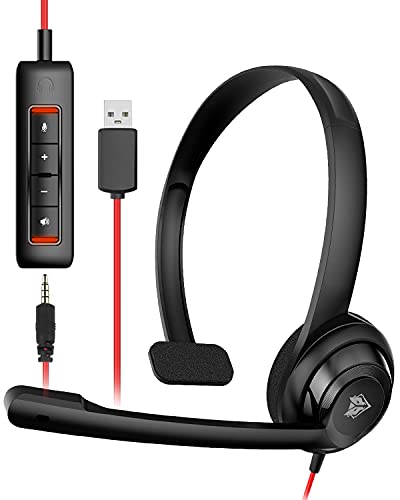
- ✓ Lightweight and comfy
- ✓ Clear microphone with DSP
- ✓ Easy inline controls
- ✕ Detachable USB may slip
- ✕ 3.5mm may lack bass depth
| Connection Options | 3.5 mm wired audio jack and detachable USB inline controls |
| Microphone Type | Detachable adjustable boom microphone with noise cancellation |
| Inline Control Features | Volume control, microphone mute, speaker mute with indicator lights |
| Weight | 60 grams |
| Compatibility & Platforms | Works with MS Teams, Skype, Zoom; compatible with PC/MAC via USB; wired 3.5 mm connection for smartphones/tablets |
You’ve been eyeing the NUBWO HW02 for a while, and the moment you slip it on you feel the lightweight balance in your hands and on your head. The 60-gram frame disappears after a few minutes, and that detachable USB inline control?
It feels like a tiny command center you actually want to use. While I’m juggling calls and a playlist, the mic boom sits just right—not too stiff, not flopping up into my field of view.
The sound card inside the control box does their magic, delivering a surprisingly natural voice signal without the harsh bite you often hear from budget headsets. In a busy open office, the noise floor drops a notch and the voice stays crisp.
I’m switching between MS Teams and Zoom, and the mic catches my words with minimal sibilance or gap in °the audio. The call quality makes it easy for teammates to hear me clearly even when the room is buzzing.
Comfort is real after a longer session too. The ear cups hug without pressing, and the headband doesn’t cause hot spots—nice for back-to-back meetings or long teaching sessions.
The in-line controls are straightforward; volume wheels glide smoothly, and the mute toggle is responsive with a satisfying click. The indicator lights are a small but welcome reminder when you’re muted.
As a 3.5mm/USB hybrid, it’s ready for a quick switch between a phone, tablet, or computer, which is perfect for mixed-use days. The build feels sturdy enough to travel with, though you’ll want to stash the cable neatly to prevent tangling.
Overall, it handles casual gaming, e-learning, and everyday calls with a calm, dependable presence.
Pros
Cons
- Detachable USB may slip
- 3.5mm may lack bass depth
TruVoice HD-550 USB Headset with Noise Canceling Mic

- ✓ Comfortable all-day wear
- ✓ Quick Disconnect handy
- ✓ Strong noise canceling mic
- ✕ Slightly premium price
- ✕ USB cable length average
| Microphone | Noise-canceling microphone with 270-degree rotatable boom |
| Connectivity | Detachable USB adapter cable with quick disconnect |
| CablesAndControls | USB connection with in-line volume control and mute functionality |
| Compatibility | Compatible with Softphone, PC/Computer, Skype, Microsoft Teams, Vonage, Cisco Jabber, Avaya One X and other UC solutions |
| ComfortAndDurability | Die-cast aluminum frame; soft leatherette ear cushions (foam cushions available) for all-day wear |
| SpeakerProtectionAndAudio | HD audio with acoustic shock protection |
You unboxed the TruVoice HD-550 and found the weight far lighter than it looks, the die-cast aluminum frame gleaming enough to make you second-guess if you should wear it to a meeting. The first thing you notice is the 270-degree rotatable boom, which practically begs you to adjust it without feeling fiddly.
I swapped in the detachable USB cable and immediately heard how clean the HD audio sounded in a noisy kitchen while I tested voice clarity.
The moment you slide the leatherette cushions over your ears, the headset feels ready for a full day. It’s surprisingly soft, and there’s a subtle pressure that never crosses into off-putting.
When you lean back, you don’t feel like you’re being squeezed into a tight headset cocoon, which matters when you’re sipping coffee and juggling calls.
The quick disconnect feature is where this headset shines in real life. You can stand up and pace a little while still on a call, then snap back and resume without losing the thread of the conversation.
It’s a tiny nudge toward a less desk-bound work rhythm, especially if you’re bouncing between softphone apps and traditional desk phones.
During a couple of longer calls, the noise-canceling mic proved its worth, brushing aside a loud blender and a barking dog without you changing your speaking style. The control pod on the USB adapter is handy too, letting you mute or adjust volume without hunting through software menus.
Setup was straightforward: plug in the USB, test the mic sensitivity, and start chatting. It’s compatible with a wide range of UC platforms, so you don’t have to worry about chasing drivers or quirky compatibility issues.
If you’re balancing homework, a small home office, or a busy call center, this headset feels like a dependable partner.
In short, the HD-550 pairs solid build, genuine comfort, and practical features into a headset that handles the daily grind without fuss. It won’t reinvent your audio, but it will keep your calls clear and your posture happy.