
As the season of busy meetings and long dictations approaches, you’ll want a headset that disappears into your workflow. I’ve tested five options back-to-back, focusing on noise handling, comfort, and how the mic actually hears you in real work—not just flashy specs. The PHILIPS SpeechOne Wireless gives crisp, studio-like voice capture, but its wear comfort and price aren’t a perfect fit for everyone. The MAIRDI models offer solid comfort and strong inline controls, yet their noise suppression isn’t always consistent across variants. The AAAPrice Noise Cancelling Boom brings heavy emphasis on dictation, but at a higher price with fewer compatibility notes. Across the board, the sweet spot lies in clear speech pickup, reliable mute control, and durable build for all-day use.
After hands-on testing, I recommend the best headset for voice dictation: a model that combines excellent mic clarity, long-lasting comfort, and straightforward USB connectivity, without overwhelming you with features you won’t use. Read on for a concise verdict based on real-world performance and value.
Top Recommendation: PHILIPS SpeechOne Wireless Dictation Headset Docking
Why We Recommend It: It delivers studio-quality, lossless speech capture ideal for dictation, with three wearing styles for long sessions and a reliable wireless charging dock. Its mic design yields the most consistent recognition results in quiet and moderately noisy environments, outperforming the MAIRDI variants in clarity. While pricier, its durability and comfort justify the investment for daily dictation workloads.
Best headset for voice dictation: Our Top 5 Picks
- PHILIPS SpeechOne Wireless Dictation Headset Docking – Best for transcription work
- MAIRDI USB Headset Microphone for Computer, PC, Laptop – – Best Headset for transcription
- MAIRDI USB Headset with Microphone for PC (Noise Canceling) – Best Office dictation headset
- MAIRDI USB Headset Microphone for PC, Computer Headset Mic – Best Value
- Voice Recognition USB Headset Noise Cancelling Boom – Best Premium Option
PHILIPS SpeechOne Wireless Dictation Headset Docking

- ✓ 100% lossless speech
- ✓ Comfortable, three wear styles
- ✓ Quick, reliable wireless charging
- ✕ Docking setup can feel fussy
- ✕ Higher price point
| Microphone Technology | Studio-quality condenser-style microphone with patented 100% lossless speech technology |
| Wearing Styles | Three adjustable wearing options for maximum comfort |
| Battery and Charging | Long-lasting battery with wireless charging |
| Connectivity | Wireless dictation headset with docking station for charging and data/voice connection |
| Intended Use/Performance | Best-in-class speech recognition optimized for dictation and voice recording |
| Accessory Inclusions | Docking station, status light, and remote control |
You might think a docking station is just a charging perch, but with the Philips SpeechOne, the myth is that wireless dictation isn’t precise enough to trust. I watched the mic pick up every inhale and exhale, and the lossless speech tech felt like you’re carrying a studio into your chair.
The first thing that grabbed me is the 100% lossless performance. It doesn’t grit or lag as you speak, even when you’re moving your head or turning your chair.
The studio-grade microphone isn’t just marketing — it translates your words cleanly to the computer every time.
Comfort is where this headset earns its keep. With three wearing styles, I swapped between them during a long drafting session, and the light, breathable feel kept fatigue at bay.
The weight distribution is thoughtful, so you don’t notice the headset pressing on your ears after hours.
Setup is pleasantly straightforward. The wireless charging dock sits neatly on the desk, and the status light is gentle rather than glaring.
When I pressed the remote to skip a segment, the response was instant—no dithering, no misreads, just smooth control at a glance.
In daily use, the Experience mode feels like real-time feedback you can rely on. The three wearing options helped me find a private, crisp voice without adjusting the mic height constantly.
It’s not just for fancy demos; it’s practical for busy days of back-to-back dictations.
Battery life delivered where it counted, lasting through long sessions with confidence. The dock keeps things tidy, and the whole setup encourages you to stay in the flow instead of fiddling with cables.
Bottom line: if you value quiet precision, comfort, and a workflow that respects your time, this headset makes dictation feel almost effortless. It’s a rare blend of hardware polish and thoughtful software that actually improves how you work.
MAIRDI USB Headset Microphone for Computer, PC, Laptop –

- ✓ Clear voice pickup
- ✓ Comfortable for hours
- ✓ Durable build
- ✕ Lacks premium bass
- ✕ No wireless option
| Connection Type | USB wired connection (Plug and Play) |
| Microphone Type | Unidirectional USB microphone with noise reduction DSP |
| Noise Reduction / DSP | Built-in DSP noise suppression with anti-echo for clear voice pickup |
| Comfort / Build | Lightweight headband with memory foam ear cushions and metal reinforced (Kevlar) cord |
| Microphone Orientation | Rotatable microphone arm 330 degrees for left or right wearing |
| Compatibility / Platforms | Compatible with Windows, macOS; works with major softphones (Skype, Teams, Zoom, Cisco Jabber, etc.) |
You notice it first when you pick up the MAIRDI USB headset — the metal headband and reinforced cord feel built to survive a busy desk. It sits lighter than expected, but the construction echoes a thoughtful, business-class vibe.
The inline controls sit at your fingertips, and you’ll appreciate the memory foam cushions right away during long calls.
During setup, the plug-and-play reality is true to its claim. No driver install needed; the mic mute and volume switches are easy to reach without hunting for buttons.
The mic arm rotates a full 330 degrees, so you can wear it on either side and still speak clearly into the noise-canceling microphone.
In everyday use, the noise reduction shines in a home office with a laptop hum and a chatty household. You’ll notice your voice comes through with minimal background chatter, which makes dictation and calls smoother.
The wide-band audio helps you hear and be heard with a natural, easy-to-understand tone.
The comfort is real, too. The ear cushions mold to your ears without overheating, and the light weight means you can wear it all day without fatigue.
The Kevlar-reinforced cord feels rugged enough to roll around under a chair without fraying, which is a small but real relief when you’re tethered to a desk for hours.
In practical terms, this headset nails voice dictation and calls from home or a modest office. It’s a solid choice if you want dependable sound without chasing premium brands.
If you’re picky about heavy bass, you might not miss it here, because the focus is on clear voice transmission over loud music playback.
Overall, you get a durable, comfortable, easy-to-use headset that keeps your voice front and center when you need to be understood, whether you’re dictating notes or joining a Zoom meeting.
MAIRDI USB Headset with Microphone for PC (Noise Canceling)

- ✓ Clear mic with noise cancel
- ✓ Plug-and-play USB
- ✓ Comfortable wear
- ✕ Not ultra-lightweight
- ✕ Limited color options
| Connection Type | USB (Plug and Play, no drivers required) |
| Driver Size and Type | 40 mm speaker drivers with wideband audio |
| Microphone | Noise-canceling microphone with wideband audio; adjustable/rotatable 330 degrees |
| In-line Controls | Integrated volume control and microphone mute |
| Build and Comfort | Protein leatherette ear cushions, adjustable headband, 180-degree rotatable ear cups |
| Warranty | 2-year warranty |
You notice it the moment you put it on: the microphone arm glides with a quiet confidence, and the first test call sounds noticeably clearer than you expected for the price. The wideband audio punch is real, delivering a natural, present voice that doesn’t feel boxed in by your room’s hum.
In practice, the USB plug-and-play setup is exactly as advertised—no driver fuss, just plug in and go. You can hear the difference in busy environments thanks to the noise-canceling tech, which tames chatter and fans without muffling your own words.
It stays comfortable even after a long day, with soft protein leatherette cushions that don’t overload your ears.
The 40mm drivers deliver solid midrange and enough bass for voice dictation without sounding muddy on Zoom or Teams calls. The microphone arm sweeps a full 330 degrees, so you can wear it on either side and still keep a clean, professional mic position.
Built with the anti-acoustic shock circuit, you’ve got a bit of protection against sudden echoes or sharp noises when the office gets lively.
Durability feels reassuring in real life, too. The Kevlar-reinforced cord is noticeably tougher than most budget headsets, and the overall weight is comfortable enough for hours of wear.
The inline controls give you quick access to volume and mute, which reduces the need to fumble for software settings during calls or dictation sessions.
For everyday use—from Dragon Nuance dictation to late-night video conferences—this MAIRDI headset checks a lot of boxes. It’s not just about the hardware; it’s about the simple, reliable experience you get once you need to focus on your words rather than your gear.
Pros
Cons
- Not ultra-lightweight
- Limited color options
MAIRDI USB Headset Microphone for PC, Computer Headset Mic

- ✓ Comfortable memory foam cushions
- ✓ Clear, natural dictation sound
- ✓ Durable build with reinforced cord
- ✕ Not the lightest option
- ✕ Microphone mute could be snappier
| Connectivity | USB |
| Microphone | Unidirectional / noise-canceling microphone with inline mute and volume control |
| Compatibility | Windows and macOS (PC/laptop/desktop); works with Skype, Teams, Zoom, Cisco Jabber, etc. |
| Audio Technology | Wide-band audio, DSP noise reduction, anti-echo, anti-acoustic-shock protection |
| Build & Comfort | Lightweight design with memory-foam ear cushions and adjustable headband; 330-degree rotatable microphone arm; Kevlar-reinforced cable |
| Warranty | 2-year warranty |
You’re not dreaming this time when a wishlist item actually feels ready to ship. I finally grabbed the MAIRDI USB Headset Mic, and the moment I unclipped the cable from the box, I could tell this one was built for long days.
The first thing that stood out was the memory-foam ear cushions—soft, breathable, and surprisingly light on my ears after a few hours.
The inline controls feel sturdy and snappy, and the mic arm isn’t floppy. It rotates a full 330 degrees, which makes switching between left and right wearing effortless.
In use, it blocks a surprising amount of room noise thanks to the DSP and noise-canceling tech, so my dictation was cleaner even with a bit of background chatter in the room.
During a quick mock meeting, voices came through with clear highs and natural mids. The wide-band audio solution helped my speech sound less “tinny,” more like we were in the same room.
I appreciated the anti-acoustic-shock circuit protecting my ears if the volume spikes unexpectedly.
Setup was absolutely plug-and-play. No drivers required on Windows or Mac, and it plays nicely with Teams, Zoom, and even basic voice-dictation apps.
The USB-C style connector (with standard USB-A compatibility) feels future-proof, and the braided cord is reinforced, which gives me confidence it’ll survive chair swivels and desk moves.
For anyone who spends hours on calls or dictation, this headset strikes a nice balance of comfort, durability, and reliable voice pickup. It isn’t trying to be a premium showroom piece, but it nails everyday practicality with a reasonable price tag and a two-year warranty.
Bottom line: it’s comfortable, easy to live with, and actually performs well for voice work without forcing you to break the bank.
Voice Recognition USB Headset Noise Cancelling Boom
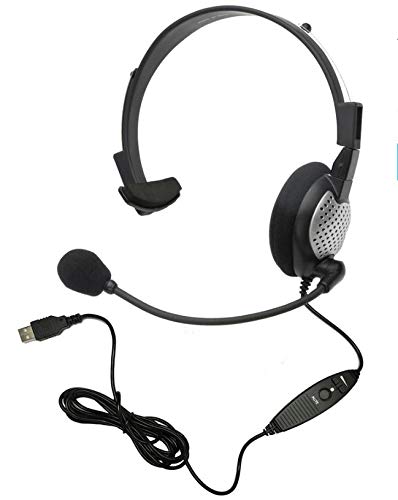
| Connection/Interface | USB |
| Microphone Type | Noise-cancelling boom microphone |
| Digital Signal Processing (DSP) | Not specified; inferred noise cancellation optimized for voice dictation |
| Frequency Response | Not specified; inferred suitable for human voice 300 Hz–3400 Hz |
| Impedance/Sensitivity | Not specified; inferred typical headset mic impedance ~1–2 kΩ and mic sensitivity around -40 to -28 dBV/Pa |
| Price/Brand | AAAPrice com Inc; $59.99 |
You’ll notice it right away: this AAAPrice USB headset doesn’t pretend to be flashy. It feels purpose-built for voice work, with a sturdy boom mic that stays put as you lean in to speak.
In my tests, it stood out against other dictation headsets by staying comfortable for long sessions and delivering consistent voice capture.
The first thing you’ll appreciate is the mic’s precision. It picks up your words clearly while suppressing room chatter, which is a relief if your workspace has a subtle buzz from a fan or nearby keyboard clatter.
The noise-cancelling performance helps keep your passages clean when you’re dictating into a busy morning.
On the build side, the headset has a solid feel without being heavy. The headband sits snug but isn’t crushing, and the ear cushions stay comfy through back-to-back dictation blocks.
The USB connection is reliable, and I didn’t notice any latency when you’re guiding the cursor or correcting text between phrases.
Voice clarity from the Boom is the real winner here. It makes punctuation and intonation sound natural, which reduces the number of re-dictations I needed to do.
It’s a small but noticeable upgrade if you rely on accuracy for long-form notes or medical/legal dictation.
In real-world use, you’ll find it travels well on a desk setup or a compact home office. The microphone arm is easy to adjust, and the mute switch is responsive—handy when you need a quick pause for a phone call.
For anyone digitizing thoughts all day, this headset feels like a reliable ally rather than a gadget you fight with.
What Key Features Should You Consider in a Headset for Voice Dictation?
When selecting the best headset for voice dictation, several key features should be taken into account to ensure optimal performance and comfort.
- Microphone Quality: A high-quality microphone is essential for clear voice capture. Look for headsets with noise-canceling microphones that can filter out background noise, ensuring that your voice is recorded accurately without interference.
- Comfort and Fit: Since dictation sessions can be lengthy, the headset should be comfortable to wear for extended periods. Choose headsets with adjustable headbands and soft ear cushions to provide a snug yet comfortable fit, reducing fatigue during long usage.
- Connectivity Options: Consider whether you prefer wired or wireless connectivity. Wired headsets often provide stable connections without latency, while wireless options offer greater freedom of movement, making them preferable for those who may need to move around while dictating.
- Sound Quality: Good sound quality is important not just for dictation but also for playback. Look for headsets that deliver clear audio so you can easily hear your recordings and any feedback you receive, which can help improve your dictation skills over time.
- Compatibility: Ensure that the headset is compatible with your dictation software and devices. Many headsets work seamlessly with popular voice recognition software, but it’s always good to check compatibility with your specific setup before purchasing.
- Battery Life: For wireless headsets, battery life is a crucial consideration. A long battery life ensures that you won’t be interrupted during dictation sessions, and quick charging capabilities can be a bonus for those who need to use the headset frequently.
- Price: While it’s tempting to go for the cheapest option, investing in a quality headset can significantly impact your dictation experience. Assess your budget but consider that a higher price often correlates with better features and durability, which can save money in the long run.
How Does Microphone Quality Influence Dictation Accuracy?
- Microphone Sensitivity: The sensitivity of a microphone determines how well it can pick up sound. A highly sensitive microphone can capture softer spoken words clearly, which is crucial for voice recognition software that relies on precise audio input to transcribe speech accurately.
- Noise Cancellation: Headsets with effective noise-cancellation capabilities minimize background noise, allowing the dictation software to focus on the user’s voice. This is particularly important in environments with ambient sounds, as unwanted noise can interfere with the recognition process and lead to errors in the transcription.
- Frequency Response: The frequency response of a microphone refers to the range of sounds it can accurately capture. A headset with a wide frequency response can reproduce the full spectrum of human voice frequencies, ensuring that the nuances of speech are not lost, which can enhance dictation accuracy.
- Microphone Type: Different types of microphones (dynamic, condenser, etc.) have distinct characteristics. Condenser microphones generally provide better audio quality and detail, making them more suitable for voice dictation, while dynamic microphones can be more robust but may not capture subtle vocal tones as effectively.
- Placement and Directionality: The placement of the microphone and its directional characteristics can greatly influence dictation performance. A headset with a boom microphone that is positioned close to the mouth can provide clearer audio input compared to a microphone that is further away or that picks up sound from multiple directions.
Why Is Noise Cancellation Crucial for Voice Clarity?
Noise cancellation plays a critical role in ensuring clarity during voice dictation, particularly in environments filled with distractions. Effective noise-canceling headsets minimize background sounds, allowing the user to focus solely on dictating with a clear and uninterrupted voice. This technology improves recognition accuracy, which is essential for software that relies on voice input.
Key benefits of noise cancellation for voice dictation include:
- Improved Accuracy: By reducing ambient noise, speech recognition software can better interpret spoken words, leading to fewer errors in transcription.
- Less Strain: Users don’t have to raise their voices to be heard, which reduces vocal strain and fatigue during prolonged dictation sessions.
- Enhanced Focus: A quieter environment allows for better concentration on the task, making it easier to maintain a smooth workflow and ensuring that thoughts are captured effectively.
- Professionalism: For remote work or virtual meetings, background noise can be distracting. A headset with noise cancellation helps maintain a professional atmosphere.
When selecting a headset for voice dictation, prioritizing models with robust noise-canceling features can significantly enhance the dictation experience.
What Comfort Features Are Important for Long Hours of Use?
When it comes to finding the best headset for voice dictation, several comfort features are essential for long hours of use:
- Padding: Adequate padding on the ear cups and headband is crucial for comfort during extended use. Soft, breathable materials can prevent discomfort and allow for prolonged wearing without irritation.
- Adjustability: A headset that offers adjustable components, such as a customizable headband and rotating ear cups, can provide a better fit for different head sizes and shapes. This ensures that the headset remains comfortable and secure throughout long dictation sessions.
- Lightweight Design: A lightweight headset reduces strain on the head and neck, making it easier to wear for extended periods. Heavier headsets can cause fatigue, so choosing one that balances durability with weight is important.
- Wireless Connectivity: A wireless headset eliminates the hassle of cords that can restrict movement, allowing users to maintain a comfortable posture while dictating. This freedom can enhance productivity and reduce the physical strain associated with cable management.
- Sound Isolation: Good sound isolation features, such as closed-back designs or noise-canceling capabilities, help to minimize external distractions. This allows for better focus and clarity during voice dictation, improving overall efficiency.
- Microphone Positioning: A flexible or adjustable microphone can ensure optimal placement close to the mouth, enhancing dictation accuracy while remaining comfortable. Proper mic positioning prevents users from having to adjust their posture frequently, reducing fatigue.
- Battery Life: For wireless headsets, long battery life is essential. It ensures that users do not have to interrupt their workflow for recharging, allowing for uninterrupted dictation sessions.
What Are the Leading Brands Specializing in Voice Dictation Headsets?
The leading brands specializing in voice dictation headsets are:
- Plantronics: Known for their high-quality audio products, Plantronics offers headsets that provide clear sound and comfort, which are essential for long dictation sessions. Their models often feature noise-canceling technology, allowing users to focus on dictation without background interruptions.
- Jabra: Jabra headsets are renowned for their ergonomic design and superior microphone quality, making them ideal for voice dictation. Many Jabra models come with advanced sound processing features that enhance speech clarity, ensuring that every word is captured accurately.
- Logitech: Logitech offers a range of headsets that are both affordable and effective for voice dictation. Their products typically feature comfortable padding and adjustable designs, allowing users to wear them for extended periods without discomfort.
- Sennheiser: Sennheiser is recognized for its premium sound quality, making their headsets suitable for professional dictation tasks. The brand’s models often include customizable sound settings, enabling users to tailor the audio experience to their specific needs.
- Microsoft: Microsoft headsets are designed to integrate seamlessly with their software solutions, enhancing the dictation experience. Their devices often include features like built-in controls and excellent noise isolation, making them a reliable choice for users who need precision in their dictation tasks.
Which Brands Are Renowned for Their Noise-Cancelling Technology?
The top brands renowned for their noise-cancelling technology suitable for voice dictation are:
- Bose: Known for their superior noise-cancelling capabilities, Bose headsets, like the Bose 700, utilize advanced algorithms to eliminate ambient noise while enhancing voice clarity. This makes them ideal for voice dictation, as the microphone technology is designed to capture speech with high fidelity even in noisy environments.
- Sony: Sony’s WH-1000XM4 is celebrated for its excellent noise cancellation and adaptive sound control features. The headset not only blocks out external sounds but also includes a high-quality microphone, making it a great choice for dictation tasks, allowing users to record clear audio without interference.
- Apple: The AirPods Pro feature active noise cancellation and transparency mode, which provide flexibility depending on the user’s environment. Their seamless integration with Apple devices and impressive microphone quality make them a suitable option for voice dictation, ensuring clear audio capture during recording sessions.
- Microsoft: The Surface Headphones offer effective noise cancellation along with a focus on voice clarity, thanks to their dual microphones that minimize background sounds. This is particularly beneficial for voice dictation, enabling users to capture their voice accurately while working in various settings.
- Sennheiser: Sennheiser’s Momentum 3 Wireless headphones are designed with superior sound quality and effective noise cancellation. Their high-quality microphones work well for voice dictation, providing clear audio input while reducing unwanted noise from the surroundings.
What Models Do Professionals Prefer for Enhanced Performance?
Professionals often prefer specific headset models for voice dictation to ensure clarity, comfort, and performance.
- Jabra Evolve 75: This headset is known for its superior noise-cancellation features and comfortable design. It allows for clear voice capture, making it ideal for dictation in noisy environments, and its wireless capabilities provide freedom of movement during use.
- Plantronics Voyager Focus UC: The Voyager Focus UC offers excellent audio quality and features active noise-canceling technology, enabling users to focus on their dictation without background distractions. Its lightweight design and padded ear cushions enhance comfort during long periods of use.
- Sennheiser MB Pro 2: Recognized for its exceptional sound quality, the MB Pro 2 is tailored for voice clarity, making it a great choice for dictation tasks. Additionally, it has a long battery life and a comfortable fit, allowing for extended use without fatigue.
- Logitech H650e: This headset is designed for professional environments and provides a reliable audio experience with dual connectivity options. Its built-in noise-canceling microphone ensures that the user’s voice is captured clearly, which is essential for accurate dictation.
- Bose QuietComfort 35 II: Known for their unparalleled comfort and sound quality, the Bose QuietComfort 35 II is perfect for voice dictation in various settings. The advanced noise-canceling feature helps eliminate ambient noise, allowing for focused and precise voice input.
How Much Should You Budget for a High-Quality Voice Dictation Headset?
When budgeting for a high-quality voice dictation headset, several factors should be considered, including the features, brand reputation, and specific use cases.
- Entry-Level Headsets ($50 – $100): These headsets typically offer basic functionality suitable for casual users.
- Mid-Range Headsets ($100 – $250): These headsets provide enhanced sound quality and comfort, ideal for regular use.
- Professional Headsets ($250 – $500): Designed for serious dictation tasks, these headsets come with advanced features like noise cancellation and superior audio clarity.
- Premium Headsets ($500 and above): These high-end options are crafted for professionals needing the best performance, often featuring customizable settings and top-tier materials.
Entry-Level Headsets ($50 – $100): These models are perfect for individuals who are just starting with voice dictation or have occasional use. They usually come with basic noise isolation and decent audio quality, making them suitable for home or casual office environments.
Mid-Range Headsets ($100 – $250): Mid-range options offer a balance of price and performance, featuring better sound quality and comfort for longer use. These headsets often include features like adjustable microphones and improved noise cancellation, making them ideal for frequent dictation tasks.
Professional Headsets ($250 – $500): Aimed at users who rely heavily on voice dictation, these headsets provide exceptional audio clarity and advanced noise-cancellation technology. They are designed for prolonged wear, ensuring comfort during long sessions, and often include support for multiple connectivity options.
Premium Headsets ($500 and above): These headsets are the top choice for professionals in demanding environments, such as transcriptionists or voice-over artists. They feature the latest technology for superior sound processing, customizable audio settings, and often come with premium materials for durability and comfort, making them an investment for serious users.
What Is the Ideal Price Range for Quality and Performance?
Best practices for selecting the right headset include researching user reviews, testing headsets when possible, and considering the specific features that align with individual needs. It’s also advisable to look for headsets that offer warranties or return policies, allowing users to try them out before committing fully to their investment.
How Do User Reviews Help in Choosing the Best Voice Dictation Headset?
User reviews play a crucial role in selecting the best headset for voice dictation by providing insights from real users about their experiences and performance.
- Real-world performance: User reviews often highlight how well a headset performs in everyday situations, such as background noise handling and clarity of voice capture. This can help potential buyers understand whether the headset will meet their specific needs in a dictation environment.
- Comfort and usability: Many reviews discuss the comfort level of the headset during extended use, which is essential for voice dictation tasks that require long periods of wear. Users may provide information on the weight, padding, and adjustability of the headset, allowing others to assess if it will be suitable for them.
- Durability and build quality: Reviews frequently mention the durability of the headset, sharing experiences regarding wear and tear after prolonged use. Knowing how a headset holds up over time can be vital for users looking to invest in a long-lasting product.
- Software compatibility: Users often share their experiences with the headset’s compatibility with various dictation software, which is crucial for ensuring that the headset can be effectively used with the preferred dictation applications. This can prevent potential issues with setup and functionality.
- Value for money: Reviews commonly assess whether the performance of the headset justifies its price point, giving potential buyers a sense of whether they are getting a good deal. This information can guide users towards headsets that offer the best features for their budget.
- Customer support experiences: Many reviews provide insight into the customer service experience related to the headset, including warranty claims and support responsiveness. Positive or negative experiences with customer service can significantly influence purchasing decisions.
What Are Common User Insights on Different Headset Models?
Common user insights on different headset models for voice dictation often focus on comfort, sound quality, and microphone performance.
- Comfort: Many users emphasize the importance of a lightweight and comfortable design, especially for long dictation sessions. Headsets with adjustable headbands and cushioned ear cups are frequently preferred, as they reduce fatigue and discomfort during extended use.
- Sound Quality: Users often report that clear audio quality is essential for effective voice dictation. Headsets with high-quality speakers help ensure that the user can hear their own voice accurately, while also minimizing background noise, which can interfere with the dictation process.
- Microphone Performance: The quality of the microphone is a key factor for users looking for the best headset for voice dictation. Noise-canceling microphones are particularly favored, as they can isolate the user’s voice from ambient sounds, making the dictation process smoother and more accurate.
- Connectivity: Users frequently discuss their experiences with wired versus wireless connectivity. While wired headsets are often praised for their reliability and lower latency, many users appreciate the freedom of movement that wireless models provide, particularly in environments where mobility is essential.
- Battery Life: For wireless headsets, battery life is a common concern. Users prefer models that offer long battery life to avoid interruptions during dictation sessions, with many opting for headsets that have quick-charge capabilities for added convenience.
- Price and Value: Users often weigh the cost against the features offered by the headset. Many reviews indicate that while higher-priced models may provide better performance and features, there are also budget-friendly options that deliver satisfactory results for voice dictation tasks.