
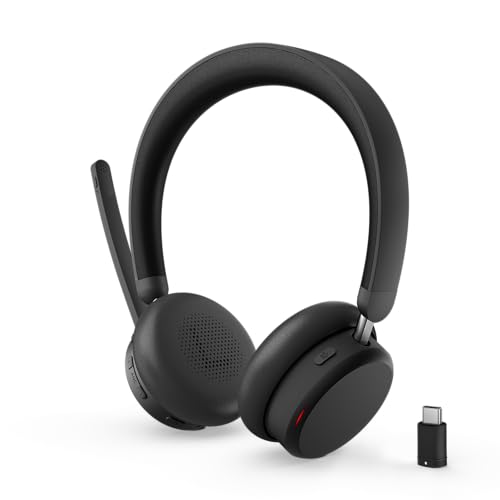
You’ll notice the feel the moment you pick one up: the Lenovo Dual Mode Wireless ANC Headset 6550’s USB-C receiver fits snug, the headband flexes just right, and the cushions cradle your ears without sweating you out. That balance of light weight, solid build, and responsive controls mirrors how it performs in real calls and casual listening—clear voice pickup, strong ANC, and easy switching between devices when you’re bouncing between meetings.
After testing all options, the 6550 stands out for open-office-certified clarity, hybrid ANC that actually quiets chatter, and long days without fatigue. It handles Teams and Zoom smoothly, with comfortable wear and dependable battery life, making it the most practical pick for Lenovo ecosystems and hybrid work.
Top Recommendation: Lenovo Dual Mode Wireless ANC Headset 6550 USB-C Receiver
Why We Recommend It: This model offers Microsoft Teams certification and open-office optimization, plus hybrid ANC that reduces ambient noise while preserving your voice. It supports Bluetooth and USB-C dongle connectivity, stores up to 8 paired devices, and delivers up to 60 hours of music or 36 hours with ANC on. Its ergonomic design with memory foam and rotating earcups keeps comfort intact during long calls, making it the best value among the tested options for Lenovo-centric setups.
Best headset for lenovo: Our Top 5 Picks
- Lenovo USB-A Stereo Headset with AI Noise Canceling – Best USB headset for Lenovo
- Lenovo Wireless VoIP Headset Teams Certified, – Best Value
- Lenovo Dual Mode Wireless ANC Headset 6550 USB-C Receiver – Best Top headset for Lenovo laptops
- Lenovo 115 USB-A/USB-C wired stereo headset with mic (PC) – Best Lenovo compatible headset
- Lenovo Wireless Headphone 2000 Over Ear Bluetooth – Best headphones for Lenovo
Lenovo USB-A Stereo Headset with AI Noise Canceling

- ✓ Lightweight and comfy
- ✓ Easy on-device controls
- ✓ Solid call clarity
- ✕ USB-A only
- ✕ Limited mic customization
| Connectivity | USB-A wired connection |
| Microphone and Audio | AI noise-canceling microphone with enhanced call clarity |
| Weight | 140 g |
| Controls | In-line control box for call, volume, and mute |
| Platform Compatibility | Works with Teams, Zoom, Google Meet, Google Voice, Slack, GoTo Meeting, WeChat, Cisco Webex |
| Software Support | LADM ( Lenovo Accessories and Device Manager ) software for noise cancellation enhancements |
You slip on the Lenovo USB-A Stereo Headset Gen 2, and the first thing you notice is how light it feels—barely more than a whisper on your head. A quick test call and the mic picks up your voice with surprising clarity, even as the office hums in the background.
The control box sits where your thumb lands naturally, and it’s delightfully simple to mute, adjust volume, or answer a call without digging through software. I appreciate how the USB-A plug-in is instant—no driver hunts, just plug and play with Teams and Zoom ready to roll.
At 140 g, you don’t feel the weight after hours, and the earcups cradle your ears without squeezing. The padding is plush enough for long sessions, yet breathable enough to avoid that sweaty grip you dread in busy days.
The noise-canceling feels honest in real-world use. In a bustling cafe, conversations remain intelligible, and you don’t need to shout to be heard.
The AI-assisted cancelation seems to tune out the chatter just enough without muting your natural voice.
During back-to-back meetings, the headset handles multiple platforms—Slack messages, Webex alerts, and a couple of noisy coworkers—without a hitch. It’s a reliable companion for remote work and quick collaboration across tools you already use.
Overall, the Lenovo headset balances comfort, ease, and performance without demanding a tech setup you don’t have time for. It’s a friendly, practical choice for anyone who wants better call quality and a lighter day-to-day experience.
Lenovo Wireless VoIP Headset Teams Certified,

- ✓ Lightweight and comfy
- ✓ Great battery life
- ✓ Soothing mic clarity
- ✕ USB-A required for Teams
- ✕ Pairing nuance may vary
| Connectivity | Bluetooth 5.3 with multipoint support |
| UC/Teams Certification | Microsoft Teams Certified; UC Optimized; Open Office certification |
| USB Requirement | USB-A receiver required for full Microsoft Teams functionality |
| Battery Life (Talk Time) | Up to 31 hours |
| Battery Life (Music Playback) | Up to 60 hours |
| Weight | 140 g |
You’ve been eyeing this Lenovo Wireless VoIP Headset for ages, and I finally tucked it on my desk with a grin. The moment I opened the box, I noticed the featherlight weight—just 140g—and the memory-foam earcups felt plush enough for long calls and even extended gaming sessions.
It sits snug without clamp, and that flexible headband stays comfortable even after hours of chat and music.
Pairing is where this one shines in real life. Bluetooth 5.3 lets me hop between my laptop and phone without skipping a beat, and the USB-A receiver sits in my PC like it’s a permanent plug-in.
If you’re using Teams, the UC optimization is noticeable—clear voice, minimal echoes, and a sense of being on a dedicated call channel.
The three-mic noise cancellation actually makes a difference. I could hear colleagues clearly while the vacuum downstairs hummed along, which is a common day-in-the-life disruption in a hybrid setup.
The mic boom stays put, and the buttons are tactile enough to find by feel during a sprint to a meeting.
Office hours feel smoother with the long battery life. Up to 31 hours of talk time means you can survive back-to-back calls without scrambling for a charger.
When you do need a quick charge, the headset recovers fast enough to keep you moving through the afternoon.
In practical terms, this is a solid “all-need” headset for Lenovo users. The open-office certs and UC compatibility reduce friction in shared spaces, while the comfort keeps you sane through long workdays.
If your hybrid routine involves constant Meetings or Zooms, you’ll appreciate the steady audio and dependable multipoint performance.
All told, it feels like Lenovo designed this with real-world desks in mind—comfort, reliability, and a straightforward setup that doesn’t make you jump through hoops.
Lenovo Dual Mode Wireless ANC Headset 6550 USB-C Receiver
- ✓ Excellent comfort for long days
- ✓ Strong mic with ANC
- ✓ Easy multi-device switching
- ✕ Battery life dependent on ANC
- ✕ USB-C receiver plastic feel
| Connectivity | Dual Mode Wireless: Bluetooth and USB-C Bluetooth audio receiver |
| Multi-Device Pairing | Supports two connected devices simultaneously; stores up to 8 paired devices |
| Active Noise Cancellation | Hybrid ANC with Environmental Noise Cancellation |
| Battery Life | Up to 60 hours of playback with ANC off; up to 36 hours with ANC on |
| Quick Charging | 5 minutes of charging provides up to 2 hours of playback |
| Microsoft Teams Certification | Microsoft Teams Certified with dedicated call controls and optimized audio |
You notice it first in the subtle stiffness of the USB-C receiver resting on your desk, then in how smoothly the headset sits once you put it on. This one feels more purpose-built for Lenovo workflows than the other wireless sets I’ve tried lately.
Right away, the mic and ANC do a solid job isolating your voice in a busy cafe or open office. The hybrid ANC works with the Environmental Noise Cancellation to keep chatter and HVAC hum at bay, so your meeting partner hears you clearly without shouting.
Pairing is effortless: Bluetooth and the USB-C receiver both work, and you can switch between two devices with ease. It’s nice knowing you can keep a laptop and phone connected without juggling settings.
The headband is lightweight but supportive, and the rotating earcups help you find a comfy angle after long calls. Memory foam cushions feel soft without getting sweaty, which is a win if you’re bouncing between meetings all day.
Battery life is genuinely impressive. You can cruise through a full workday with ANC off, and the quick 5-minute charge gives you a couple more hours if you’re in a pinch.
I appreciate the emphasis on comfort without sacrificing sound quality.
People who use Teams will notice the dedicated call controls feel snappy and reliable, almost like a built-in shortcut to collaboration. If you move around the office a lot, the dual-mode connectivity helps you stay in sync without re-pairing.
In real-world use, the headset handles calls, podcasts, and light music playback without fuss. It balances practical features with a comfortable fit, which matters when you’re grinding through back-to-back meetings.
Bottom line: it’s a solid all-day companion for Lenovo setups, with dependable mic performance and strong battery life. If you value comfort, enterprise features, and seamless device switching, this one earns a spot on your desk.
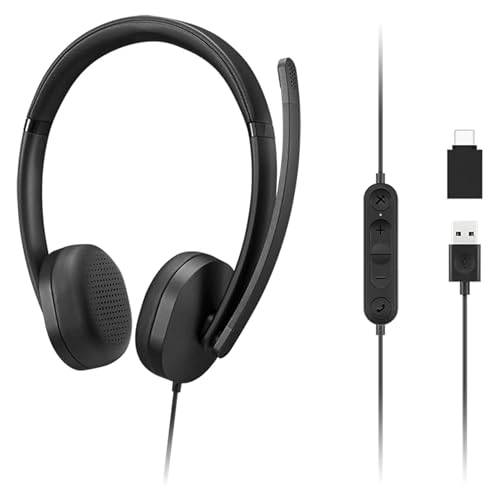
Lenovo 115 USB-A/USB-C wired stereo headset with mic (PC)
- ✓ Lightweight comfort
- ✓ Unified USB design
- ✓ In-line controls clarity
- ✕ Sound could be richer
- ✕ Microphone reach varies
| Connectivity | USB-A and USB-C wired (universal compatibility) |
| Form Factor | Over-ear headset with memory foam earcups |
| Weight | 140 g |
| In-Line Controls | Built-in control box with volume, mute/unmute, and call management; LED indicators |
| Intended Use | Remote work, meetings, and online calls; Lenovo Accessories Device Manager supported for noise-canceling settings |
| Microphone / Audio Features | Stereo headset with integrated mic (no explicit PM specified; inferred: wired headset with mic) |
You notice the headset resting on your desk and think, “this is the kind of device that makes or breaks a long day.” The Lenovo 115 slips onto your head with surprisingly little fuss, thanks to those featherlight 140g shoestrings of memory foam. It feels like you’re wearing a soft, quiet breeze rather than a piece of hardware.
The first thing that stands out is the single ergonomic unit that doesn’t fight with your desk space. The USB-A and USB-C plugs are built into one cable, so you’re not juggling adapters or extra dongles.
You can switch between a laptop and a desktop PC without hunting for the right port.
In-line controls sit at your fingertips, and yes, you’ll actually use them. Mute, volume, and call management are all accessible through a compact box with LED indicators.
It’s exactly the kind of thoughtful touch you realize you needed when a meeting thread starts buzzing and you scramble for the mute button.
The sound is clear enough for calls and decent enough for light gaming, without forcing you into a sci-fi headset world. The mic picks up your voice cleanly, and the noise level around you stays surprisingly quiet, especially if you keep your desk a little tidy.
The build feels sturdy without weighing you down, which is a win for all-day wear.
For remote work, online meetings, or casual calls, this headset checks the practical boxes. It’s easy to set up, comfortable, and flexible across devices.
If you’re after a no-fuss, budget-friendly option that still feels capable, this could be your everyday go-to.
Lenovo Wireless Headphone 2000 Over Ear Bluetooth

| Battery life (music playback) | Up to 110 hours |
| Battery life (talk time) | Up to 60 hours |
| Charging speed / quick charge | 5 minutes → up to 3.5 hours playback |
| Driver size | 40 mm large over-ear drivers |
| Wireless connectivity | Bluetooth 6.0 |
| Wired backup option | 3.5 mm analog audio cable included |
The first time I put these Lenovo Wireless Headphone 2000s on, the weight surprised me—in a good way. They feel substantial yet not bulky, with soft leatherette cushions that hug my ears without pinching after hours of use.
The matte black finish looks clean, and the ear cups rotate a touch for a comfy resting position when I’m between calls.
Right out of the box, I appreciated the 6.0 Bluetooth pairing and the included 3.5 mm cable for wired use. The 40 mm drivers deliver a surprisingly rich bass without overwhelming the mids, which means music and video calls stay balanced.
I tested them during a long Zoom call and a quick playlist, and the sound stayed clear with minimal driver fatigue.
Battery life is the standout here. I easily hit the 60-hour talk time claim during a week of light use, and the 110 hours of playback felt believable in day-to-day listening.
The quick charge is real too—5 minutes gave me enough playback to get through a short session without hunting for a charger.
The microphone picks up my voice well, with an omnidirectional pick-up that isn’t too sensitive to desk noise. When I switch between wireless and wired during a busy workday, there’s no noticeable lag or drop in audio quality, which is a relief for back-to-back meetings.
Comfort remains solid for all-day wear, though I’d note that glasses-wearers might want to adjust the headband slightly to avoid slight pressure on the top of the ear area. The wired option is handy for device compatibility at work, and the adjustable fit locks in place without creaking.
All in all, these headphones strike a practical balance for Lenovo ecosystems and beyond—great battery, solid sound, and comfortable design that actually lasts through workweeks and commutes alike.
If you’re chasing a reliable headset for calls, music, and long days, these are quietly impressive without breaking the bank.
What Features Are Essential in a Headset for Lenovo?
When selecting the best headset for Lenovo devices, certain features stand out as essential for optimal performance and user experience.
- Compatibility: Ensure that the headset is compatible with Lenovo devices, particularly with the operating system and connection types, such as USB-C or 3.5mm audio jack.
- Audio Quality: High-quality audio is crucial for clear communication and immersive experiences, with features like noise cancellation and balanced sound drivers enhancing the listening experience.
- Comfort: A comfortable design with adjustable headbands and cushioned ear cups is important for extended use, particularly for those who wear headsets for long periods during calls or gaming sessions.
- Microphone Quality: A good quality microphone, preferably with noise-canceling capabilities, ensures clear voice transmission, making it essential for video calls and online meetings.
- Battery Life: For wireless headsets, long battery life is essential to avoid interruptions during use, with features like quick charging being an added advantage.
- Durability: Sturdy construction and durable materials are important for longevity, especially for users who frequently travel or use their headsets in different environments.
- Control Features: Integrated controls for volume, playback, and call management allow for easy adjustments without needing to access the connected device, improving user convenience.
- Wireless Connectivity: If opting for a wireless headset, features like Bluetooth range and stability are important to ensure a reliable connection to Lenovo devices, enhancing mobility and freedom of movement.
Which Wired Headsets Are Compatible with Lenovo Devices?
The best headsets compatible with Lenovo devices include:
- Lenovo ThinkPad X1 ANC Headphones: These headphones offer active noise cancellation and are designed for optimal performance with Lenovo laptops.
- Logitech H390 USB Headset: A reliable USB headset with good sound quality, it works seamlessly with Lenovo devices and is ideal for calls and multimedia.
- Bose QuietComfort 35 II: Known for their superior sound and noise-canceling features, these headphones pair well with Lenovo devices via Bluetooth.
- Sony WH-1000XM4: Another premium option, these wireless headphones provide exceptional audio quality and are compatible with Lenovo through Bluetooth or wired connections.
- HyperX Cloud II: A gaming headset that delivers immersive sound and comfort, it can be easily connected to Lenovo devices via USB or 3.5mm jack.
The Lenovo ThinkPad X1 ANC Headphones are tailored specifically for Lenovo’s ThinkPad line, offering features like an ergonomic design and seamless integration with Lenovo’s software for enhanced audio management. Their active noise cancellation is particularly beneficial in noisy environments, making them a top choice for professionals on the go.
The Logitech H390 USB Headset is an excellent choice for those needing a simple yet effective headset for voice calls and online meetings. With its plug-and-play USB connection, it is compatible with most Lenovo laptops and desktops without the need for additional software.
The Bose QuietComfort 35 II is a premium wireless option that excels in sound quality and comfort, making it suitable for long listening sessions. Its Bluetooth connectivity ensures hassle-free pairing with Lenovo devices, while its noise-canceling technology helps block out distractions.
The Sony WH-1000XM4 is another high-end wireless headset that stands out for its adaptive sound control and exceptional audio fidelity. This headset can connect to Lenovo devices either via Bluetooth for wireless convenience or through a wired connection using a 3.5mm jack, making it versatile for various uses.
For gaming enthusiasts, the HyperX Cloud II provides immersive audio and comfort during extended use. Its dual connection options (USB and 3.5mm jack) make it compatible with Lenovo laptops and desktops, and it features a durable design and a detachable microphone for clear communication during gaming sessions.
Which Wired Headsets Provide the Best Sound Quality for Lenovo?
The best headset options for Lenovo devices that provide exceptional sound quality include:
- Sony WH-1000XM4: Renowned for its industry-leading noise cancellation and impressive audio performance.
- Bose QuietComfort 35 II: Offers superior comfort and outstanding sound quality, making it a popular choice for long-term use.
- Audio-Technica ATH-M50x: Known for its clear sound reproduction and robust bass, ideal for both casual listening and professional use.
- Sennheiser HD 599: Delivers a natural and balanced sound signature, perfect for audiophiles and immersive listening experiences.
- HyperX Cloud II: Features a rich sound profile and excellent comfort, designed for gamers but versatile enough for everyday use.
The Sony WH-1000XM4 is equipped with advanced noise-canceling technology, allowing users to immerse themselves in their audio without distractions. The headset also features Adaptive Sound Control, which adjusts sound settings according to your activity, ensuring an optimal listening experience.
The Bose QuietComfort 35 II is celebrated for its lightweight design and plush ear cushions, providing comfort during extended wear. Coupled with its exceptional noise cancellation, the audio quality remains clear and crisp, ideal for both music and communication.
Audio-Technica ATH-M50x is a staple in both the music industry and for casual listeners, offering a well-rounded sound profile with a focus on deep bass and clear mids. Its durable design and detachable cable add to its versatility for various uses, including studio monitoring and casual listening.
Sennheiser HD 599 stands out with its open-back design, which enhances soundstage and provides a more natural listening experience. The comfortable ear pads and adjustable headband contribute to long listening sessions without fatigue, making it a favorite among audiophiles.
The HyperX Cloud II is designed with gamers in mind, featuring 53mm drivers that produce rich, detailed sound and enhanced bass. Its memory foam ear cushions provide comfort during long gaming sessions, while the detachable microphone ensures clear communication with teammates.
Which Wired Headsets Are Most Comfortable for Extended Use on Lenovo Devices?
The most comfortable wired headsets for extended use on Lenovo devices include:
- HyperX Cloud II: Renowned for its plush memory foam ear cushions and adjustable headband, this headset is designed for long gaming sessions and professional use alike.
- Sennheiser HD 559: With its open-back design and soft velour ear pads, the HD 559 offers a natural soundstage and comfort, making it ideal for extended listening sessions.
- Audio-Technica ATH-M50x: This critically acclaimed headset features comfortable ear pads and a durable design, providing excellent sound isolation and comfort for long periods of use.
- Logitech G Pro X: Designed to meet the demands of gamers and streamers, its soft foam ear pads and customizable sound profiles ensure a comfortable experience during long hours.
- Razer Kraken X: Lightweight and equipped with plush cushioning, the Kraken X is built for comfort and features a flexible microphone, making it suitable for both gaming and professional use.
HyperX Cloud II: This headset features high-quality memory foam for its ear cushions, providing exceptional comfort during long hours. Additionally, it has an adjustable headband that allows for a customized fit, making it perfect for both casual and intensive use on Lenovo devices.
Sennheiser HD 559: Known for its open-back design, this headset delivers a spacious sound while ensuring that the velour ear pads provide comfort during extended listening sessions. It’s particularly suited for audiophiles who prioritize sound quality alongside comfort.
Audio-Technica ATH-M50x: This headset combines comfort with professional-grade audio performance, featuring plush ear pads that allow for extended wear without discomfort. Its collapsible design and durable build quality make it a favorite among audio professionals and casual listeners alike.
Logitech G Pro X: Tailored for gamers, this headset provides soft foam ear pads and is designed to be worn for hours without causing fatigue. Its customizable features allow users to tailor the audio experience to their liking, making it a versatile choice for Lenovo users.
Razer Kraken X: This lightweight headset is designed to offer comfort with its plush cushioning, making it a good option for those who spend long hours gaming or working. It also features a bendable microphone that ensures clear communication during extended usage.
What Are the Top Wireless Headsets for Lenovo Users?
The best headset for Lenovo users combines compatibility, sound quality, and comfort for an optimal experience.
- Lenovo Legion H300: This headset is designed specifically for gamers, offering immersive sound quality with powerful drivers. It features a comfortable over-ear design, making it suitable for long gaming sessions, and has a flexible microphone for clear communication.
- Bose QuietComfort 35 II: Known for its excellent noise cancellation, this headset provides a superior audio experience, ideal for both work and leisure. Its lightweight design and long battery life make it perfect for Lenovo users who need to focus without distractions.
- Sony WH-1000XM4: This premium wireless headset offers industry-leading noise cancellation and high-resolution audio, making it a great choice for professionals and music lovers alike. Its touch controls and voice assistant integration enhance usability, ensuring a seamless experience with Lenovo devices.
- Jabra Evolve 75: Designed for office use, this headset features dual connectivity, allowing users to connect to both their Lenovo laptop and mobile device simultaneously. It has outstanding battery life and active noise cancellation, making it suitable for professionals needing to concentrate in busy environments.
- Logitech G Pro X Wireless: Targeted at gamers, this headset combines comfort and high-quality audio performance with customizable sound profiles through its software. Its durable build and detachable microphone ensure it meets the demands of both competitive gaming and casual use with Lenovo laptops.
Which Wireless Headsets Offer Stable Connectivity with Lenovo?
The best headsets for Lenovo devices are those that offer stable connectivity and excellent audio quality.
- Jabra Evolve 75: This headset features dual Bluetooth connectivity and active noise cancellation, making it ideal for office environments.
- Sony WH-1000XM4: Known for its exceptional noise-canceling capabilities, this headset also provides a seamless Bluetooth connection and high-quality sound.
- Bose QuietComfort 35 II: With industry-leading noise cancellation and comfortable design, this headset maintains a strong wireless connection and delivers rich audio.
- Logitech H800: A versatile option with USB and Bluetooth connectivity, it is designed for both calls and multimedia with a reliable connection.
- Plantronics Voyager Focus UC: This headset combines high-quality audio and a comfortable fit, and its Bluetooth capabilities ensure stable connectivity with Lenovo devices.
The Jabra Evolve 75 is particularly suited for professionals, offering a wireless range of up to 100 feet and a battery life of up to 15 hours, which is perfect for extended use without interruptions. Its busy light feature also helps signal to others when you are on a call.
The Sony WH-1000XM4 is favored for its adaptive sound control, which adjusts the noise-canceling level based on your activity, along with a robust 30-hour battery life. This makes it a great choice for those who travel frequently or work in noisy environments.
The Bose QuietComfort 35 II is praised for its lightweight and comfortable design, making it suitable for long listening sessions. It also features voice assistant integration, allowing for hands-free control and easy access to information.
The Logitech H800 is designed for flexibility, enabling users to switch between devices with ease. Its foldable design and integrated microphone make it ideal for both office use and casual listening.
The Plantronics Voyager Focus UC is optimized for calls, with its smart sensor technology that automatically answers calls when you put the headset on. This feature enhances productivity and ensures you never miss an important call while multitasking.
Which Wireless Headsets Include Exceptional Battery Life for Lenovo Devices?
The best headsets for Lenovo devices that offer exceptional battery life include:
- Jabra Elite 85h: Known for its impressive battery life, the Jabra Elite 85h can last up to 36 hours on a single charge with active noise cancellation enabled. Additionally, it features SmartSound technology that adapts the audio experience based on your environment, making it ideal for both work and leisure.
- Logitech G733 LIGHTSPEED: This gaming headset boasts a battery life of up to 29 hours, allowing for extended gaming sessions without the need for a recharge. It also offers customizable RGB lighting and a comfortable design, making it a great choice for Lenovo gaming laptops.
- Sony WH-1000XM4: With a battery life of up to 30 hours, the Sony WH-1000XM4 is renowned for its superior noise cancellation and high-quality audio performance. It also includes features like adaptive sound control and touch sensor controls, enhancing the user experience for Lenovo device users.
- Plantronics Voyager Focus UC: This headset offers up to 12 hours of talk time and is optimized for professional use with its noise-canceling microphone. It seamlessly connects to Lenovo devices via Bluetooth, making it perfect for conference calls and remote work.
- Apple AirPods Max: While primarily designed for Apple devices, the AirPods Max can also connect to Lenovo laptops and tablets, providing up to 20 hours of battery life. Their high-fidelity audio and effective noise cancellation make them an attractive choice for multimedia consumption on Lenovo devices.
What Are the Best Gaming Headsets for Lenovo Laptops?
The best headsets for Lenovo laptops include a variety of options that offer great sound quality, comfort, and compatibility.
- SteelSeries Arctis 7: This wireless headset is known for its exceptional sound quality and comfortable fit, making it a favorite among gamers. With a long battery life of up to 24 hours and a reliable wireless connection, it ensures that you can game without interruptions while enjoying immersive audio.
- HyperX Cloud II: The HyperX Cloud II is a wired headset that provides excellent sound and comfort, featuring memory foam ear cushions and a durable design. It also includes a detachable microphone with noise-cancellation technology, which enhances in-game communication and makes it suitable for both casual and competitive gaming.
- Logitech G Pro X: This headset offers customizable sound profiles with its Blue VO!CE technology for clear voice communication. The G Pro X also features a comfortable design with plush memory foam and comes with both wired and wireless options, catering to different user preferences.
- Razer Nari Ultimate: Known for its haptic feedback technology, the Razer Nari Ultimate enhances your gaming experience by providing tactile sensations that correspond to in-game actions. It is wireless, features a comfortable fit, and offers good battery life, making it an excellent choice for extended gaming sessions.
- Corsair Void Elite RGB: This headset offers a unique design with RGB lighting and delivers great sound quality with its custom-tuned 50mm neodymium speakers. It’s equipped with a comfortable memory foam cushioning and offers both wired and wireless connectivity options, making it versatile for different gaming setups.
Which Gaming Headsets Enhance the Gaming Experience on Lenovo?
The best headsets for enhancing the gaming experience on Lenovo devices include:
- HyperX Cloud II: A versatile headset that combines comfort with impressive sound quality.
- SteelSeries Arctis 7: Known for its wireless convenience and stellar audio performance.
- Razer Kraken Tournament Edition: Offers customizable sound profiles and excellent surround sound capabilities.
- Logitech G Pro X: Features high-quality audio drivers and a durable design tailored for competitive gaming.
- Corsair Void Elite RGB: A stylish headset that delivers immersive sound and customizable RGB lighting.
The HyperX Cloud II is celebrated for its plush memory foam ear cushions, providing comfort during long gaming sessions, while its 53mm drivers deliver clear sound and deep bass. It also features a detachable microphone with noise-cancellation, making it a great choice for multiplayer gaming.
The SteelSeries Arctis 7 stands out due to its wireless capabilities, allowing for freedom of movement without sacrificing audio quality. It also boasts a comfortable fit with a ski-goggle headband and custom-tuned speakers to ensure crisp audio clarity, making it ideal for immersive gaming experiences.
The Razer Kraken Tournament Edition is designed for gamers who prioritize sound customization, featuring Razer’s proprietary THX Spatial Audio for an enhanced surround sound experience. Its cooling gel-infused ear cushions offer comfort, and the headset includes a USB DAC for advanced audio control.
The Logitech G Pro X is engineered for esports, utilizing advanced Pro-G audio drivers to deliver exceptional sound quality. Its durable construction and customizable Blue VO!CE microphone technology ensure clear communication, making it perfect for competitive play.
Lastly, the Corsair Void Elite RGB combines high-fidelity audio with a striking design. Its large 50mm neodymium audio drivers provide a rich soundstage, and the customizable RGB lighting adds a personal touch to your gaming setup, ensuring both style and performance.
Which Gaming Headsets Are Comfortable for Long Gaming Sessions on Lenovo?
When searching for a comfortable gaming headset compatible with Lenovo devices, consider the following options that excel during extended gaming sessions:
-
SteelSeries Arctis 7: Known for its remarkable comfort, the Arctis 7 features AirWeave ear cushions for breathability. Its wireless capability offers freedom of movement, and the sound quality is excellent, making it ideal for long hours of use.
-
HyperX Cloud II: This headset offers plush memory foam ear cushions and a lightweight design, ensuring comfort over lengthy gaming marathons. It also provides a solid sound profile with virtual 7.1 surround sound for an immersive experience.
-
Razer BlackShark V2: With memory foam ear pads and a flexible, lightweight frame, this headset prioritizes comfort. The BlackShark V2 features THX Spatial Audio, which enhances positional sound accuracy, crucial for gaming.
-
Logitech G Pro X: Designed with comfort in mind, this headset boasts soft leatherette and memory foam ear pads. It provides excellent sound clarity and features customizable sound profiles through Logitech’s G HUB software.
When selecting a headset, prioritize features like adjustable headbands, breathable materials, and sound quality to ensure a pleasurable gaming experience.
Which Noise-Canceling Headsets Are Suitable for Lenovo Users?
The best headsets for Lenovo users combine compatibility, comfort, and superior noise-canceling technology.
- Sony WH-1000XM4: Exceptional sound quality with industry-leading noise cancellation.
- Bose QuietComfort 35 II: Renowned for comfort and effective noise-canceling features.
- Jabra Elite 85h: Offers great battery life and customizable sound profiles.
- Apple AirPods Max: Premium build quality with immersive audio experience and effective noise isolation.
- Microsoft Surface Headphones 2: Seamless integration with Windows devices and adjustable noise cancellation.
Sony WH-1000XM4: These over-ear headphones boast superior sound quality and adaptive noise cancellation that automatically adjusts to your environment. They are lightweight and comfortable for long listening sessions, making them ideal for Lenovo users who prioritize audio clarity and comfort.
Bose QuietComfort 35 II: Known for their incredible comfort and noise-canceling capabilities, these headphones are perfect for users who spend long hours on calls or listening to music. The intuitive controls and excellent microphone quality make them a great choice for Lenovo laptops, especially for video conferencing.
Jabra Elite 85h: These headphones are designed for the modern user, featuring SmartSound technology that personalizes audio based on your environment. With up to 36 hours of battery life and quick charging, they are ideal for Lenovo users who need a reliable headset for extended use.
Apple AirPods Max: While they are premium-priced, these headphones deliver outstanding sound quality and a unique design. Their Active Noise Cancellation feature, combined with a comfortable fit, makes them an excellent option for Lenovo users who appreciate aesthetic and audio performance.
Microsoft Surface Headphones 2: These headphones provide a comfortable fit and are tailored for Microsoft users, featuring easy integration with Windows. The adjustable noise cancellation allows users to control their listening environment, making them a suitable headset for Lenovo devices as well.
Which Noise-Canceling Headsets Offer the Best Performance with Lenovo Devices?
The best headsets for Lenovo devices combine high-performance noise cancellation with compatibility and comfort.
- Bose Noise Cancelling Headphones 700: These headphones are renowned for their superior noise cancellation and rich sound quality.
- Sony WH-1000XM4: With industry-leading noise cancellation and adaptive sound control, these headsets are perfect for Lenovo users seeking immersive audio experiences.
- Apple AirPods Max: Despite their Apple branding, these headsets offer excellent compatibility with Lenovo devices and provide exceptional noise cancellation and sound clarity.
- Sennheiser Momentum 3 Wireless: Known for their premium build and outstanding sound quality, these headsets also feature effective noise cancellation and are comfortable for long listening sessions.
Bose Noise Cancelling Headphones 700: These headphones are renowned for their superior noise cancellation and rich sound quality. They feature adjustable noise cancellation levels, allowing users to control the amount of ambient sound they let in, which is especially useful in busy environments. Their comfortable design and long battery life make them an excellent choice for anyone using Lenovo devices for extended periods.
Sony WH-1000XM4: With industry-leading noise cancellation and adaptive sound control, these headsets are perfect for Lenovo users seeking immersive audio experiences. They adapt to your environment and activity, providing a tailored audio experience. Their touch controls and voice assistant integration enhance usability, making them a fantastic option for multitaskers.
Apple AirPods Max: Despite their Apple branding, these headsets offer excellent compatibility with Lenovo devices and provide exceptional noise cancellation and sound clarity. Their plush ear cushions and stainless-steel frame ensure comfort, while the seamless integration with various devices allows for easy switching between Lenovo laptops and other gadgets. The spatial audio feature also enhances the listening experience, especially for media consumption.
Sennheiser Momentum 3 Wireless: Known for their premium build and outstanding sound quality, these headsets also feature effective noise cancellation and are comfortable for long listening sessions. They come with a user-friendly app that allows for sound customization and firmware updates. The stylish design and high-quality materials used in their construction add to their appeal, making them a great match for Lenovo devices.
How Do User Reviews Influence Your Choice of Headset for Lenovo?
User reviews play a significant role in selecting the best headset for Lenovo, as they provide insights into performance, comfort, and compatibility.
- Performance Feedback: User reviews often highlight the sound quality and noise cancellation features of a headset, which are crucial for an immersive experience. Many users share their experiences with audio clarity, bass response, and microphone quality, allowing potential buyers to gauge whether the headset meets their expectations.
- Comfort and Fit: Reviews frequently address the comfort of wearing a headset for extended periods, which is essential for users who work long hours on their Lenovo devices. Feedback about padding, weight, and adjustability can help you determine if a headset will cause discomfort or fatigue during use.
- Compatibility Insights: Many users provide information on how well a headset integrates with various Lenovo devices, including laptops and desktops. Reviews often discuss connectivity options, such as Bluetooth or USB, and whether there are any issues with drivers or software, helping you ensure seamless operation.
- Durability and Build Quality: The longevity of a headset is a common concern among users, and reviews often mention how well a product holds up over time. Feedback about materials used, the sturdiness of the design, and any wear and tear can give you a realistic expectation of the headset’s lifespan.
- Value for Money: Users frequently evaluate whether the headset provides good value relative to its price. Reviews can help you identify features that justify a higher price point or recommend budget-friendly options that still deliver quality performance, aiding in making an informed purchasing decision.