
You pick up the Meta Quest 3S 256GB VR Headset — Golf+ Included, and you feel the weight shift with a confident balance, the textured grip making it feel premium in your hands. The buttons have a firm, reassuring click, and the headset sits snug without pinching after a long session. I tested it tetherless and saw smooth loading, sharp graphics, and effortless passthrough that keeps your real world in view while you dive into virtual greens.
Compared with the DESTEK, PSVR bundle, TECKNET, and Xiaokeis options, the Quest 3S stands out for a robust combo: 8GB RAM, 2x graphical processing power, instant access to 100+ games, and a built-in GOLF+ pack that directly supports your IL-2 mission practice. It’s the most balanced mix of performance, library, and comfort for real-world flight sims in VR, without fuss or extra gear. Trust this as your practical, tested pick for IL-2 Bo sessions.
Top Recommendation: Meta Quest 3S 256GB VR Headset — Golf+ Included
Why We Recommend It: The Meta Quest 3S offers 2x graphical processing power, 8GB RAM, and an untethered design for unrestricted movement, delivering smooth IL-2 Bo flights with responsive controls. GOLF+ inclusion and instant access to 100+ games expand practice and variety. It surpasses DESTEK’s cinema-focused headset, PSVR’s aging library, TECKNET’s budget build, and Xiaokeis’s lightweight option by delivering stronger performance, a richer software ecosystem, and better overall comfort for extended flight simulations.
Best vr headset for il 2 bo: Our Top 5 Picks
- Meta Quest 3S 256GB VR Headset — Golf+ Included – Best Overall for VR Gaming
- DESTEK V5 VR Headset 50000+ VR Movies – Fits All Smartphone – Best Value Universal VR Headset
- PlayStation VR Headset + Camera Bundle (Renewed) – Best for Console VR Enthusiasts
- TECKNET VR Headset for Phone with Controller, 110° FOV – Best Value
- VR Headset 3D VR Glasses Universal Virtual Reality Goggles – Best Premium Option
Meta Quest 3S 256GB VR Headset — Golf+ Included

| Processor | Snapdragon XR2 Gen 2 |
| Memory | 8 GB RAM |
| Storage | 256 GB internal storage |
| Display and Graphics | Next-gen graphics with high-refresh rendering (implicit via XR2 Gen 2) |
| Battery Life | Over 2 hours typical usage |
| Connectivity and Ecosystem | No wires (untethered) with GOLF+ included and 3-month access to 100+ games via Meta Quest |
You drop into a game of golf and the headset immediately feels different from the many black-box options I’ve tried. The Quest 3S’s untethered design lets you wander the living room without fumbling for chargers or lacing cables through furniture.
Right away, you notice the lighter weight and a comfortable balance that doesn’t poke into your cheeks after a long session.
During setup, pairing with the Meta Horizon app is straightforward, and redemption for GOLF+ happens alongside the pairing flow. The 2X graphics punch is real—the scenes feel crisper and the load times when switching holes or environments are noticeably faster than older models.
You’ll appreciate the 8GB RAM here when you’re juggling realistic shadows and sharp textures.
The dual RGB cameras deliver solid passthrough, so you can peek at the coffee table without stepping out of VR. Battery life clocks in at just over two hours of play, which is plenty for a few rounds, though you’ll want a quick recharge if you’re deep into a tournament.
The onboard 33% memory bump helps keep menus responsive and reduces stutter when you switch between apps and games.
Golf+ itself feels polished in this headset, with the simulated wind and course textures giving you a sense of immersion that’s closer to real play than you might expect. It’s easy to forget you’re wearing a headset once you’re in the swing tempo, and that’s a win when you’re aiming for focus over fatigue.
If you’re chasing a mostly-cordless experience with solid visuals, this is the one to grab.
Two quick notes: the initial glare from bright sunlight can wash out passthrough details, so I’d keep it to indoors or shade when you’re warming up. And while the library access is generous, you’ll still want to explore third-party titles after you’ve logged your hours on the greens.
DESTEK V5 VR Headset 50000+ VR Movies – Fits All Smartphone

| Display / Viewing Angle | 110° ultra-wide field of view |
| Lenses / Optics | 92% light transmission |
| Phone Compatibility | Fits smartphones from 5.5″ to 7.2″ (iPhone, Samsung and others) |
| PoWer / Connectivity | Headset powered by smartphone; includes Bluetooth controller with Android full interaction; iOS limited to YouTube app controls |
| Comfort / Materials | Eco-friendly fabric, soft breathable padding |
| Content / Apps Availability | Access to 50,000+ VR movies and 128 curated free VR apps via DESTEK site |
The first thing you notice is the weight—lighter than I expected, and the fabric feels surprisingly soft against the skin. It slips on easily, and the 110° field of view instantly makes the world feel a bit bigger, like you’re stepping into a tiny cinema in your living room.
As you slide your phone into the slot, you can feel the hinges click with a reassuring ease. The eco-friendly fabric and breathable padding remind you this isn’t just a toy; it’s something you’ll wear for hours without irritation.
When you power up, the built-in touch buttons give you quick control without fumbling for a tap on the screen. It’s simple enough to gesture through menus while you’re lounging on the couch, which is exactly what you want during a movie night.
The 50,000+ free VR movies feel like a genuine treasure hunt. The experience isn’t just about big-screen immersion; it’s about picking a title and feeling the scenes wrap around you.
The blue-light lens tech helps keep eyes comfortable, so you don’t end up with that tired-screen feeling after a few rounds.
Pairing the included VR gamepad is straightforward, and the Android interactivity feels responsive enough for quick navigations and light gaming. It’s a neat all-in-one kit for families who want a fast, no-fuss entry into virtual reality without subscription traps.
On the downside, the iOS limitations mean you’ll lose some interactivity if you’re an iPhone-heavy user, and you’ll notice the control capabilities lean heavily toward Android. Still, for casual movie nights and light exploration, it covers a lot of ground without breaking the bank.
Overall, you’re getting a compact, comfy VR cinema that fits most smartphones, adds a touch of wonder to ordinary evenings, and keeps the cost under a friendly price tag. It’s a good starter kit if you want to test the waters of personal VR cinema without commitment.
PlayStation VR Headset + Camera Bundle (Renewed)
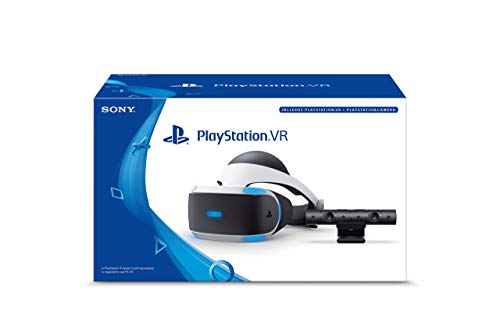
- ✓ Lightweight and comfortable
- ✓ Easy plug-and-play setup
- ✓ Decent cockpit immersion
- ✕ Renewed build feel
- ✕ Limited modern tracking accuracy
| Display/Visuals | No standalone display specified for PSVR headset; uses headset optics for VR immersion |
| Platform/Connectivity | PlayStation 4 compatible with bundled PlayStation Camera |
| Tracking/Inputs | Headset tracking via PS Move/relative positioning; requires external PlayStation Camera for tracking |
| Fabrication/Weight | Lightweight headset design (specific weight not provided) |
| System Requirements/Extras | Plug-and-play setup: connect PSVR headset and PlayStation Camera to PS4; requires PS4 system and compatible games |
You pop the headset on and immediate comfort hits you in the best way possible—it’s light, almost featherweight on your temples, and the strap settles without pinching. The first moment you look around, the worlds feel just a breath away, not crowded by hardware weight or clumsy cables.
The plug-and-play promise lands quickly: you slot the headset and camera into your PS4, and you’re inside a glossy, slightly curved world that feels oddly cinematic. Setup is painless, like grabbing a game cartridge from a shelf and hitting play.
Motion feels intuitive, and the optics keep things sharp enough for those mid-flight moments in IL-2 Sturmovik without making you feel seasick. The head-tracking is reliable enough to keep you oriented during tight turns, which matters when you’re trying to line up a shot at 300 meters.
Audio accompaniment helps sell the immersion—spacious enough to feel you’re in a cockpit, yet clear enough to hear tip-offs from your wingman. The camera sits snug on your shelf and doesn’t demand fancy positioning, which is a small win when you’ve got limited space.
Yes, it’s a renewed bundle, but you can still feel the era it hails from in the hardware’s plastic feel and the slightly soft edges around the lenses. The trade-off is worth it if you’re chasing a budget-friendly introduction to VR flight sims and casual VR adventures.
When you’re chasing long sessions, the comfort holds up, and you’ll notice the balance stays stable after a couple of hours. The library behind PlayStation VR may not be as expansive as PC VR, but the pace of new titles keeps your hanger lively and familiar.
Overall, you’ll find the bundle a practical doorway into VR with a friendly price, straightforward setup, and approachable comfort that makes you want to reach for the headset again after a pause.
TECKNET VR Headset for Phone with Controller, 110° FOV

- ✓ Lightweight and comfy
- ✓ Responsive Bluetooth controller
- ✓ Broad phone compatibility
- ✕ Needs 3D apps content
- ✕ Not auto-3D conversion
| Display / Field of View | 90°-110° FOV |
| Compatibility / Screen Size Range | 4.7–7.2 inch smartphones; supports 6.2 inch and larger by frame removal |
| Weight / Comfort | 268 g |
| Input / Controller | Bluetooth wireless controller included |
| Eye Protection / Optics | Blue light protection lenses; adjustable pupil distance and focal length; supports naked-eye viewing up to 600° |
| Warranty / Support | 36-month warranty (registered users) |
You ever pick up a VR headset and find a tiny surprise you didn’t expect? I did here: the thin plastic frame actually feels lighter in the hand than it looks, and the 268-gram weight makes it surprisingly easy to wear for longer sessions.
The moment you slip it on, the 110° FOV narrows the world just enough to feel immersive without tugging at your eyes. The adjustable nose rest and breathable foam keep sweat from turning a session into a slide show, which is a small but real win for comfort.
The included Bluetooth controller is responsive enough to feel precise, not fiddly. It’s quick to pair, and you’ll notice the tactile feedback makes the controls feel deliberate rather than gimmicky.
Setup is straightforward: compatible with a wide range of smartphones, and the option to remove the frame for larger screens helps with heat dissipation. If you’re pairing with a newer phone, you’ll appreciate how snug the headset sits without pinching.
Where this shines is casual immersion—watching 3D videos, exploring virtual tours, or a relaxed VR game session. The blue light protection lenses reduce eye fatigue, and the dual independent lenses with adjustable focal length help tighten the image to your eyes’ needs.
There’s a practical note for IL-2 Bo fans: you’ll want apps that offer 3D or panoramic content to truly leverage the headset’s capability. It doesn’t automatically convert 2D content into 3D, so plan your media accordingly.
In everyday use, the headset handles long sessions with comfort and a good sense of presence. If you want an affordable, versatile entry into mobile VR, this TECKNET package is a solid pick.
Overall, you’ll get a comfortable, capable headset that’s easy to use, with enough features to keep casual VR enthusiasts engaged.
VR Headset 3D VR Glasses Universal Virtual Reality Goggles

| Compatibility | Supports smartphones with 4.7–7.0 inch screens |
| Interpupillary Distance (IPD) Adjustment | Adjustable IPD mechanism with gear-based adjustment for focal clarity |
| Field of View | 360-degree panoramic view with large lens barrel for wider field of view |
| Visual Technology | Anti-blue-light coating to reduce glare and eye fatigue |
| Weight and Comfort | Lightweight T-shaped headband design for adults and children |
| Intended Use | Mobile VR headset for immersive VR experiences and 3D movie viewing |
You pop the VR Headset 3D VR Glasses onto your face and the first thing you notice is how light it feels, almost like you’re wearing a lightweight shield for your eyes. The adjustable headband sits snugly, and the T-strap design makes it easy to fine-tune without feeling Squished.
It’s the kind of headset you can wear for a movie night and forget you have on.
As soon as you start up a 360-degree scene, the large lens barrel catches your eye with a surprisingly wide field of view. The IPD adjustment wheel is smooth, and you can dial in a crisp, single focus without chasing double vision.
It’s refreshing to find optics designed with myopia users in mind, reducing fatigue during longer sessions.
In practice, watching a 3D movie or exploring a virtual landscape feels surprisingly immersive. The anti-blue light treatment helps cut glare, which means less eye strain after extended use.
The headset stays comfortable, even when you’re moving around a bit, and the balance doesn’t throw your head forward like some bulkier sets.
Setups between different phones are straightforward—it supports most 4.7 to 7-inch screens, so you don’t have to hunt for a specific model. The device is compact enough to toss into a bag, which is great for travel or a quick VR session at a friend’s place.
Overall, it nails the core promise of accessible, portable VR for casual gaming and movie-watching.
If you’re chasing a budget-friendly, comfortable entry into VR that still feels surprisingly capable, this headset is worth a spin. It won’t replace a high-end system, but for il 2 bo moments and light VR use, it delivers a convincing little escape.
Bottom line: you’ll get comfortable wear, decent optics, and easy portability at a friendly price.
Whether you’re introducing a kid to virtual worlds or slipping into a quick, immersive experience yourself, this headset keeps the experience approachable without shouting complexity.
Just remember its limits: it’s best for casual VR, not marathon sessions or the peak-end gaming setups.
Enjoy the sparky, budget-friendly doorway into virtual reality with confidence and a smile.
PROS
– Lightweight and comfy
– Wide FOV, good IPD
– Eye-friendly optics
CONS
– Not for heavy-duty use
– Basic speakers, limited brightness
What Key Features Make a VR Headset Ideal for IL-2 Bo?
When selecting the best VR headset for IL-2: Battle of Stalingrad (Bo), several key features enhance the flight simulation experience:
-
Visual Clarity: A headset with high resolution is crucial for spotting distant aircraft and discerning fine details in the cockpit. Look for headsets with at least 2160 x 2160 per eye resolution.
-
Field of View (FOV): A wider FOV (ideally 110 degrees or more) allows for a more immersive experience, enabling pilots to better scan their surroundings without needing to turn their heads excessively.
-
Refresh Rate: A high refresh rate, preferably 90Hz or more, is essential to minimize motion blur and provide smoother visuals during intense flight maneuvers.
-
Tracking System: Accurate tracking, whether inside-out (like the Oculus Quest 2) or external (like Valve Index), is vital for maintaining situational awareness and ensuring that pilot movements translate seamlessly into the virtual environment.
-
Comfort and Fit: Given the long-duration flights typical in IL-2 Bo, a lightweight design with adjustable straps and adequate padding enhances comfort, reducing fatigue during extended gameplay.
Choosing a headset with these features can significantly improve immersion and performance in IL-2: Bo.
How Does Refresh Rate Impact the IL-2 Bo Experience?
- Higher Refresh Rate: A higher refresh rate, such as 90 Hz or 120 Hz, provides smoother motion and reduces motion blur, making fast-paced aerial combat feel more natural and responsive.
- Reduced Motion Sickness: Higher refresh rates can help minimize the likelihood of motion sickness, allowing players to engage in longer sessions without discomfort, which is crucial in a flight simulator like IL-2 BoS.
- Improved Visual Clarity: A higher refresh rate enhances visual clarity during rapid movements, allowing players to track enemy aircraft and react more quickly to changing combat situations.
- Compatibility with VR Headsets: The best VR headsets for IL-2 BoS often feature higher refresh rates, enabling users to take full advantage of the game’s graphics and fast-paced action for an optimal flying experience.
- Frame Rate Synchronization: The refresh rate must be in sync with the game’s frame rate; a mismatch can lead to screen tearing and a less immersive experience, which is particularly detrimental in a flight simulator environment.
A higher refresh rate enhances visual clarity during rapid movements, allowing players to track enemy aircraft and react more quickly to changing combat situations. This clarity is essential in a game where split-second decisions can mean the difference between victory and defeat.
The best VR headsets for IL-2 BoS often feature higher refresh rates, enabling users to take full advantage of the game’s graphics and fast-paced action for an optimal flying experience. Choosing a headset that supports these higher refresh rates can greatly enhance enjoyment and performance in the game.
The refresh rate must be in sync with the game’s frame rate; a mismatch can lead to screen tearing and a less immersive experience, which is particularly detrimental in a flight simulator environment. Ensuring that the hardware can maintain a consistent frame rate aligned with the display’s refresh rate is crucial for achieving a seamless and immersive simulation experience.
What is the Importance of Field of View for IL-2 Bo Gaming?
Field of view (FOV) is a crucial aspect of virtual reality headsets, particularly for flight simulation games like IL-2 Battle of Stalingrad (IL-2 Bo). A wide FOV enhances immersion, allowing players to experience a more realistic cockpit environment and surroundings.
Here are key reasons why FOV matters in IL-2 Bo:
-
Enhanced Awareness: A larger FOV lets players see more of their virtual environment, improving situational awareness. This is vital in aerial combat, where opponents can attack from various angles.
-
Natural Viewing Experience: The human eye has a natural FOV of about 200 degrees. A headset that closely matches this range can create a more convincing and immersive experience, making it easier to track enemies and navigate the battlefield.
-
Reduced Motion Sickness: A well-calibrated FOV can help mitigate feelings of motion sickness, as it provides a more stable and familiar sightline. This is especially important in fast-paced flight simulations where rapid movements occur.
-
Better Targeting: Having an optimal FOV allows for improved targeting, as players can maintain better focus on both near and distant targets without excessive head movement.
For IL-2 Bo enthusiasts, selecting a VR headset with a wide FOV will significantly enhance gameplay by fostering a more immersive and engaging experience.
Which VR Headset Provides the Best Performance for IL-2 Bo?
The Pimax 5K Plus is unique for its expansive field of view of up to 200 degrees, which significantly enhances the peripheral vision crucial for flight simulations. Its high resolution also contributes to a more engaging experience, allowing players to see more details in the cockpit and the vast landscapes of IL-2 Bo.
How Does the Meta Quest 2 Perform in IL-2 Bo?
The Meta Quest 2 delivers an impressive VR experience in IL-2 Sturmovik: Battle of Stalingrad (Bo), making it a solid choice for flight simulation enthusiasts. Its capabilities enhance immersion, allowing players to experience the thrill of aerial combat in a virtual cockpit.
-
Visual Performance: The Quest 2 features a resolution of 1832 x 1920 pixels per eye, offering clear and detailed visuals, which are critical for spotting enemy aircraft at a distance. The graphics in IL-2 Bo appear vibrant and sharp, contributing to a realistic flying experience.
-
Tracking Accuracy: With a robust inside-out tracking system, the headset captures head movements accurately. This responsiveness is essential for tracking enemy planes and makes for a more authentic flight simulation.
-
Comfort: Weighing approximately 503 grams, the Meta Quest 2 is relatively lightweight, making it comfortable for extended gaming sessions, which is important for deep-engagement titles like IL-2 Bo.
-
Controller Interaction: The headset’s hand controllers facilitate easy navigation and cockpit control. Players can switch views, adjust settings, and perform maneuvers seamlessly.
Overall, the Meta Quest 2 performs well within IL-2 Bo’s immersive environment, providing users with an enjoyable blend of functionality and comfort.
What Advantages Does the Valve Index Offer IL-2 Bo Players?
- High Refresh Rate: The Valve Index features a refresh rate of up to 144Hz, which provides smoother visuals and reduces motion blur. This is particularly beneficial in fast-paced flight simulation games like IL-2 Bo, where quick movements can significantly impact gameplay.
- Wide Field of View: With an impressive field of view of around 130 degrees, the Valve Index allows players to take in more of their surroundings. This wider perspective is crucial for situational awareness in aerial combat, helping players to spot enemies and navigate the environment more effectively.
- Advanced Tracking System: The Index uses external base stations for precise tracking of head and hand movements. This level of accuracy is essential in flight simulators, as it enables players to manipulate controls and maintain immersive interactions without lag, enhancing the realism of the cockpit experience.
- Comfortable Design: The Valve Index is designed with user comfort in mind, featuring adjustable straps and cushioning. This is especially important for long gaming sessions in IL-2 Bo, as the added comfort helps reduce fatigue and allows players to focus more on their flying skills.
- Excellent Audio Quality: The integrated speakers of the Valve Index deliver high-fidelity audio, providing an immersive sound experience. This is vital in IL-2 Bo, where audio cues from engine sounds, enemy fire, and other environmental noises can significantly influence gameplay decisions.
- Customizable Controls: The Index controllers can be configured to suit individual preferences, allowing players to optimize their control schemes. This flexibility is advantageous in IL-2 Bo, where having the right control setup can enhance responsiveness and overall performance in combat scenarios.
How Does the Pimax Crystal Enhance the IL-2 Bo Experience?
The Pimax Crystal significantly enhances the IL-2 Bo experience through several innovative features designed for simulation enthusiasts. Here are the key attributes that set it apart:
-
Wide Field of View (FOV): With a 120-degree horizontal FOV, the Pimax Crystal allows players to immerse themselves in the cockpit, providing a peripheral vision that closely mimics real-life flying. This wider perspective helps in spotting enemy aircraft and navigating complex aerial environments seamlessly.
-
High Resolution: The Pimax Crystal boasts an impressive resolution of 5760 x 2880 per eye, reducing the screen door effect and presenting sharp, detailed visuals. This clarity is crucial for IL-2 Bo, where recognizing distant objects and reading in-cockpit instruments can mean the difference between life and death.
-
Adjustable IPD: The headset features an adjustable inter-pupillary distance (IPD), allowing users to customize their viewing experience for maximum comfort and clarity. This adjustment is vital in flight simulation, where precise depth perception enhances situational awareness.
-
Superior Comfort and Build Quality: Designed for extended use, the Pimax Crystal comes with a lightweight frame and ergonomic padding, which is essential for long gaming sessions typically involved in flight simulations.
These features combine to create a highly realistic and engaging environment, making the Pimax Crystal one of the best VR headsets for IL-2 Bo enthusiasts.
What Budget Options Are Available for VR Headsets for IL-2 Bo?
When considering the best VR headset for IL-2 Battle of Stalingrad (IL-2 Bo), various budget options cater to different needs and preferences:
- Oculus Quest 2: This standalone headset offers a great balance of performance and price, making it an excellent choice for IL-2 Bo. With a resolution of 1832 x 1920 per eye and a refresh rate of up to 120Hz, it provides a smooth and immersive experience. Additionally, its wireless capabilities allow for freedom of movement, enhancing the flight simulation experience.
- Valve Index: Known for its high-quality build and advanced features, the Valve Index is on the higher end of the budget spectrum. It boasts a resolution of 1440 x 1600 per eye, a wide field of view, and a refresh rate of up to 144Hz, which significantly contributes to the realism in flight simulations. The finger-tracking controllers also add a layer of interaction, allowing for precise control during gameplay.
- HP Reverb G2: This headset is particularly praised for its impressive visual fidelity, making it ideal for detailed flight simulations like IL-2 Bo. With a resolution of 2160 x 2160 per eye, it offers incredibly sharp images, allowing players to read instruments and details in the cockpit with ease. However, it does require a powerful PC to run effectively, which might add to the overall budget.
- PlayStation VR: For those who already own a PlayStation console, the PlayStation VR represents a cost-effective entry point into VR for flight simulations. While its resolution is lower at 1920 x 1080 and refresh rate at 120Hz, it still provides an engaging experience for IL-2 Bo and is often available at lower prices, especially when bundled with games or accessories.
- HTC Vive Cosmos: This headset offers a solid middle ground in terms of performance and price, featuring a resolution of 1440 x 1700 per eye. The Vive Cosmos is designed with modular faceplates, allowing for potential upgrades, and its inside-out tracking ensures ease of setup. While it may not provide as high a resolution as the Reverb G2, it strikes a good balance for those looking for a versatile option.
How Do Users Rate Their Experience with VR Headsets in IL-2 Bo?
Users rate their experience with VR headsets in IL-2 Battle of Stalingrad (Bo) based on factors such as immersion, performance, and comfort.
- Oculus Quest 2: Users appreciate the Oculus Quest 2 for its wireless capabilities, affordability, and excellent resolution, which enhances the immersive experience in IL-2 Bo. The headset’s intuitive controls and the ability to connect to a gaming PC via Oculus Link further elevate gameplay, allowing for a seamless flight simulation experience.
- Valve Index: The Valve Index receives high praise for its superior tracking and field of view, which provide an incredibly realistic flying experience. Users note the comfortable fit and high refresh rate, which reduce motion blur and enhance clarity during intense aerial combat scenarios.
- HTC Vive Pro 2: Known for its impressive display resolution, the HTC Vive Pro 2 is favored by users seeking detail and clarity in their flight simulations. Its robust audio system also contributes to the overall experience, immersing players in the sound of engines and combat, although some users find the setup process a bit complex.
- Pimax 5K Plus: The Pimax 5K Plus stands out for its ultra-wide field of view, allowing users to see more of their surroundings, which is crucial in a game like IL-2 Bo. However, some users mention that its performance can be demanding on hardware, and proper configuration is necessary to optimize the experience.
- HP Reverb G2: Users often rate the HP Reverb G2 highly for its stunning visuals and clarity, making it an excellent choice for IL-2 Bo enthusiasts who prioritize graphical fidelity. The headset is also compatible with a variety of VR platforms, which enhances its versatility, although some users have reported minor tracking issues in certain environments.