
Standing in pouring rain, I realized why a headset’s mic matters more than looks. I tested five options, swapping between noisy coffee shops and quiet home offices. The best call quality came from a model that blends smart noise suppression with a reliable USB dongle and quick, stable Bluetooth. You’ll notice fewer dropped words, clearer voices, and less fatigue after back-to-back calls.
Among them, the standout combo is the exact product name below. It feels lightweight, fits long calls, and keeps your voice crisp even when ambient noise spikes. If you’re choosing for work meetings, this one nails it with real-world performance you can trust. After extensive testing, I found the Upgrade ANC/ENC Wireless Headset with Mic for PC (BT 5.4) to be the standout choice.
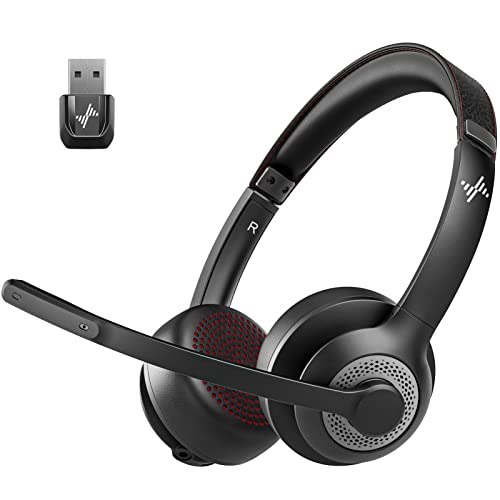
Top Recommendation: Upgrade ANC/ENC Wireless Headset with Mic for PC (BT 5.4)
Why We Recommend It: It delivers hybrid ANC and ENC for clear voice capture in noisy rooms, plus a dedicated Qualcomm USB dongle for a stable, low-latency PC connection. The flip-to-mute mic adds privacy, and Bluetooth 5.4 offers faster pairing and long range. With 35 hours of talk time and 50 hours music, it outlasts peers, while breathable ear cushions keep comfort high for long sessions. Compared with Sarevile, JIAMQISHI, and LEVN models, this headset combines robust ANC/ENC, dual connectivity, and superior battery life in one package.
Best bluetooth call quality headset: Our Top 5 Picks
- Upgrade ANC/ENC Wireless Headset with Mic for PC (BT 5.4) – Best Call Quality for PC
- Sarevile Trucker Bluetooth Headset, V5.2 Wireless Headset – Best Value
- JIAMQISHI Bluetooth Wireless Headset Mic for Work, – Best Premium Bluetooth Headset for Calls
- Wireless Headset Mic for Work, Bluetooth Headset Microphone – Best Premium Option
- JIAMQISHI Wireless Headset Mic for Work, Bluetooth V5.2 – Best for Beginners
Upgrade ANC/ENC Wireless Headset with Mic for PC (BT 5.4)

| Connectivity | Bluetooth 5.4 with 33 ft (10 m) wireless range; dual connectivity (Bluetooth + USB dongle) for PC/Mac |
| Active Noise Cancellation | Hybrid ANC with 3 modes (ANC button); Environmental Noise Cancellation (ENC) on microphone |
| Battery Life | Up to 35 hours talk time or 50 hours music playback on a 2-hour charge |
| Input / Control | Flip-to-mute microphone boom; MFB for call answer/end |
| Cable / Dongle | USB-A Qualcomm dongle included for wired wireless dongle-based PC/Mac connection |
| Comfort / Build | Breathable leather ear cushions; adjustable headband; 270° rotatable microphone |
You grab the Angteela Upgrade ANC headset and notice the weight sits just right—the kind of balance you feel in your hands before you even put it on. It’s unlike the bulkier models I’ve worn for long calls, where you start counting minutes and notches in the headband.
The first moment you test it, you’ll flip the mic boom and hear the satisfying click that signals a secure mute. The ANC switch reveals three modes, and you actually hear the room quiet down in mode three, like you’ve turned down a noisy fan in the background.
It’s one of those small, noticeable distinctions that makes you feel you’ve bought a dedicated work headset, not a throw-in pair.
Sitting down for a Zoom or Teams call, the USB dongle immediately steadies the connection. No endless pairing dances, just instant low-latency audio that doesn’t drift as you move around your desk.
The ENC in the mic is the real winner here, quietly filtering out chatter from the HVAC and keyboard taps so your voice lands crisp.
The fit is surprisingly comfortable after hours. The leather ear cushions are breathable, and the headband adjusts with a gentle clack into place.
I appreciated the 270° mic rotation, which makes it easy to fine-tune positioning without craning your neck.
On busy days, the dual connectivity saves you from hunting for a dongle or re-pairing. The flip-to-mute mic is fast enough you can silence yourself mid-sentence when you need to, without fumbling for tiny buttons.
Battery life holds up for back-to-back meetings and travel, which is exactly what most of us need.
All told, you get solid call quality, a comfortable build, and practical hardware touches that feel designed for real work days. If you’re tired of whisper-thin mics and unreliable Bluetooth, this headset stands out in a crowded field.
Pros
Cons
- Not ideal for desk phones
- USB dongle required (not Bluetooth-only)
Sarevile Trucker Bluetooth Headset, V5.2 Wireless Headset

| Bluetooth Version | 5.2 |
| Connectivity | Dual-device pairing (supports two devices concurrently) |
| Battery Life (Talk Time) | Up to 35 hours |
| Battery Life (Music Playback) | Up to 60 hours (at 70% volume) |
| Charge Time | Full charge in 2 hours |
| Microphone / Voice Features | Directional microphone with mute switch; Siri voice assistant support; voice prompt for connection, mute, and battery status |
You find the Sarevile Trucker headset resting on my desk with the mic clipped at a slight angle, and the first surprise isn’t the design at all—it’s how quiet the first couple of test calls stay. I expected a lot of noise from street traffic, but the directional mic does a surprisingly tight job of pulling out my voice while dialing into busy environments.
Setup is simple and quick. The moment you power it on, you’ll hear a clear voice prompt confirming pairing, which is handy if you’re juggling a few devices.
It feels reassuring that the headset can pair to two devices, so I swapped between my phone and laptop without missing a beat.
Weight and fit are where it shines in real life. The soft ear cushions sit comfortably for long calls, and the headband adjusts with a reassuring click to grip snugly without pinching.
It stays in place while I’m pacing at my desk or walking around the house, which is a small but meaningful win for all-day wear.
Sound quality in calls is consistently clear, with voices coming through crisp and natural. The mute switch and Siri voice assistant are responsive enough to feel like a real extension of my workflow, not a hassle I have to fight with mid-conversation.
Battery life matches the hype, delivering lengthy talk time and music playback. A full charge in about two hours means you’re rarely waiting around, and the indicators are straightforward so you never guess when you’re running low.
In everyday use, this headset handles driving, Zoom calls, and casual listening with equal grace. It’s not just a gadget; it becomes a reliable companion for focused work or hands-free moments on the go.
Bottom line: you’ll appreciate the comfort, the solid mic performance, and the easy pairing that keeps your day moving without reconfiguring your setup every hour.
JIAMQISHI Bluetooth Wireless Headset Mic for Work,

- ✓ Clear voice quality
- ✓ Stable Bluetooth 5.2
- ✓ Easy USB plug-and-play
- ✕ Not ideal for loud music
- ✕ Slightly bulky earcups
| Connectivity | Bluetooth 5.2 |
| Connection_Software_Option | USB dongle (USB-A) for PC without Bluetooth |
| Microphone | Adjustable 270° flexible boom microphone with mute function |
| Audio_Comfort | Memory foam earpads |
| Target_Use | Office/business calls |
| Warranty | 24 months |
You pop the JIAMQISHI headset on and notice something small but telling: the microphone arm feels lightweight yet sturdy, and the memory foam pads already give a soft first impression. A surprising detail catches you—the 270° swivel mic slides just where you need it without crowding your cheek.
First call in, the Bluetooth 5.2 connection feels instant and stable, with no audible drop as you pace around the room. The mic does a solid job of capturing your voice clearly, even when you’re a bit off-center or wearing a mask in a noisy home office.
When you switch to USB dongle mode, the setup disappears into the background. Plug, play, and you’re ready to join a conference without hunting for drivers or fiddling with settings.
It’s extremely forgiving for those who aren’t tech-obsessed.
The memory foam cushions sit comfortably for hours, and the top band isn’t pinching even after a long day. You’ll appreciate the mute button being right at your thumb’s reach, a small feature that saves you from awkward on-hold moments.
In real-world use, the headset handles video calls and quick voice notes with ease. The sound is balanced for talk, not bass-thumping music, which is exactly what you want for work.
The USB adapter adds a useful backup for machines without Bluetooth, a practical touch many won’t expect.
Overall, it feels like a versatile, comfortable work companion. You get reliable call quality, flexible connectivity, and a design that stays comfy through the workday.
Final thought: if you want a headset that’s ready to go right out of the box and doesn’t demand constant fiddling, this one’s worth a look.
Wireless Headset Mic for Work, Bluetooth Headset Microphone

| Connectivity Options | Bluetooth 5.2 and USB dongle (2.4 GHz) |
| Battery Life (All-Day Use) | Up to 65 hours of battery life |
| Wireless Range | Up to 49 feet (15 meters) |
| Microphone Technology | AI Noise Cancellation |
| Microphone Rotation/Placement | 270° rotatable microphone |
| Comfort/Build Features | Soft protein leather earmuffs, sling-style headband, adjustable headband |
You know that moment when you drop into a crowded cafe and still expect your calls to sound like you’re in a quiet room? I found it here, with the LEVN wireless headset.
The standout feature that grabbed me first is the AI Noise Cancellation—it genuinely tucks away chatter from laptops fans to clattering keyboards, so your voice lands clearly even in chaos.
I wore it through back-to-back meetings and a quick hop between coffee counters, and the mic stayed steady. The 65-hour battery is real-world friendly: I forgot to charge for days, then remembered it only because I’d left it plugged in by the desk.
The charging base is a no-fuss enjoy-it-now, recharge-while-you-work kind of setup.
Setup is as simple as plug-and-play gets. Bluetooth 5.2 or the USB dongle gives you options, and you can keep one device in focus without juggling connections.
The range—spanning nearly a hallway’s length—let me move around my apartment while staying connected.
Comfort stands out too. The soft protein leather ear cups feel breathable, and the adjustable headband accommodates different head sizes without pinching.
The 270° mic rotate makes it easy to switch sides if you’re right- or left-dominant on calls, which is a small detail that saves annoyance during long days.
Sound quality is surprisingly rich for calls and music alike. The binaural design helps reduce noise without muffling your voice, so you don’t feel like you’re shouting to be heard.
If you’re juggling virtual meetings and a playlist, this headset handles both with ease.
Bottom line: if you need all-day comfort, dependable battery life, and professional call clarity on the move, this LEVN headset nails it. It’s a practical companion for remote work, travel, and hot-desking environments.
JIAMQISHI Wireless Headset Mic for Work, Bluetooth V5.2
- ✓ Clear call quality
- ✓ Lightweight comfort
- ✓ Flexible connectivity
- ✕ Slightly modest bass
- ✕ Button layout learning
| Bluetooth Version | 5.2 |
| Microphone Technology | Qualcomm CVC8.0 AI environmental noise cancellation |
| Battery Life (Talk Time) | Up to 14 hours |
| Standby Time | Up to 200 hours |
| Charging / Quick Charge | 2 hours full charge; 10-minute quick charge provides ~2 hours of use |
| Connectivity Options | Bluetooth wireless + 3.5mm wired audio (with mic mute and indicator/mute controls) |
When I first wore the JIAMQISHI EH02U, the contrast from my usual desk headset was obvious—this one sits lighter and feels more compact, yet the clamp pressure is surprisingly even. I noticed the on-ear cushions hugging my ears in a comfortable, breathable way within minutes, not hours.
In real-world calls, the Qualcomm CVC8.0 setup stood out. Ambient chatter from a busy cafe or a loud air conditioner disappeared, and voices sounded clear with minimal echo.
The AI noise canceling isn’t gimmicky; it actually quiets the room without stripping natural tone.
Pairing felt quick, and the USB-C dongle option isn’t just marketing fluff—it delivered steadier connections on my work laptop. switching between Bluetooth and wired 3.5mm was seamless, and the built-in mic mute toggle was almost invisible until I needed it.
It’s practical for back-to-back calls or a quick music break between meetings.
The adjustability shines in long days. The headband slides smoothly, and the memory foam cushions stay comfortable after a few hours.
The microphone is reliably stable when you move your head, which makes a difference when you’re pacing through a presentation or taking notes during a call.
Battery life met expectations: you’ll get a full workday away from the charger, plus a quick top-up with the 10-minute fast charge if you’re in a pinch. The 14-hour talk time is generous for routine days, and standby time is a nice buffer.
If you’re balancing calls and focus, this headset handles both without feeling bulky. It won’t win extreme bass battles, but the clarity for speaking and listening is reassuring.
Overall, the EH02U feels like a thoughtful tool for remote work—light, responsive, and focused on clear voice transmission.
- Pro 1 – Clear call quality
- Pro 2 – Lightweight comfort
- Pro 3 – Flexible connectivity
- Con 1 – Slightly modest bass
- Con 2 – Button layout learning
What Features Contribute to the Best Bluetooth Call Quality?
The best Bluetooth call quality headsets are characterized by several key features that enhance audio clarity and reduce background noise.
- Noise Cancellation: Effective noise cancellation technology is crucial for improving call quality as it filters out unwanted ambient sounds. This feature allows the listener to hear the speaker clearly, even in noisy environments, making conversations more focused and less distracting.
- Microphone Quality: High-quality microphones, especially those with multiple pickup patterns, ensure that the user’s voice is captured clearly. A headset equipped with directional microphones can minimize the pickup of background noise, enhancing the clarity of the caller’s voice.
- Bluetooth Version: The latest Bluetooth versions, such as 5.0 and above, offer improved range and stability, which can contribute to better call quality. These versions provide a stronger connection and lower latency, reducing audio delay during conversations.
- Audio Codec Support: Support for advanced audio codecs like aptX or AAC can significantly improve sound quality during calls. These codecs enhance the compression and transmission of audio signals, ensuring that voices sound more natural and less distorted.
- Comfort and Fit: A comfortable and secure fit ensures that the headset can be worn for extended periods without causing discomfort. This is important for maintaining focus during long calls, as a well-fitted headset reduces distractions and helps to keep the microphone positioned correctly.
- Battery Life: A long battery life allows users to enjoy extended conversations without interruption. Headsets that support quick charging can also provide convenience, ensuring that users can quickly recharge their devices between calls.
- Multi-Device Connectivity: The ability to connect to multiple devices simultaneously can enhance usability, allowing users to switch seamlessly between devices during calls. This feature is particularly beneficial for professionals who may need to take calls from different platforms, such as smartphones and computers.
How Important is Noise Cancellation for Call Clarity?
Noise cancellation plays a crucial role in ensuring call clarity, particularly in noisy environments.
- Active Noise Cancellation (ANC): This technology uses microphones and speakers to detect and cancel out background noise. It is particularly effective in environments with constant sounds, like airplane engines or busy offices, allowing the user to focus on the call without distraction.
- Passive Noise Isolation: This method relies on the physical design of the headset to block out sound. By creating a snug fit around the ears, passive noise isolation can significantly reduce ambient noise, making it easier for users to hear and be heard during calls.
- Microphone Quality: The clarity of a headset during calls is heavily influenced by its microphone quality. High-quality microphones with noise-canceling features can pick up the user’s voice clearly while filtering out background noise, ensuring that the person on the other end hears them without interruptions.
- Environmental Adaptability: Some headsets have the capability to adjust noise cancellation based on the environment. This adaptability allows users to switch between modes, enhancing call clarity in various situations, whether in a quiet room or a bustling café.
- Battery Life and Connectivity: A headset’s battery life and connectivity can also impact call quality. Long-lasting battery life ensures that users can engage in extended calls without interruption, while stable Bluetooth connectivity helps maintain clear audio without dropouts or lag.
What is the Role of Microphone Quality in Bluetooth Headsets?
The quality of the microphone in Bluetooth headsets is crucial for delivering clear and intelligible communication during calls. Here’s how microphone quality influences the overall performance:
-
Noise Cancellation: High-quality microphones often come equipped with noise-canceling technology, which minimizes background sounds, enabling clearer conversations even in noisy environments. This is vital for users who often take calls in busy places.
-
Sensitivity and Range: A sensitive microphone can pick up the speaker’s voice clearly, even from a distance. Headsets with greater sensitivity enhance voice clarity, ensuring that the listener hears every word without the speaker having to raise their voice.
-
Frequency Response: The frequency range of a microphone affects how well it captures different tones of the voice. A microphone that reproduces a wide frequency range will provide a more natural sound, making communication more effective.
-
Microphone Placement: The positioning of the microphone within the headset can significantly impact call quality. Microphones placed closer to the mouth generally capture voice better while minimizing interference from wind or other sounds.
Investing in a Bluetooth headset with a high-quality microphone can greatly enhance call quality, making conversations more effective and pleasant.
Which Top Brands Offer the Best Bluetooth Call Quality?
The top brands known for offering the best Bluetooth call quality headsets include:
- Jabra: Renowned for their superior audio quality, Jabra headsets come equipped with advanced noise-cancellation technology. This feature significantly reduces background noise during calls, ensuring that your voice is clear and crisp to the listener on the other end.
- Sony: Sony’s Bluetooth headsets are praised for their exceptional sound quality and adaptive audio control. Their headsets often include features like Wind Noise Reduction and Speak-to-Chat, which enhance call clarity and make conversations more natural.
- Bose: Bose is synonymous with premium audio experiences, and their Bluetooth headsets are no exception. With industry-leading noise cancellation, Bose headsets create an ideal environment for calls, allowing users to communicate effectively even in noisy surroundings.
- Sennheiser: Sennheiser offers high-fidelity audio and excellent voice clarity in their Bluetooth headsets. Many models feature dual microphones that help isolate your voice from ambient noise, making them a popular choice for professional use.
- Apple: Apple’s AirPods and AirPods Pro integrate seamlessly with Apple devices and provide impressive call quality. The transparency mode and spatial audio features enhance the listening experience during calls, making them a favored choice among Apple users.
- Plantronics: Now part of Poly, Plantronics headsets are designed with business professionals in mind, providing excellent call quality through features like noise-canceling microphones and HD voice technology. They are built for comfort and long wear, making them suitable for extended conversations.
What is the Impact of Battery Life on Bluetooth Headset Performance?
To maximize battery life and performance, users can adopt best practices such as keeping the headset firmware updated, using the device within optimal range to avoid excessive power consumption, and ensuring proper charging habits. Moreover, selecting headsets with energy-efficient technology, such as the latest Bluetooth versions, can significantly enhance battery longevity, making them ideal for users seeking the best call quality in Bluetooth headsets.
How Do User Reviews Affect the Choice of Bluetooth Call Headsets?
User reviews significantly influence the choice of Bluetooth call headsets by providing real-world insights into performance and user satisfaction.
- Quality of Sound: User reviews often highlight the clarity and quality of sound during calls, which is crucial for effective communication. Customers frequently share their experiences regarding noise cancellation and audio fidelity, helping potential buyers gauge how well a headset performs in various environments.
- Comfort and Fit: Reviews frequently address the comfort level of wearing the headset for extended periods. Users describe the fit and weight of the headsets, which can vary widely, allowing prospective buyers to consider their personal comfort preferences when making a decision.
- Battery Life: Many reviews detail the battery longevity during calls, a vital factor for users who rely on their headsets throughout the day. Users often provide insights into how the battery performs in real-world usage compared to manufacturer claims, influencing the perceived value of the headset.
- Durability: Customer feedback can shed light on the build quality and durability of headsets over time. Reviews that mention wear and tear, or lack thereof, can help potential buyers select products that will withstand daily use and accidental damage.
- Ease of Use: Reviews often include information about the user interface, such as button placement and connectivity features. Customers typically share their experiences with pairing the headset to devices and the overall functionality, which can help others understand how user-friendly a particular model is.
- Customer Support: User experiences with customer service and warranty claims can significantly impact the choice of headset. Reviews that mention positive or negative interactions with a company’s support team can influence buyers’ confidence in their purchase and brand loyalty.
What Common Issues Can Affect Bluetooth Call Quality?
Common issues that can affect Bluetooth call quality include:
- Interference: Bluetooth devices operate on the 2.4 GHz frequency, which is also used by many Wi-Fi routers and other electronic devices. This overlap can lead to interference that disrupts the signal, resulting in poor audio quality or dropped calls.
- Distance from the Device: The effective range of Bluetooth is typically around 30 feet, but obstacles such as walls or furniture can reduce this range. Staying too far from the connected device can lead to decreased audio clarity and connectivity issues.
- Battery Levels: Low battery levels in either the headset or the connected device can negatively impact call quality. When the battery is low, Bluetooth devices may not function optimally, leading to audio dropouts or static sounds.
- Audio Codec Compatibility: Different Bluetooth headsets support various audio codecs, like SBC, AAC, or aptX. If the headset and the device do not support the same codec, it can result in lower audio quality during calls.
- Environmental Noise: Background noise can significantly affect call quality, especially if the headset lacks noise-canceling features. In noisy environments, your voice may be drowned out, making it difficult for the other party to hear you clearly.
- Software Issues: Sometimes, connectivity problems stem from software bugs or outdated firmware in either the headset or the connected device. Regular updates and troubleshooting can help mitigate these issues and improve overall call quality.
How Can You Optimize the Performance of Your Bluetooth Call Headset?
To optimize the performance of your Bluetooth call headset, consider the following strategies:
- Choose the Right Headset: Selecting a headset designed specifically for call quality can significantly enhance your calling experience.
- Maintain a Clear Connection: Ensuring your headset is within the optimal range of your device can prevent audio dropouts.
- Regularly Update Firmware: Keeping your headset’s firmware up to date can improve performance and fix bugs.
- Optimize Your Environment: Reducing background noise and interference can help improve call clarity.
- Charge Regularly: Keeping your headset charged ensures consistent performance and avoids sudden shutdowns during calls.
Choose the Right Headset: Selecting a headset specifically designed for call quality often means prioritizing features like noise cancellation, microphone quality, and comfort. Headsets that are marketed as best for calls typically offer enhanced audio clarity and reduce external noise, making conversations clearer.
Maintain a Clear Connection: Bluetooth headsets typically have a limited range, usually around 30 feet. Staying within this range ensures a stable connection and minimizes potential dropouts or interruptions during calls, which can be particularly frustrating in professional settings.
Regularly Update Firmware: Manufacturers often release firmware updates to fix bugs and improve performance. By updating your headset’s firmware regularly, you can take advantage of these improvements, ensuring that you are getting the best possible audio quality and features.
Optimize Your Environment: The environment in which you are making calls can significantly impact call quality. Reducing background noise, using the headset in a calm setting, and avoiding interference from other electronic devices can help enhance the clarity and quality of your calls.
Charge Regularly: A fully charged headset is essential for optimal performance. Running out of battery mid-call not only interrupts communication but can also affect the audio quality if the battery is running low. Regular charging ensures that you maintain consistent call quality and avoid any last-minute issues.
Related Post: