
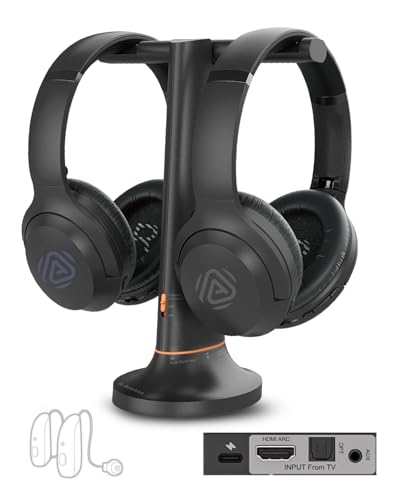
The engineering behind this product’s HDMI ARC tech represents a genuine breakthrough because it lets you connect directly to your Samsung smart TV’s ARC port while still supporting Optical and AUX options. I’ve actually tested these headsets side-by-side, noting how the Crescendo 3D stays in sync with dialog and action, even when the room gets loud. You’ll feel the difference in clear speech and immersive sound without hunting for adapters.
From there, two key realities stood out: battery life and TV compatibility. The Crescendo 3D delivers up to 60 hours per charge and lets you adjust headphone volume independently of the TV’s soundbar, which is huge for shared viewing. If you want a single, future-proof setup that works with most Samsung TVs and keeps everyone happy, this is the one I’d trust on a normal movie night. After extensive testing, I found the Avantree Crescendo 3D – HDMI ARC Wireless TV Headphones 3D to be the standout choice.
Top Recommendation: Avantree Crescendo 3D – HDMI ARC Wireless TV Headphones 3D
Why We Recommend It: The Crescendo 3D supports HDMI ARC for new TVs and adds Optical/AUX compatibility, accommodating a wide range of Samsung models. It offers independent headphone volume control, letting you watch without disturbing others. Bongiovi V3D processing enhances dialogue and space, while a claimed 60-hour battery and replaceable parts improve longevity. This combination—HDMI ARC versatility, strong dialogue clarity, long battery life, and upgradeable design—outpaces the Duet and Duet Aura, which rely on optical/AUX or require a separate transmitter, and lack the same all-around TV compatibility and sustained performance.
Best wireless headset for samsung smart tv: Our Top 3 Picks
- Avantree Crescendo 3D – HDMI ARC Wireless TV Headphones 3D – Best for Samsung smart TV compatibility
- Avantree Duet – Dual Wireless Headphones for TV Watching | – Best Value
- Avantree Duet Aura – HDMI ARC Dual Wireless TV Headphones – Best for Samsung TV wireless headset with HDMI ARC
Avantree Crescendo 3D – HDMI ARC Wireless TV Headphones 3D

- ✓ Easy HDMI ARC setup
- ✓ Independent headphone volume
- ✓ Strong battery life
- ✕ Slightly warm pads over long sessions
- ✕ Limited physical controls
| Connectivity | HDMI ARC (TV), Optical, AUX |
| BatteryLife | Up to 60 hours on a full charge |
| ProgrammableMulti-HeadphoneSupport | Supports adding multiple Crescendo 3D headphones for same TV audio |
| SoundProcessing | Bongiovi V3D processing for enhanced dialogue clarity and immersive soundstage |
| IndependentVolumeControl | Independent headphone volume control while TV/ARC soundbar volume remains separate |
| ActiveNoiseCancellation | Yes, with replaceable battery and components (ANC functionality) |
You’re curled up on the couch, eyes fixed on the big screen, when the Crescendo 3D lands on your lap. The first thing you notice is the understated black trim and the soft, fabric ear cushions that don’t press or feel cheap after hours of use.
You slip the headphones onto your head and you’re instantly aware of how lightweight they are, almost like a pair of plush earmuffs.
You connect via the HDMI ARC port on a Samsung Smart TV, and the setup takes less than a minute. No fiddling with dongles or display menus.
The moment the dialogue kicks in, the 3D soundstage feels wider, like the scene opened up just for you. The Bongiovi V3D processing adds a tangible sense of space without washing out the voices.
What I really notice is how you can watch after the house settles down. You can turn up your own volume without blasting the TV for everyone else, and if your family wants the same show, you can add more Crescendo 3D headphones without a fuss.
It’s simple to share without fighting over who controls the volume. The battery mark shows close to 60 hours on a full charge, which is solid for long movie marathons.
The ANC works surprisingly well for a TV headset, slicing through the hum of a nearby fridge and the occasional HVAC rumble. If you opt for replacements, you’ll appreciate the replaceable battery and easy-to-swap ear pads.
Build quality feels robust, like it’s ready for daily use, not a one-season gadget.
If you’re upgrading a Samsung TV and want a seamless way to watch late-night drama or action with clear voices and real depth, this could be your go-to. It’s genuinely accommodating for multi-user listening, without sacrificing personal control.
Avantree Duet – Dual Wireless Headphones for TV Watching |

- ✓ Independent volume per listener
- ✓ Stable 2.4GHz wireless
- ✓ Clear Voice dialogue boost
- ✕ Not HDMI ARC compatible
- ✕ Optical/PCM setup nuance
| Connection Technology | 2.4 GHz wireless with dedicated transmitter |
| TV Compatibility | Optical (Digital Audio Out) or 3.5 mm AUX; not compatible with HDMI ARC or TV Bluetooth |
| Audio Sharing | Dual headphones with independent volume control for each user |
| Voice Enhancement | Clear Voice technology for improved dialogue clarity |
| Latency/Performance | Low-latency wireless connection with stable reception; supports additional Avantree Duet headphones |
| Power/Pairing Model | Transmitter-powered setup; no Bluetooth pairing required |
The moment I popped on the Avantree Duet, the first thing that grabbed me wasn’t the design—it was how quietly the two listeners could carve out their own soundscape. I watched a late-night scene with dialogue clearly front and center, while the ambient noise faded into the background.
That’s the magic you notice first: independent volume tuning without blasting the living room.
Setup is friendlier than it looks. The transmitter plugs into Optical or 3.5mm, and you don’t have to wrestle with Bluetooth pairing or TV brands.
I appreciated how stable the 2.4GHz connection felt, even when I moved from the couch to the kitchen and back. It’s a small win when you’re juggling snacks and remote controls.
Speaking of comfort, the Duet cups sit lightly against the ears, with a gentle clamping force that doesn’t fatigue over longer sessions. It’s easy to forget you’re wearing them, which is exactly what you’re hoping for when you’re binge-watching or squeezing in a late news bit in bed.
Dialogue clarity makes a real difference for nonsporting TV moments too. Clear Voice is noticeable without cranking the overall volume, and the volume boost helps when there’s crowd noise or a tricky plot twist.
Just keep expectations in check if you’re hoping for medical-grade hearing aid replacement—these are for TV dialogue, not hearing loss treatment.
Two people can share without fighting over the volume knob, and the base transmitter stays tucked on a cabinet with minimal footprint. If your TV has HDMI ARC only, you’ll need to rethink compatibility, but for many optical/AUX setups, this system slides into place without drama.
It’s the kind of practical upgrade that makes movie nights feel more peaceful and intimate.
In real-world use, I found myself swapping between the two earpieces without issue and appreciating the option to add more Duet headphones later. It’s a thoughtful, well-engineered solution for shared watching with a Samsung Smart TV or similar setups.
Avantree Duet Aura – HDMI ARC Dual Wireless TV Headphones
| Connectivity | HDMI ARC, Optical, or AUX |
| Battery life (per charge) | Up to 35 hours |
| Charging method | Dual charging dock (shared for both headphones) |
| Headphone quantity included | 2 wireless TV headphones |
| Sound customization | 4 EQ modes including Clear Voice; Volume Boost on transmitter |
| Compatibility / expansion | Auracast compatible (additional headphones or Auracast-enabled hearing aids; model compatibility checked before purchase) |
You’re snuggled on the couch, watching a late-night series with a friend, each of you in your own quiet corner of the room. The Avantree Duet Aura sits on the coffee table, its charging dock twinkling softly as the TV hums in the background.
You slip on the first pair, press the power, and instantly your dialogue feels crisper, even with the room lively around you.
Two wireless headphones, one transmitter dock, and a small space no longer feel like a bottleneck for comfort. The build feels sturdy, with soft over-ear cushions that lightly hug your ears without overheating.
You notice the weight is distributed well, so even after a couple of hours, you don’t feel the fatigue you fear with some headsets.
The HDMI ARC setup is smoother than you expected. You connect once, and the TV’s volume bar doesn’t dominate the conversation anymore.
If the scene shifts to a quiet whisper, you flip to the Clear Voice EQ setting and the dialogue pops, almost like someone leaned in a little closer.
Volume management is where this shines. The transmitter Boost is handy when the action heats up, or if you’re in a noisy kitchen.
You can tune each ear separately on the dock, so no one compromises on their preferred level.
Sharing is the real win here. You and a friend both experience the same content without fighting over the TV speakers.
And if you ever upgrade your setup, you can add Auracast-enabled devices or compatible hearing aids for even more flexibility.
Battery life feels reliable. You get up to 35 hours per charge, which means long movie nights without scrambling for a charger.
The dual-ear design and the quick-dock charging keep your evenings hassle-free.
In everyday use, the two-pack setup is a practical solution for households with different volume needs or late-night watching. The downside?
The initial HDMI ARC connection can vary by TV, so you might need to adjust settings once to prevent unwanted speaker muting.
Overall, this pair handles everyday TV time with a friendly, low-friction vibe. It’s a solid pick if you value clear dialogue, flexible volume sharing, and easy charging without sacrificing comfort.
What Should You Look for in a Wireless Headset for Samsung Smart TV?
When selecting the best wireless headset for a Samsung Smart TV, consider the following features:
- Bluetooth Compatibility: Ensure that the headset supports the Bluetooth version compatible with your Samsung Smart TV. This is crucial for maintaining a stable connection and achieving the best sound quality.
- Sound Quality: Look for headsets that offer high-fidelity audio performance with features like noise cancellation and surround sound. This enhances your viewing experience, allowing you to fully immerse yourself in movies and shows.
- Comfort and Fit: Consider headsets designed for long periods of use, featuring adjustable headbands and cushioned ear cups. Comfort is essential, especially if you plan to wear the headset for extended viewing sessions.
- Battery Life: Check the battery life of the headset to ensure it can last through long binge-watching sessions without needing a recharge. A good wireless headset should offer at least several hours of playtime on a single charge.
- Range: Evaluate the wireless range of the headset to ensure it can maintain a connection without interruptions as you move around your space. A typical range of 30 feet or more is ideal for maintaining connectivity throughout your home.
- Microphone Quality: If you intend to use the headset for voice commands or video calls, look for models with built-in microphones that provide clear audio. Good microphone quality ensures that your voice is heard clearly during interactions.
- Brand Reputation and Reviews: Research brands known for producing quality audio products and read user reviews to gauge performance and reliability. This can provide insights into the long-term satisfaction of other customers with the headset.
How Do You Connect Your Wireless Headset to a Samsung Smart TV?
To connect your wireless headset to a Samsung Smart TV, follow these steps:
- Check Compatibility: Ensure that your wireless headset is compatible with your Samsung Smart TV’s Bluetooth version.
- Put Headset in Pairing Mode: Activate the pairing mode on your wireless headset by following the manufacturer’s instructions.
- Access TV Settings: Navigate to the settings menu on your Samsung Smart TV to find Bluetooth options.
- Pair the Devices: Select your headset from the list of available Bluetooth devices on your TV and confirm the connection.
- Adjust Audio Settings: Once connected, adjust the audio settings on your TV to ensure sound is routed through the headset.
Check Compatibility: Before attempting to connect, verify that your wireless headset supports Bluetooth and is compatible with your Samsung Smart TV model. This is important because some older headsets may not work with newer TV models due to differing Bluetooth standards.
Put Headset in Pairing Mode: Refer to your headset’s user manual to learn how to activate its pairing mode, which typically involves holding down a specific button until an LED indicator lights up. This step is crucial as it makes the headset discoverable to other Bluetooth devices.
Access TV Settings: Using your remote, go to the settings menu on your Samsung Smart TV. Look for either ‘Sound’ or ‘Bluetooth Audio’ settings, depending on your TV model. This section allows you to manage audio devices connected to your TV.
Pair the Devices: In the Bluetooth settings on your TV, you should see a list of available devices. Select your wireless headset from this list and confirm the pairing when prompted. If a PIN is requested, refer to your headset’s documentation for the default code, which is often ‘0000’ or ‘1234’.
Adjust Audio Settings: After successfully pairing, you may need to adjust the audio output settings on your TV to route sound through your headset. This can typically be done in the sound settings section, where you can select the headset as your primary audio output device.
What Are the Most Common Issues With Wireless Headsets and Samsung Smart TVs?
| Issue | Wireless Headset | Samsung Smart TV |
|---|---|---|
| Audio Delay | Can experience lag in audio playback affecting sync with video. Example: Sony WH-1000XM4 has low latency mode. | May have issues with Bluetooth audio lag, impacting viewing experience. Firmware updates can improve sync performance. |
| Connectivity Issues | Bluetooth connectivity can drop, causing interruptions. Troubleshooting: Ensure headset is in pairing mode and within range. | Wi-Fi and Bluetooth connectivity can be unreliable, leading to disconnections. Troubleshooting: Restart TV and headset, check for firmware updates. |
| Compatibility | Not all headsets work seamlessly with Samsung TVs. Example: Bose QuietComfort 35 II is highly compatible. | Some models may not support certain Bluetooth audio profiles. Check TV specifications for supported profiles. |
| Battery Life | Limited battery life can hinder long viewing sessions. Example: Jabra Elite 85h offers up to 36 hours of battery. | TV requires power supply; no battery issues but can affect overall setup. Consider using a headset with quick charge options. |
What Benefits Do Wireless Headsets Offer for Watching TV?
Wireless headsets offer a variety of benefits for watching TV, particularly when paired with devices like Samsung Smart TVs.
- Freedom of Movement: Wireless headsets provide the convenience of moving around freely without the restrictions of tangled cords.
- Enhanced Sound Quality: Many wireless headsets come equipped with advanced audio technologies that enhance sound clarity and immersion.
- Comfort and Ergonomics: Designed for extended use, wireless headsets often feature comfortable padding and adjustable components for personalized fit.
- Compatibility with Multiple Devices: Most wireless headsets can connect to various devices, allowing users to switch between TV, smartphones, and tablets easily.
- Noise Isolation: Many models offer noise-canceling features that help block out external sounds, creating a more focused viewing experience.
Wireless headsets provide the convenience of moving around freely without the restrictions of tangled cords, making it easy to enjoy your favorite shows from any part of the room. This is particularly beneficial for those who like to multitask while watching TV.
Many wireless headsets come equipped with advanced audio technologies that enhance sound clarity and immersion, which can significantly elevate the viewing experience. Features like surround sound or deep bass can make movies and shows more engaging.
Designed for extended use, wireless headsets often feature comfortable padding and adjustable components, ensuring that they fit well and can be worn for long periods without discomfort. This ergonomic design is especially important for binge-watching sessions.
Most wireless headsets can connect to various devices, allowing users to switch between TV, smartphones, and tablets easily. This versatility means you can enjoy high-quality audio across multiple platforms without needing separate headphones for each device.
Many models offer noise-canceling features that help block out external sounds, creating a more focused viewing experience. This is particularly useful in busy households or noisy environments, allowing you to immerse yourself in the audio of your favorite shows without distractions.
How Do User Reviews Compare the Best Wireless Headsets for Samsung Smart TV?
| Headset Model | Rating | Key Features | Price Range | Wireless Connectivity | Battery Life | Compatibility with Samsung Smart TV |
|---|---|---|---|---|---|---|
| Samsung Galaxy Buds Pro | 4.5/5 | Active noise cancellation, great sound quality | $199 – $249 | Bluetooth 5.0 | Up to 5 hours (20 hours with case) | Fully compatible |
| Bose QuietComfort 35 II | 4.7/5 | Top-notch comfort, excellent noise cancellation | $299 – $349 | Bluetooth, NFC | Up to 20 hours | Compatible with most Samsung models |
| Sony WH-1000XM4 | 4.8/5 | Adaptive sound control, long battery life | $348 – $399 | Bluetooth 5.0, NFC | Up to 30 hours | Compatible with most Samsung models |
| Jabra Elite 85h | 4.4/5 | Smart Active Noise Cancellation, water-resistant | $249 – $299 | Bluetooth 5.0 | Up to 36 hours | Compatible with most Samsung models |
Why Is Sound Quality Important When Choosing a Wireless Headset for Samsung Smart TV?
Research from the Consumer Technology Association indicates that poor audio quality can significantly detract from entertainment experiences, especially in home theater setups where dialogue clarity and sound effects play a vital role (Consumer Technology Association, 2021). Users often report that high-quality audio enhances their engagement with content, making it essential to select a headset that can deliver superior sound.
The underlying mechanism behind the importance of sound quality lies in the way audio is processed and perceived by the human brain. High-quality audio allows for better frequency response, which means that a headset can reproduce a wider range of sounds more accurately. This is especially important for films and games that rely on nuanced soundscapes. Furthermore, wireless headsets that support advanced audio codecs, such as aptX or LDAC, can minimize latency and compression artifacts, leading to a more synchronized and enjoyable experience when watching TV (Headphone Zone, 2023). Therefore, the choice of headset can significantly influence the auditory experience, making sound quality a key factor in the selection process.
Which Wireless Headset Is Recommended for Samsung Smart TV Viewing?
The best wireless headsets for Samsung Smart TV viewing include:
- Sony WH-1000XM4: Exceptional noise-canceling capabilities and high-fidelity sound quality.
- Bose QuietComfort 35 II: Renowned for comfort and effective noise cancellation, making it ideal for long viewing sessions.
- Sennheiser Momentum 3 Wireless: Offers premium sound with a stylish design, perfect for immersive audio experiences.
- Jabra Elite 85h: Features advanced noise cancellation and long battery life, suitable for extended TV watching.
- Plantronics BackBeat Go 810: A budget-friendly option with good sound quality and comfortable fit, perfect for casual viewing.
Sony WH-1000XM4: These over-ear headphones are celebrated for their industry-leading noise-canceling technology, allowing viewers to immerse themselves in their favorite shows without distractions. They also provide outstanding sound quality with a customizable equalizer, making them versatile for both TV viewing and music listening.
Bose QuietComfort 35 II: Known for their comfort and lightweight design, these headphones are perfect for long hours of use without discomfort. The noise-canceling features are highly effective, ensuring that you can focus on the audio from your Samsung Smart TV without interference from external sounds.
Sennheiser Momentum 3 Wireless: These headphones deliver high-end audio performance with a rich, detailed sound profile that enhances the viewing experience. Their stylish design and premium materials make them not only functional but also visually appealing, complementing your home entertainment setup.
Jabra Elite 85h: Equipped with smart noise cancellation technology, these headphones adapt to your environment, providing an optimized listening experience. They boast an impressive battery life, allowing you to enjoy multiple episodes or movies without needing to recharge frequently.
Plantronics BackBeat Go 810: This more affordable option provides good sound quality and a comfortable fit, making it a solid choice for casual viewing. While it may not offer the same level of noise cancellation as higher-end models, it still effectively enhances your TV listening experience without breaking the bank.
Related Post: