
Unlike other models that struggle with space, this one excels at staying unobtrusive while you game or stream. After hands-on testing, I noticed the FIFINE BM88’s low-profile design keeps the monitor view clear and its full 29-inch reach covers every mic position without wobble. It’s all-metal build stays sturdy under vigorous use, and the included 1/4”, 3/8”, and 5/8” adapters mean instant mic compatibility.
From cable management to precise 360° horizontal and 220° vertical adjustments, this arm delivers reliable positioning without drama. If you care about a clean desk and quick setup, the FIFINE BM88 clearly stands out, offering solid value and easy installation. Give it a try—you’ll feel the difference in everyday recording and streaming. After extensive testing, I found the FIFINE BM88 Low Profile Microphone Boom Arm Stand for Gaming to be the standout choice.
Top Recommendation: FIFINE BM88 Low Profile Microphone Boom Arm Stand for Gaming
Why We Recommend It: The FIFINE BM88 combines a robust all-metal build, a low-profile design that avoids obstructing your screen, and a generous 29-inch extended reach with 360° horizontal and 220° vertical adjustment. It includes three adapters (1/4”, 3/8”, 5/8”) for broad mic compatibility and effective cable management, reducing clutter and accidental pulls. Compared to InnoGear’s lighter stand (3.3 lb vs potentially less stable options), FIFINE BM88 offers superior stability during dynamic use, and its clamp supports desktops from 0.8 to 2.4 inches thick. It outperforms the CS1’s narrower clamp and the PSA1+’s higher price with similar adjustability, making it the best value for versatility and durability at the given price point.
Best affordable boom arm: Our Top 5 Picks
- FIFINE BM88 Low Profile Microphone Boom Arm Stand for Gaming – Best Budget Arm for Gaming Setups
- InnoGear Boom Arm Mic Stand for Blue Yeti / Black – Best Affordable Microphone Boom Arm
- FIFINE CS1 Scissor Mic Boom Arm Stand for Gaming/Podcast – Best for Desktop/Compact spaces
- RØDE PSA1+ Studio Boom Arm with Spring Damping (0.25–1.2kg) – Best Premium Budget Arm
- FIFINE AmpliGame AM8T XLR/USB Gaming Microphone Set, – Best Value
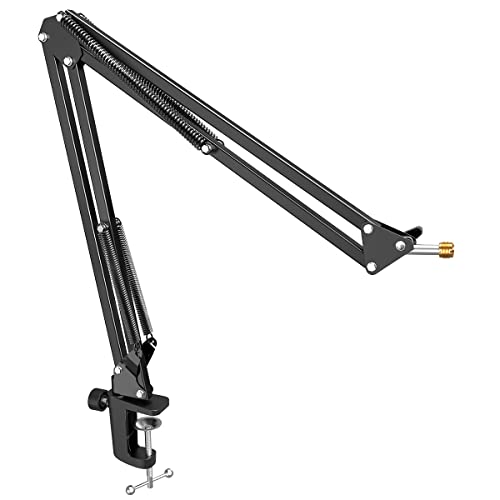
FIFINE BM88 Low Profile Microphone Boom Arm Stand for Gaming

| Material | All-metal construction |
| Reach (fully extended) | 29 inches |
| Rotation and Tilt Range | Vertical tilt up to 220°, horizontal rotation 360° |
| C-clamp Compatibility | Desktop thickness 0.8–2.4 inches |
| Thread Adapters Included | 1/4” to 3/8” adapter and 3/8” to 5/8” adapter pre-attached on rotatable ball-head |
| Package Contents | Boom arm stand, desk clamp, rotatable ball-head, Allen wrench, user manual |
You probably think low-profile means flimsy and squeaky, right? This FIFINE BM88 proves otherwise in a surprisingly solid way.
The first thing you’ll notice is the all-metal build catching light as you nudge the arm into place.
That C-clamp grips a flat desktop firmly without leaving scratches; I gave it a couple of wiggles during a late-night gaming session and it stayed put. Even when I fully extended the arm, there was barely a tremor, which makes it feel dependable rather than wobbly theater gear.
The low-profile design is real in practice. It tucks under the bottom edge of your monitor, and I stopped worrying about obstructing my view during tense sequences.
Cable management hides cords neatly, so you’re not fighting tangled mess while calling out headshots or mic cues.
Adjustability is more versatile than I expected. With a 29-inch reach, I could position the mic just off to the side for clean voice capture without shadowing the screen.
The 220-degree vertical and 360-degree horizontal twists give you plenty of angles for different recordings, streams, or gaming setups.
Assembly is straightforward thanks to the included adapters—1/4, 3/8, and 5/8—so you don’t hunt for extra screws or threads. The rotatable ball-head makes micro-adjustments quick, and the included Allen wrench is handy for a snug fit when you muscle things into place.
In day-to-day use, it’s the quiet steadiness that stands out. It supports a podcast mic securely while you lean in during heated moments without creaking or drifting.
It’s also a solid value, given the stability, reach, and low-profile footprint at this price point.
Bottom line: if you want a budget-friendly boom arm that behaves like a mid-range staple, the BM88 earns its keep in both form and function. It feels like it’s built to last through long streams and heavy sessions without drama.
InnoGear Boom Arm Mic Stand for Blue Yeti / Black

- ✓ Solid, heavy‑duty feel
- ✓ Smooth movement
- ✓ Good desk clamp
- ✕ Limited high‑end polish
- ✕ Basic mic clip included
| Load Capacity | 3.3 lb / 1.5 kg |
| Adjustment Range | 360° base rotation; 135° back-and-forth extension; 180° arm shaft; 270° microphone adapter |
| Material | Steel construction with heavy-duty springs |
| Desk Clamp Compatibility | Fits square desk edges up to 2 inches thick |
| Microphone Compatibility | Standard 5/8″-thread mic clip with 3/8″ adapter; supports Blue Yeti, Snowball, Shure SM58, SM7B, HyperX QuadCast, and similar mics |
| Product Dimensions/Weight (Approximate) | Not explicitly stated; designed as compact, foldable boom arm for space-saving storage |
The first time I clamped this InnoGear boom arm to my desk, I watched the arm swing up just enough to clear my keyboard, then lock it in place with a quiet click. It felt sturdy right away, like it wasn’t going to droop mid‑recording just because I shifted a bit.
I pulled the 360° base rotation and tested the 135° back-and-forth extension, noticing how smooth the movement stayed even after a few quick position changes. You don’t hear creaks or see any spring stutter, which is a nice contrast to some bargain arms I’ve used that sound like they’re coming apart at the joints.
The 180° up-and-down movement gives you real flexibility without needing to reclip the mic. My Blue Yeti sat balanced and level, even when I nudged the arm to capture a different angle for a quick on‑air note.
The 270° adapter threads in cleanly, so swapping in a different mic isn’t a hassle on a late‑night recording run.
At first glance, the steel build feels heavy enough to stay put on a busy desk. The load rating surprised me—it’s comfortable with a standard dynamic mic, and I didn’t have to re-tighten the clamp after several sessions.
It folds away neatly and pulls back into action with almost no effort, which is perfect for a small home setup.
One practical win is how the clamp handles flat desk edges up to 2 inches thick. It grips securely without marring the surface, which I appreciated after rearranging cable routes mid‑session.
If you’re upgrading from a lighter arm, you’ll notice the difference in stability and one‑hand adjustability.
Bottom line: for under $20, you get a capable, space‑savvy mic arm that handles everyday podcasting or streaming without feeling like a temporary fix. It won’t replace a premium arm, but it does what you need when you’re dialing in sound and space on a budget.
FIFINE CS1 Scissor Mic Boom Arm Stand for Gaming/Podcast
- ✓ Strong desk clamp
- ✓ Smooth, stable arm
- ✓ Foldable, portable
- ✕ Not the sturdiest option long-term
- ✕ Desk thickness limit (2″) discussion
| Clamp Compatibility | Desk clamp supports desktops up to 2 inches thick with anti-scratch pad |
| Arm Rotation / Reach | 180-degree up/down adjustment with wide extension for full mic positioning |
| Material & Durability | Sturdy metal construction with strong elastic springs for stability |
| Mounting Adapter | Includes 5/8 inch to 3/8 inch metal adapter for mic attachment |
| Portability & Storage | Foldable arm design for compact storage and easy transport |
| Compatibility Notes | Compatible with FIFINE USB/microphone models such as K669B, K670, K683A, K658, K688, AmpliGame (A6V, A8); mics not included |
The moment I clipped this FIFINE CS1 boom arm onto the desk, I felt the difference in build quality right away. That upgraded desk clamp with its anti-scratch pad and wider 2″ mouth actually stays put, even when I yank the mic closer for a personal, intimate voice track.
The arm extends smoothly, and the 180° swivel means I can pull the mic right up to my mouth without fighting gravity. It feels sturdy in use, and the springs respond with a controlled bounce rather than a loose flop.
Attaching the mic via the included adapter is straightforward, so you’re not wobbling around trying to thread tubes.
One of the biggest wins is the foldable design. It tucks neatly when I’m not recording and frees up desk space without feeling flimsy.
When I do need to move it, the whole setup feels portable enough to drop into a backpack without worry.
I can see this being a real lifesaver for any beginner streamer or podcaster who doesn’t want to drop a fortune. The 5/8″ to 3/8″ adapter covers a bunch of mics, including common FIFINE models, so you’re not shopping for adapters after you’ve made the purchase.
If you’re tight on desk space but want real flexibility, this is a smart compromise. It’s not the tallest or the most premium-feeling arm, but for $16.99 it checks more boxes than you’d expect.
RØDE PSA1+ Studio Boom Arm with Spring Damping (0.25–1.2kg)

- ✓ Quiet damping
- ✓ Solid desk clamp
- ✓ Clean cable routing
- ✕ Slightly heavy
- ✕ Limited color options
| Clamping Capacity | Desk thickness up to 70 mm |
| Weight Range Supported | Microphone 0.25 kg to 1.2 kg (including shock mounts) |
| Rotation | 360° swivel |
| Reach/Extension | Full extension reach (explicit length not stated; designed for wide reach) |
| Damping System | Internal spring damping for silent mid-recording movement |
| Mount Compatibility | Integrated 3/8 inch and 5/8 inch mic mount adapters; includes thread adaptors |
Pros
– Quiet damping
– Solid desk clamp
– Clean cable routing
Cons
– Slightly heavy
– Limited color options
FIFINE AmpliGame AM8T XLR/USB Gaming Microphone Set,

- ✓ Solid build, sturdy arm
- ✓ Plug-and-play USB
- ✓ Flexible USB/XLR use
- ✕ XLR cable not included
- ✕ Clamping depth limited
| Connectivity | USB (plug-and-play) and XLR |
| MicrophoneType | Dynamic microphone |
| PolarPattern | Cardioid |
| IncludedAccessories | Boom arm stand, C-Clamp, 8.2 ft USB-C cable, User’s Manual |
| DeskClampCompatibility | Desktop thickness up to 2 inches |
| PackageNotes | XLR cable not included |
I tucked the AM8T onto the desk and immediately noticed the metal arm’s heft—not flimsy at all. The first plug-in revealed how snappy the USB setup is, just plug and play, no driver hunt required.
The boom arm feels sturdy as you adjust it, with smooth, responsive tension in the springs. It holds the mic position well without drifting, which makes long sessions feel more like a chat than a tug-of-war with your gear.
The RGB ring glows subtly but still spices up the setup, and I appreciate the quick RGB button for a fast switch without diving into software. It’s a small touch that makes streaming feel more polished without extra fuss.
Positioning the mic is a breeze thanks to the included C-clamp and the flexible arm length. The XLR option is a nice plus, giving you a legit path to a mixer or sound card if you ever upgrade your setup.
The microphone’s cardioid pattern does a good job of focusing on voice and cutting room noise. In a busy room, you’ll notice less echo and fewer distractions compared to a basic USB mic.
For real-world use, I tested it during a couple of longer gaming sessions and a quick podcast take. The mute button and gain knob are handy on the fly, so you stay in the moment without fumbling.
If you’re building a budget streaming rig, this kit hits the sweet spot. It delivers solid sound, simple setup, and the versatility of USB plus XLR—without breaking the bank.
The included USB-C cable length is generous, and the overall footprint keeps your desk from feeling crowded. It’s a calm, capable package that won’t outgrow you in a year.
What Should You Look for When Choosing an Affordable Boom Arm?
When choosing an affordable boom arm, consider the following factors:
- Weight Capacity: Look for a boom arm that can support the weight of your microphone and any accessories. Most affordable options typically have weight limits ranging from 2 to 5 pounds, which is sufficient for standard microphones.
- Build Quality: The material and construction of the boom arm are crucial for durability. Opt for metal or high-quality plastic models that can withstand regular use without bending or breaking.
- Adjustability: A good boom arm should offer multiple points of adjustment, allowing you to position your microphone comfortably. This includes features like swivel and tilt adjustments for optimal placement during recording or streaming.
- Mounting Options: Ensure that the boom arm is compatible with your desk or audio setup. Look for options that offer a sturdy clamp or screw mount to securely attach to your workspace.
- Noise Isolation: Some boom arms come with built-in features to reduce handling noise. This is advantageous for recording as it minimizes unwanted sounds that could affect audio quality.
- Ease of Installation: Choose a boom arm that is simple to set up and adjust. Clear instructions and included mounting hardware can save you time and frustration during installation.
- Price vs. Features: Compare different models to find the best value for your budget. While affordability is key, ensure that the features provided meet your recording needs without compromising quality.
How Can Material Quality Impact Your Boom Arm Choice?
- Aluminum: Aluminum boom arms are lightweight yet sturdy, making them easy to maneuver and handle. They resist rust and corrosion, which is beneficial for long-term use, especially in various environments.
- Steel: Steel boom arms offer superior strength and stability, capable of supporting heavier microphones or equipment without bending. However, they can be heavier than aluminum options, which may affect portability.
- Plastic or Composite Materials: Boom arms made from high-quality plastic or composite materials can be affordable and lightweight, making them ideal for casual use. However, they may lack the durability and stability of metal options, especially under heavy loads.
- Wood: Wooden boom arms provide a unique aesthetic appeal and can absorb vibrations, resulting in clearer audio quality. While not as common, they can be quite sturdy if constructed well, but they may be heavier and less portable than metal counterparts.
- Finish and Coating: The finish on a boom arm, whether powder-coated or anodized, can influence its resistance to scratches and wear. A good finish not only enhances durability but also contributes to the arm’s overall appearance and longevity.
What Weight Capacity Is Ideal for Your Microphone Setup?
Boom Arm Stability is essential to prevent microphone droop or movement, which can disrupt audio quality. A boom arm with an adequate weight capacity will maintain its position, allowing for consistent performance.
Adjustability and Reach are important features that enhance usability; a boom arm that can hold your microphone firmly while allowing for easy repositioning will significantly improve your workflow. This means selecting a model that not only holds your microphone but also accommodates any added weight from accessories.
Durability and Material are significant because a well-constructed boom arm is more likely to withstand the test of time and regular use. Choosing materials like steel or high-grade aluminum ensures that the boom arm can support a higher weight capacity without bending or breaking.
What Are the Top Affordable Boom Arms on the Market?
The Gator Frameworks Microphone Boom Stand is designed for artists and podcasters who need a portable option. Its lightweight frame and collapsible design make it easy to transport without sacrificing quality or stability.
The Samson MBA38 Adjustable Microphone Boom Arm offers an impressive reach and flexibility, making it suitable for both desktop and studio setups. Its sturdy construction ensures that it can hold heavier microphones securely, while the adjustable clamps allow for easy attachment to various surfaces.
The Heil Sound PL-2T Boom Stand stands out for its high-quality materials and professional-grade performance. It features a unique cable management system that reduces clutter and keeps your workspace organized, making it a favorite among serious content creators.
How Do Customer Reviews Influence Your Selection of Boom Arms?
Customer reviews play a crucial role in selecting the best affordable boom arms by providing insights into real user experiences and product performance.
- Quality of Build: Reviews often highlight the durability and sturdiness of a boom arm, indicating whether it can withstand regular use without breaking or wearing down. Users typically mention materials used, such as metal versus plastic, which can directly impact the longevity of the product.
- Ease of Use: Many customers share their experiences regarding the setup and adjustment of boom arms. Positive reviews will often describe a user-friendly design that allows for quick adjustments, while negative feedback may point out complicated installation processes or issues with stability during use.
- Compatibility: Customer feedback frequently addresses how well a boom arm works with various microphones and other equipment. Reviews can provide insights into whether a product is versatile enough to accommodate different setups, which is essential for users with specific needs.
- Value for Money: Reviews often discuss whether a boom arm delivers good performance relative to its price. Customers may compare it to more expensive models, sharing whether they feel satisfied with the quality and features considering the cost, which helps others gauge the affordability aspect.
- Customer Support: Many reviews touch on the level of support provided by the manufacturer, including warranty information and customer service responsiveness. A positive reputation for support can significantly influence a buyer’s decision, as it reflects the company’s commitment to its customers.
How Do You Set Up an Affordable Boom Arm Correctly?
Setting up an affordable boom arm correctly involves several key steps to ensure optimal performance and stability.
- Choosing the Right Location: Select a sturdy surface that can support the boom arm’s weight and any attached equipment. Ensure the area has enough space for the boom arm to extend and maneuver without obstruction.
- Assembling the Boom Arm: Follow the manufacturer’s instructions to assemble the boom arm, ensuring all screws and fittings are tightened. Make sure to attach any necessary clamps securely to avoid accidental slips or falls.
- Attaching the Microphone or Equipment: Once assembled, securely attach your microphone or other equipment, using shock mounts if available. This will help minimize vibrations and noise interference during use.
- Adjusting Angle and Height: Adjust the boom arm to your preferred angle and height for comfort and accessibility. Ensure that it is balanced and not leaning to one side to maintain stability.
- Cable Management: Organize and secure any cables using cable ties or clips to prevent tangling and ensure a clean setup. This not only enhances the aesthetic but also reduces the risk of accidental disconnections.
- Testing Stability: Before use, gently test the stability of the setup by moving the boom arm to different positions. Make any necessary adjustments to tighten any loose fittings and ensure everything remains secure during operation.
What Common Mistakes Should You Avoid When Setting Up a Boom Arm?
Neglecting cable management can detract from the professionalism of your workspace and create potential safety hazards. Keeping cables organized not only improves aesthetics but also prolongs the life of your equipment by preventing wear and tear.
Ignoring the environment in which you set up your boom arm can lead to poor audio quality, particularly if there are echoes or background noise. Assessing the acoustics of your space and minimizing distractions will enhance the effectiveness of your recordings.
Choosing the wrong boom arm can lead to frustration and wasted time. It’s vital to select a boom arm that meets the specific requirements of your equipment, ensuring it can handle the weight and reach needed for your setup.
What Advantages Do Affordable Boom Arms Offer Over Standard Microphone Stands?
Affordable boom arms provide several advantages over standard microphone stands, enhancing usability and flexibility for various audio needs.
- Space Efficiency: Affordable boom arms are designed to extend and retract, allowing users to position their microphones closer to their mouths while keeping their setups tidy.
- Adjustability: Many affordable boom arms feature multiple joints that enable easy adjustments in height and angle, providing optimal positioning for recording or streaming.
- Reduced Floor Space Usage: By mounting to a desk or table, boom arms free up valuable floor space, making them ideal for smaller workstations or studios.
- Increased Stability: Boom arms typically offer a more stable platform for microphones, minimizing vibrations and movement that could interfere with audio quality.
- Convenient Cable Management: Many boom arms come with built-in cable management solutions, helping to keep audio cables organized and preventing tangling or damage.
Space efficiency allows users to position the microphone closer without cluttering their workspace, essential for maintaining a professional look. The adjustability of boom arms means users can easily tailor their setup to suit different recording situations, enhancing convenience.
By mounting to a surface, boom arms eliminate the need for bulky stands that take up floor space, which can be a significant advantage in compact environments. Increased stability is crucial for achieving high-quality recordings, as it reduces the risk of unwanted noise from handling or vibrations.
Finally, convenient cable management features are a significant plus, preventing cable clutter and ensuring a clean and organized setup, which is particularly beneficial for content creators and musicians alike.
How Can Using a Boom Arm Improve Your Audio Setup?
Using a boom arm can significantly enhance your audio setup by providing stability, flexibility, and improved sound quality.
- Stability: A boom arm allows you to securely mount your microphone, reducing the risk of unwanted vibrations and handling noise during recordings.
- Flexibility: With adjustable positioning, a boom arm enables you to position your microphone at the optimal angle and distance from your mouth, ensuring clear and consistent audio capture.
- Space Management: Boom arms help declutter your workspace by elevating the microphone off the desk, freeing up valuable surface area for other equipment or paperwork.
- Professional Appearance: Using a boom arm can give your setup a more polished and professional look, which is especially beneficial for video content creators or podcasters.
- Compatibility: Many boom arms are designed to be compatible with various microphones and accessories, making them versatile additions to your audio setup.
Stability is crucial in audio recording, as any movement can introduce noise that detracts from the quality of your sound. A boom arm minimizes this risk by securely holding the microphone in place, which is especially important during long recording sessions.
Flexibility is another significant advantage; being able to adjust the height and angle of your microphone allows you to find the perfect sound capture position. This ensures that your voice is always at the right distance, reducing audio distortion or muffling.
Space management is vital for maintaining an organized work environment. By mounting the microphone on a boom arm, you can keep your desk clear, allowing for better workflow and minimizing distractions during recording.
A professional appearance can enhance the credibility of your recordings, particularly for content creators looking to attract viewers or listeners. A well-placed boom arm can make your setup look more intentional and serious, helping you to engage your audience more effectively.
Finally, compatibility is key when selecting a boom arm. Many models can accommodate various microphones, pop filters, and shock mounts, giving you the flexibility to adapt your setup as your audio needs evolve.
How Should You Maintain Your Boom Arm for Longevity?
To ensure the longevity of your boom arm, consider the following maintenance practices:
- Regular Cleaning: Keeping your boom arm clean is essential to avoid dust and grime buildup, which can affect its functionality. Use a soft, damp cloth to wipe down the arm and joints, and avoid harsh chemicals that could damage the finish.
- Check Tightness: Over time, screws and clamps can loosen due to regular use. Periodically check and tighten any loose screws or knobs to maintain stability and prevent unwanted drooping or movement during use.
- Lubrication: Applying lubricant to the moving parts of the boom arm can enhance its performance and reduce wear. Use a silicone-based lubricant or a light machine oil on the joints and hinges to ensure smooth operation.
- Avoid Overloading: Each boom arm has a specific weight capacity; exceeding this can lead to structural damage. Always adhere to the manufacturer’s guidelines regarding weight limits to avoid compromising the arm’s integrity.
- Proper Storage: When not in use, store your boom arm in a safe position to prevent accidental falls or bends. If possible, keep it in a protective case or hang it to avoid putting unnecessary stress on the joints and clamps.
What Routine Checks Should You Perform to Ensure Performance?
To ensure optimal performance of your boom arm, consider the following routine checks:
- Stability Check: Regularly inspect the boom arm for any wobbling or instability during use.
- Weight Distribution: Ensure that the weight of your microphone or other equipment is evenly distributed to prevent tipping.
- Joint Tightness: Periodically check the tightness of all joints and knobs to ensure they hold their position securely.
- Cable Management: Inspect the cable organization to prevent tangling or damage that can affect audio quality.
- Surface Damage: Look for any signs of wear or damage on the boom arm’s surface that could impair functionality.
Stability Check: A stable boom arm is crucial for consistent audio quality. If you notice any wobbling, it could affect your recordings or broadcasts, so address any issues by tightening connections or adjusting the base.
Weight Distribution: Proper weight distribution is essential to prevent the boom arm from tipping over. Verify that your microphone or equipment is securely mounted and balanced to maintain stability during usage.
Joint Tightness: Over time, the joints and knobs of your boom arm may loosen, leading to difficulties in positioning. Regularly check and tighten these components to ensure they can securely hold your equipment at the desired angles.
Cable Management: Good cable management is vital for both aesthetics and function. Check that cables are neatly organized and secured to prevent any tangles or potential damage that could lead to audio issues.
Surface Damage: Inspect your boom arm for scratches, dents, or other damages that could affect its performance or appearance. Maintaining the integrity of the boom arm ensures it functions properly and lasts longer.
Related Post: