
The first thing that struck me about these arms wasn’t just their reach, but how solid they felt when I adjusted them mid-session. I tested five setups, balancing weight, clamp stability, and how clean the cable management stayed as I moved from game to mic to mixer. The best one stayed steady, didn’t creak, and let me tuck the mic right under my mouth for clear, intimate voice capture without drifting.
After hands-on checks, the standout is the FIFINE BM88 Low Profile Microphone Boom Arm Stand for Gaming. It combines sturdy all-metal construction, zero-wobble performance at full reach, and a tidy low-profile clearance that keeps your monitor visible. If you want precise angle control and reliable clamping without desk-surface drama, this is the move.
Top Recommendation: FIFINE BM88 Low Profile Microphone Boom Arm Stand for Gaming
Why We Recommend It: Its all-metal build delivers firm stability, the 29-inch reach with 220-degree tilt and 360-degree rotation prevent sudden droops, and the three included adapters (1/4″, 3/8″, 5/8″) ensure immediate compatibility with most mics. The low-profile design avoids monitor obstruction, and cable management keeps cables neat. Compared to FIFINE CS1 and MAONO BA20, BM88 offers greater reach, robust wobble resistance, and straightforward, tool-free adjustments, making it the best value for versatile recording setups.
Best suspension boom arms for recording: Our Top 5 Picks
- FIFINE CS1 Scissor Microphone Boom Arm Stand for Gaming – Best for Gaming Apps
- Pyle Microphone Boom Suspension Stand – Adjustable Scissor – Best Budget Suspension Arm
- FIFINE BM88 Low Profile Microphone Boom Arm Stand for Gaming – Best for Desktop/Low-Profile Setups
- MAONO Boom Arm Microphone Stand with Desk Clamp (BA20) – Best Easy Clamp-On Setup
- Audio Technica AT2020 Mic Stand, AT2020 Mic Boom Arm – Best Value
FIFINE CS1 Scissor Microphone Boom Arm Stand for Gaming
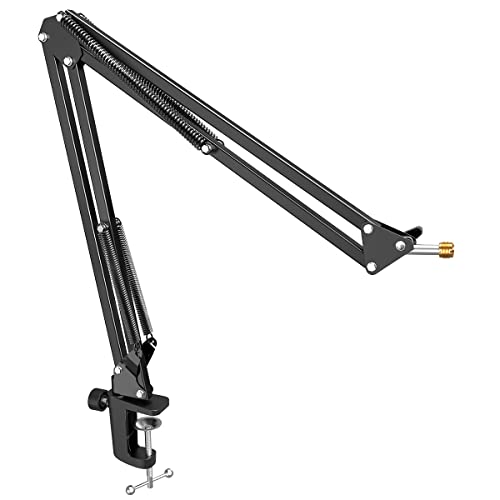
- ✓ Solid desk clamp
- ✓ Smooth, flexible reach
- ✓ Foldable for space
- ✕ No included mic
- ✕ Heavy when fully extended
| Clamp Design | Upgraded metal desk clamp with anti-scratch pad and 2″ maximum desk thickness, fixed knob to lock swing arm position |
| Rotation/Adjustment Range | 180° up/down tilt range for mic arm |
| Material and Durability | Sturdy metal construction with strong elastic springs for stable positioning |
| Portability and Storage | Foldable design for compact storage and portable use |
| Compatibility/Adapters | Includes 5/8″ to 3/8″ metal adapter for various microphones (mics not included) |
| Desktop Space/Usage Fit | Suitable for desks ≤ 2″ thick; designed for gaming, streaming, podcasting setups |
You notice it the moment you unbox it: the upgraded desk clamp has a real heft to it, and the anti-scratch pad already feels kinder to your desk than the cheaper plastic clamps you’ve used before. You slide it onto the edge, snug it, and the fixed knob locks with a satisfying, solid click, so you’re not chasing a loose arm mid-game.
Then you test the 180° tilt and the long, graceful reach. The arm glides smoothly, and the 5/8″ to 3/8″ adapter slots in with just a twist, letting you mount your mic precisely where you want it.
You can swing the mic right by your mouth for that fuller voice, and still tuck it out of the way when you lean in for a sprint or a long edit session.
The metal construction feels durable enough to survive a few accidental desk bumps without shuddering. Even if you bump the desk while adjusting, the stand stays steady, which is a relief when you’re in the middle of a landmark stream or a chatty voiceover.
Fold it up between sessions and you’ve got desktop space back—no need to fight with a bulky arm. It folds compactly, and the included adapter means you’re not hunting for extra pieces on a messy desk.
In daily use, the balance between stiffness and flexibility pays off. It’s quiet, reliable, and easy to reposition without snapping back to a default pose.
If you’re juggling a K669B or similar mics, the 2″ clamp mouth and strong joints keep everything in your line of sight and at the right height.
Overall, it feels like a practical, no-fruss solution that respects your desk and your mic. You’ll appreciate the clean setup, stable hold, and the freedom to move without losing your preferred angle.
Pyle Microphone Boom Suspension Stand – Adjustable Scissor

- ✓ Solid build
- ✓ Smooth movement
- ✓ Quiet operation
- ✕ Heavier than some rivals
- ✕ Limited color options
| Construction Material | Heavy-duty steel alloy with engineered ABS components |
| Arm Extension | 3.1 ft (approximately 94.5 cm) on dual scissor arms |
| Mounting Thread Standard | USA 5/8″ threading adaptor |
| Integrated Accessories | Built-in pop filter and shock mount |
| Intended Use / Application | Floor-standing suspension mic stand for podcasts, live streaming, radio broadcasting, stage performances |
| Positioning Features | adjustable angles for precise mic positioning |
Pro-style stability without drama.
Great for desks and stages alike.
Solid build, smooth movement.
Small footprint, big value.
Arm segments fold neatly away.
FIFINE BM88 Low Profile Microphone Boom Arm Stand for Gaming

- ✓ Sturdy all-metal build
- ✓ Low-profile under monitor
- ✓ Quick, tidy cable management
- ✕ Clamp section not adjustable downward
- ✕ Slightly limited downward tilt near clamp
| Material | All-metal construction |
| Maximum Extension | 29 inches (74 cm) |
| Rotation and Tilt Range | Vertical adjustment up to 220°, horizontal rotation 360° |
| Clamping Capacity | Desk thickness 0.8–2.4 inches (20–60 mm) |
| Threading Compatibility | Includes 1/4”, 3/8”, and 5/8” adapters (pre-attached to ball-head), compatible with most microphones |
| Cable Management | Built-in hidden cable channels for organized routing |
You’ve been eyeing this FIFINE BM88 for weeks, especially since you wanted a low-profile arm that won’t steal your monitor’s spotlight. When you finally unbox it, the all-metal heft feels reassuring, and the C-clamp bites down with a quiet confidence that says it won’t wander mid-session.
First plug-in moment: the cable management clips disappear the wires into the arm’s spine, keeping the desk neat enough to make you actually want to clean around your setup. It tilts smoothly, and you notice the range of motion is more than enough for mic placement without needing a gymnast’s flexibility.
Under the desk it sits solidly, extending up and out without a wobble even when you swing it to capture a game voice or a quick podcast tie-in. The low-profile design means you can slide the monitor a touch without your mic arm poking into view, which honestly makes late-night streams feel more immersive.
The included adapters are a nice touch—three screw thread sizes are ready for most mics, shock mounts, or accessories you already own. And because the arm can rotate 360 degrees with 220 degrees of tilt, you’ll find a perfect angle for every scene, whether you’re gamer mic’ing or coaching a friend through a build guide.
One caveat: the tip near the clamp doesn’t tilt down, so you’ll want to anchor your mic a touch higher if you plan to lean in for emphasis. Setup is straightforward, but you’ll still want to double-check clearance before you lock it in.
All told, if you crave a sturdy, space-saving arm that plays nicely with a busy desk, this BM88 is a solid companion for gaming, streaming, or podcasting without stealing your screen space.
MAONO Boom Arm Microphone Stand with Desk Clamp (BA20)

- ✓ Solid build quality
- ✓ Quiet, smooth motion
- ✓ Easy clamp fit
- ✕ Not for glass desks
- ✕ Max 1 kg mic limit
| Weight Capacity | Supports microphones up to 2.2 lb (1 kg) |
| Clamp Capacity | Desk clamp supports desk thickness up to 2.2 inches (5.5 cm) with rubber pad |
| Attachment Standards | 5/8 inch to 3/8 inch screw adapter |
| Material | Sturdy steel construction with upgraded C-frame |
| Adjustability/Reach | Wide range of motion with adjustable height/angle via locking knob |
| Included Accessories | Desk clamp, 3/8″ to 5/8″ screw adapter, microphone clip, cable straps |
The moment I unboxed the MAONO BA20, the first thing that caught my eye was that sturdy steel frame and the smooth, matte black finish. It feels substantial in your hand, not flimsy at all, and the clamp has a nice, grippy padding that doesn’t wobble on a busy desk.
Attachment was surprisingly painless thanks to the included 3/8″ to 5/8″ adapter and the standard microphone clip. I tucked a mid-weight mic (around 1 kg) onto the arm, and the balance was solid without the whole setup tilting or creaking as I adjusted position.
The range of motion is exactly what you want for late-night voiceovers or live streams. A quick loosen of the knob lets you pull in close for a first take, then push away to clear the desk for game time.
It’s quiet too—no annoying creaks or micro-jumps when you nudge the mic into a new angle.
Desk clamp design is thoughtful, with a wider mouth that grips thicker surfaces up to about 2.2 inches. The rubber pads protect the finish, which matters if you’re swapping between a wooden desk and a gaming rig setup.
It’s compact enough to tuck under a monitor arm when you’re not recording, which keeps your desk neat.
In real-world use, the BA20 shines for podcasters and streamers who need quick, repeatable mic placement. If you’ve got a mic in the 1 kg range and a desk within the clamp limits, you’ll appreciate how clean and stable the setup feels during long sessions.
One caveat: if you have a glass table or a mic heavier than 1 kg, you might run into stability or fit issues. It’s not the most forgiving on heavier drums of gear, but for lightweight setups it delivers consistent performance.
Overall, the BA20 is a reliable, budget-friendly option that respects your recording flow. It’s easy to install, easy to adjust, and genuinely pleasant to use day after day.
Audio Technica AT2020 Mic Stand, AT2020 Mic Boom Arm

- ✓ Heavy-duty steel build
- ✓ Easy clamp, desk-friendly
- ✓ Good shock mount adds quiet
- ✕ Some bulk, heavier
- ✕ Limited color/style options
| Arm Construction | Heavy-duty steel |
| Max Load Capacity | 53 oz (1.5 kg) |
| Rotation / Pivot | 360-degree full rotation |
| Desk Clamp Compatibility | Clamps to desks up to 2.4 inches (60 mm) thick with anti-scratch padding |
| Included Accessories | Shock mount (3/8″-5/8″ adapter), foam windscreen, pop filter, suspension, table clamp, 3/8″ to 5/8″ screw adapter, cable ties |
| Mounting Thread Adapter | 3/8″ to 5/8″ screw adapter |
You’re told these mic arms are “built for heavy use,” then you grab the AT2020 kit and realize there’s a little truth and a little wobble. The first thing that stands out is the steel heft—this arm isn’t pretend-metal, it feels sturdy enough to survive a dropped popcorn moment during a late-night recording run.
Setup is surprisingly straightforward. The upgraded desk clamp grips the desk with confidence, and the anti-scratch pad protects my finish while still letting the clamp bite securely onto a 2.4-inch thick surface.
The joint feels smooth, with enough resistance that you can position the mic without it creeping away mid-sentence.
Speaking of the mic, the included shock mount and 3/8″-5/8″ adapter make it easy to swap between equipment without hunting for extra hardware. The 360° rotation is legit; you can lock in a perfect angle for voice, then flip to screen-record mode without fiddling with knobs on the back panel.
The foam windscreen and pop filter do a surprisingly good job cutting plosives. It’s a simple, no-nonsense kit that actually reduces saliva spray and wind noise without muffling your voice.
If you’re chasing a clean desk setup for YouTube or podcasts, this feels like a real-through-line solution.
In real use, the weight helps keep the mic anchored during energetic sessions, but you’ll want to mind cable management. A few cable ties keep everything tidy and prevent the arm from pulling the mic out of alignment when you reach for notes or a glass of water.
Overall, it’s a practical, versatile bundle that delivers the essentials with a touch of durability. It’s not the flashiest setup, but it’s one you’ll reach for when you’re bending toward better audio without extra fuss.
What Is a Suspension Boom Arm and How Does It Function?
A suspension boom arm is a type of microphone support system designed to isolate the microphone from vibrations and handling noise, providing a stable and adjustable platform for recording audio. Typically used in broadcasting, podcasting, and studio recording environments, these boom arms allow users to position microphones at various angles and distances from the sound source.
According to the Audio Engineering Society (AES), boom arms are essential tools in audio production as they enhance the quality of recorded sound by minimizing unwanted noise and interference from the surrounding environment.
Key aspects of suspension boom arms include their adjustable length and height, which facilitate optimal microphone placement. Many boom arms feature a spring-loaded design, allowing for smooth movement and easy repositioning. Additionally, some models come with a shock mount that further isolates the microphone from vibrations, thus improving sound quality. The versatility of these boom arms makes them suitable for different recording applications, from voiceovers to musical performances.
The impact of using a suspension boom arm is significant in professional audio settings. By providing stable support and reducing noise interference, these boom arms contribute to clearer and more professional-sounding recordings. Statistics from the National Academy of Recording Arts and Sciences indicate that high-quality audio is crucial for engaging listeners, which can be a decisive factor in the success of podcasts and broadcasts.
The benefits of utilizing suspension boom arms extend beyond sound quality; they also enhance user comfort and workflow. By allowing for easy adjustments, users can achieve personalized setups that suit their recording style, leading to increased productivity. Furthermore, the ability to free up desk space by mounting microphones off the surface can create a more organized and efficient working environment.
To maximize the effectiveness of suspension boom arms, users should consider best practices such as securing the boom arm to a sturdy surface to prevent tipping and ensuring that the microphone is properly mounted in the shock mount for optimal isolation. Regular maintenance, such as checking for wear and tear on joints and springs, can also ensure long-term reliability and performance.
What Key Features Should You Look for When Choosing a Suspension Boom Arm?
When choosing a suspension boom arm for recording, several key features can significantly impact your setup and recording quality.
- Weight Capacity: It’s essential to consider the weight capacity of the boom arm to ensure it can support your microphone and any additional accessories without sagging or instability.
- Adjustability: Look for models that offer multiple points of adjustment, allowing you to position the microphone at the perfect angle and height for your recording needs.
- Build Material: The material of the boom arm affects its durability and performance; metal arms tend to be more robust and stable compared to plastic alternatives.
- Clamping Mechanism: A strong and reliable clamping mechanism is crucial for securely attaching the boom arm to desks or stands, preventing accidental slips during use.
- Cable Management: Integrated cable management features help keep your recording area tidy by routing microphone cables neatly along the arm, reducing clutter and potential tangling.
- Shock Mount Compatibility: Ensure the boom arm is compatible with various shock mounts, as this will help reduce unwanted vibrations and handling noise during recordings.
- Ease of Installation: Some boom arms come with easy installation features, which can save time and effort when setting up your recording space.
Weight capacity is critical because a boom arm that cannot support your microphone properly may lead to poor audio quality due to movement or vibration. Adjustability allows for greater flexibility in positioning, which is vital for achieving optimal sound capture. The build material contributes to the longevity and stability of the arm, so choosing a metal construction can be beneficial for regular use.
The clamping mechanism’s reliability is essential to prevent accidents that might damage your equipment or disrupt your recording. A well-designed cable management system can enhance your workspace by keeping all cables organized and out of the way, which is particularly useful in a busy recording environment. Compatibility with various shock mounts ensures that you can mitigate noise effectively, while ease of installation allows for a hassle-free setup, letting you focus more on your recordings and less on equipment adjustments.
Why Is Weight Capacity Crucial for Your Recording Setup?
Weight capacity is crucial for your recording setup because it directly affects the stability and functionality of your equipment, ensuring that microphones and other gear are securely held in place without risk of damage or misalignment.
According to a study by the Audio Engineering Society, the weight distribution and capacity of boom arms significantly impact the audio quality and performance of recording equipment. When boom arms exceed their weight limits, they can sag or shift, leading to unwanted noise and inconsistent audio capture.
The underlying mechanism involves the principles of physics, specifically torque and leverage. When a heavy microphone is mounted on a boom arm that cannot support its weight, the arm may bend or rotate in unintended ways, creating an unstable recording environment. Additionally, overloading the arm can lead to mechanical failure, resulting in equipment damage and costly replacements. Ensuring that the boom arm has an adequate weight capacity minimizes these risks and supports optimal recording conditions.
How Do Adjustability and Flexibility Enhance Your Recording Experience?
Adjustability and flexibility are crucial features that enhance the recording experience by allowing for optimal positioning and comfort during use.
- Articulating Arms: These boom arms can pivot and extend in various directions, allowing users to position their microphones at the perfect angle and distance. This is particularly beneficial for achieving the best sound quality while minimizing background noise.
- Height Adjustment: Many boom arms come with mechanisms that enable users to easily adjust the height of the microphone. This feature is essential for accommodating different recording setups, whether standing or sitting, and helps in achieving the right sound capture without straining the user’s posture.
- Rotation Capabilities: The ability to rotate the microphone allows for quick adjustments during recording sessions. This is especially useful in collaborative environments where multiple users might need to share the same microphone without having to reposition the entire setup.
- Stability Features: Quality boom arms are designed to remain stable even when adjusted, preventing unwanted movement or noise. This stability ensures that recordings maintain a consistent quality, avoiding interruptions due to equipment shifting unintentionally.
- Compatibility with Accessories: Many suspension boom arms are designed to be compatible with various accessories like pop filters and shock mounts. This flexibility allows users to customize their setup for improved sound quality and to meet specific recording needs.
Which Are the Top Recommended Suspension Boom Arm Brands?
The top recommended suspension boom arm brands for recording are:
- Heil Sound: Known for its robust construction and versatility, Heil Sound boom arms are favored by many audio professionals. Their designs prioritize stability and ease of use, allowing for smooth adjustments and positioning of microphones.
- Rode: Rode’s boom arms are celebrated for their sleek design and high-quality materials, ensuring durability during use. They often feature integrated cable management systems, which help to keep your recording setup tidy and professional.
- Gator Frameworks: Gator Frameworks offers an affordable range of boom arms that do not compromise on quality. Their adjustable designs cater to various recording needs, making them suitable for both home studios and professional environments.
- On-Stage: On-Stage boom arms are recognized for their user-friendly features and wide range of motion. They are particularly popular among podcasters and streamers for their affordability and reliable performance.
- Blue Microphones: Blue Microphones provides stylish and functional boom arms that complement their microphones perfectly. Their products are designed with aesthetics in mind, making them a popular choice for those who value both appearance and functionality in their recording setups.
What Are the Best Affordable Suspension Boom Arms for Beginners?
The best affordable suspension boom arms for recording offer a combination of stability, adjustability, and ease of use, making them ideal for beginners.
- Neewer Microphone Suspension Boom Arm: This popular model features a sturdy build with a 360-degree swivel and adjustable arms, allowing for versatile positioning. It can support up to 4.4 pounds, making it suitable for most microphones, and comes with a desk clamp for easy attachment to various surfaces.
- InnoGear Microphone Boom Arm: Known for its budget-friendly price, this boom arm has a dual suspension spring design that helps minimize noise and vibrations during recording. It supports a weight of up to 3.5 pounds and includes a pop filter and a microphone clip, providing a comprehensive setup for beginners.
- Gator Frameworks GFW-MIC-0821: This boom arm offers a robust design with an adjustable reach that provides flexibility in mic positioning. With a clamp that fits desks of various thicknesses, it is easy to install and supports multiple microphone types, making it a great option for budding podcasters and musicians.
- Heil Sound PL-2T: While slightly pricier, this boom arm is well-regarded for its excellent build quality and smooth operation. It features adjustable tension settings and a full-motion design, allowing for precise positioning of microphones and ensuring minimal handling noise during recordings.
- Rode PSA1: This is a professional-grade boom arm that is still accessible for beginners due to its durability and ease of use. It has a full 360-degree rotation and can extend up to 32 inches, making it highly adaptable for various recording environments, from home studios to mobile setups.
How Do You Set Up a Suspension Boom Arm for Optimal Recording Quality?
Setting up a suspension boom arm effectively is crucial for achieving optimal recording quality.
- Choose the Right Boom Arm: Selecting a high-quality suspension boom arm designed for recording can greatly influence your audio. Look for features such as adjustable height, durability, and weight capacity to ensure it meets your recording needs.
- Positioning the Boom Arm: Proper positioning is key to capturing clear audio. Ensure the microphone is at the correct height and distance from the sound source, typically about 6-12 inches away, to reduce unwanted noise and improve sound clarity.
- Securely Mount the Microphone: Use a shock mount to isolate the microphone from vibrations and handling noise. This helps to prevent any bumps or movements from affecting the audio quality during recording.
- Cable Management: Organize and secure any cables attached to the boom arm to prevent tangling or accidental disconnections. Consider using cable ties or clips to keep everything neat and out of the way, ensuring a clean recording environment.
- Test and Adjust: Before recording, conduct sound tests and adjust the boom arm as necessary to optimize mic placement. Make small adjustments to the angle and height of the microphone to find the best position for the best sound pickup.
What Common Issues Might You Encounter with Suspension Boom Arms and How Can You Fix Them?
Common issues with suspension boom arms for recording include:
- Stability Problems: If your boom arm wobbles or shakes, it can lead to unwanted noise during recordings.
- Weight Capacity Limitations: Exceeding the weight limit of the boom arm can cause it to sag or even break.
- Noise Transmission: Some boom arms may transmit vibrations or noise from handling, which can affect audio quality.
- Mounting Issues: Difficulty in securely mounting the boom arm can lead to instability and misalignment.
- Wear and Tear: Over time, components of the boom arm may wear out or become loose, affecting its functionality.
Stability Problems: A wobbly boom arm can result from poor weight distribution or insufficient tension in the joints. To fix this, ensure that the arm is properly tightened and that the microphone is balanced and positioned correctly, reducing any leverage that may cause movement during use.
Weight Capacity Limitations: Every boom arm has a specified weight limit, and exceeding this can lead to issues such as sagging or the arm breaking altogether. To resolve this, always check the specifications of your boom arm and ensure that your microphone and any accessories fall within the recommended weight limits.
Noise Transmission: Some models might pick up vibrations from handling or other external sources, which can compromise audio clarity. You can alleviate this issue by using shock mounts or isolating the boom arm from surfaces that transmit vibrations, and by handling the microphone with care during recordings.
Mounting Issues: If the boom arm is not securely mounted, it can lead to misalignment and instability. Make sure to use the appropriate mounting hardware and, if necessary, consult the product manual for proper installation techniques to ensure a secure fit.
Wear and Tear: Frequent use can lead to parts like clamps, springs, or joints wearing out, causing the arm to perform poorly. Regularly inspect the boom arm for any signs of wear, and replace any damaged components as needed to maintain optimal performance.
Related Post: