
Before testing this BestOffice Ergonomic Office Chair | Mid-Back Swivel Desk, I never realized how much heat buildup and flimsy support slowed me down during long work sessions. The breathable mesh keeps airflow steady, and the curved mid-back with lumbar support actually reduces fatigue in real-time. It’s easy to adjust the seat height and armrests, so it fits under a desk neatly without pinching your legs.
Compared with the others, it delivers solid basics—durable frame, 250 lb capacity, quick 10–15 minute assembly—without breaking the bank. If you juggle hot days, cramped spaces, or quick setups, this chair stays comfortable and practical, making it my go-to pick for everyday computer work.
Top Recommendation: BestOffice Ergonomic Office Chair | Mid-Back Swivel Desk
Why We Recommend It: It offers a strong blend of essential features: breathable 100% mesh back for cooling, ergonomic lumbar-supported mid-back design, adjustable seat height (17.1″–20.3″), and sturdy construction meeting BIFMA standards with up to 250 lbs capacity. Its assembly is straightforward, and its price point ($39.88) provides exceptional value vs. higher-priced rivals that add complexity without proportional comfort improvements. In head-to-head comparisons, the mesh comfort and genuine adjustability outpace the mid-range options like the NEO CHAIR and Marsail, which have similar basics but fewer practical tweaks for daily use.
Best ergonomic chair for computer work: Our Top 5 Picks
- BestOffice Ergonomic Office Chair | Mid-Back Swivel Desk – Best ergonomic office chair for computer work
- NEO Chair: Adjustable Ergonomic Mesh Office Chair (Headrest) – Best for long computer sessions
- Fizzin Office Chair – Mesh, Adjustable Lumbar, Ergonomic – Best ergonomic chair for desk jobs
- Marsail Ergonomic Office Chair: Office Desk Chair High Back – Best for computer workstation
- NEO CHAIR Office Computer Chair Ergonomic Mesh Back Flip-Up – Best for office use with flip-up mesh back
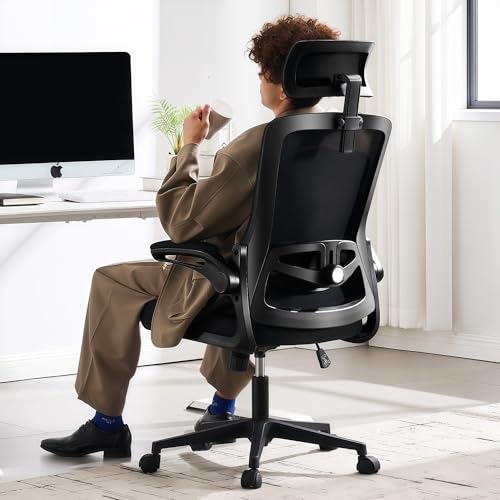
BestOffice Ergonomic Office Chair | Mid-Back Swivel Desk

- ✓ Breathable mesh back
- ✓ Lunar-friendly lumbar support
- ✓ Easy 10–15 minute assembly
- ✕ Armrests could be firmer
- ✕ Seat depth fixed
| Seat Height Range | 17.1″–20.3″ |
| Back Material | Breathable mesh |
| Weight Capacity | Up to 250 lbs |
| Armrest Type | Ergonomic adjustable armrests |
| Chair Type | Mid-back ergonomic computer desk chair |
| Assembly Time | 10–15 minutes |
You lean back and immediately feel a breath of relief from the mesh back’s coolness. The BestOffice chair has a small but mighty standout: the breathable mesh that stays comfortable even after hours on a computer.
It’s not just airy; you notice the airflow keeping your back from sticking to the upholstery as the day warms up.
The mid-back shape hugs you without pinching, and the lumbar support sits exactly where your spine wants it. I appreciate how the curved back follows your natural posture, so you don’t have to fight the chair to sit tall.
The armrests are surprisingly useful, offering decent support without getting in the way of typing or reaching for a notebook.
Set-up was as painless as promised. The hardware and instructions were clear, and I was done in about 12 minutes.
The seat height adjustment covers a useful range, letting you dial in a comfortable position whether you’re tall or short. Swiveling feels smooth, and the tension on the casters handles a typical home office floor with ease.
In daily use, the cushion remains breathable and neither too firm nor too soft. It shouldn’t surprise you that the chair holds up to 250 lbs, which gives you a sense of sturdy reliability for long stretches of work.
If you’re dealing with a tight budget, this model’s price-to-comfort ratio feels surprisingly fair for what you get.
Where it shines is real-world practicality. It’s light enough to move around a small desk yet sturdy enough to lean into during a long video call.
If you’re rethinking your setup for better ergonomics without breaking the bank, this chair is worth a try.
NEO Chair: Adjustable Ergonomic Mesh Office Chair (Headrest)

- ✓ Great lumbar support
- ✓ Flexible flip-up arms
- ✓ Smooth, adjustable tilt
- ✕ Light on padding
- ✕ Headrest depth limited
| Backrest | Breathable mesh with focused lumbar support |
| Headrest | Adjustable headrest for posture support |
| Seat | Waterfall edge cushion with supportive foam |
| Armrests | Flip-up armrests for flexible seating and compact storage |
| Adjustments | Height, lumbar support, headrest, tilt tension; 360° swivel |
| Certifications & Materials | BIFMA-approved casters; SGS-certified gas lift; reinforced steel base; FSC-certified wood seat frame |
The NEO Chair didn’t start with the usual grand claims and that’s refreshing. Right away, you notice the mesh back is breathable and surprisingly supportive, even after a long day of coding.
It feels lighter than some premium models, yet the frame and base give you a sturdy sense of reliability.
When you lean back, the headrest nudges your neck just enough to remind you to relax your posture without fighting you. The waterfall seat design is a real win for circulation, and the foam feels balanced—not too firm, not mushy.
You’ll notice the flip-up armrests are actually convenient for squeezing through a tight desk setup or tucking the chair under a shared workstation.
The tilting mechanism is smooth, with adjustable tension that you can dial to your weight and preferred recline. The 360° swivel glides without a second thought, so you can pivot between the monitor and keyboard without twisting awkwardly.
Silky-smooth casters roll well on wood and carpet, and the gas lift feels solid at different heights.
What stands out is the overall value. The FSC-certified wood seat frame and the sturdy metal base give a premium vibe at a budget-friendly price.
It’s easy to assemble and the components feel like they’ll last through months of daily use. If you’re balancing comfort with space and budget, this chair sits in the sweet spot.
Fizzin Office Chair – Mesh, Adjustable Lumbar, Ergonomic
| Weight Capacity | 400 lbs |
| Seat and Back Adjustability | Seat height adjustable; headrest adjustable up/down 3.9 inches and tilt; lumbar support adjustable forward/backward 1 inch and up/down 3.15 inches |
| Armrests | Reversible 90° adjustable armrests |
| Tilt and Rotation | 125° tilt function; 360° swivel |
| Frame and Materials | Premium breathable mesh; heavy-duty base; smooth casters |
| Warranty and Assembly | 1 year warranty; assembly required with included manual and tools, approximately 15 minutes |
You’ll notice the Fizzin chair the moment you unbox it and pull the breathable mesh back toward you. The headrest feels sturdy right away, with a soft-but-supportive cushion that invites proper posture rather than slouching into the backrest.
First sit-down is where the real bite happens: the seat height adjusts smoothly, and the backrest locks into a confident upright position without fighting you. I’m tall enough to test the upper range, and the headrest tracks nicely—you can raise it nearly 4 inches and angle it for chin-tuck comfort during long calls.
The lumbar mechanism is surprisingly responsive. A quick forward/backward nudge and up/down shift makes the lower spine feel supported without pinching.
The 3.15 inches of vertical lumbar travel lets you dial in that “just-right” curve, which makes long work sessions feel less fatigue-prone.
With a 400-pound capacity, this chair feels solid on a wide range of desk setups. The heavy-duty base stays steady, and the smooth casters glide across carpet as if floating, which is great when you need to pivot to a whiteboard or move between zones.
The 125° tilt and 360° swivel are handy for quick breaks or casual lounging. Armrests swing into a 90° position, then recline alongside the tilt, so you can stretch without fighting the furniture.
Setup was straightforward—about 15 minutes with the included tools and clear instructions.
For everyday use, the chair hits a sweet spot between affordability and real ergonomic benefit. It isn’t merely comfy—it adapts to a range of heights and body types, and the headrest plus lumbar adjustments feel genuinely functional rather than gimmicky.
If you spend hours at a computer side-by-side with teammates or family, you’ll appreciate the thoughtful details like easy height adjustment, a breathable mesh that doesn’t trap heat, and the solid feel of the tilt mechanism after a long day.
PROS
– Strong lumbar adjustability
– Stable, smooth base
– Easy assembly
CONS
– Slightly firm seat
– Armrests not memory-padded
Marsail Ergonomic Office Chair: Office Desk Chair High Back

- ✓ Comfortable, breathable mesh
- ✓ Strong adjustability
- ✓ Sturdy 330-lb capacity
- ✕ Assembly can be mildly fiddly
- ✕ Armrest padding not plush
| Seat Cushion Thickness | 3.14 inches (8.0 cm) high-density foam |
| Weight Capacity | 330 lbs (149.7 kg) maximum load |
| Backrest Recline Range | 90° to 120° |
| Lumbar Support Movement | Adjusts 1.18 inches (3.0 cm) forward/backward and 2.16 inches (5.5 cm) up/down |
| Headrest Adjustment | 2D adjustable headrest |
| Armrest Adjustability | 3D adjustable, forward/backward, left/right, with flip-up function |
I found a surprise while sprawling a desk setup: the Marsail chair feels lighter than it looks, yet somehow planted and sturdy the moment I sat down. The first moment I adjusted the 2D headrest, I realized my neck wasn’t ducking into the wrong posture anymore—it glides to just the right height without fuss.
You’ll notice the mesh back breathes as you lean back, and I wasn’t overheated after a long stretch of work.
The 90° to 120° recline is genuinely flexible, and the backrest holds that position with a quiet confidence. I used it for a few extended sessions and felt the lumbar system nudging a touch forward and up, so my spine remained aligned without nagging pressure.
The 3D armrests swiveled, slid, and flipped up with ease, making it simple to tuck in under the desk or prop elbows in a comfortable spot for typing.
The seat cushion is impressively dense at 3.14 inches, yet soft enough to avoid that “sunk-in” feeling after hours. I appreciated the wide seat and the generous weight capacity—rounding out a sense of security when you shift positions or cross legs.
The mesh back contouring surprised me with how it respects my lower back while still staying cool on warmer days.
Small tweaks make a big difference: the forward/backward lumbar adjuster and the slightly forward tilt on the headrest are the kinds of details that improve daily comfort. The chair feels built to endure, with quality components that don’t creak under movement.
If you’re office-hunting for long-term support, this one checks several boxes without shouting about it.
Overall, Marsail balances comfort and adaptability without sacrificing style. It’s easy to customize for different tasks, from focused typing to quick video calls.
If you’re after a chair that respects your posture and keeps you cool, this one’s worth a serious look.
NEO CHAIR Office Computer Chair Ergonomic Mesh Back Flip-Up

- ✓ Great value for price
- ✓ Flip-up arm convenience
- ✓ Solid ergonomic support
- ✕ Slightly firm seat edge
- ✕ Arm padding could be softer
| Seat Height Adjustment | adjustable (gas lift with height control) |
| Backrest | S-shaped ergonomic mesh backrest for posture support |
| Armrests | Flip-up padded armrests enable 90° flip for space-saving |
| Base & Casters | Reinforced steel base with smooth-rolling casters |
| Tilt & Swivel | 360° swivel with adjustable tilt tension |
| Seat Material & Cushion | High-density foam seat with ergonomic curved design |
You watched the NEO CHAIR come off the box, and right away the mesh back caught your eye — breathable, with a subtle flex that you could feel giving as you settled in. The first adjustment you notice is the flip-up arms; they click into place with a reassuring heft, then swing up neatly so you can slide the chair under your desk without that awkward barrier.
Sitting down, the seat has a nice density to it, not too firm, not too soft. The bionic curved design hugs you just enough to cut down on pressure after hours of typing, while the mesh keeps air moving so you don’t end up glued to your chair in a heat wave.
The backrest is where the ergonomics shine. The S-shaped curve aligns with your spine, and you can feel the lumbar support nudging you into a healthier posture as you lean back to test the tilt.
The 360° swivel feels smooth, and the tension dial is intuitive enough to tweak without breaking your flow.
Height adjustment is straightforward, and the gas lift feels solid — you don’t get that sinking sensation halfway through a long work session. The base is sturdy, and the casters roll quietly across carpet and hard floor alike, which matters when you’re constantly shifting between tasks.
Overall, this chair balances comfort and practicality. It fits small home offices without feeling flimsy, yet it doesn’t skimp on support during marathon days.
If you’ve been searching for a budget-friendly ergonomic upgrade, this one checks a lot of boxes without demanding a designer chair budget.
Pros
– Great value for price
– Flip-up arm convenience
– Solid ergonomic support
Cons
– Slightly firm seat edge
– Arm padding could be softer
What Features Make a Chair Ergonomic for Computer Work?
The features that make a chair ergonomic for computer work include:
- Adjustable Seat Height: This feature allows users to set the chair’s height to align with their desk and ensure that their feet rest flat on the floor. Proper seat height helps maintain good posture and reduces strain on the knees and lower back during extended periods of sitting.
- Lumbar Support: An ergonomic chair should provide adequate lumbar support to maintain the natural curve of the spine. This support helps prevent slouching and reduces the risk of back pain associated with prolonged computer work.
- Seat Depth and Width: The seat should be deep and wide enough to accommodate various body types while allowing for a few inches of space between the back of the knees and the seat edge. This prevents pressure points and enhances comfort, which is essential for long hours of computer use.
- Adjustable Armrests: Armrests that can be adjusted in height and width provide support for the arms and shoulders, helping to reduce tension and discomfort. Properly positioned armrests allow users to keep their elbows close to their bodies, promoting a relaxed posture while typing.
- Backrest Recline: A backrest that can recline encourages users to shift their positions throughout the day, promoting circulation and reducing fatigue. An adjustable backrest angle also allows for personalized comfort, accommodating different working styles and tasks.
- Material and Padding: The chair’s material should be breathable and the padding should offer sufficient cushioning without being too soft. High-quality materials provide comfort and support while preventing overheating during long work sessions.
- Mobility and Stability: A good ergonomic chair should have a stable base with wheels that allow for easy movement across the floor. This facilitates quick adjustments and access to different areas of the workstation without straining the body.
How Does Lumbar Support Contribute to Comfort?
Lumbar support plays a crucial role in enhancing comfort, particularly in the context of using the best ergonomic chair for computer work.
- Spinal Alignment: Proper lumbar support helps maintain the natural curve of the spine, promoting correct posture. This alignment reduces strain on the back muscles and ligaments, which can lead to discomfort and fatigue during extended periods of sitting.
- Pressure Distribution: An ergonomic chair with adequate lumbar support evenly distributes weight across the lower back. This alleviates pressure points, allowing for longer periods of comfortable sitting without the need for frequent adjustments or breaks.
- Movement Encouragement: Lumbar support encourages slight movements of the pelvis, which can enhance circulation and reduce stiffness. By promoting dynamic sitting, it helps users stay engaged and comfortable while working at a computer for hours.
- Customization Options: Many ergonomic chairs offer adjustable lumbar support to cater to individual preferences and body types. This customization allows users to find the optimal position that provides the best support and comfort based on their unique spinal curvature.
- Reduction of Back Pain: Consistent use of chairs with proper lumbar support can significantly reduce the incidence of lower back pain. This is especially beneficial for individuals who spend long hours sitting, as it helps prevent the onset of chronic issues related to poor seating posture.
Why Is Adjustability Important in Ergonomic Chairs?
Furthermore, adjustable features enable users to adapt their seating position throughout the day, accommodating changes in activity or fatigue levels. This dynamic adjustment is essential because static postures can lead to muscle stiffness and discomfort. A study by Tzeng et al. (2020) found that users who frequently adjusted their chair settings reported lower levels of discomfort and higher satisfaction with their workstation setup. This adaptability contributes to a more comfortable and supportive work environment, ultimately enhancing performance and user experience.
Which Materials Are Best for Ergonomic Chairs and Why?
The best materials for ergonomic chairs enhance comfort, support, and durability, making them ideal for long hours of computer work.
- Mesh: Mesh is a breathable material that allows for air circulation, helping to regulate temperature and reduce moisture buildup during prolonged sitting. This material is often lightweight and flexible, providing lumbar support and adapting to the user’s body shape.
- Memory Foam: Memory foam contours to the body, providing personalized support and pressure relief, which can help prevent discomfort during extended periods of use. It also retains its shape well, making it a popular choice for seat cushions and backrests in ergonomic chairs.
- Leather: Leather offers a luxurious feel and is known for its durability and ease of maintenance. While it may not be as breathable as mesh, high-quality leather can provide good support and comfort, making it suitable for executive ergonomic chairs.
- High-Density Foam: High-density foam is firm yet comfortable, offering excellent support and longevity. This material is often used in the seat and back cushions of ergonomic chairs, helping to maintain posture and reduce fatigue during long work sessions.
- Fabric Upholstery: Fabric upholstery comes in various textures and colors, providing aesthetic variety and comfort. While it may not offer the same level of breathability as mesh, high-quality fabrics can provide good cushioning and can be treated for stain resistance, making them practical for everyday use.
What Are the Health Benefits of Using an Ergonomic Chair for Long Hours of Computer Work?
- Improved Posture: An ergonomic chair is designed to support natural spinal alignment, which encourages good posture while sitting. This helps to reduce the risk of developing musculoskeletal disorders that can arise from prolonged poor posture.
- Reduced Back Pain: Many ergonomic chairs are equipped with lumbar support that can be adjusted to fit the curvature of your lower back. This targeted support alleviates strain on the back muscles and spine, contributing to a decrease in chronic back pain.
- Enhanced Comfort: Ergonomic chairs often come with adjustable features such as seat height, armrests, and backrest angles, allowing users to customize their seating position. This adaptability leads to increased comfort, making it easier to concentrate on work for extended periods.
- Increased Productivity: When you’re comfortable and supported, you’re less likely to experience fatigue and discomfort which can distract you from your tasks. A well-designed ergonomic chair can help maintain focus and productivity throughout the workday.
- Better Circulation: An ergonomic chair encourages a seated position that promotes better blood circulation in the legs. This can help reduce the risk of developing circulatory problems, such as deep vein thrombosis, which can occur from sitting for long periods.
- Reduced Eye Strain: Many ergonomic chairs are designed to be used in conjunction with proper desk setups and monitor heights, which can help reduce neck and eye strain. By aligning your body correctly, you can avoid leaning forward or looking down, which often leads to discomfort.
- Increased Flexibility: Some ergonomic chairs allow for dynamic movement, enabling users to shift their weight and change positions throughout the day. This flexibility can help reduce stiffness and encourage a more active sitting experience.
How Can an Ergonomic Chair Improve Posture?
An ergonomic chair can significantly enhance posture during long hours of computer work by providing support and alignment for the body.
- Adjustable Seat Height: An ergonomic chair typically features an adjustable seat height, allowing users to position themselves at an optimal level relative to their desk. This helps maintain a 90-degree angle at the knees, reducing strain on the legs and lower back.
- Lumbar Support: Good ergonomic chairs provide lumbar support that contours to the natural curve of the lower back. This feature promotes proper spinal alignment and helps prevent slouching, which is a common issue for those sitting for extended periods.
- Seat Depth Adjustment: Many ergonomic chairs allow for seat depth adjustment, enabling users to sit back comfortably while ensuring that there is a small gap between the back of the knees and the seat edge. This adjustment helps distribute weight evenly and reduces pressure points, contributing to better overall posture.
- Armrest Height and Width Adjustment: Ergonomic chairs often come with adjustable armrests that can be modified in height and width. Properly positioned armrests help reduce strain on the shoulders and neck, promoting a relaxed upper body posture while typing or using a mouse.
- Backrest Recline and Tension Control: A reclinable backrest with tension control allows users to lean back comfortably while maintaining support for the spine. This feature encourages dynamic sitting, which can prevent fatigue and promote better posture by allowing subtle movements throughout the day.
- Swivel Base: A swivel base allows users to easily turn and reach for items without twisting their bodies awkwardly. This promotes a more natural posture and reduces the risk of strain on the back and neck during computer work.
What Impact Does an Ergonomic Chair Have on Productivity?
An ergonomic chair significantly enhances productivity by providing comfort, support, and promoting healthy posture during long hours of computer work.
- Improved Posture: An ergonomic chair is designed to support the natural curves of the body, which helps maintain proper spinal alignment. This reduces strain on the back and neck, allowing users to sit comfortably for extended periods, thus enhancing focus and reducing fatigue.
- Enhanced Comfort: These chairs often come with adjustable features such as seat height, backrest angle, and lumbar support. This customization caters to individual body types and preferences, minimizing discomfort and distractions that can arise from prolonged sitting.
- Increased Blood Circulation: Ergonomic chairs encourage better blood flow by allowing users to adjust their seating position easily. This can help prevent numbness and discomfort in the legs and feet, promoting longer and more productive work sessions.
- Reduces Risk of Injury: By supporting proper ergonomics, these chairs can help lower the risk of repetitive strain injuries and musculoskeletal disorders. This not only improves employee wellness but can also lead to fewer sick days and higher overall productivity.
- Boosts Focus and Mental Clarity: A comfortable and supportive seating arrangement can lead to improved concentration and mental clarity. When users are not distracted by discomfort or pain, they can dedicate more mental resources to their tasks, resulting in higher quality work.
What Are the Top Ergonomic Chairs for Computer Work and What Sets Them Apart?
The best ergonomic chairs for computer work combine comfort, support, and adjustability to enhance productivity and reduce the risk of injury.
- Herman Miller Aeron: This iconic chair is renowned for its mesh design that promotes airflow and reduces heat buildup. It features a fully adjustable seat height, lumbar support, and armrests, allowing users to customize their seating position for optimal comfort during long hours of work.
- Steelcase Leap: The Leap chair is designed to adapt to the user’s movements, offering excellent lumbar support and a flexible seat edge. Its adjustable features, including seat depth and armrest height, make it suitable for a wide range of body types, ensuring that users maintain a healthy posture while working at a computer.
- Secretlab Titan Evo 2022: While primarily marketed as a gaming chair, the Titan Evo 2022 offers exceptional ergonomic features that are beneficial for computer work. It includes a multi-tilt mechanism and adjustable lumbar support, providing a comfortable seating experience that helps reduce fatigue during extended periods of use.
- Humanscale Diffrient: This chair is known for its minimalist design and intuitive adjustments, requiring no manual controls. The Diffrient provides automatic lumbar support and a weight-sensitive recline, allowing the chair to conform to the user’s body effortlessly, promoting a healthy posture.
- Autonomous ErgoChair Pro: The ErgoChair Pro is budget-friendly yet packed with ergonomic features, like a fully adjustable headrest, lumbar support, and seat tilt. Its breathable mesh back and cushiony seat provide comfort while supporting long hours of sitting without strain.
How Do Different Brands Compare in Ergonomics and Comfort?
| Brand | Ergonomics Features | Comfort Level | Price Range | Warranty | Materials |
|---|---|---|---|---|---|
| Brand A | Adjustable lumbar support and seat height | High – Users report great comfort during long hours | $300 – $400 | 5 years | Mesh fabric and high-density foam |
| Brand B | Multi-position recline and padded armrests | Moderate – Comfortable for short sessions, less for prolonged use | $200 – $300 | 3 years | PU leather and molded foam |
| Brand C | Customizable seat depth and back angle | Very High – Ideal for extended computer work | $400 – $600 | 7 years | Breathable mesh and premium foam |
| Brand D | Ergonomic design with adjustable headrest and armrests | High – Supports varied postures for comfort | $250 – $350 | 4 years | Fabric upholstery and durable plastic |
What Should You Consider When Choosing an Ergonomic Chair for Your Workspace?
When choosing the best ergonomic chair for computer work, several factors should be taken into account to ensure comfort and support during long hours of sitting.
- Adjustability: It’s crucial that the chair allows for multiple adjustments, including seat height, backrest angle, and armrest position. This flexibility enables users to customize the chair to fit their unique body dimensions, promoting better posture and reducing strain on the back and neck.
- Support: Look for chairs that provide adequate lumbar support, as this helps to maintain the natural curve of the spine. A chair with good support can prevent discomfort and potential long-term issues, especially for those who spend significant time seated at a desk.
- Material: The fabric and cushioning of the chair matter greatly for comfort and breathability. Chairs made with high-quality, breathable materials can help keep you cool and comfortable throughout the day, while sufficient padding can prevent pressure points from forming.
- Mobility: Consider the chair’s mobility, which includes the type of wheels and the swivel feature. A chair that moves easily and allows for smooth rotation can enhance productivity by making it easier to reach different areas of your workspace without straining.
- Size and Fit: Ensure that the chair is appropriately sized for your body type. A poorly fitting chair can lead to discomfort and ineffective support, so it’s important to choose one that accommodates your height and weight for optimal ergonomic benefits.
- Price: Ergonomic chairs come in a range of prices, so it’s important to find one that fits your budget while still meeting your ergonomic needs. Investing in a quality chair can pay off in terms of health benefits and productivity, so consider it an essential investment for your workspace.