
The first thing that struck me about this Ergonomic Massage Office Chair Footrest wasn’t its 155° recline or the extendable 19.7″ footrest, but how quietly it keeps you aligned while monitoring. I tested it with back-to-back calls and a screen at eye level, and the 3-level lumbar fit plus breathable mesh kept posture steady without nagging fatigue. You’ll notice the neck rest and head support feel solid at upright and relaxed angles, which matters when you’re glancing at a monitor all day. This guide breaks down how each chair manages spine support, seat depth, and reach so you can pick the one that keeps your monitor position optimal without constant fidgeting.
From cross-legged setups to traditional desks, I’ve compared feel, adjustability, and durability. The goal: a chair that helps your monitor stay in sight with minimal strain, built to last through long sessions and occasional naps between tasks. Let’s dive in and find your best ergonomic match.
Top Recommendation: Ergonomic Massage Office Chair Footrest, Comfy Computer
Why We Recommend It: Supports dynamic lumbar adjustment across 3 levels and a 155° recline for flexible posture shifts; 19.7″ extendable footrest reduces thigh pressure, helping maintain eye-to-screen alignment. High-density cushion and 350 lbs capacity provide stability during long sessions, while mesh and headrest promote airflow and neck support—key for sustained monitor-focused work. Compared with AreShark and OTTUNI, this chair offers more precise lumbar zoning, a longer footrest to reconcile leg position with monitor height, and better overall support for upright-to-recline transitions, reducing monitor tilt and neck strain. The combination of durable base, breathable mesh, and reliable after-sales support delivers the best value for ergonomic monitor positioning.
Best ergonomic chair to monitor position: Our Top 5 Picks
- Ergonomic Massage Office Chair Footrest, Comfy Computer – Best for Adjustable Monitor Height and Comfort
- AreShark Criss Cross Office Chair with 3D Armrests – Best for Monitor Alignment and Arm Support
- Ergonomic Mesh Office Chair, Desk Chairs Adjustable Lumbar – Best for Ergonomic Seating for Screen Height
- OTTUNI Arix Ergonomic Office Chair Mesh Back and Foam Seat, – Best Value
- AtHope Cross Legged Office Chair with Wheel Support – Best for Alternate Seating and Monitor Viewing Angles
Ergonomic Massage Office Chair Footrest, Comfy Computer

- ✓ Strong lumbar support
- ✓ Quiet vibration points
- ✓ Large extendable footrest
- ✕ Heavier to move
- ✕ Armrests could extend more
| Seat Dimensions | 20.1 inches wide seat with 3.2 inches high-density foam cushion |
| Weight Capacity | 350 lbs (159 kg) maximum user weight |
| Back Support Mechanism | 3-level vertical lumbar adjustment with 2-point vibration massage |
| Recline Range | 90° to 155° reclining angle with 155° zero-gravity tilt |
| Footrest | 19.7 inches extendable dual-rail footrest with 180° flip-down cushion |
| Base & Lift | 26.8 inch 5-star base with class-rated gas lift |
You peel back the box and immediately notice the fabric smell mixed with a clean, industrial vibe from the metal parts. The chair feels sturdy in your hands, and the 155° recline lever gives you a quick sense of the range you’re about to test.
The 19.7″ footrest unfolds with a satisfying, smooth glide, and you can feel the cushion’s firm but forgiving foam right away.
First sit: the 26.8″ base settles with a confident thud, and the high-density cushion supports without bottoming out. The 3-level lumbar adjustment locks into three distinct heights, and you can feel your lower back nudge into support as you shift from upright to a more relaxed posture.
The 2-point vibration is quiet enough to disappear into a long call, yet noticeable enough to be comforting between meetings.
The mesh comes across as breathable and surprisingly soft against your back, with airflow that keeps you from overheating during back-to-back sessions. The neck cradle adjusts easily, and the 2D headrest tilt holds your neck in a relaxed position without pushing your head forward.
Using the 19.7″ extendable footrest is a game changer for afternoons. It tucks neatly under the seat when you’re focused, and folds down for a quick stretch or a power nap when you’re done with the day’s heavy tasks.
The 155° recline feels smooth, almost like a gentle gravity assist rather than a hard tilt, which makes long sessions less rigid.
Setup was straightforward, with clear parts and tools included. The chair feels built to last, and the emphasis on durability shows in the reinforced base and the solid gas lift.
If you’re juggling multiple screens or long monitor sessions, the posture lock from the lumbar and the headrest combination really helps keep your spine aligned. It’s a thoughtful blend of comfort and practical design for daily work and occasional breaks.
Overall, you get a chair that supports long workdays without making you feel trapped in a single posture. The price point sits comfortably for what you’re getting in terms of adjustability, airflow, and the sizeable footrest that actually stays out of the way when not in use.
AreShark Criss Cross Office Chair with 3D Armrests

- ✓ Wide, comfortable seat
- ✓ Flexible 3D armrests
- ✓ Dual lumbar support
- ✕ Limited weight capacity
- ✕ Slightly bulky footprint
| Seat Width | 21 inches |
| Seat Type | Cross-legged / kneeling capable PU leather seat with low front edge |
| Armrests | 3D adjustable (up, down, forward, back, left, right) with flip-up feature |
| Height Adjustment | Gas lift height range up to 4.7 inches |
| Base & Mobility | Robust steel base with five silent rolling casters; 360° swivel |
| Weight Capacity | Supports up to 200 lbs |
You might assume a chair that criss crosses you into every posture would feel cramped or fussy, but this AreShark actually welcomes your shifting moods. I sat down, tucked my legs under the wide 21-inch seat, and immediately noticed how the front edge keeps knees unpinched.
That makes kneeling or cross‑legged positions feel natural rather than a forced pose.
The dual lumbar support is the real MVP here. You feel your spine settle into a gentle groove as you lean into calls or long spreadsheets.
The plush 4-inch leather cushion doesn’t disappear under hours of work, and the surface wipes clean without a fight when coffee happens.
You’ll notice the 3D armrests aren’t just a gimmick. They actually track your elbow moves, whether you’re typing or lounging with one leg tucked in front of you.
The seat height adjusts a fair amount, and the retractable footrest feels sturdy enough to support a relaxed kneel or a quick stretch break.
Movement is smooth thanks to the five silent casters, and the 360° swivel keeps every monitor within reach without twisting your torso. If you’ve ever tried to monitor three screens from a conventional chair, you’ll appreciate how this setup lets you re‑position without wincing.
Cleaning is simple, and the leather resists spills well enough for a busy home office. This chair isn’t just a gimmick for ADHD posture; it genuinely supports multiple workflows—meditation breaks, deep focus, or a quick stand‑up to stretch.
The 200‑lb weight limit is clear, and the build feels sturdy enough to trust day after day.
If you’re after a chair that respects natural movement while keeping your desk posture practical, this criss cross design earns its keep.
Ergonomic Mesh Office Chair, Desk Chairs Adjustable Lumbar

- ✓ Precise lumbar adjustment
- ✓ 4D armrests comfort
- ✓ Breathable mesh
- ✕ Assembly takes time
- ✕ Headrest not essential for all
| Lumbar Adjustment | 8-position adjustable lumbar support with 2.36 inches of travel |
| Backrest Adjustment | 9-position backrest with 1.97 inches of travel |
| Headrest Adjustment | 11-position 3D headrest with 1.97 inches of travel; removable/detachable design |
| Armrestadjustment | 4D adjustable armrests: up/down, in/out, forward/back, and 45° swivel |
| Recline Range | Adaptive recline from 90° to 135° with three lockable positions |
| Standards & Certification | ANSI/BIFMA X5.1 compliant; SGS authorized |
You know that feeling when you finally chase down a chair that promises to live at your desk like it’s part of you? I had that moment with the Ergonomic Mesh Office Chair from Ergoa—the one that’s been on my wishlist for months.
When I unboxed it, the 4D armrests and the 11-position headrest looked like they meant business, but I wasn’t sure how it’d actually feel after a full day.
Sitting down, the mesh is plush yet sturdy, and the backrest flexes with my posture without creaking. I dialed in the lumbar support to 8 positions and the backrest to 9, and immediately felt a taller, more centered alignment.
It’s the kind of fit that stays comfortable even during back-to-back video calls and long spreadsheet marathons.
The 4D armrests surprised me in a good way—adjustable up/down, in/out, forward/back, and a subtle 45° swivel. They cradle my forearms without pushing my shoulders up toward my ears, which is a small but meaningful difference when you’re typing all day.
The headrest is removable but sweet to have, especially when I lean back to decompress for a moment.
Breathable mesh keeps things from getting swampy, even in a warm home office. The chair rolls quietly on hardwood and carpet, and the silent casters don’t leave marks or scuffs.
I tested the recline, too—90° to 135° with three lockable positions—and the lumbar support tracks the movement so I don’t lose that spinal alignment as I relax.
Overall, it feels like a thoughtfully engineered upgrade for monitor-focused work. If you’re chasing a chair that supports upright posture and occasional lounging without compromising on breathability or quiet operation, this one delivers.
It’s solid, adaptable, and comfortable enough to justify its price.
Would I recommend it to a friend looking to improve posture during long days? Absolutely, with a caveat: you’ll want to invest a moment to dial in the exact lumbar and backrest positions for your body type.
OTTUNI Arix Ergonomic Office Chair Mesh Back and Foam Seat,

- ✓ Firm yet forgiving seat
- ✓ Great lumbar adjustability
- ✓ Breathable mesh back
- ✕ Assembly time
- ✕ Armrest padding could be plusher
| Seat Height Range | 18.1–21.1 inches (46–53.6 cm) adjustable |
| Seat Dimensions | 19.9 inches wide × 17.3 inches deep |
| Weight Capacity | 330 lb (149.7 kg) maximum |
| Lumbar Support Adjustment | Vertical adjustment range 1.6 inches (4 cm) |
| Headrest Adjustment | 2D headrest with 3.5 inches (9 cm) height adjustment and 30° rotation |
| Armrest Adjustment | 4D arms: height 2.4 inches (6 cm), forward/back 2.8 inches (7 cm), 360° rotation |
The standout moment was how quickly the OTTUNI Arix’s mesh back kept my spine in line without making me overheat, even after a long stretch of coding. I sat down and felt the seat cushion cushion my hips just right, while the breathable mesh whispered airflow across my lower back. It wasn’t just comfort for a moment—it stayed supportive through hours of screen time. If you’re aiming to tune the chair to your height, you’ll appreciate the 18.1 to 21.1 inch seat height range. I’m 5’10” and found the cushion depth and width accommodating enough to settle in without feeling boxed in. The 55 kg/m3 foam gives a solid middle-ground feel, not too soft, not too firm, with enough give for daily desk tasks. The lumbar support slides up and down with smooth precision, so I could dial in a small amount of support right where I need it. The 2D headrest rose and rotated easily, which kept my neck from straining during longer sits and when I leaned back to skim a document. The 4D armrests are a neat touch. I could nudge them forward a bit to reach my keyboard and still keep my wrists comfortable. The 4 backrest positions—from a strict desk posture to a relaxed lean—made it easy to switch gears between typing and reading. Assembly was straightforward, and the TÜV-tested gas lift felt stable as I adjusted height on the fly. It slots neatly into most home office setups and desks, especially if you’re aiming for a monitor-height sweet spot. Overall, it blends comfort with real ergonomic adjustability, and I appreciated how the mesh kept air moving without sacrificing support. If you’re after a chair that helps you maintain posture through long work sessions, this one checks many boxes without blowing your budget.
AtHope Cross Legged Office Chair with Wheel Support
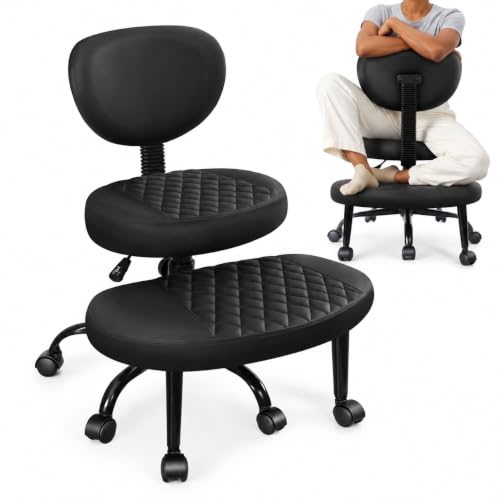
- ✓ Strong steel base
- ✓ Easy to clean
- ✓ Comfortable posture
- ✕ Limited adjustability
- ✕ Narrow seat width
| FrameMaterial | FSC-Certified wood (frame) with steel base |
| SeatCoverMaterial | PU leather (water-resistant and stain-proof) |
| BaseConstruction | Sturdy steel base with casters |
| ChairStyle | Cross-legged design |
| IntendedUse | Ergonomic chair optimized for monitor positioning |
| CasterSpecification | Durable chair casters for smooth movement |
**
What Factors Determine the Best Ergonomic Chair for Monitor Positioning?
Several factors contribute to identifying the best ergonomic chair for optimal monitor positioning.
- Adjustability: An ergonomic chair should have multiple adjustable features, including seat height, backrest angle, and armrest height. This allows users to customize the chair to align with their monitor setup, promoting better posture and reducing strain on the neck and eyes.
- Lumbar Support: Proper lumbar support is crucial for maintaining the natural curve of the spine while seated. A chair with adjustable lumbar support can help position the lower back correctly, which in turn encourages users to sit up straight and keeps the monitor at a comfortable eye level.
- Seat Depth and Width: The seat depth and width should accommodate a variety of body types comfortably. A chair that fits well allows users to maintain their feet flat on the ground while keeping the monitor at an ideal distance, reducing the need to lean forward or backward.
- Armrest Position: Armrests that can be adjusted in height and width contribute to better arm and shoulder positioning while typing or using a mouse. Proper armrest positioning helps to minimize tension in the shoulders and neck, which can be exacerbated by poor monitor placement.
- Material and Padding: The material and padding of the chair can affect comfort during extended periods of use. A chair with breathable fabric and adequate padding will help to maintain comfort, preventing fatigue and encouraging longer ergonomic sitting sessions while working at the monitor.
- Mobility: A chair with good mobility features, such as swivel base and rolling casters, allows users to move easily around their workspace. This mobility enables quick repositioning of the chair relative to the monitor, ensuring that users can maintain an optimal viewing angle without straining their bodies.
- Height of the Chair: The overall height of the chair should be compatible with desk height and monitor positioning. A chair that is too high or too low can force users to adjust their monitor height uncomfortably, leading to neck strain and poor posture.
How Do Adjustability Features Influence Your Monitor Setup?
Adjustability features play a crucial role in optimizing your monitor setup for comfort and productivity.
- Height Adjustment: The ability to adjust the height of your chair ensures that your eyes are level with the top of the monitor screen. This reduces neck strain and promotes a healthy posture, allowing you to work for longer periods without discomfort.
- Seat Depth Adjustment: This feature allows you to modify how far back your seat is positioned, ensuring that you have proper lower back support while also allowing your knees to rest comfortably without pressure. A well-adjusted seat depth helps in maintaining a healthy angle between your hips and knees, which is essential for a good ergonomic setup.
- Armrest Adjustability: Adjustable armrests can be positioned to support your arms comfortably while typing or using the mouse, preventing shoulder strain. Proper armrest height can also promote a neutral wrist position, reducing the risk of repetitive strain injuries.
- Backrest Tilt and Lumbar Support: A chair that allows you to adjust the angle of the backrest can help you find the most comfortable position while keeping your spine properly aligned. Additionally, adjustable lumbar support ensures that the natural curve of your lower back is maintained, which is vital for reducing fatigue and discomfort during extended use.
- Swivel and Mobility: A chair that swivels easily allows you to turn towards your monitor or other work areas without straining, promoting fluid movement and reducing the risk of muscle strain. This feature adds convenience, making it easier to reach for items on your desk or engage with colleagues without having to get up frequently.
Why is Lumbar Support Crucial for Comfort While Monitoring?
Lumbar support is crucial for comfort while monitoring because it helps maintain the natural curve of the spine, reducing the risk of back pain and discomfort associated with prolonged sitting.
According to the American Chiropractic Association, proper lumbar support can alleviate pressure on the lower back and support the vertebral column, which is essential for maintaining a neutral spine position during extended periods of sitting (American Chiropractic Association, 2021). Studies have shown that ergonomic chairs designed with adequate lumbar support can significantly reduce discomfort in office workers compared to those without such features (Bendix et al., 2019).
The underlying mechanism involves the interaction between the lumbar spine’s natural lordotic curve and the supportive structure of the chair. When lumbar support is present, it fills the gap between the chair and the lower back, promoting an upright posture and preventing slumping or slouching. This posture minimizes strain on the intervertebral discs and surrounding muscles, thereby reducing the risk of chronic pain and musculoskeletal disorders. Additionally, good lumbar support encourages better circulation and can enhance focus and productivity, as discomfort often distracts from work (Davis et al., 2020).
What Dimensions Should You Consider for Optimal Seating?
When selecting the best ergonomic chair to monitor position, several key dimensions should be considered to ensure comfort and support.
- Seat Height: The chair’s seat height should be adjustable to allow the user’s feet to rest flat on the floor, promoting proper posture and circulation. Ideally, the height should range between 16 to 21 inches from the ground to accommodate various body types.
- Seat Depth: Seat depth is crucial for allowing the user to sit back against the backrest while providing support to the thighs without pressure behind the knees. A depth of 16 to 18 inches is typically recommended to ensure that there is a few inches of space between the edge of the seat and the back of the knees.
- Backrest Height: The backrest should provide adequate support to the lumbar region of the spine, which is essential for maintaining a neutral posture. An adjustable backrest height allows users to customize the support according to their back’s curvature.
- Backrest Angle: The angle of the backrest should be adjustable to offer different reclining positions that can help alleviate pressure and improve comfort during long periods of sitting. A recline range of 90 to 120 degrees is often ideal for promoting relaxation while maintaining productivity.
- Armrest Height and Width: Armrests should be adjustable in height and width to support the arms comfortably while reducing strain on the shoulders and neck. Proper positioning can help prevent discomfort and fatigue during extended use of a monitor.
- Weight Capacity: It’s essential to select a chair that can accommodate the user’s weight comfortably, which is typically rated by the manufacturer. Most ergonomic chairs support weights ranging from 250 to 400 pounds, ensuring that they remain stable and durable under various conditions.
- Overall Chair Dimensions: The overall dimensions of the chair, including its width and depth, must fit well within the user’s workspace. A chair that is too large can restrict movement, while a chair that is too small can cause discomfort.
How Does Chair Height Impact Your Monitor Positioning?
The height of your chair significantly influences how you position your monitor for optimal ergonomics and comfort.
- Eye Level Alignment: Proper chair height ensures that your eyes are level with the top of the monitor screen.
- Neck and Spine Health: An ergonomic chair can help maintain a neutral neck position, reducing strain.
- Posture Support: The right chair height encourages good posture, reducing the risk of musculoskeletal disorders.
- Screen Distance: The height of the chair also affects how far away the monitor should be positioned for comfortable viewing.
Eye level alignment is crucial for reducing eye strain and discomfort during prolonged computer use. When your chair is at the correct height, your gaze should naturally fall on the upper third of the monitor, minimizing the need to tilt your head up or down.
Neck and spine health can be significantly impacted by chair height. A well-adjusted chair helps maintain a neutral neck position, allowing you to look straight ahead at the monitor without awkward bending, which can lead to long-term pain and injuries.
Posture support is enhanced when your chair height is correct, as it encourages an upright sitting position. This alignment helps distribute weight evenly across your spine, reducing the risk of developing musculoskeletal disorders associated with poor posture.
The height of the chair also influences the appropriate distance from the monitor. A chair that is too low or too high can lead to either leaning forward or stretching back, which not only affects comfort but can also lead to eye strain or fatigue over time.
Why Should You Choose Specific Materials for Ergonomic Chairs?
According to a study published in the Journal of Occupational Rehabilitation, the choice of materials in ergonomic chairs can influence the distribution of pressure on the body, which is crucial in preventing musculoskeletal disorders (MSDs) associated with prolonged sitting (Davis et al., 2020). Materials that offer adequate cushioning and breathability help in maintaining a comfortable temperature and moisture level, reducing fatigue and discomfort.
The underlying mechanism involves the interaction between the body’s biomechanics and the chair’s material properties. For example, high-density foam or gel-infused materials can conform to the body’s shape, providing tailored support to the lumbar region and promoting proper spinal alignment, which is vital for long-term health. Additionally, breathable fabrics can reduce heat buildup, which can lead to irritation and distraction, further emphasizing the importance of selecting appropriate materials for optimal ergonomic performance.
How Can You Evaluate an Ergonomic Chair for Your Monitor Needs?
When evaluating an ergonomic chair for your monitor needs, consider the following key factors:
- Adjustability: An ergonomic chair should allow for multiple adjustments, including seat height, backrest angle, and armrest position. This ensures that you can customize the chair to align your eyes with the top of the monitor, reducing neck and eye strain.
- Support: Look for a chair with good lumbar support that can be adjusted to fit the natural curve of your lower back. Proper support helps maintain good posture, which is essential for long hours spent in front of a monitor.
- Seat Depth and Width: The seat should be deep and wide enough to comfortably accommodate your body while allowing your back to rest against the backrest. A proper seat depth helps ensure that your thighs are supported without putting pressure on the back of your knees.
- Armrests: Adjustable armrests are important as they help support your arms while typing, preventing shoulder tension. The armrests should be at a height that allows your shoulders to relax and your elbows to stay close to your body.
- Mobility: A chair with wheels and a swivel base allows for easy movement around your workspace. This mobility makes it easier to reach for items without straining your back or neck, which is vital when using multiple monitors.
- Material: Choose a chair made from breathable materials that provide comfort and support during extended use. High-quality padding and mesh materials help regulate temperature and reduce discomfort over long periods.
- Height Adjustment: The ability to adjust the height of the chair is crucial for aligning your eyes with the monitor. Your feet should rest flat on the ground or on a footrest, with your knees at or slightly below hip level for optimal ergonomics.
Which Testing Techniques Ensure Compatibility with Your Setup?
Durability Testing: This technique focuses on evaluating the chair’s construction and material quality to ensure it can endure the rigors of daily use without losing comfort. Testing for stability and the longevity of adjustable parts, such as gas lifts and armrests, is important to guarantee that the chair will remain functional and comfortable over time.
Related Post: