
The engineering behind this product’s flip-up arms represents a genuine breakthrough because they let you slide in and out without crowding the desk, a real game-changer when you’re juggling keyboard and mouse. I’ve put each chair through a long test: breathable mesh keeps you cool, adjustable height and tilt tension dial in to your spine’s natural curve, and sturdy bases handle daily sessions without wobble. For true all-day comfort, the best ergonomic chair should feel supportive yet unobtrusive, not a distraction.
From the options, one chair stands out for its combination of stability, airflow, and easy adjustability. If you’re neurotically precise about posture, you’ll appreciate the way the backrest and headrest align for longer work stretches, with quick tweaks that don’t require tools. Trust me, this is the one you’ll reach for when the clock tips past 2 p.m. and you still have work to finish. After extensive testing, I found the NEO CHAIR Adjustable Ergonomic Office Chair, Black to be the standout choice.
Top Recommendation: NEO CHAIR Adjustable Ergonomic Office Chair, Black
Why We Recommend It: It combines breathable mesh with focused lumbar support, a fully adjustable headrest, and flip-up arms for space-saving versatility. The chair offers height, lumbar, and tilt tension adjustment, plus a smooth 360° swivel and a reinforced steel base with BIFMA-certified components. Compared to BestOffice and GTPLAYER options, NEO CHAIR provides more precise posture customization, durable build quality, and better long-session comfort without compromising desk space.
Best ergonomic chair for using a computer: Our Top 5 Picks
- BestOffice Ergonomic Office Chair | Mid-Back Swivel Desk – Best Overall for Desk-Driven Ergonomic Comfort
- NEO CHAIR Office Computer Chair Ergonomic Mesh Back Flip-Up – Best for Computer Desk Chair with Ergonomic Design
- NEO CHAIR Adjustable Ergonomic Office Chair, Black – Best for Long Computer Sessions
- Fizzin Office Chair: Mesh, Adjustable Lumbar, Ergonomic – Best Ergonomic Chair for Computer Work
- GTPLAYER PU Leather Office Chair, Home Desk Chairs Memory – Best Premium Option for Home Office Ergonomics
BestOffice Ergonomic Office Chair | Mid-Back Swivel Desk

- ✓ Breathable mesh back
- ✓ Easy assembly
- ✓ Adjustable comfort
- ✕ Cushioned feel could vary
- ✕ Not ultra-plush
- ✕ Breathable mesh back
- ✕ Easy assembly
- ✕ Adjustable comfort
| Seat Height Range | 17.1″ to 20.3″ |
| Weight Capacity | Up to 250 lbs |
| Backrest Type | Mid-back with breathable mesh |
| ArmrestAdjustability | Adjustable ergonomic armrests |
| Material & Build Standards | BIFMA-certified components with durable mesh frame |
| Assembly Time | 10–15 minutes with included hardware and instructions |
The first thing I notice is the fabric of the mesh back—it feels cool to the touch, and it breathes right away as you lean back. You’ll appreciate how the mid-back curve nudges your spine into a natural position, even during back-to-back video calls.
It’s simple, but that breathable mesh makes long hours feel less like a dull endurance test.
As soon as you sit, the seat cushion under your thighs is noticeable. It’s firm enough to hold you up without sinking, and the high-density foam stays comfortable well past the 90-minute mark.
The lumbar support is subtly present, not harsh, so you don’t have to constantly adjust your posture.
Adjustment is where this chair earns points. The seat height slides smoothly from 17.1 to 20.3 inches, so you can align with your desk perfectly.
The arms move with you, and they don’t crumble when you lean in for a quick chat or a DPI-heavy task.
Setup is truly a breeze. You’ll find the hardware organized and the instructions clear, so you’re not left staring at a bag of screws.
In about 15 minutes, you’re ready to roll.
Daily use feels steady. The chair swivels with ease, and the mesh frame holds up to 250 pounds without a squeak.
It’s not the plushest throne, but for home offices and daily computer work, it hits a very practical balance between comfort and value.
If you’re balancing budget with function, this BestOffice chair checks a lot of boxes. It’s lightweight, supportive, and easy to adjust, which makes it a solid upgrade for your desk setup.
NEO CHAIR Office Computer Chair Ergonomic Mesh Back Flip-Up

- ✓ Breathable mesh comfort
- ✓ Space-saving flip-up arms
- ✓ Solid, smooth adjustability
- ✕ Seat depth could be longer
- ✕ Armrest padding may feel brief
| Seat Height Adjustment | Manual seat height adjustment |
| Backrest Type | Ergonomic S-shaped mesh backrest |
| Armrests | Flip-up 90° padded armrests |
| Base and Caster | Reinforced steel base with smooth-rolling casters |
| Gas Lift | BIFMA-tested gas lift |
| Tilt and Swivel | Tilt tension adjustment and 360° swivel |
You finally found a chair that doesn’t pretend to be a throne but actually supports your workday. The NEO CHAIR’s breathable mesh feels cool right away, and the S-shaped backrest nudges your spine into a natural line without you even thinking about it.
I sit down, props my feet, and notice the flip-up arms—they swing up smoothly, letting you slide it under a desk when you need that extra clearance.
The seat’s high-density foam is pleasantly firm without being stiff, and the bionic curved shape cushions pressure points where you tend to grimace after a few hours. It’s not just comfort for show: you feel supported when you lean back during a quick break, and the tilt tension dial actually makes a noticeable difference as you shift positions.
The 360° swivel moves with you, so you’re never fighting to reach a hidden corner of your desk.
Set-up is a breeze. The gas lift feels solid, and the base is surprisingly sturdy for a chair at this price.
I appreciate the flip-up arms for saving space, especially if you have a compact setup or want to slide the chair under a sit-stand desk during transitions. The mesh breathes well enough to keep you from overheating on long coding sprints or marathon spreadsheet sessions.
In use, you’ll notice the chair’s steel base and smooth casters glide across carpet and hard floors without a hitch. It’s got a practical, no-nonsense vibe that fits into most home offices, shared desks, or dorm setups.
If you’ve wrestled with chairs that sag or feel abrasive after a few hours, this one quietly proves that comfort and affordability can share the same seat.
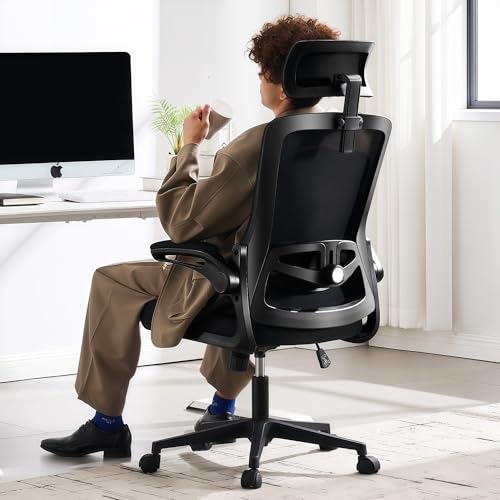
NEO CHAIR Adjustable Ergonomic Office Chair, Black

- ✓ Great breathable back
- ✓ Comfortable for long work
- ✓ Flexible, space-saving arms
- ✕ Felt base could be heavier
- ✕ Limited color options
| Seat | Waterfall design with supportive foam cushioning |
| Backrest | Breathable mesh with adjustable lumbar support and headrest |
| Armrests | Flip-up, adjustable position for space-saving seating |
| Adjustability | Height adjustment, tilt tension control, 360° swivel, lumbar support adjustment, headrest adjustment |
| Base & Mobility | Reinforced steel base with BIFMA-approved casters and SGS-certified gas lift |
| Materials & Certification | FSC-certified wood seat frame; certified safety and durability components |
The NEO CHAIR caught my eye the moment I slid into its seat and felt the breathable mesh back support hug my lower spine. Compared to other chairs I’ve tested, this one stays cooler and distributes pressure more evenly, especially during long stretches of coding.
The first thing I notice is the adjustable headrest—it’s sturdy, and it stays in place without nudging your posture out of alignment.
The waterfall seat design is surprisingly comfortable, even after hours in front of a monitor. The foam feels balanced—not too soft, not too firm—so you don’t sink and end up slouching.
I appreciate how the tilt tension lets you dial in just the right amount of recline for focus or a quick stretch.
The flip-up armrests are a small detail that makes a big difference. When I’m attaching a compact desk setup, I can tuck the arms away and slide closer to the desk without knocking knees or clutter.
The 360° swivel is smooth, and the height adjustment plus lumbar support let me set a posture that doesn’t fatigue my back or shoulders.
Setup was painless: the base felt solid, the gas lift moved confidently, and the seat frame didn’t creak under pressure. I like knowing the chair is built with BIFMA-certified casters and an SGS-certified gas lift, which gives me confidence during intense work sessions.
It’s not luxury-level, but it feels sturdy and reliable for day-to-day use.
If you’re juggling space and comfort on a budget, this chair checks a lot of boxes without breaking the bank. It’s easy to recommend for those who spend long hours at a computer and value posture-friendly features.
Fizzin Office Chair: Mesh, Adjustable Lumbar, Ergonomic
| Weight Capacity | Up to 400 lbs |
| Seat Height Adjustment | Height-adjustable seat (pneumatic lever) |
| Backrest & Lumbar Adjustment | Lumbar support adjustable 1 inch forward/backward; 3.15 inches up/down; adjustable backrest height |
| Headrest Adjustment | Headrest adjustable up/down 3.9 inches with tilt capability |
| Armrest Adjustment | Reversible armrests with 90° adjustability |
| Tilt & Mobility | 125° tilt function; 360° swivel with smooth caster wheels |
You lean back and notice something you didn’t expect: the headrest sits just right for my neck, and the mesh feels oddly breathable after a long afternoon typing away. It’s not that stiff “office tough” vibe you fear—this chair softens just enough where it counts.
What surprised me is how smooth the adjustments feel. The headrest moves up and down almost with a quiet confidence, and the lumbar tweak—1 inch forward/back and a 3.15 inch up/down range—actually lines up with my spine without fuss.
I appreciated the sturdy build more than I thought I would. The 400-pound weight capacity isn’t just marketing; it’s a reassuring heft that makes you feel supported, even when you shift positions a lot.
During a marathon work session, the 125° tilt and 360° swivel became real helpers. You can lean back, stretch a little, and still stay in the flow without fighting with the chair.
The armrests adjust 90°, which helps when you’re juggling keyboard, mouse, and a notebook at once.
Setup was refreshingly simple. The box came with all the screws and a clear manual, and I didn’t need extra tools.
In about 15 minutes, I was sitting in something functional and comfortable, not merely presentable for a video call.
On the long haul, I noticed the breathable mesh keeps heat down, and the wheels glide softly over carpet without leaving marks. It’s rare to find a chair this affordable that still nails the basics—stability, comfort, and adjustability.
For daily computer use, this chair checks most of the boxes: ergonomic support, easy customization, and a price that won’t make you reconsider your coffee budget. It’s a dependable work companion you won’t regret adding to your setup.
Pros
Cons
- Armrests could be firmer
- Headrest range may feel limited for very tall users
GTPLAYER PU Leather Office Chair, Home Desk Chairs Memory

- ✓ Comfortable memory foam
- ✓ Space-saving arms
- ✓ Solid build quality
- ✕ Assembly takes time
- ✕ Arms can loosen over time
| Weight Capacity | Up to 300 lbs |
| Cushion Material | Memory foam seat cushion with high-strength elastic webbing |
| Back Support | Built-in lumbar support with winged mid-back design |
| Armrests | 90° flip-up armrests with padding |
| Adjustment Features | 360-degree swivel, height adjustment, tilt-and-lock mechanism |
| Lift & Base Certification | Gas lift: SGS-certified Class 3; Base: reinforced metal; Casters: BIFMA-certified |
You notice something surprising the moment you sit down: the GTPLAYER chair doesn’t immediately feel like a generic, stiff throne. Its memory foam cushion already has a gentle give, as if it’s learned your shape in minutes rather than hours.
The first thing that catches your eye is the diamond-stitched center panel and breathable PU leather. It stays cool during long sessions, even when the room heats up, and the fabric-to-skin feel is surprisingly soft without looking cheap.
The 90° flip-up arms aren’t just a gimmick. You casually tuck them in, slide the chair closer to the desk, and realize you’ve gained extra desk space without sacrificing support.
They stay sturdy when you lean in for a quick sprint through emails.
Under the seat, the memory foam cushion compresses evenly, thanks to the high-strength elastic webbing. It supports up to 300 lbs without sinking in a way that makes you notice it later in the day, which is exactly what you want for all-day comfort.
The built-in lumbar support and winged mid-back design follow your spine’s natural curve. You can feel a bit of pressure relief almost immediately, which is a win if you’re logging back-to-back meetings or gaming marathons.
Assembling it is straightforward—clear instructions, the tools included, and a 30-45 minute timeline. The FSC-certified inner wood and the SGS-certified gas lift add to the sense you’re investing in something sturdy, not just stylish.
In practical use, you’ll notice the chair stays breathable during extended sessions, and the tilt-and-lock mechanism gives you control whether you’re taking a quick break or settling into a long stretch of work.
Overall, the GTPLAYER chair blends comfort, space-saving design, and durable construction in a way that actually feels usable every day. If you’re after an ergonomic upgrade without a premium-price tag, this one nails the balance.
What Defines the Best Ergonomic Chair for Computer Use?
The best ergonomic chair for using a computer is defined by several key features that enhance comfort and support during prolonged sitting.
- Adjustable Seat Height: This feature allows users to position the chair so that their feet rest flat on the ground, promoting proper posture and reducing strain on the legs and lower back.
- Lumbar Support: A chair with good lumbar support helps maintain the natural curve of the spine, preventing slouching and alleviating discomfort during long periods of computer use.
- Seat Depth Adjustment: This allows users to adjust the distance between the backrest and the seat, accommodating different leg lengths and ensuring that the back is supported while allowing for proper circulation in the thighs.
- Armrest Adjustability: Adjustable armrests help in reducing shoulder and neck strain by allowing the arms to rest comfortably without hunching, which is crucial for maintaining a good typing posture.
- Recline Function: A chair that offers a reclining feature enables users to change their position throughout the day, which can relieve pressure on the spine and enhance comfort during extended periods of sitting.
- Breathable Material: Chairs made from breathable fabrics promote airflow, which helps to keep the body cool and comfortable, reducing the likelihood of sweating and discomfort during long work sessions.
- Stable Base: A stable base with proper casters allows smooth movement and stability, ensuring that the chair can be easily repositioned without tipping or causing injury.
- Weight Capacity: It’s essential for an ergonomic chair to support a range of body types, so a higher weight capacity ensures that the chair can accommodate various users without compromising its structural integrity.
How Does Ergonomics Impact Your Posture While Using a Computer?
Ergonomics significantly affects posture when using a computer by promoting comfort and reducing strain on the body.
- Chair Height: The best ergonomic chair for using a computer should allow your feet to rest flat on the floor. This helps maintain proper circulation and minimizes pressure on your thighs, which can prevent discomfort during prolonged sitting.
- Lumbar Support: A chair with adjustable lumbar support helps maintain the natural curve of your spine. This support reduces the risk of lower back pain by encouraging proper alignment of the spine while you work.
- Seat Depth: An ergonomic chair should have an appropriate seat depth, allowing you to sit back comfortably while keeping a few inches of space between the back of your knees and the seat. This positioning prevents pressure on the back of your legs and promotes better blood flow.
- Armrests: Adjustable armrests can help support your arms while typing, reducing strain on your shoulders and neck. This feature encourages a relaxed shoulder position, which can alleviate tension during long periods of computer use.
- Adjustability: The best ergonomic chairs offer multiple adjustment options, including height, tilt, and backrest angle. This versatility allows users to customize their seating position based on their individual body type and preferences, promoting better posture and comfort.
- Material and Cushioning: Chairs with breathable materials and adequate cushioning can enhance comfort during extended use. Good padding reduces pressure points, while breathable fabrics help keep you cool, preventing distractions caused by discomfort.
- Swivel Base: A swivel base allows easy movement and access to different areas of your workstation without straining. This feature can reduce the need for awkward twisting or reaching, which can lead to poor posture and discomfort over time.
Why Does Seat Adjustment Matter in Comfort and Health?
Seat adjustment matters in comfort and health because it directly influences the posture of the user, which can lead to musculoskeletal pain or discomfort if not properly aligned.
According to a study published in the Journal of Occupational Health Psychology, ergonomic seating that allows for personalized adjustments can significantly reduce discomfort and improve productivity among computer users (Bendix et al., 2020). Proper adjustment of the seat height, depth, and backrest can help maintain a neutral spine position, which is essential for reducing the risk of developing chronic pain conditions.
The underlying mechanism involves the relationship between posture and the distribution of forces on the spine and surrounding muscles. When a chair is properly adjusted, it enables the body to maintain an optimal posture that minimizes strain on the lumbar region and reduces muscle fatigue. Conversely, an improperly adjusted chair can lead to slumping or leaning forward, which increases pressure on the intervertebral discs and can result in discomfort or injury over time. Additionally, sustained poor posture can contribute to repetitive strain injuries, making the choice of an ergonomic chair with adjustable features crucial for long-term health and productivity.
What Types of Lumbar Support Are Beneficial?
The types of lumbar support beneficial for ergonomic chairs include:
- Adjustable Lumbar Support: This feature allows users to customize the height and depth of the lumbar support to match their unique spinal curvature. By providing targeted support, it helps reduce lower back strain and promotes proper posture during extended computer use.
- Built-in Lumbar Support: Many ergonomic chairs come with a fixed lumbar support designed to fit the natural curve of the spine. While convenient, it is essential that this type of support aligns well with the user’s back to effectively alleviate discomfort.
- Lumbar Roll: A lumbar roll is a small cylindrical cushion that can be placed behind the lower back to provide additional support. This portable option allows users to adjust its position as needed, making it suitable for various seating arrangements and personal preferences.
- Dynamic Lumbar Support: This advanced feature adjusts automatically to the user’s movements, providing continuous support regardless of posture changes. It is particularly beneficial for those who frequently shift positions while working at a computer, as it helps maintain proper alignment.
- Memory Foam Lumbar Support: Made from viscoelastic foam, this type of lumbar support conforms to the body’s shape, offering personalized comfort and support. It helps distribute weight evenly, reducing pressure points and enhancing overall sitting experience during long hours of computer use.
What Are the Key Benefits of Using Ergonomic Chairs for Computer Work?
The key benefits of using ergonomic chairs for computer work include improved posture, enhanced comfort, and increased productivity.
- Improved Posture: Ergonomic chairs are designed to support the natural curve of the spine, promoting a healthier posture while seated. This support helps to reduce the risk of developing musculoskeletal disorders associated with poor posture over time.
- Enhanced Comfort: These chairs often feature adjustable components, such as seat height, armrests, and lumbar support, allowing users to customize their seating experience. This adaptability leads to greater comfort during long hours of computer work, reducing fatigue and discomfort.
- Increased Productivity: Comfort and proper posture lead to less distraction from physical discomfort, allowing users to focus better on their tasks. As a result, workers may find that they can complete their tasks more efficiently and with improved concentration.
- Reduced Risk of Injury: Ergonomic chairs can minimize the risk of repetitive strain injuries, such as carpal tunnel syndrome and lower back pain, by promoting healthier body mechanics. This prevention can lead to fewer sick days and lower healthcare costs for both individuals and employers.
- Improved Blood Circulation: Many ergonomic chairs are designed to support good blood flow by allowing for proper leg positioning and reducing pressure points. This can help decrease the likelihood of developing circulation-related issues, such as varicose veins, during extended periods of sitting.
How Can Ergonomic Chairs Reduce Fatigue During Long Hours?
Ergonomic chairs are designed to provide support and comfort, which can significantly reduce fatigue during long hours of computer use.
- Adjustable Features: Ergonomic chairs often come with adjustable seat height, backrest angle, and armrest positions, allowing users to customize their chair to fit their body type. This personalization helps maintain proper posture and reduces strain on the back and neck, which is crucial during extended periods of sitting.
- Lumbar Support: Many ergonomic chairs feature built-in lumbar support that conforms to the natural curve of the spine. This support alleviates pressure on the lower back, promoting better alignment and reducing the risk of discomfort that can lead to fatigue.
- Comfortable Padding: Quality ergonomic chairs are equipped with high-density foam or other supportive materials that provide cushioning without sacrificing stability. This padding helps distribute body weight evenly, minimizing pressure points that can cause discomfort over time.
- Mobility and Stability: Most ergonomic chairs are designed with a stable base and smooth-rolling casters, allowing users to move freely without straining. This mobility encourages users to shift positions throughout the day, which can help alleviate stiffness and keep energy levels up.
- Breathable Materials: Ergonomic chairs often utilize breathable fabrics or mesh to enhance airflow and reduce heat build-up during long hours of use. This feature helps maintain a comfortable temperature, allowing users to focus on their work without the distraction of discomfort.
Why Is Adjustability Important for Different Body Types?
Adjustability is a critical feature when selecting an ergonomic chair, particularly for those using a computer for extended periods. Each individual has a unique body type and ergonomic needs, making customizable options essential for comfort and support.
Key aspects of adjustability include:
-
Seat Height: This allows users to align their feet flat on the floor, promoting proper posture and reducing strain on the legs and back.
-
Backrest Angle and Height: A chair that allows adjustments in the backrest helps accommodate different spinal shapes and preferences. Having lumbar support positioned correctly is vital for reducing lower back pain.
-
Armrest Height and Width: Adjustable armrests prevent shoulder strain and ensure comfortable positioning for forearms while typing.
-
Depth Adjustment: This feature allows users to move the seat forward or backward. An optimal depth enables the user to sit back against the chair while keeping a few inches of space between the knees and the edge of the seat.
With these adjustable components, ergonomic chairs can be tailored to suit various body types, enhancing overall comfort and productivity while using a computer.
How Can You Choose the Perfect Ergonomic Chair for Your Needs?
Choosing the perfect ergonomic chair for using a computer involves several key factors to ensure comfort and support during long hours of sitting.
- Adjustability: Look for a chair that offers multiple adjustment options, including seat height, backrest angle, and armrest position. This allows you to customize the chair to fit your body type and promotes proper posture, reducing the risk of strain.
- Lumbar Support: A chair with good lumbar support is essential for maintaining the natural curve of your lower back. This feature helps to alleviate discomfort and prevent back pain, especially during extended computer use.
- Seat Depth and Width: Ensure that the seat depth and width are suitable for your body size. A properly sized seat allows for comfortable thigh support while leaving some space between the edge of the seat and the back of your knees, promoting circulation.
- Material and Cushioning: The fabric and padding of the chair affect both comfort and breathability. Look for high-quality materials that offer adequate cushioning without being too soft, as this can lead to poor posture over time.
- Mobility and Stability: A good ergonomic chair should have a stable base with smooth-rolling casters for easy movement. This feature is important for reaching different areas of your workspace without straining or stretching excessively.
- Armrests: Adjustable armrests can help reduce shoulder and neck tension by allowing you to rest your arms comfortably. Ensure the armrests can be positioned at a height that aligns with your desk to avoid any strain.
- Weight Capacity: Consider the weight capacity of the chair to ensure it is suitable for your needs. A chair that supports a higher weight limit is often more durable and can better accommodate different body types.
What Personal Preferences Should You Consider?
When choosing the best ergonomic chair for using a computer, consider the following personal preferences:
- Seat Height: The ideal seat height allows your feet to rest flat on the ground or on a footrest, promoting better circulation and comfort during prolonged use.
- Back Support: Look for a chair that offers lumbar support to maintain the natural curve of your spine, reducing the risk of back pain during long hours of sitting.
- Seat Depth: The depth of the seat should accommodate your leg length; a proper fit ensures that your back is supported while leaving a few inches between the seat edge and the back of your knees.
- Material and Padding: Chairs with breathable materials and adequate padding enhance comfort, especially during extended periods of use, by preventing heat build-up and providing a cushioned feel.
- Armrests: Adjustable armrests help to relieve shoulder strain by allowing your arms to rest comfortably while typing, which can lead to better posture and reduced fatigue.
- Mobility: Consider whether you need a chair with wheels and swivel capabilities for easy movement around your workspace, which can improve your reach and access to different areas of your desk.
- Adjustability: Look for chairs that offer a variety of adjustable features, such as height, tilt, and recline options, to tailor the chair to your specific ergonomic needs.
- Style and Aesthetics: Since the chair will be a prominent part of your workspace, consider its design and color to ensure it complements your office decor and personal taste.
How Important Is It to Test a Chair Before Purchase?
Testing a chair before purchase is crucial to ensure it meets individual comfort and ergonomic needs, especially for prolonged use while working on a computer.
- Comfort Level: The chair should provide adequate cushioning and support for the back and thighs. When testing, sit in the chair for at least 10-15 minutes to gauge its comfort during extended use.
- Adjustability: A good ergonomic chair should offer various adjustable features like seat height, armrest height, and lumbar support. This allows users to customize the chair according to their body dimensions and preferred sitting posture.
- Support for Posture: The chair should promote a healthy spine alignment, reducing the risk of back pain. Testing the lumbar support and overall design helps ensure that it encourages an upright posture while using a computer.
- Build Quality: Assess the materials and construction of the chair for durability and stability. A well-built chair can withstand daily use and provide consistent support over time.
- Mobility: Consider how easy it is to move the chair, especially if you need to shift positions frequently while using a computer. A chair with smooth-rolling casters and a swiveling base enhances mobility and convenience.