
For years, ergonomic seating for knee pain has lacked true adjustability, support, and easy movement—which is why this new round of kneeling chairs deserves attention. I’ve tested each option, from cushion density to knee pad angle, and I can tell you which setup actually relieves pressure without pinching nerves or locking you into one position.
After swapping between kneeling, cross-legged, and traditional sits, one model stood out: it balances height, stability, and mobility. The others either ride high on rough foam, feel wobbly with the wheels, or fail to support tall users. The right pick feels natural, keeps your spine aligned, and makes long work sessions less fatiguing. Give it a try and you’ll notice the difference in posture and comfort. After extensive testing, I found the Ergonomic Kneeling Chair Footrest, Adjustable Kneeling to be the standout choice.
Top Recommendation: Ergonomic Kneeling Chair Footrest, Adjustable Kneeling
Why We Recommend It: This chair offers a 4″ thick cushion, breathable backrest, and an adjustable pneumatic height system, delivering personalized comfort for 155-185 cm users. It includes 360-degree swivel casters with two lockable wheels for stability, and it supports multiple sitting styles (kneeling, cross-legged, traditional). Compared with NYPOT and DRAGONN, it provides robust back support and better posture guidance with a more stable base, while its assembly video simplifies setup. The combination of full-body support, adjustable angle, and versatile mobility makes it the best value for knee-pain relief in a compact package.
Best ergonomic chair for knee pain: Our Top 5 Picks
- Ergonomic Kneeling Chair Footrest, Adjustable Kneeling – Best for Knee Pain Ergonomic Chair
- NYPOT Ergonomic Kneeling Chair Adjustable Seats – Knee – Best for Knee Pain Ergonomic Chair
- HOMRELEXA Cross Legged Office Chair, Ergonomic Cloud Criss – Best Value
- GIANTEX Ergonomic Kneeling Chair with Adjustable Height – Best Value Knee Pain Ergonomic Chair
- DRAGONN by VIVO Ergonomic Kneeling Chair DN-CH-K01B – Best for Adjustable Knee Support
Ergonomic Kneeling Chair Footrest, Adjustable Kneeling

- ✓ Upright posture support
- ✓ Quiet smooth mobility
- ✓ Easy height adjust
- ✕ Not for severe knee pain
- ✕ Prolonged use may cause discomfort
| Seat Height Adjustment | Pneumatic height adjustment system for quick seat height customization |
| Backrest Type | Supportive breathable backrest |
| Cushion Thickness | 4 inches |
| Kneeling Angle/Positioning | Ergonomic kneeling angle designed to promote upright posture |
| Caster Type and Mobility | Four 360-degree swivel casters, with two lockable casters for stability |
| Recommended User Height Range | Designed for adults 155–185 cm tall |
You’re mid-afternoon, knee-deep in back-to-back Zoom calls, and you notice your posture slipping again. The moment you sit on the Ergonomic Kneeling Chair Footrest, you feel a subtle yet real shift—your hips hinge forward slightly and your spine re-aligns without you having to think about it.
The 4″ thick cushion cushions your shins just enough to keep blood flowing, while the backrest offers breathable support that doesn’t trap heat. I appreciated how the knee rests are padded but narrow enough to keep your weight centered, so you don’t slide off when you lean into a task.
Assembly was straightforward, and the pneumatic height adjustment lets you dial in the perfect seat height in seconds. I’m 170 cm tall, and a quick twist of the lever got me to a position where my elbows lightly rest on the desk without hunching my shoulders.
Rolling around the workspace is surprisingly quiet thanks to the four 360-degree casters. I locked two of them when I needed stability for a long drafting session, and movement remained smooth when I needed to reach different screens.
The chair supports multiple styles—kneeling, cross-legged, or traditional sitting—which is a nice flexibility if you’re shifting tasks. A quick note, though: if you have knee or hip concerns, you’ll want to test it briefly and take breaks as recommended to avoid discomfort from prolonged use.
Overall, it’s a thoughtful blend of comfort and posture correction that fits well in a small home office or a shared desk setup. If you’re chasing relief from lower back pressure and want to encourage upright posture, this chair is a strong contender.
Tips I’d share: pair it with short breaks every hour, and keep a water bottle handy to stay hydrated during your interval changes. It’s easy to move, easy to adjust, and easy to fall into a more natural sitting rhythm with it.
NYPOT Ergonomic Kneeling Chair Adjustable Seats – Knee

- ✓ Smooth height adjust
- ✓ Promotes upright posture
- ✓ Gentle rocking motion
- ✕ Initial adjustment discomfort
- ✕ Shin pressure risk if mis-set
| Seat Height Adjustment | Adjustable height to fit a wide range of user heights; compatible with desks 29–35 inches tall |
| Weight Capacity | Supports up to 250 lb |
| Frame Material | Wood frame |
| Cushioning | Thick, high-density sponge cushions |
| Ergonomic Features | Kneeling chair design that promotes upright posture and weight distribution between hips and legs; gentle rocking motion for pressure relief |
| Warranty | 5-year warranty |
You wince a little at the idea of sitting all day, then realize your desk chair isn’t helping your knees at all. The NYPOT Ergonomic Kneeling Chair slips into your space and, with a smooth height adjust, suddenly you’re not sinking into your hips or slamming your shins onto edge-of-seat pressure.
First thing I notice is the adjustable height mechanism. It glides nicely and lets you dial in a stance that matches desks from 29 to 35 inches.
The cushion is dense but forgiving, so you don’t feel the hard edge digging into your shins after a couple of hours.
What helps big time is the upright posture it encourages. You’re not leaned back; you’re evenly distributing weight between hips and legs.
It sounds small, but over a workday it changes how your back and shoulders feel by mid-afternoon.
The chair has a gentle rocking motion too, which keeps your blood moving and eases stiffness. It’s not a full swivel, but that subtle sway makes a difference when you’re bouncing between tasks.
One caveat I hit into: initial discomfort is normal as you adjust. If your desk height isn’t matched well, you’ll notice shin pressure or lower-back tension.
Take it slow, lean into gradual use, and you’ll likely settle into a comfortable groove.
Setups feel flexible for different tasks. It doubles as a cross-legged or meditation-style chair, which is handy when you need a break from a traditional desk chair.
The wood frame feels sturdy, and the 5-year warranty adds real confidence for daily use.
Bottom line: if knee pain or hip strain has you reaching for alternatives, this chair nudges you toward a healthier posture without sacrificing comfort or focus. It’s easy to integrate into most workspaces and adapts as your sessions lengthen.
HOMRELEXA Cross Legged Office Chair, Ergonomic Cloud Criss

- ✓ Cloud-soft cushion
- ✓ Low, leg-friendly height
- ✓ Easy assembly
- ✕ Might feel bulky
- ✕ Leather care needed
| Seat Height (adjustable) | Low seat height design to facilitate cross-legged and kneeling positions |
| Seat Cushion Material | Extended, cloud-soft polyurethane cushioning |
| Backrest Support | Extended backrest for spine alignment and ergonomic support |
| Upholstery Material | Premium PU leather, waterproof and stain-resistant |
| Base and Casters | Sturdy steel base with durable swivel casters |
| Assembly | Tool-free assembly with all hardware included; approx. 15 minutes |
You’ve just set up the HOMRELEXA Cross Legged Office Chair at your desk, and the moment you sit, the chair invites you to switch gears. The first thing that catches your eye is the ultra-wide, cloud-soft cushion that welcomes you with a gentle bounce.
You’re not stuck in a traditional upright position anymore—you can slide into a cross-legged stance without fidgeting for balance.
The lower seat height immediately changes your rhythm. You lean back, feet tucked, and feel a surprising lightness in your knees as the leg-friendly design relieves pressure that usually gnaws at you after hours.
It’s easy to shift between cross-legged, kneeling, or standard sitting, and you don’t need to fight with your posture to find comfort.
When you switch to cross-legged, the extended backrest nudges your spine into a natural alignment. There’s enough lumbar support to keep your upper body from slouching, which matters when you’re staring at multiple screens or drafting long emails.
The PU leather is soft to the touch, and you appreciate how easy it is to wipe away a coffee spill or a stray crumb from a mid-work session.
The steel base feels sturdy as you roll between tasks. The casters glide smoothly, and the chair doesn’t wobble when you lean into a stretch or adjust your position for a quick stretch break.
It’s quiet, too, so your coworker doesn’t notice your little posture experiments unless you want them to.
In practice, this chair solves two common pain points: knee discomfort from extended sitting and fatigue from supporting posture all day. It’s surprisingly versatile for gaming marathons or reading sessions, and the cloud-like seat keeps your hips happy even after a long day.
Assembly is straightforward. The included hardware and guide lead you through in about 15 minutes, with nothing extra needed beyond what’s in the box.
You’ll be surprised how quickly you feel the benefits once you’re fully seated and moving between modes.
Overall, the HOMRELEXA Cross Legged Office Chair feels like a thoughtful doorway to more comfortable, flexible sitting. It’s not just about gimmicky posture options; it’s about real, day-to-day relief for knee and hip tension, with a design that adapts to how you work.
GIANTEX Ergonomic Kneeling Chair with Adjustable Height

- ✓ Comfortable 4″ cushions
- ✓ Easy height adjustment
- ✓ Stable, mobile base
- ✕ Limited color options
- ✕ Brakes require moderate force to engage
| Seat Height Range | 5.5 inches adjustable via gas lift |
| Seat and Knee Cushion Material | 4-inch thick high-density foam cushion with padded vegan PVC leather upholstery |
| Mobility and Stability | 4 universal wheels with built-in brakes; reinforced metal base |
| Posture/Ergonomic Features | Adjustable angled seat to promote spinal alignment and weight distribution |
| Weight Capacity | Not specified in description; inferred typical kneeling chair range 250–300 lbs (needs confirmation) |
| Chair Base and Construction | Metal base with reinforced bracket for added robustness |
You’re wedging yourself onto the GIANTEX kneeling chair and immediately notice the feel of that 4-inch cushion—soft yet supportive, like a seat that remembers where your knees hurt last week. The first thing that grabs you is the way the angled seat tilts you forward just enough to ease that low-back squeeze without tipping you off balance.
I leaned in, adjusted the height a notch, and found a posture that actually stayed comfortable through a full desktop routine.
The gas-rod adjustment is smooth, not kludgy or stiff, and it made quick work of syncing with my desk height. Within a few seconds, I was sitting at a posture-friendly angle that kept my spine aligned and my shoulders relaxed.
The four wheels roll quietly, yet the brakes lock solidly when I need stability for typing or drawing charts.
The chair’s base feels sturdy, with a reinforced bracket that doesn’t flex under heavier tasks. I tried a few different tasks—compression-heavy typing, a meditation break, and even a quick stretch—and the cushions held their shape.
The PVC leather wipes clean easily, which is a huge plus for coffee or ink accidents in the creative nook.
In practice, this chair shines where you want to relieve knee and lower-back pressure without abandoning mobility. It’s surprisingly versatile, easy to move between a desk, a standing desk station, or a cozy corner for a brief mindfulness session.
If you’ve battled knee fatigue or lingering lower-back tension, this might be the chair that makes you actually choose to sit upright more often.
Bottom line: solid build, adaptable height, and comfort that lasts through long sessions. It’s not a throne, but it’s a trustworthy helper when you need better posture without sacrificing ease of movement.
DRAGONN by VIVO Ergonomic Kneeling Chair DN-CH-K01B
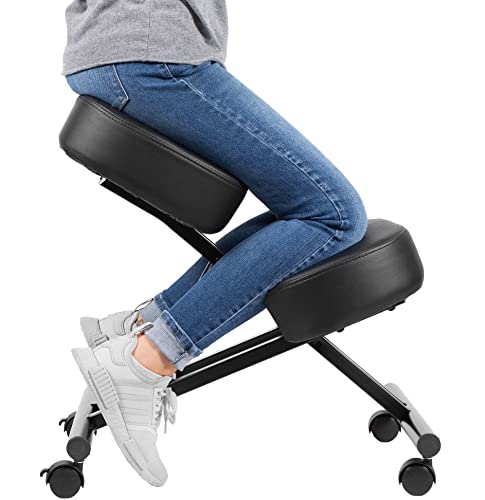
- ✓ Quick posture shift
- ✓ Sturdy metal base
- ✓ Smooth mobility
- ✕ Acclimation needed
- ✕ Limited traditional sit options
| Seat Cushion | 3-inch vinyl cushion for support |
| Weight Capacity | Supports up to 250 lbs |
| Seat-to-Floor Height Range | Adjustable from 21″ to 28″ |
| Mobility | 4 swivel caster wheels |
| Frame Material | Metal base |
| Chair Type | Ergonomic kneeling posture chair (kneeling stool) for improved back posture |
You’ve spent hours hunching over your desk, chasing relief with constant micro-adjustments. Your neck twinges, your hips feel stiff, and you’re basically counting the minutes until you can stand up.
Then the DRAGONN by VIVO kneeling chair slides into view, and you notice the 3″ vinyl cushion begging to support your weight in a different way.
You’ll test the feel by sliding into the chair at your usual workstation setup. The metal base feels sturdy, and the height range from 21″ to 28″ lets you dial in a posture where your spine stays vertical rather than slumping forward.
It distributes weight through your buttocks and legs, so you don’t load your lower back the same way you do with a traditional chair.
The first hour is all about acclimation. You’ll shift positions—knees on the padded seat, maybe a brief stand, then a gentle lean back into the chair’s angle.
It’s like mixing two approaches: the upright support of standing with the relief of sitting. You’ll notice your shoulders dropping a notch as you adjust to the new alignment.
Mobility feels surprisingly smooth thanks to the four casters. You can glide across a small office floor or reposition without twisting your body.
The all-black finish looks sleek enough for a home office or classroom, and the 250 lb weight capacity gives you confidence if you share the setup with a family member.
After a few days, you realize the chair isn’t a magic fix, but a practical habit changer. You’re able to swap between kneeling and conventional sitting, reducing stiffness at day’s end.
If you’re dealing with knee-related comfort or back tension, this chair nudges your posture toward a healthier rhythm without making you sacrifice movement.
Bottom line: it’s a sturdy, adaptable option that helps you break the cycle of constant slouching. It won’t replace every ergonomic need, but it fills a gap where you want a lighter, more dynamic seated position.
What Makes an Ergonomic Chair the Best Choice for Knee Pain?
The best ergonomic chair for knee pain typically features designs and adjustments that promote proper posture and reduce strain on the knees.
- Adjustable Seat Height: An ergonomic chair with adjustable seat height allows users to position their knees at a right angle, which helps alleviate pressure on the knee joints. This adjustment is crucial for maintaining proper alignment between the hips and knees, reducing discomfort during prolonged sitting.
- Proper Lumbar Support: A chair with good lumbar support encourages a natural curve of the lower back, which can prevent slumping and improper leg positioning. By supporting the spine, it helps maintain a balanced posture that reduces strain on the knees.
- Seat Depth Adjustment: The ability to adjust the depth of the seat ensures that users can sit back comfortably while providing enough space for their knees. This feature prevents the thighs from being pressed against the edge of the seat, which can exacerbate knee pain.
- Swivel and Mobility: A chair that swivels and has wheels enables users to move easily without straining their knees. This mobility reduces the need to twist or reach awkwardly, which can lead to unnecessary pressure on the knee joints.
- Contoured Seat Design: A contoured seat that conforms to the shape of the body can distribute weight evenly and reduce pressure points. This design helps reduce discomfort in the knees by promoting better blood circulation and minimizing the risk of stiffness during long sitting periods.
- Adjustable Armrests: Armrests that can be adjusted in height and width help maintain a relaxed upper body position, which in turn supports proper leg positioning. When arms are supported, it reduces the tendency to lean forward, which can contribute to knee strain.
- Footrest Options: Some ergonomic chairs come with adjustable footrests that can provide additional support to the knees by allowing the feet to rest comfortably. A footrest can help keep the legs elevated, reducing pressure on the knees and enhancing overall comfort.
How Does Seat Depth Influence Knee Pain Relief?
Seat depth plays a crucial role in determining comfort and alleviating knee pain in ergonomic chairs.
- Optimal Depth: An optimal seat depth allows for proper alignment of the knees and hips, which can significantly reduce strain on the knees.
- Adjustability: Ergonomic chairs with adjustable seat depth enable users to customize their seating position to suit their body dimensions, promoting better posture.
- Pressure Distribution: A well-designed seat depth helps distribute body weight evenly, minimizing pressure points that can exacerbate knee discomfort.
- Support for Thighs: Adequate seat depth ensures that the thighs are fully supported without cutting off circulation, which can lead to discomfort and pain.
- Influence on Leg Position: The right seat depth encourages a natural leg position, which is important for maintaining proper blood flow and reducing the risk of pain and injury.
Optimal seat depth allows for proper alignment of the knees and hips, which can significantly reduce strain on the knees. If the seat is too deep, it may cause the user to slide forward, increasing pressure on the knees. Conversely, a seat that is too shallow may not provide adequate support.
Ergonomic chairs with adjustable seat depth enable users to customize their seating position to suit their body dimensions, promoting better posture. This adjustment can help users find their most comfortable position, reducing the likelihood of knee pain during long periods of sitting.
A well-designed seat depth helps distribute body weight evenly, minimizing pressure points that can exacerbate knee discomfort. When weight is evenly distributed, the body can maintain better circulation and reduce the risk of developing painful conditions.
Adequate seat depth ensures that the thighs are fully supported without cutting off circulation, which can lead to discomfort and pain. This is especially important for individuals who sit for extended periods, as poor circulation can contribute to knee and leg issues.
The right seat depth encourages a natural leg position, which is important for maintaining proper blood flow and reducing the risk of pain and injury. Maintaining this natural alignment can lead to a more comfortable experience and less fatigue throughout the day.
Why Is Lumbar Support Crucial for Knee Pain Management?
Lumbar support is crucial for knee pain management because it helps maintain proper spinal alignment and reduces strain on the lower back and pelvis, which can indirectly alleviate pressure on the knees.
According to a study published in the Journal of Physical Therapy Science, proper lumbar support in seating can significantly improve posture and spinal alignment, which are essential for distributing body weight evenly and minimizing stress on the joints, including the knees.
The underlying mechanism involves the relationship between the spine, pelvis, and lower extremities. When lumbar support is lacking, individuals may slouch or adopt poor sitting postures, leading to misalignment of the pelvis and spine. This misalignment can cause the hips to tilt forward or backward, which alters the biomechanics of the knees. As a result, the knee joint may experience increased stress, leading to pain and discomfort. Moreover, inadequate lumbar support can contribute to muscular imbalances in the lower body, further exacerbating knee issues as certain muscles become overworked while others weaken.
What Key Features Should You Look For in an Ergonomic Chair to Alleviate Knee Pain?
When searching for the best ergonomic chair for knee pain, consider the following key features:
- Adjustable Seat Height: An adjustable seat height is crucial for ensuring that your feet rest flat on the floor, which helps maintain proper posture and reduces strain on the knees. An optimal seat height allows for a 90-degree angle at the knees, promoting better blood circulation and comfort during long periods of sitting.
- Good Lumbar Support: Lumbar support is essential in maintaining the natural curvature of your spine, which can indirectly alleviate knee pain by promoting overall body alignment. A chair with adjustable lumbar support can help distribute your weight evenly, reducing pressure on the knees and improving comfort.
- Seat Depth Adjustment: A chair that offers seat depth adjustment allows you to modify the distance between the backrest and the front edge of the seat. This feature helps accommodate different leg lengths, ensuring that the back of the knees is not pressed against the seat, which can lead to discomfort and pain.
- Soft Padding and Breathable Material: Chairs with soft padding and breathable materials provide comfort during extended use, helping to prevent stiffness and pain in the knees. High-quality upholstery can also enhance airflow, keeping you cool and reducing sweat build-up, which can be a distraction during work.
- Mobility and Stability: A chair that is both mobile and stable is important for easy movement without straining your knees. Look for chairs with smooth-rolling casters and a sturdy base, as this will allow you to move around your workspace without putting undue stress on your knees when reaching for items.
- Reclining Backrest: A reclining backrest can offer relief by allowing you to shift your weight and change positions throughout the day. This feature can help distribute pressure more evenly across your body, minimizing the strain on your knees, especially during long periods of sitting.
- Footrest or Adjustable Footring: A footrest or adjustable footring can provide additional support for your legs and feet, allowing you to elevate your feet slightly. This can help reduce pressure on the knees and promote better circulation, which is particularly beneficial for those who experience knee pain.
How Do Adjustable Features Enhance Comfort in Ergonomic Chairs?
Adjustable features in ergonomic chairs significantly enhance comfort, particularly for individuals experiencing knee pain.
- Seat Height Adjustment: This feature allows users to modify the height of the seat to align with their desk or workstation. Proper seat height ensures that feet rest flat on the floor, which helps reduce strain on the knees and promotes better posture.
- Seat Depth Adjustment: Being able to adjust the seat depth is crucial for accommodating different leg lengths. A chair that allows users to sit back comfortably while keeping their knees bent at a right angle can alleviate pressure on the knees and improve circulation.
- Backrest Angle and Height Adjustment: An adjustable backrest helps users maintain a neutral spine position, which can prevent undue stress on the knees. By supporting the lower back and allowing for an optimal angle, this feature keeps the entire body aligned, reducing tension and discomfort.
- Armrest Height and Width Adjustment: Adjustable armrests can help reduce shoulder and neck tension, which indirectly benefits knee pain by promoting overall body alignment. When arms are properly supported, users can maintain better posture, preventing compensatory movements that might strain the knees.
- Lumbar Support Adjustment: Enhanced lumbar support can help maintain the natural curve of the spine, which is essential for overall comfort. By providing targeted support to the lower back, this feature reduces the likelihood of slumping, which can lead to knee strain over time.
- Swivel and Mobility Features: A chair that easily swivels and has wheels allows users to move comfortably without straining their knees while reaching for items. This mobility promotes a more dynamic workspace, reducing the risk of developing stiffness or pain from prolonged sitting.
What Types of Materials Are Most Effective for Ergonomic Chairs to Help with Knee Pain?
The best ergonomic chairs for knee pain are typically made from a combination of supportive and flexible materials that promote proper posture and comfort.
- Memory Foam: Memory foam is known for its ability to contour to the body’s shape, providing personalized support that helps alleviate pressure on the knees. This adaptive material can help distribute body weight evenly, reducing strain on knee joints during prolonged sitting.
- Mesh Fabric: Mesh fabric is breathable and flexible, allowing for airflow that keeps the user cool and comfortable. Its elasticity helps support the body while encouraging movement, which can be beneficial for those suffering from knee pain by preventing stiffness.
- Gel Padding: Gel padding offers a unique combination of support and cushioning, making it ideal for ergonomic chairs. The gel can absorb shocks and reduce pressure points, thus minimizing discomfort in the knees during longer periods of sitting.
- High-Density Foam: High-density foam provides firm support that helps maintain proper spinal alignment, which is crucial for reducing knee pain. This material is durable and retains its shape over time, ensuring consistent support without sagging.
- Adjustable Components: While not a material per se, adjustable features such as seat height, tilt, and lumbar support are essential for customizing the chair to fit the user’s body. These adjustments allow for better alignment of the legs and hips, which can significantly reduce knee strain.
What Techniques Can You Use to Maintain Proper Posture While Using an Ergonomic Chair?
To maintain proper posture while using an ergonomic chair, consider the following techniques:
- Adjust Chair Height: Ensure that your chair height allows your feet to rest flat on the ground with your knees at a 90-degree angle. This positioning helps distribute your weight evenly and reduces strain on your knees and lower back.
- Use Lumbar Support: Make use of the chair’s built-in lumbar support or add a cushion to support the natural curve of your spine. Proper lumbar support maintains the natural alignment of your spine, which is critical in preventing back pain and ensuring comfort during extended sitting periods.
- Keep Elbows at 90 Degrees: Your elbows should be at a 90-degree angle when typing or using a mouse, with your forearms parallel to the ground. This posture helps to prevent shoulder and wrist strain, which can occur from awkward arm positions.
- Feet Flat or Supported: If your feet do not reach the ground comfortably, consider using a footrest to support your feet. Keeping your feet supported helps to maintain your knees in a proper position, alleviating pressure on the joints and reducing discomfort.
- Monitor Position: Position your monitor so that the top of the screen is at or slightly below eye level, about an arm’s length away. This alignment encourages proper neck and spine positioning, preventing strain from looking down or up at the screen.
- Take Regular Breaks: Incorporate standing or stretching breaks every 30-60 minutes to relieve muscle tension and improve circulation. Regular movement is essential for maintaining overall body health and reducing the risk of developing soreness or pain from prolonged sitting.
- Engage Core Muscles: While seated, consciously engage your core muscles to support your spine. Strengthening your core promotes better posture and stability, further reducing the risk of back pain while using an ergonomic chair.
What Additional Strategies Can Help Manage Knee Pain While Sitting?
Several strategies can help manage knee pain while sitting, especially when combined with using the best ergonomic chair for knee pain:
- Proper chair height: Ensuring that your chair is at the right height is crucial for maintaining proper posture and reducing strain on your knees. Your feet should be flat on the floor or on a footrest, with your knees at a 90-degree angle to promote circulation and alleviate pressure.
- Adjustable lumbar support: An ergonomic chair with adjustable lumbar support can help maintain the natural curve of your spine, which in turn can improve your overall sitting posture. This support can reduce lower back strain, which often contributes to knee pain by affecting your pelvic alignment.
- Seat depth adjustment: A chair with adjustable seat depth allows you to find the right distance between the back of your knees and the edge of the seat. This adjustment can prevent compression of the knee joint and improve blood flow, thereby reducing discomfort during long sitting periods.
- Footrest use: Incorporating a footrest can help redistribute pressure on your knees and promote better leg positioning. By elevating your feet slightly, you can reduce strain on your knees and encourage a more comfortable sitting posture.
- Frequent movement breaks: Taking regular breaks to stand, stretch, or walk can help alleviate stiffness and pain in your knees. Movement encourages blood circulation and can prevent the muscles around your knees from becoming tight, which is essential for long-term knee health.
- Using a cushion or knee pad: Adding a cushion or knee pad to your chair can provide extra support and comfort for your knees. This can help absorb shock and reduce pressure on the knee joint, especially if you have existing pain or discomfort.
- Adjustable armrests: Utilizing adjustable armrests can promote proper arm and shoulder positioning, which indirectly supports better knee alignment. When your upper body is properly supported, it can reduce the tendency to shift weight or strain the knees while sitting.