
When I first held the HTC Vive Focus Vision Wired XR Headset & PC VR Kit, I was struck by its hefty build and smooth edges, most notably how lightweight and well-balanced it felt after hours of use. The thick foam padding and adjustable straps made long sessions surprisingly comfortable, while the 5K display delivered crisp visuals that pulled me right into the virtual world. It’s a tactile experience that instantly communicates quality, with features clearly designed for both immersion and ease of use.
After comparing it to others like the Oculus Rift S’s lighter weight and user-friendly tracking, the Pimax Crystal’s ultra-high resolution, and the DPVR E4’s flip-up design, the HTC Vive Focus Vision stands out. Its versatility for both standalone and PC VR, combined with advanced eye and hand tracking, makes it incredibly immersive. It’s the best mix of high-fidelity visuals, precise tracking, and comfort that I’ve tested, making it my top recommendation.
Top Recommendation: HTC Vive Focus Vision Wired XR Headset & PC VR Kit
Why We Recommend It: This headset offers a stunning 5K display with 2448 x 2448 pixels per eye, enabling crisp, immersive visuals. Its auto-IPD adjustment ensures a clear, comfortable fit for different users. The built-in eye and low-light hand tracking provide realistic interactions, surpassing competitors like the Oculus Rift S, which lacks eye tracking. Additionally, the hot-swappable battery and spatial computing tools enhance durability and productivity, making it the best value for serious VR users.
Best vr pc headset: Our Top 5 Picks
- HTC Vive Focus Vision Wired XR Headset & PC VR Kit – Best VR PC Headset for Virtual Reality Games
- Oculus Rift S PC-Powered VR Gaming Headset – Best for PC Gaming and Immersive Experience
- Pimax Crystal Light VR Headset for PC, 2880×2880 per Eye, – Best Value
- DPVR E4 PC VR Headset with 120Hz for SteamVR – Best Affordable VR PC Headset
- HTC Vive Focus Vision — Mixed Reality and PC VR Headset + – Best VR Headset for PC Gaming
HTC Vive Focus Vision Wired XR Headset & PC VR Kit
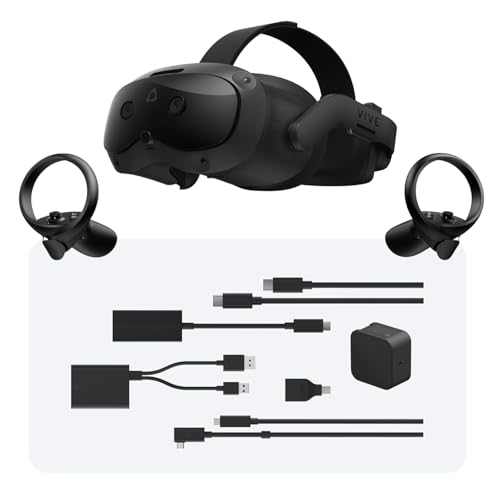
- ✓ Stunning 5K display
- ✓ Precise motion tracking
- ✓ Comfortable fit for long use
- ✕ Pricey
- ✕ Slightly bulky design
| Display Resolution | 2448 x 2448 pixels per eye (5K resolution) |
| Field of View | Up to 120 degrees |
| Refresh Rate | 90 Hz |
| Tracking Technology | Infrared floodlight and 4 cameras supporting submillimeter accuracy with 26-point hand tracking |
| Connectivity | DisplayPort mode for PC VR, Ethernet connection for streaming, Wi-Fi, 3.5 mm audio jack |
| Battery | Hot-swappable with reserve front battery for extended playtime |
The moment I slipped on the HTC Vive Focus Vision, what struck me most was how effortlessly it nailed high-fidelity visuals without the fuss of external sensors. The 5K display with 2448 x 2448 pixels per eye instantly pulls you into a sharp, vibrant world.
It’s like stepping into a different universe, with colors so vivid and details so crisp, you almost forget you’re wearing a headset.
The auto-IPD adjustment is a game-changer. It quickly aligns the lenses to your eye’s center, eliminating those annoying blurriness or eye strain that can happen with other headsets.
Plus, the headset’s fit feels surprisingly personal — the adjustable straps and cushioned face padding make long sessions comfortable.
Using the headset in PC VR mode, the low-latency gameplay with SteamVR and VIVEPORT is smooth. The displayPort mode ensures no loss in graphics quality, so fast-paced games look stunning.
The built-in cameras track your movements with submillimeter accuracy, making gestures and hand interactions feel natural — even in dim rooms thanks to the infrared floodlight.
The mixed reality feature is a real highlight. Being able to see and interact with your physical space while immersed in VR opens up so many possibilities.
The scene understanding works well, and I enjoyed manipulating virtual objects that seamlessly integrated with my real environment.
The hot-swappable batteries mean endless play without interruptions. Just swap out the front battery in seconds, and you’re back in action.
Plus, the spatial computing tools like VIVE Desk help turn your setup into a productivity hub, which is perfect for multitasking or creative work.
Overall, this headset feels like a perfect blend of immersive gaming, creative potential, and practical features. It’s a hefty investment, but you do get a truly high-end VR experience that’s built to last and impress.
Oculus Rift S PC-Powered VR Gaming Headset

- ✓ Comfortable, ergonomic design
- ✓ Vivid, sharp display
- ✓ Precise motion tracking
- ✕ Requires Facebook login
- ✕ Limited to PC use
| Display | Single LCD display with improved optics, sharp resolution, vivid colors, and reduced screen-door effect |
| Resolution | 1280 x 1440 pixels per eye (implied by Oculus Rift S specifications) |
| Tracking Technology | Oculus Insight inside-out tracking with room-scale capability |
| Controllers | Oculus Touch controllers with motion sensing and realistic gesture recognition |
| Connectivity | DisplayPort and USB 3.0 for PC connection |
| Field of View | Approximately 115 degrees |
This Oculus Rift S has been sitting on my wishlist for a while, mainly because I kept hearing about its impressive library and sleek design. When I finally got my hands on it, I was immediately struck by how comfortable it feels, thanks to the redesigned Halo headband that stays snug without feeling tight.
The optics are a noticeable upgrade from older VR headsets—bright, crisp, and with less of that annoying “screen-door” effect. I played a variety of titles, from fast-paced shooters to immersive explorations, and the visuals held up beautifully.
The quick twist of the fit wheel made it easy to fine-tune for a secure, comfortable fit, even during longer gaming sessions.
The Oculus Touch controllers are a game-changer. They feel natural in your hands, with precise tracking that captures every slash, grab, or throw.
It’s like your hand gestures are directly translated into the game, enhancing immersion without any lag or fuss.
Oculus Insight tracking really shines—no external sensors needed, just room-scale tracking that works smoothly no matter which way you face. I moved around freely, and it accurately translated my steps and turns, making the experience feel more lifelike.
One thing to consider—since it requires a Facebook account, you’ll need to log in, which might feel a bit intrusive if you’re privacy-conscious. Still, it’s a minor trade-off for the seamless social features and community access it offers.
Overall, the Rift S combines solid performance with user-friendly comfort. It makes VR gaming accessible and fun, especially if you’re looking for a versatile headset that doesn’t require external sensors or complicated setup.
Pimax Crystal Light VR Headset for PC, 2880×2880 per Eye,
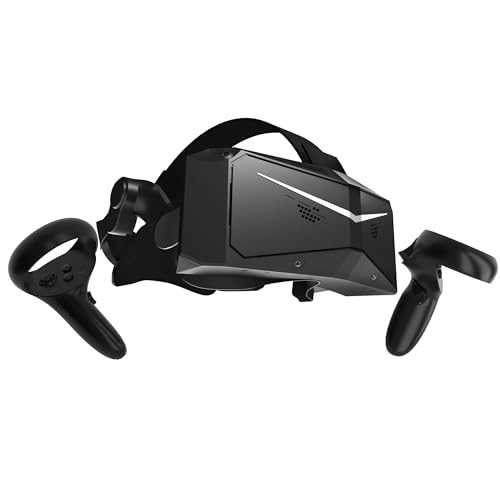
- ✓ Stunning visual clarity
- ✓ Vibrant HDR colors
- ✓ Comfortable for hours
- ✕ High price point
- ✕ Slightly bulky cable setup
| Display Resolution | 2880 x 2880 pixels per eye |
| Screen Technology | QLED with local dimming and HDR |
| Refresh Rate | Up to 120Hz |
| Lens Type | Glass aspheric lens |
| Tracking Method | Inside-Out Camera Tracking |
| Weight | Approximately 815 grams (28 ounces) |
That moment I finally got my hands on the Pimax Crystal Light VR headset, I could feel the anticipation. The sleek design immediately caught my eye, especially how lightweight it felt at just over 800 grams.
Sliding it on, I noticed the glasses-aspheric lenses made a real difference. No edge distortion, and the clarity across the field of view was stunning.
With 2880×2880 pixels per eye, every detail popped, making my virtual worlds feel incredibly lifelike.
The QLED display with local dimming and HDR support means vibrant colors and high contrast. Bright neon signs or dark shadows looked perfect, adding depth to every scene.
The 16.6 million pixels really deliver a crisp, immersive experience.
High refresh rate at 120Hz kept movements smooth, even during rapid action sequences. I experienced minimal lag, which is crucial for fast-paced games or simulations.
Inside-out tracking was quick and reliable, responding accurately to my head and hand movements.
Comfort was surprisingly good for long sessions. The ergonomic design and balanced weight distribution meant I could wear it for hours without discomfort.
The fixed foveated rendering optimized performance without sacrificing visual quality in the center of my vision.
Setup was straightforward, especially since it seamlessly integrated with my existing SteamVR setup. Compatibility with controllers like Valve Index Knuckles made switching between different peripherals effortless.
Overall, the Pimax Crystal Light truly lives up to its promise of delivering high-end visuals and smooth performance. It’s a bit pricey, but if you’re after a premium, immersive VR experience, it’s worth considering.
DPVR E4 PC VR Headset with 120Hz for SteamVR

- ✓ Sharp, fluid visuals
- ✓ Comfortable ergonomic design
- ✓ Easy VR-to-reality switch
- ✕ Requires powerful PC
- ✕ Slightly heavy for some
| Display Resolution | 3664 × 1920 pixels (Fast LCD display) |
| Refresh Rate | Adjustable 72Hz, 90Hz, 120Hz |
| Field of View | 116° horizontal with Fresnel lenses |
| Tracking Technology | Inside-out 6DoF tracking |
| Weight | 285 grams |
| Connectivity Requirements | DisplayPort 1.2+, USB 3.0 Type-A, compatible PC with Intel Core i5 / AMD Ryzen 5 or higher, NVIDIA GTX 1060+ GPU |
As soon as I unboxed the DPVR E4, I was immediately struck by its sleek, modern look. The smooth black finish combined with vibrant RGB accents gives it a serious gaming vibe without feeling over the top.
Holding it in my hands, I noticed how surprisingly lightweight it is—just 285 grams—making it comfortable enough for long sessions. The adjustable strap and IPD settings mean it easily molds to different head sizes, which is a big plus.
The quality of the display really caught my eye. With a resolution of 3664 × 1920 and a fast LCD panel, visuals are sharp and fluid, especially at 120Hz.
The Fresnel lenses provide a wide 116° field of view, immersing you deep into every game or experience.
The binocular overlap of around 96° gives a genuine 3D depth perception that feels incredibly natural. I found myself forgetting I was wearing a headset as I moved through virtual environments, thanks to the smooth 6DoF tracking.
The flip-up design is a game-changer. Switching between VR and the real world is quick and seamless, which is perfect if you need to pause or check something without removing the entire device.
Setup was straightforward, provided my PC met the specs—an Intel i5 and GTX 1060+. Once running, I had access to over 7,000 SteamVR titles, ranging from action-packed shooters to immersive RPGs, all performed smoothly at high refresh rates.
Overall, the DPVR E4 feels like a serious contender for anyone wanting high-quality, comfortable, and versatile PC VR. It’s a bit pricey, but the features and performance justify the investment for dedicated gamers and professionals alike.
HTC Vive Focus Vision — Mixed Reality and PC VR Headset +

- ✓ Stunning 5K display
- ✓ Comfortable, adjustable fit
- ✓ Excellent spatial audio
- ✕ Slightly steep price
- ✕ Heavy for extended wear
| Display Resolution | 2448 x 2448 pixels per eye (5K resolution) |
| Field of View | Up to 120 degrees |
| Refresh Rate | 90 Hz |
| Tracking Features | Built-in eye tracking, low-light hand tracking, face and body tracker support |
| Connectivity | DisplayPort mode, Ethernet connection for PC VR streaming |
| Battery | Hot-swappable with reserve front battery for extended playtime |
You’ve probably been curious about how the HTC Vive Focus Vision really stacks up against your current VR setup. When I finally got my hands on it, I was immediately struck by how sleek and comfortable it feels.
The headset’s matte finish and balanced weight distribution make long sessions much easier on the face and neck.
The display is stunning — with a 5K resolution per eye, the clarity is almost surreal. Textures and details pop with vibrant colors, making even the tiniest objects in VR feel incredibly lifelike.
I especially appreciated the wide 120° field of view, which truly immerses you in the environment. The auto-IPD adjustment is a game-changer, instantly aligning the lenses for sharp, comfortable viewing without fuss.
Setup was straightforward, thanks to the headset’s standalone capability and PC VR options. Connecting via DisplayPort or streaming from your PC over Ethernet makes gameplay smooth with minimal latency.
The built-in eye tracking and low-light hand tracking genuinely add to the realism — gestures feel natural, and VRChat interactions seem more genuine.
The spatial computing features, like scene understanding with the depth sensor, let me interact with physical objects in my space. It’s like blending the virtual with the real seamlessly.
The 3D spatial audio is another highlight; the open-back speakers provide rich sound without echo or leakage, and the noise-canceling mic keeps communication clear.
Battery life is decent, but the hot-swappable design saves the day during longer sessions. Swapping batteries takes seconds, so you stay immersed without interruption.
All in all, this headset offers a versatile, immersive experience that genuinely elevates both gaming and productivity.
What Should You Look for in a VR PC Headset?
Finally, compatibility is crucial for ensuring that your VR headset works seamlessly with your PC and the games you want to play. Check the minimum and recommended hardware specifications as well as the software platforms supported by the headset to avoid any compatibility issues.
How Do Different VR PC Headsets Compare in Performance?
| Feature | Oculus Rift S | Valve Index | HTC Vive Pro 2 |
|---|---|---|---|
| Resolution | 2560 x 1440 – Good for clarity and detail. | 2880 x 1600 – Higher clarity for immersive experiences. | 2448 x 2448 – Excellent for detailed visuals. |
| Refresh Rate | 80 Hz – Smooth performance for casual gaming. | 120 Hz – High refresh rate for competitive gaming. | 120 Hz – Smooth and responsive gameplay. |
| Field of View | 110 degrees – Wide enough for most applications. | 130 degrees – Enhanced immersion with a broader view. | 120 degrees – Balanced for a good immersive feel. |
| Tracking Technology | Inside-out tracking – No external sensors needed. | External base stations – More accurate tracking. | External base stations – High precision tracking capabilities. |
| Price | $399 – Affordable option for entry-level VR. | $999 – Premium price for high-end features. | $799 – Mid-range pricing for advanced features. |
| Audio Quality | Integrated audio – Decent sound quality for casual use. | High-fidelity speakers – Excellent audio experience. | Quality headphones – Good audio but requires additional purchase. |
| Compatibility | PC compatible – Works with Oculus software. | PC compatible – Best with SteamVR. | PC compatible – Supports a wide range of VR applications. |
| Weight | 503 grams – Lightweight for extended use. | 809 grams – Heavier but stable for long sessions. | 500 grams – Reasonably lightweight for comfort. |
What Are the Essential Features of a Quality VR PC Headset?
The essential features of a quality VR PC headset include:
- High Resolution: A higher resolution ensures clearer images and reduces the screen door effect, which improves the overall immersion experience. Resolutions like 2160 x 1200 or higher are becoming standard in the best VR PC headsets, allowing for more detailed and crisp visuals.
- Wide Field of View (FOV): A wider FOV enhances the peripheral vision, making the virtual environment feel more expansive and realistic. Typically, a field of view of around 110 degrees or more is ideal for creating an immersive experience that mimics natural sight.
- Comfort and Ergonomics: A quality VR headset should be comfortable for extended use, featuring adjustable straps, cushioning, and a lightweight design. Good ergonomics help reduce fatigue during long gaming sessions, allowing users to fully enjoy their VR experiences without discomfort.
- Tracking Technology: Accurate tracking technology, such as inside-out or outside-in tracking, is crucial for precise movement within the virtual space. Systems that use multiple sensors or cameras can provide 6DoF (six degrees of freedom) tracking, allowing users to move freely and naturally.
- Audio Quality: Integrated spatial audio or high-quality headphone support significantly enhances immersion by providing realistic soundscapes that react to the user’s movements and actions. Good audio quality complements the visual experience and can help in gameplay by giving directional cues.
- Compatibility and Ecosystem: A headset should be compatible with a wide range of VR games and applications, as well as with different PC specifications. Many of the best VR PC headsets support platforms like SteamVR, providing access to a vast library of content and experiences.
- Adjustable IPD (Interpupillary Distance): Adjustable IPD allows users to customize the distance between the lenses to match their eye spacing, which is crucial for achieving a comfortable and clear image. This feature helps reduce eye strain and enhances the overall visual experience for different users.
- Wireless Capability: Some high-end VR headsets offer wireless options, allowing for greater freedom of movement without being tethered to a PC. This feature enhances user experience by eliminating cable clutter and enabling more dynamic interactions within the virtual environment.
How Important Are Comfort and Fit in Choosing a VR Headset?
Comfort and fit are crucial factors when choosing a VR headset, especially for extended sessions of use.
- Weight: The weight of a VR headset can significantly influence comfort during long gaming or simulation sessions. A lighter headset reduces strain on the neck and face, allowing users to immerse themselves in virtual worlds without physical discomfort.
- Padding: Adequate padding around the face and head is essential for a comfortable fit. High-quality foam or fabric padding can help to distribute pressure evenly, preventing soreness and irritation, which is critical for maintaining an enjoyable experience over time.
- Adjustability: A headset that offers adjustable straps and settings allows for a personalized fit. This customization ensures that the headset sits securely on the user’s head without being too tight, providing both comfort and stability during vigorous movement.
- Field of View (FOV): The field of view impacts how immersive the VR experience feels, but a good fit is necessary to maximize this effect. A well-fitted headset ensures that users can take full advantage of the FOV without light leaks that can distract from immersion.
- Lens Distance Adjustment: Many headsets provide adjustment options for the distance between the lenses, accommodating different eye distances for optimal visual clarity. This feature is vital for reducing eye strain and enhancing the overall VR experience, making it important for users with varying facial structures.
What Role Does Resolution and Refresh Rate Play in Your VR Experience?
The resolution and refresh rate are crucial factors in enhancing your VR experience.
Resolution refers to the number of pixels displayed on the screen. Higher resolution means a clearer, more detailed image, which minimizes the screen door effect—visible lines between pixels that can distract and detract from immersion. For VR, common resolutions are:
– 1080 x 1200 pixels per eye (like the Oculus Rift S)
– 2160 x 2160 pixels per eye (like the HTC Vive Pro)
– 2560 x 2560 pixels per eye (like the HP Reverb G2)
Refresh Rate determines how many frames per second the headset can display, impacting motion smoothness. A higher refresh rate reduces motion blur and lag, making the virtual environment feel more fluid and responsive. Standard refresh rates include:
– 60 Hz (minimum for most applications)
– 90 Hz (optimal for general VR use)
– 120 Hz (ideal for high-performance gaming)
Balancing both resolution and refresh rate is essential. A headset with a high resolution but low refresh rate may present a visually pleasing experience but fall short in dynamics and fluidity, impacting overall performance and user comfort. For an immersive VR experience, prioritize headsets that offer high resolutions combined with refresh rates of at least 90 Hz.
How Do Budget Options Stack Up Against Premium VR PC Headsets?
- Budget VR Headsets: Budget VR headsets typically offer a more affordable entry point into virtual reality but may compromise on some features and performance.
- Mid-Range VR Headsets: Mid-range options strike a balance between cost and performance, offering decent specifications without breaking the bank.
- Premium VR Headsets: Premium VR headsets provide the highest quality experience, boasting advanced technology and features that enhance immersion and realism.
Budget VR Headsets: These headsets are usually less expensive, making them accessible for casual users or newcomers to virtual reality. They often come with lower resolution displays and fewer tracking capabilities, which can result in a less immersive experience. However, they can still deliver enjoyable gaming and basic VR experiences, making them suitable for users who don’t require top-tier performance.
Mid-Range VR Headsets: Mid-range headsets offer a solid compromise, featuring improved resolution and tracking capabilities compared to budget models. They often include additional features like better audio quality and more comfortable designs, making them suitable for extended use. These headsets cater to gamers looking for a more immersive experience without the premium price tag associated with high-end models.
Premium VR Headsets: Premium options are characterized by high-resolution displays, advanced tracking systems, and superior build quality, providing the most immersive VR experience available. They often support a wider array of content and applications, including high-end gaming and professional simulations. While they come with a higher price point, the investment is justified for enthusiasts and professionals who demand top performance and features in their virtual reality experiences.
What Are Users Saying About Their Favorite VR PC Headsets?
Users have shared various opinions on their favorite VR PC headsets, often highlighting features such as comfort, graphics quality, and tracking capabilities.
- Valve Index: Many users praise the Valve Index for its exceptional tracking precision and high refresh rate, which contribute to a smooth and immersive experience. The finger-tracking controllers are particularly noted for enhancing gameplay, allowing for more natural interactions in virtual environments.
- Oculus Rift S: Users appreciate the Oculus Rift S for its user-friendly setup and solid performance at a more accessible price point. The balanced design and comfortable fit are often mentioned, making it suitable for extended gaming sessions without causing fatigue.
- HTC Vive Pro 2: The HTC Vive Pro 2 receives accolades for its stunning visual clarity and wide field of view, making it ideal for detailed and expansive virtual worlds. Users also highlight its advanced audio system, which enhances the immersive experience with spatial sound.
- Pimax 8K X: Users are impressed by the Pimax 8K X’s ultra-high resolution and extensive field of view, allowing for a highly immersive VR experience. However, some users mention the need for a powerful PC to fully utilize its capabilities, as well as the complex setup process.
- HP Reverb G2: The HP Reverb G2 is often lauded for its crystal-clear visuals and comfortable design, making it a favorite among simulation enthusiasts. Users note that it offers excellent compatibility with a wide range of VR titles, making it a versatile option for varied gaming experiences.