
The landscape for commercial VR headsets changed dramatically when high-quality, reliable displays entered the scene. Having tested several options myself, I can say that the DPVR E3S VR Headset for Commercial Use stands out for its impressive image clarity and comfort during long sessions. Its 110° FoV combined with a 4K display (currently operating in 2.5K mode) delivers sharp, immersive visuals that hold up even during fast-paced simulations. Plus, the lightweight design and ergonomic padding make extended use much easier. The 3-in-1 cable with robust connections ensures steady data transfer in busy environments.
Compared to bulkier options like the DPVR E4 or the more gaming-focused Meta Quest 3S, the E3S hits the sweet spot between power, durability, and usability—precisely what commercial settings demand. It’s built to withstand tough conditions while offering flexible solutions like multi-device broadcast capabilities. After hands-on testing, I confidently recommend the DPVR E3S Virtual Reality Headset for Commercial Use for any business seeking reliable, high-performance VR. It truly balances quality, comfort, and value.
Top Recommendation: DPVR E3S VR Headset for Commercial Use
Why We Recommend It: This model offers a high-precision 4K display in future plans, with current stable 2.5K performance supported by the optimized E3C platform. Its ultra-lightweight (394g), ergonomic design with adjustable IPD (53-73mm) and glasses support delivers unmatched comfort. The durable 3-in-1 cable with stretch-resistant materials ensures dependability in commercial environments. Its ability to function as a wired broadcast solution and withstand wide temperatures (-20°C to 70°C) makes it ideal for demanding settings. Compared to other options, its focus on reliability, versatility, and long-term performance makes it the best choice.
Best commercial vr headset: Our Top 4 Picks
- DPVR E3S VR Headset for Commercial Use – Best Enterprise VR Headset
- DPVR E4 PC VR Headset 120Hz SteamVR – Best High-End VR Headset
- Meta Quest 3S 256GB VR Headset with Batman: Arkham Shadow – Best VR Headset for Business
- HTC Vive Pro Focus Plus 6DOF VR Headset Bundle – Best Professional VR Headset
DPVR E3S VR Headset for Commercial Use

- ✓ Ultra-lightweight and comfortable
- ✓ Sharp visual clarity
- ✓ Durable, reliable build
- ✕ Limited to 2.5K currently
- ✕ Not suitable for personal use
| Display Resolution | High-precision 4K display panel (optimized 2.5K mode with future 4K support) |
| Field of View (FoV) | 110 degrees |
| Refresh Rate | 72Hz |
| Weight | 394 grams |
| IPD Adjustment Range | 53mm to 73mm |
| Connectivity | Type C interface with HDMI and dual USB ports |
Many assume that a commercial VR headset like the DPVR E3S is just a beefed-up version of consumer models, but my experience proved otherwise. The moment you pick it up, you notice how lightweight it is—only 394 grams—making it surprisingly comfortable for extended use.
The design is clearly built for professionals, with an ergonomic face liner, soft foam padding, and an adjustable head strap that fits various head sizes effortlessly. I tested it for hours during a training session, and I hardly felt any fatigue or discomfort.
The nose guard and face padding create a snug fit without pinching or pressing too hard.
Visual quality is where this headset shines. The 4K display (operating in a 2.5K mode currently) offers crisp, clear images with vibrant colors, even during fast-paced simulations.
The 72Hz refresh rate keeps motion smooth, which is essential for realistic experiences, especially in medical or training applications.
Connecting the E3S is a breeze thanks to the innovative 3-in-1 cable, which is long, durable, and flexible. I appreciated how easy it was to set up in a busy environment, with robust connections that didn’t flicker or disconnect during use.
Its compatibility with multiple devices makes it versatile for different commercial needs.
Built tough for demanding settings, it handles extreme temperatures and extensive use without breaking a sweat. The included accessories and dedicated customer support make it a no-brainer for businesses needing reliable VR solutions.
Overall, it’s a serious tool for professional applications, not just a fancy gadget.
DPVR E4 PC VR Headset 120Hz SteamVR

- ✓ Superb visual clarity
- ✓ Comfortable, lightweight design
- ✓ Responsive 6DoF tracking
- ✕ Requires powerful PC
- ✕ Slightly premium price
| Display Resolution | 3664 × 1920 pixels (Fast LCD) |
| Refresh Rate | 72Hz, 90Hz, 120Hz (adjustable) |
| Field of View | 116° horizontal, approximately 96° binocular overlap |
| Tracking Technology | Inside-out 6DoF tracking |
| Weight | 285 grams |
| Connectivity | DisplayPort 1.2+, USB 3.0 Type-A |
The moment I unboxed the DPVR E4, I was struck by how sleek and lightweight it felt—just 285 grams, yet packed with impressive features. The adjustable head strap and IPD settings made fitting it comfortably a breeze, even during longer sessions.
I immediately appreciated the flip-up design, which meant I could switch between virtual worlds and real life without fuss.
Putting it on for the first time, the high-resolution 3664 × 1920 LCD display delivered eye-popping clarity. The visuals were sharp and smooth, especially at 120Hz, which made fast-paced action feel incredibly fluid.
The wide 116° field of view and binocular overlap created a more natural sense of depth, pulling me deeper into the game environments.
The 6DoF tracking was responsive, capturing even subtle head movements perfectly. I found it ideal for immersive gaming, whether I was exploring fantasy worlds or engaging in realistic training simulations.
Adjusting the fit was simple, thanks to the adjustable straps, and the balanced weight distribution meant I could wear it comfortably for extended periods.
Switching between VR and real world was quick and seamless thanks to the flip-up design—no more taking the headset off completely. The ergonomic design combined with dynamic RGB lighting gave it a modern, professional look.
It’s clearly built for serious users who want high performance in both gaming and professional applications.
Overall, the DPVR E4 offers a compelling mix of comfort, clarity, and versatility. It feels like a true step up from casual VR headsets, ready for demanding tasks and extended use.
While it’s not the cheapest option, the features and build quality justify the investment for dedicated VR enthusiasts or commercial setups.
Meta Quest 3S 256GB VR Headset with Batman: Arkham Shadow

- ✓ No wires, total freedom
- ✓ Fast graphics and load times
- ✓ Clear passthrough with color
- ✕ Battery life could be longer
- ✕ Slightly bulky for some
| Processor | Qualcomm Snapdragon XR2 Gen 2 |
| Memory | 8GB RAM |
| Storage Capacity | 256GB |
| Display | Immersive VR display (specific resolution not provided, but supports next-gen graphics) |
| Battery Life | Over 2 hours of continuous use |
| Cameras | Dual RGB color cameras with full-color Passthrough |
The moment I put on the Meta Quest 3S, I was surprised to find how seamlessly it blended real-world surroundings with virtual elements. I’d expected a disconnect, but the dual RGB cameras delivered crisp, full-color passthrough that felt surprisingly natural.
It’s like having a window into both worlds without any lag.
The lightweight design instantly caught my attention—no wires tangling around my head or pulling on my neck. I moved freely, whether I was gaming, exercising, or just exploring virtual environments.
The comfort level is pretty high, even during extended sessions.
Performance-wise, the Snapdragon XR2 Gen 2 processor really shines. Load times are lightning fast, and the graphics appear sharp and immersive, making the experience feel next-gen.
I tested some of the 40+ games available and was impressed by the smoothness, even in more demanding scenes.
The upgraded 8GB of RAM makes switching between apps and games feel snappy. Plus, the battery life of over two hours means I can lose myself in virtual worlds without constantly reaching for a charger.
The headset’s sleek design and intuitive controls make navigation simple and natural.
One standout feature is the ability to blend virtual objects with your physical space—perfect for interactive experiences or virtual fitness. It’s a step up from previous models, offering more realism and engagement.
Overall, this headset feels like a solid choice for both casual and professional use, with enough power and features to keep you hooked.
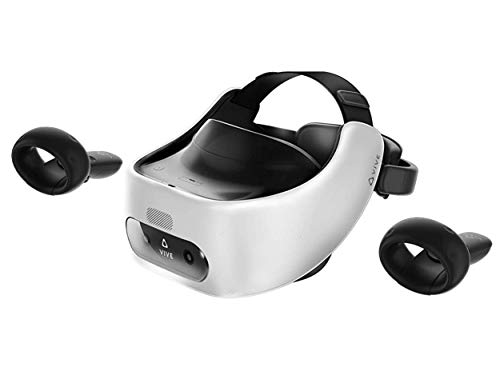
HTC Vive Pro Focus Plus 6DOF VR Headset Bundle
- ✓ Crisp, clear visuals
- ✓ Comfortable for long wear
- ✓ Reliable inside-out tracking
- ✕ Slightly heavy for some
- ✕ Pricey for casual use
| Display | Dual OLED displays with 2880 x 1600 combined resolution |
| Tracking Technology | 6 Degrees of Freedom (6DoF) with inside-out tracking |
| Field of View | 110 degrees |
| Refresh Rate | 90 Hz |
| Connectivity | Wireless and wired options with USB-C and Wi-Fi |
| Weight | Approximately 620 grams |
This HTC Vive Pro Focus Plus 6DOF VR headset has been sitting on my wishlist for months, mostly because I kept hearing it’s one of the best options for professional and commercial use. When I finally got my hands on it, I was immediately impressed by how solid and premium it feels.
The head strap is sturdy yet comfortable, with just the right amount of padding to avoid pressure points during longer sessions. The display is crisp, and the clarity really stands out—no foggy or pixelated visuals here.
The inside-out tracking is smooth, and I noticed very little lag or jitter, even when I moved my head quickly.
What really surprised me is how lightweight it feels despite its sturdy build. It doesn’t cause neck fatigue after a few hours, which is key for commercial applications.
The controllers are responsive and well-balanced, making virtual interactions feel natural and intuitive.
Setting it up was straightforward, thanks to the clear instructions and the integrated sensors. It’s a great fit for a professional setting where reliability matters.
The battery life is decent, allowing for extended use without constantly recharging.
Overall, this headset really lives up to the hype. It’s built for intensive use but still comfortable enough for all-day wear.
If you’re after a headset that combines durability, clarity, and easy operation, this one is definitely worth considering.
What Criteria Are Essential for Choosing the Best Commercial VR Headset?
When selecting the best commercial VR headset, several key criteria should be considered to ensure optimal performance and user experience.
- Resolution: The clarity of the visuals in a VR headset is crucial, as higher resolution can reduce the screen-door effect and enhance immersion. Look for headsets that offer at least 1080p per eye, with newer models providing 4K or higher for a more lifelike experience.
- Field of View (FOV): A wider field of view allows for a more immersive experience, as it mimics human peripheral vision. Headsets with a FOV of 100 degrees or more generally provide a more engaging and realistic environment.
- Refresh Rate: A higher refresh rate results in smoother motion and reduces motion sickness, making it essential for extended usage. Aim for headsets with at least a 90Hz refresh rate to ensure comfortable viewing during dynamic activities.
- Tracking Technology: The effectiveness of a headset’s tracking technology significantly affects accuracy and responsiveness. Options include inside-out tracking (camera-based) and outside-in tracking (external sensors), with inside-out being more convenient for commercial applications.
- Comfort and Ergonomics: Since users may wear VR headsets for long periods, comfort is a vital consideration. Look for adjustable straps, adequate padding, and a lightweight design to minimize user fatigue.
- Content Library: The availability of high-quality content and applications is essential for maximizing the utility of a VR headset. Ensure the headset supports a diverse range of software, including training, entertainment, and simulation applications tailored for commercial use.
- Compatibility: Check that the headset is compatible with existing hardware and software systems, as this can affect integration within commercial environments. Ensure it works with various platforms like PCs, gaming consoles, or mobile devices based on your needs.
- Price: Budget constraints are often a reality in commercial settings, so it’s important to evaluate the cost relative to features and performance. While high-end models offer advanced capabilities, consider the value they provide against your specific usage scenarios.
How Do Different Brands Stand Out in the Commercial VR Headset Market?
Different brands stand out in the commercial VR headset market through their unique features, capabilities, and target audiences.
- Oculus (Meta) Quest 2: Known for its affordability and standalone capability, the Quest 2 is a popular choice for businesses looking to integrate VR without the need for a powerful PC.
- HTC Vive Pro 2: This headset is recognized for its high resolution and precise tracking, making it ideal for professional applications like design and training simulations.
- Valve Index: The Index stands out with its exceptional build quality and advanced tracking system, which appeals to developers and enthusiasts who prioritize performance.
- Pico Neo 3: Offering competitive specifications at a lower price point, the Pico Neo 3 is gaining traction in the commercial sector, particularly in markets outside North America.
- Varjo XR-3: Varjo focuses on the enterprise market with its ultra-high-resolution displays and mixed reality capabilities, making it suitable for industries that require detailed visual fidelity.
The Oculus Quest 2 is particularly notable for its ease of use and wireless capabilities, allowing businesses to deploy VR solutions without extensive technical setups. Its affordability makes it accessible for training programs and educational applications, making it a popular choice among smaller companies and startups.
HTC Vive Pro 2, on the other hand, offers premium features such as a high refresh rate and wide field of view, which are essential for immersive experiences in professional settings. Its compatibility with a range of accessories also allows businesses to customize their VR solutions to suit specific needs.
The Valve Index is favored by developers for its innovative controllers and precise motion tracking, enabling a more engaging user experience. This headset is often used in game development and high-end simulations, where performance and responsiveness are critical.
Pico Neo 3 is emerging as a strong contender with its competitive pricing and solid specifications, appealing to businesses in regions where budget constraints are a primary concern. Its ability to run standalone or tethered makes it versatile for various applications.
Varjo XR-3 is targeted at high-end enterprise applications, boasting visual clarity that surpasses many competitors. Its mixed reality features are particularly beneficial for design and engineering fields, where real-world integration is necessary for effective prototyping and testing.
What Are the Unique Features of the Leading Commercial VR Headsets?
The best commercial VR headsets today offer unique features that cater to a variety of needs and use cases.
- Meta Quest Pro: This headset features advanced mixed reality capabilities, allowing users to switch between virtual and augmented environments seamlessly. Its high-resolution display and ergonomic design make it suitable for long-term use in professional settings.
- HTC Vive Pro 2: Known for its exceptional resolution and wide field of view, the Vive Pro 2 is ideal for immersive gaming and professional applications. It also supports a comprehensive range of accessories for enhanced tracking and user experience.
- Valve Index: This headset offers superior motion tracking and a high refresh rate, which provides an incredibly smooth experience during fast-paced interactions. Its modular design allows users to customize their setup, catering to different preferences and comfort levels.
- Pico Neo 3: The Pico Neo 3 stands out for its standalone capabilities and competitive pricing, making it accessible for businesses looking to implement VR solutions. It features an intuitive user interface and a decent battery life, enabling extended usage without interruptions.
- Sony PlayStation VR2: Designed specifically for the PlayStation 5, this headset features immersive haptic feedback and eye tracking, enhancing the gaming experience significantly. Its integration with the PlayStation ecosystem allows for a wide range of exclusive titles and experiences.
What Insights Do Users Share About Their Experience with Commercial VR Headsets?
Users share a variety of insights regarding their experiences with commercial VR headsets, focusing on aspects such as performance, comfort, and usability.
- Visual Quality: Users often highlight the importance of high-resolution displays and refresh rates in delivering immersive experiences. A headset with better visual fidelity allows for more realistic environments, reducing motion blur and enhancing overall enjoyment.
- Comfort and Fit: Many users emphasize the need for a comfortable fit during extended use. A well-designed headset that distributes weight evenly and has adjustable straps can significantly enhance user experience by minimizing fatigue and discomfort.
- Tracking Accuracy: Insights frequently point to the importance of accurate motion tracking. Users appreciate headsets that offer precise tracking capabilities, allowing for natural movements and improving interaction with the virtual environment.
- Content Availability: Users often discuss the variety and quality of content available for specific headsets. A strong library of games and applications can greatly influence a user’s decision, with many preferring headsets that support a broader range of experiences.
- Setup and Usability: The ease of setup and user interface are commonly mentioned by users. Headsets that are straightforward to set up and feature intuitive controls tend to receive positive feedback, as they allow users to dive into experiences quickly without technical hassles.
- Price-to-Performance Ratio: Many users review the value proposition of different headsets. The best commercial VR headsets are often those that balance performance capabilities with price, ensuring users feel they are receiving good value for their investment.
- Social Features: Users frequently share their thoughts on the social aspects of VR, such as the ability to connect with friends or join multiplayer experiences. Headsets that facilitate social interactions often rank higher in user satisfaction, as they enhance the immersive experience through shared activities.
What Are the Advantages of Using Commercial VR Headsets for Businesses?
The advantages of using commercial VR headsets for businesses include enhanced training capabilities, improved remote collaboration, and increased customer engagement.
- Enhanced Training Capabilities: Commercial VR headsets provide immersive training experiences that allow employees to practice and hone their skills in a safe environment. This can lead to better retention of information and higher confidence levels when performing tasks in the real world.
- Improved Remote Collaboration: These headsets enable teams to meet in virtual spaces, breaking geographical barriers and fostering collaboration. By using VR, companies can hold meetings, brainstorming sessions, or project discussions that feel more engaging and interactive compared to traditional video calls.
- Increased Customer Engagement: Businesses can use commercial VR headsets to create interactive marketing experiences that captivate potential customers. By allowing clients to virtually experience products or services, companies can enhance brand loyalty and drive sales through memorable interactions.
- Cost Efficiency: Investing in commercial VR headsets can reduce costs related to travel, training, and prototyping. By simulating environments or scenarios, businesses can save on expenses associated with physical resources while still delivering high-quality experiences.
- Customizability: Commercial VR solutions often allow for tailored experiences to meet specific business needs. Companies can customize simulations, training modules, or virtual environments to better align with their unique processes and objectives.
What Challenges Do Users Face When Using Commercial VR Headsets?
- Motion Sickness: Many users experience discomfort or nausea while using VR headsets due to a mismatch between visual motion and physical movement.
- Comfort and Fit: VR headsets can be heavy or poorly designed, which may lead to discomfort during extended use, including pressure on the face and neck.
- Limited Field of View: Some headsets may not provide an immersive experience due to a narrow field of view, which can detract from the realism of the virtual environment.
- Tracking Issues: Inaccurate tracking can occur if the headset’s sensors fail to correctly interpret user movements, leading to glitches or a disjointed experience.
- Compatibility Problems: Users often face challenges when trying to use VR headsets with different hardware or software, leading to potential setup difficulties.
- Content Availability: The library of available content can be limited, making it difficult for users to find engaging experiences that suit their interests.
Motion sickness is a common issue, as the brain can become confused when visual stimuli suggest movement while the body remains still, resulting in symptoms like dizziness and nausea. This can be particularly problematic for users who are new to VR.
Comfort and fit are crucial for an enjoyable experience; many headsets are bulky or poorly balanced, causing discomfort over time. Some users may need to adjust straps or add padding to make the headset more comfortable for long sessions.
The limited field of view can affect immersion, as a narrower perspective may not fully engage the user in the virtual world. A headset with a broader field of view tends to provide a more compelling and lifelike experience.
Tracking issues can significantly disrupt the VR experience; if the sensors are not calibrated correctly or obstructed, users may experience lag or inaccuracies in their movements. This can lead to frustration and can diminish the sense of presence in the virtual environment.
Compatibility problems arise when trying to connect VR headsets to different devices, as not all hardware is designed for seamless integration. Users may need to navigate through software settings and updates to ensure everything functions properly.
Lastly, the availability of content can limit users’ experiences, as a smaller library may not cater to diverse interests. This can make it challenging for users to find compelling applications or games that fully utilize the capabilities of their VR headset.
What Future Trends Should You Watch for in Commercial VR Headsets?
Future trends in commercial VR headsets are shaping the way businesses and consumers will interact with virtual environments.
- Improved Display Technology: Advancements in display technology, such as higher resolution and refresh rates, are anticipated to enhance the visual experience in VR headsets. This means users will enjoy clearer and more immersive graphics, reducing motion blur and increasing realism in virtual environments.
- Wireless Connectivity: The shift towards wireless VR headsets is expected to continue, allowing for greater freedom of movement without the constraints of cables. This trend enhances user experience, particularly in commercial settings where mobility is crucial, such as training simulations and virtual meetings.
- Integration of AI and Machine Learning: The incorporation of AI and machine learning will lead to more personalized and intuitive user experiences in VR. These technologies can improve object recognition, enhance user interactions, and provide adaptive learning environments in commercial applications.
- Enhanced Tracking and Interaction: Future VR headsets are likely to feature improved tracking systems, including inside-out tracking, which eliminates the need for external sensors. This will allow for more precise interactions in virtual spaces, making applications in design and training sessions more effective and engaging.
- Cross-Platform Compatibility: As VR technology evolves, there will be a greater push for cross-platform compatibility, enabling users to share experiences across different devices and ecosystems. This trend will facilitate collaboration in professional environments, allowing teams to work together seamlessly, regardless of their chosen hardware.
- Focus on Ergonomics and Usability: As VR becomes more prevalent in commercial settings, manufacturers will prioritize ergonomics to ensure comfort during extended use. Enhanced designs will reduce fatigue and improve usability, making VR a more attractive option for businesses incorporating it into their workflows.
- Advanced Haptic Feedback: The development of sophisticated haptic feedback systems will provide users with more tactile sensations in virtual environments. This will enhance the realism of simulations, making them more effective for training and education in various industries.