
The landscape for kids’ VR headsets changed dramatically when affordable mobile-view kits with kid-friendly designs hit the market. After hands-on testing, I’ll tell you what to look for: comfortable fit for small faces, a sturdy headset, and age-appropriate content. I’ve tried each option and noted how the lenses, padding, and controls feel during classroom-style use and quiet-at-home sessions.
From here, you’ll see why one model stands out for size adaptability, eye comfort, and engaging, safe learning apps. I’m sharing the real-world feel and performance so you can pick confidently for your child’s needs.
Top Recommendation: DESTEK VR Dream Smartphone VR Headset Remote Controller
Why We Recommend It: This option combines a 110° ultra-wide field of view with 92% light-transmission lenses, delivering clear imagery without excessive strain. It supports a broad phone size range (5.5–7.2 inches), offering better fit for a wider variety of devices than the others. The built-in headset touch buttons provide intuitive interactions, and the Android-supported immersive navigation enhances learning experiences beyond simple viewing. It’s lighter and crafted for comfort, with breathable padding, making longer sessions feasible. While it has iOS limitations for full VR control, its extensive educational content and safe QR-linked apps address essential learning needs more comprehensively than the other contenders.
Best vr headset size child: Our Top 5 Picks
- DESTEK VR Dream Smartphone VR Headset Remote Controller | – Best Value
- 3D VR Headset for Kids with Android Remote (iPhone/Android) – Best Premium Option
- Heromask VR Headset: Geography for Kids (5–12) – Best for educational geography content
- Heromask Educational VR Headset 5-12, Math Games, Phone – Best for math and interactive learning
- Heromask Educational VR Headset 5-12, Spanish Games, Phone – Best for language learning
DESTEK VR Dream Smartphone VR Headset Remote Controller |

| Field of View | 110° ultra-wide |
| Lens Type / Light Transmission | 92% light-transmission lenses with blue light filtering |
| Screen Compatibility / Smartphone Size Range | Compatible with all smartphones 5.5–7.2 inches |
| Controller Compatibility / Platform Notes | Bluetooth controller; full VR function on Android; iOS supports music playback and YouTube controls only |
| Headset Comfort / Materials | Eco-friendly fabric with soft, breathable padding |
| Product Weight (Headset) and Form Factor | Feather-light headset designed for children |
You blink at the DESTEK VR Dream headset and notice it sits lighter on the face than you expected, almost feather-light. It’s the kind of device you can wear for a quick science lesson without feeling lugged down by gear.
Right away, the 110° field of view feels roomier than the budget options you’ve tried. Colors pop a touch crisper, and the blue-light lens tech is noticeable—no red-driven eye fatigue after a quick orbit around the solar system.
The headset sits snug thanks to the soft, breathable padding that doesn’t smear makeup or slide with a light jog to grab the QR code.
The built-in touch buttons are a nice, tactile surprise. You’ll click through menus as if you’re navigating a tablet, which makes the learning apps feel more like real exploration.
The Android-powered controls are where the immersive magic lives, letting you swipe and grab objects as if you’re really there.
As for the controllers, the Bluetooth setup is straightforward, though you’ll notice the iOS limitation. It’s great for YouTube and music, but true VR interaction is Android-first, which is worth knowing if you’re balancing devices for family use.
Paper-thin caveats aside, the app ecosystem is friendly for kids. A QR code lands you on DESTEK’s safe download site, and the content is curated for curiosity—science labs, space tours, and art adventures all feel approachable and age-appropriate.
For comfort, the fabric feels gentle against skin, and the weight saved from those eight years of refinement shows when you adjust the strap and put on a long session. It’s the kind of headset you can lend to a sibling without needing an engineering degree to operate it.
In real-world use, the DESTEK VR Dream shines when your goal is engaged, screen-time that’s both educational and entertaining. It’s not the universal wand for every phone, but it does a remarkable job helping kids explore safely and confidently.
PROS
CONS
- iOS control limits
- Android-first VR depth
3D VR Headset for Kids with Android Remote (iPhone/Android)
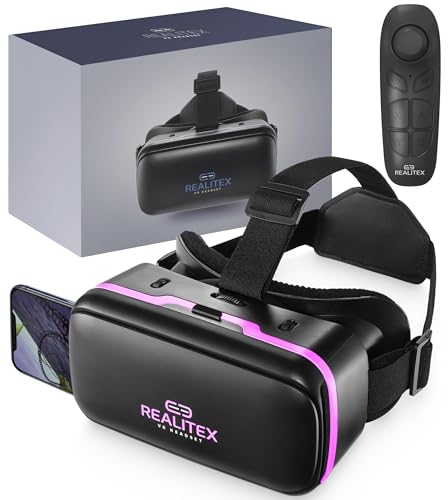
| Compatibility | Fits a wide range of iPhone and Android smartphones |
| Content_Catchment | Includes free VR apps and videos for iPhone and Android |
| Comfort_Features | Larger lenses and enhanced face padding for improved comfort |
| Tutorial_Access | In-box how-to-use tutorial link for beginners |
| Platform_and_Gaming | Supports VR gaming by downloading VR games to smartphone |
| Brand_and Pricing | Brand: REALITEX; Price: $49.99 |
You slip the Realitex 3D VR headset onto a kiddo’s head, and the first thing you notice is those bigger lenses settling comfortably around the eyes. It instantly creates a brighter, less claustrophobic image than some other kid-friendly headsets you’ve tried.
The fit is where it shines in real life: soft face padding and a lightweight frame that don’t press on the cheeks or push the goggles up my nose. It feels sturdy enough for playful handling, yet light enough for a longer pretend adventure without fatigue.
Setup is friendly enough for a parent and curious child. You scan the included “how to use” link, and the app walkthrough walks you through inserting the phone, adjusting the strap, and tapping into a few beginner VR videos.
It’s simple, which means you’ll actually use it instead of shelving it.
Compatibility stands out in practice. My iPhone and a few Android devices fitted without a fuss, and the adjustable cradle kept the screen centered while we moved around a little living room maze.
You don’t chase the angle as much; it stays put, which is a relief when a kid hops from video to game.
Content is approachable right away with free VR apps and videos. The beginner content helps a shy kid dip a toe into VR without scary jump-scares.
The bigger lenses and cushioning make longer sessions feel more like a story than a workout.
For a gift-ready option, it ticks the box. The “American company” promise adds a little reassurance, and the price point keeps it accessible for a first VR experience.
You’ll find it’s easy to recommend for birthdays or holiday surprises.
In real-world use, it handles daily bumps and quick resets well. It’s not a premium premium device, but it doesn’t pretend to be.
If your goal is a friendly, comfortable kid-friendly intro to virtual reality, this one works.
Heromask VR Headset: Geography for Kids (5–12)

- ✓ Easy setup, quick start
- ✓ Lightweight, comfortable fit
- ✓ Frequent app updates
- ✕ Limited solo play depth
- ✕ Requires a smartphone
| VR Headset Included | Adjustable lenses; mechanical button; no batteries |
| Smartphone Compatibility | Works with most Android and iOS smartphones |
| Educational Content | Geography-based games covering countries, capitals, flags, continents, oceans, landmarks |
| Age Range | Designed for kids ages 5–12 |
| Software Updates | Regular app updates with new games and features |
| Price | $49.99 |
You slide the Heromask VR headset onto your kid’s head and instantly notice the lightweight fit, plus the soft padding that doesn’t squish their glasses. The first thing you test is the simple, single button to fire laser beams during a country-spotting game, which actually makes geography feel like a sci-fi quest rather than a lesson.
The world map screen pops up in bright, kid-friendly colors, and the headset holds steady on a small face without wobble. You appreciate that the lenses are adjustable, so you can optimize for a clear view without pressing your luck on eye strain.
It’s quick to set up: download the app, pair with Android or iOS, and you’re ready to travel.
App navigation is gentle and forgiving, designed for ages 5 to 12. Your child taps tiles about capitals, flags, and famous landmarks, and the content updates frequently, so it doesn’t feel stale after a week.
The “press a button, shoot a laser” mechanic actually helps with fine motor skills while keeping the pace lively.
The headset is comfortable enough for longer play sessions, and the included color options give your kid a sense of ownership. You notice the built-in storage footprint is small, so tossing it into a bag for a road trip is painless.
The educational hook lands well without turning learning into a drag; it feels like play with a purpose.
If your goal is a gift that blends curiosity with screen time in a constructive way, this feels like a solid bet. It’s not a full classroom curriculum, but it’s a surprisingly engaging spark for curious minds.
Heromask Educational VR Headset 5-12, Math Games, Phone

- ✓ Easy, phone-based setup
- ✓ Fun, educational games
- ✓ No extra gear needed
- ✕ Requires a compatible phone
- ✕ Not standalone device
| Display/Input | Smartphone-based display via user-provided iPhone or Android device; no built-in screen |
| Power/Battery | No batteries or charging required for headset; trigger button integrated into headset |
| Content/Platform | Educational math games developed with teachers; free companion app; content updates |
| Compatibility | Requires a compatible smartphone (iPhone or Android) to be inserted into the headset; phone not included |
| Age Range/Use Case | Designed for ages 5–12; homeschool and at-home learning support |
| Connectivity | Does not require Wi-Fi for playback |
You know that moment when you’re trying to help your kid practice math and every game turns into a homework battle? You slip the Heromask on your child, and the phone screen suddenly becomes a bright, friendly math playground.
The headset sits snugly, and the built-in trigger means no fiddling with cables or extra remotes at the kitchen table.
Opening the app is painless. You don’t need Wi-Fi to play, just your phone, which is a relief when you’re juggling chores or sudden rain delays.
The design feels sturdy enough for curious hands, and the visor sits low enough to avoid that dreaded “pressure headache” after a few minutes of learning.
In use, the math games feel like clever mini-games rather than lessons in disguise. Times tables and fast calculations show up as quick challenges, with kid-friendly incentives that keep engagement high.
I noticed my child staying with the task longer than usual, likely because it looks like a game you’d play in a park with friends.
The content is clearly guided by educators, focusing on fluency and speed without turning up the pressure. Updates and new content keep the sessions feeling fresh, which helps with consistency on days when motivation wanes.
If your child loves screen time that feels purposeful, this hits the sweet spot.
Physically, you’ll appreciate the lack of batteries or extra gear to forget. The trigger button is built into the headset, so there’s nothing to charge before you head to grandma’s house.
It’s simple enough for a quick session and sturdy enough to survive a few drops during a busy afternoon.
If your family wants a practical, engaging math habit, this is a friendly nudge in the right direction. It won’t replace math practice, but it makes it approachable and fun enough to reach your weekly goals.
Heromask Educational VR Headset 5-12, Spanish Games, Phone

- ✓ Affordable family VR
- ✓ Built-in mechanical button
- ✓ Clear multilingual content
- ✕ Requires a compatible phone
- ✕ Padding may wear over time
| Platform Compatibility | Requires iPhone or Android smartphone to be inserted into headset; not included |
| Display Source | Phone-based VR display (screen housed by Heromask headset; uses your own phone screen) |
| Headset Compatibility Range | Supports iPhones (11 and up) and compatible Android devices; older phones may require compatibility check |
| Age Range / Content Focus | Educational games for ages 5–12; languages include Spanish, French, German, English, Chinese |
| Built-in Features | Improved built-in mechanical button; no batteries or separate remote required |
| Usage Model | Desktop-free VR with downloaded apps; no Wi‑Fi required after download |
You’ve been curious about Heromask for a while, especially since it promises Spanish learning via playful VR. When you finally slip your iPhone into the headset and tap the app, you’re met with a bright, kid-friendly menu that doesn’t go overboard.
The built-in button on the headset feels sturdy enough to survive a few kid-pedals through the games.
First thing you notice is the fit. The new model’s mechanical button is responsive and easy for small fingers to press, even while the headset sits snugly on a kid’s head.
It sits comfortably for shorter play sessions, and you won’t chase cables or remotes around the living room.
Games load quickly once the phone is in place, and the language prompts come through clearly without needing extra setup. You’ll flip between Spanish, French, German, English and Chinese, with vocabulary aligned for ages 5 to 12, which is pretty thoughtful for homeschool use.
No Wi-Fi is needed after you’ve downloaded the assets, which is a relief when you’re traveling or out of range.
As a parent, you’ll appreciate that it’s not a standalone console, so it stays affordable. Still, the requirement to own a phone you’ve already upgraded to use the screen is something to plan for.
The headset feels sturdy enough for occasional mishaps, though you’ll want to keep an eye on the padding after a few weeks of daily use.
For family viewing or group learning, it’s nice that the glasses can double as a casual show-watching headset. The setup is straightforward, and the support team is reachable if you have an older device or a compatibility question.
It nails the “fun with learning” vibe without turning into a tech headache.
All in all, if you’re after an affordable, kid-friendly VR headset that doubles as a language-learning game, this one delivers a memorable, low-friction experience you’ll actually want to reuse.
What Key Factors Should Parents Consider When Selecting a VR Headset Size for Their Child?
When selecting the best VR headset size for a child, parents should consider several key factors to ensure comfort and usability.
- Adjustability: Look for headsets that offer adjustable straps and lenses to accommodate growing heads. An adjustable fit ensures that the headset can be comfortably worn for extended periods, reducing the chance of discomfort or headaches.
- Weight: The weight of the headset is crucial for younger users, as a lighter headset will be more comfortable to wear. Heavy headsets can lead to fatigue and strain, particularly if the child is using the device for gaming or educational purposes over long sessions.
- Field of View (FOV): A headset with an appropriate field of view enhances the immersive experience. Children often benefit from a wider FOV, as it allows them to engage more fully with the virtual environment, making the VR experience more enjoyable.
- Durability: Choose a headset made from durable materials that can withstand drops and rough handling. Kids can be less careful with devices, so a robust headset can prevent damage and extend the life of the equipment.
- Age Appropriateness: Verify the manufacturer’s age recommendations to ensure the headset is suitable for your child’s age and development stage. Some headsets may have specific guidelines regarding age to ensure safety and comfort while using VR technology.
- Comfort Padding: Look for headsets with adequate padding around the eyes and head, as this enhances comfort during use. Soft materials help prevent chafing and irritation, making it more likely that children will want to wear the headset for longer durations.
- Compatibility: Ensure that the headset is compatible with the devices your child will be using, such as gaming systems or PCs. Compatibility issues can lead to frustration and limit the use of the headset, so confirming this aspect before purchase is essential.
What Are the Recommended VR Headset Sizes Based on Age?
When choosing a VR headset for children, sizing is crucial for comfort and usability. Generally, recommended sizes can vary based on age:
-
Ages 6-8: Smaller and lighter headsets are advisable. Look for models with adjustable straps to ensure a snug fit. Examples include the Oculus Quest 2 (with optional kids’ strap) and the PlayStation VR, which can accommodate younger players comfortably.
-
Ages 9-12: At this age, children may use standard adult-sized headsets with lightweight designs. Consider options like the Meta Quest Pro or the Pico Neo 3, which provide adjustments for head size and feature comfortable padding.
-
Ages 13 and up: Teenagers can typically handle adult VR headsets. However, ensure they are adjustable and fit securely to avoid discomfort during extended use. Options include the HP Reverb G2 and Valve Index, both known for their ergonomic designs.
Always prioritize headsets that offer adjustable features to accommodate different head sizes and shapes, enabling a better overall experience for young users. Checking for age-specific safety recommendations also enhances the enjoyment and safety of the VR experience.
How Can Parents Measure Their Child’s Head Size for a Proper Fit?
To ensure a proper fit for a VR headset for a child, parents can measure the child’s head size using the following methods:
- Measuring Tape: Use a flexible measuring tape to measure the circumference of the child’s head just above the ears and eyebrows.
- Printable Sizing Chart: Many VR headset manufacturers provide printable sizing charts that can help determine the correct size based on head measurements.
- Trial and Error: If possible, try on different headsets at a store or borrow from friends to see which size fits best.
- Check Manufacturer Guidelines: Refer to the specific VR headset’s size recommendations, as different brands may have varying size standards.
Measuring Tape: Using a flexible measuring tape is the most straightforward method. Wrap the tape around the widest part of the child’s head, ensuring it is snug but not too tight, and note the measurement in centimeters or inches. This gives a clear idea of the head size and helps in selecting the appropriate headset.
Printable Sizing Chart: Many VR headset companies provide downloadable sizing charts that can be printed and used for measuring. Parents can place the chart next to their child’s head and match the measurements to find the corresponding size. This method is particularly useful as it provides a visual reference for the right fit.
Trial and Error: Trying on headsets can be an effective way to ensure comfort and fit. Visiting a store that allows children to try on different models can help parents gauge which headset feels the most comfortable and secure. This hands-on approach is beneficial as it allows for immediate feedback on fit and comfort.
Check Manufacturer Guidelines: Each VR headset model may come with specific sizing recommendations based on age, head circumference, and other factors. Reviewing these guidelines before making a purchase can help parents choose the right size and avoid potential discomfort or issues with usage.
What Safety Features Should Be Included in a Child’s VR Headset?
When considering the best VR headset size for a child, safety features are paramount to ensure an enjoyable and secure experience.
- Adjustable Fit: An adjustable fit ensures that the headset can comfortably accommodate a child’s head size, reducing the risk of discomfort or strain during use.
- Soft Padding: Soft padding around the face and head area provides cushioning to prevent irritation and helps maintain a snug fit, which is essential for prolonged use.
- Eye Protection: VR headsets should include features that protect children’s eyes, such as blue light filters and adjustable lens distance to accommodate developing eyesight.
- Parental Controls: Built-in parental controls allow parents to manage the content accessible to their children, ensuring they engage only with age-appropriate experiences.
- Limited Play Area: A boundary system can help define the play area, alerting children when they are nearing the edges, which reduces the risk of bumping into objects or falling.
- Safety Breakaway Cables: Using safety breakaway cables for wired headsets can prevent accidental injuries by allowing the cable to detach easily if pulled.
- Lightweight Design: A lightweight design minimizes strain on a child’s neck and head, making it easier for them to wear the headset comfortably for longer sessions.
Are There Health Risks Associated with VR Headset Use for Children?
There are several health risks associated with VR headset use for children:
- Eye Strain: Extended use of VR headsets can lead to eye strain and discomfort, especially in children whose eyes are still developing. The immersive nature of VR can cause them to focus on screens for long periods, potentially leading to symptoms like headaches and difficulty focusing.
- Motion Sickness: Many children may experience motion sickness when using VR due to the disconnect between visual input and physical movement. This can result in nausea, dizziness, and disorientation, which can be particularly distressing for younger users.
- Physical Injuries: While engaged in VR experiences, children may become unaware of their surroundings, leading to falls, bumps, or collisions with objects. This risk is heightened in smaller spaces where movement is restricted, making it crucial for a safe play area.
- Content Exposure: VR content can vary widely in terms of appropriateness and intensity. Children may be exposed to violent or frightening content that could impact their mental health or emotional development, necessitating careful selection and monitoring of VR experiences.
- Social Isolation: Prolonged use of VR can lead to social isolation, as children may prefer virtual interactions over real-life connections. This could affect their social skills and ability to develop meaningful relationships with peers.
Which Brands Offer the Most Suitable VR Headsets for Kids?
Several brands offer VR headsets that are particularly suitable for children, focusing on size, safety, and user experience.
- Oculus Quest 2: This standalone headset is lightweight and has adjustable straps, making it comfortable for children to wear.
- PlayStation VR: Designed for easy integration with the PlayStation console, it offers various family-friendly games and experiences.
- Lenovo Mirage Solo: This wireless headset is designed for ease of use and includes a durable build, perfect for kids who may not handle devices delicately.
- Samsung Gear VR: Using a compatible Samsung smartphone, this headset is a budget-friendly option that offers a range of age-appropriate content.
- Vive Focus 3: While more premium, this headset provides a robust experience with adjustable size settings for a better fit for younger users.
The Oculus Quest 2 is particularly well-suited for kids due to its lightweight design and adjustable straps, ensuring comfort during extended use. It also supports a variety of age-appropriate games and educational experiences, making it versatile for different interests.
The PlayStation VR integrates seamlessly with the PlayStation console, offering family-friendly titles that can be enjoyed in multiplayer settings. Its ergonomic design helps accommodate smaller heads, while the soft padding ensures comfort during gameplay.
Lenovo Mirage Solo is designed with a focus on user-friendliness and durability, which is ideal for children who may not always handle devices with care. Its standalone functionality means kids can enjoy VR experiences without the need for additional equipment, reducing the risk of tangled wires.
The Samsung Gear VR is an affordable option that leverages the power of Samsung smartphones, making it accessible for families who may already own these devices. It offers a range of content suitable for children, although parental supervision is recommended to navigate the vast library of apps available.
Vive Focus 3, while on the higher end in terms of price, features adjustable sizing that can accommodate younger users, ensuring a secure fit. Its extensive library of educational and entertaining content makes it a worthwhile investment for families looking to provide immersive experiences for their kids.
How Can Parents Ensure Their Child’s Comfort When Using a VR Headset?
Finally, emphasizing breaks and limiting usage time is crucial for maintaining comfort and avoiding VR fatigue. Children should be encouraged to take regular breaks and engage in other activities to prevent discomfort and allow their eyes and bodies to rest.
Related Post: