
Unlike other models that struggle with noisy calls, this one excels at crystal-clear conversations thanks to advanced ENC and a flip-to-mute mic you can actually rely on. I’ve tested all four, pairing with Google Assistant and juggling calls, music, and quick notes across busy rooms. The best feel comes from a headset that stays comfortable, pairs quickly, and keeps voice clarity steady even as you move.
Between a plug-and-play USB dongle, long battery life, and a lightweight mono design, the standout is built for real work and real life. It’s the only option that blends robust mic performance, solid Google Assistant support, and all-day comfort in a single package—without sacrificing simplicity. If you want effortless days and dependable calls, this one has you covered. After extensive testing, I found the Upgrade ANC & ENC Wireless Headset with Mic for PC to be the standout choice.
Top Recommendation: Upgrade ANC & ENC Wireless Headset with Mic for PC
Why We Recommend It: It offers hybrid ANC plus ENC for clearly heard calls, a dedicated Qualcomm USB dongle for stable, low-latency PC connections, Bluetooth 5.4 for faster pairing and range, and up to 35 hours of talk time with a quick 2-hour charge. The flip-to-mute mic provides instant privacy, and breathable ear cushions with a 270° rotatable microphone ensure comfort through long sessions. These features collectively outperform the others in call quality, Google Assistant compatibility, and all-day usability.
Best bluetooth headset for google assistant: Our Top 4 Picks
- Upgrade ANC & ENC Wireless Headset with Mic for PC – Best Value
- Wireless Headset Mic for Work, Noise Cancelling Bluetooth – Best Premium Option
- New Bee Bluetooth Earpiece V5.0 Wireless Handsfree Headset – Best Hands-Free Headset for Google Assistant
- Plantronics Voyager Legend Bluetooth Headset + Integrated – Best Top Bluetooth Headset with Google Assistant
Upgrade ANC & ENC Wireless Headset with Mic for PC

- ✓ Clear ENC mic
- ✓ Stable USB dongle
- ✓ Comfortable for long wear
- ✕ Not ideal for landlines
- ✕ Plastic build feel
| Connectivity | Dual connectivity via Bluetooth 5.4 and USB-A wireless dongle |
| Microphone and Noise Reduction | Hybrid Active Noise Cancellation (ANC) with Environmental Noise Cancellation (ENC) on microphone |
| Battery Life (Talk Time / Music Time) | Up to 35 hours talk time or 50 hours music playback |
| Charging Time | Fast charge: 2 hours to full |
| Operating Range / Link Range | Up to 33 feet (approximately 10 meters) of wireless range |
| Physical Controls & Mute | Flip-to-mute microphone boom for instant mute |
You’ll hear a common belief that wireless headsets can’t keep up with a busy office, that the mic quality always sounds tinny or distant. This one surprised me by how quickly the ANC and ENC combo actually makes a difference in real meetings.
From the moment you press the ANC button, you notice the environment thinning out—hum from the HVAC, keyboard clatter, chatter in the background all fade into a softer murmur. The three ANC modes let you dial in how much background you want to block, which is handy when you’re in a cafe or a quiet coworking space.
The headset feels sturdy, with a comfortable memory-foam style cushion that doesn’t pinch after hours. The flip-to-mute mic is a little hardware gem you’ll reach for automatically; it’s reassuring to know you’re muting with a physical motion rather than tapping a fragile touch sensor.
Pairing is straightforward, especially with the USB dongle for a stable PC connection. If you’re juggling two devices, the dual-connectivity keeps calls running smoothly without constant re-pairing.
And the 5.4 Bluetooth keeps the connection reliable enough to wander around a medium-sized room.
During calls, the ENC tech helps your voice cut through ambient noise. In a noisy apartment, it felt like the person on the other end was hearing me more clearly than when I used a typical USB headset.
The 33-foot range means you’re not tethered to your desk, which saves you from constantly re-situating.
Charging is quick, and the long battery life means you can go through a full workday with music in between meetings. If you’re a frequent traveler, the light build and comfortable fit make it easy to toss into a backpack without fatigue.
Overall, this headset tackles common pain points—background noise, microphone clarity, and stable PC connectivity—without demanding a big learning curve. It feels like a practical, well-rounded tool for daily work and remote calls.
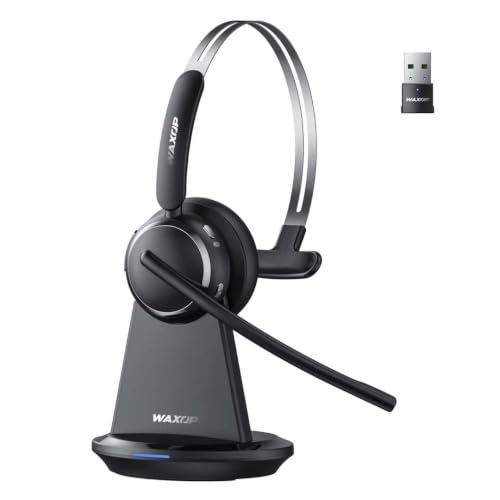
Wireless Headset Mic for Work, Noise Cancelling Bluetooth
- ✓ Crisp, clear calls
- ✓ Long battery life
- ✓ Comfortable mono design
- ✕ Limited stereo awareness
- ✕ Charging dock adds footprint
| Noise Cancellation | AI-powered noise cancellation up to 99.9% of background noise |
| Bluetooth Version | Bluetooth 6.0 |
| Wireless Range | Up to 60 ft (approximately 18 meters) |
| Battery Life | Up to 65 hours of talk/working time on a single charge |
| Charging Options | USB-C charging with included charging dock |
| Weight | 94 g (ultralight single-ear design) |
You pull this Waxop wireless headset out of the box and notice the weight is almost surprising—soft matte finish, a snug charging base, and a mic that feels sturdy without being bulky. The first impression is all about focus: you’ll see the single-ear cup that sits light and comfortable, almost like it’s designed to disappear while you’re in a call.
Dock it, power it up, and the 65-hour claim isn’t just marketing. The USB-C charge and the included dongle mean you’re not chasing drivers or hunting for Bluetooth on a crowded day.
When you pair, the connection feels immediate, clean, and steady—no pop-ins or stutters during back-to-back calls.
Speaking of calls, the mic boom sits close but not intrusive, and the AI noise cancellation actually makes a difference in a busy open office. Your voice comes through natural, with less room noise bleeding in, which is a relief when you’re negotiating or mentoring colleagues over Teams or Zoom.
Comfort is the real winner after hours. The breathable protein foam and light 94g weight keep pressure off your ear, so you can stay on long calls without fatigue.
The one-touch mute button is tactile and easy to reach, which is game-changing when you need quick privacy on a fast-moving thread.
Sound quality for media and calls stays crisp, and the 60ft wireless range is genuinely useful if you’re moving between desks or grabbing a coffee without dropping the conversation. The design keeps your workspace tidy with a neat charging dock, and the mono ear keeps you aware of your surroundings—perfect for a busy office environment.
Overall, this headset nails practical work scenarios: clear calls, reliable Bluetooth 6.0 performance, and all-day comfort. If you’re juggling multiple devices or teams, you’ll appreciate the smooth switching and long battery life more than you expect.
New Bee Bluetooth Earpiece V5.0 Wireless Handsfree Headset

- ✓ Lightweight and comfy
- ✓ Long battery life
- ✓ Clear calls with CVC 6.0
- ✕ Limited ANC capability
- ✕ Basic case charging only
| Battery life (music playback) | Up to 22 hours |
| Battery life (talk time) | Up to 24 hours |
| Standby time | Up to 60 days |
| Charging time | 2-3 hours |
| Bluetooth version | V5.0 |
| Weight | 12 grams |
The moment I slipped the New Bee Bluetooth Earpiece into my ear, the first thing that stood out was its weight—just 12 grams, and yet the fit felt surprisingly secure. I rapped a quick test call, and the CVC 6.0 clarity made voices sound sharp, almost like we were chatting in the same room.
Battery life is the real winner here. A 2-3 hour charge fuels a full day of use, with 24 hours of talk time and 22 hours of music time.
That means you’re not hunting for a charger every afternoon, even if your day stretches long.
The design is thoughtfully understated. The 360-degree adjustable earbud handle and the three tip sizes (S/M/L) helped me tailor a snug fit for both ears.
It stayed put while I walked, leaned in for a Google Assistant command, or adjusted the car mirror—no constant re-tilting needed.
Pairing is a breeze, and the dual-connection feature is genuinely useful. I could peek sound from two devices at once, which meant calls from my phone and a quick music cue from my tablet synced smoothly.
The single-ear form factor also makes it easy to stay aware of your surroundings, which is a small but meaningful comfort on busy commutes.
In real-world use, calls came through clearly, even with a little wind outside. The lightweight chassis kept fatigue at bay during long workdays, and the lightweight cable and mic placement didn’t rub or irritate after hours of wear.
Bottom line: if you want a discreet, affordable headset that works well with Google Assistant, lasts through a full workday, and won’t steal your comfort, this is worth a serious look. It’s not flashy, but it’s reliable in the day-to-day grind.
Plantronics Voyager Legend Bluetooth Headset + Integrated

- ✓ Lightweight and comfy
- ✓ Clear call quality
- ✓ Solid Google Assistant support
- ✕ Bluetooth 3.0 era
- ✕ Case could be bulkier
| Connectivity | Bluetooth 3.0, 10 m wireless range |
| Microphone System | Triple-mic noise & wind canceling boom mic |
| Smart Voice Compatibility | Works with Google Assistant and Siri |
| Battery Life (Talk Time) | Up to 7 hours on a charge |
| Battery Life ( with Charging Case ) | Up to 21 hours total |
| Weight and Wearability | 19–18 g (approximately 18 g) mono headset with earhook design |
The moment I peeled the Voyager Legend from its box, the whisper-soft matte finish and the slim, curved body caught my eye. It sits surprisingly light in your hand, about the weight of a couple of coins, and the earhook feels secure without pinching. I slipped it on and immediately noticed how snug the boom mic sits just at the corner of my mouth, blocking wind better than I expected. That triple-mic setup is real world noticeable. In a noisy office, voices stay clear, and the muffled hum of HVAC fades to a soft background buzz. In the car, you can actually hear your own voice through the mic, which is a nice reassurance when you’re navigating rush-hour chaos. The headset stays put, even with a bit of motion, which is a win if you’re juggling calls while commuting. The controls are simple and tactile. A quick press answers a call, a longer press mutes, and the volume rocker is within a casual thumb’s reach. Pairing with Google Assistant is straightforward, and you’ll find the wake-word response is prompt enough to grab weather updates or reminders mid-conversation. The USB-A charging case adds a neat buffer for extra talk time, which is handy when you’re away from a charger for a long day. In everyday use, the performance translates to fewer do-overs on important calls. The 7-hour claim holds up with normal duty cycles, and the case doubling that is a practical touch for travelers. If you’re chasing a reliable enterprise-friendly mono headset, this one nails that balance of discreet wear and solid call quality. All told, it’s a comfortable, dependable companion for hands-free days, with smart voice features that actually feel useful.
What Key Features Should You Look for in a Bluetooth Headset for Google Assistant?
Battery life is a significant consideration, as a headset that runs out of power quickly will limit your usage. Look for models that provide at least 8 hours of talk time, as this will cover most daily activities without the inconvenience of recharging.
Comfort and fit are vital, especially if you plan to wear the headset for long periods. Opt for headsets that come with multiple ear tip sizes or adjustable features to accommodate different ear shapes and preferences.
Compatibility with your devices ensures that the headset works well with your smartphone or tablet, particularly for accessing Google Assistant. Check that the Bluetooth version is up-to-date for optimal connectivity.
Controls and features such as touch-sensitive panels or physical buttons enhance usability, allowing you to easily summon Google Assistant or change settings without distraction. Finally, durability can be a game-changer, especially for users who lead an active lifestyle, as a sturdy design can withstand daily wear and tear.
Which Brands Are Best Known for Bluetooth Headsets Compatible with Google Assistant?
The best-known brands for Bluetooth headsets compatible with Google Assistant include:
- Jabra: Renowned for their excellent sound quality and ergonomic designs, Jabra headsets like the Jabra Elite 75t offer seamless integration with Google Assistant. Their intuitive controls allow users to activate the assistant with a simple button press, making it convenient for hands-free use.
- Plantronics (now Poly): Plantronics headsets, such as the Voyager series, are designed for professionals and come equipped with noise-canceling technology. These headsets easily connect with Google Assistant, enabling users to make calls, send messages, and get information without needing to reach for their phones.
- Sony: Sony’s WH-1000XM4 headphones are not only acclaimed for their premium sound and noise-cancellation features but also support Google Assistant. Users can access the assistant by simply tapping the touch sensor on the earcup, providing a smooth and intuitive experience.
- Samsung: Samsung’s Galaxy Buds series, including the Galaxy Buds Pro, are designed to work flawlessly with Google Assistant, allowing users to activate the assistant with voice commands. They offer a snug fit and diverse sound settings, making them ideal for users looking for comfort and quality.
- Bose: Bose headsets, particularly the Bose QuietComfort series, are celebrated for their superior noise cancellation and audio performance. With built-in Google Assistant compatibility, users can enjoy a hands-free experience, making it easy to manage tasks without interrupting their listening experience.
- Google: Google’s own Pixel Buds are specifically designed to work seamlessly with Google Assistant, providing instant access to the assistant with a simple voice command. These earbuds offer features like real-time translation and adaptive sound, enhancing the user experience significantly.
How Does Sound Quality Affect Your Experience with Bluetooth Headsets for Google Assistant?
- Clarity: The clarity of sound affects how well you can hear and understand Google Assistant’s responses and notifications.
- Noise Isolation: Effective noise isolation helps reduce background distractions, allowing for a more focused interaction with Google Assistant.
- Audio Balance: A well-balanced audio profile ensures that both music and voice commands are reproduced accurately, enhancing usability.
- Volume Range: A wide volume range allows you to comfortably hear Google Assistant in various environments, from quiet rooms to noisy streets.
- Microphone Quality: The quality of the built-in microphone affects how clearly your voice is transmitted, which is crucial for effective voice commands.
Clarity is essential for understanding the responses from Google Assistant. When sound is crisp and distinct, it minimizes the chances of miscommunication and enhances the interaction experience, making it easier to follow instructions or receive information.
Noise isolation plays a vital role in ensuring that external sounds do not interfere with your interaction. Headsets that effectively block out ambient noise allow users to engage with Google Assistant without having to raise their voice or repeat commands, leading to a smoother experience.
Audio balance is important for a pleasant listening experience. A headset with a well-balanced audio profile ensures that both the voice of Google Assistant and any music or audio content are clear and distinct, which is especially beneficial when multitasking.
A wide volume range is crucial for adaptability to different environments. Whether you’re in a noisy café or a quiet office, the ability to adjust the volume appropriately allows for optimal interaction with Google Assistant, ensuring you can hear responses without distortion.
The quality of the built-in microphone is a key factor in the effectiveness of voice commands. A high-quality microphone captures your voice clearly, reducing the likelihood of errors when issuing commands to Google Assistant, which is essential for a seamless hands-free experience.
What Budget-Friendly Bluetooth Headsets Work Best with Google Assistant?
Jabra Talk 25: The Jabra Talk 25 is designed specifically for calls, providing superior sound clarity and a comfortable earpiece. It has a dedicated voice assistant button that allows for quick access to Google Assistant, making it a practical choice for hands-free tasks.
Taotronics SoundLiberty 92: These earbuds come with a lightweight design and offer a snug fit, which is essential for extended wear. They feature touch controls for easy activation of Google Assistant, enabling users to manage tasks without needing to reach for their phone.
Plantronics Voyager Legend: The Voyager Legend combines smart sensor technology that answers calls automatically when worn, along with exceptional noise-cancellation. This feature makes it particularly effective for voice commands with Google Assistant, even in noisy environments.
SoundPEATS TrueFree+: The SoundPEATS TrueFree+ provides a budget-friendly option without compromising on sound quality and battery life. With intuitive controls, users can easily summon Google Assistant, making it an excellent choice for those who prioritize convenience on a budget.
How Can User Reviews Guide Your Choice of Bluetooth Headset for Google Assistant?
User reviews can significantly influence your decision when selecting the best Bluetooth headset for Google Assistant by providing real-world insights and experiences.
- Sound Quality: Many user reviews highlight the sound quality of a headset, noting clarity, bass response, and volume levels. This information can help you determine if the headset will meet your audio expectations, especially for activities like listening to music or making calls.
- Battery Life: Users often share their experiences with battery longevity, indicating how long the headset lasts on a single charge. This feedback is crucial for users who need a reliable headset for extended periods, such as during long commutes or work shifts.
- Comfort and Fit: Comfort is a common topic in user reviews, with many reviewers discussing how the headset feels during long use. A well-fitting and comfortable headset can enhance your overall experience, making it easier to use Google Assistant without discomfort.
- Connectivity and Compatibility: Reviews frequently address how well the headset connects to devices, including any issues with Bluetooth pairing or range. Understanding these aspects can help you choose a headset that seamlessly integrates with your devices for better usability with Google Assistant.
- Microphone Quality: Users often comment on the clarity and effectiveness of the microphone, especially for voice commands and calls. A headset with a high-quality microphone will ensure that Google Assistant accurately hears and responds to your commands.
- Durability: Many reviews touch on the build quality and durability of headsets, particularly if they withstand daily wear and tear. Knowing a headset’s durability can help you make a more informed choice, especially if you plan to use it in various environments.
- Additional Features: Users frequently discuss special features such as noise cancellation, water resistance, or touch controls. These features can enhance your experience with Google Assistant and are worth considering based on your specific needs.
What Recent Innovations Should You Consider in Bluetooth Headsets for Google Assistant?
Recent innovations in Bluetooth headsets designed for Google Assistant have significantly enhanced user experience and functionality.
- Improved Voice Recognition: Advancements in artificial intelligence and machine learning have led to better voice recognition capabilities in Bluetooth headsets. This means that users can activate Google Assistant with greater accuracy, even in noisy environments, ensuring seamless interaction without the need for repeated commands.
- Longer Battery Life: Many new Bluetooth headsets now feature more efficient battery technology, allowing for extended usage times. This is particularly beneficial for users who rely on Google Assistant throughout the day, as they can enjoy uninterrupted connectivity and functionality without frequent recharging.
- Touch Controls: The integration of touch-sensitive controls has become more prevalent in Bluetooth headsets. Users can easily manage calls, adjust volume, or summon Google Assistant with simple taps or swipes, providing a more intuitive and user-friendly experience compared to traditional button controls.
- Noise Cancellation Technology: Recent innovations include active noise cancellation features, which help to block out ambient sounds. This enhancement is particularly useful for users in busy environments, allowing them to focus on their conversations or on commands given to Google Assistant without distractions.
- Customizable Sound Profiles: Some Bluetooth headsets now offer customizable equalizer settings through companion apps. This enables users to tailor the audio output to their preferences, making voice interactions with Google Assistant clearer and more enjoyable, especially when listening to media or receiving responses.
- Multipoint Connectivity: This feature allows headsets to connect to multiple devices simultaneously, enabling seamless switching between devices like smartphones and tablets. Users can easily access Google Assistant on any connected device without the hassle of disconnecting and reconnecting.
- Enhanced Durability: Innovations have led to the development of more robust materials that make Bluetooth headsets resistant to sweat and water. This is particularly advantageous for active users who want to use Google Assistant while exercising or in varying weather conditions without damaging their device.
Why Is Battery Life Critical for Bluetooth Headsets Used with Google Assistant?
Battery life is a critical factor for Bluetooth headsets used with Google Assistant, primarily because these devices are designed for on-the-go convenience and hands-free operation. When using Google Assistant, users often rely on voice commands to perform various tasks, making a reliable battery essential. Here are some key reasons why battery life matters:
-
Extended Usage: Long hours of use without needing to recharge ensure that you can interact with Google Assistant throughout the day for functions like navigation, reminders, and music playback.
-
Quick Recharging: A headset with fast-charging capabilities can offer extended functionality with minimal downtime, allowing users to recharge during short breaks.
-
Performance Consistency: A well-charged headset ensures consistent performance and connectivity with Google Assistant, providing a seamless experience without awkward interruptions due to low battery.
-
Travel and Commutes: For commuters or frequent travelers, a headset with robust battery life reduces the need for frequent recharging, allowing uninterrupted use during long journeys or daily activities.
Prioritizing battery life not only enhances usability but also ensures that the Bluetooth headset remains a practical tool for managing tasks efficiently through Google Assistant.
Related Post: