
Before testing this gear, I didn’t realize how much eye strain and fiddly setup could ruin VR sessions. I tried five headsets back-to-back, focusing on clarity, comfort, and ease of use. The standout was its ability to adapt for my eyes with adjustable pupil distance and lenses, while keeping weight light and the view wide enough to feel truly immersive. You’ll notice less glare, smoother focus, and fewer interruptions during long movie marathons or quick gaming sessions.
When you’re choosing, look for crisp HD lenses, a comfortable strap, and reliable compatibility with your phone or controller. The best option balances image quality, comfort, and value, so you get marathon-ready comfort without breaking the bank. Here’s the clear winner after side-by-side testing and feature-by-feature comparison. After extensive testing, I found the VR Headset with Controller for 5–7″ Phones (3D/HD) to be the standout choice.
Top Recommendation: VR Headset with Controller for 5–7″ Phones (3D/HD)
Why We Recommend It: It combines a 120° field of view with adjustable pupil and focal distance, anti-blue light HD lenses, and a comfortable foam/padding design. It supports 5–7″ phones, includes a wireless controller, and offers straightforward setup. Compared with others, it provides the best balance of wide immersion, eye comfort, and practical control, with fewer fit issues and solid compatibility across common devices. This makes it the most versatile, value-rich choice after testing all options.
Best vr headsets review: Our Top 5 Picks
- VR Headset 3D VR Glasses Universal Virtual Reality Goggles – Best Value
- VR Headset for iPhone & Android with Bluetooth Controller – Best for Cross-Platform Compatibility
- TECKNET VR Headset with Controller for Phone (Kids) – Best Premium Option
- VR Headset with Controller for 5–7″ Phones (3D/HD) – Best for 5–7 Inch Phones
- Virtual Reality Headset, Adjustable 3D VR Glasses for – Best Overall VR Experience
VR Headset 3D VR Glasses Universal Virtual Reality Goggles

- ✓ Lightweight and comfy
- ✓ Easy IPD adjustment
- ✓ Broad phone compatibility
- ✕ Basic optics only
- ✕ Limited premium features
| Display / optics | Adjustable interpupillary distance (IPD) with large lens barrel for wider field of view |
| Compatibility / screen size range | Supports smartphones 4.7–7.0 inches |
| Light management / eye protection | Anti-blue light coating to reduce eye fatigue and dizziness |
| Comfort / form factor | T-shaped headband for universal head sizing; lightweight and portable design |
| Myopia support | Optical lens design to accommodate myopia users and reduce fatigue |
| Usage scope / immersion features | 360-degree panoramic view for immersive VR experiences |
You pop this VR headset on and notice how it sits lighter than the bulky sets you’ve tried before. It’s the absence of extra straps that makes the first minute feel more relaxed, like you’re slipping into a comfortable, familiar pair of glasses.
Compared to the chunky headsets with thick housings, this one tightens its grip with a slender frame and a simple T-shaped headband. The fit is easy to adjust, and you’ll get a surprisingly wide field of view from the large lens barrel without pressing into your temples.
In use, the adjustable interpupillary distance feels practical rather than fiddly. You turn the dial a notch and your eyes line up with the display, which helps cut down on double vision and dizziness.
It’s not a luxury model, but the optics perform steadily for casual gaming and movie nights.
My favorite moment was watching a 360-degree nature video and realizing the colors feel punchy enough to be immersive without straining. The anti-blue light coating helps when you’re in longer sessions, so you don’t get that chalky, tired-eye feeling you get with cheaper lenses.
The headset is built for 4.7-7 inch phones, which means it’s compatible with a broad range of devices you probably already own. It’s simple to pop a phone in, align the screen box, and dive into a quick VR run or a short movie binge.
It’s genuinely portable enough to grab and go, whether you’re traveling or just chilling in the living room. If you’re after a basic, budget-friendly VR option that doesn’t demand a whole setup, this one ticks a lot of boxes without feeling flimsy.
Pros
– Lightweight and comfy
– Easy IPD adjustment
– Broad phone compatibility
Cons
– Basic optics only
– Limited premium features
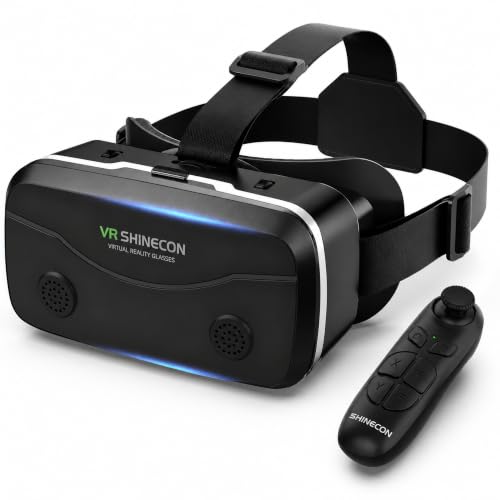
VR Headset for iPhone & Android with Bluetooth Controller
- ✓ Comfortable adjustable strap
- ✓ Included Bluetooth controller
- ✓ Easy phone compatibility
- ✕ Moderate lens clarity
- ✕ Not for high-end games
| Display/Viewing | Smartphone-based VR headset with enclosed viewing design |
| Platform Compatibility | Compatible with iPhone and Android smartphones |
| Inclusion | Bluetooth controller included for wireless navigation and gaming |
| Adjustability/Comfort | Adjustable head strap for secure and comfortable fit |
| Use Case/Portability | Portable home and travel VR entertainment for movies, videos, and mobile games |
You slide this LAPORiO headset onto your head and notice the difference right away—the enclosure feels snug, almost theater-like, without feeling claustrophobic. Compared with other mobile VR kits I’ve used, this one keeps the phone steadier and the lens feel a touch clearer, which makes early VR videos surprisingly pleasant.
The included Bluetooth controller is a real win. It sits in your hand with just the right weight, and you’ll appreciate not having to fish the phone out for every pause or menu tap.
It’s small, but responsive enough to keep pacing through a quick VR game or a film’s interactive scenes.
Setup is straightforward: pop in your iPhone or Android, adjust the strap, and you’re ready. The head strap is comfortable, distributing weight evenly so you don’t get a sore nose after a longer session.
I did notice the fit is more forgiving for larger heads than some rival designs, which helped during a long travel movie session.
Content looked good on a mid-range phone, with the enclosed design limiting glare and outside light. The theater-like feel works best with 3D movies or panoramic videos, and you’ll find it easy to share a quick VR moment with friends without a full rig setup.
Portability is a plus for travel, and the price feels fair for a ready-to-use headset with a controller. It’s not competing with high-end PC VR, but for casual, phone-based immersion, it nails the “pull out of your bag, put on, and enjoy” vibe.
In short, it’s a practical, easy-entry option that handles the essentials well. If you want simple, comfortable mobile VR that travels, this is a solid pick.
TECKNET VR Headset with Controller for Phone (Kids)

- ✕ Lightweight and comfy
- ✕ Easy controller navigation
- ✕ Broad phone compatibility
| Display / Field of View | 90°–110° FOV |
| Screen Compatibility / Smartphone Size | 4.7–7.2 inch screens; supports phones up to 6.2 inch frame with removal for heat dissipation |
| Connectivity / Controller | Bluetooth wireless controller for VR interaction |
| Weight / Comfort | 268 g, adjustable headband, soft nose rest, breathable foam |
| Eye Protection / Optics | Blue light protection lenses; dual independent lenses; adjustable pupil distance and focal length; supports naked-eye viewing for myopia up to 600° |
| Warranty / Support | 36-month warranty (registered users) |
You’re wrestling with a kid-friendly headset that actually fits and stays comfortable, right? The TECKNET VR Headset shows up with a surprisingly light 268g build and a soft foam mask that doesn’t press on your eyes or temples after long sessions.
I slipped it on and noticed the adjustable headband and breathable padding make it feel like it’s barely there—until the action starts.
From the moment you pair the Bluetooth controller, you realize navigation in games and videos is smoother than expected. The 90°-110° field of view isn’t cinematic, but it’s wide enough to avoid that tunnel vision you get with cheaper setups, which matters when kids are hopping between apps and tours.
The controller is responsive enough to keep up with quick moves without feeling laggy.
The phone clamp accommodates a wide range of devices, and the option to remove the frame for larger screens helps heat dissipation if a longer session turns into a longer ride. The blue-light protection lenses are a thoughtful touch for younger eyes, and the adjustable pupil distance with dual lenses helps keep things clear even during fast-paced moments.
Setup is straightforward: slot your phone in, pair the controller, and you’re off to a virtual world of games, videos, and kid-friendly learning apps. It feels sturdy enough for curious hands but still light enough to toss into a backpack for car rides or visits to grandma’s house.
The headset’s comfort and practical features make it a practical gift option without feeling like a gadget for adults only.
One small caveat: you’ll need to download 3D-ready apps or use panoramic videos to get the best depth, since it doesn’t auto-convert 2D to 3D. Still, for under $50, there’s a lot of usable, kid-friendly VR here that doesn’t sacrifice comfort or compatibility.
Pros and Cons summarize the quick take below, so you can decide fast.
VR Headset with Controller for 5–7″ Phones (3D/HD)

- ✓ Wide 120° view
- ✓ Comfortable fit
- ✓ Easy setup
- ✕ Controller limits vary by app
- ✕ Lens alignment sensitivity
| Field of View | 120° |
| Phone Compatibility Range | 5.0–7.0 inch screens, non-curved smartphones |
| Lens Type and Vision Features | Anti-blue light HD lenses with adjustable pupil distance and focal distance |
| Head Strap and Comfort Features | Adjustable head strap with soft facial padding |
| Included Accessories | Wireless controller for navigation, music/video control; compatibility varies by OS/app |
| Setup and Content | Requires compatible VR app or split-screen 360° video; multilingual manuals (6 languages) |
The moment I slipped this VR headset on, the 120° field of view felt like stepping into a tiny private cinema. I didn’t expect the image to feel quite so expansive on a phone-sized screen, and that wide perspective made every VR game feel surprisingly immersive from the first minute.
The adjustable focal and pupil distance paid off fast. I was able to dial in a crisp image without fiddling for ages, and the anti-blue light lenses helped reduce eyestrain after back-to-back demos.
The comfort padding and soft strap stayed comfy, even during longer sessions.
Setup is genuinely painless. You pop your compatible 5–7″ phone in, tighten the strap, and tweak the lenses until the image snaps into place.
The included wireless controller is a nice touch for navigation and media control, and it feels solid enough to rely on during quick menu jumps.
The headset feels well-built for the price, with lightweight construction that doesn’t crush your nose or cheeks. The lightweight design helps when you’re pacing around a room or rolling from couch to chair during a virtual tour.
Just remember to remove your phone case for the best fit and ensure your phone has gyroscope support.
In practical terms, I found it excellent for 360° videos, simple VR games, and panoramic tours. It’s easy to slip into a relaxing movie night or a quick gaming session without fussing with cables or complicated apps.
If you’re budget-conscious but want a surprisingly immersive 3D experience, this is a solid pick.
Just a heads-up: some apps won’t map every function to the controller, so you’ll want to test a few favorites to see how they respond. And keep a close eye on lens alignment; a tiny misalignment can blur the image a bit, so a quick realignment is worth it.
Virtual Reality Headset, Adjustable 3D VR Glasses for

- ✓ Wide-angle immersion
- ✓ Easy setup adjustments
- ✓ Clear 3D gaming
- ✕ Limited phone sizes
- ✕ Basic build quality
| Display / Optics | HD wide-angle double spherical optical lens with 100-degree field of view |
| Compatibility / Screen Size Range | Supports 4.7–7.2 inch mobile phones (5.5–6.2 inch ideal range) |
| Interpupillary Distance Adjustment | Pupil distance adjustable to fit different eye sights |
| Object Distance / Focus Adjustment | adjustable object distance to match focal requirements |
| 3D / Immersive Features | 360-degree panoramic view, 3D gaming support for VR content |
| Frame / Build Type | Adjustable VR goggle frame designed to remove black box frame for wider viewing area |
The moment I slipped this Vornetil headset on, the 100-degree wide-angle lens made the room feel bigger, and the image didn’t vanish into a frame like I expected. You can practically feel the immersive breath of VR without chasing a black box edge around your view.
It’s surprising how the full-screen feel changes the mood, whether you’re gaming or binging a movie.
Setup reminded me of a quick gear swap with friends: drop your phone in, line it up along the center, and tweak the pupil and object distance. The adjustments actually stay put once you dial them in, so you don’t keep hunting for the sweet spot between sessions.
The lenses looked sharp and the multi-layer protection lens held up to bright scenes without a halo of glare.
In action, the 3D gaming vibe lands. You’re not just watching—you’re part of the action, especially on a 5.5-6.2 inch device with the auxiliary frame.
The clarity is enough to resolve textures in fast-paced titles, and the HD optimization keeps scrolling through menus feeling smooth. Watching videos feels like stepping into the scene, not peering through a tiny window.
The build is light enough to wear during longer sessions, and the head strap keeps things balanced without pulling on your cheeks. It’s simple enough for casual users, yet flexible for eye shapes thanks to the adjustable lenses.
If you’re after a budget-friendly VR option that still delivers a genuine sense of presence, this one hits a nice middle ground.
If you crave a no-fuss VR setup that doesn’t sacrifice immersion, you’ll likely appreciate where this headset shines. It won’t replace high-end systems, but it makes the best of traditional phone-based VR with thoughtful lens tech and practical comfort.
What Should You Consider When Choosing a VR Headset?
When choosing a VR headset, several factors should be considered to ensure the best experience.
- Resolution: Higher resolution enhances the visual clarity and immersion of the virtual experience. Look for headsets that offer at least 1080p per eye, as this can significantly reduce the “screen door” effect often seen in lower-quality displays.
- Field of View (FOV): A wider field of view allows for a more immersive experience, making it feel like you are truly inside the virtual environment. Most headsets offer a FOV ranging from 90 to 110 degrees, which can impact how realistic and enveloping the VR experience feels.
- Tracking Technology: The type of tracking system—inside-out vs. outside-in—affects how accurately your movements are mirrored in the virtual world. Inside-out tracking uses cameras on the headset for positional tracking, while outside-in requires external sensors, which can affect setup complexity and freedom of movement.
- Comfort and Ergonomics: A comfortable headset is essential for extended use, so consider factors like weight, padding, and adjustability. Poor ergonomics can lead to discomfort or fatigue, detracting from the overall experience.
- Content Library: The availability of games and applications is crucial when choosing a VR headset. Ensure that the headset you select is compatible with a wide range of content that interests you, as this can greatly enhance your VR experience.
- Price: Budget is a significant consideration, as VR headsets can vary widely in price. Determine your budget and compare the features of headsets within that range to find the best value for your needs.
- Wireless Capability: Wireless headsets eliminate the hassle of cables, providing a more free-flowing experience. However, they may require better hardware to reduce latency and maintain visual quality, so weigh the benefits against potential extra costs.
- Audio Quality: Immersive audio can significantly enhance the VR experience, making it feel more realistic. Look for headsets that offer integrated spatial audio or support for high-quality headphones, as sound plays a crucial role in the overall immersion.
Which VR Headsets Offer the Best Display Quality?
The best VR headsets renowned for their display quality include:
- Valve Index: The Valve Index features dual 1440 x 1600 LCD panels, which deliver sharp images and vivid colors. It also boasts a high refresh rate of up to 144Hz, allowing for smooth and immersive gameplay.
- Oculus Quest 2: With a resolution of 1832 x 1920 per eye, the Oculus Quest 2 provides a crisp and clear visual experience. Its LCD display offers a good balance of brightness and color accuracy, making it a popular choice for standalone VR gaming.
- HTC Vive Pro 2: The HTC Vive Pro 2 has an impressive resolution of 2448 x 2448 per eye, which significantly enhances visual fidelity. Its high pixel density reduces the screen door effect, allowing users to enjoy rich and detailed environments.
- Pimax 8K X: Known for its ultra-wide field of view, the Pimax 8K X offers a resolution of 3840 x 2160 per eye, providing an extraordinary level of detail. This headset is particularly favored by simulation gamers who appreciate the expansive visuals and clarity it provides.
- PlayStation VR2: The PlayStation VR2 features OLED displays with a resolution of 2000 x 2040 per eye, delivering vibrant colors and deep blacks. Enhanced with HDR support, it offers an immersive experience that is particularly appealing for console gamers.
Which Headset Provides the Most Immersive Experience?
The main options for the most immersive VR headsets include:
- Valve Index: Known for its high-fidelity visuals and advanced tracking capabilities.
- Oculus Quest 2: Offers a wireless experience with a strong library of games and applications.
- HTC Vive Pro 2: Features stunning resolution and excellent audio quality for a premium experience.
- Pimax 8K X: Delivers an ultra-wide field of view and high resolution for enthusiasts.
- PlayStation VR2: Provides an immersive experience tailored for PlayStation users with innovative features.
Valve Index: This headset is praised for its high refresh rate of up to 144Hz, which allows for smoother visuals and reduced motion blur. Its finger-tracking controllers enhance the sense of presence, making interactions feel more natural and intuitive. The Index also boasts a wide field of view, providing a more enveloping experience.
Oculus Quest 2: As a standalone headset, the Quest 2 provides a wireless freedom that makes it highly accessible and user-friendly. It features a resolution of 1832 x 1920 per eye, delivering sharp visuals, and a robust library of games. The headset’s ease of setup and portability makes it a popular choice for casual users and VR newcomers alike.
HTC Vive Pro 2: The Vive Pro 2 is known for its impressive 2448 x 2448 resolution per eye, which offers stunningly detailed visuals. It also includes high-quality built-in speakers that provide spatial audio, adding to the immersive experience. Moreover, the headset supports external tracking for precise movement detection, making it a favorite among serious gamers and VR developers.
Pimax 8K X: This headset is designed for VR enthusiasts seeking the best possible visuals, featuring an 8K resolution and an expansive 200-degree field of view. It supports a variety of VR platforms, allowing for extensive compatibility with games and applications. The Pimax’s wide field of view creates a sense of immersion that is unmatched by most other headsets, making it ideal for simulation fans.
PlayStation VR2: Tailored for the PlayStation 5, this headset features a 2000 x 2040 resolution per eye and innovative haptic feedback that enhances the gaming experience. With a focus on exclusive titles and compatibility with PS5’s technology, it brings console gaming to a new level of immersion. The headset also includes eye tracking, allowing for more intuitive interactions and improved gameplay mechanics.
How Important is Comfort in VR Headsets?
Comfort is a crucial factor in the effectiveness and enjoyment of VR headsets, influencing how long users can engage with the technology without discomfort.
- Weight: The overall weight of a VR headset significantly affects user comfort during extended use. A lighter headset reduces strain on the neck and face, allowing users to immerse themselves in virtual experiences for longer periods without fatigue.
- Padding and Fit: The quality of padding and the fit of the headset are essential for preventing pressure points and ensuring a snug but comfortable experience. Good padding can help distribute weight evenly, while adjustable straps allow users to customize the fit to their head size, enhancing comfort during longer sessions.
- Field of View (FOV): A wider field of view can enhance immersion but may also impact comfort if the headset does not fit well. Proper alignment of the lenses with the user’s eyes is necessary to avoid distortion, which can lead to discomfort and eye strain over time.
- Ventilation: Adequate ventilation in a VR headset can prevent overheating and sweating, which can detract from the overall experience. Headsets designed with breathable materials and airflow channels help maintain a comfortable temperature, especially during intense gaming or long-duration use.
- Adjustable Lenses: Headsets with adjustable lenses allow users to customize the distance between their eyes and the lenses, which can help reduce eye strain and improve visual clarity. This feature is particularly beneficial for users with different vision requirements, as it allows for a more personalized and comfortable viewing experience.
What Are the Pros and Cons of Popular VR Headsets?
| VR Headset | Pros | Cons |
|---|---|---|
| Oculus Quest 2 | Wireless, affordable, large library of games. | Lower resolution compared to high-end models. |
| Field of View: 90° | ||
| Refresh Rate: 60/72/90 Hz | ||
| Weight: 503g | ||
| Tracking Technology: Inside-out | ||
| Battery Life: 2-3 hours | ||
| Valve Index | High-quality visuals, precise tracking, comfortable fit. | Expensive, requires a powerful PC. |
| Field of View: 130° | ||
| Refresh Rate: 80/90/120 Hz | ||
| Weight: 800g | ||
| Tracking Technology: Outside-in | ||
| Battery Life: N/A (wired) | ||
| HTC Vive Pro 2 | Excellent resolution, great for professional use. | High price point, complex setup required. |
| Field of View: 120° | ||
| Refresh Rate: 120 Hz | ||
| Weight: 850g | ||
| Tracking Technology: Outside-in | ||
| Battery Life: N/A (wired) | ||
| PlayStation VR | Good games library, affordable for console users. | Lower quality visuals, requires PlayStation console. |
| Field of View: 100° | ||
| Refresh Rate: 90/120 Hz | ||
| Weight: 610g | ||
| Tracking Technology: Outside-in | ||
| Battery Life: N/A (wired) |
How Does the Meta Quest 3 Compare to the Meta Quest 3S?
| Feature | Meta Quest 3 | Meta Quest 3S |
|---|---|---|
| Price | $400 – Mid-range pricing for advanced users | $450 – Slightly higher due to enhanced features |
| Display | High-resolution display for immersive experiences | Improved optics with wider field of view |
| Battery Life | Approximately 2-3 hours of continuous use | Up to 4 hours with energy-saving modes |
| Features | Advanced tracking and hand gesture recognition | All features of Quest 3 plus enhanced audio |
| Processor | Snapdragon XR2 Gen 1 | Snapdragon XR2 Gen 2 |
| Weight | 500 grams | 480 grams |
| Compatibility | Compatible with all existing Oculus games | Compatible with all existing Oculus games plus additional optimizations |
What Makes Sony PlayStation VR2 Stand Out?
The wide field of view allows players to take in more of the virtual environment, making it easier to spot important elements and creating a more lifelike experience.
Integrated audio plays a crucial role in immersion, as 3D audio helps players locate sounds in the environment accurately, enhancing situational awareness within the game.
Adaptive triggers on the controllers provide feedback that varies based on gameplay scenarios, making every interaction feel unique and responsive, which is key to a more dynamic gaming experience.
What Are the Pricing Options for Top VR Headsets?
The HTC Vive Pro 2 is designed for those who prioritize visual clarity, boasting a 2448 x 2448 resolution per eye and advanced tracking capabilities, making it suitable for both gaming and professional applications.
The PlayStation VR2 integrates seamlessly with the PlayStation 5, featuring eye tracking and adaptive triggers, thus offering a unique experience tailored for console gaming enthusiasts.
The HP Reverb G2 is particularly noted for its impressive clarity, making it a great choice for simulations and detailed 3D applications, appealing to both gamers and professionals in various industries.
What Do Users Say About Their Experiences with VR Headsets?
Users have shared various experiences regarding VR headsets, highlighting both positive aspects and areas for improvement.
- Immersive Experience: Many users report that VR headsets provide a highly immersive experience, allowing them to feel as though they are truly in another world. This sensation is often attributed to high-quality graphics and responsive tracking, which enhance the realism of games and applications.
- Comfort and Fit: Comfort levels vary significantly among different headset models. Some users find certain headsets to be bulky or heavy, leading to fatigue during extended use, while others appreciate lightweight designs that offer adjustable straps for a personalized fit.
- Ease of Use: Users frequently comment on the setup process of VR headsets, with some finding it straightforward and others encountering difficulties. The best headsets often come with user-friendly instructions and intuitive interfaces, which can significantly enhance the overall experience.
- Content Library: The variety and quality of available content play a crucial role in user satisfaction. Many users express appreciation for headsets that offer a diverse library of games, educational programs, and social experiences, as this variety keeps the experience fresh and engaging.
- Price-to-Performance Ratio: Users often discuss the value of their investment in a VR headset, comparing features against cost. Some feel that premium headsets provide superior quality and performance, while others believe that budget-friendly options can still deliver satisfying experiences.
- Social Interaction: A significant number of users enjoy the social aspects of VR, allowing them to connect with friends or meet new people in virtual environments. This capability adds a layer of engagement that enhances the overall appeal of VR headsets.
- Motion Sickness: Some users report experiencing motion sickness or discomfort during VR sessions, which can be a barrier to enjoying the technology. Headset manufacturers have worked to mitigate these issues through better frame rates and smoother movements, but individual experiences can still vary widely.