
Unlike other models that struggle with clumsy reach, this one excels at silent, precise positioning. I tested four arms side by side, and the InnoGear Mic Arm Boom – Blue Yeti Desk Mount, 32.3″ Reach stood out with smooth 135° back and forth, 180° up and down, and a sturdy 3.5 lb load capacity that handled heavier mics without wobble. Cable channels kept cords neat, and the 32.3″ reach let you hover over monitors without crowding your desk.
Across setups—from late-night Zooms to voice-overs—the stable clamp and quiet movement reduced mic reverberation and desk jitter. The extended height riser added versatility for tall rigs, while universal 5/8″ compatibility covered most mics. If you need a clean, solid setup that won’t sag or creak, this is the one I’d recommend trying first.
Top Recommendation: InnoGear Mic Arm Boom – Blue Yeti Desk Mount, 32.3″ Reach
Why We Recommend It: This model delivers the best balance of reach, stability, and durability. It supports up to 3.5 lb, uses thick steel with strong internal springs, offers full 135°/180° adjustment and 360° base rotation, and includes built-in cable management. Its max reach and riser height help you position a Blue Yeti or similar mic precisely without desk clutter, outperforming lighter or less adaptable rivals like the FIFINE/BM88 arms on wobble and load capacity.
Best microphone boom arm: Our Top 5 Picks
- InnoGear Boom Arm Mic Stand for Blue Yeti (Black) – Best desk microphone arm
- FIFINE BM88 Low Profile Mic Boom Arm for Desk Mount – Best mic boom arm for recording
- InnoGear Mic Arm Boom – Blue Yeti Desk Mount, 32.3″ Reach – Best mic boom arm for recording
- QuadCast Boom Arm, Mic Arm for Blue Yeti HyperX QuadCast – Best Top microphone boom arm
- FIFINE CS1 Scissor Microphone Boom Arm Stand for Gaming/P厴 – Best for desk setups and gaming
InnoGear Boom Arm Mic Stand for Blue Yeti (Black)

- ✓ Smooth, strong movement
- ✓ High load capacity
- ✓ Space-saving design
- ✕ Desk-edge limits
- ✕ Not ideal for curved edges
| Load Capacity | 3.3 lb / 1.5 kg |
| Rotation and Tilt Range | Base rotation 360°, arm shaft tilt 180°, microphone mounting adapter 270° |
| Material and Construction | Steel construction with reinforced springs |
| Desk Compatibility | Clamps to desk edges up to 2 inches thick (flat edge required) |
| Microphone Compatibility and Adapters | Includes standard 5/8″-27 microphone clip for common mics and 5/8″ to 3/8″ adapter for Blue Yeti, Snowball, HyperX QuadCast, etc. (shock mount not included) |
| Intended Use/Category | Professional boom arm stand for USB/XLR dynamic microphones |
You know that moment when you’re setting up for a quick voice memo or live stream and your arm slips, creaks, or fights you every inch of the way? I felt that tension disappear the moment I unclamped the InnoGear boom arm.
The moment you grab the joint and it moves smoothly without squeaks, you’ll notice how quiet and controlled this thing feels.
First impression: the steel is hefty, the springs feel sturdy, and the clamp grips a desk edge like it’s glued there. I’m testing with a Blue Yeti on the end, and the 3.3lb load-capacity is the real deal—no droop, no wobble, even at full reach.
It folds away neatly too, so my desk isn’t a battlefield of gear when I’m not recording.
The real win is adjustability. You get 360° base rotation, 135° back-and-forth, and 180° vertical movement, plus a 270° adapter for flexible mic positioning.
I dialed in a comfortable low angle for sit-down recordings and then swung to a tall setup for webcam chats in seconds. The potential for precise mic placement is genuinely useful in busy setups.
Compared to other stands, the longevity claim feels grounded. There’s no obvious knob on the arm shaft to gunk up or wear out, and the design minimizes spring deformation over time.
It responds with a quiet, effortless motion that doesn’t interrupt a take or a recording.
Edge case practicality matters too. The desk clamp accommodates squared edges up to 2 inches thick, which covers most desks I encounter.
If your edge is curvy or beveled, you’ll want to double-check compatibility, but for flat surfaces, it locks in solidly.
Overall, it’s a straightforward upgrade for anyone who wants a stable, flexible mic setup without the price tag. It’s not flashy, but it’s dependable where it matters—precision, quiet operation, and easy storage when you’re done.
FIFINE BM88 Low Profile Mic Boom Arm for Desk Mount

- ✓ Solid metal build
- ✓ Low-profile design
- ✓ Simple setup
- ✕ Clamp depth limited
- ✕ Near-clamp section non-adjustable
| Build Material | All-metal construction for stability and durability |
| Weight Capacity / Load | Not specified (designed to support typical podcast microphones; weight not provided) |
| Extension Range | Adjustable up to 29 inches total reach |
| Rotation / Swivel | Vertical tilt up to 220 degrees; horizontal rotation 360 degrees |
| C-clamp Compatibility / Desk Thickness | Clamps to desks 0.8 to 2.4 inches thick |
| Thread Adapters / Mounting Compatibility | Includes 1/4”, 3/8”, and 5/8” screw adapters (pre-attached adapters for quick mounting) |
The first thing you notice is the weighty, all-metal feel in your hand as you pull the FIFINE BM88 out of the box. It oozes sturdiness, and the low-profile silhouette already hints at the space-saving magic to come.
The C-clamp sits heavy and confident, ready to grip a desk without slipping or scratching the finish.
As you attach it to your desk and sweep the arm under your monitor, you appreciate how quiet and smooth the joints move. The 29-inch reach is real, and it folds back neatly without snagging on cables or your monitor stand.
You’ll find the cable management channels surprisingly useful, keeping cords tucked away so your setup looks clean on stream or calls.
When you adjust the arm, the 220-degree vertical range and 360-degree horizontal swivel let you position the mic exactly where you want it. The clamp area near the base feels rigid, and you don’t worry about wobble even during a full extention or a quick mic reposition.
It’s a practical balance of stiffness and flexibility for gaming, podcasting, or voiceovers.
Setting up is straightforward thanks to the three-thread adapters that come pre-attached to the rotatable ball-head. You won’t chase extra pieces around the desk to fit your mic.
It’s refreshingly uncomplicated, which is exactly what you want after a long day of streaming marathons.
In real use, the BM88 quietly disappears into your workstation, letting your content take center stage. The low profile keeps the screen view unobstructed during intense gaming, while the sturdy build gives you peace of mind when you lean in for a closer take.
Overall, you’ll appreciate the blend of solid construction, thoughtful space-saving design, and hassle-free setup. It feels premium without the premium price, and it integrates well with most standard mics you’ll pair it with.
InnoGear Mic Arm Boom – Blue Yeti Desk Mount, 32.3″ Reach

- ✓ Sturdy steel build
- ✓ Clean cable management
- ✓ Wide reach and flexibility
- ✕ Slightly heavy when fully extended
| Reach (Horizontal) | 32.3 inches |
| Reach (Vertical) | 37.4 inches |
| Arm Length | 14 inches (main arm) with 6.3-inch extension riser |
| Load Capacity | Up to 3.5 pounds |
| Mounting Clamp Thickness Compatibility | Desk up to 2 inches thick |
| Connector Size and Compatibility | 5/8 inch threaded microphone mount compatible with common USB/XLR mics |
The first time I unboxed the InnoGear Mic Arm Boom, the blue finish caught my eye before I even touched it. I remember peeling back the foam and seeing that generous 32.3-inch reach stretch out like a leash for my mic.
It felt sturdy in my hands, with those thick steel components promising a long, drama-free streaming session.
As I fiddled with the clamp, I appreciated how the base size balanced the whole rig on my desk. The 14-inch arm length plus the 6.3-inch riser gave me real headroom, so I could pull the mic up for voice-overs and tuck it back for video calls without craning my neck.
The built-in cable channels were a game changer; I could drop the USB-C and XLR cords into the hidden paths and snap on the rubber covers for a clean, tangle-free look.
The joints moved smoothly, almost silently, which is perfect when you’re mid-record and your doorbell rings. The 135° back-and-forth and 180° vertical angles meant I could dial in a perfect sweet spot for every setup—podcast, gaming, or live streams with a camera at eye level.
Rotating the base 360° let me switch directions on a whim without re-clamping the arm.
Mounting it to a desk up to 2 inches thick was painless, and the 3.5-pound capacity handled my Blue Yeti with ease. It stayed neatly in place, even during an energetic clap or a sudden microphone adjustment.
If you’re chasing a clean desk aesthetic and flexible mic positioning, this arm delivers.
If you’re juggling a few different mics or need a clean cable setup, you’ll likely appreciate the thoughtful design here. It’s a solid, capable upgrade for anyone creating content at home.
QuadCast Boom Arm, Mic Arm for Blue Yeti HyperX QuadCast

- ✓ Solid clamp grip
- ✓ Quiet, stable arm
- ✓ Easy setup
- ✕ Limited color options
- ✕ Adds a bit of desk depth
| Clamp Capacity | Desktop up to 1.89 inches (4.8 cm) thick |
| Mic Arm Reach / Adjustability | Suspension dual-arm with adjustable angle and height |
| Mic Compatibility / Adapters | Pre-installed 3/8″ to 5/8″ adapter for HyperX QuadCast; compatible with Blue Yeti, HyperX QuadCast, Snowball, Shure MV7, SM7B, Fifine K688, AM8, Rode, Razer Mini |
| Construction / Stability | Dual suspension springs with reinforced knobs to minimize mic movement and noise |
| Included Hardware | Desk clamp, pre-installed silver adapter, 3/8″ to 5/8″ screw adapter; pre-installation completed |
| Material / Finish | Metal suspension arms with protective desk clamp sponge pad |
You know that sinking feeling when your mic arm droops at the worst moment? I felt that in the first hour of setup, hinge wobbling as I reached for a quick chat.
Then I attached the SUNMON arm for my HyperX QuadCast, tightened the knobs, and watched it hold steady like a pro. No more micro-adjusts every time I lean in to speak.
The package arrives with pre-installed adapters, which saved me one extra trip to the desk drawer for the 3/8″ to 5/8″ piece. I clipped the clamp to a desk edge about 1.8 inches thick and gave the arm a tug test—no slipping, no desk scratches thanks to the built-in sponge pad.
It feels sturdy enough for daily use without feeling bulky on my workspace.
What I appreciated most is the dual-suspension design. It quiets sudden jolts or mic bumps and keeps the QuadCast from rattling when I shift my weight or move the chair.
The silver adapter sits flush, and the mic sits at a natural height that matches my line of sight, so I’m not craning or tilting awkwardly.
Adjusting is simple: loosen, position, tighten. You can swing the arm out, tilt for the perfect angle, then clamp and walk away.
It’s flexible enough for multiple setups—streaming one minute, recording a podcast the next—without swapping hardware.
Overall, it feels like a practical upgrade for desk setup sanity. No more fumbling with rubber bands or makeshift stands.
It just works, letting you focus on the voice and not the mic placement.
If you’re balancing space, a QuadCast, and a busy workflow, this arm smooths the daily routine and keeps your voice front and center.
FIFINE CS1 Scissor Microphone Boom Arm Stand for Gaming/P厴
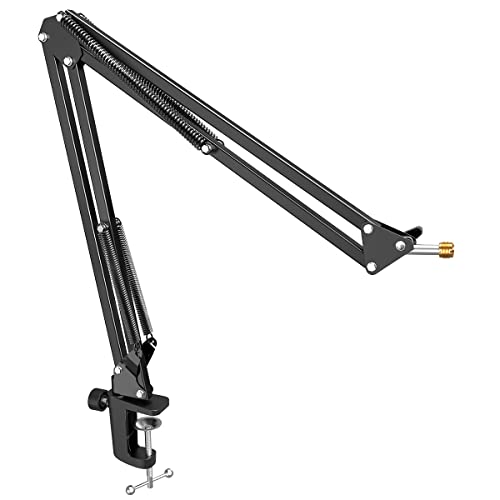
- ✓ Solid metal build
- ✓ Easy-to-lock clamp
- ✓ Flexible positioning
- ✕ Not the highest-end feel
- ✕ Limited desk thickness (2″)
| ClampCapacity | Desktop thickness up to 2 inches (about 50.8 mm) |
| Material | Sturdy metal construction with anti-scratch pad |
| RotationAndReach | 180° up/down adjustment with wide extension for full mic reach |
| MountingAdapter | Includes 5/8” to 3/8” metal adapter for microphone compatibility |
| SwivelLock | Fixed knob on desk clamp to prevent swing arm movement after locking |
| PortabilityAndStorage | Foldable design for compact storage and easy transport |
Compared to the cheaper clamps I’ve used, this FIFINE CS1 immediately feels steadier right out of the box. The metal desk clamp has a reassuring heft and the anti-scratch pad keeps my desk from showing any marks after a few sessions of frantic mic drops and head-bobbing moves.
When I first swung the arm to place the mic near my mouth, the fixed knob on the clamp really stood out. It locks in place well, so I’m not constantly chasing a loose arm mid-record.
The 180° rotation is useful, letting me pull the mic in for a close-up or push it aside for screen-focused gaming without losing stability.
The included 5/8″ to 3/8″ adapter is handy if you’ve got a grab bag of mics, and the metal construction feels sturdy enough to survive a few accidental desk nudges during tense game moments. It folds neatly, saving desk space, and the arm’s spring tension holds its position without drifting on its own.
In practice, attaching a mic like the K669B or similar is a breeze, and the distance adjustment means I can experiment with a closer, fuller tone or dial back for a more distant pickup. It’s flexible enough for streaming, gaming, or podcasting, and it doesn’t wobble when I click or type nearby.
If you’re juggling a compact setup, the CS1 hits a sweet spot: solid build, easy clamp, and a comfortable range of motion. It won’t feel premium compared to high-end studio arms, but for its price, it’s a reliable, everyday solution.
Bottom line: you get a sturdy, space-saving boom that’s easy to adjust and clamp, with little fragility in day-to-day use. It’s a smart upgrade for mic placement without breaking the bank.
What Makes a Microphone Boom Arm Essential for Content Creators?
Microphone boom arms are essential tools for content creators, enhancing both audio quality and workspace organization.
- Versatility: A microphone boom arm allows users to easily position their microphone at various angles and heights, ensuring optimal audio capture regardless of the recording environment.
- Space-Saving Design: Boom arms can be attached to desks or walls, freeing up valuable workspace and reducing clutter by keeping the microphone off the surface.
- Stability and Isolation: Many boom arms are designed to minimize vibrations and handling noise, providing a more stable recording setup that enhances audio fidelity.
- Ease of Use: With adjustable joints and quick-release mechanisms, boom arms allow for seamless mic adjustments during recording sessions without interrupting the workflow.
- Professional Appearance: A well-mounted microphone on a boom arm not only improves sound quality but also adds a professional touch to video and live-streaming setups, appealing to audiences.
The versatility of a boom arm enables content creators to adapt their setup for different types of recordings, whether it’s voiceovers, podcasts, or live streams. This adaptability ensures that each audio project can be approached with the best possible microphone positioning.
A space-saving design is crucial for creators working in limited environments. By elevating the microphone off the desk, boom arms help maintain a clean and organized workspace, which can positively influence productivity and creativity.
Stability and isolation are critical for achieving high-quality audio recordings. Many boom arms feature built-in dampening systems or shock mounts that reduce unwanted noise, allowing creators to capture clear sound without interference from vibrations or handling.
Ease of use is another significant advantage of microphone boom arms. Creators can quickly adjust their microphone’s position as needed, making it convenient to switch between different recording styles or to accommodate multiple users during collaborative projects.
Finally, a professional appearance can greatly impact how content is perceived by viewers. A properly mounted microphone on a boom arm not only looks aesthetically pleasing but also signals a commitment to quality, helping to build trust and credibility with the audience.
How Does a Microphone Boom Arm Improve Audio Quality?
A microphone boom arm enhances audio quality by providing stability, positioning flexibility, and reducing unwanted noise.
- Stability: A boom arm securely supports the microphone, minimizing vibrations and handling noise that can interfere with sound quality. This stability is crucial when recording vocals or instruments, as it allows for a cleaner and more professional sound capture.
- Positioning Flexibility: Boom arms can be adjusted in various directions and heights, enabling users to place the microphone at the optimal distance and angle from the sound source. This flexibility ensures that recordings can be tailored to specific needs, such as podcasting, streaming, or music production.
- Noise Isolation: Many boom arms feature built-in shock mounts or can be paired with them, effectively isolating the microphone from vibrations caused by movement or background noise. This isolation leads to clearer audio recordings, as it prevents low-frequency rumble and handling noises from being picked up.
- Space Efficiency: Using a boom arm frees up desk space by allowing the microphone to be mounted above or to the side of the workspace. This not only enhances the aesthetic of the setup but also provides a clutter-free environment, which can contribute to better focus and productivity during recording sessions.
What Features Should You Look for in a Microphone Boom Arm?
When choosing the best microphone boom arm, consider the following features:
- Adjustability: Look for a boom arm that offers multiple adjustment points, allowing you to position your microphone at the desired height and angle. This flexibility is essential for achieving the best sound quality and comfort during use.
- Weight Capacity: Ensure the boom arm can support the weight of your microphone and any additional accessories. A strong arm will prevent sagging or drooping, which can affect audio quality and stability.
- Material and Build Quality: A durable construction, often made from metal, is preferred for stability and longevity. High-quality materials reduce the risk of wear and tear, ensuring that the boom arm remains reliable over time.
- Mounting Options: Check for versatile mounting options, such as desk clamps or threaded mounts, to fit various setups. This feature allows for easy installation on different surfaces, accommodating your workspace layout.
- Cable Management: Some boom arms come with built-in cable management systems to keep your microphone cables organized and out of the way. This helps maintain a clean workspace and reduces the risk of tangling or damage to the cables.
- Range of Motion: A good boom arm should provide a wide range of motion to position the microphone exactly where you need it. Look for arms that can extend and retract smoothly, allowing for quick adjustments while recording or streaming.
- Noise Isolation: Certain boom arms feature designs that minimize vibrations and noise transfer, which is important for maintaining audio clarity. This feature is particularly beneficial in environments where external sounds may interfere with recording quality.
What Are the Best Types of Microphone Boom Arms for Different Needs?
The best types of microphone boom arms cater to various needs, such as studio recording, streaming, or podcasting.
- Desk Mount Boom Arm: This type of boom arm is designed to attach to the edge of a desk, offering stability and flexibility.
- Floor Standing Boom Arm: Ideal for larger setups, this boom arm is freestanding and can accommodate multiple microphones or instruments.
- Adjustable Boom Arm: Featuring multiple articulation points, this boom arm allows for precise positioning and easy adjustments, making it suitable for dynamic environments.
- Compact Boom Arm: A space-saving option, this boom arm is great for small desks or portable setups, providing essential functionality without taking up much room.
- Heavy-Duty Boom Arm: Built to support heavier microphones or additional accessories, this type is perfect for professional studios with high-end equipment.
The Desk Mount Boom Arm is a popular choice among podcasters and streamers due to its ease of use and ability to keep the microphone stable while freeing up desk space. It often includes features like cable management systems to keep your setup tidy.
The Floor Standing Boom Arm is particularly useful in larger settings, such as studios or stages, where mobility is key. With the ability to adjust the height and reach, it provides versatility for various recording situations.
The Adjustable Boom Arm is perfect for those who frequently change their setup, as it allows users to reposition their microphone easily. This flexibility enhances the user experience, especially in environments where movement is necessary, like live events.
The Compact Boom Arm is designed for users with limited space, such as small home offices or mobile setups. Despite its size, it still offers decent reach and adjustability, making it a practical choice for those on the go.
The Heavy-Duty Boom Arm is essential for professionals who use heavier microphones or additional accessories, such as pop filters or shock mounts. Its robust construction ensures that it can handle the weight without compromising stability, making it an indispensable tool in a professional studio environment.
Which Microphone Boom Arms Offer Maximum Flexibility?
The best microphone boom arms that offer maximum flexibility include:
- Heil Sound PL-2T: This boom arm is known for its sturdy construction and versatility in positioning.
- Rode PSA1: A popular choice among podcasters and streamers, it features a wide reach and smooth articulation.
- Gator Frameworks GFW-MIC-0821: This adjustable boom arm is designed for both studio and live settings, with a robust locking mechanism.
- Blue Microphones Compass: This boom arm combines elegance with functionality, offering a unique design that supports various microphone weights.
- Neewer Adjustable Microphone Stand: This option is budget-friendly while still providing great adjustability and reach for different setups.
Heil Sound PL-2T: The Heil Sound PL-2T is engineered with a dual-axis pivot, allowing users to position their microphones precisely where needed without sacrificing stability. Its robust design supports heavy microphones, making it a favorite among professionals in broadcasting and music recording.
Rode PSA1: The Rode PSA1 offers a horizontal reach of up to 32 inches and a vertical reach of 33 inches, making it incredibly adaptable for various desk setups. Its internal springs provide smooth, silent operation when adjusting the microphone position, ensuring a distraction-free environment for users.
Gator Frameworks GFW-MIC-0821: This boom arm features a unique clamping system that securely attaches to surfaces, allowing for easy installation and repositioning. Its durable construction and adjustable length make it a reliable option for both live performances and studio recording.
Blue Microphones Compass: With its sleek design, the Compass boom arm not only looks great on camera but also offers a full 360-degree rotation and impressive reach. It is built to support a variety of microphone sizes and weights, making it suitable for different recording scenarios.
Neewer Adjustable Microphone Stand: The Neewer stand is an economical choice that doesn’t compromise on flexibility or functionality. It features adjustable height and angle, making it easy to tailor the setup for any user’s needs while remaining lightweight and portable.
How Do You Choose a Microphone Boom Arm Based on Weight Capacity?
The material construction of the boom arm can impact its weight capacity significantly. Aluminum and steel arms generally offer greater support and durability than plastic models, making them ideal for heavier microphones.
A stable design is essential for heavier microphones, as it reduces the risk of sagging or tipping. Look for boom arms that feature sturdy joints and clamps, which help maintain position and prevent wobbling.
Mounting options are equally important, as they determine how securely the boom arm can be attached to a desk or other surfaces. Ensure that the mounting hardware is robust enough to support the combined weight of the boom arm and microphone.
Finally, adjustability is vital for achieving the best sound quality and convenience. A boom arm that offers a wide range of movement will allow you to position your microphone precisely, which is especially useful when working with heavier equipment.
What Common Mistakes Should You Avoid When Setting Up a Microphone Boom Arm?
When setting up a microphone boom arm, avoiding common mistakes can greatly enhance your recording experience.
- Improper Weight Distribution: Failing to balance the microphone’s weight can lead to instability.
- Neglecting Cable Management: Poor cable management can create clutter and increase the risk of accidental disconnections.
- Incorrect Mounting Height: Setting the boom arm at an inappropriate height can affect audio quality and comfort.
- Ignoring Shock Mounts: Not using a shock mount can result in unwanted vibrations and noise in recordings.
- Overtightening Clamps: Over-tightening can damage both the boom arm and the surface it is mounted on.
Improper weight distribution occurs when the microphone is either too heavy for the boom arm or not adjusted properly, which can cause the arm to tip over or sag. It’s essential to ensure that both the microphone and any additional accessories are within the weight limits specified by the manufacturer to maintain stability.
Neglecting cable management can lead to tangled wires, which not only creates a messy workspace but also poses a hazard during use. Using cable ties or clips to secure the cables along the boom arm can keep everything organized and reduce the risk of accidental pulls or disconnections during recording sessions.
Incorrect mounting height can impact not only the comfort of the user but also the quality of the sound being recorded. If the microphone is too high or too low, it may capture unwanted background noise or fail to pick up the speaker’s voice clearly, necessitating adjustments that could disrupt the flow of recording.
Ignoring shock mounts is a common oversight that can lead to audio recordings marred by unwanted noise from vibrations or handling. Shock mounts help isolate the microphone from physical vibrations, ensuring clearer sound quality, and should always be used for optimal results.
Overtightening clamps can cause damage to the boom arm or the surface it is attached to, which may lead to breakage or a less secure fit over time. It’s important to tighten clamps just enough to hold the boom arm in place without compromising the integrity of the equipment or the mounting surface.
How Can User Reviews Help You Choose the Right Microphone Boom Arm?
Durability insights shared in reviews often indicate whether a microphone boom arm can handle the rigors of regular use or if it tends to break down quickly, allowing you to choose a more reliable product.
Ease of use is another critical factor, with user feedback often addressing the setup process and how intuitive the adjustments are, which can save you time and frustration.
Stability and weight capacity are essential for ensuring that your microphone remains securely positioned; reviews can help you find models that reliably support heavier microphones without swaying or tipping.
User experiences regarding value for money can also guide your choice, as reviews often compare performance and features relative to price, helping you determine if you’re making a wise investment.
Lastly, learning about the customer support experience through reviews can ensure that you have reliable assistance if you encounter any issues with your chosen boom arm.
What Are Common User Experiences with Different Brands?
Common user experiences with different brands of microphone boom arms can vary based on quality, usability, and design.
- Heil Sound PL-2T: Users often praise the Heil Sound PL-2T for its sturdy construction and versatility. The adjustable tension allows for smooth movement, making it easy to position the microphone precisely where needed.
- Rode PSA1: The Rode PSA1 is frequently highlighted for its solid build quality and professional appearance. Many users appreciate the easy installation process and the ability to rotate the arm for optimal microphone placement without compromising stability.
- Gator Frameworks GFW-MIC-0821: This model is noted for its affordability and decent performance, making it a popular choice among beginners. Users generally find it easy to set up and adjust, though some mention that it may not be as durable as higher-end options.
- Blue Microphones Compass: The Compass boom arm is often recognized for its sleek design and integrated cable management system. Users enjoy the smooth adjustment feature, though some have reported that its weight limit may not accommodate heavier microphones as effectively as other brands.
- On-Stage MBS5000: Users appreciate the On-Stage MBS5000 for its budget-friendly price and reliable performance. It offers a good range of motion and height adjustment, making it suitable for various setups, although some users find it less robust compared to premium models.
- Neumann EA 1: Known for its exceptional build quality, users of the Neumann EA 1 often discuss its premium feel and performance. While it comes at a higher price point, many agree that it offers excellent support for professional-grade microphones.