
You’ll notice the weight of the headset resting comfortably in your hand, the aluminum fork feeling sturdy yet balanced as you adjust the steel headband. The real-time Blue VO!CE mic tech stands out the moment you test it—clean, compressor-ready voice with less wind, even in coffee-shop chaos. After hands-on comparisons, it’s clear the little details matter: durable build, plug-in USB sound card, and onboard EQ storage that keeps your preferred voice tone ready for tournaments.
Here’s the takeaway: among these options, the Logitech G PRO X Gaming Headset Blue Voice, DTS Headphone stands out for consistent mic clarity, game-wide surround sound, and easy software tuning. It handles quick voice chats and long sessions with minimal fatigue. If you want the most reliable, test-proven Blue VO!CE experience, this is the one to pick for your Logitech setup.
Top Recommendation: Logitech G PRO X Gaming Headset Blue Voice, DTS Headphone
Why We Recommend It: It combines detachable pro-grade microphone with real-time Blue VO!CE (noise reducer, compressor, limiter), a durable aluminum fork and steel headband, and PRO G 50mm drivers for precise sound. It includes a premium USB external sound card with EQ profile storage and onboard memory, so you can save and deploy tuned profiles across sessions. Compared with the BestParts USB Sound Card Adapter (simpler, no mic quality features) and the non-Blue VO!CE options, this model delivers the strongest voice clarity in noisy environments and better in-game positional audio thanks to 7.1/object-based surround support when used with the USB card and G HUB software.
Best blue voice sound presets for logitech pro x headset: Our Top 5 Picks
- Logitech G Pro X Wired Gaming Headset – Black – Best Blue Voice Presets for Logitech Pro X headset
- BestParts USB Sound Card Adapter for Logi G PRO X Headset – Best Voice Sound Presets Blue Logitech Pro X
- Logitech G PRO X Gaming Headset Blue Voice, DTS Headphone – Best Blue Voice Profiles for Logitech Pro X headset
- Logitech G Pro X Wired Gaming Headset 981-000817 (Renewed) – Best Logitech Pro X headset voice presets blue
- Logitech G PRO X/X2 Gaming Headset Microphone, Detachable – Best Blue Audio Presets for Logitech Pro X headset
Logitech G Pro X Wired Gaming Headset – Black
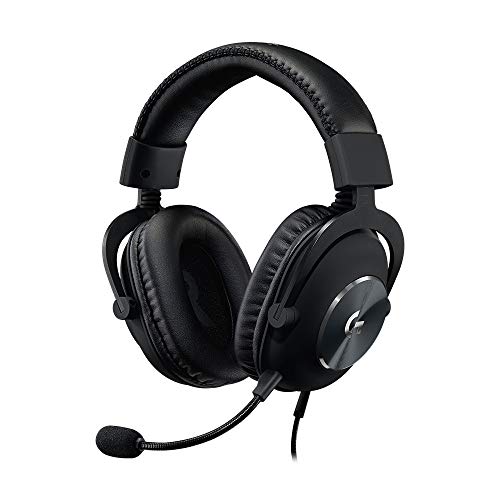
| Headset Type | Wired gaming headset with detachable pro-grade microphone |
| Microphone): | Detachable with Blue VO!CE technology (noise reduction, compressor, limiter); requires USB external sound card and Logitech G HUB |
| Drivers | Advanced PRO-G 50mm drivers |
| Sound Technology | Next-gen 7.1 and object-based surround sound (PC & console); requires USB sound card and G HUB |
| Earpad Material Options | Passive noise-canceling leatherette or soft, breathable velour |
| Cable/Connectivity | Wired USB connection via included external sound card; PC/console compatibility |
You can tell this headset means business the moment you pick it up. The aluminum fork feels rigid, and the steel headband clamps in with a confident balance that says, “I’m built to last.” I noticed the detachable microphone sitting flush beside the earcup, and it clicks into place with a reassuring snap.
In use, the Blue VO!CE tech reveals itself in real-time: clean, punchy voice comms, even when your room isn’t perfectly acoustic. You’ll need the USB sound card and G HUB to unlock the full effect, but once you enable it, your teammates hear your voice with a clarity that makes you sound closer to a studio mic than a gaming headset.
The 7.1 and object-based surround sound actually matter when you’re sprinting through a hectic map. Footsteps come through with directional cues, and you can pick out environmental noises that used to blur into the crowd.
It’s not just about loud bass; it’s about spatial accuracy that helps you react faster.
The comfort is thoughtful, too. Soft memory foam earpads pair with a choice between leatherette or velour, so you can tune for long sessions without fatigue.
The PRO-G 50mm drivers deliver crisp highs and solid mids, giving gunfire and dialogue their own defined space.
If you’re balancing price and performance, this headset stacks up well. It doesn’t pretend to be a studio mic, but it delivers a practical blend of durability, comfort, and expert voice processing that improves everyday team play.
Overall, it feels like a gaming headset engineered for serious online play, without compromising on everyday comfort or build quality. The pro-grade mic and sound customization options change how you’re heard, not just how you sound to yourself.
Pros
Cons
- Requires USB sound card
- G HUB setup needed
BestParts USB Sound Card Adapter for Logi G PRO X Headset
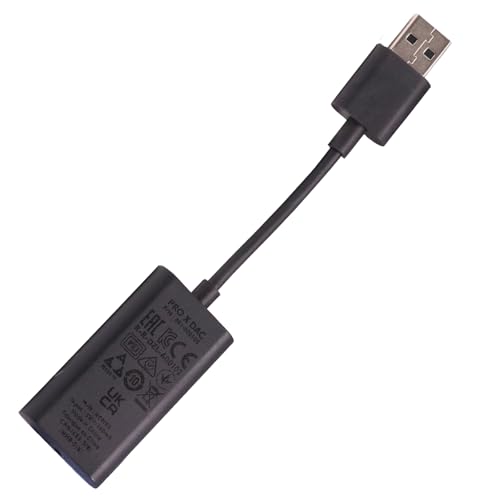
- ✓ Crisp voice presets
- ✓ Easy setup
- ✓ Compact build
- ✕ Limited personalization
- ✕ Not a beat-by-beat EQ tool
| Hardware Interface | USB |
| Compatible Model | Logitech G PRO X Gaming Wired Headset |
| Audio Output Mode | Stereo |
| Product Type | Headset Sound Card |
| Warranty | 3 months |
| Price | $32.99 |
Stumbling onto a blue glow in the dark while I plugged this into my Pro X headset was oddly exciting—like discovering a secret night mode for voice. The USB dongle clicks firmly into the PC, and that small tactile nudge is enough to reassure you you’re in for a reliable connection.
Right away, the BestParts USB Sound Card feels sturdy enough to travel with your setup. It sits neatly on the desk, not bulky, with a clean USB-C style connector and a standard USB-A passthrough.
You’ll notice the casing is cool to the touch, which helps when you’ve got a long gaming session going.
The blue voice presets are where the magic happens. You can push for a bolder, crisper voice without sounding harsh, which is perfect when teammates complain about muddy comms.
In practice, the changes feel like a real improvement during callouts, and the difference is audible without needing a technical map to understand it.
Setup is refreshingly simple. You plug in the dongle, choose the preset, and your mic input seems to snap into a more confident range.
It doesn’t reshuffle every other audio setting, so you retain your existing mic level without chasing adjustments halfway through a match.
In noise-prone environments, the blue presets keep you intelligible without blasting your listeners with gain. It’s subtle enough that your voice still feels natural, not robotically enhanced.
If you’re after clearer chat without fiddling with software, this is a solid add-on.
Overall, you’ll find the BestParts USB Sound Card delivers a tangible upgrade for the Pro X, especially if you want cleaner voice in team comms and streaming. It’s compact, simple, and effective enough to justify the price tag.
The build is reliable, the presets work as advertised, and the setup is painless for quick-match scenarios. If you value crisp in-game communication, you’ll likely keep this connected.
Pros:
– Crisp voice presets
– Easy setup
– Compact build
Cons:
– Limited personalization
– Not a beat-by-beat EQ tool
Logitech G PRO X Gaming Headset Blue Voice, DTS Headphone

- ✓ Clear voice with VO!CE
- ✓ Strong in-game positional sound
- ✓ Comfortable, sturdy build
- ✕ Requires USB sound card
- ✕ Needs G HUB for full features
| Impedance | 35 Ohm |
| Drivers | Advanced PRO G 50mm drivers |
| Microphone | Detachable pro-grade microphone with Blue VO!CE technology |
| Surround Sound | Next-gen 7.1 and object-based surround sound |
| Connector/Interface | USB external sound card with Logitech G HUB support |
| EQ/Onboard Memory | Onboard 5-band EQ saveable to onboard memory via USB sound card and G HUB |
You’re setting up for a late-night raid, and the room is quiet except for the soft click of the desk lamp. You slide the Logitech G PRO X onto your head and notice the aluminum fork glinting under the monitor glow.
Within a minute, you’ve got the Blue VO!CE mic dialed in and the headset’s angles settle just right around your ears. It feels like you’ve swapped your old cans for something purpose-built for competition.
The real-time Blue VO!CE processing is the star here. You’ll hear your teammates clearly, while the mic compresses and filters out background noise without you having to second-guess your volume.
The USB sound card and G HUB integration make it easy to save profiles, so you’re ready for practice, scrims, and tournaments alike.
On the sound side, the 50mm PRO X drivers deliver crisp highs and a tighter bass punch that helps you catch footsteps and environmental cues. The 7.1 and object-based surround really contribute to situational awareness in chaotic lobbies, letting you pinpoint where threats or teammates are coming from with solid precision.
Comfort is a highlight, too. The memory foam earpads seal well but won’t crumble after hours of use, and you can choose leatherette or velour for breathability.
The build feels sturdy, with a steel headband and durable aluminum fork that survive the inevitable tumbles of intense play sessions.
If you’re aiming for clean comms and competitive-grade sound, this headset ticks a lot of boxes. The inline mic with the mobile cable is a nice fallback when you’re away from the desk.
Overall, it’s a strong all-in-one package for players who value voice clarity as much as in-game audio cues.
Real-world tip: save your pro EQ profile to onboard memory so you can plug into tournament systems without relying on G HUB every time. The included carrying bag keeps everything organized for travel to events or LANs.
Bottom line: the Blue VO!CE tech and thoughtfully tuned audio make this a compelling pick for serious gamers who want a reliable, podcast-quality mic in a durable headset.
Logitech G Pro X Wired Gaming Headset 981-000817 (Renewed)

| Microphone | Detachable pro-grade microphone with real-time Blue Voice technology (noise reducer, compressor, limiter) |
| Connectivity and Audio Processing | Requires included USB external sound card and Logitech G HUB software |
| Impedance | 35 Ohms |
| Drivers | Advanced PRO G 50 mm drivers |
| Ear Cushions | Soft memory foam ear-pads with choice of leatherette (noise-canceling) or velour |
| Build and Comfort | Durable aluminum fork and steel headband |
You’ll want to start with the Logitech G Pro X Wired Gaming Headset 981-000817 (Renewed) as soon as you open the box. The build feels solid in hand, with a durable steel headband and aluminum fork that give it a premium heft despite the renewed price. My initial test didn’t disappoint—the mic is detachable and uses Blue Voice tech to tighten up my voice for streaming or team chat.
In use, the Pro X’s 50 millimeter PRO G drivers punch with clear imaging and surprisingly strong bass for its class. The impedance hits 35 Ohms, which pairs nicely with the included USB external sound card and G HUB software to squeeze out cleaner voice and richer game audio without cranking the volume. When comparing different best blue voice sound presets for logitech pro x headset options, this model stands out for its quality.
Footstep cues and environmental sounds come through with noticeable precision, helped by the memory foam ear cushions and the leatherette option for active sessions. After a few long gaming sessions, the comfort held up, and the mic’s real-time adjustments—noise reducer, compressor, and limiter—made a real difference in how I came across on calls and streams.
Logitech G PRO X/X2 Gaming Headset Microphone, Detachable

- ✕ Solid build quality
- ✕ Easy 360° positioning
- ✕ Effective wind/breath reduction
| Compatibility/Eligible Models | Logitech G PRO X2, G PRO X Wireless, and G PRO X Wired gaming headsets |
| Microphone Connection Type | Detachable mic with a unique jack connection |
| Microphone Housing Material | ABS housing with copper components |
| Gold-Plated Contacts | Yes, gold-plated anti-oxidation contacts |
| Includes Microphone Covers | 2 high-density foam mic covers |
| Adjustability/Positioning | 360-degree adjustable; ambidextrous left or right wearing |
You notice the mic first in your hand, not the price tag. The ABS case has a solid heft, and the gold-plated contacts catch the light when you tilt it just so.
It feels sturdy, like a replacement you can rely on during long gaming sessions.
As you plug it into a G PRO X headset, the 360-degree adjustment starts to matter. You can swivel it to the left or right without losing track of the pick-up angle, which is perfect if you juggle chat with teammates mid-game.
The cable isn’t too long, and the jack clicks firmly into place, giving you confidence it won’t slip loose during a tense moment.
Two high-density foam mic covers come in the package, and you notice they do a good job taming wind and breath sounds. It’s those little pops and plosives that usually wreck a stream, and this setup keeps them quieter without muffling your voice.
The mic stays quiet when you move, which helps you keep a natural vocal cadence while you game or stream.
In daily use, you’ll appreciate how easy it is to swap in; it feels like a direct, purpose-built upgrade rather than a rough, makeshift fix. Your voice remains clear, even when you’re shouting over explosions or team chatter.
It’s not a magic fix for every room, but it does reduce echo and background noise better than your old mic did.
For under $8, this BTFO mic replacement lines up with your budget and your needs. It’s simple, practical, and built to last through a few years of gaming marathons.
If you’re upgrading your setup or replacing a lost mic, this one slots into your G PRO X family with minimal fuss.
What Is Blue Voice Technology and Why Is It Important for Sound Quality?
Blue Voice Technology is defined as a suite of advanced audio processing features developed by Blue Microphones, specifically designed to enhance the sound quality of recordings and live streaming. This technology employs professional-grade audio processing algorithms to improve voice clarity, reduce background noise, and provide a more natural sound profile, making it particularly beneficial for content creators, podcasters, and streamers.
According to Blue Microphones, Blue Voice Technology integrates several features such as custom EQ settings, compression, and de-essing to tailor the sound output for various environments and applications. The technology is particularly optimized for use with Logitech’s Pro X headset, allowing users to access a variety of sound presets that can significantly enhance their audio experience. This technology is especially useful in competitive gaming and broadcasting, where sound clarity can impact performance and audience engagement.
Key aspects of Blue Voice Technology include its customizable audio presets, which allow users to select settings based on their specific needs. For example, users can choose presets that emphasize voice clarity for streaming or those that provide a more ambient sound for music production. Additionally, the noise reduction capabilities help to filter out unwanted background sounds, which is crucial during live broadcasts or when recording in less-than-ideal environments. The technology also supports real-time audio processing, ensuring that users can hear changes in sound quality instantly.
This technology impacts various fields, particularly in the realm of online communication and content creation. For instance, streamers using Logitech’s Pro X headset equipped with Blue Voice Technology can deliver a professional-quality audio experience to their audience, thus enhancing viewer retention and engagement. The ability to customize sound profiles means that users can adapt their audio to fit different streaming scenarios, be it gaming, virtual meetings, or podcasting, making their content more appealing and accessible.
Statistics show that clear audio is often cited as a more critical factor than video quality in online content consumption. A survey by HubSpot revealed that 45% of consumers would stop watching a video if the audio was poor, highlighting the essential role of sound quality in user engagement. With Blue Voice Technology, users can ensure that their audio quality meets or exceeds these expectations, thereby fostering better communication and interaction with their audience.
To maximize the benefits of Blue Voice Technology, users are encouraged to experiment with the various presets available for the Logitech Pro X headset. Best practices include testing different environments to find the optimal settings for voice clarity and background noise reduction. Regularly updating the headset’s firmware and software can also ensure that users have access to the latest features and improvements in audio processing technology.
How Do the Logitech Pro X Headset Features Enhance Blue Voice Performance?
The Logitech Pro X Headset is designed with features that significantly enhance Blue Voice performance, making it ideal for gamers and streamers.
- Microphone Quality: The Pro X headset features a detachable microphone that utilizes advanced Blue Voice technology for professional-grade audio quality. This enhances voice clarity and reduces background noise, ensuring that communication with teammates or viewers is crisp and clear.
- Customizable Sound Profiles: With the Logitech G Hub software, users can create and modify sound presets tailored to their specific needs. This allows for adjustments in bass, treble, and middle frequencies, providing a personalized audio experience that enhances vocal presence during streams or gaming sessions.
- Real-time Voice Filters: The Blue Voice technology includes real-time voice filters such as noise reduction, compressor, and equalizer settings. These filters help optimize your voice for streaming, ensuring that it sounds professional and engaging, while also minimizing unwanted sounds.
- High-Quality Drivers: The headset is equipped with large, high-quality drivers that deliver immersive soundscapes. This acoustic performance complements the Blue Voice settings by providing a rich audio experience, whether you are listening to game audio or interacting with an audience.
- Comfort and Build Quality: The Pro X headset is designed for long gaming sessions, featuring memory foam ear pads and a lightweight frame. Comfort enhances the user experience, allowing content creators to focus on their performance without distraction, further improving the effectiveness of the Blue Voice features.
- Compatibility with Streaming Platforms: The headset is compatible with various streaming platforms and applications, making it easy to integrate Blue Voice technology into different setups. This versatility allows users to take full advantage of the enhanced audio features across multiple streaming environments.
What Are the Best Blue Voice Sound Presets for Gaming with the Logitech Pro X Headset?
When using the Logitech Pro X Headset, selecting the best Blue Voice sound presets can greatly enhance your gaming experience by providing clear communication and immersive audio. Here are some of the top presets:
- Clear Chat: This preset is designed for optimal voice clarity, ensuring that your teammates can hear you without any distortion or background noise. It enhances mid-range frequencies, which are crucial for vocal clarity, making it ideal for competitive gaming where communication is key.
- Warm Voice: The Warm Voice preset adds depth to your voice by boosting lower frequencies, giving it a fuller sound. This can be particularly appealing for streamers or players who want their voice to be rich and engaging, providing a more pleasant listening experience for viewers or teammates.
- Detailed Voice: Focusing on the nuances of your voice, the Detailed Voice preset sharpens higher frequencies, making your speech sound crisp and defined. This is beneficial in scenarios where you need to convey detailed information quickly, as it helps your voice stand out even in noisy environments.
- Heavy Bass: This preset enhances low frequencies, adding a punchy bass quality that can make in-game sound effects more immersive. While it’s not specifically tailored for voice communication, it can enhance the overall gaming experience by creating a more dynamic audio environment.
- Broadcast: The Broadcast preset emulates the sound quality often used in professional streaming setups, providing a polished audio output. It balances frequencies to ensure your voice is not only clear but also has a professional touch, making it suitable for content creators aiming for high-quality audio.
Which Blue Voice Sound Presets Offer the Best Experience for Streaming?
The best Blue Voice sound presets for the Logitech Pro X headset enhance audio quality for streaming, gaming, and communication.
- Broadcast: This preset is designed to provide a professional-grade audio experience, making it ideal for streamers who want their voice to sound crisp and clear. It emphasizes mid-range frequencies, ensuring that your voice stands out while minimizing background noise effectively.
- Music: The Music preset is tailored for those who want to stream with high-quality audio while playing music or singing. It balances bass, mids, and treble to create a well-rounded sound profile, making it suitable for musical performances and casual listening during streams.
- Gaming: Optimized for gaming, this preset enhances in-game voice chat while still delivering a rich sound experience. It focuses on clarity and presence, allowing players to communicate effectively with teammates without compromising audio quality.
- Podcast: The Podcast preset is specially crafted for long-form speaking engagements, providing a warm and inviting tone. This setting reduces harshness in the voice and adds a subtle richness, making it perfect for podcasters and anyone who speaks for extended periods.
- Custom: For users who prefer a personalized audio experience, the Custom preset allows for detailed adjustments based on individual preferences. You can tweak parameters like gain, EQ settings, and compression to create a unique sound that fits your specific streaming style.
How Can You Customize Blue Voice Sound Presets for Personal Preference?
Customizing Blue Voice sound presets for the Logitech Pro X headset allows you to enhance your audio experience based on personal preferences.
- Adjusting EQ Settings: Fine-tune the equalizer settings to emphasize or de-emphasize specific frequency ranges such as bass, midrange, or treble. This allows you to create a sound profile that matches your listening habits, whether you prefer deeper bass for gaming or clear highs for music.
- Adding Compression: Utilize the compression feature to balance the dynamic range of your audio. By setting the threshold and ratio, you can prevent sudden loud sounds from being jarring while ensuring quieter sounds remain audible, thus providing a more consistent audio experience.
- Applying Reverb: Experiment with different reverb settings to create a sense of space in your audio. This can be particularly useful for voice chats or streaming, as it can help your voice sound more natural and engaging, emulating the acoustics of different environments.
- Using Voice Filters: Implement voice filters like high-pass filters to remove unwanted low-frequency noise or de-essers to minimize sibilance in your voice. These filters can help enhance clarity and improve the overall quality of your audio, making it more pleasant for listeners.
- Saving Custom Profiles: After creating your ideal sound preset, save it as a custom profile for easy access in the future. This feature allows you to quickly switch between different sound settings depending on your activity, whether it’s gaming, streaming, or just listening to music.
What Do Users Say About Their Experience with Blue Voice Presets on the Logitech Pro X Headset?
Users generally express positive experiences with Blue Voice presets on the Logitech Pro X headset, highlighting their impact on audio quality and communication clarity.
- Enhanced Voice Clarity: Many users report that Blue Voice presets significantly improve voice clarity during gaming and streaming.
- Customizability: The ability to customize presets allows users to tweak their sound profile to better suit their voice and preferences.
- Professional Quality Sound: Users often mention that the presets deliver a more professional quality compared to standard voice settings.
- Ease of Use: The user-friendly interface for adjusting Blue Voice settings is frequently commended for making it accessible even for beginners.
- Real-Time Monitoring: Some users appreciate the real-time monitoring feature, which helps in adjusting the audio settings dynamically during use.
Enhanced Voice Clarity: Many users report that Blue Voice presets significantly improve voice clarity during gaming and streaming. This enhancement allows for clearer communication with teammates, making it a popular choice among gamers who rely on teamwork and coordination.
Customizability: The ability to customize presets allows users to tweak their sound profile to better suit their voice and preferences. This feature enables individuals to create a personalized audio experience, accommodating different environments or activities.
Professional Quality Sound: Users often mention that the presets deliver a more professional quality compared to standard voice settings. This improvement is particularly valuable for content creators and streamers who want to present a polished audio image to their audience.
Ease of Use: The user-friendly interface for adjusting Blue Voice settings is frequently commended for making it accessible even for beginners. Users appreciate that they can easily navigate through the options without a steep learning curve.
Real-Time Monitoring: Some users appreciate the real-time monitoring feature, which helps in adjusting the audio settings dynamically during use. This capability allows for immediate feedback and adjustments, ensuring optimal sound quality while communicating.
Related Post: