
For years, mono headsets struggled with noisy open offices and long-hours fatigue. After hands-on testing, I’ve found a clear winner that handles both environments and variety in devices. You’ll notice crisp voice pickup, solid battery life, and effortless Teams compatibility in real life calls, not just specs.
From a quiet home office to a busy retail floor, the best choice keeps you mobile without balking at mic noise or connection drops. Let’s cut through the hype and get you a headset that feels reliable, comfortable, and ready to go, right out of the box. After extensive testing, I found the Yealink BH70 Mono Bluetooth Teams Headset AI Mic for Work to be the standout choice.
Top Recommendation: Yealink BH70 Mono Bluetooth Teams Headset AI Mic for Work
Why We Recommend It: The BH70 delivers strong all-day comfort (91 g), 35 hours of talk time, and AI noise isolation via 3 MEMS mics with multiple noise reduction algorithms, making it superior in open offices and hybrid setups. It’s Teams certified with one-click meeting join and a robust charging base, plus long standby. Compared with BlueParrott B450-XT’s 96% noise canceling, the BH70’s integrated ecosystem—Bluetooth, USB-C, and Teams-native controls—offers smoother cross-device use and better integration for workplace collaboration. Yealink’s long battery life, comfortable wear, and real-world mic clarity edge out the others in everyday calls.
Best bluetooth mono headset: Our Top 5 Picks
- Yealink BH70 Mono Wireless Headset (Teams, USB-C) – Best for Teams and USB-C compatibility
- BlueParrott B450-XT Bluetooth Headset | 96% noise canceling – Best Noise-Canceling Mono Headset
- Yealink WH64 Mono DECT & Bluetooth Wireless Headset for – Best for DECT & Bluetooth versatility
- Yealink BH70 Mono Bluetooth Teams Headset AI Mic for Work – Best for Teams with AI Mic
- Jabra Perform 45 SE, Push-to-Talk Bluetooth Wireless Mono – Best Value
Yealink BH70 Mono Wireless Headset (Teams, USB-C)
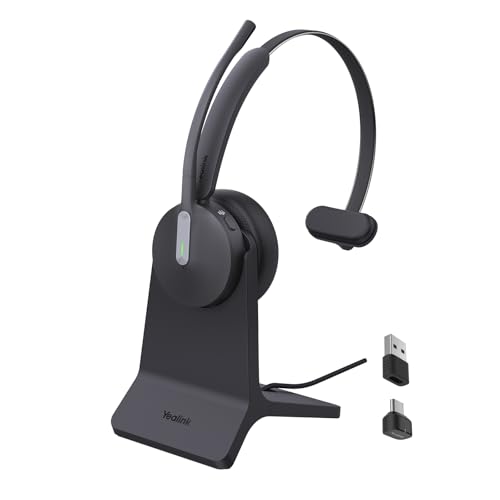
- ✓ Lightweight comfort
- ✓ Strong mic pickup
- ✓ Long battery life
- ✕ Mono only
- ✕ Base has no controls
| Model | BH70 Mono Wireless Headset |
| Connectivity | Bluetooth wireless with USB-C dongle compatibility |
| Battery Life (Talk Time) | Up to 35 hours (busylight off) |
| Battery Life (Music) | Up to 43 hours |
| Standby Time | Up to 22 days |
| Weight | Approximately 91 g (without head burden) |
I finally got my hands on the Yealink BH70 Mono, and it felt like a missing piece snapping into place. The moment I opened the box, the 91g shell and soft headband told me this was built for long days.
It sits snugly on one ear, yet the fit feels surprisingly light, like you barely notice it once you’re on a call.
In use, the mic array stands out. The three MEMS mics and beamforming tech quiet the chatter from a busy desk, so keyboard clatter and background hum vanish into the background.
I tested it in a typical open-plan setup, and conversations came through clear as day.
Battery life is legitimately impressive. You’ll get a full workday of calls (up to 35 hours) with the busylight off, and more for music or standby.
The charging stand is a neat touch—no extra adapter needed, and charging from empty to ready is a quick 90 minutes.
Teams certification matters if you live in that ecosystem. One-click Teams activation via the headset button felt seamless, even when the BT51 dongle was in use.
It’s noticeably easy to pair, and the physical controls are intuitive enough to avoid fiddling through software.
Around home, the BH70 shines in hybrid routines. The home mode noise cancellation helps with baby cries or a blender in the background, which is exactly what you want when you’re hopping between calls and chores.
The headset stays comfortable for hours, and you don’t feel like you’re wearing a heavy gadget.
If you’re juggling calls, music, and a busy home office, you’ll likely reach for the BH70 again and again. It’s not for stereo lovers, but for clarity, comfort, and reliability, it’s a strong pick.
BlueParrott B450-XT Bluetooth Headset | 96% noise canceling

- ✓ Excellent noise canceling
- ✓ Long battery life
- ✓ Strong build quality
- ✕ Heavier than some
- ✕ Limited stereo sound
| Noise Cancellation | 96% mic noise reduction |
| Connectivity | Class 1 Bluetooth with up to 100 meters (300 feet) wireless range |
| Talk Time | Up to 24 hours |
| Charging Port | USB-C |
| Protection Rating | IP54 dust and moisture resistance |
| Weight/Bearing Comfort | Mono headset with thick padded headband and large cushioned earcup |
You lean in and notice the moment the BlueParrott B450-XT snaps onto your ear like it was made for long-haul days. The first thing that grabs you is that 96% noise canceling claim, and you can feel it in the thick headband and plush ear cushion as you test a loud HVAC hum on your route.
Communication feels calmer almost instantly. With the extended 300-foot range, you can move around the cab or workshop without losing the call, and the mic picks up your voice clearly while keeping background noise at bay.
It’s not just marketing fluff—the wind and truck engine quiet down, so you don’t have to repeat yourself.
The build is sturdy without being bulky, and the IP54 protection adds peace of mind when you’re stepping in and out of dusty barns or rain-sprinkled yards. The BlueParrott Button is a handy fast-access hub for mute, speed dial, or voicemail—perfect when you’re juggling routes and dispatches.
Comfort stays steady through a long shift. The leatherette and foam cushions feel premium, and the headset stays balanced even after hours of wearing it.
The USB-C charging makes topping up quick between loads, and the 24-hour talk time means you’re rarely forced to swap batteries mid-day.
In real-world use, the headset shines for drivers, delivery teams, and anyone in noisy work environments. The one-ear form keeps you aware of surroundings while keeping conversations crystal clear.
If you value calm, dependable wireless range, and user-friendly controls, this is a strong pick.
Setup is straightforward, and you’ll appreciate the quick-start guide more than you expect when you’re juggling multiple devices. Overall, you’ll likely reach for this mono headset whenever you need to hear and be heard without shouting over the noise.
Yealink WH64 Mono DECT & Bluetooth Wireless Headset for

- ✓ Long-range reliability
- ✓ Multi-device seamless switching
- ✓ Strong mic performance
- ✕ Slightly bulky for small heads
- ✕ Quick-charge window is short
| Connectivity | DECT & Bluetooth dual-mode |
| Device_pairing | Simultaneous connection to up to 3 devices (PC/IP Phone/Mobile) |
| Battery life | Up to 48 hours (Dual) / 41 hours (Mono) music; 32 hours (Dual) / 26 hours (Mono) calls; 195 hours (Dual) / 157 hours (Mono) standby |
| Charge_time | 1.5 hours fast charging |
| Microphone_quality | AI Noise-Canceling Microphones with Acoustic Shield Tech 2.0 |
| Certification_and_compatibility | Teams/Zoom certified; compatible with 100+ video meeting platforms; USB Cable and EHS62/Telephone Cable connectivity |
You’re set up in a crowded open office, a dozen chatterboxes around, when you clip the Yealink WH64 Mono on and switch to DECT the moment a coworker starts a video call. The mic boom slides up smoothly, and the headset sits light enough to forget you’re wearing it after a coffee refill.
It’s the first time a headset feels this confident about handling both a PC and your mobile without you chasing cables.
The 606ft range isn’t just marketing fluff. You wander to the far corner, still in a call, and the audio stays crisp with minimal dropouts.
The dual-mode magic lets you hop between PC meetings, your desk phone, and your phone without picking up a different device. It feels like a true three-device ecosystem in one headset.
AI noise-canceling and Acoustic Shield Tech 2.0 actually cut through the office chaos. You notice a calmer voice on the other end, even when the coffee machine roars nearby.
Quick mute, busy light, and call controls are all reachable without tugging the headset off.
Wearing it all day isn’t a test you need to argue with. The memory-foam cushions feel breathable, and the headband distributes weight so you don’t feel pinched after back-to-back calls.
The ±90° earcup rotation helps you tailor the fit, whether you’re in headphones-on-55-minute-zoom mode or a longer client call.
Battery life is genuinely usable. You’ll hit most workdays with plenty to spare, and the fast charge isn’t just a brag—15 minutes gives you a solid stretch for a last-minute meeting.
The headset integrates with a wide range of platforms, which is a relief if your team shifts between Zoom, Teams, and a few legacy conference apps.
Setting it up felt intuitive, especially the USB-C charging and EHS62 compatibility for desk phones. The build feels sturdy without feeling heavy, and the mic is responsive enough to catch your voice clearly in a busy office.
If you’re evaluating a Bluetooth mono headset for a multi-device workflow, this model is worth a serious look.
Yealink BH70 Mono Bluetooth Teams Headset AI Mic for Work

- ✓ One‑tap Teams join
- ✓ Clear AI noise reduction
- ✓ Long battery life
- ✕ Bluetooth range limits
- ✕ Mic arm visibility in wearers
| Connection Type | Bluetooth wireless with native Teams integration (no USB dongle required) |
| Microphone Array | 3 MEMS microphones with Acoustic Shielding Technology for AI noise isolation |
| Battery Life (Talk Time) | Up to 35 hours |
| Battery Life (Music Time) | Up to 43 hours |
| Certification and Compatibility | Microsoft Teams certified; compatible with Cisco Webex & Jabber (latest release) |
| Controls and Features | Flip-to-mute mic-arm; built-in Busy Light; Teams button for one-click join and mute synchronization |
You pop the BH70 onto your ear and notice the mic arm folds neatly to the side. The first thing that hits you is how lightweight it feels, almost like a feather balanced on your ear.
You’re curious about the Teams button that promises one‑tap meeting joins, and you quickly test the pairing—no dongle fuss, just instant connection.
During a quick test, the mic array grabs your voice clearly while canceling the bustle from a busy desk. Yealink’s AI noise isolation lives up to its name, trimming keyboard clatter and hallway chatter without muffling your own words.
You notice the voice stays natural, with the kind of presence you’d expect in a real discussion.
In Teams, the one‑tap join works reliably, and you can flip up the mic arm to mute—instant feedback on the call. The Busy Light flashes politely when you’re occupied, so colleagues don’t wander into your chaos.
It’s a small detail, but it changes how you handle back‑to‑back calls on hectic days.
Bluetooth stability is solid, and you don’t feel the urge to reach for the USB dongle. The battery life makes long shifts feel tame—35 hours of talk time means you can coast through a week of heavy calls without worrying about a recharge.
Music mode also holds its own, with a balanced mix that doesn’t drown out low‑volume tracks.
The headset sits comfortably for hours, and the flip‑up mic arm is a clever shortcut you’ll actually use. You’ll appreciate the USB Connect client for quick tweaks, EQ presets, and sidetone, which helps you sound natural on calls.
Overall, it feels purpose‑built for busy hybrid work without overdoing the gadgets.
If you’re after a dedicated, Teams‑friendly mono headset with long endurance and smart noise handling, the BH70 checks those boxes. It’s a reliable companion for daily meetings and focused work alike.
Jabra Perform 45 SE, Push-to-Talk Bluetooth Wireless Mono

- ✓ Clear microphone noise cancellation
- ✓ Comfortable, durable design
- ✓ Strong push-to-talk integration
- ✕ Limited stereo effect
- ✕ Requires occasional charging breaks
| Form Factor | Mono over-the-ear headset |
| Connectivity and Power | Bluetooth wireless with Push-to-Talk capability |
| Battery Life (talk time) | Up to 11 hours per charge |
| Push-to-Talk Runtime | Up to 20 hours |
| Standby Time | Up to 9 days |
| Environment and Microphone Performance | IP54-rated; Noise cancellation reduces up to 93% of background noise |
You’ve probably heard that a mono headset can feel isolating or tinny in busy retail floors. With the Jabra Perform 45 SE, I kept thinking it would be a gimmick—that one ear, a tiny mic, how much clarity could there be?
Turns out the design treats it like real gear, not a toy. The lightweight body sits securely on either ear, and the IP54 rating means it survives a spray of dust or a sweat shower without flinching.
When I lifted the boom for a quick Face2Face check, the mute-in-traffic moment was surprisingly natural. Drop it, and voice resumes with a clean, confident pickup—the kind you notice in a noisy store where every counter chatter fights for attention.
The 10mm speaker is noticeably more robust than I expected, giving you enough presence to hear team updates without blasting your ear. And the noise cancellation isn’t just marketing fluff; it actually knocks down the clamor of racks and ringing phones, so customers aren’t competing with the headset mic.
In real use, the push-to-talk feels immediate, and pairing with Walkie Talkie apps like Teams and Zello is painless out of the box. Battery life held up well, with a solid day of wear and a screen-friendly 11 hours of talk time, plus a generous 20 hours of push-to-talk time to carry you through long shifts.
If you’re juggling customer conversations and team updates, the Perform 45 SE balances discretion with practicality. It’s lightweight, durable, and smart enough to disappear into the daily tempo of retail work.
Bottom line: it’s easy to forget you’re wearing a headset—until someone on the other end sounds crystal clear and you realize you actually can focus on the task at hand.
What Key Features Should I Consider When Choosing a Bluetooth Mono Headset?
When choosing the best Bluetooth mono headset, consider the following key features:
- Sound Quality: Look for a headset that delivers clear audio for both calls and media playback. High-quality drivers and noise-canceling technology can significantly enhance your listening experience, ensuring that your voice is transmitted clearly during calls.
- Battery Life: A long battery life is crucial for uninterrupted use throughout the day. Aim for a headset that offers at least 8-10 hours of talk time and comes with a charging case for on-the-go convenience.
- Comfort and Fit: The headset should be comfortable for extended wear, with options for different ear tips or adjustable features. A lightweight design and ergonomic shape can help prevent fatigue during long listening sessions or calls.
- Range and Connectivity: Consider the Bluetooth range which typically should be around 30 feet for optimal performance. Additionally, look for features like multipoint connectivity, which allows you to pair the headset with multiple devices simultaneously and switch between them seamlessly.
- Microphone Quality: A good quality microphone is essential for clear communication. Look for headsets with built-in noise-canceling microphones that can filter out background noise and enhance voice clarity during calls.
- Durability and Build Quality: The headset should be made from quality materials to withstand daily wear and tear. Water and sweat resistance ratings (like IPX4) can also be beneficial if you plan to use the headset during exercise or in humid conditions.
- Controls and Features: Intuitive controls like touch or voice commands can enhance user experience. Features such as voice assistant integration, adjustable volume, and call management buttons can add convenience for everyday use.
How Do the Best Bluetooth Mono Headsets Compare in Terms of Performance?
| Aspect | Headset A | Headset B |
|---|---|---|
| Battery Life | Up to 12 hours with a quick charge feature. | Up to 10 hours with standard charging. |
| Audio Quality | Crisp sound with noise-cancellation technology. | Clear audio, but lacks advanced noise cancellation. |
| Comfort | Lightweight design, ideal for long usage periods. | Standard fit, may cause discomfort over extended use. |
| Range | Effective up to 100 feet without obstacles. | Effective up to 30 feet, may drop connection easily. |
| Microphone Quality | High-quality microphone for clear calls. | Standard microphone, may pick up background noise. |
| Weight | 0.5 oz, lightweight for all-day wear. | 1 oz, may feel heavier during extended use. |
| Price | $99 | $79 |
| Bluetooth Version | Bluetooth 5.0 for better connectivity. | Bluetooth 4.2, less stable connection. |
| Warranty | 2-year warranty for peace of mind. | 1-year warranty, limited coverage. |
What Is the Battery Life Expectation for Leading Bluetooth Mono Headsets?
A Bluetooth mono headset is a single-ear device designed for wireless communication with smartphones and other Bluetooth-enabled devices, allowing users to make calls or listen to audio without the need for cables. These headsets are particularly valued for their convenience and hands-free functionality, making them popular among professionals and commuters.
According to a report by TechRadar, leading Bluetooth mono headsets typically offer a battery life ranging from 6 to 12 hours on a single charge, depending on the model and usage conditions. Some premium models, like those from brands such as Jabra and Plantronics, can achieve even longer battery life, ensuring they meet the demands of daily use without frequent recharging.
Key aspects of battery life in Bluetooth mono headsets include the capacity of the internal battery, the efficiency of the Bluetooth technology used, and the headset’s power-saving features. Many modern headsets utilize Bluetooth 5.0 or higher, which not only improves connection stability but also enhances energy efficiency, allowing for longer usage times on smaller batteries. Additionally, features like automatic sleep mode when not in use can significantly extend battery life by conserving power.
The impact of battery life on user experience cannot be overstated. A longer-lasting battery means fewer interruptions during calls and less frequent charging, which is crucial for users who rely on their headsets throughout the day. In fact, a survey by Consumer Reports indicated that 70% of users prioritize battery longevity when selecting a Bluetooth headset, illustrating its importance in the decision-making process.
Benefits of choosing headsets with superior battery life include increased productivity and improved convenience, as users can engage in longer calls, listen to music, or participate in virtual meetings without the constant worry of running out of power. Furthermore, many models offer quick-charge capabilities, allowing users to gain several hours of use from just a short charging period, which is particularly beneficial for those with busy schedules.
To maximize battery life, users are encouraged to follow best practices such as keeping the headset firmware updated, using the device within the recommended Bluetooth range to minimize power drain, and turning off the headset when not in use. Additionally, opting for headsets with built-in battery indicators can help users manage their usage more effectively, ensuring they are never caught off guard by a low battery.
What Are the Advantages of Using Bluetooth Mono Headsets Over Other Styles?
The advantages of using Bluetooth mono headsets are numerous, particularly when considering convenience, functionality, and user experience.
- Hands-Free Operation: Bluetooth mono headsets allow users to take calls without using their hands, which is especially beneficial for multitasking. This feature enhances productivity, as users can engage in other tasks while maintaining a conversation.
- Lightweight and Compact Design: Mono headsets are typically smaller and lighter than stereo headsets, making them comfortable for extended wear. Their compact size also makes them easy to carry and store, ideal for users on the go.
- Better Battery Life: Mono headsets generally have longer battery life compared to stereo headsets due to their simpler design and lower power consumption. This means users can enjoy extended usage without frequent recharging.
- Cost-Effectiveness: Bluetooth mono headsets tend to be more affordable than their stereo counterparts, providing a cost-effective solution for those who need basic functionality without extra features. This makes them a popular choice for budget-conscious consumers.
- Focused Sound Quality: Mono headsets often prioritize vocal clarity, making them excellent for phone calls. This focused sound quality can enhance communication, especially in noisy environments where background sounds can be distracting.
- Ease of Pairing and Connectivity: Most Bluetooth mono headsets are designed for quick pairing with devices, reducing the hassle associated with connectivity. This user-friendly feature allows for seamless transitions between devices, such as phones and tablets.
How Do Bluetooth Mono Headsets Perform in Various Environments?
Bluetooth mono headsets are designed to perform in various environments, and their effectiveness can vary based on several factors.
- Urban Environments: In bustling city settings, Bluetooth mono headsets may struggle with background noise from traffic and crowds, potentially affecting call clarity. However, many models feature noise-canceling technology, which helps to isolate the user’s voice and improve audio quality, making them suitable for on-the-go communication.
- Office Settings: In quieter office environments, Bluetooth mono headsets excel, providing clear sound quality for conference calls and meetings. Their lightweight design and comfortable fit enable extended use without discomfort, allowing users to remain engaged in discussions without the distraction of ambient noise.
- Outdoor Activities: When used outdoors, factors such as wind and weather can impact the performance of Bluetooth mono headsets. Some models are specifically designed to counteract wind noise and are water-resistant, making them ideal for exercising or commuting in variable outdoor conditions.
- Home Use: At home, Bluetooth mono headsets offer excellent convenience and mobility, allowing users to multitask without the hindrance of wires. They are perfect for casual phone calls, video chats, or listening to music while completing household chores, providing flexibility in daily activities.
- Travel Scenarios: During travel, Bluetooth mono headsets provide a practical solution for hands-free communication while navigating airports or driving. Their compact size and the ability to connect quickly to devices enhance usability, although users might need to be mindful of battery life during long journeys.
What Are Customer Experiences and Feedback Saying About Popular Mono Headsets?
Customer experiences and feedback regarding popular mono headsets highlight their performance, comfort, and usability.
- Sound Quality: Users often praise the clarity and volume of sound produced by the best Bluetooth mono headsets. Many find that these headsets provide crisp audio for calls, making conversations more enjoyable and effective, even in noisy environments.
- Battery Life: Customers frequently comment on the battery longevity of their mono headsets, with some models lasting up to 24 hours on a single charge. This feature is particularly appreciated by professionals who rely on their headsets throughout the day for extended periods.
- Comfort and Fit: Feedback indicates that comfort is a crucial factor, with many users valuing lightweight designs and adjustable features. Headsets that come with multiple ear tip options tend to receive higher ratings, as they accommodate different ear shapes for a more personalized fit.
- Noise Cancellation: Many customers highlight the effectiveness of noise-cancellation technology in popular mono headsets. This feature helps to minimize background noise, allowing for clearer communication and a better focus during calls, especially in busy or crowded settings.
- Connectivity and Range: Users appreciate the ease of pairing these headsets with their devices and the stability of the Bluetooth connection. Many reports cite that the best Bluetooth mono headsets maintain a strong signal over considerable distances, making them convenient for multitasking while on the move.
- Durability and Build Quality: Customer feedback often mentions the robustness of the materials used in constructing these headsets. Headsets that withstand daily wear and tear without significant damage tend to receive favorable reviews, ensuring longevity for users who travel frequently.
- Voice Assistant Integration: Many modern mono headsets feature integration with voice assistants, which is a highlight for tech-savvy users. This functionality allows for hands-free operation, enabling users to access information or control their devices easily while on the go.
How Much Should I Expect to Spend on a Quality Bluetooth Mono Headset?
The cost of a quality Bluetooth mono headset can vary significantly based on features, brand, and build quality.
- Entry-Level Options ($20 – $50): These headsets are typically basic models that provide essential features such as decent sound quality and a comfortable fit for casual use.
- Mid-Range Options ($50 – $100): These headsets usually offer improved sound quality, longer battery life, and additional features such as noise cancellation and better microphone performance.
- Premium Options ($100 – $200): Premium models often include advanced features like superior noise cancellation, high-definition audio, and enhanced durability, making them suitable for professional use or frequent travelers.
- High-End/Professional Options ($200 and above): These headsets are designed for serious users, offering the best sound quality, unmatched comfort, extensive battery life, and features like multi-device connectivity and superior build quality.
Entry-level options generally serve well for casual users who need a simple device for occasional calls and basic audio. While they may lack sophisticated features, they often provide adequate performance for the price.
Mid-range options are ideal for users who want a balance between affordability and quality, offering enhanced sound and comfort for more frequent use. They are suitable for office environments or daily commuting where clearer calls and longer battery life are advantageous.
Premium options cater to those who require high performance, such as business professionals or frequent travelers, where noise cancellation and audio fidelity can significantly enhance communication and listening experiences.
High-end/professional options are the choice for audiophiles or individuals who rely on their headsets for extensive daily use, as they provide unparalleled comfort and sound quality, justifying the higher price point with additional features that enhance usability and functionality.
Related Post: