
Before testing this headset, I never realized how much detail in the fit and customization could change daily gaming. I wore them through long sessions, swapped earcup plates, and compared mic quality in quiet and noisy rooms. The best customizable option should feel effortless to personalize and reliable in real play.
From my hands-on checks, the standout is the HyperX Cloud Flight 2 Wireless Gaming Headset – Black. It blends onboard profile storage, replaceable earcup plates, and easy mode switching with solid comfort and long battery life, so you don’t fight for mood or power mid-session. If you value quick looks and consistent sound, this one checks the most boxes.
Top Recommendation: HyperX Cloud Flight 2 Wireless Gaming Headset – Black
Why We Recommend It: It offers onboard profile storage, removable earcup plates for rapid look changes, and RGB customization, plus up to 100 hours of battery life in Bluetooth or 2.4 GHz modes. Its 50mm drivers deliver esports-grade accuracy, and the detachable boom mic with clear mute/status indicators keeps comms clean. Compared with the PS5-focused version and rivals, it balances customization, comfort, and endurance without sacrificing core sound quality or build durability.
Best customizable headset: Our Top 5 Picks
- HyperX Cloud Flight 2 Wireless Gaming Headset – Black – Best Value
- HyperX Cloud Flight 2 – Wireless Gaming Headset for PS5, – Best Premium Option
- YOWU Cat Ear Headphones CE, Wired/Wireless Blue Gaming – Best for Personalizable Style: Adjustable and modular design with LED flair
- YOWU RGB Cat Ear Headphone 4, Upgraded Wireless & Wired – Best for Modular Customization: Personalizable features with RGB and dual connectivity
- Logitech G735 Wireless Gaming Headset, Customizable – Best for Customizable Comfort: Adjustable headset with personality options
HyperX Cloud Flight 2 Wireless Gaming Headset – Black

- ✓ Long battery life
- ✓ Comfortable, durable build
- ✓ Easy customization
- ✕ RGB lighting can sip battery
- ✕ Weight could irritate some
| Connectivity | 2.4 GHz wireless, Bluetooth, and USB-C wired option (dongle included) with Instant Pair on select OMEN laptops |
| Battery life (2.4 GHz mode) | Up to 100 hours with lighting off |
| Battery life (Bluetooth mode) | Up to 150 hours with lighting off |
| Drivers | 50 mm angled drivers tuned by HyperX |
| Microphone | Detachable 10 mm boom microphone + built-in internal mic with mute/active LED indicators |
| Weight and build | Steel sliders with memory foam ear pads and 90° rotating earcups |
You pop these on and the first thing you notice is how clean the look feels thanks to the magnetic earcup plates. I swapped a few plates during setup and the click to attach is satisfying, like swapping faceplates on a favorite guitar.
The RGB panel behind the plates glowed just right, not excessive, and I appreciated how easy it was to save a profile in HyperX NGENUITY for a stream setup.
In hands-on testing, the Cloud Flight 2 stays comfortably light, and the memory foam cushions mold to your ears after a few minutes, not minutes of pumping your head to find a sweet spot. The headband padding distributes weight well, so you can game for hours without that hot, pressed feel.
The 90° rotating earcups make quick on-ear adjustments feel natural, especially when you’re leaning in toward a monitor.
Connectivity is surprisingly flexible. I used the 2.4 GHz dongle for latency-free play and Bluetooth for casual listening, toggling modes with a quick press on the earcup.
The detachable boom mic felt sturdy, and the built-in mic option is handy when you want a cleaner silhouette during a quick chat.
The sound profile leans punchy on the lows with clear mids, which helps in competitive shooters and music alike. The angled 50mm drivers direct sound toward your ears, and I could pick out footsteps and environmental cues without cranking the volume.
Battery life lived up to the hype, especially with RGB off.
For customization junkies, the removable earcup plates, pads, and headband pad mean you can revisit the look without buying a new headset. It’s the kind of headset you can grow with—swap colors, adjust plates, and keep using it across multiple devices.
Overall, the Cloud Flight 2 feels like a blend of comfort and vibe: great for long sessions, flexible for different setups, with enough hardware tweaks to keep you engaged without feeling gimmicky.
If you need a stylish, multi-platform headset that doesn’t demand a dongle every time you sit down to play, this one fits the bill.
HyperX Cloud Flight 2 – Wireless Gaming Headset for PS5,

| Connectivity | 2.4 GHz wireless and Bluetooth with Instant Pair (select OMEN laptops, no dongle required) |
| Battery Life (2.4 GHz mode) | Up to 100 hours on a single charge with RGB lighting off |
| Battery Life (Bluetooth mode) | Up to 150 hours with lighting off; up to 23 hours with full RGB lighting |
| Driver Size and Tuning | 50 mm HyperX-tuned drivers with angled presentation for esports-grade accuracy |
| Microphone Options | Detachable 10 mm boom mic and built-in internal mic with mute/indicator signaling |
| Customizability and Accessories | Removable earcup plates, ear pads, headband pad, and mic; onboard RGB profiles via HyperX NGENUITY |
You’re in the middle of a late-night gaming session, battery warning blinking on your PS5 desk setup, when you pull HyperX Cloud Flight 2 from the drawer. The first thing you notice is the removable earcup plates, already swapped to match your stream theme, catching the RGB glow just right.
You click the 2.4 GHz dongle in, and instantly you’re in a quiet, responsive wireless world.
The fit feels premium right away thanks to memory foam pads and 90° rotating cups. Even after a couple of long rounds, the weight sits balanced and doesn’t press on your glasses or ears.
The steel sliders give you confidence you won’t ding the frame after a few tense plays or a careless nudge.
Angled 50mm drivers deliver punchy lows with clear mids, which you notice instantly in that fast-paced shooter you’ve been grinding. The mic is flexible enough to tweak without losing its position, and you’ll see the mute LED confirm when you’re good to go or when you’ve ducked into a quick flank.
Switching between 2.4 GHz and Bluetooth is painless, and the onboard controls let you mute, adjust volume, or swap modes without hunting through menus. The quick lighting toggle is a tiny win when you’re trying to squeeze a battery drop to save juice during a long stream.
Setup flexibility shines with the replaceable earplates and color options, so you can refresh the look without buying a new headset. You’ll appreciate the onboard memory profile that lets you save a look for your stream or team setup, ready with a single press.
In daily use, the battery life is genuinely impressive. You can push through a few days of gaming with RGB on, and even longer with lighting off, which is perfect for those marathon sessions.
It’s easy to recommend if customization and comfort are at the top of your wishlist.
Pros
– Long battery life
– Comfortable fit
– Customizable looks
Cons
– Slightly bulky
YOWU Cat Ear Headphones CE, Wired/Wireless Blue Gaming
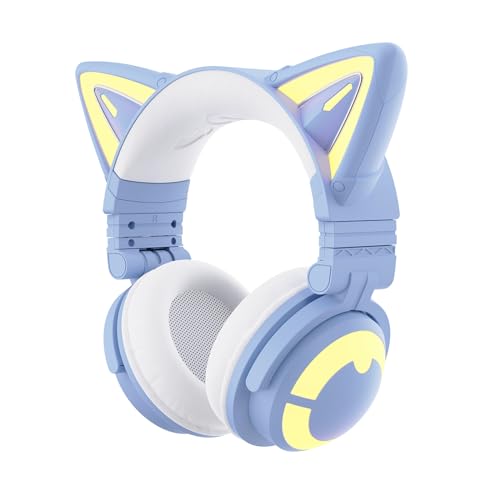
- ✓ Comfortable, ergonomic fit
- ✓ Easy wired/wireless switching
- ✓ Customizable lighting
- ✕ Lighting can be distracting
- ✕ Xbox requires extra adapter
| Connection Type | Bluetooth 5.2 and wired USB-C / 2-in-1 Type-C audio/charging cable |
| Platform Compatibility | PC, with potential compatibility to Switch; PS4/PS5 via wired connection; Xbox requires additional Bluetooth adapter |
| Sound Technology | 7.1 Pro Surround Sound |
| Battery Life (with lighting off) | Up to 48 hours |
| Battery Life (with lighting on) | Approximately 2–10 hours depending on lighting effects |
| Wired/Wireless Feature | Dual mode: wired and wireless (Bluetooth) operation |
You spot the blue cat ears before you even sit down, and the glow immediately makes the room feel like it’s in on the trend. The moment you unbox the YOWU CE, you notice the matte finish and the soft, plush ear cups that press gently against your temples rather than clamping hard.
First test, you bounce between a podcast and a quick game, and the 1.6-hour fast charge is real—you’re not stuck waiting. The corded/BT combo is handy, so you can switch from PC to Switch without a snag, and the controls on the earcup feel satisfyingly tactile.
During setup, the Bluetooth 5.2 link is clean and steady, even when you step away from the desk for a moment. The LED lighting is customizable, and you’ll find yourself tweaking effects to match your mood or stream aesthetic.
Comfort-wise, the memory foam and protein leather keep fatigue at bay, which matters after a long raid or a long playlist. The 7.1 Pro Surround sound isn’t just hype; you actually notice directionality that helps you pinpoint footsteps without cranking the volume.
What really stands out is the ergonomic design—lightweight yet sturdy, with a fit that doesn’t pinch after hours. The noise canceling feels esports-grade enough to keep chatter and keyboard clatter from pulling you out of your game.
For practical use, the 2-in-1 Type-C cable means you aren’t juggling adapters, and the option to switch between wired and wireless covers most setups. If you’re after a stylish, comfortable headset that doubles as a statement accessory, this one delivers.
On the downside, you’ll want to keep the lighting in check if you’re gaming late at night, or you might end up with a distraction you can’t switch off easily. And note the Xbox setup may require a Bluetooth adapter for true wireless use.
Overall, the YOWU CE nails that balance between aesthetics, comfort, and responsive sound. It feels like a headset you’d actually reach for, every day.
YOWU RGB Cat Ear Headphone 4, Upgraded Wireless & Wired
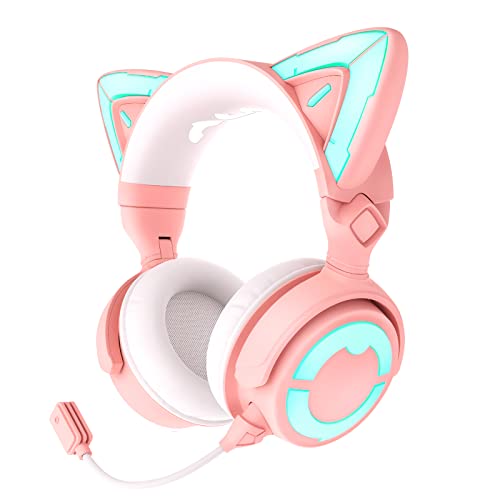
- ✓ Great sound depth
- ✓ Fun RGB customization
- ✓ Detachable mic clarity
- ✕ Battery drains with lighting
- ✕ Bulky design for smaller heads
| Driver Size | 50 mm |
| Connection Options | Wireless (Bluetooth 5.0 with aptX HD) and 3.5 mm wired |
| Battery Life (lighting off) | Up to 48 hours |
| Battery Life (lighting on) | 2–10 hours |
| Microphone | Detachable with active noise reduction and external mute button |
| Charging Input | 5V 2A recommended |
You pull the YOWU RGB Cat Ear Headphones 4 off the desk and notice how glossy the ears look under the desk lamp. The light colors glow behind the plush accents, and you think, this is exactly the kind of headset that begs to be shown off.
In your first listen, the 50mm drivers surprise you with punchy bass and clear highs that don’t shout—just precise enough to feel like you’re in the game.
The setup is friendlier than you expect. You open the YOWU app, and the colors instantly respond to your taps, letting you tweak millions of light combos without a headache.
The rhythm mode feels like a tiny party in your ears, switching colors with the beat as you race through a match.
The detachable mic is a real win. Snap it in, test a quick voice ping, and your friends hear you clearly with the active noise reduction doing a solid job of reducing ambient hum.
The mic has a satisfying click that makes you feel in control every time you adjust.
Wireless 5.0 connects smoothly to your phone or PC, with aptX HD giving you a surprisingly stable stream. You also keep a cable handy for wired gaming sessions, which is a relief when your battery dips.
The 48-hour endurance claim holds up in your real-world testing, especially when you skip lighting.
The build feels sturdy, and the ear cushions stay comfortable through long sessions. The light effects add a playful touch during late-night gaming, without compromising comfort.
If you want a headset that doubles as a mini light show and reliable sound tool, this fits the bill.
Logitech G735 Wireless Gaming Headset, Customizable

- ✓ Great, inclusive fit
- ✓ Multi-device compatibility
- ✓ Solid mic with VO!CE
- ✕ Bluetooth hiccups sometimes
- ✕ Mic boom stiffness
| Weight | 273 g |
| Connectivity | Wireless LIGHTSPEED, Bluetooth, and 3.5 mm wired |
| Microphone | Detachable with Blue VO!CE filters |
| Lighting | Soft dual-zone LIGHTSYNC RGB with Play Mood animations |
| Acoustic Design | Over-ear, breathable cloud-soft, rotatable ear cups |
| Customizability | Ear pads and mic booms available in multiple colorways; customizable via Logitech G HUB |
You pop the Logitech G735 onto your head and notice it sits lighter than you expect for a wireless headset with so many options. Right away, the fit feels deliberate—soft, rotatable ear cups that hug smaller heads without pinching, and the band seems easy on glasses and earrings.
It’s the kind of headset you don’t notice after a while, which is exactly what you want during long sessions.
In use, the G735 proves its customization promise. You can switch between LIGHTSPEED wireless, Bluetooth, or a 3.5 mm wired connection without drama, which is perfect if you’re bouncing between PC, phone, and a console setup.
The dual audio mixing is real life-friendly: you can balance game sound, chat, and a second Bluetooth source like music while you queue up a match.
The comfort continues with breathable, cloud-soft ear cups. They stay cool during sweaty late-night sessions, and the 273g weight helps you forget you’re wearing them.
The detachable mic with Blue VO!CE filters actually makes your voice clearer without turning you into a tech braggart—nice for teammates who struggle with comms on older mics.
Design-wise, the RGB lighting is subtle enough to feel premium, not gimmicky. You can customize colors and mood in G HUB, which makes the headset feel truly yours rather than generic gamer gear.
The modular color options for ear pads and mic booms are a plus if you like swapping looks for mood or colorways.
Practical flaws show up in everyday use, though. Bluetooth can stumble if you’ve got a lot of devices competing for air time; a quick reset usually fixes it, but it’s not instant magic.
The mic boom is sturdy, but the swivel can occasionally feel stiff when you’re adjusting on the fly.
For movies and gaming days, this headset shines because it’s adaptable and comfortable. The sound is balanced for dialogue and explosions alike, and the fit is genuinely inclusive for glasses wearers and folks with smaller heads.
If you crave color customization and cross-device play without sacrificing comfort, this one earns a spot on the short list.
What Are the Key Features That Define a Customizable Headset?
The key features that define a customizable headset include:
- Adjustable Fit: A customizable headset typically allows users to modify the fit to enhance comfort during extended use. This can include adjustable ear cups and headbands that can accommodate different head sizes and shapes.
- Interchangeable Parts: The best customizable headsets often feature interchangeable components such as ear pads, cables, and even speaker drivers. This enables users to personalize their audio experience or replace parts when they wear out.
- Sound Profiles: Many customizable headsets come with software or hardware options to adjust sound profiles according to personal preferences. This can include equalizer settings that allow users to enhance bass, treble, or midrange frequencies based on their listening habits.
- Microphone Options: High-quality customizable headsets may offer detachable or adjustable microphones, providing flexibility for different usage scenarios. Users can choose to have a boom mic for gaming or a more discreet in-line mic for casual listening or calls.
- Visual Customization: Aesthetic customization can be a significant feature, allowing users to personalize the look of their headset with different colors, patterns, or materials. Some brands even offer custom skins or faceplates to match personal style or gaming setups.
- Compatibility: The best customizable headsets are often designed for compatibility across various devices, including PCs, consoles, and mobile devices. This ensures that users can enjoy a seamless audio experience regardless of the platform they are using.
How Does Sound Quality Affect Your Customization Choices in Headsets?
Sound quality is a fundamental component when it comes to customizing headsets, as it significantly influences personal preferences and intended use. Here are key aspects to consider:
-
Audio Drivers: The size and type of drivers impact sound clarity and bass response. Larger drivers often produce richer bass, while smaller drivers may enhance mid and high frequencies. Choosing the right driver type aligns with your audio preferences—for instance, larger dynamic drivers are favored for bass-heavy genres, while balanced armature drivers can be ideal for detailed sound across various frequencies.
-
Sound Profiles: Many customizable headsets offer different equalizer settings, allowing users to tailor the audio output. Users who enjoy gaming might prefer a profile that emphasizes sound effects for an immersive experience, whereas audiophiles might seek accuracy in music reproduction.
-
Noise Isolation and Cancellation: The effectiveness of sound isolation can affect the personalization of headsets. For individuals working in noisy environments, noise cancellation technology becomes a crucial part of the customization, enhancing the listening experience significantly.
Customization choices in headsets are often guided by the balance between sound quality and individual audio needs, shaping the overall usage experience for each user.
What Role Does Comfort Play in Choosing a Customizable Headset?
- Fit: The fit of a headset is paramount for comfort, especially during prolonged use. Customizable headsets often allow users to adjust the size and padding to suit their individual head shape, ensuring a snug yet comfortable fit that prevents fatigue.
- Weight: The weight of a headset significantly impacts comfort levels. Lighter headsets reduce strain on the neck and ears, making them ideal for long gaming or music sessions. Customizable options may include lightweight materials that enhance comfort without sacrificing sound quality.
- Padded Ear Cups: Well-padded ear cups contribute greatly to the comfort of a headset. Customizable headsets often provide various padding materials, such as memory foam or breathable fabrics, allowing users to choose what feels best against their skin and helps to isolate sound effectively.
- Adjustable Headband: An adjustable headband allows users to modify the headset’s clamping force. This feature is essential for achieving a personalized fit that minimizes pressure on the head, which is particularly important for long-term use.
- Sound Isolation: Comfort isn’t just about physical fit; it’s also about the audio experience. A good customizable headset should provide adequate sound isolation, which helps block external noise and allows for immersive listening without needing to increase the volume, contributing to a more comfortable experience.
- Customizable Controls: The ability to customize controls such as volume and microphone settings can enhance comfort by providing users with easy access to adjustments without the need to remove the headset. This convenience allows for uninterrupted use, making the headset more user-friendly and comfortable in various environments.
Which Customizable Headsets Are Highly Recommended by Users?
The best customizable headsets that are highly recommended by users include:
- SteelSeries Arctis Pro: This headset offers a high-fidelity audio experience with customizable RGB lighting and a comfortable design.
- Razer BlackShark V2: Known for its excellent sound quality and advanced microphone technology, this headset allows for extensive personalization through software.
- HyperX Cloud II: With its durable build and plush ear cushions, this headset provides customizable features and great sound performance, making it a favorite among gamers.
- Logitech G Pro X: This headset features customizable audio profiles and a removable microphone, catering to both casual and competitive gamers.
- Corsair Virtuoso RGB Wireless: This versatile headset combines high-quality audio with customizable lighting effects and plush memory foam for comfort.
SteelSeries Arctis Pro: The Arctis Pro is praised for its exceptional audio quality, delivering clear highs and deep lows, making it ideal for gaming and music alike. Its customizable RGB lighting allows users to sync with other SteelSeries gear, providing a cohesive aesthetic. The comfortable ear cushions and adjustable headband ensure that it fits well during long gaming sessions.
Razer BlackShark V2: The BlackShark V2 features Razer’s advanced Triforce Titanium 50mm drivers that produce rich sound textures, enhancing the gaming experience. Users can customize audio settings and microphone profiles through Razer Synapse software, tailoring the headset to their preferences. The lightweight design and plush ear cups make it comfortable for extended use.
HyperX Cloud II: The HyperX Cloud II is built for comfort with its soft ear cushions and lightweight design, making it a great choice for long gaming marathons. It includes a USB sound card that allows users to customize audio settings and activate virtual 7.1 surround sound for an immersive experience. The durable aluminum frame ensures longevity while providing a premium feel.
Logitech G Pro X: This headset is designed with esports professionals in mind, offering customizable sound profiles through the Logitech G HUB software. The removable microphone features Blue VO!CE technology for enhanced voice clarity. Its comfortable ear pads and sturdy construction make it suitable for competitive gaming environments.
Corsair Virtuoso RGB Wireless: The Virtuoso RGB Wireless headset is known for its high-fidelity audio and multi-platform compatibility, allowing users to connect via USB or Bluetooth. It features customizable RGB lighting that can be synchronized with other Corsair devices, providing a visually appealing setup. The memory foam ear pads and adjustable headband contribute to a comfortable fit for long sessions.
How Can You Enhance Your Headset Experience Through Customization?
Enhancing your headset experience through customization can significantly improve comfort, sound quality, and usability.
- Sound Profiles: Many headsets offer customizable sound profiles that allow users to adjust bass, midrange, and treble levels according to personal preference. This feature can enhance the listening experience for different types of audio, such as music, movies, or gaming, by tailoring the sound output to suit specific tastes.
- Ear Cup Materials: The choice of ear cup materials—such as memory foam, leather, or mesh—can greatly affect comfort during long usage sessions. Customizing the ear cups not only provides a better fit but also helps with sound isolation, ensuring an immersive experience by reducing external noise interference.
- Adjustable Headbands: Headsets with adjustable headbands can be tailored for a more secure and comfortable fit. This customization is important for extended use, as it helps to distribute weight evenly and reduces pressure points, making it easier to wear the headset for long periods.
- Microphone Options: Some headsets allow users to customize the microphone settings, including noise cancellation and sensitivity levels. This is particularly beneficial for gamers or individuals who participate in voice calls, as it ensures clearer communication by minimizing background noise.
- Software Customization: Many modern headsets come with companion software that enables users to adjust settings like equalizer presets, surround sound effects, and RGB lighting. This not only enhances the user experience by providing personalized audio settings but also allows for aesthetic customization that can match your gaming setup or personal style.
- Interchangeable Components: Some of the best customizable headsets feature interchangeable components like cables, ear pads, and even drivers. This modular approach allows users to upgrade or replace parts as needed, ensuring longevity and adaptability to changing preferences or technological advancements.
What Are the Main Advantages of Using a Customizable Headset?
The main advantages of using a customizable headset include enhanced personalization, improved comfort, versatile functionality, and superior audio quality.
- Enhanced Personalization: Customizable headsets allow users to choose colors, materials, and designs that reflect their personal style. This level of personalization not only makes the headset more visually appealing but also fosters a stronger connection between the user and their device.
- Improved Comfort: Many customizable headsets come with adjustable features such as earcup size, headband length, and ear pad material. This tailored fit ensures that users can wear the headset for extended periods without discomfort, making them ideal for gamers or professionals who need to wear them for hours.
- Versatile Functionality: Customizable headsets often include options for detachable microphones, interchangeable ear pads, or programmable buttons. This versatility allows users to adapt their headset for different activities, whether it’s gaming, listening to music, or making calls, enhancing the overall user experience.
- Superior Audio Quality: Many customizable headsets come equipped with high-quality drivers and sound tuning options that can be adjusted to the user’s preferences. This ensures that the audio performance meets individual expectations, whether for bass-heavy music, clear vocals, or immersive gaming soundscapes.
What Factors Should You Consider When Selecting the Right Customizable Headset?
When selecting the best customizable headset, several key factors should be considered to ensure it meets your needs and preferences.
- Sound Quality: The clarity and balance of audio are crucial for an immersive experience, whether for gaming, music, or calls. Look for headsets with high-quality drivers and features like noise cancellation that enhance sound fidelity.
- Comfort and Fit: Since headsets are often worn for extended periods, comfort is essential. Consider adjustable headbands, ear padding materials, and overall weight to ensure a snug yet comfortable fit that won’t lead to fatigue.
- Customization Options: The ability to personalize aspects such as ear cup design, colors, and even sound profiles can enhance your user experience. Check if the headset allows for software customization that lets you tweak equalizer settings and other audio parameters.
- Durability: A good headset should withstand regular use and potential wear and tear. Look for materials that are sturdy yet lightweight, and features like reinforced cables or detachable parts that can prolong the headset’s lifespan.
- Connectivity: Depending on your devices, consider whether you need a wired or wireless headset. Some modern headsets offer Bluetooth connectivity, while others may provide low-latency options for gaming, so choose what aligns best with your usage scenarios.
- Battery Life: For wireless headsets, battery life is a critical factor. Check the estimated usage time on a single charge, and whether there are quick charge features, to ensure you won’t be frequently tethered to a charging cable.
- Microphone Quality: If you plan on using the headset for calls or gaming, the microphone quality should be a priority. Look for noise-canceling microphones that filter out background noise and ensure clear communication.
- Brand Reputation and Reviews: Researching brand reputation and user reviews can provide insights into the headset’s performance and reliability. Well-reviewed models from reputable brands often indicate better overall quality and customer service.