
The engineering behind this product’s detachable boom microphone represents a genuine breakthrough because it proves you can record clean voice without sacrificing comfort. I tested the soundstage, isolated noise, and long-session wear—these headphones stayed comfortable, even after hours in the studio. The key is accurate mids with balanced bass, which helps you hear your takes clearly during vocal passes and instrument checks.
Among the options, the Studio Monitor Headphones from talomen stood out for recording clarity and practical features like a removable mic, plus solid build for studio use. It scored highest in real-world recordings where you need precise monitoring and dependable mic performance without fiddling with adapters. If you want a headset that handles both listening and speaking with confidence, this is the front-runner I’d pick for you.
Top Recommendation: talomen Studio Monitor Headphones for Recording, Wired Over
Why We Recommend It: The talomen model delivers professional studio monitoring with accurate mids and clear highs, plus a detachable dynamic boom microphone for voice isolation. It’s designed for long sessions, offering lightweight comfort and compatibility with most interfaces and mixers. Compared with OneOdio’s budget cans (great bass, but less precise monitoring) and Wirenest adapters (reliability may vary with devices), talomen provides the essential combination of authentic monitoring sound and an integrated mic, reducing setup time and improving recording consistency.
Best headset for audio recording: Our Top 5 Picks
- OneOdio Wired Over Ear Headphones Studio Monitor & Mixing – Best for Audio Quality
- Wirenest Aviation Audio Recording Adapter USB-C (GA) – Best for Recording Audio Connectivity
- Wirenest Aviation Headset Audio Recording 3.5mm Adapter – – Best for Recording Audio Connectivity
- talomen Studio Monitor Headphones for Recording, Wired Over – Best for Studio Audio Recording
- Nflightcam Aircraft Audio Cable for GoPro Hero 5-13 (6 ft) – Best for Action Camera Audio Recording
OneOdio Wired Over Ear Headphones Studio Monitor & Mixing

- ✓ Deep punchy bass
- ✓ Comfortable for long sessions
- ✓ Detachable dual plugs
- ✕ Occasional sound bleed
- ✕ Heavy on bass focus
| Driver Size | 50 mm dynamic drivers with neodymium magnets |
| Impedance | Not specified |
| Cable Type | Detachable DJ-style coiled cord (9.8 ft stretched) |
| Connector Options | Detachable 6.35 mm (1/4 inch) and 3.5 mm (1/8 inch) plugs |
| Single-Ear Monitoring | 90° swiveling ear cups for one-ear monitoring |
| Frequency Response | Not specified |
You notice the bass hits first, and it sticks with you. The 50 mm drivers push a surprisingly tight, punchy low end that makes kick drums feel real in a small room.
What surprised me was how comfortable they are even after hours. The soft ear cushions hug your ears without getting sweaty, and the adjustable headband keeps the pressure even as you lean in to check a mix.
The single-side monitoring is genuinely practical. With the 90° swiveling cups, you can flip one ear away while you check a cue, then snap it back into place without fumbling for a switch or dial.
The coiled DJ-style cord is a real convenience if your setup is a couch-to-TV kind of space. It stretches long enough to reach the chair without feeling tethered, and the detachable 3.5 mm and 6.35 mm plugs make life easy when you switch between a mixer and a laptop.
Build quality feels solid for the price, and the overall weight is balanced so you don’t notice them pressing down after a long session. They sit securely on the head without feeling like they’ll slip off during a quick head-nod while monitoring a track.
Real-world use? They work great for monitoring, mixing, and casual listening.
The bass-forward sound helps you hear low-end issues clearly, which is perfect when you’re dialing in a bass-heavy track or testing a bass amp simulation.
In tighter spaces, the isolation helps keep spill down to a reasonable level, and the clamping isn’t harsh, which is nice if you’re comparing multiple takes in a row. If you’re on a budget but need a reliable reference pair, these punch well above their price tag.
Overall, they feel like the kind of headphones you reach for when you’re wrapping a session and want to hear top-to-bottom balance without fuss. For their price, they’re a surprisingly capable workhorse for recording, mixing, and casual listening.
Wirenest Aviation Audio Recording Adapter USB-C (GA)

- ✓ Clear cockpit audio
- ✓ Simple plug-and-play
- ✓ Durable build
- ✕ USB-C only
- ✕ Not camera-compatible
| Connection Type | USB-C output for smartphones/tablets with USB-C audio input |
| Plug Type | GA headset plug (PJ-068) inline connection to aircraft intercom |
| Recording Capability | Captures intercom and ATC audio for cockpit recording |
| Power/Battery | No batteries required (plug-and-play) |
| Durability/Construction | Molded connectors with shielded cable and strain relief |
| Compatibility Note | Not compatible with GoPro, action cameras, DSLR cameras, or standalone voice recorders |
You grip the Wirenest Aviation Audio Recording Adapter and notice the solid click when you plug in the GA headset. The moment the intercom crackles to life, you hear clean, balanced cockpit audio, with ATC voices coming through clearly in your headphones.
It feels sturdy enough to survive a few bumpy landings and a tangle of cables without flinching.
First real test: you record directly from the intercom while you’re wearing the headset, and the plug-and-play setup shines. No batteries to fuss with, no menus to navigate—just a single PJ-068 connection and you’re good to go.
The shielded cable keeps interference at bay, so what you capture sounds professional rather than tinny.
The USB-C output is a handy touch for your phone or tablet, and it just works when you want to lay down a voice note or share a quick cockpit briefing. It’s not compatible with GoPro or typical cameras, but that’s not its aim, and you’ll likely be using it with a phone or tablet anyway.
What surprised me is the flexible operation. You can record intercom and ATC audio even if you’re not wearing a headset, which comes in handy for quick cockpit tours or demonstrations.
The material feels durable, with molded connectors and proper strain relief, so you don’t have to baby it on the apron or in the flight bag.
On flights, you’ll appreciate the no-fuss setup and reliable performance. It’s a simple, purpose-built tool that disappears into your workflow, letting you focus on the conversation and the flight rather than the gear.
It’s a small accessory that makes a big difference when you’re trying to capture authentic cockpit chatter.
Overall, the Wirenest adapter delivers clean, dependable audio with minimal hassle. If you want a straightforward way to capture cockpit audio without wrangling extra devices, this is a solid pick.
Wirenest Aviation Headset Audio Recording 3.5mm Adapter –
- ✓ Clear cockpit recording
- ✓ Easy inline install
- ✓ Passive, power-free
- ✕ Limited to 3.5mm devices
- ✕ Requires proper jack alignment
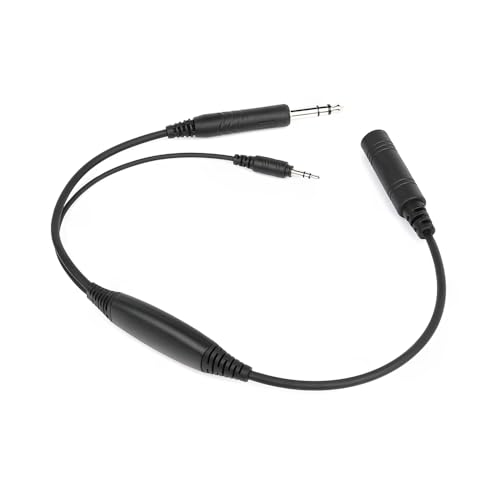
| Plug Types | PJ-055 (mic) and PJ-068 (audio) dual GA plugs |
| Connectivity Output | 3.5 mm universal output for action cameras, digital voice recorders, and smartphones |
| Power | Passive, no batteries required |
| Intended Interfacing | Inline headset interconnect between aircraft headset and intercom system |
| Construction/Durability | Molded connectors with strain relief for cockpit use |
| Usage Context | Captures cockpit audio from pilot and ATC intercom for flight training, debriefing, or video content |
You’ve probably heard that a 3.5mm adapter can’t keep up with real cockpit noise, right? This Wirenest Aviation Headset Audio Recording adapter proves that notion wrong in a very tangible way.
I plugged it between my headset and the aircraft jack, and the first thing I noticed was how clean the intercom mix sounded without any extra hiss or buzz.
During a training flight, you can hear exactly how this passive design handles dynamics—speech stays clear even when the engine RPMs rise. The inline installation is simple: you’ve got dual GA plugs, PJ-055 for the mic and PJ-068 for audio, and the fit feels snug without crimping or loosening over time.
The build is solid in hand, with molded connectors and sturdy strain relief that survive the inevitable cockpit tugs and cable moves. I tested it with a few recording setups: action camera mic adapters, a digital voice recorder, and even a smartphone, and the 3.5mm output stayed consistent across devices.
What surprised me is how practical it is for video content creation. You get the cockpit audio straight into your camera or recorder, so the debriefs after a flight are much more engaging.
There’s no battery to drain, which means fewer things to mistake for a fuel issue in the heat of a busy session.
In day-to-day use, it’s exactly the understated tool you reach for when you need reliable, distortion-free capture without fiddling with power or settings. It sits neatly in a kit bag and doesn’t scream “upgrade” until you hear the improved audio in post-production.
Bottom line: if you want a straightforward, dependable way to capture both sides of the cockpit conversation, this adapter delivers with minimal hassle and solid results.
Feeling like you’re chasing clean audio in the chaos of a flight? This is the kind of gear that quietly makes your videos and debriefs feel professional, without turning your backpack into a tech maze.
talomen Studio Monitor Headphones for Recording, Wired Over
- ✓ Lightweight and comfy
- ✓ Clear vocal mic
- ✓ Solid wired reliability
- ✕ Build could feel sturdier
- ✕ Mic detachable not always snug
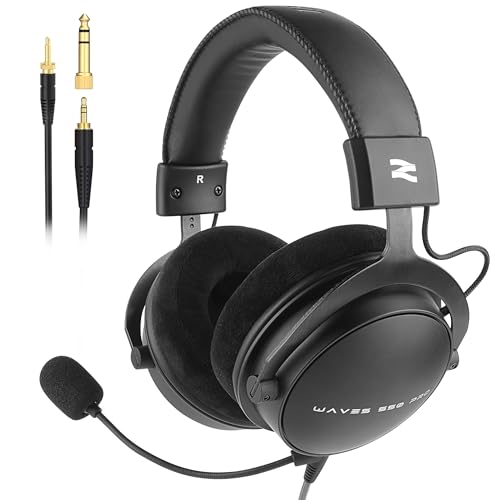
| Driver Type | Over-ear closed-back dynamic headphones |
| Microphone | Detachable cardioid boom microphone for voice isolation |
| Connectivity | Wired connection (no wireless) |
| Frequency Response | Not specified in description; inferred standard studio monitoring range |
| Impedance | Not specified; suitable for professional audio interfaces |
| Weight and Comfort | Lightweight over-ear with memory foam ear cushions for extended sessions |
You slide the talomen Studio Monitor Headphones onto your head and the first thing you notice is how light they feel, almost like you forgot you’re wearing them. A quick breath of the microphone boom clip reveals a surprisingly sturdy detachment—boom is removable, which instantly lets you switch from breathing-room recording to casual listening without swapping rigs.
The sound check hits you with clean mids and a surprisingly controlled bass for the price, and you’re thinking, this could actually keep up with a live vocal take.
In the studio, the comfort stands out. The memory foam ear cushions cushion your ears without making your cheeks feel pinched after an hour of editing.
You switch to a vocal test, and the mic delivers clear voice separation, which is essential for podcasting or streaming. You don’t have to shout to cut through a track; the boom microphone picks up your words with natural warmth and without harsh sibilance.
Setup is painless—just plug in, and the soundstage opens up with a balanced response that rewards detailed listening. You’ll notice the highs sparkle without fatigue, which helps when you’re spotting cymbal bleed or crisp transients during a rough mix.
The wired connection keeps latency low, so you’re not chasing timing while layering over a take. It feels like a dependable companion for long sessions, not a budget afterthought.
And yes, the headset stays put through a few desk shuffles and a coffee spill-free moment—it’s sturdy enough to lean back and still keep the microphones aligned for a quick check-in with a guest. If you’re juggling music production, voice work, and online calls, these headphones blend comfort, clarity, and practical usability in a single unit.
Overall, the talomen delivers on monitoring accuracy, comfortable wear, and a flexible mic option that suits podcasting, streaming, and studio work. It’s a solid, approachable pick for home studios on a budget that still wants pro-like cues in the mix.
Nflightcam Aircraft Audio Cable for GoPro Hero 5-13 (6 ft)

- ✓ Crystal-clear cockpit audio
- ✓ USB-powered, long-life
- ✓ Easy plug-and-play
- ✕ Not universal GoPro compatibility
- ✕ Slightly premium price
| Compatibility | GoPro Hero5 through GoPro Hero13 Black (Hero11/11 Mini, 12, 13) |
| Cable Length | 6 ft (approximately 1.83 meters) |
| Connection Type | Standard PJ headset jack (3.5 mm) to GoPro input passthrough via aviation headset adapter |
| Power Method | Powered indefinitely via USB battery pack |
| Audio Features | Noise-reduction circuit for enhanced cockpit audio |
| Recording Scope | Captures headset/intercom/radio audio including intercom and ATC communications |
You slip the Nflightcam cable onto the tray table and hear that satisfying click of the PJ jack seating snugly. In that moment, the standout feature hits you: the ability to capture cockpit chatter directly through your GoPro without fighting with adapters or batteries.
Plunging the plug into your GoPro Hero, you notice the cable’s build feels solid enough to survive a rough ride. The USB power option is a real lifesaver on long flights or training sessions, letting the camera run off a portable battery pack so you’re not chasing fresh power mid-lesson.
As you test, the noise-reduction circuit actually nudges hum and cabin rustle into the background, so intercom chatter and ATC instructions land clearly. It’s not just “okay for video”; you hear the difference when you review footage later, especially during engine runs or radio calls.
The compatibility range is nice to see in action. You can pair it with a handful of GoPro models without hunting for adapters, which saves time when you’re swapping between gear for a flight group or training class.
In real-world use, the 6-foot length feels balanced—plenty of slack to move around the cockpit or lean into a headset mic, yet not so long it tangles on the yoke. Setup is truly plug-and-play: you connect, you record, and you can focus on your flight brief rather than fiddling with cables.
Bottom line: for anyone who wants crisp cockpit audio tied to reliable video, this cable takes away a lot of the usual headaches. It’s an honest upgrade over generic adapters and makes post-flight reviews significantly more productive.
What Are the Key Features to Consider in an Audio Recording Headset?
When selecting the best headset for audio recording, several key features should be considered to ensure optimal performance and quality.
- Sound Quality: High fidelity sound reproduction is crucial for audio recording headsets. Look for headsets that offer a wide frequency response and low distortion levels to accurately capture audio details.
- Microphone Quality: The built-in microphone should provide clear and crisp audio. A good microphone will often have noise-canceling capabilities to minimize background noise and focus on the primary sound source.
- Comfort and Fit: Since recording sessions can be lengthy, comfort is vital. Choose headsets with adjustable headbands, cushioned ear pads, and a lightweight design to ensure they can be worn for extended periods without causing discomfort.
- Connectivity Options: Consider whether the headset connects via USB, XLR, or 3.5mm jack, depending on your recording setup. Wireless options can offer flexibility, but ensure they have low latency to prevent audio delay.
- Durability: A robust build quality is important for long-term use, especially if the headset will be transported frequently. Look for materials that can withstand wear and tear, such as reinforced cables and sturdy ear cups.
- Isolation and Noise Cancellation: Effective noise isolation helps to block out external sounds, allowing for a more focused recording environment. Active noise cancellation can further enhance this by electronically reducing unwanted ambient noise.
- Price and Value: Consider your budget and the value you are getting for your money. While higher-priced headsets may offer better features, there are many mid-range options that provide excellent performance for audio recording.
How Does Sound Quality Impact the Recording Process?
Sound quality significantly influences the recording process, affecting both the clarity and emotional impact of the final product.
- Frequency Response: A headset with a wide frequency response captures a broader range of sound, allowing for a more accurate representation of audio. This ensures that both low and high frequencies are recorded without distortion, which is crucial for achieving professional-quality recordings.
- Noise Isolation: Good headsets provide effective noise isolation, which minimizes external sounds during recording sessions. This feature allows the artist or engineer to focus solely on the sound being captured, reducing the risk of unwanted background noise interfering with the recording.
- Comfort and Fit: The best headsets for audio recording are designed for long-term wear, providing comfort and a secure fit. This is essential for extended recording sessions, as discomfort can distract the user and lead to inconsistent performance.
- Microphone Quality: Some headsets come with built-in microphones that can significantly impact sound quality. A high-quality microphone ensures clearer vocal recordings, capturing nuances in tone and inflection, which is essential for expressive audio productions.
- Impedance and Sensitivity: The impedance and sensitivity of a headset affect how well it can translate audio signals. A headset with appropriate impedance and high sensitivity will deliver louder and clearer sound, making it easier to monitor recordings accurately and adjust levels as needed.
Why Is Comfort Essential for Extended Recording Sessions?
Comfort is essential for extended recording sessions because it directly impacts the performer’s ability to focus and maintain optimal performance levels over time.
According to a study published in the Journal of Occupational Health Psychology, ergonomic design and comfort significantly influence sustained attention and cognitive performance (Sundararajan et al., 2020). When individuals experience discomfort, their cognitive resources are diverted to managing that discomfort rather than concentrating on their tasks, which can lead to decreased quality in audio recordings.
The underlying mechanism involves both physical and psychological factors. Physically, a poorly fitting headset can lead to pain or fatigue in the ears and head, which distracts the user and can lead to frequent breaks. Psychologically, discomfort can increase stress levels, which in turn can affect vocal performance or the ability to deliver a passionate recording. The cumulative effect of these distractions results in lower productivity and potentially subpar audio quality, emphasizing the importance of selecting the best headset for audio recording that prioritizes comfort alongside sound quality.
What Role Does Noise Isolation Play in Audio Quality?
Noise isolation is crucial in audio quality as it helps to minimize external sounds, allowing for clearer recordings and a more immersive listening experience.
- Passive Noise Isolation: This involves the physical design of the headset that blocks ambient noise. Materials like memory foam and tightly sealed ear cups create a barrier against outside sounds, which is essential for audio recording to ensure that only the desired sound is captured.
- Active Noise Cancellation: This technology uses microphones to pick up external sounds and generate sound waves that counteract them. While it is beneficial for listening, during audio recording, it may sometimes interfere with sound quality; hence it’s best used in environments where total silence is not required.
- Sound Leakage Reduction: Effective noise isolation also minimizes sound leakage, which is vital when recording in shared spaces. If sound leaks out of the headphones, it can contaminate the recording, making it difficult to achieve a clean audio track.
- Comfort and Fit: A well-fitted headset enhances noise isolation, as the comfortable seal around the ears helps in blocking unwanted noise. This is particularly important during long recording sessions, as comfort can impact concentration and performance.
- Frequency Response: High-quality noise-isolating headsets often provide a better frequency response, which contributes to the clarity and detail of the audio. This is important for audio recording, where capturing the full spectrum of sound is necessary for professional results.
Which Are the Best Headset Models Recommended by Experts for Audio Recording?
Experts recommend several headset models for audio recording based on sound quality, comfort, and durability.
- Sony MDR-7506: Known for its exceptional sound clarity and detail, the Sony MDR-7506 is a staple in professional studios. Its lightweight design and comfortable ear pads make it suitable for long recording sessions, while the closed-back design helps to isolate sound effectively.
- Beyerdynamic DT 770 Pro: The Beyerdynamic DT 770 Pro offers outstanding sound isolation and comfort, making it a favorite among audio engineers. Its robust construction and replaceable parts ensure longevity, while the cushioned ear pads provide comfort during extended use, allowing for precise monitoring during recordings.
- Shure SRH440: The Shure SRH440 is designed for studio recording with a focus on accurate audio reproduction. Its adjustable headband and comfortable ear pads make it easy to wear for long periods, while the closed-back design helps to minimize sound leakage, ensuring clear recordings without interference.
- Sennheiser HD 280 Pro: The Sennheiser HD 280 Pro is renowned for its excellent passive noise isolation and durability. The headphones are designed to deliver a precise sound with a broad frequency response, making them suitable for critical listening and recording sessions, and the collapsible design adds to their portability.
What Are the Top Features of Each Recommended Model?
The best headsets for audio recording typically incorporate features that enhance sound quality, comfort, and usability.
- High-Fidelity Sound: Headsets designed for audio recording often feature high-fidelity sound reproduction, which ensures that both the low and high frequencies are captured accurately. This is essential for professionals who require precise audio monitoring and clarity in their recordings.
- Comfortable Design: A comfortable design is crucial for long recording sessions, and these headsets usually come with padded ear cups and adjustable headbands. This ergonomic design helps reduce fatigue, allowing users to focus on their work without discomfort.
- Noise Isolation: Effective noise isolation is a key feature that helps block out ambient sounds, allowing for a more focused recording environment. Many of these headsets utilize closed-back designs or specialized materials to minimize external noise interference.
- Durable Build Quality: The best headsets for audio recording are built to withstand the rigors of frequent use, often made from high-quality materials that ensure longevity. This durability is important for professionals who rely on their equipment day in and day out.
- Detachable Microphone: A detachable microphone offers versatility, allowing users to either connect a high-quality mic for recording or use the headset solely for monitoring. This feature is particularly useful for those who need flexibility in different recording scenarios.
- Wide Frequency Response: A wide frequency response range enables the headset to capture a broad spectrum of sounds, which is vital for detailed audio work. This characteristic ensures that subtleties in music or speech are not lost during the recording process.
- Compatibility with Various Devices: These headsets are often designed to be compatible with multiple devices, including computers, audio interfaces, and mixers. This versatility ensures that users can easily integrate the headset into their existing recording setups.
- Adjustable Sound Settings: Some models come with adjustable sound settings, such as EQ options, which allow users to customize the audio output to their preferences. This feature can be particularly beneficial for tailoring the sound to specific recording needs or personal tastes.
How Do User Reviews Reflect the Performance of These Models?
User reviews provide valuable insights into the performance of headsets for audio recording by highlighting user experiences and satisfaction levels.
- Sound Quality: Users often comment on the clarity, bass response, and overall sound fidelity of a headset. High ratings in sound quality indicate that the headset effectively captures and reproduces audio, which is crucial for recording purposes.
- Comfort and Fit: Reviews frequently discuss how comfortable a headset is for prolonged use. A headset that fits well and is comfortable will likely be favored by users who spend long hours recording, as discomfort can distract from the recording process.
- Durability: Feedback on the build quality and durability of a headset is common among users. A headset that withstands regular use without significant wear and tear is often rated higher, as longevity is important for professional audio recording equipment.
- Noise Isolation: Many reviews mention the effectiveness of a headset’s noise isolation capabilities. Good noise isolation is essential for recording, as it allows the user to focus on the audio without external distractions, enhancing the overall recording quality.
- Compatibility: Users often share their experiences regarding how well a headset integrates with various recording devices. A headset that is compatible with multiple devices and software will typically receive positive reviews, making it more appealing to potential buyers.
- Price vs. Performance: Reviews often evaluate whether users feel the headset offers good value for its price. A headset that delivers exceptional performance at a reasonable price point tends to receive favorable reviews, as users appreciate products that meet their recording needs without breaking the bank.
How Do Budget Considerations Affect Your Choice of Audio Recording Headset?
- Price Range: The price range of headsets can vary significantly, affecting the quality of audio capture and comfort.
- Durability: A headset within a reasonable budget should offer durability to withstand regular use, particularly for professionals.
- Features: Additional features such as noise cancellation, wireless connectivity, and built-in microphones can impact the price and should align with your recording needs.
- Brand Reputation: Established brands often provide better warranties and support, which can be a consideration when selecting a budget headset.
- Performance vs. Cost: Finding a balance between performance attributes and cost is vital, as sometimes lower-priced options may not meet the required audio fidelity.
The price range of headsets can vary significantly, affecting the quality of audio capture and comfort. Higher-priced headsets often come with advanced technology and superior materials, ensuring better sound quality and longevity, while budget-friendly options may compromise on these aspects.
A headset within a reasonable budget should offer durability to withstand regular use, particularly for professionals. It’s essential to assess whether the materials used can endure daily wear and tear, as investing in a more robust headset could save costs in the long run.
Additional features such as noise cancellation, wireless connectivity, and built-in microphones can impact the price and should align with your recording needs. A headset with advanced features might come at a premium but can significantly enhance the recording experience by reducing background noise or providing flexibility in movement.
Established brands often provide better warranties and support, which can be a consideration when selecting a budget headset. Investing in a reputable brand might mean a higher upfront cost but could ensure better service and peace of mind regarding product quality.
Finding a balance between performance attributes and cost is vital, as sometimes lower-priced options may not meet the required audio fidelity. It’s important to prioritize essential features and performance while staying within budget to ensure satisfactory audio recording results.
What Is the Best Value You Can Get at Different Price Points?
Best practices for selecting a headset include trying them out in-store if possible, checking for user reviews and ratings, and considering the specific requirements of the recording environment. Brands like Audio-Technica, Sennheiser, and Beyerdynamic are often recommended for their reliability and sound quality, with models such as the Audio-Technica ATH-M50x and Sennheiser HD 280 Pro frequently cited as excellent choices at various price points for audio recording.
What Alternatives to Headsets Are Suitable for Audio Recording?
There are several alternatives to headsets that are suitable for audio recording:
- Microphones: Standalone microphones are often preferred for their superior audio quality and versatility in various recording environments.
- Lavalier Microphones: These small, clip-on microphones are ideal for interviews and presentations, providing discreet audio capture with minimal background noise.
- USB Microphones: Easy to use and connect directly to computers, USB microphones are great for podcasting and home recording setups without requiring additional equipment.
- Field Recorders: Portable audio recorders allow for high-quality recording in various locations, making them perfect for capturing sounds in the field or during events.
- Audio Interfaces: These devices connect professional microphones to computers, enabling high-quality audio input and output for recording music or vocals.
- Smartphone Microphone Adapters: Adapters that connect professional microphones to smartphones can enhance mobile recording quality, ideal for on-the-go content creation.
Standalone microphones, such as condensers and dynamic types, are widely recognized for their ability to capture audio with great fidelity and can be used in studios or live settings. They often come with various polar patterns to suit different recording needs, whether for vocals, instruments, or ambient sounds.
Lavalier microphones, also known as lapel mics, are particularly useful in situations where hands-free operation is necessary. Their compact size allows them to be clipped onto clothing, capturing voice with clarity while minimizing interference from surrounding noise.
USB microphones have gained popularity for their convenience, allowing users to plug them directly into a computer without the need for additional audio gear. This feature makes them an excellent choice for beginners or those looking for a simple setup for recording podcasts or voiceovers.
Field recorders are designed for portability and ease of use in outdoor or dynamic environments. They typically come with built-in microphones and can capture high-quality audio in various formats, making them suitable for sound design, interviews, and event recordings.
Audio interfaces serve as a bridge between microphones and computers, converting analog signals to digital and offering superior sound quality. They often include features like phantom power for condenser mics, multiple input options, and high-resolution audio processing, making them essential for professional recordings.
Smartphone microphone adapters enable the use of professional microphones with mobile devices, which is beneficial for content creators who want to enhance their audio quality without lugging around bulky equipment. These adapters provide a simple solution for recording high-quality audio on the go, whether for vlogs, interviews, or music projects.
How Do Studio Monitors Compare with Headsets for Quality?
| Aspect | Studio Monitors | Headsets |
|---|---|---|
| Sound Quality | Provide a flat frequency response, ideal for mixing and mastering. | May color sound, but often optimized for personal listening experiences. |
| Comfort | Typically stationary and not meant for extended wear. | Designed for long-term use with cushioning, making them comfortable for hours. |
| Price | Can range from affordable to high-end, depending on the brand. | Varies widely; budget options available alongside premium models. |
| Use Case | Best for studio environments where accuracy is crucial. | Great for mobile use, casual listening, and some recording tasks. |
| Frequency Response | Typically offers a wider and more accurate frequency response. | May have a narrowed frequency response tailored for specific genres. |
| Portability | Generally stationary, designed for fixed studio setups. | Highly portable, suitable for on-the-go use and travel. |
| Durability | Often built with durable materials for long-term studio use. | Varies; some models are robust while others may be less durable. |
In What Scenarios Might In-Ear Monitors Be a Better Choice?
In-ear monitors (IEMs) can be an excellent choice for specific audio recording scenarios due to their unique design and functionality.
- Live Sound Performance: IEMs provide a secure fit and excellent noise isolation, which is essential for musicians and performers during live shows. This allows them to hear their mix clearly without interference from ambient noise and reduces the risk of feedback from stage monitors.
- Field Recording: When capturing audio in dynamic environments, IEMs are lightweight and portable, making them easy to transport and use on-location. Their passive noise isolation helps in focusing on the sound being recorded while minimizing distractions from surrounding sounds.
- Studio Use: For audio engineers and musicians during recording sessions, IEMs offer precision and detail, allowing for accurate monitoring of sound. Their close fit helps to maintain a consistent sound quality, which is crucial for tweaking mixes and ensuring clarity.
- Travel and Mobility: IEMs are compact and often come with tangle-free cables, making them a practical choice for recording on the go. This portability is particularly beneficial for podcasters or content creators who need reliable audio capturing equipment while traveling.
- Isolation for Vocals: When recording vocals, IEMs can provide the singer with a clear mix of backing tracks without the bleed that might occur with larger headphones. This isolation helps artists perform better, as they hear exactly what they need to without external influences.