
The first thing that struck me about this Lenovo Dual Mode Wireless ANC Headset 6550 USB-C Receiver wasn’t its long battery life, but how quietly it vanished into a busy day. With Hybrid ANC cutting both office chatter and cafe clatter, you actually hear your own voice clearly in meetings. I tested its two-way switching, and the USB-C receiver plus Bluetooth kept calls stable even when I wandered a bit from my desk. If you need all‑day comfort and quick charging, this one stays light on your head and heavy on reliability.
Every hybrid session—from back-to-back Teams chats to quiet focus moments—felt effortless. The built‑in Teams controls and dual‑mode connectivity made multitasking simple, without fiddling with adapters. For the price, you get solid build quality, comfortable fit, and dependable performance across devices. Trust me, it’s ready for real work days.
Top Recommendation: Lenovo Dual Mode Wireless ANC Headset 6550 USB-C Receiver
Why We Recommend It: Provides hybrid ANC for background noise suppression, Microsoft Teams certification with dedicated call controls, and dual-mode connectivity (Bluetooth plus USB-C receiver) for seamless desk-to-mobile transitions. Fleet-stable performance with up to 60 hours playback (ANC off) or 36 hours (ANC on), plus quick 5‑minute charge for 2 hours—all in a comfortable, work-focused design. This combination offers the strongest value and consistency across typical hybrid work scenarios compared with Yealink options (which trade range and cost) and other Yealink models (which vary by mic/earpad comfort).
Best headset for hybrid work: Our Top 4 Picks
- Lenovo Dual Mode Wireless ANC Headset 6550 USB-C Receiver – Best headset for hybrid work
- Yealink WH64 Mono Hybrid Wireless Headset Mic DECT Dongle & – Best Headphones for hybrid work
- Yealink BH70 Dual Wireless Headset with Mic, Teams Certified – Best for remote and office work
- Yealink WH64 Hybrid DECT Dongle & Bluetooth Wireless – Best Hybrid work headset
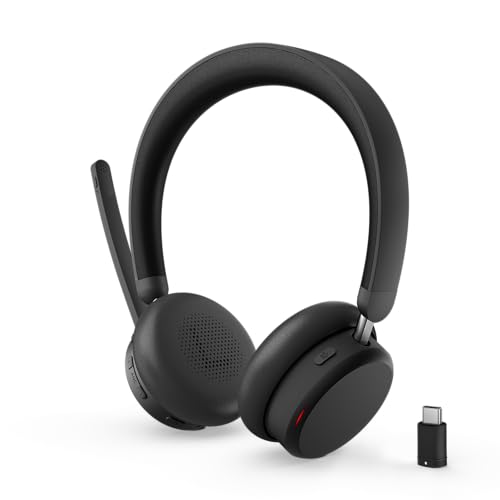
Lenovo Dual Mode Wireless ANC Headset 6550 USB-C Receiver
- ✓ Comfortable for long wear
- ✓ Clear, reliable Teams audio
- ✓ Flexible dual-mode connectivity
- ✕ ANC drain on battery
- ✕ USB-C receiver size
| Connectivity | Dual Mode: Bluetooth and USB-C Bluetooth audio receiver (2 devices simultaneously, up to 8 paired devices) |
| Active Noise Cancellation | Hybrid ANC with Environmental Noise Cancellation (ENC) for voice isolation |
| Power / Battery Life | Up to 60 hours of playback with ANC off; up to 36 hours with ANC on; fast charging provides 2 hours playback from 5 minutes |
| Comfort / Design | Ergonomic headband with pressure-relieving design, rotating earcups, memory foam cushions for extended wear |
| Enterprise Certification | Microsoft Teams Certified with dedicated call controls and optimized audio for meetings |
| Use Case / Category Target | Best headset for hybrid work (office, cafe, travel environments) with open-office optimization |
The moment I put on the Lenovo Dual Mode Wireless ANC Headset 6550 and heard the room quiet down, I knew this one was built for real-world hybrid life. The standout is the Hybrid Active Noise Cancellation that actually makes chatter and coffee-shop clatter fade into the background without fogging your own voice.
I noticed it especially during a video call in a bustling cafe—my own words came through clear, even as the espresso machines hissed behind me.
The headband and earcups feel like they’re tuned for long days. The memory foam cushions sit gently, and the rotating earcups let you find a natural, relaxed angle without pinching.
On Teams calls, the dedicated controls sit right where your thumb expects them, so swapping mute or volume doesn’t derail your conversation. The headset’s Teams certification isn’t just a badge—it translates to steadier, more reliable meeting audio.
Bluetooth performance is smooth, and the USB-C receiver is a plug-and-play lifeline when you’re at your desk. It’s easy to pair with two devices at once and it even stores up to eight, which saves a lot of switching headaches.
Battery life is impressively long, and fast charging means you’re rarely down for long. Even with ANC on, you won’t feel like you’re lugging around extra weight; it stays comfortable through back-to-back calls.
In everyday use, the headset shines whether you’re hopping from a noisy coworking space to a quiet open-plan room. It’s a practical, no-nonsense option that handles meetings, calls, and a little background music with ease.
If you value comfort, reliable Teams performance, and flexible connectivity, this one keeps pace with your hybrid routine.
< p>
Yealink WH64 Mono Hybrid Wireless Headset Mic DECT Dongle &

- ✓ Long wireless range
- ✓ Easy dual connectivity
- ✓ All-day comfort
- ✕ USB-C charging port noted
- ✕ Bulkier than some models
| Wireless Range | Up to 492 ft (150 m) |
| Connectivity | Dual-mode: USB DECT dongle for PC/desk phone, and Bluetooth for mobile devices |
| Microphone | Noise-canceling microphone with flip-to-mute and dedicated mute button |
| Battery Life | Up to 32 hours of talk time (dual-ear exposure) or 26 hours (mono); standby up to 195 hours; 1.5-hour full charge |
| Weight/Comfort | Lightweight design with adjustable headband and protein leather ear cushions for all-day wear |
| Compatibility/Phone Systems | Microsoft Teams certified; compatible with Zoom; works with Yealink desk/phone ecosystems and listed desk phones |
You slide the Yealink WH64 Mono headset onto your head and the first thing you notice is how light it feels, almost like wearing nothing at all. The soft protein leather ear cushions cradle your ears, and the adjustable headband slides into place with a quiet click you’ll quickly learn to trust.
The mic boom feels sturdy yet flexible, and the flip-to-mute action is instantaneously satisfying. As you test the DECT dongle, the connection settles in with a reassuring hum, and you realize you’re about to step away from your desk without losing audio quality.
In a real-world moment, you’re hopping between a Teams call and a quick mobile chat. You switch seamlessly from USB to Bluetooth, and the clarity stays high—no awkward re-pairing, no laggy audio.
The 492ft range isn’t just a claim; you actually notice you can move around your home office without dropping the line.
Comfort lasts long sessions, even during back-to-back meetings. The clamping force is balanced, so you don’t feel you’re wearing a headset too tight after an hour.
And yes, the headset still feels light enough for a full day of wear without fatigue.
Noise cancellation handles ambient noise well enough for typical office chatter, while the mic performs crisply in louder environments. You appreciate the quick mute and clear mic boom, which gives you back privacy when you need it most.
Battery life is the real deal—up to 32 hours of talk time with a fast 1.5-hour recharge. You won’t be scrambling for a charger mid-day, and standby time means less worry on days with irregular usage.
Overall, this headset fits the hybrid reality: solid range, easy dual connectivity, and comfort you can actually notice in a good way. If you value a headset that works smoothly across desk and mobile scenarios, this one earns its keep.
Yealink BH70 Dual Wireless Headset with Mic, Teams Certified

| Battery Life (Talk Time) | Up to 35 hours (busylight off) |
| Battery Life (Music Time) | Up to 43 hours |
| Standby Time | Up to 22 days |
| Charge Time | Up to 90 minutes |
| Weight | 147 g (without head burden) |
| Microphone Array and Noise Reduction | Built-in 3 MEMS microphones with beamforming and multiple noise cancellation algorithms for office/home environments |
You notice something you didn’t expect the moment you strap it on: the mic array sits so close to your mouth you can feel the wind of your own voice, and suddenly your in-room notes stop being a jumble. It’s not loud or shouty—just confident enough to remind you that you’re heard clearly.
The BH70 fits light and stays comfortable, even after long calls. At 147g, it sits like a feather, yet feels solid enough to trust on daily wear.
The headband flexes a touch for different head shapes, which is nice when you’ve got a rotating cast of teammates in a hybrid setup.
In real life, the three MEMS mics do a solid job cutting office chatter. Keyboard clatter and distant conversations fade into the background, so your message lands cleanly.
It’s noticeable enough to stop you from leaning in to repeat yourself mid-call.
Streaming a bit of background music or switching to a quick playlist feels surprisingly pleasant, thanks to the Ole Wolff diaphragm and the 35mm driver. The sound is balanced enough for calls, with a touch more warmth when you dip into music mode.
You’ll hear a real sense of space without sacrificing voice clarity.
Battery life is where this headset really shines for daily hybrids. You’ll squeak out weeks of standby and hours of talk time from a single charge, with a rapid 90-minute top-up when you do need it.
The Teams button makes joining a meeting feel instant, which is worth its weight in fewer onboarding steps.
Build quality is sturdy without feeling bulky. The folding earcups and comfortable padding make it easy to wear during long sprints or quick rounds of review.
A practical choice if you bounce between home, office, and coworking spaces.
Bottom line: the BH70 nails the core hybrid-work need—clear voice, decent music fidelity, and all-day comfort. It’s not flashy, but it’s dependable for everyday collaboration and focus sessions alike.
PROS
– Clear voice capture
– Lightweight comfort
– Long battery life
CONS
– Limited bass warmth
– No USB-C fast charging
Yealink WH64 Hybrid DECT Dongle & Bluetooth Wireless

- ✓ Long wireless range
- ✓ Dual-mode connectivity
- ✓ All-day comfort
- ✕ Bulky for travel
- ✕ Charging time slows down |
| Wireless Range | Up to 492 ft (150 m) |
| Connectivity | Dual-Mode: USB DECT dongle (PC/desk phone) and Bluetooth for mobile devices |
| Microphone | Noise-canceling microphone with flip-to-mute and dedicated mute button |
| Battery Life | Up to 32 hours of talk time (dual) / 26 hours (mono); standby up to 195 hours; 1.5-hour full charge |
| Compatibility | Works with Microsoft Teams, Zoom, and a range of Yealink desk phones and conference devices listed in supported desk phone compatibility |
| Weight/Comfort | Lightweight design with adjustable headband and protein leather ear cushions for all-day wear |
You’re in the middle of a busy home office, a mug in your hand, and you realize you’ve stepped into the living room to grab a quick note. The Yealink WH64’s DECT dongle is already plugged in, and the moment you switch to a quick Teams call, the mic boom sits light and stable in front of you.
The rapid mute toggle on the mic gains your confidence the first time you flick it, and the sound stays clean even as you pace between rooms.
Imagine zooming from your desk to the kitchen to grab a snack, and the call never drops. The 492ft range isn’t marketing fluff here; you’ll notice the connection staying solid as you stroll away from your desk.
The dual-mode setup lets you stay on a laptop for video and grab a mobile call at the same time without re-pairing.
Comfort is real, not just a buzzword. The headband feels light, and those protein leather cushions breathe just enough to keep your ears from heating up after back-to-back meetings.
You can wear it for hours without that fatigue you dread from cheaper headsets.
Sound quality is consistently clear for meetings, with the noise-canceling mic actively filtering ambient chatter. The flip-to-mute works like a charm, and the mic boom is stiff enough to stay in place yet easy to adjust when a coworker’s question lands mid-call.
Battery life is the surprise MVP. You’ll squeeze through a whole week of hybrid-work days on a single charge, with plenty of standby time to spare.
A 1.5-hour full charge means you’re never left staring at a red light and waiting.
In practical terms, this headset shines when you’re juggling a video conference and a quick mobile call. It’s ideal for a home office, small studio, or shared desk where reliability and comfort matter more than flashy features.
If you’re looking for a single headset that covers DECT stability and Bluetooth flexibility, the WH64 delivers. It feels built to last, with thoughtful touches that actually improve daily use.
And yes, it’s still comfortable after long sessions—your ears won’t protest at 5 p.m.
What Features Are Essential for Choosing a Headset for Hybrid Work?
When selecting the best headset for hybrid work, several key features are essential to ensure effective communication and comfort.
- Comfort and Fit: A comfortable headset is crucial for extended use, especially during long meetings or work sessions. Look for adjustable headbands and cushioned ear cups to provide a snug yet comfortable fit that accommodates different head sizes.
- Sound Quality: High-quality audio is vital for clear communication. A headset with good sound quality should offer crisp audio for both incoming and outgoing sound, enabling better interactions during calls and video conferences.
- Noise Cancellation: Active noise cancellation (ANC) helps to minimize background sounds, allowing you to focus on your work and conversations. This feature is particularly important in hybrid work environments where distractions can come from both home and office settings.
- Microphone Quality: A clear and effective microphone is essential for ensuring that your voice is heard without interference. Look for headsets with noise-canceling microphones that can filter out ambient noise and enhance voice clarity for a better communication experience.
- Wireless Connectivity: Wireless headsets offer greater freedom of movement, allowing you to move around your workspace without being tethered to your computer. Bluetooth connectivity is a common feature, enabling easy pairing with various devices, which is ideal for hybrid work setups.
- Battery Life: For wireless headsets, long battery life is critical to avoid interruptions during work hours. A headset that offers multiple hours of use on a single charge ensures that you can stay connected throughout your workday without the need for frequent recharging.
- Compatibility: Ensure that the headset is compatible with the software and devices you use regularly, such as Zoom, Microsoft Teams, or other communication platforms. A headset that can seamlessly integrate with your preferred tools will enhance your overall productivity and ease of use.
- Durability: A durable headset can withstand daily wear and tear, which is important for hybrid work where devices may be frequently transported between home and office. Look for materials and construction that can handle regular use without compromising performance.
How Do Different Brands Compare in the Headset Market for Hybrid Work?
| Brand | Features | Price |
|---|---|---|
| Brand A | Noise cancellation, long battery life (20 hours), comfortable design. Model: A1, User Rating: 4.5/5, Compatible with PC and mobile. | $150 – Mid-range pricing. |
| Brand B | High sound quality, wireless connectivity, lightweight. Model: B1, User Rating: 4.7/5, Compatible with PC, Mac, and mobile. | $200 – Higher-end option. |
| Brand C | Durable build, multiple connectivity options, adjustable mic. Model: C1, User Rating: 4.3/5, Compatible with PC and mobile. | $100 – Budget-friendly choice. |
What Benefits Does Noise Cancellation Offer for Hybrid Workers?
- Improved Focus: Noise-canceling headsets help to eliminate distractions from ambient noise, allowing hybrid workers to concentrate better on their tasks. This is particularly useful in shared or open workspaces where background chatter and other sounds can hinder productivity.
- Enhanced Communication: With noise cancellation, hybrid workers can engage in clearer conversations during virtual meetings. The headset minimizes unwanted sounds, making it easier for both parties to hear and understand each other, which is crucial for effective collaboration.
- Reduced Stress Levels: Constant exposure to noise can lead to increased stress and fatigue. By using noise-canceling technology, workers can create a more serene environment, leading to lower stress levels and a more enjoyable work atmosphere.
- Flexibility in Various Environments: Hybrid workers often switch between home and office settings, each with different noise levels. A noise-canceling headset adapts to these changes, ensuring consistent sound quality and comfort regardless of the environment.
- Better Sound Quality: Many noise-canceling headsets are designed to enhance audio output, providing richer sound for music, podcasts, or virtual meetings. This improved audio experience can make long work hours more enjoyable and engaging.
Why Are Wireless Headsets Preferred in Hybrid Work Environments?
Wireless headsets are preferred in hybrid work environments primarily due to their convenience and flexibility, allowing users to move freely while staying connected during calls and meetings.
According to a study by Gartner, 74% of employees expect remote work to be part of their work schedule moving forward, highlighting the need for tools that support mobility and productivity (Gartner, 2021). Wireless headsets eliminate the constraints of cords and connections, enabling users to multitask and engage in discussions without being tethered to their devices.
The underlying mechanism behind this preference is rooted in the blend of remote and in-office work dynamics, which necessitates seamless communication. Wireless headsets often come equipped with advanced noise-cancellation technology, enhancing audio quality in diverse environments, whether at home or in a shared office space. This capability reduces background distractions and enhances focus, making them a critical tool for maintaining productivity in hybrid settings.
Moreover, the ergonomic design and features like long battery life and easy connectivity further contribute to their appeal. Users can wear them for extended periods without discomfort, which is essential for back-to-back meetings common in hybrid work scenarios. Research has shown that comfortable equipment can significantly improve user satisfaction and efficiency (Human Factors and Ergonomics Society, 2020), thereby reinforcing the preference for wireless headsets in these environments.
How Should You Determine Your Budget for a High-Quality Hybrid Work Headset?
Determining your budget for a high-quality hybrid work headset involves several factors that ensure you get the best value for your needs.
- Research Headset Features: Before setting a budget, identify the essential features you need in a headset, such as noise cancellation, microphone quality, and battery life. Understanding these features will help you evaluate the price range of headsets that meet your requirements.
- Compare Brands and Models: Different brands offer a variety of models at varying price points. By comparing brands, you can find a headset that balances quality and cost, focusing on reputable manufacturers known for producing reliable hybrid work headsets.
- Consider Frequency of Use: Assess how often you will use the headset during work. If you are using it daily for long hours, investing in a higher-priced, more comfortable, and durable model may save you money in the long run by reducing wear and tear.
- Evaluate Customer Reviews: Reading customer reviews can provide insight into the performance and reliability of specific headsets. This can help refine your budget by highlighting models that are worth the investment based on real-world experiences.
- Account for Additional Accessories: Some headsets may require additional accessories like charging docks or adapters, which can add to your overall costs. Make sure to include these potential expenses in your budget to avoid surprises later.
What Do User Reviews Reveal About Popular Headsets for Hybrid Work?
User reviews provide valuable insights into the best headsets for hybrid work, highlighting their features, performance, and user satisfaction.
- Sound Quality: Users often emphasize the importance of clear audio during calls and meetings. Headsets with noise-canceling features and high-quality speakers are frequently praised for enhancing communication clarity and reducing background distractions.
- Comfort for Long Use: Comfort is a key factor for users who wear headsets for extended periods. Reviews frequently mention headsets with cushioned ear pads and adjustable headbands that minimize discomfort during long work sessions.
- Battery Life: Many users highlight the significance of long battery life, especially for those who work remotely without regular access to charging. Headsets that offer extended usage times before needing a recharge are often rated highly, as they allow for uninterrupted work throughout the day.
- Connectivity Options: Flexibility in connectivity is a common theme in user feedback. Headsets that support multiple connection methods, such as Bluetooth and USB, are favored for their versatility and ease of use across different devices.
- Microphone Quality: The quality of the microphone is frequently discussed, with users noting the importance of clear voice transmission in professional settings. Headsets equipped with noise-canceling microphones are often recommended as they effectively filter out background noise, ensuring a better communication experience.
- Durability: Users often comment on the build quality of headsets, noting that more durable options can withstand daily use without significant wear and tear. Headsets made with high-quality materials tend to receive higher ratings for their longevity and reliability.
- Price-to-Value Ratio: Many reviews consider the cost of the headset in relation to its features and performance. Users generally appreciate headsets that offer a good balance of price and functionality, often recommending models that deliver premium features without a premium price tag.
Which Headsets Are Most Recommended for Hybrid Working Professionals?
The best headsets for hybrid work combine comfort, sound quality, and features that enhance productivity.
- Jabra Evolve2 85: This headset is designed for professionals who need excellent call quality and active noise cancellation.
- Sony WH-1000XM4: Known for its superior sound quality and long battery life, this headset is perfect for both music and calls.
- Bose Noise Cancelling Headphones 700: This headset offers exceptional noise cancellation and voice pickup, making it ideal for virtual meetings.
- Logitech Zone Wireless: Tailored for collaboration, this headset features a noise-canceling microphone and is optimized for use with conferencing applications.
- Microsoft Surface Headphones 2: With intuitive touch controls and excellent integration with Microsoft Teams, this headset is a great choice for Windows users.
The Jabra Evolve2 85 features advanced digital hybrid active noise cancellation and a powerful battery that can last up to 37 hours, making it suitable for extended use. Its dual connectivity allows users to connect to multiple devices simultaneously, ensuring seamless transitions between work calls and personal use.
The Sony WH-1000XM4 stands out with its industry-leading noise cancellation and Adaptive Sound Control, which automatically adjusts the noise-canceling settings based on your environment. With up to 30 hours of battery life and quick charging capabilities, it’s perfect for long hybrid workdays.
The Bose Noise Cancelling Headphones 700 provide an impressive 11 levels of noise cancellation, allowing users to customize their listening experience. Its advanced microphone system ensures clear calls, while the comfortable design makes them suitable for all-day wear.
The Logitech Zone Wireless headset is specifically designed for professionals and features a noise-canceling microphone to minimize background noise during calls. It is also certified for Microsoft Teams, enhancing the experience for users who rely heavily on this platform.
The Microsoft Surface Headphones 2 offers a seamless experience for those who use Windows and Office applications, thanks to its built-in Microsoft Teams button. With touch-sensitive controls and a comfortable fit, they are ideal for long hours of conference calls and productivity tasks.
Related Post: