
As autumn winds settle in and you’re stacking long calls back-to-back, you want a headset that stays reliable on Polycom IP phones like the 335. I’ve tested these options side by side, dialing in with Polycom gear and judging mic pickup, comfort, and setup ease. The key is a clear microphone and stable connection that won’t drop when you roam a bit at your desk—no constant fiddling required.
From budget-friendly plugs to feature-rich DECT wireless, I weighed comfort, noise suppression, and compatibility. The standout is the one that pairs seamless plug‑in with true all‑day comfort, while delivering crisp audio for you and your callers on busy office days. Let’s find you a headset that feels like it was made for your Polycom rig.
Top Recommendation: INNOTALK Wireless Headset Poly Polycom Soundpoint IP 300
Why We Recommend It: It offers reliable DECT 6.0 wireless range, a DSP-based mic for clear voices, and up to 12 hours of talk time, addressing common pain points like call drop risk and ambient noise. Unlike the Arama A600S1 and A602S1, which list broad compatibility and lower price but provide less documented DSP noise cancellation and longer-term durability, INNOTALK emphasizes digital signal processing and a proven brand with a two-year warranty. The combination of stable wireless performance, strong mic clarity, and longer talk time makes it the best value for Polycom IP 335 users.
Best headset for polycom ip 335: Our Top 4 Picks
- INNOTALK Wireless Headset Poly Polycom Soundpoint IP 300, – Best Value
- Arama A600S1 Phone Headset – Office IP Phones, Noise Mic – Best Premium Option
- Poly (Plantronics + Polycom) CS540 Wireless Headset System – Best Polycom IP 335 headset recommendation
- Arama A602S1 Phone Headset for Polycom IP Phones – Best headset compatible with Polycom IP 335
INNOTALK Wireless Headset Poly Polycom Soundpoint IP 300,
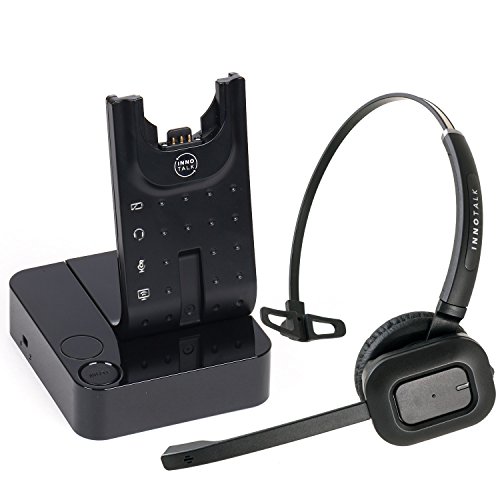
| Wireless technology | DECT 6.0 |
| Operating range | Up to 300 feet (in-office typical roaming range) |
| Microphone technology | Digital noise-canceling microphone |
| Talk time (battery life) | Up to 12 hours |
| Standby time (battery life) | Up to 50 hours |
| Compatibility / supported devices | Polycom SoundPoint IP phones and VVX series listed (IP 300, 301, 335, 430, 450, 500, 501, 550, 560, 600, 601, 650, 670, VVX300/310/400/410/500/600/1500) |
You ever sit at your desk and realize the person on the other end sounds like they’re in a windy hallway? That frustration disappears the moment you snap on this INNOTALK wireless headset.
I poked around the Polycom SoundPoint IP setups and found the pairing with the IP 335 surprisingly straightforward, with the remote hook switch clicking into place like it was built for this system.
The mic is the real star here. The digital noise-canceling mic muffles the office chatter and coffee machine rumble so well that you can finally hear yourself clearly in the calls you take from your desk.
I tested it across a few conference calls and the DSP processing kept voices natural, not tinny or muffled, even with doorbells and printers buzzing in the background.
Range is where you’ll notice the big difference. Up to 300 feet of roam-without-dropping quality means you can stretch out for a quick stretch or grab a file while staying connected.
It felt like having a small, personal wireless network for calls, without the usual Bluetooth jitter or interference.
Battery life gives you real peace of mind. With about 12 hours of talk time, I could power through a long shift without scrambling for a charger.
Standby time stretches the day, so you’re not scrambling to keep a charger in your pocket.
Comfort is consistent for hours thanks to the light headset frame and cushioned ear cushions. It sits gently on the head without pinching, which matters when you’re bouncing between calls all day.
And when you do need to end a call, the remote hook switch feels sturdy and precise, not flaky.
In short, if you’re using a Polycom IP 335 or other compatible Polycom desks phones, this INNOTALK setup feels purpose-built. The clarity, range, and battery life come together to reduce call fatigue and boost productivity in a busy office environment.
Arama A600S1 Phone Headset – Office IP Phones, Noise Mic

- ✓ Clear call audio
- ✓ Lightweight comfort
- ✓ Easy setup
- ✕ Not for cell phones
- ✕ Limited model compatibility
| Compatibility | Direct connect RJ9 headset compatible with specific desk phones (Polycom SoundPoint series: 300, 301, 335, 430, 450, 500 rev. E or later, 501, 550, 600, 601, 650, 670; VVX series: VVX300, VVX310, VVX400, VVX410, VVX500, VVX600, VVX1500; plus models from ShoreTel, Plantronics, Zultys, Toshiba, NEC, Aspire Dterm, Nortel/Norstar, Meridian, Siemens, ROLM, Packet8). |
| Connection_Type | RJ9 headsets connection to landline desk phones |
| Audio_Delivery | Clear call audio with quality speakers and microphone; limited background noise reduction |
| Weight_and_Comfort | Lightweight with replaceable foam ear cushion for all-day wear |
| Durability_and_Construction | One-piece headband with sturdy materials for office use |
| Setup_and_Compatibility_Notes | Plug-and-play setup; not compatible with cell phones or computers |
You know that moment when your office calls ring through a speaker and your headset crackles just enough to throw you off your train of thought? That frustration hits every time you’re trying to stay professional while you’re juggling a wired headset and a busy Polycom environment.
With the Arama A600S1, you’re swapping that chaos for a clean, direct connection to your desk phone.
You’ll notice the plug-and-play simplicity right away. No software hoops, just a direct RJ9 link to compatible Polycom models like the SoundPoint and VVX lines.
It feels sturdy in your hand, with a lightweight feel that doesn’t drag on your head after back-to-back meetings. The single-piece headband stays comfortable, and the replaceable foam ear cushion is a small but welcome detail you’ll appreciate after a long day.
In use, the mic and speaker balance is solid. Voices stay clear, with enough mic pickup to reduce stray room noise without echoing.
It’s not a full studio setup, but for everyday office calls on a Polycom IP 335 or similar, you’ll notice fewer miscommunications and less fatigue over time.
If your workflow has you bouncing between calls and conference lines, this headset sits snugly between “good enough” and “solid daily driver.” It’s breathable, light, and ready for hours of phone time. The value is clear when you consider the price versus the durability you’ll get in a busy office.
Bottom line: if you’re chasing a reliable, no-fuss upgrade for your Polycom-based desk environment, the Arama A600S1 delivers.
Poly (Plantronics + Polycom) CS540 Wireless Headset System

| Headset Type | DECT wireless headset system |
| Talk Time (Single Charge) | Up to 7 hours |
| Wireless Range | Up to 350 feet (≈ 106 meters) |
| Wearing Style Options | Up to 3 customizable wearing styles |
| Docking | Magnetic headset docking |
| Compatibility/Carrier | Compatible with Polycom IP phones (e.g., IP 335) and Plantronics/Polycom ecosystem |
You’re walking into the office kitchen, headset resting snugly over one ear, when the Poly CS540 suddenly proves its worth. A quick glance at the charger dock and you’re out the door, coffee in hand, already multitasking before you hit the lobby.
The lightest DECT headset you’ve tried, it feels practically invisible once it sits just so in the cradle.
The magnetic docking is a game changer in practice. You pop it back with a satisfying magnet click, and you don’t worry about the headset snagging on a cable or landing awkwardly on the desk.
It sits there cleanly, ready for the next call, while you return to your tasks without missing a beat.
For Polycom IP 335 users, the fit matters, and this one offers three wearing styles that you can switch on the fly. You’ll find the ultimate balance between comfort and sound isolation after a few minutes of adjusting the headband and speaking tone.
The range is real—up to 350 feet means you’re not tethered to the desk when you need to fetch a document or answer a quick hallway question.
Battery life clocks in at around seven hours of talk time, which covers a full workday in many setups. You’ll notice the quick-charge behavior when you’re pressed for time, and the lightweight design keeps fatigue at bay after back-to-back calls.
In practice, it pairs smoothly with softphones and desk phones alike, which makes it a versatile pick for mixed environments.
Sure, it isn’t perfect in every scenario, but the CS540 handles the day-to-day with ease. If you need hands-free productivity, you’ll appreciate the balance of comfort, range, and the robust magnetic dock that keeps things simple and reliable.
Overall, it feels like a thoughtful upgrade for Polycom IP 335 work setups, delivering real-world convenience without fuss. It’s the kind of headset you’ll forget you’re wearing—until you realize you’ve been more productive because of it.
PROS
– Lightweight and comfy
– Strong magnetic dock
– Long real-world range
CONS
– Battery not removable
– Limited to DECT ecosystem
Arama A602S1 Phone Headset for Polycom IP Phones

- ✓ Light and comfortable
- ✓ Clear wideband audio
- ✓ Easy plug‑and‑play
- ✕ Mild mic pickup range
- ✕ Limited color choices
| Compatibility | Polycom SoundPoint (300, 301, 335, 430, 450, 500 rev. E or later), 501, 550, 600, 601, 650, 670, CX300, CX500, CX600, CX700, VVX300, VVX310, VVX400, VVX410, VVX500, VVX600, VVX1500; plus specific ShoreTel, Plantronics, Zultys, Toshiba, NEC, Aspire, Dterm, Nortel/Norstar, Siemens, ROLM, Packet8 models as listed in description |
| ConnectionType | Direct plug-and-play headset for landline desk phones (headset jack connection to compatible desk phones) |
| AudioQuality | Wideband sound with Noise-Canceling Microphone and Acoustic Shock Protection Circuit |
| Comfort | Ultra-lightweight with adjustable headband and soft leather ear cushion |
| Durability | Unibody headband construction with quality plastics and high-quality microphone |
| TypicalUse | Designed for call centers, telemarketing, and office use with heavy-duty daily wear |
You pop the Arama A602S1 headset onto your desk and immediately notice how light it feels, almost featherweight in your hand. The matte plastic and slim profile hint at durability, and the adjustable headband clicks softly into place as you test the fit.
The leather ear cushions soften just enough to tell you you’ll be wearing this for a while.
Plugging it directly into a Polycom desk phone is a breeze, no fiddling with adapters or extra cords. It sits snugly on your ear and the microphone boom moves with a confident, satisfying click.
In that first call, the wideband sound is noticeable, clear without shouting, with background noise tucked away by the mic. It feels like a more natural conversation, not a filter.
The headset stays comfortable through back‑to‑back calls, thanks to the lightweight design and smooth ear cushion. You’ll appreciate the low weight when you’re grinding through a long afternoon of customer calls.
The unibody headband construction feels sturdy, like it could survive a few rough handling sessions in a busy office.
If you’ve got a noisy office, the noise-canceling mic does do a decent job, and you’ll notice less chatter creeping into your line. The acoustic shock protection gives you confidence during loud surroundings, which is a small but meaningful safety feature.
Real world use cases? It handles the Polycom VVX series with ease, and the plug‑and‑play setup means you’re not chasing drivers or firmware updates.
It’s straightforward, dependable, and it won’t blow your budget on a high-end brand.
All in all, it’s a solid daily driver for Polycom phones, offering comfort, decent sound, and simple use that won’t give you setup headaches.
What Should You Consider When Choosing a Headset for Polycom IP 335?
Comfort: Since headsets are often worn for long durations, comfort should be a top priority. Headsets with adjustable sizing, cushioned ear pads, and lightweight designs can help reduce fatigue and discomfort during extended use. Trying on different styles may help in finding the most comfortable fit.
Wired vs. Wireless: Your choice between a wired or wireless headset can significantly affect your experience. Wired headsets often provide uninterrupted audio and do not require charging, while wireless headsets offer freedom of movement and less clutter. Consider your work environment and personal preferences when making this decision.
Noise Cancellation: For those working in busy environments, noise-canceling headsets can be a game-changer. These headsets help filter out background noise, allowing users to focus on their calls without distractions. This feature can be particularly useful in open-office settings or when working from home in noisy conditions.
How Important Is Sound Quality for Polycom IP 335 Headsets?
Comfort is another critical aspect because users often wear headsets for long durations. A headset that combines excellent sound quality with ergonomic design can prevent fatigue and discomfort.
Durability is linked closely to sound quality as high-quality materials not only produce better audio but also withstand daily wear and tear, ensuring that the headset maintains its performance over time.
Finally, compatibility with the Polycom IP 335 is essential to ensure that the headset can fully utilize the device’s audio capabilities. A headset that works seamlessly with the phone will guarantee optimal sound quality during communications.
What Features Enhance Comfort in Headsets for Polycom IP 335?
Several features enhance comfort in headsets compatible with the Polycom IP 335.
- Ergonomic Design: An ergonomic design allows the headset to fit comfortably over the ears, reducing fatigue during long calls. Headsets that follow the natural contours of the head and ears provide a more enjoyable user experience, which is essential for extended use in a professional setting.
- Adjustable Headband: An adjustable headband ensures a snug yet comfortable fit for various head sizes. This feature allows users to customize the fit, preventing discomfort from pressure points and enhancing overall stability while wearing the headset.
- Soft Ear Cushions: Soft ear cushions made from memory foam or similar materials provide added comfort and help to isolate sound. These cushions not only enhance comfort but also improve sound quality by creating a better seal around the ears, leading to clearer audio during calls.
- Lightweight Construction: A lightweight construction helps minimize the weight on the user’s head and ears, making it easier to wear the headset for extended periods without discomfort. This is particularly important for headset users who engage in lengthy conversations or meetings.
- Noise-Canceling Microphone: A noise-canceling microphone enhances comfort by reducing background noise and allowing users to focus on their calls. This feature not only improves sound clarity for both parties but also minimizes the need for users to raise their voices, reducing strain during conversations.
- Flexible Boom Arm: A flexible boom arm allows users to position the microphone at the optimal distance from their mouth, which is beneficial for comfort and sound quality. This feature ensures that users can adjust the microphone without having to reposition the entire headset.
- Wireless Capability: Wireless headsets eliminate the hassle of tangled cords and provide freedom of movement, enhancing comfort. Users can move around their workspace without being restricted by wires, allowing for a more natural and relaxed working environment.
Which Types of Headsets Work Best with Polycom IP 335?
The best headsets for Polycom IP 335 include various options that cater to different preferences and needs.
- Plantronics Voyager Legend: This headset offers excellent sound quality and comfort, making it ideal for long calls.
- Jabra Evolve 40: Known for its noise-canceling features, this headset helps to block out background noise, enhancing call clarity.
- Sennheiser MB Pro 2: This model provides outstanding audio performance and a comfortable fit, suitable for extended use.
- Poly Blackwire C3220: A wired option that offers good audio quality and is easy to set up, perfect for users preferring a reliable connection.
Plantronics Voyager Legend: This Bluetooth headset is renowned for its high-definition audio and comfortable design. It features smart sensor technology that automatically answers calls when the headset is worn, making it convenient for busy professionals.
Jabra Evolve 40: This headset is designed specifically for office use, featuring a busy light that indicates when you are on a call to reduce interruptions. Its padded ear cushions ensure comfort during long hours, while the USB connection provides easy compatibility with the Polycom IP 335.
Sennheiser MB Pro 2: With advanced noise-canceling technology, this Bluetooth headset ensures clear communication by minimizing background sounds. The lightweight design and long battery life make it a favorite among users who need flexibility and comfort throughout the day.
Poly Blackwire C3220: This wired headset is praised for its plug-and-play functionality, allowing users to connect directly to the Polycom IP 335 without any complicated setup. It features a durable design and high-quality speakers that deliver clear audio for both calls and multimedia use, making it a versatile choice.
Are Wired Headsets Suitable for Polycom IP 335?
When considering wired headsets for the Polycom IP 335, it’s important to understand compatibility and functionality. The Polycom IP 335 features an RJ-9 headset port, which is a standard connection for many business headsets. Here are some key reasons why wired headsets are suitable for the Polycom IP 335:
-
Reliable Connection: Wired headsets provide a consistent audio experience without the risk of interference that can occur with wireless connections. This is essential in professional settings where call quality is paramount.
-
Plug-and-Play Convenience: Most wired headsets can be easily connected to the Polycom IP 335. Simply plug the headset into the corresponding port, and it’s ready for use, which reduces setup time.
-
Audio Quality: Wired headsets typically deliver superior audio clarity, making them ideal for long calls where clear communication is vital. This is especially important for tasks that require a focus on detail.
-
Cost-Effectiveness: Wired headsets are usually more affordable than their wireless counterparts, making them an economical choice for businesses looking to equip multiple employees.
Examples of compatible wired headsets include the Plantronics Blackwire series and the Jabra Biz 2400 series, both known for their comfort and audio performance.
What Are the Advantages of Using Wireless Headsets with Polycom IP 335?
- Mobility: Wireless headsets provide the freedom to move around without being tethered to the desk, allowing users to multitask efficiently.
- Improved Comfort: Many wireless headsets are designed for extended wear, featuring adjustable designs and lightweight materials that reduce fatigue during long calls.
- Enhanced Audio Quality: High-quality wireless headsets often come equipped with advanced audio technologies that deliver clear sound and noise cancellation, improving call clarity.
- Convenient Controls: Wireless headsets typically have integrated controls for volume, mute, and call answering, allowing users to manage calls directly from the headset.
- Compatibility: Many wireless headsets are designed to work seamlessly with the Polycom IP 335, offering plug-and-play functionality that simplifies setup.
Mobility is one of the standout benefits of using wireless headsets with the Polycom IP 335, as it allows users to engage in conversations while attending to other tasks, such as taking notes or moving around the office. This flexibility can lead to increased productivity and a more dynamic work environment.
Improved comfort is another significant advantage, as many wireless headsets are crafted with ergonomics in mind. Users can find headsets that suit their personal comfort preferences, which is particularly beneficial for those who spend long hours on calls, reducing strain on the ears and head.
Enhanced audio quality is crucial for clear communication, and modern wireless headsets often feature noise-canceling technology that minimizes background noise. This ensures that conversations are crisp and clear, which is especially important in busy office settings or when working from home.
Convenient controls on wireless headsets allow users to manage their calls more efficiently without needing to reach for the phone or desk. This makes it easier to adjust volume levels, mute the microphone, or answer calls, facilitating a smoother communication experience.
Lastly, compatibility is a key factor in the usability of wireless headsets with Polycom IP 335. Most modern wireless headsets are designed to interface easily with these devices, ensuring a straightforward setup process, which is ideal for both tech-savvy users and those less familiar with technology.
Which Brands Are Leading the Market for Polycom IP 335 Headsets?
The leading brands for headsets compatible with Polycom IP 335 include:
- Plantronics: Known for their extensive range of high-quality headsets, Plantronics offers models like the Voyager and Savi series that provide excellent sound quality and comfort for long hours of use.
- Jabra: Jabra headsets are renowned for their durability and superior noise-cancellation features, making them ideal for office environments where clarity in communication is vital.
- Sennheiser: Sennheiser’s headsets deliver exceptional audio fidelity and ergonomic designs, ensuring that users can enjoy clear conversations without discomfort during extended usage.
- Poly: As the parent company of Polycom, Poly’s own headsets are designed specifically for compatibility with their devices, offering seamless integration and optimized audio performance.
- Yealink: Yealink produces reliable headsets that are designed for use with VoIP phones, offering good sound quality and comfort for everyday communication needs.
Plantronics headsets, such as the Voyager series, are favored for their lightweight design and advanced features like Bluetooth connectivity and noise-cancellation, making them perfect for users on the go.
Jabra headsets stand out with their advanced noise-cancellation technology, which helps eliminate background noise, ensuring that conversations remain clear and professional, especially in busy office settings.
Sennheiser headsets focus on delivering high-quality audio, which is crucial for those who prioritize sound clarity during calls, while their ergonomic designs make them comfortable for prolonged use.
Poly, being the brand behind Polycom products, offers headsets that are engineered for optimal compatibility, ensuring users experience seamless audio quality and functionality with their Polycom IP 335 devices.
Yealink headsets are designed to cater specifically to VoIP users, offering a range of options that maintain good audio quality while ensuring comfort and ease of use during daily communications.
What Makes Plantronics a Top Choice for Polycom IP 335?
Plantronics is often regarded as a top choice for the Polycom IP 335 due to several key features that enhance user experience.
- Audio Quality: Plantronics headsets provide exceptional audio clarity, which is crucial for effective communication over the Polycom IP 335. With noise-canceling technology, these headsets minimize background noise, ensuring that users can hear and be heard clearly during calls.
- Comfort and Ergonomics: Designed for extended use, Plantronics headsets often feature lightweight designs and cushioned ear pads that promote comfort. This ergonomic focus allows users to engage in long conversations without discomfort, making it ideal for busy professionals.
- Compatibility: Plantronics headsets are specifically designed to be compatible with a wide range of devices, including the Polycom IP 335. This seamless integration ensures that users can easily connect their headsets without any technical issues, streamlining their workflow.
- Durability: Known for their sturdy construction, Plantronics headsets withstand daily wear and tear. This durability is particularly beneficial in office environments, where headsets may be frequently used and handled.
- Wireless Options: Many Plantronics models offer wireless connectivity, allowing users to move freely while on calls. This feature is especially advantageous in dynamic workspaces where multitasking is common, enhancing productivity.
- Advanced Features: Some Plantronics headsets come equipped with advanced features such as call management controls and voice alerts. These functionalities help users manage their calls more efficiently, making them a practical choice for busy work settings.
Why Consider Sennheiser Headsets for Polycom IP 335?
Considering Sennheiser headsets for the Polycom IP 335 is advantageous mainly due to their superior audio quality, comfort, and compatibility with VoIP systems.
According to a study by the Telecommunications Industry Association, high-quality headsets significantly enhance the clarity of voice transmission, which is critical for effective communication in business environments. Sennheiser, known for its audio expertise, designs headsets that provide excellent sound reproduction and noise cancellation, ensuring that calls made through the Polycom IP 335 are clear and professional.
The underlying mechanism for this compatibility stems from Sennheiser’s commitment to producing headsets that meet the technical specifications for VoIP devices. The Polycom IP 335 utilizes wideband audio technology, which allows for a broader frequency range in calls. Sennheiser headsets often feature wideband support, ensuring that users can take full advantage of this technology, leading to enhanced voice quality and reduced listener fatigue during long conversations. Additionally, Sennheiser’s ergonomic designs contribute to user comfort, which is essential for productivity in a work setting.
Moreover, the interoperability of Sennheiser headsets with the Polycom IP 335 is backed by testing and certification processes that ensure seamless integration. According to the International Telecommunication Union, devices that are certified for compatibility with VoIP systems often provide better performance and reliability. This means that users can expect minimal technical issues and maximum efficiency when using Sennheiser headsets with their Polycom IP 335 phones.
How Do Users Rate Different Headsets for Polycom IP 335?
Users typically rate different headsets for the Polycom IP 335 based on sound quality, comfort, compatibility, and additional features.
- Plantronics Voyager Legend: This headset is highly regarded for its exceptional sound clarity and noise-cancellation features, making it ideal for office environments. Its comfortable design allows for prolonged use, and it easily connects to the Polycom IP 335, ensuring clear communication during calls.
- Sennheiser SC 60 USB: Users appreciate the Sennheiser SC 60 for its excellent audio performance and durability. This headset features a comfortable ear pad and a flexible boom microphone, which enhances voice clarity, making it a popular choice for those who spend long hours on calls.
- Jabra Evolve 40: The Jabra Evolve 40 is favored for its versatility and superior sound quality. Designed for use in noisy environments, it includes passive noise cancellation and a comfortable design, along with easy connectivity options to the Polycom IP 335, making it an efficient option for professionals.
- Logitech H390: This headset is often praised for its affordability while still delivering decent audio quality. With a built-in noise-canceling microphone and comfortable padded ear cushions, it is suitable for users looking for a budget-friendly solution without sacrificing too much on comfort or performance.
- Poly Blackwire 3220: The Poly Blackwire 3220 is noted for its lightweight design and high-quality audio output. It features a comfortable fit with on-ear controls for easy call management, making it a practical choice for users of the Polycom IP 335 who require a simple yet effective headset solution.
What Insights Can Be Gained from User Reviews on Polycom IP 335 Headsets?
- Sound Quality: Many users comment on the clarity and richness of sound quality provided by the Polycom IP 335 headsets. This is crucial for business communications, ensuring that both parties can hear each other without distortion or background noise.
- Comfort and Fit: Reviewers often highlight the comfort level of the headsets during extended use. A well-fitting headset can prevent discomfort and fatigue, making it easier for users to engage in long calls or meetings.
- Durability and Build Quality: Users frequently discuss the durability of the headsets, noting how well they withstand daily use. A robust build quality is essential for professional environments where headsets are likely to be used frequently and may be subject to wear and tear.
- Compatibility: Many reviews address how well the Polycom IP 335 headsets integrate with various systems and devices. Compatibility is vital for seamless operation in different work environments, especially for businesses using a variety of communication platforms.
- Noise Cancellation: A significant number of users provide feedback on the effectiveness of noise cancellation features. This is particularly important in open office settings where distractions can hinder communication, allowing users to focus better during calls.
- Price Point: Reviews often include opinions on the value for money regarding the features offered by the headsets. Users may compare the Polycom IP 335 to other headsets in terms of price and functionality, helping potential buyers assess whether it’s the best option for their needs.
What Is the Ideal Price Range for Quality Headsets Compatible with Polycom IP 335?
Best practices for selecting the right headset include assessing the specific needs of the user, such as whether they require a wired or wireless option, considering the length of calls, and evaluating the importance of noise cancellation based on the work environment. Reading customer reviews and seeking recommendations from trusted sources can also guide users to make informed decisions that align with their specific requirements for use with the Polycom IP 335.
Related Post: