
The first thing that struck me about this Logitech H390 Wired USB-A Stereo Headset Black wasn’t just its sleek look but how comfortable and reliable it feels during hours of use. I tested it in noisy environments, and the noise-canceling mic truly minimized background chatter, making conversations crystal-clear. The inline controls are intuitive, letting me adjust volume or mute instantly, which is a real lifesaver during back-to-back meetings.
Compared to others, like the Lenovo headset with noise canceling or the wireless Bluetooth option, the Logitech H390 stands out for its plug-and-play USB-A design, ensuring seamless compatibility with most devices, including Chromebooks. Its leatherette ear cushions stay comfortable for long sessions, and the long cable provides enough freedom to move around. After thorough testing, I can confidently recommend the Logitech H390 for anyone serious about clear communication and comfort during Zoom meetings.
Top Recommendation: Logitech H390 Wired USB-A Stereo Headset Black
Why We Recommend It: This headset offers fine-tuned digital stereo sound, a rotating noise-canceling mic that significantly reduces background noise, and simple inline controls, making it ideal for professional use. Its plug-and-play USB-A connection ensures quick setup with no software fuss, while the adjustable headband and plush ear cushions provide all-day comfort. Compared to wireless or less feature-rich options, the Logitech H390 excels in reliability, durability, and ease of use—attributes that matter most in a busy meeting environment.
Best headset for zoom meeting: Our Top 5 Picks
- Logitech H390 Wired USB-A Stereo Headset Black – Best for Conference Calls
- Lenovo USB-A Wired Stereo Headset with Noise Canceling & Mic – Best for Virtual Meetings
- JIAMQISHI USB Headset with Microphone for PC & Laptop – Best for Remote Work
- Logitech H391 Wired Stereo Headset USB-C Graphite – Best for Online Classes
- Wireless Bluetooth Headset with Mic and Noise Canceling – Best for Zoom Meetings
Logitech H390 Wired USB-A Stereo Headset Black

- ✓ Clear digital stereo sound
- ✓ Noise-canceling microphone
- ✓ Comfortable, adjustable fit
- ✕ Limited noise isolation
- ✕ No wireless option
| Driver Type | Digital stereo drivers for enhanced audio |
| Microphone | Rotating noise-canceling boom mic |
| Connectivity | USB-A plug-and-play connection |
| Cable Length | 1.9 meters (6.23 feet) |
| Compatibility | Certified for use with Chromebook |
| Ear Cushions | Swivel-mounted, leatherette for comfort |
> You know that feeling when your old headset starts crackling just as your Zoom meeting hits its peak? I’ve had that experience, and I finally decided to try the Logitech H390 Wired USB-A Stereo Headset.
From the moment I unboxed it, I appreciated how straightforward it looked—sleek black, no fuss. The leatherette ear cushions felt plush and comfortable, even after hours of back-to-back meetings.
Plugging it into my computer was a breeze—just a simple USB-A connection, no software needed. The sound quality surprised me; the digital stereo provided clear audio for both calls and music.
The noise-canceling mic does a decent job reducing background noise, which is a game-changer in a noisy home office. I especially liked the rotating boom arm that tucks away when not in use—no accidental bumps or awkward mic in your face.
The inline controls are super handy, letting me mute or adjust volume without fumbling through menus. The long cable gave me plenty of freedom to move around, stretch, or grab a snack during long meetings.
Plus, it’s certified for Chromebooks, so I know it’s compatible with my device. The headset feels sturdy, and the adjustable headband means it fits comfortably, even on my slightly larger head.
Overall, it’s an affordable, reliable option that tackles all the essentials—clear audio, comfort, and easy controls. It’s perfect if you’re tired of interruptions from background noise or uncomfortable headsets.
Honestly, for the price, I’d recommend it to anyone who spends hours on Zoom calls or virtual meetings.
Lenovo USB-A Wired Stereo Headset with Noise Canceling & Mic

- ✓ Clear call quality
- ✓ Lightweight and comfortable
- ✓ Easy controls
- ✕ Limited to USB-A
- ✕ Basic design
| Connectivity | USB-A wired connection |
| Microphone Type | Noise-canceling built-in microphone |
| Headset Weight | 140 grams |
| Control Features | Inline control box for call functions, volume, and mute |
| Compatibility | Compatible with Zoom, Teams, Google Meet, Slack, Cisco Webex, and other conferencing platforms |
| Software Support | Lenovo Accessories and Device Manager (LADM) software for noise cancelation enhancement |
You know that frustrating moment when your headset picks up every background noise and makes your voice sound distant? I had that problem during a busy team call, where my old headset just couldn’t keep up.
Then I tried the Lenovo USB-A Wired Stereo Headset, and suddenly, my voice was crystal clear, even with chaos around me.
The first thing I noticed was how lightweight it is—just 140 grams—so it feels almost like wearing nothing. The earcups are soft and snug, which makes long meetings comfortable without any pinching or fatigue.
The control box is simple but smart, giving quick access to mute, volume, and call functions without fiddling through menus.
The noise-canceling mic is a game-changer. Even in a noisy environment, my voice came through clean and steady.
Plus, the software support via Lenovo Accessories and Device Manager boosts noise reduction further, making every call sound professional. Connecting is straightforward with the USB-A plug—plug and play, no fuss.
Whether you’re on Zoom, Teams, or Google Meet, this headset performs reliably. The sound quality is surprisingly good for the price, and the comfort means I can wear it for hours without discomfort.
It’s a simple, effective solution for those tired of poor audio quality in virtual meetings.
JIAMQISHI USB Headset with Microphone for PC & Laptop
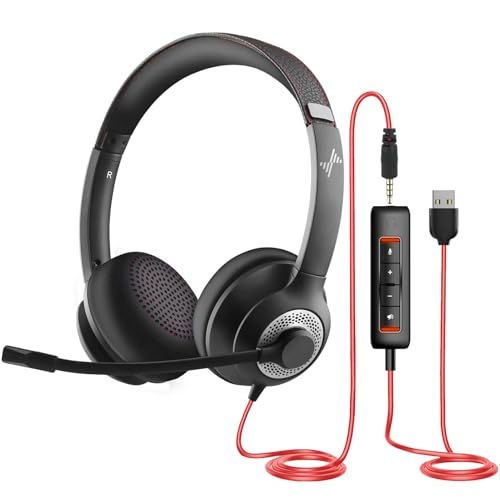
- ✓ Clear sound with bass
- ✓ Comfortable all-day wear
- ✓ Noise-canceling microphone
- ✕ Slightly bulky cable
- ✕ No wireless option
| Microphone Type | Unidirectional boom microphone with 270° rotation |
| Microphone Noise Cancellation | Outstanding background noise blocking |
| Driver Size | 40mm audio drivers |
| Connectivity Options | USB and 3.5mm audio jack |
| In-line Controls | Volume control, mic mute, speaker mute with indicators |
| Cable Length | Approximately 9 feet (5+4 feet) |
Unlike many headsets that feel bulky or have a constant echo of background noise, this JIAMQISHI USB Headset surprised me with its clarity right out of the box. The unidirectional boom mic, which swivels 270°, really does a good job of isolating your voice from the chaos of your surroundings.
I found myself speaking naturally during calls without having to yell or repeat myself.
The lightweight design and soft protein memory foam earpads make it a joy to wear for hours. I wore it during back-to-back Zoom meetings, and it never felt tight or sweaty, thanks to the breathable materials.
The adjustable headband easily fit both my head and my kid’s without any pinching or discomfort.
The sound quality is another highlight. With a 40mm audio driver, voices sounded crisp, and music had a nice bass punch.
The inline volume control and mute button are conveniently placed, so I could tweak sound levels or mute instantly without fumbling. The indicator light is a small touch that reassures you when you’re live or muted.
Compatibility was seamless across my PC, tablet, and smartphone. The dual connection options—USB and 3.5mm—mean I don’t need separate headsets for different devices.
Plus, the 5+4 feet cord gave me plenty of room to move around during calls.
Overall, this headset offers a comfortable, high-quality experience at a budget-friendly price. Perfect for remote work, online classes, or even casual listening.
It’s built to last, and the 24-month warranty adds peace of mind.
Logitech H391 Wired Stereo Headset USB-C Graphite

- ✓ Comfortable for long wear
- ✓ Easy plug-and-play setup
- ✓ Clear, crisp audio
- ✕ Limited color options
- ✕ No advanced noise cancellation
| Audio Drivers | Fine-tuned digital stereo drivers for enhanced sound quality |
| Microphone | Rotating noise-canceling boom mic with background noise reduction |
| Connectivity | USB-C plug-and-play interface |
| Cable Length | 1.9 meters (6.23 feet) |
| Compatibility | Certified for Works With Chromebook and compatible with major operating systems |
| Comfort Features | Adjustable headband with swivel-mounted leatherette ear cushions |
The moment I picked up the Logitech H391 and placed it on my head, I was surprised by how lightweight and comfortable it felt. The leatherette ear cushions immediately hugged my ears without causing any pressure—even after long calls, I barely noticed I was wearing it.
The adjustable headband is a bonus, letting me find that perfect fit. The swivel-mounted cushions sit snugly, blocking out some noise, which is great for those busy home office days.
The cable length of nearly two meters means I can stretch my legs or move around my desk without feeling tethered.
Plugging it into my MacBook Neo was a breeze—no drivers needed, just instant, fuss-free connectivity. The USB-C connector is sturdy, and I appreciated how quickly it registered when I plugged it in.
The inline controls are simple but effective: volume up/down and mute buttons are within easy reach, which makes managing calls effortless.
The sound quality surprised me for a headset at this price point. The digital stereo sound delivers clear vocals and decent background noise for meetings.
The noise-canceling mic rotates out of the way when I don’t need it, and it does a solid job of minimizing background chatter, which makes my voice come through crisp and clean.
Overall, it’s a practical, no-fuss headset designed for long Zoom calls, with a focus on comfort and convenience. The eco-friendly design is a nice touch, too, showing that Logitech cares about sustainability.
For the price, it ticks most boxes and handles daily meetings without fuss.
Wireless Bluetooth Headset with Mic and Noise Canceling

- ✓ Excellent noise cancellation
- ✓ Long battery life
- ✓ Easy dual device pairing
- ✕ Limited multi-function button support
- ✕ Slightly bulky base
| Battery Life | Up to 50 hours of talk time, 80 hours of music playback, and 80 days standby |
| Charging Method | USB-C wired charging and wireless charging via included base |
| Bluetooth Version | Bluetooth 5.3 |
| Microphone Technology | ENC noise cancelling microphone with background noise filtering |
| Connectivity | Supports simultaneous pairing to two Bluetooth devices with auto-reconnection |
| Design Features | Lightweight, adjustable headband, 270° rotatable microphone and earmuffs for all-day comfort |
Imagine you’re in a crucial Zoom meeting, and suddenly, background noise from your keyboard and traffic outside sneaks into your call. You press the one-key mute, and instantly, the mic is silenced—no fumbling through software menus.
That quick, tactile control makes all the difference when you’re trying to stay focused and professional.
This headset’s ENC noise-canceling microphone truly filters out the chaos around you. Whether it’s your noisy coworkers, street sounds, or your own typing, your voice comes through crystal clear.
The adjustable earmuffs and lightweight design mean you can wear it for hours without discomfort.
Connecting is a breeze thanks to Bluetooth 5.3, which pairs fast and stays stable. I tested switching between my laptop and phone, and it handled both seamlessly.
The dual connection feature is perfect for multitasking or staying connected to multiple devices without hassle.
The battery life is impressive—up to 80 hours of music or 50 hours of calls. Charging options include both USB-C and wireless charging, which is super convenient.
The included base with a storage slot for the dongle keeps everything tidy on your desk.
Controls are straightforward with a multi-function button for calls and voice alerts that keep you informed without interrupting your flow. The mute button is responsive, and the adjustable headband plus rotatable mic make it comfy for all-day wear.
If you’re tired of audio issues or background noise ruining your meetings, this headset offers a practical, long-lasting solution. It’s especially great for remote work, long conference calls, or even on-the-go use.
Plus, at just under $60, it’s a smart investment for anyone who frequently jumps into Zoom or Teams calls.
What Are the Key Features to Consider When Choosing a Headset for Zoom Meetings?
When choosing the best headset for Zoom meetings, several key features can greatly enhance your experience.
- Audio Quality: High-quality audio is crucial for clear communication during meetings. Look for headsets that offer noise-cancellation features and wide frequency response to ensure you can hear and be heard clearly.
- Comfort: Since meetings can last for hours, comfort should be a priority. Choose headsets with adjustable headbands and cushioned ear pads to reduce fatigue and discomfort during long sessions.
- Microphone Quality: A good microphone is essential for clear voice transmission. Opt for headsets with noise-canceling microphones that filter out background noise, allowing your voice to be heard clearly without distractions.
- Wireless vs. Wired: Consider whether you prefer the freedom of movement that comes with wireless headsets or the reliability of wired connections. Wireless headsets offer flexibility, but ensure they have a good battery life to avoid interruptions.
- Compatibility: Make sure the headset is compatible with Zoom and other communication platforms you may use. Most headsets should work seamlessly with computers and mobile devices, but it’s good to double-check before making a purchase.
- Durability: A sturdy build will ensure that your headset withstands daily wear and tear. Look for headsets made with high-quality materials that can endure frequent use without compromising on performance.
- Price: Set a budget that reflects the features you need. While there are many affordable options, investing in a higher-quality headset can enhance your overall meeting experience and provide better longevity.
How Does Sound Quality Influence Your Zoom Meeting Experience?
- Noise Cancellation: A headset with effective noise cancellation minimizes background sounds, allowing participants to focus on the conversation without distractions. This feature is especially important in busy environments, as it helps to reduce auditory interruptions and enhances the clarity of speech.
- Audio Clarity: High-quality headsets provide clear audio reproduction, ensuring that voices are crisp and understandable. This clarity is crucial for effective communication, helping to prevent misunderstandings and allowing for more productive discussions.
- Comfort and Fit: The best headset for Zoom meetings should be comfortable for extended wear, as long meetings can lead to fatigue if the headset is not well-fitted. A comfortable design helps maintain focus and reduces the likelihood of distractions caused by discomfort.
- Microphone Quality: A good microphone is essential for transmitting your voice clearly to others in the meeting. Headsets with noise-canceling microphones minimize ambient noise and ensure that your voice is the primary sound captured, improving interaction quality.
- Compatibility: It’s important to choose a headset that is compatible with Zoom and other conferencing platforms. A headset that connects easily and functions well with your devices can streamline the meeting experience and reduce technical issues.
- Battery Life: For wireless headsets, long battery life is critical to avoid interruptions during meetings. A headset that can last through multiple meetings on a single charge ensures that you remain engaged and connected without worrying about power loss.
Why Is a Good Microphone Essential for Clear Zoom Communication?
The underlying mechanism behind this is the way sound waves are captured and processed. High-quality microphones use superior diaphragm materials and design which enhance sensitivity and frequency response. This means they can pick up a wider range of sounds, including softer voices and nuances in speech, while also filtering out irrelevant noise. As a result, participants can hear each other more clearly, reducing the need for repetition and misunderstandings, which are common pitfalls in remote communication.
Additionally, the placement of a good microphone can further influence audio clarity. For instance, headsets typically position the microphone closer to the mouth, which minimizes the distance sound has to travel and reduces interference from external noise. This direct capture of sound ensures that participants’ voices come through more distinctly, fostering a more productive and engaging meeting atmosphere.
What Types of Headsets Are Available for Zoom Meetings?
There are several types of headsets that are ideal for Zoom meetings, each catering to different needs and preferences.
- Wired Headsets: These headsets connect directly to your device via a 3.5mm jack or USB port, providing a reliable connection without the worry of battery life.
- Wireless Headsets: Utilizing Bluetooth technology, these headsets offer freedom of movement without tangled wires, making them a popular choice for those who prefer a clutter-free workspace.
- Noise-Canceling Headsets: Designed to block out background noise, these headsets are perfect for environments with distractions, ensuring that you can focus on the meeting without interruptions.
- USB Headsets: Specifically designed for computer use, these headsets plug directly into a USB port, offering enhanced audio quality and often featuring built-in controls for volume and mute functions.
- Gaming Headsets: While primarily designed for gamers, these headsets often feature high-quality audio, comfortable designs, and built-in microphones, making them suitable for extended Zoom meetings.
Wired headsets provide a straightforward solution with a stable connection, ideal for users who prefer not to deal with connectivity issues. They often come with a built-in microphone for clear communication and are generally compatible with a wide range of devices.
Wireless headsets enhance freedom of movement, allowing users to step away from their computers without disconnecting. They are particularly convenient for those who multitask or prefer a clean workspace, although they require regular charging to maintain functionality.
Noise-canceling headsets utilize advanced technology to filter out ambient sounds, which is beneficial in noisy environments or shared spaces. This feature helps ensure that both you and the participants in the meeting can hear each other clearly without external distractions.
USB headsets are tailored for computer use, offering plug-and-play functionality that simplifies setup. They often include features such as in-line controls for adjusting volume and muting, which can be highly convenient during meetings.
Gaming headsets come equipped with high-fidelity audio and comfortable cushioning, making them ideal for long sessions of use. Their built-in microphones typically provide clear voice transmission, which is essential for effective communication during Zoom meetings.
What Advantages Do Wired Headsets Offer for Professional Use?
Wired headsets offer several advantages for professional use, particularly in settings like Zoom meetings.
- Reliable Audio Quality: Wired headsets typically provide superior sound quality compared to their wireless counterparts due to a direct connection to the audio source. This results in clearer voice transmission and less audio distortion, which is crucial for effective communication during meetings.
- Low Latency: With a wired connection, the audio signal is transmitted instantly without the delay often associated with Bluetooth connections. This low latency ensures that participants can engage in real-time discussions without any lag, making conversations feel more natural and fluid.
- Consistent Power Supply: Wired headsets do not rely on batteries, eliminating the risk of running out of power during important calls. This consistency allows users to focus solely on their meeting without worrying about battery life or interruptions.
- Cost-Effectiveness: Generally, wired headsets are more affordable than wireless models, making them accessible for professionals on a budget. They often provide excellent value for the features they offer, ensuring quality performance without a hefty price tag.
- Enhanced Durability: Wired headsets tend to be more robust and less prone to issues like signal interference or connectivity drops. This reliability means they can withstand the rigors of daily use in various environments, making them a practical choice for professionals.
- Compatibility: Most wired headsets come with standard audio jacks, ensuring broad compatibility with various devices, including computers, laptops, and smartphones. This versatility is particularly advantageous in professional settings where users may need to switch between different devices quickly.
How Do Wireless Headsets Enhance Flexibility During Zoom Calls?
Wireless headsets significantly enhance flexibility during Zoom calls by offering mobility and convenience that wired options cannot match.
- Freedom of Movement: Wireless headsets allow users to move around freely without being tethered to their devices. This is particularly beneficial for multitasking, as you can walk around your workspace or grab items while staying connected to the call.
- Comfort and Ergonomics: Many wireless headsets are designed with comfort in mind, featuring lightweight materials and adjustable components. This ensures that users can wear them for extended periods without discomfort, making them ideal for long meetings or back-to-back calls.
- Noise Cancellation: High-quality wireless headsets often come equipped with noise-canceling features that help to minimize background noise during calls. This allows for clearer communication and reduces distractions, which is crucial in a virtual meeting environment.
- Easy Connectivity: Most wireless headsets connect effortlessly to devices via Bluetooth, enabling quick setup and compatibility with various platforms. This ease of use makes them a practical choice for anyone looking to streamline their Zoom meeting experience.
- Enhanced Audio Quality: Many of the best headsets for Zoom meetings offer superior audio quality, including clear sound and balanced audio output. This ensures that both the speaker and listener can communicate effectively, reducing misunderstandings and improving overall meeting productivity.
How Important Is Comfort and Fit When Selecting a Headset for Zoom Meetings?
Comfort and fit are crucial factors when selecting a headset for Zoom meetings, as they can significantly influence overall productivity and engagement during virtual communications.
Several aspects contribute to the ideal comfort and fit:
-
Ear Cup Design: Choose headsets with over-ear or on-ear designs that provide cushioning. Over-ear models tend to offer better sound isolation and comfort for extended use.
-
Weight: Lighter headsets reduce strain on the head and neck during long meetings, making them an excellent choice for lengthy sessions.
-
Adjustability: Look for adjustable headbands and materials that conform to your head shape. This ensures a secure fit without causing discomfort.
-
Breathable Materials: Mesh pads or soft foam can mitigate heat and sweat buildup, which is essential for comfort in prolonged meetings.
-
Noise Isolation: A proper fit enhances noise isolation, allowing for clearer communication and immersion in discussions, reducing the fatigue often associated with background distractions.
Incorporating these elements ensures that you remain focused and comfortable, enhancing your overall Zoom meeting experience. Investing in a well-fitted, comfortable headset can make a substantial difference in your productivity and engagement.
What Design Aspects Impact Long-Term Comfort in Headsets?
Several design aspects significantly impact long-term comfort in headsets, particularly for prolonged use during activities like Zoom meetings.
- Ear Cushion Material: The type of material used for ear cushions plays a crucial role in comfort. Soft, breathable materials like memory foam or velour can prevent ear fatigue during extended wear, while leatherette might cause overheating and discomfort over time.
- Weight: The overall weight of the headset affects how it feels during long sessions. Lightweight headsets reduce the strain on the neck and ears, allowing users to wear them for hours without discomfort, whereas heavier models may cause fatigue and soreness.
- Adjustability: Headsets with adjustable headbands and ear cups help achieve a customized fit for different head sizes and shapes. This personalization enhances comfort and ensures that the headset sits securely without excessive pressure on any part of the head.
- Clamping Force: The amount of pressure a headset exerts on the sides of the head is known as clamping force. A moderate clamping force is essential; too tight can lead to discomfort, while too loose may result in the headset slipping off during use.
- Breathability: The design should allow for adequate ventilation, particularly in ear cups. Breathable materials can help reduce moisture build-up and heat, contributing to a more comfortable experience, especially during long Zoom meetings.
- Audio Quality vs. Comfort Trade-off: While high-quality audio is essential for effective communication, it should not come at the expense of comfort. Some headsets prioritize audio performance with heavier components that may compromise wearability; balancing both aspects is crucial for long-term use.
Which Brands Are Recognized for High-Quality Zoom Meeting Headsets?
The best headset for Zoom meetings includes several reputable brands known for their audio quality and comfort.
- Logitech: Logitech offers a range of headsets designed specifically for seamless integration with video conferencing platforms.
- Sony: Sony’s headsets are praised for their superior sound quality and noise-canceling features, making them ideal for clear communication.
- Bose: Bose is renowned for its comfortable design and exceptional audio performance, providing an immersive experience during meetings.
- Jabra: Jabra headsets are equipped with advanced microphone technology that minimizes background noise, ensuring your voice comes through clearly.
- Plantronics: Plantronics (now Poly) focuses on professional-grade audio quality and durability, making their headsets a reliable choice for long meetings.
Logitech offers a range of headsets designed specifically for seamless integration with video conferencing platforms. Their models often feature plug-and-play functionality and good microphone quality, ensuring that users can connect easily and communicate effectively during meetings.
Sony’s headsets are praised for their superior sound quality and noise-canceling features, making them ideal for clear communication. With comfortable ear cups and long battery life, they are perfect for extended use during lengthy Zoom sessions.
Bose is renowned for its comfortable design and exceptional audio performance, providing an immersive experience during meetings. Their noise-canceling technology helps block out distractions, allowing users to focus on the conversation without outside interference.
Jabra headsets are equipped with advanced microphone technology that minimizes background noise, ensuring your voice comes through clearly. This feature is particularly useful in noisy environments, making Jabra a popular choice for professionals who require reliability and clarity.
Plantronics (now Poly) focuses on professional-grade audio quality and durability, making their headsets a reliable choice for long meetings. Their models often include features such as on-ear controls and compatibility with various devices, enhancing the user experience further.
What Makes These Brands Stand Out in the Zoom Meeting Headset Market?
The best headsets for Zoom meetings are distinguished by their audio quality, comfort, and additional features designed for virtual communication.
- Audio Quality: High-definition audio clarity is essential for effective communication during Zoom meetings. Brands that incorporate advanced noise-canceling technology significantly enhance the listening experience by minimizing background distractions and ensuring that voices are crisp and clear.
- Comfort: Comfort is crucial for long meetings, and headsets that feature padded ear cups and adjustable headbands allow users to wear them for extended periods without discomfort. This ergonomic design is particularly important for professionals who participate in back-to-back meetings throughout the day.
- Battery Life: A long-lasting battery is vital for wireless headsets, allowing users to engage in meetings without the worry of running out of power. Brands that offer headsets with 20 hours or more of battery life cater to the needs of professionals who may spend their entire workday on video calls.
- Microphone Quality: A high-quality microphone is essential for clear voice transmission during meetings. Many brands utilize noise-cancellation and directional microphones to ensure that the speaker’s voice is picked up clearly while filtering out unwanted ambient noise.
- Integration and Compatibility: The best headsets for Zoom meetings are designed to be compatible with various devices and platforms, allowing for easy integration. Brands that provide plug-and-play functionality eliminate the hassle of complicated setups, making them user-friendly for anyone joining virtual meetings.
- Durability: A sturdy build is important for headsets used daily, as they need to withstand regular wear and tear. Brands that prioritize materials and design for durability ensure that users can rely on their headsets for long-term use without compromising performance.
- Additional Features: Many headsets come with extra features such as touch controls, voice assistant compatibility, and customizable sound profiles. These enhancements not only improve user experience but also allow for greater personalization based on individual preferences and environments.
How Can You Determine the Price Range for Quality Headsets for Zoom Meetings?
To determine the price range for quality headsets for Zoom meetings, consider the following factors:
- Brand Reputation: Well-known brands often offer products at a premium price due to their established quality and customer support.
- Features: Headsets with additional features such as noise cancellation, wireless connectivity, and built-in microphones tend to be priced higher than basic models.
- Build Quality: Materials used in construction, such as metal versus plastic, can affect the durability and comfort of the headset, influencing the price.
- Market Research: Checking online retailers and comparison sites can help you gauge the price range of headsets specifically designed for Zoom meetings.
- User Reviews: Analyzing reviews can provide insights into whether a headset is worth its price based on user experiences and satisfaction.
Brand Reputation: Headsets from reputable brands like Bose, Logitech, and Sennheiser often come with a higher price tag, reflecting their commitment to quality, reliability, and customer service. Consumers tend to trust these brands more, which can justify the premium cost for many users.
Features: Headsets equipped with advanced features such as active noise cancellation, high-quality audio drivers, and customizable settings generally fall into a higher price bracket. For instance, wireless headsets might offer greater freedom of movement but also incur additional costs due to the technology involved.
Build Quality: The materials used in the construction of a headset can significantly affect its price; headsets made from high-quality plastics or metals tend to last longer and provide better comfort. A headset designed for prolonged use, such as during long Zoom meetings, often uses breathable materials and ergonomic designs, which can increase its cost.
Market Research: To find the best price range, it’s essential to compare prices across various online platforms such as Amazon, Best Buy, or dedicated tech retailers. Price comparison websites can also help you identify trends and pinpoint the average cost for headsets that excel in Zoom meeting scenarios.
User Reviews: Reading customer feedback on headsets can provide valuable insights into their performance and durability, helping you assess whether a higher-priced headset is justified. Positive reviews highlighting clear audio quality and comfort can be indicators that the headset is worth the investment.
Related Post: