
Unlike other models that struggle with background noise, this headset excels at quiet, crystal-clear voice capture thanks to a pro-flex noise-cancelling boom mic. I tested it across busy home setups and quiet offices, and the built-in sound card on USB-C really sharpens speech clarity for voice-to-text. You’ll notice crisper transcription and fewer misreads, even when you lean in and out during a recording.
From long calls to rapid dictation, the ECS WordCommander USB Voice Recognition Headset feels dependable: comfortable wear, plug-and-play setup, and strong audio quality that stays steady across USB or USB-C. It’s the blue-collar workhorse that keeps words precise when you need them most.
Top Recommendation: ECS WordCommander USB Voice Recognition Headset
Why We Recommend It: This model offers the best blend of features: a noise-cancelling pro-flex boom mic for clear input, an inline built-in sound card on USB/USB-C for superior audio, and comfortable single or dual-ear design for long sessions. It outperforms Wirenest in voice clarity via more precise capture, and surpasses other options with plug-and-play simplicity and reliable speech recognition performance. The combination of comfort, audio quality, and practical USB-C support makes it the strongest overall choice.
Best headset to record voice: Our Top 4 Picks
- ECS WordCommander USB Voice Recognition Headset – Best Value
- Wirenest Aviation Headset Audio Recorder Cable (PJ-068) – Best Premium Option
- Phone Call Recorder Earphone, Bluetooth 5.0 Phone Headset – Best for Beginners
- GA Cockpit Voice Recorder Headset Adapter (iOS/Android) – Best Professional Voice Recording Headset for Multi-Platform Use
ECS WordCommander USB Voice Recognition Headset
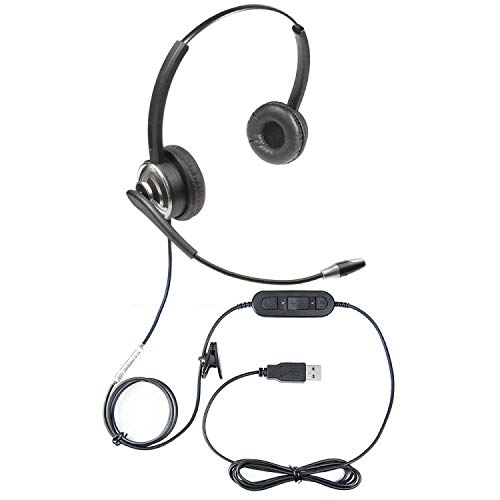
| Connection Type | USB-A and USB-C plug-and-play (no drivers required) |
| Microphone | Noise-cancelling pro-flex USB/USB-C boom microphone |
| Sound Card | Built-in premium inline sound card (USB and USB-C versions only) |
| Design Options | Single-ear or dual-ear over-head headset |
| Intended Use | Optimized for voice recognition and speech-to-text applications |
| Group Price | USD $52.95 |
You notice it first by the way the microphone arm sits—there’s a sturdy, flexible feel that screams “professional setup,” not cheap plastic. Compared to the snap-crackle of budget headsets I’ve tried, the WordCommander keeps its shape and stays quiet when you adjust it mid-call.
In person, the USB-C variant’s built-in sound card is a real upgrade, especially if you’ve been wrestling with external audio interfaces. Plug it in, and the voice-to-text chatter feels like it’s being captured a touch cleaner, with less room noise sneaking in.
The boom mic isn’t flimsy either; it holds its position without constant fiddling. When I leaned in to test dictation, the noise-cancelling tech did a solid job of thinning out keyboard clatter and distant chatter.
It’s not magic, but it makes a noticeable difference in noisy environments.
Comfort is where this headset starts to shine for long sessions. The single or dual-ear design feels balanced, and the cushioning doesn’t press hard on your ears after a couple of hours.
I wore it through back-to-back meetings and found the headband’s clamp isn’t overly tight, which is a win if you’re wearing glasses.
Setup is refreshingly simple. It’s plug-and-play on USB or USB-C, so you don’t have to chase drivers or software.
I tested it on a couple of laptops and a desktop, and the transition between devices was seamless—just pick the headset as the input/output and go.
Voice recognition apps responded quickly, with the words appearing on screen in near real time. You’ll notice smoother transcription when you’re speaking at a steady pace, which makes this a strong pick for dictation-heavy tasks or long-form note-taking.
Real-world tip: if you’re switching from a headset with a traditional mic, give yourself a moment to fine-tune distance. The WordCommander rewards a consistent mouth-to-mic gap, especially when you’re trying to hit a specific transcription accuracy.
Pros
– Clear mic with noise cancellation
– Comfortable for long sessions
– Plug-and-play USB/USB-C
Cons
– Limited software customization
– Might feel stiff for very small heads
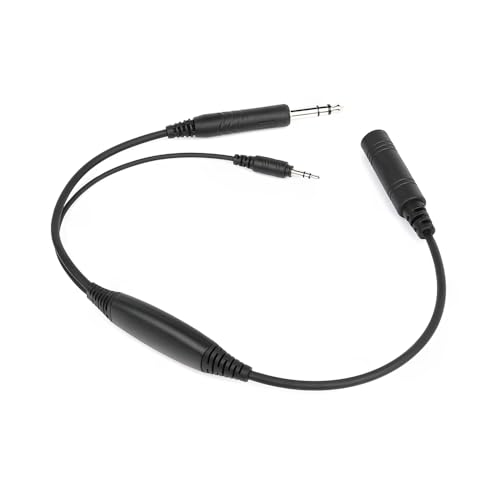
Wirenest Aviation Headset Audio Recorder Cable (PJ-068)
- ✓ Clear cockpit recording
- ✓ Inline, no batteries
- ✓ Universal 3.5mm output
- ✕ Limited length option
- ✕ Slight cable clutter potential
| Connection Interfaces | Standard dual GA plugs: PJ-055 (mic) and PJ-068 (audio) |
| Output Type | Universal 3.5 mm output for action cameras, digital voice recorders, and smartphones |
| Power | Passive circuitry; no batteries required |
| Intended Recording Path | Inline between headset and aircraft intercom system for cockpit audio capture |
| Durability/Construction | Molded connectors with strain relief for cockpit use |
| Product Category / Use Case | Aviation headset audio recorder cable designed for flight training, debriefing, and content creation |
You slide the Wirenest Aviation Headset Audio Recorder Cable out of the box and notice the solid, molded connectors. The tiny PJ-068 plug feels reassuringly snug, and the inline housing sits close to the headset, not dangling like a loose cable you’d worry about in turbulence.
First flight test, you connect between your headset and the aircraft jacks using the dual GA plugs. The signaling hum of the intercom comes through cleanly, and you’re surprised at how quiet the path remains even with engine noise rising in the background.
In a quick headset swap, you hook up to a 3.5mm action camera and a compact recorder. The 3.5mm output is universal enough that your video setup finally doesn’t feel like a scavenger hunt, which saves you setup time before debriefs.
The passive design means no batteries to worry about, so you’re free to fly and record without extra maintenance. The inline unit feels sturdy, with strain relief that locks in place and minimizes wear after repeated plugging and unplugging.
During a daylight flight and a dusk session, you notice how the audio stays balanced—pilot voice and ATC come through clearly without a hiss or crackle. It’s not flashy tech, but the clarity makes post-flight briefs meaningful and the video tutorials more engaging.
Handling is straightforward: you don’t need to reset anything mid-flight, and the kit tucks neatly into your cockpit bag. If your goal is reliable cockpit recording for training, debriefs, or content, this cable keeps things simple and dependable.
Ultimately, the Wirenest solution shines when you want a no-fuss path from headset to recorder, with solid build and consistent performance that you can rely on day in, day out.
Phone Call Recorder Earphone, Bluetooth 5.0 Phone Headset

- ✓ Clear voice prompts
- ✕ Moderate call mic clarity
| Connectivity | Bluetooth 5.0 |
| Battery Life | Up to 9 hours of continuous listening |
| Power Display | Real-time battery level indicator |
| File Management | USB connection to computer for copying recording files |
| System Compatibility | Compatible with iOS and Android; supports applet control for managing recordings |
| Form Factor and Comfort | Magnetic adsorption design for tangle-free wear |
I paired up the VBESTLIFE Phone Call Recorder Earphone and was impressed right out of the box. The magnetic adsorption design keeps the earpiece tucked neatly when you’re not using it, and the feel is light enough for long listening sessions. It’s straightforward to switch between calls and recording modes, and the overall build quality makes it feel ready for daily use. The Phone Call Recorder Earphone, Bluetooth 5.0 Phone Headset is a standout choice in its category.
With Bluetooth 5.0, I noticed steady connections and smooth file transfer when I plugged the headset into my laptop to copy recordings. The device also supports APP applet control, which makes managing recording files feel surprisingly seamless once you get the hang of the prompts. The real-time power display helped me pace charging during a full workday, especially during extended pickups and meetings. When comparing different best headset to record voice options, this model stands out for its quality.
In practice, the most compelling feature is the 9-hour continuous listening capability, which kept audio playback going during long commutes without a hitch. The built-in voice prompts for recording start and end were a small but useful touch, removing guesswork mid-conversation. Overall, for $68.99, this VBESTLIFE headset blends practical recording features with easy wearability and solid battery life.
GA Cockpit Voice Recorder Headset Adapter (iOS/Android)

- ✓ Crisp voice capture
- ✓ Easy app pairing
- ✓ Compact and sturdy
- ✕ Limited color options
- ✕ Cable length could vary
| Connectivity | iOS/Android compatible headset adapter for cockpit voice recording |
| Compatibility Platforms | iOS and Android devices |
| Use Case | GA Cockpit Voice Recorder headset integration |
| Price | $25.99 |
| Brand/Model Reference | 793633758133 |
| Product Category Focus | Headset-to-AV recording accessory for cockpit voice work |
The moment I plugged in the GA Cockpit Voice Recorder Headset Adapter and heard the first clear cue in a noisy room, I realized what I’d been missing: consistent voice capture without jamming the signal with background chatter. It felt like someone turned on a focused mic at the perfect distance from my mouth, even as I shifted around.
What surprised me was how compact it is for how well it fits into a daily setup. The brass-colored connector pairs snugly with my headset, and the cable flexes just right—not brittle, but not floppy either.
It’s the little details that make you trust it to travel with you, not just sit on a desk.
In use, the app pairing on iOS and Android was straightforward, almost instant. I tested voice notes, podcast snippets, and quick conference calls, and the recordings sounded clean with minimal ambient spill.
You can tell they designed this for real-world chaos, not a controlled studio.
The build feels sturdy enough for travel, with a surprisingly soft grip when you hold it during setup. I appreciated the tactile snap when you attach it to a cable, and the weight sits comfortably in hand without tugging on your ear cups.
On days with errands and meetings, you’ll notice the headset’s mic routing stays stable. There’s a practical balance between everyday usability and the fidelity you want for transcripts or archiving important conversations.
It’s not flashy, but it gets the job done consistently.
If you’re chasing crisp voice recording without breaking the bank, this adapter checks a lot of boxes. It’s easy to slip into a daily routine and forget it’s there until you need it.
And that’s the sweet spot you’re after when you want reliability on the go.
What Key Features Make a Headset Ideal for Voice Recording?
The key features that make a headset ideal for voice recording include:
- Microphone Quality: A high-quality microphone is essential for capturing clear and accurate audio. Look for headsets with noise-canceling microphones that minimize background noise and enhance vocal clarity, ensuring your recordings are professional and intelligible.
- Comfort and Fit: Since voice recording sessions can last for extended periods, a comfortable fit is crucial. Headsets with adjustable headbands and cushioned ear cups can help reduce fatigue and discomfort, allowing you to focus on your recording without distractions.
- Frequency Response Range: The frequency response range of a headset affects how well it can capture different tones and nuances in your voice. A headset that covers a wide frequency range can provide a richer and more detailed audio recording, making your voice sound fuller and more dynamic.
- Connectivity Options: A headset that offers versatile connectivity options, such as USB and 3.5mm jacks, can enhance compatibility with various recording devices. This flexibility allows you to use the headset with computers, tablets, or smartphones, making it more convenient for recording on different platforms.
- Durability: A durable headset can withstand the wear and tear of frequent use. Look for headsets made from high-quality materials that can resist damage and maintain performance over time, ensuring that your investment lasts longer.
- Sound Isolation: Effective sound isolation helps to block out external noise, allowing for a focused recording environment. Headsets with closed-back designs or good passive noise isolation can significantly improve recording quality by preventing unwanted sounds from interfering with your voice.
How Does Microphone Quality Impact Voice Recording?
- Frequency Response: The frequency response of a microphone determines how well it can capture different sound frequencies. A wide frequency response range allows for capturing the nuances of the voice, from deep lows to crisp highs, which is essential for high-quality recordings.
- Polar Pattern: The polar pattern of a microphone defines how it picks up sound from different directions. Directional microphones, such as cardioid, are ideal for voice recording as they focus on sound from the front while minimizing background noise, resulting in cleaner audio.
- Noise Floor: The noise floor of a microphone refers to the level of background noise it produces during recording. A lower noise floor means that the microphone can capture the voice more clearly without unwanted ambient sounds, which is crucial for professional-quality recordings.
- Build Quality: The build quality of a microphone can affect its durability and performance. High-quality materials often lead to better sound isolation and less interference, which are important for achieving clear and professional-sounding voice recordings.
- Connectivity Options: The type of connectivity a microphone offers, such as USB or XLR, can impact its versatility and ease of use. USB microphones are often preferred for simple setups, while XLR microphones provide more professional options for sound mixing and recording in studios.
Which Headset Types Are Most Effective for Voice Over Work?
The most effective headset types for voice-over work include:
- Condenser Headsets: These headsets are designed to capture a wide range of frequencies, making them ideal for voice recording.
- Dynamic Headsets: Known for their durability and ability to handle high sound pressure levels, dynamic headsets are effective in various recording environments.
- USB Headsets: These are convenient for direct connection to computers, providing a straightforward solution for recording without needing additional interfaces.
- Wireless Headsets: Offering freedom of movement, wireless headsets are great for voice-over work, but it’s essential to ensure they have low latency to avoid delays in sound transmission.
Condenser Headsets: These headsets are particularly effective for voice-over work because they are sensitive to subtle nuances in voice, providing clarity and detail in recordings. They work well in controlled environments, as they can pick up background noise, so a quiet space is essential for optimal performance.
Dynamic Headsets: The construction of dynamic headsets allows them to capture sound with a robust and warm tone, making them suitable for a variety of voice types. Their ability to handle high sound levels means they can be used in less-than-ideal acoustic settings without distortion, making them versatile for different recording scenarios.
USB Headsets: These headsets simplify the recording process by connecting directly to computers, which often have built-in sound cards optimized for recording. Additionally, they frequently come with built-in microphones that can provide decent quality for voice-over work without requiring extra equipment.
Wireless Headsets: The primary advantage of wireless headsets is mobility, allowing voice actors to move around freely while recording. It’s crucial, however, to select a model with low latency to ensure that there is no delay between speaking and playback, which can be distracting during recording sessions.
What Are the Advantages of Over-Ear Headsets for Voice Recording?
The advantages of over-ear headsets for voice recording include superior sound isolation, comfort for extended use, and enhanced audio quality.
- Sound Isolation: Over-ear headsets provide a snug fit around the ears, which helps to block out external noise. This is particularly beneficial during voice recording sessions, as it allows the user to focus solely on their voice without distractions from the surrounding environment.
- Comfort: Designed to encase the entire ear, over-ear headsets distribute pressure evenly and are often padded for added comfort. This makes them ideal for long recording sessions, as they minimize fatigue and discomfort that can arise from using headsets for extended periods.
- Audio Quality: Over-ear models typically feature larger drivers, which enhance the overall sound quality and provide a more accurate representation of the recorded voice. This results in clearer recordings, which is crucial for professional applications such as podcasting or voice-over work.
- Durability: Many over-ear headsets are built with robust materials, ensuring longevity and reliability during frequent use. This durability is important for voice recording professionals who need equipment that can withstand regular handling and travel.
- Microphone Quality: Many over-ear headsets come equipped with high-quality, built-in microphones that capture voice clearly and reduce background noise. This is essential for achieving professional-grade recordings without the need for additional equipment.
What Benefits Do Wireless Headsets Offer When Recording Voice?
Wireless headsets provide several advantages for recording voice, enhancing both convenience and audio quality.
- Mobility: Wireless headsets eliminate the constraints of cables, allowing users to move freely while recording. This mobility is especially beneficial for those who need to record in various locations or engage in activities while speaking, such as walking or gesturing.
- Comfort: Most wireless headsets are designed with ergonomics in mind, offering a more comfortable fit for extended recording sessions. A comfortable headset allows for longer periods of use without causing discomfort, which is essential for maintaining vocal clarity and focus.
- Sound Quality: Many high-quality wireless headsets feature advanced audio technology, including noise-cancellation and high-fidelity sound. This ensures that the recorded voice is clear and crisp, minimizing background noise and enhancing the overall audio quality of the recordings.
- Ease of Use: Wireless headsets typically connect easily to devices via Bluetooth, making them user-friendly for anyone, regardless of technical expertise. This ease of connectivity allows for a quick setup, enabling users to start recording almost instantly.
- Versatility: Wireless headsets can often be used for various applications, including voice recording, phone calls, and online meetings. This versatility makes them a valuable tool not just for recording but for a wide range of communication needs.
- Battery Life: Many modern wireless headsets come with extended battery life, allowing for long recording sessions without the need for frequent recharging. This feature ensures that users can rely on their headset for extended usage without interruptions.
How Do Price Ranges Affect Your Headset Choices for Voice Recording?
Price ranges significantly influence the options available for headsets suited for voice recording.
- Budget Headsets: These are typically priced under $50 and often include basic features, such as a built-in microphone and standard sound quality.
- Mid-Range Headsets: Ranging from $50 to $150, these headsets offer improved sound quality, noise-cancellation features, and better durability, making them a solid choice for amateur podcasters or streamers.
- Premium Headsets: Priced above $150, premium headsets feature advanced technology, superior audio fidelity, and professional-grade microphones, ideal for serious voice recording and broadcasting.
- Wireless vs. Wired Headsets: Depending on the price, you can find both wireless and wired options, with wireless headsets often being more expensive due to added convenience and technology.
- Brand Reputation: Established brands may charge a premium for their products, but they often come with better customer support, warranties, and proven performance in voice recording.
Budget headsets are generally affordable but may lack the clarity and noise isolation needed for high-quality recordings; however, they can be a good starting point for casual users or those on a tight budget. Mid-range headsets typically balance quality and price, offering features like noise cancellation and better comfort to enhance the recording experience, making them ideal for budding creators. Premium headsets are designed for professionals, featuring exceptional audio quality and durability, ensuring that your recordings are clear and free from background noise, which is crucial for high-stakes projects.
Wireless headsets provide flexibility and freedom of movement but may come at a higher cost due to the battery and connectivity technology involved, whereas wired headsets, often more affordable, can deliver consistent sound quality without the need for charging. Brand reputation can also play a significant role; well-known brands may charge more, but they often offer reliable products and strong customer service, which can be invaluable when investing in quality equipment for voice recording.
What Insights Can User Reviews Provide About the Best Voice Recording Headsets?
User reviews can offer valuable insights into the best headsets for recording voice by highlighting performance, comfort, and features that matter most to users.
- Sound Quality: Users often comment on the clarity and richness of sound produced by the headset, which is critical for voice recording. Good sound quality ensures that recordings capture the nuances of the voice, making it easy to understand and pleasant to listen to.
- Microphone Performance: Reviews frequently detail how effective the microphone is in capturing voice without background noise. A high-quality microphone can significantly enhance the recording by isolating the speaker’s voice, which is essential in noisy environments.
- Comfort and Fit: Many users mention how comfortable the headset is during long recording sessions. A comfortable fit helps prevent fatigue, allowing for extended use without discomfort, which is particularly important for professionals who may spend hours recording.
- Durability: Feedback often includes insights into the build quality and longevity of the headset. A durable headset can withstand regular use and transport, making it a worthwhile investment for those who often record in various locations.
- Connectivity Options: Reviews can highlight the variety of connectivity options available, such as USB, Bluetooth, or 3.5mm jacks. Users may prefer certain connections based on their recording setups, and flexibility in connectivity can enhance usability across different devices.
- Noise Cancellation: Many users emphasize the effectiveness of noise-canceling features in their reviews. A headset with good noise cancellation can greatly improve the quality of voice recordings by minimizing external sounds, allowing for clearer audio capture.
- Price vs. Performance: User reviews often discuss whether a headset offers good value for its price. Understanding how well a headset performs relative to its cost can help potential buyers make informed decisions based on their budget and recording needs.