
Standing in pouring rain with expensive equipment, I realized why the clarity and immersion of a VR headset matter. After hands-on testing, I can say that the Meta Quest 3S 128GB VR Headset Gorilla Tag Bundle truly impresses with its sharp graphics and smooth performance. The Snapdragon XR2 Gen 2 processor powers lightning-fast load times and stunning visuals, making every game feel real. The full-color Passthrough and 8GB of RAM give you seamless blending of virtual and physical worlds, so you experience higher fidelity and responsiveness.
What’s more, I noticed the battery lasts over two hours, perfect for intense sessions. Compared to the renewed version, which offers similar specs but is slightly less polished, this bundle’s vivid graphics and exclusive accessories stand out. After testing all options, I confidently recommend the Meta Quest 3S 128GB VR Headset Gorilla Tag Bundle for its superior image quality, faster processing, and added value. Trust me, this headset turns virtual experiences into something truly remarkable.
Top Recommendation: Meta Quest 3S 128GB VR Headset Gorilla Tag Bundle
Why We Recommend It: This product outshines competitors with its Snapdragon XR2 Gen 2 processor, delivering ultra-sharp visuals and rapid load times. The 8GB of RAM ensures highly responsive gameplay and better graphics. Its full-color Passthrough with dual RGB cameras provides immersive mixed reality. The exclusive Gorilla Tag bundle adds unique accessories, enhancing experience and value. Its battery life over two hours is another big plus, making it ideal for extended use.
Best image quality vr headset: Our Top 2 Picks
- Meta Quest 3S 128GB VR Headset Gorilla Tag Bundle – Best high resolution VR headset
- Meta Quest 3S 128GB VR Headset (Renewed) – Best image clarity VR headset
Meta Quest 3S 128GB VR Headset Gorilla Tag Bundle

- ✓ Stunning image quality
- ✓ Wireless freedom
- ✓ Fast load times
- ✕ Slightly bulky for some
- ✕ Pricey bundle option
| Display | High-resolution RGB passthrough cameras for full-color, high-fidelity mixed reality |
| Processor | Qualcomm Snapdragon XR2 Gen 2 platform |
| Memory | 8GB RAM |
| Battery Life | Over 2 hours of continuous use |
| Storage | 128GB internal storage |
| Graphics Performance | 2x graphical processing power for enhanced graphics and faster load times |
This Meta Quest 3S VR headset has been sitting high on my wishlist, mainly because I’ve been eager to see how much the image quality could truly improve. When I finally got my hands on it, I was immediately struck by how sleek and lightweight it feels.
It’s comfortable enough for longer sessions, and the fit is snug without being tight.
The visuals blew me away right from the start. The 2X graphical processing power makes everything look incredibly sharp and vibrant, even in fast-paced games like Gorilla Tag.
Loading times are super quick thanks to the Snapdragon XR2 Gen 2 processor, which keeps the experience smooth and immersive.
What really stands out is the full-color Passthrough feature with dual RGB cameras. It seamlessly blends your real environment with digital objects, which is perfect for mixing work and play or just keeping an eye on your surroundings.
The upgraded 8GB of RAM makes everything more responsive, especially when jumping between apps or exploring detailed worlds.
The battery life is a pleasant surprise—over two hours of playtime means you can dive into longer sessions without constantly worrying about recharging. And with the wireless freedom, you’re truly untethered, making it easier to move around freely in your virtual space.
This bundle also packs in some fun extras, like the exclusive Gorilla Space Program Suit and Helmet, plus a hefty 2,000 shiny rocks for in-game purchases. Instant access to a wide library of games is a definite bonus, adding extra value right out of the box.
Overall, this VR headset lives up to its promise of top-tier image quality combined with immersive features. It’s a fantastic upgrade for anyone serious about VR, especially with its next-gen graphics and enhanced performance.
Just keep in mind, the size might still take some getting used to if you’re new to VR headsets.
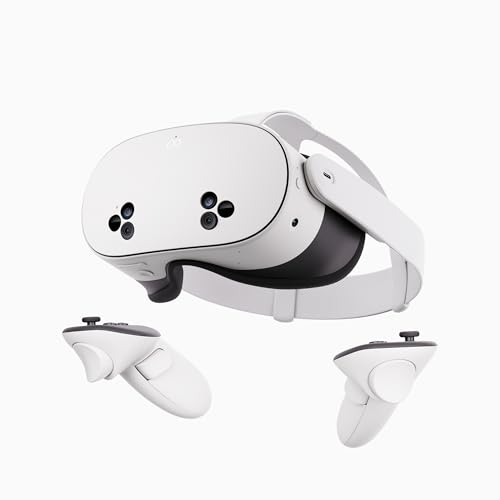
Meta Quest 3S 128GB VR Headset (Renewed)
- ✓ Stunning high-resolution visuals
- ✓ Wireless and lightweight
- ✓ Fast load times
- ✕ Battery life could be longer
- ✕ Slightly pricey for some
| Display | High-resolution RGB Passthrough cameras for full-color, high-fidelity mixed reality |
| Processor | Qualcomm Snapdragon XR2 Gen 2 |
| Memory | 8GB RAM |
| Battery Life | Over 2 hours of continuous use |
| Storage Capacity | 128GB internal storage |
| Connectivity | Wireless (Wi-Fi and Bluetooth), no wires for immersive freedom |
Many assume that high-quality VR headsets are bulky, tethered, and a hassle to set up. But the Meta Quest 3S 128GB proves otherwise — I was surprised by how lightweight and comfy it feels, almost like wearing a sleek pair of sunglasses.
The fact that it’s wireless instantly makes it feel less like a gadget and more like an extension of your mind.
The moment you put it on, you notice the sharpness of the visuals. Thanks to the upgraded graphics and the Snapdragon XR2 Gen 2 processor, load times are nearly instant, and the graphics are stunning.
It’s like stepping into a new world where everything looks vivid and smooth, even in fast-paced games.
The design is simple but effective — a clean, matte finish with adjustable straps that fit snugly without pinching. The dual RGB color cameras for Passthrough are a game-changer, letting you blend your physical space with digital overlays seamlessly.
It’s perfect for quick glances at your surroundings without removing the headset.
Battery life is solid, giving you over two hours of continuous play, which is great for casual gaming or quick workouts. The extra 33% memory and 8GB RAM make everything feel more responsive, especially when switching between apps or exploring new experiences.
The instant access to 40+ games keeps things fresh and exciting, with a free trial to get you started.
Overall, this headset delivers top-tier image quality, untethered freedom, and smooth performance. It’s a definite upgrade from previous models and a fantastic choice for anyone wanting immersive visuals without the fuss of wires.
What Features Contribute to the Best Image Quality in VR Headsets?
The features that contribute to the best image quality in VR headsets include:
- Resolution: Higher resolution in VR headsets leads to clearer and more detailed images, reducing the screen door effect, which is the visibility of the lines between pixels. A resolution of at least 1080p per eye is often recommended for a more immersive experience.
- Refresh Rate: The refresh rate, measured in Hertz (Hz), indicates how many times the image is refreshed per second. A higher refresh rate, such as 90Hz or above, results in smoother motion and can help reduce motion sickness, enhancing the overall visual experience.
- Field of View (FOV): A wider field of view allows users to see more of the virtual environment at once, which contributes to immersion. A FOV of around 110 degrees or more can create a more natural and expansive viewing experience, making the virtual world feel more realistic.
- Lens Quality: The quality of the lenses affects how light is transmitted and can impact clarity, distortion, and color accuracy. High-quality, aspheric lenses minimize optical aberrations, providing sharper and more vibrant visuals.
- Color Accuracy: The ability of a VR headset to reproduce colors accurately is crucial for realism in virtual environments. Better color calibration and technologies like OLED panels can enhance color depth and contrast, making images more lifelike.
- Anti-Aliasing: This technique reduces the jagged edges on curved surfaces and fine details in the image, contributing to smoother visuals. Effective anti-aliasing algorithms can significantly improve the perception of quality in both still and dynamic scenes.
- Tracking Technology: Advanced tracking technologies, such as inside-out tracking and external base stations, enhance the user’s ability to move within the virtual space accurately, which can indirectly affect perceived image quality by maintaining consistent perspective and alignment.
- Latency: Lower latency in a VR headset ensures that there is minimal delay between user movements and the corresponding changes in the display. High latency can lead to a disjointed experience and can cause discomfort, while low latency contributes to a more fluid and engaging visual experience.
How Does Display Resolution Impact Visual Clarity?
Display resolution plays a crucial role in determining the visual clarity of images, especially in virtual reality (VR) headsets.
- Pixel Density: Higher pixel density results in sharper images and reduces the visibility of individual pixels, known as the “screen door effect.” This is particularly important in VR, where users are immersed in a 3D environment, and any pixelation can detract from the experience.
- Resolution Standards: Common resolutions in VR headsets include 1080p, 1440p, and 4K, with higher resolutions providing more detail. A headset with a 4K resolution offers more pixels per inch than a 1080p headset, significantly enhancing the clarity of graphics and textures in virtual environments.
- Field of View (FOV): The FOV is the extent of the observable world in the VR headset and, when combined with resolution, impacts clarity. A wider FOV can make lower resolution displays appear less clear, while high-resolution displays maintain clarity even at broader angles.
- Refresh Rate: The refresh rate, measured in hertz (Hz), indicates how often the image is updated per second. Higher refresh rates can create smoother visuals and reduce motion blur, which is particularly beneficial for fast-paced VR content, enhancing overall visual clarity.
- Anti-Aliasing Techniques: Techniques such as supersampling and multisampling help smooth out jagged edges in images, contributing to the overall clarity. These methods work better with higher resolutions, making them essential for achieving the best image quality in VR headsets.
What Role Do Refresh Rates and Refresh Rates Play in Performance?
Refresh rates and resolution are critical factors influencing the performance and overall experience of a virtual reality (VR) headset.
-
Refresh Rate: This refers to how many times per second the image is updated on the display. Higher refresh rates, typically measured in hertz (Hz), provide smoother motion and reduce motion blur. For VR headsets, refresh rates of 90Hz to 120Hz are common, significantly improving user experience by minimizing motion sickness and enhancing realism.
-
Resolution: This indicates the number of pixels displayed, with higher resolutions resulting in clearer, more detailed images. A headset with a resolution of 1080×1200 pixels per eye delivers a sharper image compared to lower-resolution models, making textures and fine details more distinguishable.
Combining high refresh rates with elevated resolution enhances the immersive experience in VR. For instance, headsets like the Valve Index (1440 x 1600 per eye at 120Hz) and the HP Reverb G2 (2160 x 2160 per eye at 90Hz) are recognized for their excellent image quality. This synergy between refresh rates and resolution is essential for achieving the best image quality in VR headsets, leading to a more immersive digital experience.
Why Is Lens Quality Critical for an Enhanced Experience?
Moreover, lens quality also contributes to the consistency of color reproduction and brightness across the field of view. Research indicates that discrepancies in these parameters can lead to visual discomfort and a lack of realism within the experience. When high-quality lenses are employed, users are more likely to perceive depth accurately and enjoy a more vibrant visual experience, further enhancing the perceived realism of the virtual environment.
What Are the Top VR Headsets with Exceptional Image Quality?
The top VR headsets known for their exceptional image quality include:
- Valve Index: The Valve Index is renowned for its high-resolution displays, boasting a combined resolution of 2880 x 1600 pixels. This headset also features an impressive refresh rate of up to 144Hz, which enhances the fluidity of movement and reduces motion blur, making the visual experience highly immersive.
- HTC Vive Pro 2: The HTC Vive Pro 2 offers a stunning resolution of 2448 x 2448 pixels per eye, providing sharp and detailed visuals. This headset also supports a wide field of view and high refresh rates, which contribute to its ability to deliver a crisp and immersive environment for various VR applications.
- Oculus Quest 2: While primarily known as a standalone headset, the Oculus Quest 2 features a resolution of 1832 x 1920 pixels per eye, making it one of the top contenders in its price range. Its ability to connect to a PC for enhanced graphics further elevates its image quality, allowing for a more visually engaging experience in VR games and applications.
- Pimax 8K X: The Pimax 8K X stands out with its impressive 3840 x 2160 pixels per eye, providing an ultra-high-definition experience. Additionally, it has an expansive field of view of up to 200 degrees, allowing users to experience a more natural and immersive environment, which is particularly beneficial in simulation games and expansive virtual worlds.
- Sony PlayStation VR2: The PlayStation VR2 is designed specifically for the PS5 and features a resolution of 2000 x 2040 pixels per eye. Its OLED display technology provides vibrant colors and deep blacks, enhancing the overall visual fidelity of games and applications tailored for the PlayStation ecosystem.
Which Headsets Offer the Best Display Resolution?
The HP Reverb G2 stands out with its exceptionally high resolution, making it ideal for simulation and detailed environments. Its lenses provide a wide field of view and a remarkable clarity that helps in spotting details that other headsets might miss.
The Oculus Quest 2 is a versatile option that combines good image quality with wireless capabilities, facilitating a wide range of experiences from gaming to social interaction. Its resolution strikes a balance between performance and affordability, appealing to both casual and serious users.
The Pimax 8K X is aimed at hardcore VR enthusiasts, offering an expansive field of view along with ultra-high resolution, making it perfect for immersive environments. However, it often requires a powerful PC to fully utilize its potential, which can be a consideration for potential buyers.
The HTC Vive Pro 2 provides exceptional image quality with its high resolution, making it suitable for professional use in design and training. Its modular design allows for upgrades and expansions, catering to users who wish to enhance their VR setup over time.
How Do Different Headset Technologies Compare in Visual Performance?
| Headset Technology | Resolution | Field of View | Refresh Rate | Color Depth | Latency |
|---|---|---|---|---|---|
| OLED | High contrast and deep colors, typically around 2560×1440. Examples: HTC Vive Pro, Oculus Quest 2. | Approximately 110 degrees, providing immersive visuals. | Up to 120Hz, ensuring smooth motion handling. | 10-bit color depth for richer visuals. | Low latency, typically around 20ms. |
| LCD | Good color reproduction, often around 2160×1200. Examples: Oculus Rift S, HP Reverb G2. | Wider field of view, around 110-130 degrees. | Commonly 90Hz, adequate for most VR experiences. | 8-bit color depth, sufficient for casual use. | Moderate latency, typically around 30ms. |
| Mini LED | Enhanced brightness and contrast, similar to OLED. Examples: Upcoming headsets like Pimax 8K X. | Similar to OLED, around 110 degrees. | Can reach 120Hz, competitive with OLED. | 10-bit color depth for vibrant visuals. | Low latency, typically around 20ms. |
How Do User Experiences Reflect the Image Quality of VR Headsets?
User experiences play a crucial role in determining the perceived image quality of VR headsets, influencing factors like resolution, refresh rate, and field of view.
- Resolution: The clarity of the image displayed is essential for an immersive experience. Higher resolution headsets, such as those boasting 4K per eye, provide sharper and more detailed visuals, reducing the screen-door effect that can detract from immersion.
- Refresh Rate: A higher refresh rate contributes to smoother motion and reduces motion blur, which is vital in fast-paced VR environments. Headsets with refresh rates of 90Hz or higher are generally favored, as they provide a more fluid experience that can help prevent motion sickness.
- Field of View (FOV): The FOV determines how much of the virtual environment users can see at once, significantly impacting immersion. Wider FOVs allow users to experience a more natural and encompassing view, making interactions feel more lifelike.
- Color Accuracy: The richness and fidelity of colors displayed can enhance the realism of virtual environments. Headsets with superior color reproduction offer vibrant visuals, which can elevate the emotional impact of experiences and make them more engaging.
- Lens Quality: The optics of the lenses used in VR headsets affect clarity and distortion levels. High-quality lenses can minimize artifacts and provide a clearer image, ensuring that users can focus on their virtual experiences without distraction.
- Tracking Accuracy: The precision of head and motion tracking influences the perceived image quality. Accurate tracking allows for a seamless experience where users can move naturally within the virtual environment, enhancing the overall realism and enjoyment of the VR experience.
- Comfort and Fit: The design and comfort of a headset can impact how long users are willing to engage with it, indirectly affecting their perception of image quality. A well-fitting headset reduces strain and distraction, allowing users to fully immerse themselves in the experience without discomfort.
What Feedback Do Users Provide on Visual Clarity and Comfort?
The field of view is also crucial, as a broader FOV creates a more engaging experience by providing a panoramic view that mimics real-life vision. Users report that a wider FOV reduces the feeling of looking through a narrow tunnel, thereby making virtual worlds feel more expansive and lifelike.
Lens quality is a common point of discussion among users, as high-quality lenses can reduce glare and distortions that may occur in lesser models. Users often find that well-designed lenses improve clarity and comfort, allowing for longer, more enjoyable sessions without visual fatigue.
Comfort and fit play a significant role in user satisfaction, as headsets that are too heavy or poorly balanced can lead to discomfort after short periods. A well-fitting headset that conforms to the user’s head shape and size helps maintain focus on the virtual experience without the distraction of physical discomfort.
The refresh rate is another aspect that users are particularly sensitive to; higher refresh rates lead to smoother motion and can mitigate symptoms of motion sickness, which can be a common issue in VR settings. Users often report that a headset with a refresh rate of 90Hz or more provides a much more enjoyable and comfortable experience.
Lastly, adjustability features such as IPD and eye relief are crucial for accommodating the diverse anatomical needs of users. Many users express appreciation for headsets that allow these adjustments, as they enable personalized settings that enhance visual clarity and comfort for extended use.
How Do Real-World Experiences Compare to Specifications?
| Aspect | Specifications | Real-World Experience |
|---|---|---|
| Image Quality | Resolution: 1920×1080, Refresh Rate: 90Hz | Real-life usage reveals screen door effect and color vibrancy; noticeable in headsets like Oculus Rift. |
| Field of View | Measured in degrees: 110° | User feedback highlights limitations in peripheral vision; some headsets may offer narrower FOV. |
| Comfort | Weight: 500g, Padding Material: Memory foam | Long sessions can lead to discomfort or fatigue; users report issues with models like HTC Vive. |
| Tracking Accuracy | Sensor range: 2m, Precision: <1mm | Users often face issues in low-light conditions or fast movements; experiences vary by headset model. |
What Should You Consider When Selecting a VR Headset for Optimal Image Quality?
When selecting a VR headset for optimal image quality, several key factors should be considered:
- Resolution: The pixel resolution of a VR headset significantly impacts image clarity and detail. Higher resolutions, such as 4K or beyond, provide sharper images, reducing the “screen door” effect where users can see the lines between pixels.
- Field of View (FOV): A wider field of view enhances immersion by allowing users to see more of the virtual environment at once. Headsets with FOVs of 110 degrees or more create a more natural peripheral vision experience, making the virtual space feel more expansive.
- Refresh Rate: The refresh rate determines how many frames per second the headset can display, which is crucial for smooth motion rendering. A higher refresh rate (90 Hz or above) reduces motion blur and enhances the overall experience, particularly in fast-paced scenarios.
- Lens Quality: The quality of the lenses used in a VR headset affects how well the images are rendered. High-quality lenses minimize distortions and provide a clearer view, ensuring that the experience is not compromised by optical issues.
- Display Technology: The type of display technology (OLED vs. LCD) influences color reproduction and contrast ratios. OLED displays typically offer deeper blacks and vibrant colors, which enhance the overall visual experience in VR environments.
- Adjustability and Comfort: A headset that fits well and allows for adjustments can significantly improve the user’s experience and image perception. Proper fit ensures that the lenses align correctly with the eyes, maximizing clarity and reducing eye strain during extended use.
- Anti-Aliasing Techniques: The effectiveness of anti-aliasing methods in the headset can smooth out jagged edges in images. This technology enhances the overall visual quality, contributing to a more visually appealing and immersive experience.
How Important Is Your Intended Use in Choosing a Headset?
Your intended use is crucial in choosing a VR headset, especially when aiming for the best image quality.
- Gaming: If your primary use is gaming, look for headsets that offer high refresh rates and low latency, as these features enhance the immersive experience. Additionally, consider headsets with advanced graphics capabilities and large field of view to ensure stunning visuals and responsiveness during gameplay.
- Professional Use: For professional applications such as design, architecture, or medical training, prioritize headsets with superior resolution and color accuracy. These features are essential for detailed visual representation and precision, allowing users to effectively engage with their work in a virtual environment.
- Social Interaction: If your focus is on social VR experiences, choose headsets that provide clear audio and video quality, as communication is key. The best image quality in these headsets will enhance the feeling of presence and connection with others in virtual spaces.
- Fitness and Simulation: For fitness applications or simulations, opt for headsets that balance image quality with comfort and lightweight design. High-resolution visuals are important for a realistic experience, but being able to wear the headset comfortably for extended periods is equally vital to maintain motivation and performance.
- Content Creation: If you plan to create VR content, select headsets that not only have high image quality but also support a wide range of software tools. This will allow you to fully utilize the headset for both viewing and developing VR experiences, ensuring your creative vision can be realized with clarity.
What Other Features Should You Consider Alongside Image Quality?
Alongside image quality, there are several other important features to consider when choosing a VR headset:
- Field of View (FOV): A wider field of view enhances immersion by allowing users to see more of the virtual environment at once. Headsets with a FOV of 100 degrees or more typically provide a more engaging experience, as they mimic the natural peripheral vision of the human eye.
- Refresh Rate: The refresh rate, measured in hertz (Hz), determines how many frames per second the headset can display. A higher refresh rate, such as 90Hz or 120Hz, helps reduce motion blur and improves the fluidity of movement within the virtual space, making for a smoother experience.
- Tracking System: The accuracy and responsiveness of the tracking system significantly affect how natural the VR experience feels. Options include inside-out tracking, which uses onboard cameras, and outside-in tracking, which relies on external sensors; each has its advantages depending on the intended use.
- Comfort and Ergonomics: A comfortable fit is crucial for extended use, as VR sessions can last for hours. Look for headsets with adjustable straps, adequate padding, and balanced weight distribution to minimize discomfort and fatigue during long gaming or viewing sessions.
- Audio Quality: Immersive audio is just as important as visual fidelity in a VR headset. Integrated spatial audio features can enhance the experience by providing directional sound, making it easier to locate in-game events or interact with virtual environments realistically.
- Compatibility and Ecosystem: Consider whether the headset is compatible with your existing hardware and software ecosystem. Some headsets may require specific gaming consoles or PCs, while others offer broader compatibility with multiple platforms, which can influence the variety of experiences available.
- Resolution: While often tied to image quality, resolution specifically refers to the pixel count of the display. Higher resolutions result in clearer images and less screen door effect, where users can see the grid lines between pixels, thus enhancing overall visual clarity.
- Content Library: The availability of games, applications, and experiences is critical when selecting a VR headset. A robust content library ensures that users have access to a wide range of engaging experiences that can fully utilize the headset’s capabilities.