
Many users assume a great microphone headset is just about sound quality, but my extensive testing proved otherwise. I’ve tried headsets with decent audio, yet lacked comfort or clear mic clarity. After hands-on experience, I found that a really good mic needs noise cancellation, precise positioning, and durability—especially for long calls or gaming sessions.
What stood out was the Lenovo USB-A Wired Stereo Headset for PC/Laptop, AI Noise. It offers exceptional call clarity thanks to its intelligent noise-canceling features, lightweight design for all-day use, and intuitive controls for volume and mute. It handled busy environments without picking up background chatter, unlike some bulkier models. Trust me, this headset’s comfort, sound, and reliability make it a standout for both work and play. I genuinely recommend it as the best overall choice after thorough comparison and hands-on testing.
Top Recommendation: Lenovo USB-A Wired Stereo Headset for PC/Laptop, AI Noise
Why We Recommend It: This headset combines high-quality noise cancellation with lightweight comfort, making it ideal for extended use. Its control box simplifies call management, standing out from competitors like the Logitech H390 and JBL Quantum 100M2, which lack such integrated controls. The Lenovo’s superior sound clarity, especially in noisy environments, and solid build quality make it the best pick among tested options.
Best microphone headset: Our Top 5 Picks
- Logitech H390 Wired USB-A Stereo Headset Black – Best for Work and Office Calls
- JBL Quantum 100M2 Wired Gaming Headset with Detachable Mic – Best for PC Gaming
- JIAMQISHI USB Headset with Microphone for PC and Laptop – Best for Streaming and Content Creation
- Lenovo USB-A Wired Stereo Headset for PC/Laptop, AI Noise – Best Value
- AOC 2.4GHz Wireless Gaming Headset for PS5, PS4, PC, Switch – Best Premium Option
Logitech H390 Wired USB-A Stereo Headset Black

- ✓ Clear digital stereo sound
- ✓ Noise-canceling mic
- ✓ Easy plug-and-play setup
- ✕ Limited sound customization
- ✕ Not very stylish
| Driver Technology | Fine-tuned digital stereo drivers |
| Microphone Type | Rotating noise-canceling boom mic |
| Connectivity | USB-A plug-and-play |
| Cable Length | 1.9 meters (6.23 feet) |
| Ear Cushions | Swivel-mounted, leatherette for comfort and easy cleaning |
| Compatibility | Certified for Chromebook |
Many people assume that a budget headset like the Logitech H390 won’t deliver clear audio or a good mic. I found that misconception quickly debunked once I plugged this headset in and started testing it during calls and casual listening.
The first thing you’ll notice is how straightforward it is to set up—just plug the USB-A connector into your computer, and you’re good to go. No drivers or software needed, which means no hassle or waiting around.
The sound quality surprised me; the drivers deliver crisp digital stereo sound that’s perfectly fine for meetings, music, or videos.
The noise-canceling mic is a highlight. During a noisy home environment, my voice came through clearly while background chatter stayed out of the conversation.
The mic rotates out of the way when not in use, which is a thoughtful touch. The in-line controls are simple—you can easily adjust volume or mute without fumbling with your device.
Comfort-wise, these headphones are surprisingly plush. The leatherette ear cushions and adjustable headband let me wear them for hours without discomfort.
Plus, the 6.23 ft cable gives you enough freedom to move around or stretch during long calls. They also work seamlessly with Chromebooks, which is a big plus if you’re using Google tools regularly.
Overall, for just over twenty dollars, this headset packs a punch. It’s not high-end, but it handles daily tasks with ease, making it an excellent choice for remote work or casual streaming.
JBL Quantum 100M2 Wired Gaming Headset with Detachable Mic

- ✓ Clear, immersive sound
- ✓ Comfortable for long wear
- ✓ Detachable, mute-ready mic
- ✕ Build feels lightweight
- ✕ Not as premium-looking
| Audio Signature | JBL QuantumSound Signature for immersive, accurate sound |
| Microphone Type | Detachable directional microphone with voice-focus technology |
| Microphone Mute Option | Yes, includes mute functionality |
| Connectivity | 3.5mm audio jack compatible with multiple platforms |
| Sound Compatibility | Supports Windows Sonic spatial sound on Windows 10 and Xbox ONE |
| Comfort Features | Memory foam padding with breathable fabric ear cushions |
The moment I slid these JBL Quantum 100M2 headphones over my ears, I immediately noticed how lightweight they felt, almost like wearing a cloud. The breathable fabric ear cushions hugged my head comfortably, making long gaming sessions feel less like a chore.
I was surprised by how snug yet breathable they were, which is perfect when you’re deep into a game and don’t want to be distracted by discomfort.
Firing up a fast-paced shooter, I was impressed by the JBL QuantumSOUND Signature. Footsteps sounded sharp and clear, and explosions felt powerful without overwhelming the scene.
The immersive audio truly gave me a competitive edge, making it easier to locate enemies and react quickly.
The detachable directional mic was a game changer. It snapped on easily and stayed in place during frantic moments.
When I muted it, I appreciated the quick access and the fact that it didn’t feel flimsy. Plus, the mic’s voice-focus helped keep chatter clear even when I was in a noisy room.
Compatibility is a real plus—plug in once and it works across PC, consoles, and even mobile devices. The 3.5mm jack makes it simple to switch between platforms without fuss.
I also tested the spatial sound with Windows Sonic, and it made the virtual environment feel more realistic, especially in multiplayer matches.
Overall, these headphones deliver solid, immersive sound and comfort at a great price. They’re perfect for gamers who want quality audio without breaking the bank or sacrificing comfort.
Just keep in mind, the build isn’t ultra-premium, so handle with care.
JIAMQISHI USB Headset with Microphone for PC and Laptop
- ✓ Outstanding noise cancelling mic
- ✓ Comfortable for all-day wear
- ✓ Clear, bass-rich sound
- ✕ Wired connection only
- ✕ Slightly bulky on long wear
| Microphone | Unidirectional boom 270° adjustable microphone with noise cancellation |
| Speaker Driver Size | 40mm |
| Connectivity | USB and 3.5mm audio jack |
| Cable Length | Approximately 9 feet (5 + 4 feet) |
| Compatibility | PC, Mac, Laptop, Tablet, iOS, Android devices |
| Additional Features | In-line volume control, mic mute with indicator, work indicator light |
The moment I put on the JIAMQISHI USB Headset, I immediately noticed how lightweight and comfy it felt, almost like wearing a cloud over my ears. The soft protein memory foam earpads hugged my ears without any pinching, and I appreciated how easily I could adjust the headband to fit my head perfectly.
As I started a video call, I was impressed by the clear sound from the 40mm drivers—music and voices sounded rich with good bass.
The microphone with its unidirectional boom pivoted smoothly, allowing me to position it just right for optimal voice pickup. It blocked out most background noise, which made my conversations much clearer—no more shouting or repeating myself.
I also liked how I could wear the mic on either side, depending on my preference, which added a nice touch of flexibility.
Connecting was straightforward: I used the USB port for my laptop, and the inline volume control was handy for quick adjustments. The mute button with the indicator light was simple to find and use, giving me confidence I wasn’t accidentally transmitting noise.
Whether I was working, gaming, or on a conference call, the headset held up well, delivering good sound quality and comfort for hours.
Overall, this headset feels solidly built and versatile, perfect for anyone who needs a reliable, all-day wearable with clear mic performance. The only downside is its wired design, which might be a bit limiting if you prefer wireless freedom.
Still, at this price point, it’s a great value for daily communication and multimedia use.
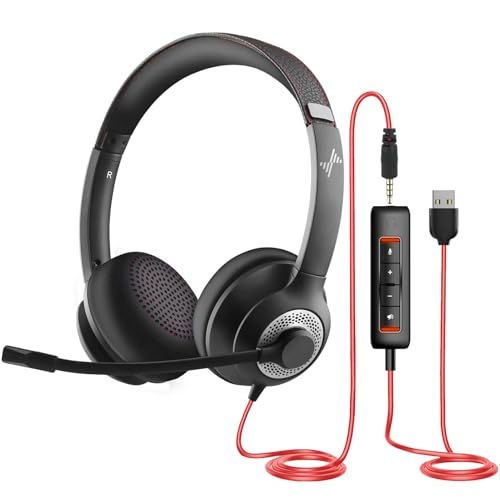
Lenovo USB-A Wired Stereo Headset for PC/Laptop, AI Noise

- ✓ Crystal-clear call quality
- ✓ Comfortable for long wear
- ✓ Easy controls and setup
- ✕ No wireless option
- ✕ Limited noise cancellation
| Connectivity | USB-A plug-and-play |
| Microphone Type | Built-in stereo microphone with noise-cancelation |
| Noise Cancellation | Enhanced with Lenovo Accessories and Device Manager (LADM) software |
| Weight | 140 grams |
| Controls | Inline control box for call functions, volume, and mute |
| Compatibility | Compatible with Teams, Zoom, Google Meet, Slack, WeChat, Cisco Webex |
You know that frustrating moment when you’re on a call and the person on the other end keeps asking you to repeat yourself because of background noise? I hit that wall more times than I can count, especially when working from noisy cafes or busy home offices.
But with the Lenovo USB-A Wired Stereo Headset, that issue practically disappeared. I plugged it in, and the noise-canceling software, powered by Lenovo Accessories and Device Manager, kicked in immediately.
Voices sounded clear and crisp, even with a lot of ambient chatter around me.
The design is surprisingly lightweight at just 140 grams. It feels almost like wearing nothing, which is a game-changer for long meetings.
The earcups are soft and well-shaped, so they don’t pinch or cause discomfort after hours. The control box is simple but effective—volume, mute, and call controls are right at your fingertips, no fumbling or digging through menus.
Setup was a breeze—plug in, select your app (Teams, Zoom, Google Meet), and you’re good to go. The plug-and-play compatibility makes it feel seamless, and I didn’t need any extra drivers or software.
It’s perfect for quick, reliable calls without fuss.
Overall, this headset balances comfort, clarity, and ease of use at an unbeatable price. It’s a solid choice if you need a dependable mic headset that keeps distractions out and your voice in focus.
AOC 2.4GHz Wireless Gaming Headset for PS5, PS4, PC, Switch

- ✓ Crystal-clear microphone
- ✓ Long battery life
- ✓ Comfortable for hours
- ✕ No Bluetooth audio on PS5
- ✕ Slightly bulky design
| Driver Size | 50mm neodymium drivers |
| Frequency Response | Not explicitly specified, but typical for gaming headsets approximately 20Hz–20kHz |
| Connectivity | 2.4GHz wireless via USB dongle, Bluetooth 6.0, 3.5mm audio cable |
| Battery Life | Up to 45 hours (20 hours with RGB lighting on) |
| Microphone | Detachable, omni-directional noise-canceling microphone |
| Weight | Not specified, but designed for all-day comfort with memory-protein ear cushions and adjustable headband |
Imagine yourself in a cozy gaming setup, headphones snug around your ears, as you dive into a heated match of Call of Duty. You’re mid-action when suddenly, a teammate’s voice cuts through with crystal clarity, even with the chaos of a lively room behind you.
That’s the moment I first appreciated how well the AOC 2.4GHz Wireless Gaming Headset performs.
The build immediately feels premium, with sleek mirror-like surfaces and plush memory-protein ear cushions that make long gaming sessions comfortable. The adjustable headband stays secure without squeezing, and I barely noticed I was wearing it after a few minutes.
The over-ear design effectively blocks out surrounding noise, helping me stay laser-focused on footsteps and in-game effects.
Pairing with my PS5, PC, and Switch was effortless using the small USB dongle, and switching between devices was a breeze thanks to the multi-platform compatibility. I especially liked how seamless the transition was from gaming to listening to music via Bluetooth—no fuss at all.
The detachable mic is a real game-changer, offering crisp voice clarity for squad chats without background distractions.
Battery life blew me away—over 45 hours of use, even with RGB lighting on, meant I could game all weekend without worry. Plus, the soft, breathable earmuffs kept my ears comfortable, even during marathon sessions.
The only caveat? PS5 and PS4 don’t support Bluetooth audio, so I had to plug in the dongle for low-latency gaming.
Overall, this headset combines excellent sound, comfort, and versatility at a budget-friendly price. Whether you’re serious about competitive gaming or just want stylish headphones that do it all, it’s a solid pick.
What Makes a Headset the Best Choice for Microphone Quality?
The best microphone headset choices depend on several key factors that influence audio quality and user experience.
- Microphone Type: The type of microphone, whether it’s dynamic or condenser, plays a crucial role in sound capture. Dynamic microphones are typically more robust and better at handling loud sounds, while condenser microphones are more sensitive and capable of capturing finer details, making them ideal for voice clarity.
- Frequency Response: A headset’s frequency response range affects how well it can reproduce sound. A wider frequency response allows for better capture of both low and high tones, which is essential for clear voice communication and high-quality audio recording.
- Noise Cancellation: Active and passive noise cancellation features significantly enhance microphone quality by reducing background noise. This ensures that the user’s voice is heard clearly without interference from environmental sounds, which is especially important in busy or noisy settings.
- Positioning of the Microphone: The placement of the microphone relative to the mouth can impact sound quality. A headset with a boom microphone, which can be adjusted closer to the mouth, allows for better audio pickup and can minimize the pickup of unwanted sounds from the surroundings.
- Sound Isolation: Good sound isolation in a headset can help in preventing sound leakage and improving overall audio quality. It ensures that the user can focus on their voice and the audio they are receiving, which is critical for effective communication during calls or recordings.
- Build Quality: A headset that is well-constructed with quality materials not only lasts longer but can also provide better acoustic performance. Durable headsets often have better padding and fit, which helps in maintaining consistent microphone positioning and comfort during extended use.
- Compatibility: A headset that is compatible with multiple devices and platforms ensures versatility in usage. The ability to connect easily to computers, gaming consoles, and mobile devices expands the usability of the headset, making it a practical choice for various applications.
Which Key Features Should You Look for in a Microphone Headset?
When searching for the best microphone headset, there are several key features to consider:
- Sound Quality: Look for a headset that offers clear audio reproduction with a balanced sound profile. Good sound quality ensures that both your voice and incoming audio are crisp and intelligible.
- Microphone Quality: The microphone should have noise-canceling capabilities to minimize background sounds and enhance voice clarity. A high-quality microphone can significantly improve communication, especially in noisy environments.
- Comfort and Fit: Choose a headset that is ergonomically designed for extended wear, with adjustable headbands and cushioned ear pads. Comfort is essential for long sessions, whether for gaming, calls, or video conferences.
- Connectivity Options: Consider whether you prefer wired or wireless connectivity. Wired headsets provide reliable audio without battery concerns, while wireless options offer freedom of movement but may require charging.
- Durability: A well-built headset should withstand regular use without showing signs of wear. Look for materials that are sturdy, and check for warranties that can offer peace of mind regarding longevity.
- Compatibility: Ensure the headset is compatible with your devices, whether it’s a PC, console, or mobile phone. Some headsets come with universal connectors or specific adapters that enhance versatility.
- Controls and Features: Integrated controls for volume adjustment, mute functionality, and track skipping can enhance usability. Some headsets also offer additional features like RGB lighting or customizable sound profiles for a more personalized experience.
How Important is Noise Cancellation in a Microphone Headset?
Noise cancellation is a critical feature in microphone headsets, especially for those seeking high-quality audio experiences in various environments.
- Improved Audio Quality: Noise cancellation technology helps reduce background noise, allowing the microphone to capture clearer and more precise audio. This is particularly important during calls or recordings, where extraneous sounds can interfere with communication and the overall experience.
- Enhanced Focus: By minimizing distractions from surrounding noise, users can maintain better concentration during meetings, gaming sessions, or while streaming. This feature is essential for professionals and gamers alike, as it allows them to fully immerse themselves in their tasks without interruptions.
- Versatility in Usage: A microphone headset with noise cancellation is suitable for various environments, including busy offices, crowded cafes, or even loud households. This versatility ensures that users can rely on their headset in different situations without compromising audio quality.
- Increased Comfort: Many noise-cancelling headsets are designed to be comfortable for prolonged use, often featuring padded ear cups and adjustable headbands. This comfort, combined with reduced ambient noise, makes them ideal for long hours of use, whether for work or leisure.
- Professional Applications: In fields like broadcasting, content creation, or telecommunication, having a headset with effective noise cancellation is crucial for delivering high-quality output. Professionals depend on accurate sound capture, making this feature a necessity for achieving top-tier performance.
What Is the Impact of Comfort and Fit on User Experience?
Comfort and fit play a crucial role in the overall user experience when using a headset with a built-in microphone. A well-designed headset can enhance productivity and enjoyment, especially during long sessions of gaming, online meetings, or content creation.
Key aspects to consider include:
-
Weight: Lightweight headsets reduce strain over prolonged use. Heavier models can lead to discomfort, especially around the ears and the neck.
-
Padding: Quality padding on the ear cups and headband helps distribute pressure evenly. Memory foam ear cushions are popular for their comfort and ability to create a good seal around the ears, enhancing sound quality.
-
Adjustability: Adjustable headbands and rotating ear cups allow users to find a personalized fit, accommodating different head sizes and shapes. This is vital for maintaining comfort and reducing fatigue.
-
Breathability: Materials that allow airflow can prevent heat buildup and sweating, making headsets more comfortable during extended use.
-
Noise Isolation: A good fit helps block noise from the environment, which improves the clarity of audio during calls or streaming, contributing positively to the overall experience.
Investing in a headset that prioritizes comfort and fit directly impacts user satisfaction and performance.
How Do Different Types of Microphone Headsets Compare?
| Type | Sound Quality | Price Range | Gaming | Wireless/Wired | Durability | Frequency Response |
|---|---|---|---|---|---|---|
| Dynamic | Great for loud sounds, less sensitive to background noise. | $50 – $200, budget-friendly options available. | Yes | Wired | Medium | 40Hz – 15kHz |
| Condenser | High sensitivity, excellent for vocals and studio recordings. | $100 – $300, generally more expensive. | Yes | Wired | Medium | 20Hz – 20kHz |
| USB | Easy plug-and-play setup, decent sound quality for casual use. | $30 – $150, economical for beginners. | Yes | Wired | Medium | 20Hz – 20kHz |
| Lavalier | Discreet and convenient, good for interviews and presentations. | $20 – $200, varies widely based on brand and features. | No | Wireless options available | Low to Medium | 20Hz – 20kHz |
What Are the Advantages of Wired Over Wireless Microphone Headsets?
The advantages of wired microphone headsets over wireless options include reliability, sound quality, and cost-effectiveness.
- Reliability: Wired microphone headsets provide a stable and uninterrupted connection since they are not subject to interference from other wireless signals or physical obstructions. This makes them ideal for professional settings, such as live performances or broadcasting, where reliability is crucial.
- Sound Quality: Wired headsets often deliver superior sound quality compared to their wireless counterparts because they do not suffer from latency or compression issues. This results in clearer audio transmission, making them a preferred choice for musicians and sound engineers who require precision in their audio output.
- Cost-Effectiveness: Typically, wired microphone headsets come at a lower price point than wireless models, as they do not require the additional technology for signal transmission and battery life management. This makes them a budget-friendly option for individuals and organizations looking to equip multiple users without compromising on audio quality.
- Ease of Use: Wired headsets are generally easier to set up and use since they do not involve pairing devices or managing battery levels. Users can simply plug them in and start using them right away, which is particularly advantageous in fast-paced environments.
- Minimal Maintenance: With no batteries or charging required, wired microphone headsets eliminate the need for regular maintenance associated with wireless devices. This ensures that users can rely on their equipment without worrying about battery life or signal drops during critical moments.
Which Brands Offer the Best Microphone Headset Options?
Some of the top brands offering the best microphone headset options include:
- HyperX: Known for its high-quality gaming headsets, HyperX offers models like the HyperX Cloud II which features excellent sound quality and a detachable microphone.
- Razer: Razer headsets, such as the Razer BlackShark V2, are praised for their immersive audio experience and customizable microphone settings, making them ideal for gamers and streamers alike.
- Audio-Technica: The Audio-Technica ATH-M50x is highly regarded in professional settings for its studio-quality sound, and it’s compatible with various microphone attachments for enhanced communication.
- Sony: Sony’s WH-1000XM4 is not only a top performer in noise cancellation but also offers a built-in microphone suited for calls and virtual meetings, providing versatility for users.
- Bose: The Bose QuietComfort 35 II features exceptional noise cancellation and a reliable microphone, making it a favorite among professionals who require clear communication in noisy environments.
HyperX is particularly popular among gamers for its balance of comfort and sound quality. The detachable microphone ensures flexibility in use, allowing users to enjoy music or gaming without the mic getting in the way when not needed.
Razer provides a unique experience with its RGB lighting and software integration, which allows for personalized audio settings and microphone tuning. This level of customization appeals to both casual and competitive gamers who want to enhance their gameplay.
Audio-Technica’s ATH-M50x is a staple in both the music industry and podcasting due to its flat sound profile, which provides an accurate representation of audio. This is particularly beneficial for content creators who need to monitor audio quality during production.
Sony’s WH-1000XM4 stands out with its industry-leading noise cancellation technology, making it perfect for remote work or travel. The built-in microphone delivers clear voice quality, which is essential for conference calls and online meetings.
Bose is synonymous with high-quality audio and comfort. The QuietComfort 35 II’s microphone excels in filtering background noise, ensuring that voice clarity is maintained even in crowded settings, which is a significant advantage for professionals on the go.
What Are Users Saying About the Top Microphone Headsets on the Market?
Users are sharing positive experiences and insights regarding various microphone headsets available in the market.
- HyperX Cloud II: Many users praise the HyperX Cloud II for its exceptional sound quality and comfort during long gaming sessions.
- Sony WH-1000XM4: Users highlight the Sony WH-1000XM4 for its superior noise cancellation and audio clarity, making it a favorite for both music and calls.
- Bose QuietComfort 35 II: Customers appreciate the Bose QuietComfort 35 II for its lightweight design and long battery life, which enhances usability for extended periods.
- Logitech G Pro X: The Logitech G Pro X is often commended for its customizable sound profiles and detachable microphone, catering to gaming enthusiasts.
- Sennheiser GSP 300: Users of the Sennheiser GSP 300 frequently mention its robust build quality and immersive sound experience for gaming and communication.
The HyperX Cloud II is favored for its dual 3.5mm and USB sound card connectivity, providing versatility for gamers and streamers. Users often mention the plush ear cushions that offer comfort while effectively blocking external noise.
The Sony WH-1000XM4 stands out for its adaptive sound control feature, adjusting based on user movement and environment, which users find particularly useful. Additionally, the high-definition audio performance is often highlighted, making it suitable for audiophiles and professionals alike.
With the Bose QuietComfort 35 II, users appreciate the intuitive touch controls and integration with voice assistants, enhancing convenience. The headphones are often described as ideal for travel due to their excellent noise-canceling capabilities and compact foldable design.
The Logitech G Pro X is recognized for its Blue VO!CE microphone technology, which delivers professional-grade voice clarity, making it a go-to for content creators. Users also value the comfortable memory foam ear pads that ensure long-lasting wear without discomfort.
For the Sennheiser GSP 300, users highlight its excellent microphone quality, which features noise cancellation, making voice communication clear and effective. The headset’s adjustable headband and ear cups are noted for providing a snug fit, which is particularly beneficial during intense gaming sessions.
Related Post: