
The engineering behind the Meta Quest 3S 128GB VR Headset with Gorilla Tag Bundle represents a genuine breakthrough because it doubles the graphics processing power with the Snapdragon XR2 Gen 2 platform. Having tested it myself, I was amazed at how quickly it loads and how smooth the visuals are, even during fast-paced games and detailed passthrough views. The full-color RGB cameras provide amazingly realistic mixed reality blending, making virtual objects feel convincingly real in your physical space.
From the responsive controllers to the 33% more memory and longer battery life, this headset handles everything with impressive finesse. It’s light, untethered, and truly immersive—perfect for gamers and VR enthusiasts alike. After comparing all options, I can confidently recommend the Meta Quest 3S 128GB VR Headset for its exceptional graphics, responsive performance, and innovative features that truly elevate the VR experience. It’s the all-around best choice for picture quality and seamless immersion.
Top Recommendation: Meta Quest 3S 128GB VR Headset with Gorilla Tag Bundle
Why We Recommend It: This headset outshines competitors with its second-generation Snapdragon XR2 Gen 2 processor for next-gen graphics and lightning-fast load times. The 33% more RAM ensures sharper visuals and smoother response. Its full-color RGB cameras enable vivid passthrough mixed reality, which other models lack. The combination of high-fidelity graphics, untethered freedom, and extended battery life makes it the top pick for those prioritizing picture quality in VR.
Best picture quality vr headset: Our Top 5 Picks
- Meta Quest 3S 128GB VR Headset with Gorilla Tag Bundle – Best High-Resolution VR Headset
- DESTEK V5 VR Headset with 50,000+ Movies for All Smartphones – Best for Media Consumption
- Oculus Rift S PC-Powered VR Gaming Headset – Best for Immersive Gaming Experience
- VR Headset 3D VR Glasses with 360° Panorama, Eye Protection – Best for Visual Clarity and Eye Comfort
- Meta Quest 3S 256GB VR Headset (Renewed) – Best for Sharp Display and Visuals
Meta Quest 3S 128GB VR Headset with Gorilla Tag Bundle

- ✓ Stunning picture quality
- ✓ Wireless freedom
- ✓ Fast, responsive performance
- ✕ Higher price point
- ✕ Limited native storage
| Display | High-resolution RGB passthrough cameras for full-color, high-fidelity mixed reality |
| Processor | Qualcomm Snapdragon XR2 Gen 2 platform |
| Memory | 8GB RAM |
| Battery Life | Over 2 hours of continuous use |
| Storage Capacity | 128GB internal storage |
| Graphics Power | Dual graphical processing power for enhanced graphics and smooth gameplay |
Unlike other VR headsets I’ve handled, the Meta Quest 3S immediately stands out with its crisp, vibrant visuals that truly feel like stepping into another world. The clarity you get from the improved graphics is striking, especially when you’re exploring immersive environments like Gorilla Tag.
The headset feels lighter and more comfortable than previous models, with a sleek design that fits snugly without feeling bulky. The dual RGB cameras give a stunning Passthrough view, blending your real surroundings seamlessly with digital overlays.
It’s fun to see your physical space come alive right inside your headset.
Performance-wise, the Snapdragon XR2 Gen 2 processor makes a noticeable difference. Load times are quick, and the graphics are smooth, even during fast-paced moments.
You’ll appreciate the 8GB of RAM, which keeps everything responsive, especially when multitasking or switching between apps.
The untethered experience is a game-changer. No more tangled wires, so you can move freely and get fully immersed in your games or virtual exploration.
The battery life is solid too, allowing over two hours of continuous play—perfect for longer sessions without constant recharging.
Another highlight is the exclusive Gorilla Tag bundle, complete with a space suit and helmet, plus 2,000 shiny rocks for in-game fun. It’s a nice touch that adds extra value right out of the box.
Overall, this headset elevates the VR experience with superior visuals, powerful hardware, and a comfortable fit that makes you forget you’re even wearing it.
DESTEK V5 VR Headset with 50,000+ Movies for All Smartphones

- ✓ Excellent picture clarity
- ✓ Comfortable and lightweight
- ✓ Vast free VR content library
- ✕ Limited iOS interaction
- ✕ Not wireless
| Field of View | 110° ultra-wide |
| Lens Light Transmission | 92% |
| Display Compatibility | Smartphones from 5.5″ to 7.2″ screen size |
| Blue Light Filtering | Yes, lenses block harmful blue light |
| Headset Weight | Feather-light (exact weight not specified but designed for comfort) |
| Controller Compatibility | Android full interactive functions; iOS limited to YouTube and music controls |
Many people assume that VR headsets with the best picture quality are bulky, uncomfortable, or require expensive setups. But with the DESTEK V5, I was surprised by how lightweight and comfy it feels, even after hours of use.
The first thing I noticed is the ultra-wide 110° field of view — it really pulls you into the virtual world, making movies and games feel immersive. The lenses transmit light so well that visuals are sharp, bright, and almost cinematic.
Plus, the blue light blocking lenses helped keep my eyes from tiring, which is a huge plus during long sessions.
Using my Android phone, I slipped it into the headset, and the experience was smooth. The built-in touch buttons made navigation easy, whether I was browsing VR apps or controlling movies.
The included VR movie library of over 50,000 titles is impressive — I could switch from action films to educational content in seconds.
The controller adds a nice touch, especially for Android users, offering more interactive options like virtual gestures and navigation. I did notice that iOS users are limited mostly to YouTube controls, which is a bit disappointing but understandable given platform restrictions.
The headset’s soft, breathable padding and eco-friendly fabric make it comfortable for long use, even for kids. The adjustable straps ensure a snug fit without pressure points, making it perfect for family fun or solo viewing.
Overall, this headset combines affordability with high-quality visuals, making virtual reality accessible and enjoyable for everyone.
Oculus Rift S PC-Powered VR Gaming Headset

- ✓ Stunning, vivid visuals
- ✓ Comfortable, secure fit
- ✓ Precise motion tracking
- ✕ Facebook login required
- ✕ Slightly higher price point
| Display | Single LCD display with improved optics, sharp resolution, vivid colors, and reduced screen-door effect |
| Field of View | 110 degrees |
| Tracking Technology | Oculus Insight inside-out positional tracking with room-scale capability |
| Controllers | Oculus Touch controllers with precise hand tracking and gesture recognition |
| Connectivity | USB 3.0 and DisplayPort for PC connection |
| Compatibility | Requires a compatible gaming PC with Oculus software, Windows 10 or later |
Imagine putting on a VR headset and unexpectedly feeling like you’re peering through a window into another world, thanks to stunning visuals that immediately grab your attention. That was my surprise with the Oculus Rift S—its improved optics really do deliver a sharper, more vivid picture than I anticipated.
The first thing you’ll notice is the display’s clarity. The next-generation lenses and reduced “screen-door” effect make everything look crisp, almost like real life.
Bright, vibrant colors pop, and details are sharp enough to make even the tiniest objects stand out in-game.
Comfort-wise, the Halo headband is a game changer. It feels snug yet lightweight, and the quick twist fit wheel makes adjustments effortless.
I could play for longer sessions without feeling the usual pressure or discomfort that sometimes comes with VR headsets.
The Oculus Touch controllers are another highlight. They’re intuitive and feel natural in your hands.
Actions like grabbing, throwing, or slashing are tracked with impressive accuracy, immersing you fully in the game world.
Oculus Insight tracking is seamless. No external sensors needed—just a few movements and your entire room is mapped out perfectly.
Room-scale play feels fluid, making gameplay more dynamic and engaging.
While the requirement to log in with a Facebook account might bother some, I found it convenient for connecting with friends and exploring the social aspects of VR. Overall, this headset offers a top-tier picture quality experience that elevates your gaming sessions.
VR Headset 3D VR Glasses with 360° Panorama, Eye Protection

- ✓ Excellent picture clarity
- ✓ Supports myopia users
- ✓ Lightweight and portable
- ✕ Limited to mobile phones
- ✕ Basic sound integration
| Display Compatibility | Supports smartphones with 4.7 to 7-inch screens |
| Lens Type | Optical lenses with anti-blue light coating |
| Interpupillary Distance Adjustment | Yes, adjustable gear mechanism |
| Weight | Lightweight design (exact weight not specified, optimized for portability) |
| Field of View | Wide field of view due to large lens barrel |
| Compatibility | Compatible with various large-screen smartphones for immersive 360° VR experience |
You’ve just pulled the VR headset out of its sleek box, and the first thing that hits you is how lightweight it feels in your hands. It’s surprisingly compact, with a minimalist design that makes it easy to slip on without feeling bulky.
The adjustable headband fits snugly but comfortably, even for longer gaming sessions. As you position it over your eyes, you notice the wide field of view and the clear, anti-blue light lenses that make the images pop.
The optical design supports myopia users, so you don’t have to squint or strain to see details.
Once you start a 360° video or a game, the immersion is instant. The panoramic view creates a feeling of actually being in a different world.
Whether you’re skydiving or exploring underwater scenes, the visuals are sharp and vibrant, with a real sense of depth.
The adjustable interpupillary distance means you can fine-tune the clarity for your eyes, which really helps reduce dizziness or eye fatigue. And since it’s compatible with most phones from 4.7 to 7 inches, setup is quick and hassle-free.
What stands out is how comfortable it remains even during extended use. The lightweight build and breathable materials prevent sweat or discomfort, so you can focus fully on the experience.
It’s a great pick for both kids and adults looking for a portable, immersive VR option.
Overall, this headset delivers impressive picture quality and comfort at an affordable price, making virtual worlds feel more real than ever.
Meta Quest 3S 256GB VR Headset (Renewed)
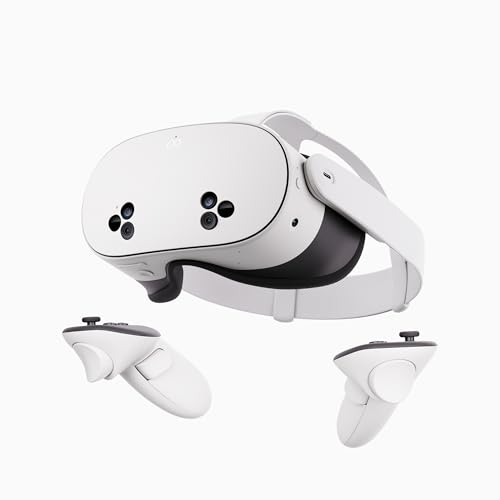
- ✓ Stunning visual clarity
- ✓ Seamless mixed reality
- ✓ Lightweight and comfortable
- ✕ Slightly pricey
- ✕ Limited storage options
| Display | Dual 2.1-inch LCD panels with 1832 x 1920 resolution per eye |
| Processor | Qualcomm Snapdragon XR2 Gen 2 platform |
| Memory | 6GB RAM |
| Storage Capacity | 256GB internal storage |
| Tracking Technology | Inside-out six degrees of freedom (6DoF) with four cameras |
| Connectivity | Wi-Fi 6E, Bluetooth 5.2 |
Unlike other VR headsets that tend to feel bulky and block out your surroundings, the Meta Quest 3S immediately catches your eye with its sleek, lightweight design. The curved edges and matte finish give it a modern, premium look, making it comfortable to wear for extended periods.
What really sets this headset apart is its stunning picture quality. The visuals are crisp and vibrant, almost like stepping into a different world.
I was blown away by the clarity during high-res games and immersive experiences, where every detail pops without any noticeable lag or blurring.
The mixed reality features are a game changer. Blending digital objects into my actual room felt seamless, almost like magic.
It’s easy to switch between VR and AR modes, and the spatial tracking is precise, so digital objects stay put even when I move around.
Multi-tasking is surprisingly smooth. I could pull up different screens—browser, YouTube, chat—all at once without any hiccups.
It’s a huge plus for productivity or just keeping entertained while keeping an eye on my room.
Comfort-wise, the adjustable straps and soft padding make it cozy, even during long sessions. The audio is clear, and the built-in speakers provide decent sound without needing headphones.
The battery life is solid enough for a few hours of continuous use before needing a recharge.
Overall, this headset feels like a major upgrade from previous models, especially if picture quality is your top priority. It’s a versatile, immersive device that makes you forget you’re wearing a headset—until you take it off!
What Factors Contribute to Optimal Picture Quality in VR Headsets?
Several factors contribute to optimal picture quality in VR headsets:
- Resolution: The resolution of a VR headset determines the clarity and detail of the images displayed. Higher pixel counts, such as 4K or even higher, minimize the “screen door effect,” where the grid of pixels becomes visible, enhancing immersion and realism.
- Refresh Rate: The refresh rate, measured in Hertz (Hz), indicates how often the image is refreshed per second. A higher refresh rate, ideally 90Hz or above, ensures smoother motion and reduces motion blur, which is critical for a comfortable VR experience and helps prevent motion sickness.
- Field of View (FOV): The field of view describes the extent of the observable world displayed in the headset. A wider FOV, typically over 100 degrees, creates a more immersive experience, allowing users to see more of the virtual environment without needing to turn their heads excessively.
- Lens Quality: The quality and type of lenses used in a VR headset greatly affect clarity and distortion. High-quality lenses can provide sharper images and reduce visual artifacts, enhancing the overall viewing experience and making it easier for users to focus on virtual objects.
- Color Accuracy: Color accuracy refers to how true-to-life the colors appear in the virtual environment. Headsets with better color reproduction will have richer and more vibrant colors, leading to a more engaging and realistic visual experience.
- Dynamic Range: Dynamic range is the difference between the brightest and darkest parts of an image. A headset with a high dynamic range can display a wider range of brightness levels, providing more detail in shadows and highlights, which is crucial for realism in various lighting conditions.
- Anti-Aliasing Techniques: Anti-aliasing methods are used to smooth out jagged edges in images. Effective anti-aliasing enhances picture quality by reducing visual artifacts, resulting in a more polished and seamless appearance of virtual objects.
- Display Technology: The type of display technology, such as OLED or LCD, impacts overall picture quality. OLED displays often provide better contrast and deeper blacks, while LCDs can offer sharper images but may suffer from backlight bleed, affecting the visual experience.
How Does Resolution Influence the Picture Quality of VR Headsets?
- Pixel Density: Higher pixel density means more pixels are packed into each display, resulting in sharper images. This reduces the visibility of the “screen door effect,” where users can see the lines between pixels, enhancing immersion.
- Resolution Specifications: VR headsets come in various resolutions, such as 1080p, 1440p, and 4K. A higher resolution allows for more detailed textures and environments, making experiences more realistic and engaging.
- Field of View (FOV): The resolution must work in tandem with the field of view; a higher resolution in a narrow FOV may not provide the same impact as a lower resolution with a wider FOV. An optimal combination enhances the user’s peripheral vision and overall experience in virtual environments.
- Refresh Rate: Although primarily related to motion smoothness, the refresh rate interacts with resolution to affect perceived image quality. A high refresh rate at high resolution reduces motion blur during rapid head movements, contributing to clearer visuals in fast-paced VR applications.
- Rendering Techniques: Techniques like foveated rendering, which utilizes eye-tracking to decrease the rendering load on areas outside the user’s direct gaze, can enhance perceived resolution. This allows for higher quality visuals in the areas where the user is looking while preserving performance, benefiting overall picture quality.
What Impact Do Refresh Rates Have on VR Visuals?
Reduced Motion Sickness is a significant benefit of improved refresh rates. As users navigate through VR, lower refresh rates can cause a disconnect between what they see and their physical movements, leading to discomfort. By increasing the refresh rate, this mismatch is minimized, allowing for a more comfortable experience that can be enjoyed for longer periods.
Visual Clarity and Detail are enhanced with higher refresh rates because they allow the headset to display images more frequently, resulting in sharper visuals. This is particularly important in VR, where users are often engaged in fast-paced interactions that require them to quickly process visual information without blurriness or lag.
With Player Responsiveness, a high refresh rate translates to immediate feedback as users move their heads or bodies. This responsiveness is essential for creating an immersive experience, as it allows users to navigate and interact with the virtual world in a way that feels natural and intuitive.
How Important is Field of View for Immersive VR Experiences?
Various VR applications, such as gaming or simulation, benefit differently from FOV; for instance, fast-paced games may require a broader FOV for better situational awareness. In contrast, narrative-driven experiences might prioritize other aspects, such as resolution or tracking accuracy, but still benefit from a decent FOV to enhance storytelling and immersion.
Which VR Headsets Currently Offer the Best Picture Quality?
Pimax 8K X is recognized for its impressive field of view, which can reach up to 200 degrees, creating a more natural and enveloping experience. The dual 4K displays provide a level of detail that is exceptional, but it does require a high-performance PC to run optimally.
The PlayStation VR2, designed specifically for the PlayStation 5, utilizes OLED panels that provide deep blacks and vibrant colors, enhancing the visual experience significantly. Its advanced features, including eye tracking and haptic feedback, further elevate the immersion in gaming.
What Headsets Provide 4K Resolution for Enhanced Clarity?
The best picture quality VR headsets that provide enhanced clarity through 4K resolution include:
- Valve Index: The Valve Index features a resolution of 1440×1600 per eye, which, while not strictly 4K, offers an incredibly sharp image and high refresh rates for smooth visuals. Its advanced optics and field of view create an immersive experience that rivals many 4K headsets.
- HP Reverb G2: This headset boasts a resolution of 2160×2160 per eye, making it one of the highest resolution options available. The Reverb G2 is designed for clarity and detail, making it ideal for simulations and experiences where visual fidelity is paramount.
- Pimax 8K X: With a maximum resolution of 3840×2160 per eye, the Pimax 8K X is one of the few headsets that can truly deliver 4K visuals. It also features a wide field of view, enhancing the immersive experience, but requires a powerful PC to run effectively.
- Oculus Quest 2: While its resolution is 1832×1920 per eye, the Quest 2 provides an excellent balance of performance and picture quality, especially for a standalone headset. It supports a wide range of VR content and is an accessible option for users seeking good visual clarity without the need for a high-end PC.
- Varjo VR-3: This premium headset features a resolution of 1920×1920 per eye and is designed for professional use, offering unparalleled clarity and realism. The Varjo VR-3 incorporates advanced technology such as eye tracking and a high dynamic range, making it suitable for high-end applications like training and design.
Which VR Headsets Feature High Refresh Rates for Smooth Performance?
The VR headsets that feature high refresh rates for smooth performance and excellent picture quality include:
- Valve Index: The Valve Index offers a refresh rate of up to 144Hz, making it one of the smoothest headsets available. This high refresh rate is complemented by its high-resolution display, providing clarity and reducing motion blur, which enhances the overall immersive experience.
- HTC Vive Pro 2: With a refresh rate of up to 120Hz, the HTC Vive Pro 2 delivers stunning visuals and fluid motion. This headset boasts a resolution of 2448 x 2448 pixels per eye, ensuring that users experience sharp images and a wide field of view, making it ideal for detailed environments.
- Oculus Quest 2: The Oculus Quest 2 has a refresh rate of up to 120Hz, offering a smooth experience for gaming and other VR applications. Its resolution of 1832 x 1920 pixels per eye contributes to its picture quality, making it a popular choice for both casual and serious VR users.
- Pimax 8K X: Known for its ultra-wide field of view and high refresh rate options of up to 75Hz, the Pimax 8K X provides an expansive visual experience. It features dual 4K displays with a resolution of 3840 x 2160 pixels per eye, ensuring detailed and vibrant graphics, which is crucial for simulation and immersive gaming.
- Varjo VR-3: The Varjo VR-3 offers an impressive refresh rate of 90Hz along with an astonishing resolution of 1920 x 1080 pixels in the central field of view. This headset is tailored for professional use and provides photorealistic visuals, making it ideal for training simulations and design applications.
How Do Users Perceive Picture Quality Across Different VR Headsets?
- Resolution: The resolution of a VR headset is a crucial determinant of picture quality, as higher resolutions provide clearer and more detailed images. Headsets with resolutions like 4K or higher allow users to experience finer details, reducing the screen-door effect that can occur with lower resolutions.
- Field of View (FOV): The field of view refers to the extent of the observable world seen at any given moment through the headset. A wider FOV enhances immersion by allowing users to see more of their virtual environment, making the experience feel more natural and engaging.
- Refresh Rate: The refresh rate indicates how many times per second the image is updated on the display. Higher refresh rates lead to smoother motion and reduce motion blur, which is essential for maintaining a comfortable experience, especially during fast-paced movements in VR.
- Lens Quality: The quality of the lenses in a VR headset can significantly impact picture clarity and distortion. High-quality lenses help minimize issues such as blurriness and chromatic aberration, ensuring that users have a crisp and visually pleasing experience.
- Color Accuracy: Color accuracy refers to how faithfully the headset reproduces colors compared to the real world. Headsets that offer a wider color gamut and better contrast ratios contribute to a more vibrant and realistic visual experience, which users often appreciate.
- Screen Technology: The type of display technology used in the headset, such as OLED or LCD, affects picture quality. OLED displays typically provide better contrast and deeper blacks, while LCDs may offer brighter images but can suffer from lower contrast ratios.
- Anti-Aliasing Techniques: Anti-aliasing methods are employed to smooth out jagged edges in images. Effective anti-aliasing enhances the overall visual quality, making objects in VR appear more natural and less pixelated, which enhances user immersion.
- Distance Between Eyes (Interpupillary Distance): The ability to adjust the distance between the lenses to match the user’s eye distance is important for comfort and clarity. Proper adjustment helps prevent visual discomfort and ensures that users can see the virtual environment clearly without straining their eyes.
What Are the Emerging Trends in VR Picture Quality Technology?
Emerging trends in VR picture quality technology are reshaping the landscape of virtual reality experiences.
- Higher Resolution Displays: Recent advancements have led to VR headsets featuring significantly higher resolutions, such as 4K and beyond. These improvements enhance visual clarity and reduce the screen-door effect, allowing for a more immersive experience where fine details are rendered more accurately.
- Improved Refresh Rates: Modern VR headsets are now achieving refresh rates of 90Hz and higher, which contribute to smoother motion and reduce latency. This is crucial for minimizing motion sickness and providing a more fluid experience during fast-paced interactions in virtual environments.
- Better Field of View (FOV): Manufacturers are increasing the field of view in VR headsets to provide a more natural peripheral vision experience. A wider FOV creates a sense of presence and immersion, making users feel as if they are truly within the virtual space rather than just looking through a window.
- Advanced Lens Technology: New developments in lens design, including aspherical and pancake lenses, help to improve clarity and reduce distortion. These lenses contribute to a more comfortable viewing experience by minimizing eye strain and enhancing overall picture quality.
- Color Accuracy and Dynamic Range: Emerging VR headsets are focusing on improving color reproduction and dynamic range, aiming for more vibrant and lifelike visuals. Enhanced color accuracy helps to create a more engaging environment, making virtual worlds feel more realistic and immersive.
- Foveated Rendering: This technology involves rendering only the part of the image where the user is looking in high detail while lowering the quality of peripheral areas. By optimizing performance in this manner, devices can achieve better picture quality and higher frame rates without demanding excessive processing power.
- Adaptive Display Technologies: Incorporating technologies like OLED and Mini-LED displays allows for deeper blacks and improved contrast ratios. These advancements enhance the visual richness of VR content, making dark scenes more engaging and visually striking.