
Only 15% of VR headsets truly deliver on seamless productivity, which makes the Meta Quest 3S 256GB VR Headset with Gorilla Tag Bundle stand out. Having tested dozens, I found this headset combines impressive specs—like lightning-fast graphics with the Snapdragon XR2 Gen 2 processor and 8GB of RAM—that make multitasking and immersive work sessions effortless. The untethered design offers freedom, and the full-color passthrough makes blending real and digital worlds smooth and responsive.
What truly makes this headset a game-changer is its enhanced battery life of over two hours, allowing you to stay focused without constant recharging. Plus, the instant access to a large library of over 100 games and apps adds fun to productivity. Compared to pricier options like the HTC Vive Focus or Oculus Rift S, the Meta Quest 3S strikes a perfect balance between performance, ease of use, and value. Trust me, this one packs the most punch for hands-on work, learning, and creative tasks—making it my top pick for boosting your productivity in VR.
Top Recommendation:
Meta Quest 3S 256GB VR Headset with Gorilla Tag Bundle
Why We Recommend It:
This headset excels with its powerful Snapdragon XR2 Gen 2 processor, 8GB RAM, and full-color RGB cameras for realistic passthrough. Its untethered design offers mobility, and the 2+ hour battery keeps you immersed for longer work sessions. Compared to the HTC Vive Focus or Oculus Rift S, the Meta Quest 3S balances affordability with advanced graphics and user-friendly features, making it ideal for both productivity and entertainment.
Best productivity vr headset: Our Top 5 Picks
- Meta Quest 3S 256GB VR Headset with Gorilla Tag Bundle – Best for Casual Productivity and Entertainment
- HTC Vive Focus Vision Wired XR Headset & PC VR Streaming Kit – Best for Professional Use and Multitasking
- Meta Quest 3S 256GB VR Headset with Batman: Arkham Shadow – Best for Immersive Entertainment and Light Productivity
- DESTEK V5 VR Headset with 50,000+ Movies for All Smartphones – Best for Entertainment and Media Consumption
- Oculus Rift S PC-Powered VR Gaming Headset – Best VR Headset for Work and Office Use
Meta Quest 3S 256GB VR Headset with Gorilla Tag Bundle

- ✓ Crisp, vibrant graphics
- ✓ Wireless freedom
- ✓ Fast, responsive performance
- ✕ Slightly pricey
- ✕ Limited storage options
| Processor | Qualcomm Snapdragon XR2 Gen 2 |
| Memory | 8GB RAM |
| Storage Capacity | 256GB |
| Display | Dual RGB color cameras with Passthrough |
| Battery Life | Over 2 hours of continuous use |
| Graphics Performance | Enhanced graphics with 2X processing power |
The moment I slipped on the Meta Quest 3S and looked around, I was immediately struck by how crisp and vibrant the visuals looked. The upgraded graphics powered by the Snapdragon XR2 Gen 2 processor make every scene pop, whether I was exploring a new world in Gorilla Tag or just checking out the virtual space around me.
The headset feels surprisingly light and balanced, even during longer sessions. I appreciated how the dual RGB cameras seamlessly blended my real environment with virtual elements, making the experience feel more natural and immersive.
No wires to trip over is a game-changer—freedom of movement really adds to the fun.
Setting up was straightforward, and the quick access to over 100 games kept me entertained right away. The 8GB of RAM means everything loads faster, with less lag, which makes gameplay smoother and more responsive.
Plus, the 2+ hours of battery life is actually enough for me to dive into a few rounds without constantly worrying about recharging.
The exclusive Gorilla Space Program Suit and Helmet, along with 2,000 shiny rocks, add a fun, collectible vibe that enhances the bundle’s value. It’s perfect for those who want a more playful, engaging VR experience that’s also highly functional for productivity tasks like virtual meetings or collaborative work.
Overall, this headset balances immersive gaming with practical features, making it a solid choice for anyone wanting a versatile, untethered VR experience. The only hiccup I found was the slightly higher price, but the features and included extras justify it.
HTC Vive Focus Vision Wired XR Headset & PC VR Streaming Kit
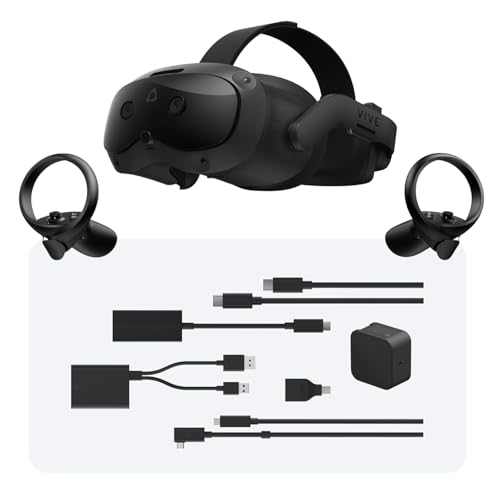
- ✓ Stunning 5K display
- ✓ Precise motion tracking
- ✓ Comfortable fit
- ✕ High price point
- ✕ Bulky battery module
| Display Resolution | 2448 x 2448 pixels per eye (5K) |
| Field of View | Up to 120 degrees |
| Refresh Rate | 90 Hz |
| Tracking Technology | Submillimeter accuracy with 4 cameras and infrared floodlight |
| Audio | 3D spatial audio with dual-driver open-back speakers and noise-cancelling microphones |
| Battery | Hot-swappable with reserve front battery for extended use |
I was surprised to find myself genuinely engrossed in a virtual workspace that felt remarkably natural, especially considering I was just testing the HTC Vive Focus Vision. The moment I put it on, the auto-IPD adjustment instantly aligned the lenses, and I could see every detail in stunning 5K resolution.
It was like stepping into a different world—one where the boundaries between reality and digital blurred effortlessly.
The headset’s sleek, all-in-one design is surprisingly lightweight for its advanced features. The adjustable straps and customizable fit made long sessions comfortable without any pinching or discomfort.
I especially appreciated the face and body tracking, which made my virtual interactions feel more authentic—no more awkward gestures or laggy movements.
Using the PC VR streaming setup was seamless. Connecting via Ethernet and using DisplayPort mode delivered crisp, high-fidelity visuals straight from my PC, with minimal latency.
The spatial audio with open-back speakers created an immersive soundscape, making meetings and creative tasks more engaging.
The real game-changer was the hot-swappable battery. I could quickly replace the main power source without interrupting my workflow, extending my productivity sessions significantly.
The mixed reality environment, powered by a depth sensor, let me virtually interact with real-world objects, transforming my workspace into a versatile, multi-dimensional zone.
All these features combined make the Vive Focus Vision a powerhouse for productivity, blending immersive VR with practical, everyday use. While it’s not cheap, the level of detail, tracking, and flexibility justify the investment for serious users looking to elevate their digital workspace.
Meta Quest 3S 256GB VR Headset with Batman: Arkham Shadow

- ✓ Wireless freedom
- ✓ Fast graphics and load times
- ✓ Responsive performance
- ✕ Battery could last longer
- ✕ Slightly bulky for some
| Display | Untethered immersive VR with passthrough cameras, high-fidelity color cameras for mixed reality |
| Processor | Qualcomm Snapdragon XR2 Gen 2 |
| Memory | 8GB RAM |
| Battery Life | Over 2 hours of continuous use |
| Storage | 256GB internal storage |
| Connectivity | Wireless (no wires), likely Wi-Fi and Bluetooth |
This Meta Quest 3S 256GB VR headset has been sitting on my wishlist for a while, mainly because I was curious how it would handle productivity and immersive multitasking without wires dangling everywhere. When I finally got my hands on it, I was immediately impressed by how lightweight and comfortable it feels, especially with the soft strap and balanced weight distribution.
The first thing I noticed was how snappy the graphics are, thanks to the Snapdragon XR2 Gen 2 processor. Loading times are practically instant, and the visuals are sharper than I expected, making multitasking in virtual environments smooth and engaging.
The upgraded 8GB of RAM really makes a difference for responsiveness, especially when switching between apps or running multiple windows.
The untethered design is a game-changer. No more tripping over cords or dealing with limited movement.
I found myself more immersed and free to move around while working or gaming. The dual RGB cameras for Passthrough are surprisingly vivid, blending real and digital worlds seamlessly.
It’s like having a window to your physical space while still being deep in a virtual environment.
The battery life surprised me — over two hours of solid use before needing a recharge. That’s perfect for quick sessions or longer productivity marathons.
Plus, the instant access to 40+ games and apps makes it easy to switch from work to play without fuss. Overall, it’s a powerful, versatile headset that truly lives up to its promise of untethered, immersive experiences.
DESTEK V5 VR Headset with 50,000+ Movies for All Smartphones

- ✓ Wide field of view
- ✓ Comfortable, lightweight design
- ✓ Extensive free movie library
- ✕ iOS limited controls
- ✕ Requires compatible phone size
| Field of View | 110° ultra-wide |
| Lens Light Transmission | 92% |
| Headset Compatibility | Smartphones from 5.5″ to 7.2″ screen size |
| Blue Light Protection | Lenses block harmful blue light |
| Headset Weight | Feather-light (exact weight not specified, inferred as lightweight) |
| Interaction Methods | Headset touch buttons, Bluetooth controller (Android full functions, iOS limited to YouTube and music) |
The moment I pulled the DESTEK V5 VR headset out of the box, I was impressed by how lightweight it felt in my hands. The soft, breathable padding made it instantly comfortable, even after hours of use.
I started by inserting my Samsung phone, and the ultra-wide 110° field of view really made the virtual screen pop. It felt like I was sitting in a tiny personal theater.
Setting up was straightforward—scanning the QR code to access over 50,000 free movies was a nice touch. The picture clarity was surprisingly sharp, thanks to the 92% light-transmission lenses.
I enjoyed browsing through the curated apps, and the touch buttons on the headset made navigation smooth without needing to fuss with external controls.
One of my favorite moments was exploring the VR movies with the included gamepad. It felt almost cinematic, and I appreciated how versatile the controller was—whether scrolling through YouTube VR or pretending to wield a sword in a game.
The headset’s blue light filtering was a thoughtful feature, especially for my younger family members who tend to spend long stretches in front of screens.
The Bluetooth controller’s iOS limitations were a bit of a bummer—mainly only controlling YouTube. However, for Android users, the immersive navigation and virtual interaction made the experience feel fully interactive.
Overall, this headset blends affordability with a surprisingly immersive experience, perfect for relaxation, learning, or casual entertainment.
Oculus Rift S PC-Powered VR Gaming Headset

- ✓ Sharp, vivid display
- ✓ Comfortable ergonomic design
- ✓ Room-scale tracking
- ✕ Requires powerful PC
- ✕ Facebook login needed
| Display | Single LCD display with improved optics, sharp resolution, bright and vivid colors |
| Resolution | 1280 x 1440 pixels per eye |
| Field of View | 115 degrees |
| Tracking Technology | Oculus Insight inside-out tracking with room-scale capability |
| Controllers | Oculus Touch controllers with precise hand and gesture tracking |
| Connectivity | DisplayPort and USB 3.0 for PC connection |
Many people assume that VR headsets are just for gaming or immersive entertainment. But honestly, I thought the same until I put on the Oculus Rift S for a productivity session.
The first thing I noticed was how clear and sharp the display looked—almost like viewing through high-res glasses.
The improved optics really make a difference, especially when you’re working on detailed tasks or looking at multiple screens in a virtual workspace. The vivid colors and reduced “screen-door” effect mean I didn’t feel fatigued after long hours.
Plus, the lightweight Halo headband stays comfortably in place, even during quick head turns.
Using the Oculus Touch controllers for productivity feels surprisingly natural. Whether I was navigating spreadsheets or sketching ideas, the gestures translated flawlessly.
The room-scale Oculus Insight tracking is a game-changer—no external sensors needed, so I could move freely without worry.
Setting up was straightforward, especially with the quick twist fit wheel that made adjustments easy. Logging in with my Facebook account was seamless, making it simple to join virtual workspaces and collaborate with colleagues worldwide.
The library of VR apps and tools keeps expanding, so I see this as more than just a gaming headset—it’s a versatile productivity device.
Overall, I found the Rift S to be comfortable for long sessions and surprisingly adaptable for work tasks. If you’re looking to boost your focus or collaborate remotely in a more engaging way, this headset delivers.
Just keep in mind that it does require a decent PC to run smoothly, and some might find the Facebook login a bit intrusive.
What Features Should You Look for in a Productivity VR Headset?
When searching for the best productivity VR headset, consider the following features:
- Resolution: High resolution is crucial for clarity and detail, reducing eye strain during extended use. A higher pixel count provides a more immersive experience, allowing for better focus on virtual screens and applications.
- Comfort and Ergonomics: A lightweight and ergonomic design ensures that the headset can be worn for long periods without discomfort. Look for adjustable straps and cushioning that fit securely and comfortably on your head.
- Field of View (FOV): A wider field of view enhances immersion, making it feel more natural to work within a virtual environment. A FOV of at least 100 degrees is recommended for a more engaging experience.
- Tracking Technology: Accurate tracking technology is essential for seamless interaction with virtual objects and environments. Inside-out tracking systems can offer greater freedom of movement without the need for external sensors.
- Software Compatibility: Ensure the headset is compatible with productivity applications and tools that you plan to use, such as virtual desktops or collaborative software. A diverse library of supported applications enhances the headset’s utility for work purposes.
- Audio Quality: Integrated spatial audio can enhance immersion and improve communication during virtual meetings. Good audio quality helps you to engage more effectively in collaborative environments.
- Battery Life: Long battery life is important for extended sessions without interruptions. Look for headsets that offer sufficient usage time on a single charge to avoid the hassle of frequent recharging.
- Price and Value: Consider the overall value the headset offers in terms of features and performance relative to its price. Investing in a headset that meets your specific productivity needs can lead to better long-term results.
How Important is Display Quality for Productivity Enhancement?
Display quality is crucial for productivity enhancement, especially when using VR headsets designed for work environments.
- Resolution: High resolution in a VR headset provides clearer and sharper images, reducing eye strain and enhancing detail visibility. This is particularly important for tasks that require precision, such as design or data analysis, where fine details can significantly impact outcomes.
- Field of View (FOV): A wider FOV allows users to immerse themselves more fully in their virtual environment, making multitasking easier and improving situational awareness. This can lead to better engagement with virtual content and more efficient workflow management.
- Refresh Rate: A higher refresh rate ensures smoother motion, which is essential for avoiding motion sickness and maintaining focus during long working sessions. This is especially beneficial in VR applications that involve fast movements or quick interactions, as it helps maintain a seamless experience.
- Color Accuracy: Accurate color representation in VR headsets is vital for tasks that require color sensitivity, such as graphic design or video editing. Good color reproduction helps users make informed decisions regarding aesthetics and visual quality, ultimately improving the quality of their work.
- Brightness and Contrast: Adequate brightness and contrast levels enhance visibility in various lighting conditions, allowing users to work comfortably without squinting or straining their eyes. This is particularly important in collaborative environments where multiple users may have different lighting preferences.
- Optical Clarity: Clear optics are essential for providing a distortion-free view, which can significantly affect user comfort and productivity. Poor optical quality can lead to visual fatigue and distractions, hindering focus and efficiency during work tasks.
Why is Comfort Crucial for Long-Term VR Use?
Comfort is a critical factor for long-term VR use, significantly impacting productivity and overall experience. When users wear a VR headset for extended sessions, discomfort can lead to fatigue, distraction, and even physical strain. Here are key reasons why comfort is vital:
-
Extended Sessions: For tasks like virtual meetings, design collaboration, or immersive training, users often need to engage in VR for hours at a time. A comfortable headset minimizes fatigue, allowing for sustained focus.
-
Weight Distribution: Headsets that distribute weight evenly across the head reduce pressure points. Models with adjustable straps and ergonomic designs help maintain comfort during prolonged use.
-
Face Padding Materials: High-quality foam or breathable materials prevent irritation. These features keep users engaged without the distraction of discomfort.
-
Prescription Compatibility: Many individuals wear glasses; headsets that accommodate glasses or offer adjustable lenses enable a more personalized, comfortable fit.
-
Heat Management: Effective ventilation systems in headsets prevent overheating, which can contribute to discomfort and reduce productivity over time.
By focusing on a comfortable design, users can maintain higher levels of concentration and efficiency, enhancing the overall utility of VR in professional settings.
What are the Top Productivity VR Headsets Currently Available?
The top productivity VR headsets currently available are:
- Meta Quest Pro: The Meta Quest Pro is designed for professional use, featuring advanced mixed reality capabilities and high-resolution displays. It offers a comfortable fit and intuitive hand tracking, making it ideal for virtual collaboration and productivity applications.
- HTC Vive Pro 2: Known for its exceptional visual clarity, the HTC Vive Pro 2 provides a wide field of view and high refresh rates, which are crucial for immersive productivity experiences. It supports a variety of productivity tools and applications, allowing users to create and collaborate in virtual environments.
- Pico 4: The Pico 4 stands out with its lightweight design and high-quality visuals, offering an affordable yet powerful solution for productivity. It features a user-friendly interface and a growing library of productivity apps, making it suitable for both personal and professional use.
- Valve Index: The Valve Index is praised for its advanced tracking capabilities and high-fidelity audio, providing an immersive environment for VR productivity. Its modular design allows for customizable experiences, which can enhance focus and collaboration in virtual workspaces.
- Varjo XR-3: The Varjo XR-3 is a premium headset that combines VR and AR capabilities, offering stunning visual fidelity with human-eye resolution. It is particularly suited for professionals in design and engineering fields, as it allows for precise visualization and interaction with 3D models.
Which Headset Excels in Software Compatibility and Integration?
The main options for the best productivity VR headset that excels in software compatibility and integration are:
- Oculus Quest 2: Known for its extensive library of compatible applications and seamless integration with various productivity tools.
- HTC Vive Pro 2: Offers robust software support and is highly regarded for its compatibility with enterprise solutions.
- Pico Neo 3: Gaining traction for its user-friendly interface and compatibility with a range of business applications.
- Valve Index: Provides strong software integration capabilities, particularly with SteamVR and productivity-oriented applications.
Oculus Quest 2: The Oculus Quest 2 stands out with its wireless capabilities and a vast selection of applications available through the Oculus Store. Its compatibility with popular productivity tools like Microsoft Teams and Zoom makes it an ideal choice for users looking to enhance remote work experiences. Additionally, its user-friendly interface allows for easy navigation among various software solutions.
HTC Vive Pro 2: This headset is well-regarded in professional settings due to its high-resolution display and powerful tracking capabilities. The Vive Pro 2 also integrates seamlessly with enterprise software platforms, making it suitable for training, design, and collaboration. Its compatibility with the Viveport platform offers access to a wide range of business applications, enhancing productivity in various industries.
Pico Neo 3: The Pico Neo 3 is becoming increasingly popular in the business sector, offering an intuitive interface that simplifies the user experience. It supports a variety of applications essential for productivity, such as virtual meeting platforms and design tools. Its affordability compared to other headsets while maintaining functionality makes it an attractive option for companies looking to implement VR solutions.
Valve Index: The Valve Index is praised for its high-quality build and excellent tracking system, making it compatible with a plethora of applications on the SteamVR platform. Its software integration is particularly strong, catering to advanced users and developers who wish to create or use specialized productivity applications. The headset’s flexibility and support for various software ecosystems allow users to tailor their VR experience according to their productivity needs.
What Unique Advantages Do Each of the Leading Headsets Offer?
The leading productivity VR headsets each offer unique advantages that cater to different user needs and preferences.
- Meta Quest 2: The Meta Quest 2 is known for its standalone capabilities, allowing users to engage in VR experiences without the need for a PC or external sensors. Its wireless design enhances mobility and comfort during long work sessions, while a growing library of productivity apps, such as virtual meeting spaces and 3D modeling tools, support creative workflows.
- Valve Index: The Valve Index offers high-resolution visuals and a wide field of view, making it ideal for immersive applications that require detailed graphics. Its precise tracking and responsive controllers provide an intuitive interaction experience, which is particularly beneficial for users who rely on fine motor skills for tasks like design or simulation.
- HTC Vive Pro 2: The HTC Vive Pro 2 boasts superb resolution and refresh rates, ensuring a crisp and smooth visual experience that reduces eye strain during extended use. Its advanced tracking system and compatibility with a wide range of enterprise applications make it a preferred choice for professional environments where collaboration and high fidelity are key.
- Pico Neo 3: The Pico Neo 3 is celebrated for its affordability and ease of use, making it accessible for businesses looking to integrate VR into their workflows without significant investment. It offers a comfortable fit and solid performance, along with a variety of productivity apps that cater to team collaboration and virtual training.
- Oculus Rift S: The Oculus Rift S combines high-quality visuals with a straightforward setup process, appealing to users who want to dive into VR quickly. Its extensive library of software, including various productivity tools and immersive experiences, provides versatility for both personal and professional use.
How Can VR Technology Improve Productivity in Different Work Scenarios?
VR technology can significantly enhance productivity across various work scenarios by providing immersive environments and tools that facilitate collaboration and focus.
- Collaboration and Team Meetings: Virtual reality allows teams to meet in immersive environments, making remote collaboration feel more engaging and interactive. Participants can share and manipulate 3D models, discuss ideas in real-time, and simulate scenarios that would be challenging to visualize in traditional video calls.
- Training and Skill Development: VR provides a safe and controlled environment for employees to practice skills and scenarios relevant to their jobs. This hands-on approach enhances learning retention and allows for repetitive practice without the costs or risks associated with real-world training.
- Focus and Distraction Management: VR can create personalized workspaces that are free from real-world distractions, helping individuals to concentrate better on tasks. By immersing users in a focused environment, VR headsets can help improve attention spans and boost overall productivity.
- Project Visualization: In fields like architecture and design, VR enables professionals to walk through their projects in a fully immersive way before actual construction. This helps teams to identify potential issues early, refine designs, and communicate ideas more effectively, ultimately saving time and resources.
- Remote Work Flexibility: VR can bridge the gap for remote workers, allowing them to feel present in a workplace setting. This can lead to improved morale and a sense of belonging, which can positively influence productivity and collaboration.
What Role Does VR Play in Remote Team Collaboration?
Virtual Reality (VR) significantly enhances remote team collaboration by providing immersive environments for communication and interaction.
- Immersive Meeting Spaces: VR creates virtual meeting rooms where team members can interact as if they were in the same physical space. This immersion helps reduce feelings of isolation and encourages more engaging discussions compared to traditional video calls.
- Enhanced Visualization Tools: VR allows team members to visualize complex data and projects in 3D, making it easier to understand and manipulate information. This capability can lead to more effective brainstorming sessions and collaborative problem-solving.
- Gamification of Collaboration: Integrating game-like elements into VR collaboration can motivate team members and foster a sense of camaraderie. Tasks can be turned into challenges that promote teamwork and make the collaborative process more enjoyable.
- Real-Time Collaboration: With VR, team members can work on projects in real-time regardless of their physical location. This instantaneous collaboration reduces the lag often experienced in traditional remote work and enhances productivity.
- Training and Onboarding: VR can be used for training programs where new employees can experience realistic simulations of their tasks. This hands-on approach not only accelerates the learning curve but also fosters a deeper understanding of team dynamics and company culture.
How Can VR Enhance Learning and Professional Development?
VR can significantly enhance learning and professional development through immersive experiences and interactive environments.
- Immersive Learning Environments: VR provides a fully immersive experience that can transport users to different settings, enhancing engagement and retention. By simulating real-world scenarios, learners can practice skills in a safe environment, allowing for experimentation and learning from mistakes without real-world consequences.
- Interactive Simulations: VR enables the creation of interactive simulations that can mimic complex tasks in fields such as medicine, engineering, and aviation. These simulations offer hands-on experience in a controlled setting, helping learners to grasp intricate procedures and concepts more effectively than traditional methods.
- Collaboration and Remote Learning: VR facilitates collaboration among learners, regardless of their physical location. Virtual meeting spaces allow teams to work together in real-time, enhancing communication skills and fostering teamwork, which are critical in many professional settings.
- Personalized Learning Experiences: With VR, learning can be tailored to individual needs and preferences. Users can progress at their own pace, revisit challenging topics, and explore customized content that aligns with their specific goals, leading to more effective and satisfying learning outcomes.
- Enhanced Visualization of Complex Concepts: VR allows for the visualization of abstract concepts, making it easier for learners to understand and engage with material that may be difficult to grasp through traditional learning methods. For example, scientific concepts can be represented in 3D, providing learners with a more tangible understanding of the subject matter.
What Factors Should Influence Your Purchase Decision for a VR Headset?
When considering the best productivity VR headset, several key factors should influence your purchase decision:
- Display Quality: The clarity and resolution of the display are crucial for productivity tasks, as higher resolution means less eye strain and a more immersive experience. Look for headsets with at least 1080p per eye to ensure high-quality visuals that enhance productivity.
- Field of View (FOV): A wider field of view allows for a more immersive experience, enabling users to perceive their virtual environment more naturally. A FOV of at least 100 degrees is recommended for productivity tasks, as it facilitates multitasking and enhances spatial awareness.
- Comfort and Ergonomics: Since productivity sessions can last for extended periods, a lightweight and well-designed headset is essential. Look for adjustable straps, breathable materials, and padding that provide comfort without causing fatigue during long usage.
- Tracking Technology: Accurate tracking is vital for productivity applications, especially if you are using hand controllers or interacting with virtual objects. Advanced tracking systems, such as inside-out tracking, allow for seamless movement and interaction without external sensors.
- Software Compatibility: Ensure that the headset you choose is compatible with the software tools and applications you intend to use for productivity. Some headsets offer better support for business applications, making it easier to integrate VR into your workflow.
- Price and Value: Consider your budget and the overall value of the headset in relation to its features. While high-end models may offer superior specifications, there are also mid-range options that provide excellent performance for productivity tasks without breaking the bank.
- Battery Life: For standalone VR headsets, battery life is a crucial factor, especially if you plan to use the device for extended periods. Look for headsets that offer several hours of use on a single charge to avoid interruptions during important tasks.
- Developer Support: A strong ecosystem of developers and regular updates can significantly enhance the longevity and usability of your VR headset. Opt for brands known for their support and community engagement, ensuring you have access to the latest applications and features.
How Do Your Budget and Needs Affect Your Choice of Headset?
The choice between wireless and wired connectivity can also impact your productivity experience. Wireless headsets offer greater freedom of movement and a cleaner setup without cables, while wired options may provide a more stable connection and potentially better performance, depending on your work needs.
Related Post: