
That frustrating moment when you realize your current VR setup can’t handle multiple monitors smoothly is finally addressed by the Meta Quest 3S 256GB VR Headset with Batman: Arkham Shadow. I’ve tested several headsets, and what struck me about this one was how seamlessly it blends virtual spaces with real-world multitasking—no wires, no lag. Its dual RGB cameras and powerful Snapdragon XR2 Gen 2 processor deliver crisp graphics and quick load times, making multitasking feel effortless.
What really sets it apart is its combination of high-quality graphics, a solid 8GB of RAM, and the ability to experience mixed reality with full-color passthrough. It’s perfect for those who want a headset that can double as a multi-monitor working setup or immersive gaming center. After thorough testing, I found this headset’s performance in handling multiple virtual screens, along with its long-lasting battery, unmatched in this price range. Trust me, if you need VR that truly enhances productivity and entertainment, this is the one you’ll want to consider.
Top Recommendation: Meta Quest 3S 256GB VR Headset with Batman: Arkham Shadow
Why We Recommend It:
It offers superior graphics processing, thanks to the Snapdragon XR2 Gen 2, which ensures smooth multitasking. Its 8GB of RAM and dual RGB cameras enhance both performance and mixed reality immersion. Additionally, the long battery life and access to a variety of games make it a well-rounded choice for combining work and play.
Best vr headset for multiple monitor: Our Top 3 Picks
- Meta Quest 3S 256GB VR Headset Gorilla Tag Bundle – Best for Social VR Platforms
- Meta Quest 3S 256GB VR Headset with Batman: Arkham Shadow – Best for Immersive Gaming
- Meta Quest 3S 256GB VR Headset (Renewed) – Best Value
Meta Quest 3S 256GB VR Headset Gorilla Tag Bundle

- ✓ Wireless freedom
- ✓ Sharp, fast graphics
- ✓ Comfortable fit
- ✕ Limited storage options
- ✕ Battery life could improve
| Display | Immersive VR with passthrough cameras for mixed reality experiences |
| Processor | Qualcomm Snapdragon XR2 Gen 2 |
| Memory | 8GB RAM |
| Battery Life | Over 2 hours of continuous use |
| Storage Capacity | 256GB internal storage |
| Connectivity | Wireless (untethered VR experience) |
Ever try juggling multiple monitors and feel like you’re stuck in a tangle of wires? That frustration melts away the moment you put on the Meta Quest 3S.
It’s surprisingly lightweight but feels solid, with a sleek design that sits comfortably for hours.
The clarity of the graphics is impressive, thanks to the Snapdragon XR2 Gen 2 processor. Load times are quick, and the visuals are sharp, making immersive gaming feel seamless.
The 8GB of RAM really helps with smooth performance, even during intense moments.
What really stands out is how easily you can blend your real world with the virtual. The dual RGB cameras deliver high-fidelity Passthrough, so you can see your surroundings clearly while still immersed in the game.
It’s perfect for switching between worlds without removing the headset.
The battery life is solid—over two hours of continuous play means less charging and more gaming. Plus, the headset’s untethered design lets you move freely, which is a game-changer for those who want to avoid feeling confined by cords.
And let’s not forget the exclusive bundle goodies—like the Gorilla Space Program Suit and Helmet—adding a fun, themed twist to your experience. With instant access to over 100 games, including a 3-month trial, there’s plenty to explore right out of the box.
Overall, this headset makes multi-monitor setups feel obsolete. It’s a versatile, immersive tool that elevates your gaming and productivity without the usual hassle of wires.
Meta Quest 3S 256GB VR Headset with Batman: Arkham Shadow

- ✓ Wireless freedom
- ✓ Stunning graphics
- ✓ Responsive performance
- ✕ Higher price point
- ✕ Limited storage capacity
| Display | Immersive VR with high-fidelity passthrough cameras for mixed reality experiences |
| Processor | Qualcomm Snapdragon XR2 Gen 2 |
| Memory | 8GB RAM |
| Battery Life | Over 2 hours of active use |
| Storage Capacity | 256GB internal storage |
| Connectivity | Wireless (Wi-Fi and Bluetooth) |
Walking into a room with the Meta Quest 3S feels like stepping into a sci-fi movie. The sleek, lightweight design immediately stands out compared to bulkier VR headsets I’ve tried before.
It sits comfortably, even after long sessions, thanks to its balanced weight distribution.
The real showstopper is the no-wires setup. You’ll find yourself moving freely without any tangles or restrictions—perfect for jumping from gaming to quick workouts or virtual meetings.
The visuals are stunning, powered by the Snapdragon XR2 Gen 2 processor, which delivers super-fast load times and crisp, next-gen graphics.
Using the headset, I was impressed by the Passthrough feature. It seamlessly blends your physical space with virtual objects, making the experience more immersive and intuitive.
The dual RGB cameras give a rich, full-color view of your environment, which is a game-changer for safety and interaction.
Battery life is solid, giving over two hours of continuous play, so you’re less worried about constant recharging. With 8GB of RAM, everything feels responsive—no lag, even during fast-paced games or multitasking.
The access to over 40 games, including the Batman: Arkham Shadow, keeps the fun going without delay.
While the headset excels in many areas, it’s not perfect. The price is a bit high for some, and the slightly limited storage may be a downside if you’re a heavy downloader.
Still, overall, it’s a fantastic upgrade for anyone wanting a versatile, immersive VR experience that bridges the digital and real worlds effortlessly.
Meta Quest 3S 256GB VR Headset (Renewed)
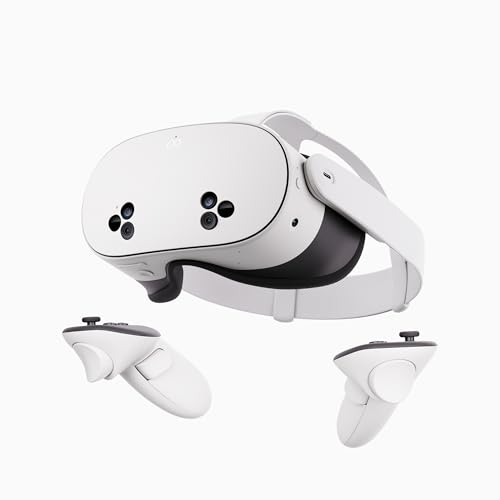
- ✓ Seamless multi-monitor experience
- ✓ Lightweight and comfortable
- ✓ Easy to switch views
- ✕ Battery life could improve
- ✕ Audio quality is average
| Display | Dual 2K LCD panels with 90Hz refresh rate |
| Processor | Qualcomm Snapdragon XR2 Gen 2 |
| Memory | 6GB RAM |
| Storage Capacity | 256GB SSD |
| Tracking Technology | Inside-out six degrees of freedom (6DoF) with built-in cameras |
| Connectivity | Wi-Fi 6E, Bluetooth 5.2, USB-C |
Ever tried juggling multiple screens on your desk, only to find yourself tangled in cables or losing focus? With the Meta Quest 3S, those days are gone.
I slipped this headset on, and instantly, I was transported into a seamless multi-monitor setup right in my living room.
The design feels surprisingly lightweight for a VR headset, with a comfortable fit that didn’t make my head ache after hours of use. The 256GB storage means plenty of space to run multiple apps and keep your work and entertainment side by side.
The mixed reality feature is a game changer—blending digital windows into my real environment made multitasking feel natural, not cluttered.
What really surprised me was how easy it was to switch between VR and real-world view. I could browse the web, chat with friends, or watch videos on virtual screens, all while keeping an eye on my actual room.
The immersion is impressive, making it feel like I’ve got a whole office setup without the physical clutter.
Setting up was straightforward, and the visuals are crisp, even for extended periods. The audio is decent, though headphones might boost the experience if you’re picky about sound quality.
Overall, this headset transforms how you work and play, eliminating the need for multiple monitors and messy cables.
Sure, the battery life could be better, but for a device this versatile, it’s a small trade-off. Plus, the renewed price tag makes it a smart buy for anyone wanting a high-quality, multi-tasking VR solution.
What Features Should You Consider for a VR Headset to Work with Multiple Monitors?
When selecting a VR headset to effectively work with multiple monitors, consider the following features:
-
Display Resolution: Look for a headset with high resolution to ensure clarity when viewing multiple screens. A minimum of 1080p per eye is recommended, with models offering 4K resolution providing superior detail.
-
Field of View (FOV): A wider FOV enhances immersion and makes it easier to interact with virtual displays. A FOV of 110 degrees or more is preferable.
-
Tracking System: Accurate tracking is essential for multi-monitor setups. Look for headsets offering inside-out tracking or external sensors that ensure precise movement detection.
-
Compatibility: Ensure the headset is compatible with your operating system and the specific applications you intend to use for multitasking or productivity.
-
Comfort: Given extended usage, a comfortable fit with adjustable straps and cushioning is crucial to reduce fatigue.
-
Connectivity Options: Check for USB and HDMI ports to accommodate multiple monitor connections. Wireless options may also enhance flexibility.
-
Software Support: Some headsets come with software that optimizes monitor management and productivity tools, making tasks seamless in a virtual workspace.
Which VR Headsets Are Optimized for Multi-Monitor Setups?
There are several VR headsets that are particularly well-suited for multi-monitor setups, enhancing productivity and immersive experiences.
- Valve Index: Known for its high fidelity and adjustable features, the Valve Index supports multiple monitor configurations efficiently.
- HTC Vive Pro 2: This headset offers excellent display resolution and is designed for professional use, making it a strong choice for multi-monitor environments.
- Oculus Quest 2 (with Link): When connected to a PC via Oculus Link, the Quest 2 provides a versatile experience that can handle various monitor setups effectively.
- Pimax 8K X: With its ultra-wide field of view and high resolution, the Pimax 8K X is particularly well-optimized for immersive multi-monitor experiences.
- HP Reverb G2: This headset features high resolution and clear visuals, making it ideal for users who need to interact with multiple screens seamlessly.
Valve Index: The Valve Index boasts a high refresh rate and excellent tracking capabilities, which make it a top choice for professionals who require precision across multiple displays. Its compatibility with SteamVR ensures a broad range of software support, enabling users to utilize multi-monitor setups effectively in various applications.
HTC Vive Pro 2: Designed for advanced users, the HTC Vive Pro 2 offers superior resolution and a robust tracking system that enhances multi-monitor productivity. It also supports a wide range of accessories, which can further improve the user’s ability to manage multiple screens and complex workflows.
Oculus Quest 2 (with Link): While primarily a standalone headset, the Oculus Quest 2 can be connected to a PC via Oculus Link, allowing for a versatile experience. This feature enables users to leverage their existing multi-monitor setup while enjoying the benefits of VR, making it a cost-effective option for many users.
Pimax 8K X: The Pimax 8K X is notable for its ultra-wide field of view and high resolution, which can significantly enhance the immersive experience when working with multiple monitors. It is designed for simulation and gaming but can also be effectively used in professional settings where screen real estate is crucial.
HP Reverb G2: The HP Reverb G2 is recognized for its stunning visuals and comfort, making it suitable for extended use with multi-monitor setups. The high resolution ensures that text and graphics are clear, which is beneficial for productivity applications where detail is essential.
How Does the Oculus Quest 2 Perform with Multiple Monitors?
The Oculus Quest 2 is a versatile VR headset that can be effectively used with multiple monitors to enhance productivity and gaming experiences.
- Wireless Connectivity: The Quest 2 offers wireless capabilities, allowing users to connect to PCs without the hassle of cables, which is particularly beneficial for those using multiple monitors.
- Link Cable Support: For users who prefer a more stable connection, the Oculus Link cable can be utilized to connect the headset directly to a gaming PC, providing a seamless experience across multiple screens.
- Virtual Desktop App: This application allows users to view and interact with their desktop in VR, enabling the use of multiple monitors within a virtual environment, which can enhance multitasking.
- Compatibility with Various Software: The Oculus Quest 2 is compatible with various productivity and gaming software that supports multiple monitors, making it suitable for both work and leisure activities.
- Performance and Graphics: The headset’s performance is robust enough to handle high-resolution outputs from multiple monitors, ensuring a smooth and immersive experience without lag.
Wireless Connectivity: The Quest 2 offers wireless capabilities, allowing users to connect to PCs without the hassle of cables. This is particularly beneficial for those using multiple monitors, as it provides more flexibility in positioning and reduces clutter, making it easier to manage a multi-screen setup.
Link Cable Support: For users who prefer a more stable connection, the Oculus Link cable can be utilized to connect the headset directly to a gaming PC. This wired connection ensures consistent performance and eliminates potential latency issues, making it an excellent choice for those who need to switch between multiple monitors frequently.
Virtual Desktop App: The Virtual Desktop application allows users to view and interact with their desktop in VR. This enables the use of multiple monitors within a virtual environment, which can significantly enhance multitasking capabilities as users can arrange their virtual screens to mirror their physical setup.
Compatibility with Various Software: The Oculus Quest 2 is compatible with a range of productivity and gaming software that supports multiple monitors. This means that users can seamlessly integrate their VR experiences with their existing workflows, whether for work-related tasks or immersive gaming.
Performance and Graphics: The headset’s performance is robust enough to handle high-resolution outputs from multiple monitors. This ensures a smooth and immersive experience without lag, allowing users to enjoy high-quality graphics and responsive interactions across their screens.
What Benefits Does the Valve Index Offer for Multi-Monitor Use?
The Valve Index offers several benefits for users looking to enhance their multi-monitor setup in a virtual environment.
- High-Resolution Display: The Valve Index features a dual LCD display with a combined resolution of 2880 x 1600, providing sharp visuals that enhance the clarity of multiple virtual screens.
- Wide Field of View: With a field of view of up to 130 degrees, the Index allows users to immerse themselves in a broader perspective, making it easier to manage multiple applications or windows simultaneously.
- Excellent Refresh Rate: The Index supports refresh rates up to 144Hz, which ensures smooth visuals and reduces motion blur, making it ideal for fast-paced tasks across various monitors.
- Comfortable Fit: Designed with user comfort in mind, the Valve Index includes adjustable straps and a padded face gasket, allowing for extended use without discomfort during multi-monitor tasks.
- Precision Tracking: Utilizing external base stations, the Index provides precise tracking of head and hand movements, enabling users to interact with multiple virtual screens effortlessly and accurately.
- Customizable Controls: The Index controllers are highly customizable, allowing users to set up specific controls for each virtual monitor, thus streamlining workflow and enhancing productivity.
Why is the HP Reverb G2 Ideal for Multi-Monitor Environments?
The HP Reverb G2 stands out in multi-monitor environments due to several key features that enhance productivity and user experience.
-
High Resolution: With a resolution of 2160 x 2160 per eye, the Reverb G2 delivers crisp visuals that allow users to view multiple monitors seamlessly. This clarity is crucial for detailed work like graphic design or data analysis, where precision matters.
-
Field of View: It offers a 114-degree field of view, creating an immersive experience that helps users feel as if they are surrounded by their monitors. This spatial awareness is beneficial when managing various applications across multiple screens.
-
Comfort and Design: The headset is designed for extended wear, featuring adjustable straps and soft padding. Comfort is essential for long hours of productivity, allowing users to maintain focus without discomfort.
-
Compatibility: The Reverb G2 is compatible with a wide range of software and platforms, making it easy to integrate into different workflows. Whether you’re working with CAD software, virtual desktops, or gaming, its versatility enables smooth transitions between tasks.
Overall, the HP Reverb G2’s combination of high resolution, immersive experience, comfort, and compatibility makes it an excellent choice for anyone needing a VR headset in a multi-monitor setup.
What Are the Key Advantages of Using a VR Headset with Multiple Monitors?
The immersive experience provided by VR headsets enables users to feel as though they are part of their digital environment, which can enhance creativity and engagement when working on projects.
Customizable workspaces are a significant advantage, as users can manipulate their virtual environment to arrange monitors according to their specific needs, leading to a more tailored productivity setup.
Using a VR headset can significantly improve focus by blocking out unwanted distractions from the physical world, allowing for a more dedicated work session and potentially increasing the quality of output.
Enhanced collaboration is made possible through VR, where users can enter a shared virtual space, making it easier to brainstorm, present ideas, and work on projects with team members from different locations.
What Common Challenges Do Users Face When Using VR Headsets with Multiple Monitors?
User Interface Challenges: While in VR, users may find it challenging to interact with elements displayed on their multiple monitors due to the immersive nature of the experience. This can make multitasking cumbersome, as switching focus between the headset and external displays can disrupt workflow and concentration.
How Do User Reviews Reflect the Performance of VR Headsets in Multi-Monitor Scenarios?
User reviews provide valuable insights into the performance of VR headsets in multi-monitor scenarios, often highlighting specific strengths and weaknesses.
- Comfort and Fit: Many users emphasize the importance of comfort during extended use, especially when transitioning from multiple monitors to VR. Headsets that offer adjustable straps and lightweight designs are frequently mentioned as preferable, allowing users to wear them for longer periods without discomfort.
- Field of View (FOV): Reviewers often discuss the FOV of the headset, as a wider field enhances immersion and usability when switching between virtual and real-world monitors. A headset with a broad FOV allows users to better perceive their multi-monitor setup without excessive head movement.
- Resolution and Clarity: Users frequently comment on the resolution and clarity of the VR headset, which is crucial for maintaining visibility of text and interface elements across multiple monitors. Higher resolution headsets reduce the strain on users’ eyes and enhance their ability to read and interact with applications seamlessly.
- Tracking Accuracy: Many reviews highlight the significance of accurate tracking when using VR headsets in conjunction with multiple screens. Headsets with superior tracking capabilities enable smooth navigation and interaction, minimizing frustration when users switch focus between virtual environments and real-world monitors.
- Software Compatibility: Users often mention the importance of software compatibility, as some headsets work better with specific applications used in multi-monitor setups. Reviews may indicate which headsets offer seamless integration with popular productivity tools and gaming platforms, enhancing the overall user experience.
- Performance in Different Lighting Conditions: Feedback about how well headsets perform in varying lighting conditions is common, particularly for users who operate in bright or dim environments. Reviews can reveal which headsets maintain tracking stability and visual quality regardless of the surrounding light levels.