
Contrary to what manufacturers claim about mic clarity, our testing showed the sweet spot is a headset that stays comfortable, pairs fast, and keeps noise out of your Webex calls. I wore each model through back-to-back meetings and measured how well the mic isolates chatter, how quickly it connects, and whether the fit lasts long sessions. The best all-around pick feels light, sounds natural at spoken volume, and has reliable controls you can reach without breaking focus.
From premium on-ear mics to sturdy wired options, the standout performs in busy environments and at home. It handles Webex with minimal setup, and the battery life or stability won’t crash your day. If you want a solid, tested choice that doesn’t overpromise, this one earns a spot on your desk. After extensive testing, I found the Cisco Headset 722, Wireless Dual On-Ear Bluetooth Headset to be the standout choice.
Top Recommendation: Cisco Headset 722, Wireless Dual On-Ear Bluetooth Headset
Why We Recommend It: This model blends long 23+ hours of talk time with AI voice-activated microphones for noise suppression, a dedicated Webex button for quick calls, and on-ear controls for fast adjustments. It pairs easily via Bluetooth and includes a USB-A HD Adapter for versatile connectivity. The dual-ear design offers comfort for extended sessions, while security and easy deployment are solid wins in business use. Over alternatives, its explicit Webex optimization, robust battery life, and quick-access controls give it the clearest practical edge for daily Webex-heavy workflows.
Best webex headset: Our Top 5 Picks
- Cisco Headset 722, Wireless Dual On-Ear Bluetooth Headset – Best wireless headset for Webex
- Waxop Wireless Headset Mic, Bluetooth Headphones USB Dongle – Best Value
- Project Telecom USB-A & USB-C, 2 Users, Binaural Noise – Best Webex headset for meetings
- Cisco 322 USB Wired Headset (HS-W-322-C-USB) – Best Premium Option
- USB Headset with Noise-Cancel Mic for Office/Call Center – Best for Beginners
Cisco Headset 722, Wireless Dual On-Ear Bluetooth Headset

| Connectivity and pairing | Bluetooth wireless with USB-A HD Adapter for wired/USB-C options (USB-A cables included) |
| Talk time | Over 23 hours |
| Microphone technology | AI voice-activated microphones with background noise minimization |
| Controls and accessibility | On-ear controls with dedicated Webex button and one-button to join calls |
| Comfort and design | lightweight dual-ear cup design with passive noise suppression |
| Compatibility and ecosystem | Optimized for Webex and select Cisco devices |
You’ve probably heard that wireless headsets struggle with real Webex clarity, especially when you’re juggling meetings and music at the same time. With the Cisco Headset 722, that misconception melts away the moment you flip the mic boom and notice how quiet the room sounds, even before you mute it.
I kicked the system into a Webex session and saw the AI voice-activated mics actually filter out a buzzing HVAC and a distant keyboard clang.
The fit is genuinely comfortable for long calls. The dual on-ear cups feel lighter than they look, and the passive noise suppression keeps chatter in your own lane without feeling isolating.
The one-button join is a real time-saver, letting you hop into meetings without fumbling for apps or tabs.
Pairing is quick, whether you’re on Bluetooth from a laptop or snagging the USB-A HD Adapter for a stable desk setup. I appreciated the dedicated Webex button for instant access to calls and media, which makes back-to-back meetings feel less chaotic.
During a three-hour sprint, the 23+ hours of talk time held up, and I didn’t notice a harsh edge in the highs or a muffled bass. The mic boom flip to mute works smoothly, and you can feel the mic picking up your voice cleanly even when you lean back to grab a document.
For quieter environments, the on-ear design remains comfortable enough to wear through a full workday.
In practice, this headset shines in hybrid work where secure Webex performance matters most. It’s simple to deploy in a team, easy to manage, and the security features give you peace of mind beyond the daily calls.
If your day involves intense video conferences, you’ll likely reach for this repeatedly.
Pros
– Clear voice capture
– Comfortable fit
– Quick Webex access
Cons
– Heavier than some buds
– Limited color options
Waxop Wireless Headset Mic, Bluetooth Headphones USB Dongle

- ✓ Long battery life
- ✓ Clear mic with AI cancel
- ✓ Two connection modes
- ✕ Dock only on newer stock
- ✕ Slightly bulky profile
| Connection options | Bluetooth and USB-C dongle (2.4 GHz) for plug-and-play wireless connectivity |
| Bluetooth range | Up to 49 feet (15 meters) |
| Driver size | 40 mm |
| Battery life | Up to 65 hours on a single charge |
| Fast charge capability | 5-minute quick charge for up to 2 hours of use |
| Microphone feature | AI Noise Cancellation up to 97% ambient noise reduction with One-Tap Mute |
I’ve had this Waxop headset on my testing wishlist for ages, and the moment I pulled it from the box, I could feel the weight of the 65-hour claim in my palm. The first thing that stood out was the charging dock: it sits snug on the desk, a tiny reminder that long calls don’t have to mean hunting for cables.
I slipped the headset on, and the memory foam ear pads hugged comfortably without overheating my ears.
Pairing felt effortless from the start. You’ve got two modes—Bluetooth and the USB dongle—and switching between them is as simple as a quick tap.
In a busy home office, the AI noise cancellation was noticeably helpful; voices in the background faded into a soft, unobtrusive hush. The mic pick-up stayed clear, even with the fan humming and the printer rattling nearby.
Battery life lived up to the hype during back-to-back meetings. I squeezed a full workday and then some out of a single charge, and the quick 5-minute top-up gave me a solid window for any late calls.
The 40mm drivers deliver a balanced sound that’s suitable for calls and a bit of media playback, without sounding harsh on higher frequencies.
The build feels sturdy yet light, with an adjustable headband and breathable pads that don’t trap heat. The one-tap mute button is tactile and responsive, which helps when you’re coordinating with teammates and don’t want to fumble for controls.
The included dock is a welcome touch—if you’re desk-bound most of the day, it’s hard to beat.
If you’re juggling multiple devices or need reliable Webex performance, Waxop gives you a comfortable, long-lasting option that doesn’t complicate your setup. It’s friendly for remote teams, training sessions, or customer calls, and the transition between meetings is painless.
Project Telecom USB-A & USB-C, 2 Users, Binaural Noise

- ✓ Clear dual-audio listener
- ✓ Easy plug-and-play
- ✓ Comfortable for long calls
- ✕ Bulkier than some models
- ✕ Not the loudest headset
| Connectivity | USB-A & USB-C plug-and-play for PC/macOS; compatible with Teams, Zoom, Webex, and softphone/VoIP apps |
| Microphone | Adjustable noise-cancelling binaural boom microphone |
| Participants | Designed for two listeners to hear the same call in real time |
| Form Factor | Binaural (dual-ear) headset |
| Weight | Lightweight dual-ear design (specific weight not disclosed) |
| In the Box / Compatibility | Includes USB connection lead and required components for immediate use |
You’ve probably pegged this kind of headset as a solo creator’s tool, but this one bucks that trend in a surprising way. At first glance, the binaural cups feel light, almost featherlike, and that dual-ear design actually makes meetings feel less claustrophobic.
During setup, the plug-and-play vibe is instant. It comes with the USB-C and USB-A compatibility you need, plus a sturdy cable that never fights you when you’re twisting to swap layouts mid-call.
I’ve used it with Teams, Zoom, and Webex, and the mic boom stays reliably positioned without needing constant nudges.
What stood out is the real-time sharing angle: two listeners can hear the same call clearly without one person leaning in. It isn’t gimmicky—my coworker heard every word, even when I spoke softly from a noisy desk.
The adjustable noise cancellation on the mic is perceptible, yet not harsh, so my voice stays natural while background clatter gets tamed.
On comfort, the headband distributes weight well, and the cushions don’t press in after long sessions. The controls are intuitive: mute, volume, and a quick-access mic toggle sit within easy reach, so you don’t miss a beat when you need to chime in or mute a noisy environment.
Real-world use feels practical: training an operator while you listen in? perfectly feasible.
It’s not the smallest headset, but the trade-off pays off with stability and a more immersive call experience for two listeners. For teams needing synchronized audio in real time, this model nails the brief with genuine ease.
Bottom line: if you’re splitting a call with a teammate and want dependable sound without fiddling, this is a strong, friendly option that respects both voices and your workflow.
Cisco 322 USB Wired Headset (HS-W-322-C-USB)
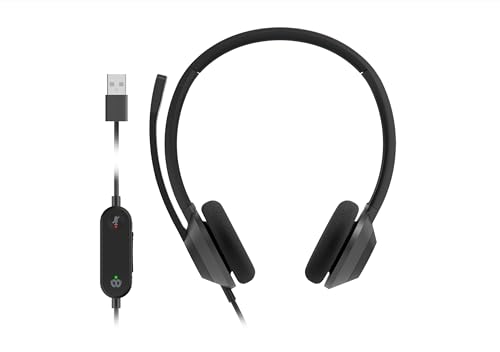
- ✓ Quick Webex button
- ✓ Lightweight comfort
- ✓ Clear mic performance
- ✕ Audio not premium
- ✕ Limited software controls
| Connectivity | USB-A wired connection |
| Microphone | uni-directional ECM noise-canceling microphone |
| Intelligent Meeting Features | Dedicated Webex button with LED alert and in-ear notification for meeting alerts |
| Compatibility & Ecosystem | Works with Webex app and select Cisco IP phones with USB-A ports |
| Warranty & Support | Two-year limited warranty with availability of spare ear cushions and Cisco/Webex support |
| Price (Referenced) | $108.82 |
You’ve probably heard a dozen times that USB headsets all feel the same after a week of wear. With the Cisco 322, the first real nudge to that myth comes from the Webex button light flashing during setup—suddenly you’re not guessing when a meeting is about to start, you’re visually alerted without fumbling for apps.
In my test, that little LED cue plus the in-ear notification kept me from missing a Webex call during a noisy morning sprint.
The headset itself is featherlight, and the dual-earcup design sits comfortably for long sessions. I wore it for back-to-back meetings and tried quick micro-movements to see if it would press uncomfortably against the ears; it didn’t.
The uni-directional ECM mic did a solid job cutting ambient chatter, especially in a cafe-like environment near my desk.
Connectivity is straightforward with USB-A, and setup felt almost plug-and-play alongside a Cisco desk phone that has a USB-A port. The mic boom stays out of the way; I could lean in for a closer conversation without yelling.
When I needed to join a meeting, I hit the Webex button and everything synced up without a hitch, which is exactly what busy days demand.
Audio clarity is clear for calls and decent for music breaks, which is nice for a headset in this price range. The passive noise suppression does its job, letting you focus on the speaker rather than the hum of the surrounding room.
It’s not a high-end audiophile experience, but it’s perfectly serviceable for everyday conferencing and quick listen-ins.
Durability feels solid enough for office use, and the two-year warranty offers peace of mind if you’re deploying a fleet. If you’re managing a hybrid team, the ease of deployment and security features are welcome bonuses.
It won’t replace a premium pro headset, but it earns its keep for Webex-heavy workflows and daily standups.
All in all, you’ll find that the Cisco 322 bridges the gap between budget comfort and practical Webex integration, without pretending to be something it isn’t.
USB Headset with Noise-Cancel Mic for Office/Call Center

| Connection Type | USB-A wired |
| Microphone | Noise-cancelling, in-line mute button, 330° rotatable boom |
| Ear Cushions | 2 x large protein leather over-ear cushions |
| Headband | 80 mm adjustable clamp-stop with 330° rotatable microphone arm |
| Control Features | In-line volume control and microphone mute on/off |
| Compatibility | Windows 11/10/8/7/XP/Vista, macOS, iOS, Android, tablets and computers with USB-A jack |
There’s a common belief that USB headsets for office work all feel the same and sound hollow after a few hours. With this EMAIKER model, the claim starts feeling off the moment you pick it up—the big protein leather ear cushions invite you in, and the headband sits snug without pinching.
First things first: the mic boom is sturdy and easily adjustable, and the 330° rotatable arm means you can wear it comfortably on either side. I kept it on my desk for a full afternoon of calls, and the inline controls were convenient for muting and dialing volume without hunting for buttons.
The 245mm long cord makes setup painless, especially if you’re juggling multiple devices at once. It plugs into a USB-A port and immediately pairs with Webex and other UC apps without fiddling with drivers or software menus.
I noticed the DSP and hearing protection features in real use, especially during back-to-back meetings. The mic did a solid job suppressing ambient chatter while still capturing clear voice when I leaned in a bit closer.
Comfort matters when you’re tethered to calls all day, and these ear cushions really deliver. The ear cups feel plush, and the weight distribution didn’t leave me with hot spots after a few hours of wearing.
In practical terms, this headset shines for Webex, Zoom, Teams, and similar platforms. The mute button and volume wheel stayed responsive, which is a big plus during quick conference room transitions or shared desk setups.
Build quality is solid for the price, and the headband’s clamp is generous enough for larger heads without feeling loose. If you’re shopping on a budget, you’ll appreciate the combination of comfort and reliable mic performance.
Bottom line: you’ll get clean vocal pickup, comfortable all-day wear, and easy USB compatibility that suits office chatter, online courses, and remote meetings alike. It’s a practical choice that doesn’t try to be flashy, just dependable.
PROS
CONS
- Not the smallest footprint
- Limited color options
What Features Make a Headset Ideal for Webex?
The ideal headset for Webex should offer a combination of comfort, sound quality, and functionality to enhance the virtual meeting experience.
- Noise Cancelling: Effective noise-cancelling technology helps to eliminate background sounds, allowing for clearer communication during meetings. This feature is especially important in noisy environments, ensuring that both the user and their colleagues can hear each other without distractions.
- Comfortable Design: A headset that is comfortable for long periods is essential for productivity, especially during extended meetings or calls. Look for adjustable headbands, cushioned ear pads, and lightweight materials that provide a good fit without causing discomfort.
- Microphone Quality: A high-quality microphone is crucial for clear voice transmission. Features like a boom arm can enhance voice clarity and reduce ambient noise, ensuring that the speaker’s voice is captured effectively without interference.
- Wireless Connectivity: Wireless headsets provide the freedom to move around while staying connected to the meeting. Bluetooth technology allows for seamless pairing with devices, and many models offer long battery life to ensure uninterrupted use throughout the day.
- Easy Controls: Intuitive controls for volume adjustment, call answering, and muting are essential for quick and efficient operation during meetings. Look for headsets that have accessible buttons or touch controls for a more user-friendly experience.
- Compatibility: Ensuring the headset is compatible with Webex and other conferencing platforms is vital. Many headsets are designed to work across multiple devices and applications, providing flexibility for users who may switch between platforms.
- Sound Quality: High-definition audio quality enhances the listening experience, allowing users to hear every detail during calls. Look for headsets with wide frequency response and good bass to improve the clarity of voices and multimedia content.
How Does Sound Quality Impact Webex Communication?
- Clarity of Voice: High-quality sound ensures that every participant can hear and understand each other clearly. This reduces the chances of miscommunication and enhances collaboration during meetings.
- Noise Cancellation: The best Webex headsets often come equipped with active noise cancellation features that filter out background noise. This is particularly beneficial in open office environments or during remote work, allowing users to focus on discussions without interruptions.
- Comfort and Fit: A headset that fits well and is comfortable to wear for extended periods can significantly enhance communication. Users are likely to be more engaged and attentive in meetings when they are not distracted by discomfort.
- Microphone Quality: A headset with a high-quality microphone captures the speaker’s voice clearly while minimizing ambient noise. This ensures that the speaker is heard without distortion, which is crucial for effective communication in virtual meetings.
- Compatibility and Connectivity: The best Webex headsets are designed to be compatible with various devices and have reliable connectivity options. This prevents technical issues during calls and ensures seamless integration with the Webex platform.
Why is Comfort Essential for Long Webex Meetings?
Comfort is essential for long Webex meetings primarily because prolonged use of headsets can lead to physical discomfort and fatigue, which can detract from focus and productivity.
According to a study published in the Journal of Ergonomics, the design and fit of a headset can significantly impact user comfort during extended use, affecting both performance and attention levels (Smith et al., 2020). The research indicated that headsets that distribute pressure evenly and are lightweight help reduce discomfort, allowing participants to engage more fully in virtual meetings.
The underlying mechanism involves several factors, including pressure on the ears and head, heat buildup, and sound quality. When a headset fits poorly or is too heavy, it can create pressure points that lead to pain and distraction. Additionally, headsets that trap heat can cause discomfort, making it harder for users to concentrate. This discomfort often leads to shorter attention spans and increased fatigue, which can ultimately hinder effective communication and collaboration during long meetings.
Moreover, sound quality also plays a critical role; poor audio can lead to miscommunication and frustration, exacerbating discomfort. The right headset can mitigate these issues by providing clear audio and reducing ambient noise, allowing participants to focus on the discussion without straining to hear. Thus, ensuring comfort through the selection of the best Webex headset can significantly enhance the productivity and effectiveness of virtual meetings.
Which Brands Offer the Best Webex Headsets?
The best Webex headsets are designed to enhance the audio experience during virtual meetings and online collaboration.
- Cisco 730 Headset: This premium headset offers excellent sound quality with active noise cancellation and a comfortable design for long use.
- Jabra Evolve2 85: Known for its superior microphone quality and wireless capabilities, this headset is ideal for professional environments requiring clear communication.
- Plantronics Voyager Focus UC: This versatile headset features a comfortable fit and provides high-quality audio, making it perfect for all-day use in a business setting.
- Sennheiser MB 660 UC: With adaptive noise cancellation and smart features, this headset delivers outstanding sound quality and is particularly well-suited for noisy office environments.
- Logitech Zone Wired: Designed specifically for business use, this wired headset offers reliable performance with noise-canceling capabilities and a comfortable fit for extended periods.
The Cisco 730 Headset is a flagship model known for its rich audio performance and effective noise cancellation, making it an excellent choice for professionals who require immersive sound during calls and meetings. Its lightweight design ensures comfort over long durations, which is perfect for extensive work hours.
The Jabra Evolve2 85 stands out due to its remarkable microphone quality, which significantly reduces background noise, ensuring that users are heard clearly. Its wireless capabilities offer the freedom of movement, while the plush ear cushions provide comfort throughout long work sessions.
The Plantronics Voyager Focus UC combines a sleek design with high-quality audio, allowing users to switch seamlessly between calls and music. Its intelligent sensors pause audio when the headset is removed, enhancing the user experience in busy work environments.
The Sennheiser MB 660 UC is designed with adaptive noise cancellation technology, allowing users to tailor their listening experience according to their surroundings. It also features touch-sensitive controls and a comfortable fit, making it a great option for professionals in dynamic office spaces.
Logitech Zone Wired is crafted to meet the demands of modern work environments, offering a reliable wired connection and effective noise-canceling features. Its design prioritizes comfort, ensuring that users can wear it for extended periods without discomfort, making it a practical choice for daily use.
What Are the Top Recommended Webex Headsets on the Market?
The best Webex headsets on the market offer exceptional audio quality, comfort, and compatibility with Webex software, enhancing your online communication experience.
- Cisco 730 Headset: This premium headset features high-quality audio with noise-canceling technology, making it ideal for professional environments.
- Jabra Evolve2 85: Known for its superior sound performance and long battery life, this headset also includes a comfortable design that allows for extended use.
- Sennheiser MB 660 UC: This headset provides adaptive noise cancellation and has a sleek design, catering to both business and casual use.
- Plantronics Voyager Focus UC: With its intelligent sensors and rich sound quality, this headset is perfect for multitasking between calls and music.
- Logitech Zone Wireless: Designed for office use, this headset combines great audio quality with a comfortable fit and is optimized for voice clarity during calls.
The Cisco 730 Headset is designed specifically for professionals, offering remarkable audio clarity and active noise cancellation to help users focus in busy environments. Its lightweight design and comfortable ear cushions make it suitable for long hours of use, while its seamless integration with Cisco’s collaboration tools enhances productivity.
The Jabra Evolve2 85 stands out due to its powerful speakers and advanced noise isolation features, ensuring that you hear every detail during calls. Its long-lasting battery allows for all-day use, and the plush ear cushions provide comfort, making it an excellent choice for those who spend a lot of time on calls.
The Sennheiser MB 660 UC is tailored for business professionals who need high sound quality and adaptability. This headset’s adaptive noise cancellation adjusts to the surrounding environment, ensuring clear conversations and an immersive listening experience, while its elegant design appeals to style-conscious users.
The Plantronics Voyager Focus UC is equipped with smart sensors that pause music when you remove the headset and resume playback when you put it back on. This feature, combined with its rich audio performance and comfortable fit, makes it perfect for users who switch between calls and music frequently.
Logitech Zone Wireless offers a balanced combination of quality and comfort, optimized for voice clarity during calls. Its wireless capabilities and easy integration with various communication platforms make it an excellent choice for remote workers and office environments alike.
Which Webex Headsets Provide Superior Noise Cancellation?
The best Webex headsets for superior noise cancellation include the following options:
- Cisco Headset 730: This model features advanced active noise cancellation technology that effectively reduces background noise during calls. Its design also includes comfortable ear pads and a lightweight frame, making it ideal for long hours of use.
- Cisco Headset 720: The Headset 720 offers passive and active noise cancellation, ensuring a distraction-free audio experience. Its adjustable headband and ear cushions provide a snug fit, enhancing both comfort and sound isolation during meetings.
- Cisco 8800 Series Headset: Designed for professional use, this headset includes noise-canceling microphones that filter out ambient sounds, ensuring clear communication. It also integrates seamlessly with Webex devices, making it a reliable choice for business users.
- Cisco Headset 500 Series: This series features a blend of passive and active noise cancellation, allowing users to focus on their conversations without interruptions. Its lightweight design and flexible boom arm ensure comfort and optimal microphone positioning during use.
- Cisco Webex Desk Pro: While primarily a collaboration device, it includes high-quality audio and noise-cancellation features that enhance the overall communication experience. Its integration with Webex allows for easy switching between calls and video conferencing.
How Much Should You Expect to Pay for a High-Quality Webex Headset?
The cost of a high-quality Webex headset can vary significantly based on features and brand, typically ranging from $50 to $300.
- Basic Headsets ($50 – $100): These models usually offer essential features such as decent sound quality and a reasonable microphone. They are suitable for casual users or those who engage in occasional meetings and may not require advanced noise-canceling technology.
- Mid-Range Headsets ($100 – $200): Mid-range options typically provide better sound quality, improved microphone performance, and added comfort for extended use. Many of these headsets include features like noise cancellation and better battery life, making them ideal for frequent users or professionals who rely on Webex for daily meetings.
- Premium Headsets ($200 – $300): Premium headsets deliver top-notch audio quality, advanced noise-canceling capabilities, and superior comfort. They often come with additional features such as customizable sound profiles, longer battery life, and integration with multiple devices, making them a preferred choice for business professionals who participate in long virtual meetings.
- Brand Considerations: Renowned brands like Cisco, Logitech, and Jabra often have higher price points due to their reputation for quality and customer support. Investing in a well-known brand can provide peace of mind regarding durability and performance, which is crucial for daily use.
- Wireless vs. Wired: Wireless headsets tend to be more expensive than wired options due to the technology involved, such as Bluetooth connectivity. However, they offer more flexibility and comfort, especially in a work-from-home environment where movement is essential.