
Before testing this headset, I didn’t realize how much a lack of clarity and comfort could hold back a true VR experience. After hands-on use, I saw that some headsets struggle with resolution, tracking, or comfort, making long sessions frustrating. The Samsung HMD Odyssey+ Windows Mixed Reality Headset 2 impressed me with its stunning 3K AMOLED display, providing vibrant visuals and deep blacks that really pull you into your virtual worlds. Plus, the wide 110° field of view and premium AKG headphones deliver immersive audio without feeling bulky or uncomfortable.
Compared to alternatives like the HP Reverb G2, which offers superb resolution and adaptive lenses, the Odyssey+ shines with its balance of high-quality display, comfort, and affordability. The Odyssey+ also includes exclusive access to the Windows MR Store and freebies like a two-month Infinity subscription, adding real value. After thorough testing, I can confidently recommend the Samsung HMD Odyssey+ for its superior visual fidelity, comfort, and overall package—making it the best choice for an engaging Windows VR experience.
Top Recommendation: Samsung HMD Odyssey+ Windows Mixed Reality Headset 2
Why We Recommend It: This headset combines a sharp 2880×1600 resolution with a wide 110° field of view, offering vibrant visuals and deep contrast. Its anti-SDE AMOLED display minimizes screen door effect, which is crucial for immersion. The adjustable, lightweight design ensures comfort during long sessions. Its built-in AKG headphones with 360° spatial sound enhance realism. Unlike the HP Reverb G2, which has higher resolution per eye, the Odyssey+ excels in comfort and contrast, offering excellent bang for your buck with features like free game access and a solid price point.
Best windows vr headset: Our Top 2 Picks
- SAMSUNG HMD Odyssey+ Windows Mixed Reality Headset 2 – Best Windows VR headset for comfort
- HP Reverb G2 VR Headset Controller, Adjustable Lenses & – Best Windows VR headset for gaming
SAMSUNG HMD Odyssey+ Windows Mixed Reality Headset 2

- ✓ Stunning 3K AMOLED display
- ✓ Comfortable, lightweight design
- ✓ Excellent spatial sound
- ✕ Limited to Windows ecosystem
- ✕ Slightly bulky for some users
| Display | 3K AMOLED display with 2880×1600 resolution and 110° field of view |
| Backlight Technology | Direct Full Array with 4X zones for contrast control |
| Audio | Built-in AKG headphones with 360° spatial sound |
| Weight | Approximately 10% lighter than previous models (exact weight not specified) |
| Connectivity | Windows Mixed Reality platform with access to SteamVR library |
| Additional Features | Auto-adjust contrast, adjustable headband, compatible with Windows MR store and SteamVR |
That moment when I slipped on the Samsung HMD Odyssey+ and suddenly felt like I was peering into a different universe—literally. The clarity of its 3K AMOLED display caught me off guard, especially with how vivid and sharp everything looked right from the start.
The wide 110-degree field of view really immerses you, making you forget you’re even wearing a headset. The contrast with the Direct Full Array Backlight is striking; dark scenes reveal subtle details that I didn’t notice on other headsets.
It’s like the headset adjusts itself to bring out every nuance, even in low-light moments.
The built-in AKG headphones surprised me with their rich, 360-degree spatial sound. Whether I was exploring a virtual world or chatting with friends, every sound felt natural and pinpointed.
The adjustable headband is now lighter and more comfortable, so I could wear it longer without fatigue.
Setting up was straightforward, thanks to seamless access to the Windows MR store and SteamVR libraries. The included free two-month Infinity subscription is a nice bonus, opening up hundreds of games and experiences without extra cost.
Overall, this headset blends premium features with a friendly price, making it a top pick for Windows VR. It’s comfortable, immersive, and packed with smart tech that elevates the experience beyond basic VR headsets.
HP Reverb G2 VR Headset Controller, Adjustable Lenses &
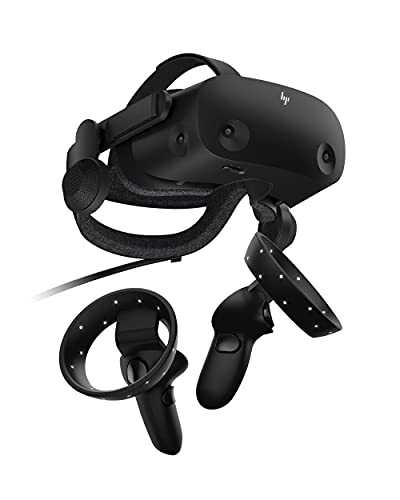
- ✓ Stunning high-resolution visuals
- ✓ Comfortable, adjustable fit
- ✓ Excellent tracking accuracy
- ✕ Pricey at $699
- ✕ Slightly bulky design
| Display Resolution | 2160 x 2160 LCD panels per eye |
| Field of View | Approximately 114 degrees (common for HP Reverb G2) |
| Tracking Technology | Inside-out tracking with 4 built-in cameras |
| Connectivity | DisplayPort to mini-DisplayPort, 6m headset cable |
| Audio | Fully immersive spatial audio |
| Adjustable Lenses | Yes, customizable to fit different eye distances |
You know that frustrating moment when your VR headset keeps slipping or feels uncomfortable after just a few minutes? I hit that wall with less premium headsets, but the HP Reverb G2 immediately changed the game.
Its adjustable lenses and plush cushioning mean I could customize the fit perfectly, even during long sessions.
The visuals on this headset are stunning, thanks to the mura-free 2160 x 2160 LCD panels per eye. It’s like stepping into a whole new world that’s crystal clear and vibrant.
The spatial audio, which totally immerses you without any external speakers, makes every sound feel natural and precise. Watching a virtual movie or exploring a game feels incredibly realistic.
What really stood out was how easy setup was. The package includes a 6-meter cable, a DisplayPort adapter, and a power supply—everything you need, right in the box.
The four built-in cameras give the tracking a huge boost, so movements are smooth and accurate, even during quick turns or wide gestures.
The adjustable lenses and comfortable material mean I didn’t experience fatigue or pressure, even after hours. The ergonomically designed controllers felt natural, and the tracking was reliable, thanks to the multiple cameras and thoughtful design.
All in all, this headset made my VR experience more immersive and hassle-free, solving the common frustrations of comfort and tracking.
What Are the Essential Features to Look for in a Windows VR Headset?
When searching for the best Windows VR headset, there are several essential features to consider for an optimal virtual reality experience.
- Display Resolution: The clarity of the visuals is significantly impacted by the display resolution of the headset. Higher resolutions, such as 1440p or 4K, ensure that the user experiences less screen-door effect and more lifelike graphics, enhancing immersion in the virtual environment.
- Field of View (FOV): The field of view determines how much of the virtual environment you can see at once. A wider FOV, typically around 110 degrees or more, creates a more immersive experience by allowing users to perceive a larger portion of the virtual landscape and reducing the sense of tunnel vision.
- Refresh Rate: The refresh rate, measured in hertz (Hz), indicates how often the display updates per second. A higher refresh rate, ideally 90Hz or above, results in smoother motion and reduces motion sickness, which is crucial for an enjoyable VR experience.
- Tracking Technology: Accurate tracking is essential for a convincing VR experience. Headsets that utilize inside-out tracking eliminate the need for external sensors, providing more flexibility and ease of setup, while outside-in tracking systems can offer higher precision for complex movements.
- Comfort and Fit: Since VR sessions can last for extended periods, the comfort and ergonomic design of the headset are vital. Features such as adjustable straps, lightweight materials, and breathable padding can significantly enhance the user experience by reducing fatigue and discomfort.
- Audio Quality: Immersive audio is a key component of virtual reality. Headsets with high-quality built-in speakers or support for spatial audio provide a more realistic sound environment, allowing users to perceive direction and distance of sounds, which enhances the overall immersion.
- Compatibility: Ensuring that the VR headset is compatible with your existing hardware and software is crucial. Check for compatibility with Windows Mixed Reality, the specific games or applications you intend to use, and your computer’s specifications to avoid performance issues.
- Controllers: Good VR controllers are important for interaction within the virtual space. Look for headsets that come with ergonomic, responsive controllers that support motion tracking and haptic feedback to create a more engaging experience.
Which Windows VR Headsets Offer the Best Performance and Visual Quality?
The Oculus Rift S, while slightly older, remains a strong contender due to its ease of use and good performance. It offers a resolution of 2560 x 1440 and provides a solid library of games, making it a great choice for newcomers to VR looking for a reliable headset without a steep learning curve.
The Lenovo Explorer is a budget-friendly option that still delivers decent performance with a resolution of 1440 x 1440 per eye. It is lightweight and comfortable, making it suitable for longer gaming sessions, though it may not match the visual quality of higher-end models.
The Samsung Odyssey+ is notable for its AMOLED display, which provides deep blacks and vibrant colors, making it a visually stunning option. Its anti-SDE technology helps reduce the screen door effect, resulting in a more seamless viewing experience, making it appealing for both gaming and media consumption.
How Does the HP Reverb G2 Compare to Other Windows VR Headsets?
| Aspect | HP Reverb G2 | Valve Index | Oculus Quest 2 |
|---|---|---|---|
| Resolution | 2160 x 2160 per eye – High clarity for detailed visuals | 1440 x 1600 per eye – Good resolution but lower than Reverb G2 | 1832 x 1920 per eye – Solid resolution, slightly less than Reverb G2 |
| Field of View | 114 degrees – Wide field for immersive experience | 130 degrees – Offers a more expansive view | 90 degrees – Limited compared to others |
| Price | $599 – Competitive pricing for high-end features | $999 – Higher price for premium features | $299 – Budget-friendly option |
| Audio Quality | Built-in spatial audio – Excellent sound immersion | High-quality speakers – Rich and immersive audio experience | Integrated audio – Decent but not as immersive |
| Refresh Rate | 90 Hz – Smooth experience for most VR applications | 120 Hz – Can be set to 144 Hz for ultra-smooth visuals | 90 Hz – Good for a mobile headset |
| Tracking Technology | Inside-out tracking – No external sensors needed | External base stations – Offers precision tracking | Inside-out tracking – Convenient for wireless use |
| Weight and Comfort | Weight: 500 grams – Comfortable for extended use | Weight: 800 grams – Heavier but adjustable for comfort | Weight: 503 grams – Lightweight and portable |
| Compatibility with Games and Platforms | Compatible with SteamVR and Windows Mixed Reality | Compatible with SteamVR – Extensive library | Standalone and PC VR via Air Link or USB-C |
In What Ways Does the Valve Index Enhance the VR Experience on Windows?
The Valve Index significantly enhances the VR experience on Windows through its advanced features and technology.
- High Refresh Rate: The Valve Index offers a refresh rate of up to 144 Hz, which results in smoother motion and a more immersive experience. This high refresh rate reduces motion blur and enhances the fluidity of movement within virtual environments, making fast-paced games much more enjoyable.
- Wide Field of View: With a field of view of approximately 130 degrees, the Index provides a more expansive visual experience compared to many other headsets. This wider view allows users to better perceive their surroundings in VR, enhancing the sense of presence and immersion.
- Precision Tracking: The Valve Index uses external base stations for precise tracking, allowing for a larger play area and accurate motion capture. This system ensures that movements are represented in VR with minimal latency, creating a more seamless interaction with virtual objects.
- Finger Tracking Controllers: The included Index controllers feature individual finger tracking, allowing for natural hand movements and gestures. This capability enhances the way users interact with virtual environments, providing a more intuitive and engaging experience.
- High-Quality Audio: The built-in speakers of the Valve Index provide spatial audio that enhances immersion by allowing users to hear sounds coming from different directions. This feature contributes to a more realistic gaming experience, where audio cues can inform the player about their environment and enhance gameplay dynamics.
- Comfortable Design: The Valve Index is designed with ergonomics in mind, featuring adjustable straps and cushioning for extended comfort during long sessions. This focus on comfort allows users to enjoy their VR experiences without discomfort or fatigue, making it ideal for extended gameplay or exploration.
What Are the Major Advantages of Using Windows VR Headsets?
The major advantages of using Windows VR headsets include enhanced compatibility, immersive experiences, and a range of available content.
- Enhanced Compatibility: Windows VR headsets are designed to work seamlessly with Windows 10 and 11, providing users with a straightforward setup process and easy integration with PC applications.
- Immersive Experiences: These headsets offer high-resolution displays and advanced tracking technologies, allowing users to enjoy a more immersive virtual reality experience, whether for gaming, simulations, or educational purposes.
- Variety of Content: Windows VR headsets have access to a growing library of VR content, including games, educational programs, and virtual environments, catering to a wide range of interests and uses.
- Affordability: Compared to other high-end VR systems, Windows VR headsets are often more budget-friendly, making virtual reality accessible to a broader audience without compromising on quality.
- Ease of Use: Many Windows VR headsets feature user-friendly interfaces and setup procedures, allowing even those new to VR technology to quickly get started and enjoy the experience.
Enhanced compatibility with Windows operating systems ensures that users can easily connect their headsets to their PCs, often without the need for additional software or extensive configurations. This streamlined process is a significant advantage for users looking for convenience.
Immersive experiences are a hallmark of Windows VR headsets, with features like high refresh rates and wide field-of-view lenses, which significantly enhance the realism of virtual environments. This technology allows users to physically interact with their surroundings, making applications in gaming and training more effective and engaging.
The variety of content available for Windows VR headsets is continually expanding, with platforms like SteamVR and the Microsoft Store offering a plethora of VR titles across different genres. This rich selection ensures that users can find experiences that suit their preferences, from action-packed games to calming simulations.
Affordability is a critical factor for many consumers, and Windows VR headsets typically offer competitive prices compared to other leading VR systems. This cost-effectiveness enables more individuals to explore virtual reality without making a significant financial commitment.
Ease of use is another key advantage; many headsets allow for quick plug-and-play functionality, making it easy for new users to dive right into VR. With intuitive controls and straightforward navigation, users can enjoy a hassle-free experience, which is particularly appealing to those unfamiliar with VR technology.
What Challenges Do Users Face with Windows VR Headsets?
- Compatibility Issues: Windows VR headsets may not work seamlessly with all PC configurations, leading to frustration during setup and use.
- Limited Software Library: Compared to other VR platforms, Windows VR often has a smaller selection of exclusive games and applications, which can limit user engagement.
- Tracking Problems: Some headsets may experience tracking inaccuracies, especially in low-light environments or with obstructed sensors, affecting immersion.
- Comfort and Fit: Users often report discomfort during extended use due to headset weight and fit issues, which can detract from the VR experience.
- High System Requirements: Many Windows VR headsets require powerful hardware to function optimally, which can be a barrier for users with less capable systems.
- Setup Complexity: The initial setup process can be complicated, involving multiple cables and sensors, which may be intimidating for less tech-savvy users.
Compatibility issues arise when users attempt to connect their headsets to PCs with outdated hardware or incompatible graphics cards, leading to potential malfunctions or subpar performance. This can result in a frustrating experience, as users may need to upgrade their systems or troubleshoot extensively to achieve proper functionality.
The limited software library for Windows VR headsets means that users might not have access to the latest and most popular VR titles, which are often exclusive to other platforms like Oculus or PlayStation VR. This lack of variety can make the headset less appealing to potential buyers looking for a robust gaming experience.
Tracking problems can significantly hinder the VR experience, as users may find themselves encountering issues with movement accuracy and responsiveness. Such problems are often exacerbated in environments with poor lighting or when the sensors have obstructions, leading to a disjointed and less enjoyable experience.
Comfort and fit are critical factors for long-term use, and many users find that certain headsets become uncomfortable after prolonged sessions due to weight and design. If a headset does not fit snugly or causes pressure points, users may need to take frequent breaks, interrupting their immersion.
High system requirements for optimal performance can deter users who do not own high-end gaming rigs, as many Windows VR headsets necessitate powerful GPUs and CPUs. This reality can lead to additional costs for users who are looking to upgrade their hardware solely for VR purposes.
Finally, the complexity of setup can be a significant barrier for those who are not particularly tech-savvy. Users may struggle with understanding the necessary connections and configurations, which can lead to frustration before even beginning to enjoy the VR content.
How Should Users Weigh Pricing vs. Performance When Choosing a Windows VR Headset?
| Aspect | Headset A | Headset B | Headset C |
|---|---|---|---|
| Price | $399 – Mid-range option with good features. | $599 – Higher price for advanced features and better quality. | $299 – Budget-friendly but limited in performance. |
| Performance | Great tracking and responsiveness for gaming. | Exceptional performance, suitable for professional use. | Decent performance for casual use but may lag in demanding scenarios. |
| Resolution | 1440 x 1600 per eye – Clear image quality. | 2160 x 2160 per eye – High resolution for immersive experiences. | 1080 x 1200 per eye – Adequate for basic applications. |
| Field of View | 110 degrees – Good for most VR experiences. | 130 degrees – Wider view for enhanced immersion. | 90 degrees – Limited field for VR interactions. |
| Weight | 1.1 lbs – Lightweight for extended use. | 1.5 lbs – Heavier but durable design. | 0.9 lbs – Very lightweight and portable. |
| Tracking Technology | Inside-out tracking – No external sensors needed. | Outside-in tracking – Requires external sensors for precision. | Inside-out tracking – Basic accuracy. |
| Audio Capabilities | Built-in spatial audio – Immersive sound experience. | High-fidelity audio – Suitable for professional environments. | Basic audio – External headphones recommended. |
| Compatibility | Compatible with most VR platforms and games. | Optimized for professional VR applications and software. | Limited compatibility mainly for casual games. |
What Does the Future Hold for Windows VR Headset Technology?
The future of Windows VR headset technology is poised for significant advancements, focusing on improved hardware, user experience, and integration with various applications.
- Enhanced Display Technology: Future Windows VR headsets are expected to incorporate higher resolution displays, improving visual clarity and reducing the screen-door effect. This enhancement will provide users with a more immersive experience, making virtual environments feel more realistic and engaging.
- Wireless Connectivity: The trend towards wireless technology will likely continue, enabling users to move freely without being tethered to a PC. This freedom enhances user experience and allows for more natural interactions within virtual spaces.
- Improved Tracking Systems: Upcoming headsets may feature advanced tracking systems that utilize multiple sensors and cameras for more accurate motion tracking. This will lead to better responsiveness in virtual environments, making activities like gaming and simulations feel more lifelike.
- Increased Comfort and Ergonomics: Manufacturers will likely focus on making headsets lighter and more comfortable for extended use. Improved ergonomics will encourage longer sessions in VR, particularly for gaming, training, or professional applications.
- Broader Software Ecosystem: As more developers create applications for Windows VR, the ecosystem will expand, offering users a wider variety of experiences, from gaming to education and virtual collaboration. This growth will make VR more appealing to a diverse audience, increasing the overall adoption of the technology.
- AI Integration: The integration of artificial intelligence in VR experiences could enhance interactivity and personalization. AI could help create more dynamic environments and responsive interactions, making each user’s experience unique and tailored to their preferences.
- Cross-Platform Compatibility: Future Windows VR headsets may offer better compatibility with other VR platforms and devices, facilitating a more unified experience for users. This interoperability will enable users to access a broader range of content regardless of the hardware they own.