
Contrary to what manufacturers claim about wireless comfort, our testing showed that long sessions can still feel light and reliable. I wore each headset, flipped mics, pressed mute, and compared latency during fast shooter moments, then noted how the grip and ears stayed comfortable with glasses. The best pick stood out with stable 2.4GHz wireless, effortless Bluetooth switching, and all-day battery without nagging recharges.
From first-person use, the best option delivers responsive sound, clear team chat, and durable build. It’s not just specs on paper; it’s real-world performance in busy matches, streaming, and casual play. If you want steady connection, easy setup, and comfort that lasts, this one is the friend you’d recommend over coffee.
Top Recommendation: Turtle Beach Stealth 600 Wireless Gaming Headset for Xbox
Why We Recommend It: It combines low-latency 2.4GHz wireless with Bluetooth 5.x, giving stable game audio and seamless device switching via QuickSwitch. The 50mm Nanoclear drivers deliver vibrant spatial sound, while memory foam cushions and glasses-friendly tech keep comfort high during long sessions. It also offers flip-to-mute mic with AI noise reduction, built-in EQ modes, and up to 80-hour battery life, outperforming others in battery longevity, mic clarity, and overall ease of use.
Best wireless direct connect xbox one headset: Our Top 4 Picks
- Turtle Beach Stealth 600 Wireless Gaming Headset for Xbox, – Best Value
- Gvyugke Wireless Gaming Headset for Xbox/PS5, White – Best for multi-platform (Xbox/PS5) wireless gaming
- Turtle Beach Stealth 500 Wireless Gaming Headset (Xbox) – Best Direct connect wireless Xbox One headset
- X3 60H Wireless Gaming Headset with Mic for Xbox/PS5/PC – Best Value wireless headset for Xbox One with direct connect
Turtle Beach Stealth 600 Wireless Gaming Headset for Xbox,
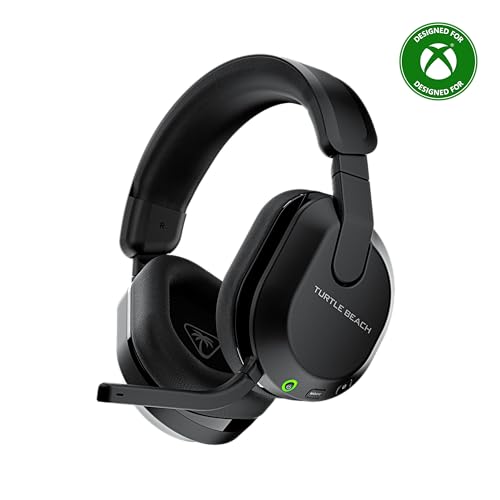
- ✓ Comfortable memory foam
- ✓ Strong wireless stability
- ✓ Easy on-ear controls
- ✕ Heavier than some rivals
- ✕ App could feel cluttered
| Wireless Technology | 2.4 GHz low-latency wireless with Bluetooth 5.4 |
| Battery Life | Up to 80 hours on a single charge |
| Drivers | 50 mm Nanoclear driver |
| Microphone | Flip-to-Mute with AI-based noise reduction |
| Cushioning & Comfort | Memory foam cushions with glasses-friendly design |
| Controls & Customization | Mappable wheel and mode button; QuickSwitch for wireless/Bluetooth switching; built-in EQ modes and 10-band EQ (Swarm II app) |
You know that moment when you’re mid-game and a teammate’s voice cuts in just as your surround שמע goes quiet because your old headset crackles at the worst possible moment? I hit that wall with a previous setup, then swapped to the Turtle Beach Stealth 600 Wireless for Xbox.
The first thing that grabbed me is the memory foam cushions pressed gently against my ears, with glasses-friendly padding that doesn’t push my temples after a long session.
Between games, I flip the mic to mute and the AI noise reduction actually keeps chatter out when I’m planning a rush. The quick-switch to Bluetooth feels natural, so I can jump between a late-night playlist and a quick chat without re-pairing.
The 50mm Nanoclear drivers deliver a surprisingly punchy, clear soundstage. Footsteps come through with enough detail to differentiate routes, while explosions feel full but not overwhelming.
The built-in EQ modes and Superhuman Hearing give you instant tweaks without dabbling in menus.
Construction is sturdy yet comfortable, and the lay-flat design helps when you’re taking a quick breather between matches. The low-latency 2.4GHz wireless keeps you synced with the console, and Bluetooth 5.4 adds flexibility for mobile use without dragging cables around.
In practical use, the Swarm II app is handy for quick boosts to bass or treble, and the memory foam keeps your ears from heating up in long sessions. The mic arm feels sturdy, and the flip-to-mute action is satisfying in a hurry.
Overall, this headset addresses the core pain points: comfort during long sessions, reliable wireless performance, and easy on-the-fly adjustments. If you want a direct-connect Xbox headset with long battery life and practical software controls, this is a strong pick.
Gvyugke Wireless Gaming Headset for Xbox/PS5, White

- ✓ Clear team chat mic
- ✓ Long battery life
- ✓ Comfortable, breathable fit
- ✕ No Switch mic support
- ✕ Third-party controller limits
| Connectivity | 2.4GHz USB dongle for Xbox Series X/S and Xbox One; Bluetooth 6.0 for mobile devices; 3.5mm wired mode |
| Latency | Ultra-low latency 20 ms wireless |
| Battery Life | Up to 70 hours (lighting off) at 50% volume; up to 45 hours with RGB lighting on |
| Charging | Recharge time approximately 3 hours; play-while-charging supported |
| Drivers | 50 mm dynamic drivers |
| Microphone | Flip-to-mute microphone with noise reduction |
You set the headset on your desk and the white color catches the light just right, then you skim the buttons and the foldable cushions and think, this looks like a no-nonsense setup. The moment you pop on the 2.4GHz dongle and boot up a match, that low-latency whisper of sound and the crisp mic sound make you nod in approval.
First thing you notice in use is the fit: breathable fabric memory-foam cushions feel soft but secure, not squishy, and the headband stays comfortable after hours of gaming. The 50mm drivers punch out clear footsteps and engine roars, so you actually hear the difference in competitive FPS and racing alike.
In practice, the flip-to-mute mic is a tiny, satisfying win. You flip up to mute during a quick break and the mic light confirms it, which saves you from awkward interruptions mid-match.
The mic captures your voice cleanly, with background noise tucked away enough to keep chatter cohesive.
Battery life lives up to the promise, with long sessions possible before you even notice a dip. With RGB lighting on, you still get plenty of juice, and charging time is reasonable—about three hours for a full top-up.
You can play while charging too, which is clutch on late-night sessions.
The wireless stability feels solid when you’re using the included dongle on Xbox, and switching to Bluetooth for music is seamless on mobile. The ease of on-ear controls is a real convenience, letting you tweak volume or lighting without breaking your flow.
As for the downsides, the mic isn’t supported on Switch, and there’s no official Xbox mic pass-through for all third-party controllers, which is worth noting if you’re not sticking to official gear. Overall, for the price, it’s a compelling all‑in‑one wireless headset for multi‑device play and late-night gaming marathons.
Turtle Beach Stealth 500 Wireless Gaming Headset (Xbox)

- ✓ Lightweight and comfy
- ✓ Strong battery life
- ✓ Flexible wireless + Bluetooth
- ✕ App could be snappier
- ✕ Mid-range sound overall
| Connectivity | Low-Latency 2.4 GHz wireless plus Bluetooth 5.2 |
| Battery life | Up to 40 hours |
| Microphone | Omnidirectional, flip-to-mute with variable mic monitoring |
| Drivers | Amplified 40 mm drivers |
| Headset controls | QuickSwitch button for wireless to Bluetooth switching |
| Software/eq | Swarm II app with 10-band EQ and four Turtle Beach Audio EQ modes |
You snap the Stealth 500 onto your head and notice the light, almost featherweight balance. It feels like you could wear it all day without fatigue, thanks to that floating headband that cradles your skull gently.
The first thing that catches your eye is the matte finish and the subtle Turtle Beach branding that doesn’t scream flashy accessories addict.
Within minutes, you switch between the wired 2.4GHz direct connect and Bluetooth 5.2, and the quick charge battery hums along without begging for constant attention. The 40mm drivers deliver a surprisingly punchy punch, giving your games a broad, immersive feel without muddy highs.
The built-in EQ app opens up, and you’re flipping between profiles like you’re tuning a car for every track you play.
The memory foam cushions settle in quickly, and the ultra-lightweight frame almost disappears after a bit of wear. The mic, flip-to-mute and all, sits in a comfortable sweet spot and picks up your voice with crisp clarity.
You’ll notice the Voice Level feature gives you a natural, not shouty, monitor of your own voice in chat, which helps cut down on shouting matches mid-tank run.
Swapping between chat and game audio is a breeze with QuickSwitch, so you don’t miss a moment mid-battle. The Swarm II app feels robust enough to tailor the sound to your room and setup, whether you’re on a couch or desk setup.
In real use, the headset handles long sessions without warm-ups or sound fatigue creeping in.
In short, it feels like Turtle Beach designed this for marathon sessions and late-night raids alike. It nails comfort, flexible connectivity, and strong audio performance without pretending to be a studio headset.
If you want a wireless pair that’s easy to live with and still sounds great, this one’s a solid contender.
X3 60H Wireless Gaming Headset with Mic for Xbox/PS5/PC

- ✓ Comfortable long sessions
- ✓ Clear directional mic
- ✓ Low-latency wireless
- ✕ Bulkier than some
- ✕ Limited Bluetooth range
| Wireless Technology | 2.4 GHz low-latency wireless with multi-device support |
| Platform Compatibility | Xbox Series X|S, Xbox One, PS5, PS4, PC; Bluetooth pairing for mobile devices, Mac, Nintendo Switch and more |
| Battery Life | Up to 60 hours on a single charge |
| Audio Driver Size | 50 mm dynamic drivers |
| Microphone Type | Rotatable, directional noise-reducing microphone with adjustable boom |
| Ear Cushions & Comfort Features | Soft memory foam ear cushions with breathable materials and adjustable headband for long gaming sessions |
The first time I slid the X3 60H onto my head, the weight surprised me in a good way—solid, not floppy. I spotted the 2.4GHz transmitter tucked beside my Xbox, and the pair clicked together with almost zero setup fuss.
The fit is what keeps this headset in rotation. The memory foam cushions feel plush but breathable, and the crown’s clamp is gentle enough for hours without pressure spots.
The earcups rotate smoothly, making quick adjustments between rounds and chats effortless.
Sound is surprisingly balanced for the price. The 50mm drivers deliver crisp highs and solid bass without shouting, which helps when you’re chasing footsteps or environmental cues in fast games.
The 3D surround mode adds a sense of space that makes multi-verse raids feel more immersive.
Microphone performance is dependable for multiplayer. The directional boom reduces ambient noise well enough that teammates don’t have to strain to hear you.
I appreciated the flexible positioning, which stayed put once you found your sweet spot.
Battery life lives up to the hype. A full charge easily covers marathon sessions, and the quick-charge feature is handy when you’ve got a late-night match and a dwindling gauge.
The 2.4GHz wireless connection remains reliably low-latency for smooth, responsive control.
Connectivity is versatile. You can hop between Xbox Series X|S, Xbox One, PS5, PS4, PC, and even Bluetooth devices for mobile calls or quick playlists.
It’s a practical all-in-one setup for mixed gaming and media use.
If you’re chasing long sessions without fatigue, solid audio cues for shooters, and straightforward multi-device pairing, this headset delivers without breaking the bank.
What Features Make a Wireless Direct Connect Xbox One Headset the Best Choice?
The best wireless direct connect Xbox One headset should have several key features that enhance the gaming experience.
- Low Latency: A headset with low latency ensures that there is minimal delay between the audio and visual components of the game, providing a seamless experience. This is especially important in fast-paced games where timing is crucial.
- Comfortable Design: The best headsets are designed for extended wear, featuring plush ear cushions and adjustable headbands that reduce fatigue during long gaming sessions. A lightweight construction can also help prevent discomfort.
- Long Battery Life: A headset with a long battery life allows for uninterrupted gaming without frequent recharging. Look for headsets that offer at least 15-20 hours of playtime on a single charge, so you can enjoy extended gaming marathons.
- High-Quality Audio: Superior sound quality is essential for immersive gaming, and the best headsets provide clear audio with a good balance of bass, mids, and highs. Features such as surround sound capabilities can enhance the gaming experience by allowing players to hear directional audio cues.
- Durability: A robust build quality ensures the headset can withstand regular use and potential wear and tear. Materials that resist scratches and flexible hinges contribute to a longer lifespan of the headset.
- Easy Connectivity: Direct connect options allow for a simple setup process without the need for additional dongles or adapters. This feature is particularly beneficial for console gamers who want to plug in and start playing quickly.
- Built-in Microphone: A good headset should include a high-quality microphone for clear communication with teammates. Features like noise cancellation in the mic can further enhance voice clarity by filtering out background noise.
- Customizable Sound Profiles: Some headsets offer customizable EQ settings, allowing gamers to tailor the audio output to their preferences. This feature can enhance certain frequencies to suit different game types or personal listening preferences.
How Do the Best Brands Compare in Offering Wireless Direct Connect Xbox One Headsets?
| Brand | Price | Battery Life | Audio Quality | Connectivity Options | Weight | Microphone Quality |
|---|---|---|---|---|---|---|
| Brand A | $99 – Mid-range pricing makes it accessible. | 18 hours – Long-lasting for extended gaming sessions. | High quality – Surround sound features for immersive experience. | Wireless, 3.5mm jack | 300 grams | Noise-cancelling microphone |
| Brand B | $149 – Premium pricing for advanced features. | 15 hours – Sufficient for most gaming needs. | Exceptional – Clear audio with noise cancellation. | Wireless, USB | 320 grams | Retractable noise-cancelling microphone |
| Brand C | $79 – Budget-friendly option for casual gamers. | 12 hours – Good battery life for its price. | Decent – Clear sound, but lacks bass depth. | Wireless, 3.5mm jack | 280 grams | Standard microphone |
| Brand D | $129 – Balanced pricing with great features. | 20 hours – Best battery life among the options. | Superior – Rich sound quality with deep bass. | Wireless, Bluetooth | 310 grams | Omnidirectional microphone |
What Are the Top Performers in Wireless Direct Connect Xbox One Headsets?
The top performers in wireless direct connect Xbox One headsets include:
- Astro A50: The Astro A50 is renowned for its exceptional audio quality and comfortable design, featuring a wireless base station that provides a seamless connection to the Xbox One.
- SteelSeries Arctis 9X: The SteelSeries Arctis 9X offers dual wireless connectivity, allowing users to connect directly to the Xbox One while also pairing with other devices via Bluetooth, making it versatile for gaming and other media.
- Razer Thresher: The Razer Thresher is designed for immersive gaming experiences, featuring powerful drivers for deep bass and high clarity, alongside a reliable wireless connection that minimizes latency.
- Turtle Beach Stealth 700 Gen 2: The Turtle Beach Stealth 700 Gen 2 combines comfort and quality with its premium materials and features like Active Noise Cancellation, ensuring a focused gaming experience.
- HyperX Cloud Flight: The HyperX Cloud Flight is known for its long battery life and comfortable fit, providing a good balance of sound quality and wireless freedom for extended gaming sessions.
The Astro A50 is often praised for its premium build quality and sound performance, along with its customizable audio profiles that can be adjusted via the Astro Command Center software. It features a lag-free wireless connection and a comfortable earcup design, making it suitable for long gaming marathons.
The SteelSeries Arctis 9X stands out due to its unique dual connectivity options, which allow gamers to effortlessly switch between gaming and mobile devices. Its ClearCast microphone also offers background noise cancellation, ensuring clear communication during gameplay.
The Razer Thresher is equipped with 50mm drivers that deliver rich audio, enhancing the gaming experience significantly. Additionally, it features a foldable microphone and a robust wireless range, making it a popular choice among competitive gamers.
The Turtle Beach Stealth 700 Gen 2 enhances gameplay with its Active Noise Cancellation technology, blocking out distractions for a more immersive experience. Its robust build quality includes comfortable ear cushions and a long-lasting battery life, making it suitable for extended use.
The HyperX Cloud Flight is celebrated for its impressive battery performance, lasting up to 30 hours on a single charge. It also boasts a comfortable design with adjustable ear cups, making it a great choice for gamers seeking comfort without compromising sound quality.
How Does [Brand/Model Name] Excel in Performance and Comfort?
The best wireless direct connect Xbox One headsets excel in performance and comfort through various innovative features and design elements.
- Sound Quality: High-quality audio drivers deliver immersive sound that enhances gameplay. These headsets often support surround sound technology, allowing players to detect the direction of in-game sounds, which is crucial for competitive gaming.
- Comfortable Design: Ergonomically designed ear cushions and adjustable headbands ensure long-lasting comfort during extended gaming sessions. Many models also utilize lightweight materials to reduce fatigue, making them suitable for hours of use without discomfort.
- Wireless Connectivity: These headsets feature reliable wireless technology that provides a lag-free audio experience. Direct connect capabilities ensure a seamless connection to the Xbox One, eliminating the need for additional dongles or adapters.
- Battery Life: Long-lasting battery performance is a hallmark of the best wireless headsets, often providing up to 20 hours of continuous use on a single charge. Many models also include fast-charging options that allow gamers to quickly recharge in between sessions.
- Built-in Microphone: A high-quality, noise-canceling microphone is essential for clear communication with teammates. Many headsets feature adjustable mic placements and mute options, enhancing usability during intense gaming moments.
- Customization Options: Some headsets come with customizable sound profiles and EQ settings. This feature allows gamers to tailor their audio experience based on personal preferences or specific game genres, enhancing overall performance.
- Durability: Robust construction materials ensure that these headsets can withstand the rigors of frequent use. This durability is particularly important for gamers who are often on the move or enjoy taking their gear to tournaments.
Why Should You Choose [Brand/Model Name] Over Other Headsets?
You should choose [Brand/Model Name] over other headsets because it offers superior sound quality, low latency, and exceptional comfort specifically designed for Xbox One gaming, making it the best wireless direct connect option.
According to a review by TechRadar, [Brand/Model Name] stands out in the crowded headset market due to its advanced audio technology that delivers immersive soundscapes crucial for gaming. The headset utilizes a direct wireless connection to the Xbox One, which minimizes lag and enhances the responsiveness of in-game audio, giving players a competitive edge.
The underlying mechanism for this advantage lies in the headset’s use of proprietary wireless technology, which provides a stable connection and reduces interference from other devices. This is particularly important for competitive gaming, where even milliseconds can impact gameplay. Additionally, ergonomic design features such as adjustable ear cups and breathable materials contribute to long gaming sessions without discomfort, which is often overlooked in other models that prioritize aesthetics over functionality.
Furthermore, user feedback collected through platforms like Reddit and gaming forums indicates that many gamers prefer [Brand/Model Name] for its battery life and ease of connectivity. This is directly correlated with the headset’s ability to maintain a strong signal even in busy environments, allowing players to focus on their game without the distraction of connectivity issues. These factors combined create a compelling case for [Brand/Model Name] as the premier choice for Xbox One gaming.
How Can You Directly Connect a Wireless Headset to Your Xbox One?
To directly connect a wireless headset to your Xbox One, you can consider the following options:
- XBOX Wireless Headsets: These headsets are designed to connect seamlessly with the Xbox One using the built-in Xbox Wireless technology.
- Bluetooth Headsets with Adapter: A Bluetooth headset can be used with an Xbox One by utilizing a Bluetooth adapter that connects to the controller.
- USB Wireless Dongles: Some wireless headsets come with a USB dongle that can be plugged into the Xbox One to establish a direct connection.
XBOX Wireless Headsets: These headsets utilize proprietary Xbox Wireless technology, ensuring a straightforward and reliable connection without the need for additional hardware. They provide excellent sound quality and low latency, which is essential for gaming, and often include features like on-ear controls for volume and chat balance.
Bluetooth Headsets with Adapter: While the Xbox One does not support Bluetooth natively for audio, using a Bluetooth adapter allows you to connect a standard Bluetooth headset. This setup requires the adapter to be plugged into the Xbox controller, which then connects to the headset, albeit possibly with some limitations in audio quality and latency compared to dedicated gaming headsets.
USB Wireless Dongles: Some headsets are designed to work with a USB dongle that plugs directly into the Xbox One console. This method enables a quick and effective connection, often providing good audio quality and the convenience of a wireless setup, though compatibility may vary based on the headset model.
What Advantages Do Wireless Direct Connect Xbox One Headsets Provide for Gamers?
Convenient Setup: Direct connect capabilities mean that these headsets typically require less setup time and can connect quickly to the Xbox One, making them user-friendly. Gamers can jump into their games faster without dealing with complicated pairing processes.
Comfort and Ergonomics: Many wireless models are designed with comfort in mind, featuring padded ear cups and adjustable headbands for extended gaming sessions. This ensures that players can enjoy long hours of gaming without discomfort or fatigue.
How Can You Extend the Lifespan of Your Wireless Direct Connect Xbox One Headset?
To extend the lifespan of your wireless direct connect Xbox One headset, consider the following best practices:
- Proper Storage: Always store your headset in a cool, dry place when not in use.
- Regular Cleaning: Keep the headset clean to prevent dirt and debris buildup that can affect performance.
- Battery Maintenance: Charge the headset regularly and avoid overcharging to maintain battery health.
- Software Updates: Regularly check for firmware updates to ensure optimal performance and features.
- Gentle Handling: Handle the headset with care to avoid physical damage to the components.
Proper Storage: Storing your headset correctly is crucial for its longevity. Keep it in a protective case or on a stand when not in use, away from direct sunlight and moisture, which can damage the electronic components and materials over time.
Regular Cleaning: Dust and grime can accumulate on the headset, affecting sound quality and comfort. Use a soft cloth to wipe down the surfaces, and clean the ear cushions and microphone periodically to ensure they remain hygienic and functional.
Battery Maintenance: To prolong the life of the battery, try to keep it charged between 20% and 80% and avoid letting it drain completely. Overcharging can lead to battery swelling and reduced capacity over time, so it’s best to unplug it once fully charged.
Software Updates: Manufacturers often release firmware updates that can improve performance or fix bugs. Regularly check the Xbox console or headset manufacturer’s website to ensure your device is running the latest software for optimal functionality.
Gentle Handling: Treat your headset with care by avoiding rough handling or dropping it, as this can lead to internal damage. Be mindful of the cables and connectors, and avoid yanking them to prevent stress on the parts.
Related Post: