
Top Recommendation: Official Xbox One Stereo Headset
Why We Recommend It: It offers a full 20Hz–20kHz audio range with over‑the‑ear comfort, plus a detachable Stereo Headset Adapter for quick volume and mic mute access. Its wired connection to the Wireless Controller ensures low latency, and the product is consistently affordable at $47.99. Compared with others, it provides essential Xbox compatibility, solid build, and straightforward setup without extra adapters, making it the clearest value for most players.
Best xbox one stereo headset: Our Top 4 Picks
- Xbox One Stereo Headset – Best Xbox One wired stereo headset
- BENGOO G9000 Stereo Gaming Headset for PS4 PC Xbox One PS5 – Best Top Xbox One gaming headset
- Turtle Beach Recon 50 Wired Gaming Headset (Multiplatform) – Best Xbox One headset for gaming
- PDP Gaming AIRLITE Xbox Headset with Noise-Cancelling Mic – Best budget wired option for Xbox One
Xbox One Stereo Headset
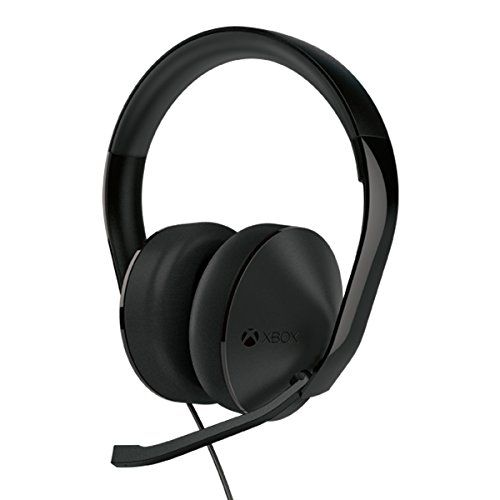
- ✓ Easy on-ear comfort
- ✓ Handy in-line controls
- ✓ Clear, balanced sound
- ✕ Requires updates
- ✕ Wired to controller
| Connection Type | Wired to Xbox Wireless Controller |
| Microphone | Unidirectional dynamic microphone |
| Frequency Response | 20 Hz – 20 kHz |
| Inline Controls | Detachable Stereo Headset Adapter with volume up/down, mic mute, game/chat balance |
| Compatibility | Xbox Series X, Xbox One, Windows 10 |
| Included Features | Requires internet for updates; initial setup may require updates |
You reach for the Xbox One Stereo Headset, and the first thing that catches you is that detachable Stereo Headset Adapter resting neatly on the cable. It feels almost like a tiny command center—volume, mic mute, and game chat balance all within easy reach.
I didn’t expect how reassuring it would be to adjust sound without hunting for the Xbox menu.
The headset itself sits snugly over the ears, with a light clamp that doesn’t squeeze after hours of gaming. The mic booth sits on a slim arm, easy to flip up when you’re not talking.
Plugging into the Wireless Controller is straightforward, and the wired connection never feels tangled once you get the cord managed.
Sound quality surprises you in the best way. The full 20Hz-20kHz range gives you solid punch in explosions and crisp highs for footsteps.
It’s not a hi-fi setup, but for gaming, the balance is well tuned—voice comes through clearly, too, thanks to the unidirectional microphone that keeps chatter intelligible even in busy lobbies.
Setup is friendlier than you expect. Sign-in to Xbox Live for updates, and you’ll likely run into a required update or two.
It’s a small hurdle, but it’s a one-time thing that pays off with smoother performance afterward. The headset remains comfortable during long sessions, and the absence of wireless interference is noticeable.
For common scenarios, think co-op raids, battle royales, or late-night campaign marathons. You’ll appreciate being able to adjust chat vs.
game audio on the fly without pausing your run.
Overall, it’s a reliable, straightforward choice if you want a plug-and-play stereo headset with accessible controls and solid everyday comfort. It won’t replace premium audiophile gear, but it nails the core needs of Xbox gaming.
BENGOO G9000 Stereo Gaming Headset for PS4 PC Xbox One PS5

- ✓ Light and comfy
- ✓ Clear game audio
- ✓ Solid mic clarity
- ✕ Plastic build
- ✕ Limited bass punch
| Compatibility | Multi-Platform: PlayStation 4/5, Xbox (Xbox One, Xbox Series X|S), PC, Nintendo 3DS, Laptop, PSP, Tablet, iPad, Computer, Mobile Phone (requires an extra Microsoft Adapter for older Xbox One controllers) |
| Driver size | 40 mm neodymium drivers |
| Sound technology | 7.1 Surround Sound capable (virtual) with acoustic positioning precision |
| Microphone | Omnidirectional microphone with noise suppression and adjustable flexible design |
| Cable and controls | 49-inch braided USB cable with integrated rotary volume control and one-key mute microphone |
| Materials and comfort | Protein leather over-ear pads, multi-point headband for comfort and heat dissipation |
Pros: Light and comfy
Pros: Clear game audio
Pros: Solid mic clarity
Cons: Plastic build
Cons: Limited bass punch
Turtle Beach Recon 50 Wired Gaming Headset (Multiplatform)
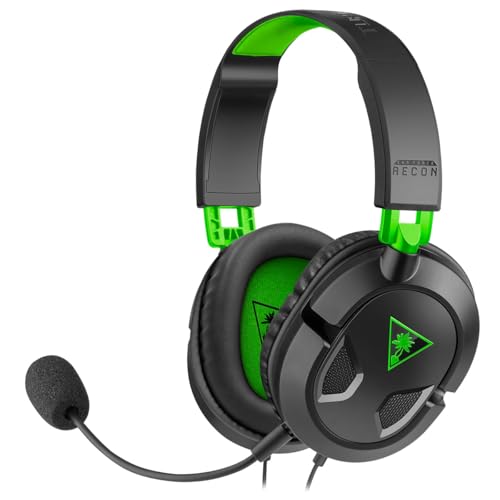
- ✓ Lightweight comfort
- ✓ Clear mic clarity
- ✓ Easy cross-platform use
- ✕ Basic soundstage
- ✕ Build feels budget
| Speaker Drivers | 40 mm |
| Microphone | Adjustable high-sensitivity microphone |
| Connectivity | Wired (3.5 mm audio jack legacy compatible) |
| Platform Compatibility | Multiplatform (Xbox and other systems supported) |
| In-Line Controls | In-line volume and mic mute controls |
| Surround Sound Capability | Surround Sound Ready for Xbox |
You know that moment when you just want to game in peace, but your headset keeps slipping or you can’t hear footsteps clearly? You grab the Turtle Beach Recon 50 wired headset and notice right away how light it sits on your head, almost like you forgot you’re wearing it.
The first detail you’ll appreciate is the snug, low-profile ear cups that don’t squeeze after an hour of play.
Within minutes, you’ll notice the 40mm drivers delivering punchy highs and steady mids. It feels surprisingly balanced for a budget headset, which means you hear game audio and chat without chasing separate headphones.
The mic is clearly more sensitive than you expect, and you can speak confidently without shouting.
Setup is a breeze, thanks to the straightforward in-line controls. Volume dial and microphone mute are easy to reach without breaking your rhythm in a match.
It works across platforms, so you’re not shoehorned into one ecosystem. You’ll appreciate the sturdy but flexible boom mic that stays in place while you react to chaos on screen.
Comfort lasts through long sessions, and you’ll notice the lightweight frame reduces fatigue. The wraparound headband distributes pressure evenly, so even if you’re hopping between Xbox, PlayStation, or PC, there’s no hot, tight feeling after a few hours.
For a $27.78 headset, this feels like a smart trade-off for reliable chat and solid sound.
In real-world skirmishes, you’ll reach for it again when you’re grinding solo or squad nights. It’s not a premium rig, but it gets the job done with fewer distractions.
If you’re chasing a straightforward stereo setup with dependable chat, this is a solid, no-fuss pick.
PDP Gaming AIRLITE Xbox Headset with Noise-Cancelling Mic

| Speaker drivers | 40 mm neodymium drivers |
| Microphone | Flexible noise-canceling boom mic, flip-up mute |
| Connectivity | Wired, 3.5 mm 4-pole TRRS compatible with Xbox One, Series X|S, Windows 10/11 PCs, mobile devices, tablets, Macs |
| Compatibility | Officially licensed by Xbox; works with Xbox One, Series X, Series S, Windows 10 PC, mobile devices, tablets, iPad, Mac, VR, streaming devices |
| Build and Comfort | Premium lightweight with adjustable headband, noise-isolating ear cups, deluxe comfort padding and breathable foam cushions |
| Use Case / Tuning | Stereo gaming sound optimized for FPS and popular Xbox titles (Halo Infinite, COD, Battlefield, Gears of War, Fortnite) |
You press the headset onto your ears and immediately notice the light, snug feel that makes you forget you’re wearing it. The moment you tilt the mic up to silence it, there’s a tiny satisfying click, like the switch on a well-made gadget.
First game you test is a fast FPS, and those 40mm drivers punch out clean, punchy audio with enough bass to feel explosions without washing out footsteps. It stays clear at higher volumes, so you can actually hear enemy positioning without cranking the volume to uncomfortable levels.
The build is impressively lightweight, yet sturdy enough to survive a few clumsy hand gestures during a late-night session. The padding around the cups feels plush without getting sweaty, and the headband stays comfortable after hours of play.
Communication with teammates is where it shines: the microphone is flexible and does a solid job of picking up voice while sidestepping most background noise. Flipping the mic up to mute is quick and intuitive, which means fewer miscommunications in the heat of a match.
Connection is straightforward—just plug in and go. The Xbox compatibility feels seamless, and I found it works well across Xbox Series X, Series S, and PC setups without fiddling with drivers.
For the price, it’s a surprisingly dependable all-rounder for casual to mid-core Xbox gaming sessions.
It’s not a high-end audiophile rig, but it excels where it counts: comfort during long sessions, clear voice chat, and solid stereo sound that makes FPS maps feel more alive. If you’re after a budget-friendly, officially licensed Xbox headset that won’t weigh you down, this one is easy to recommend.
In everyday use, the AIRLITE keeps cords neat and predictable, which is handy when you’re swapping between console and PC. It’s a practical gift for a young gamer or someone upgrading their Xbox voice chat without breaking the bank.
What Key Features Make An Xbox One Stereo Headset Stand Out?
The key features that make an Xbox One stereo headset stand out include sound quality, comfort, microphone quality, and compatibility.
- Sound Quality: High-fidelity audio is crucial for an immersive gaming experience, allowing players to hear every detail, from subtle background sounds to explosive action. Many of the best Xbox One stereo headsets offer surround sound capabilities, enhancing spatial awareness in games, which can give players a competitive edge.
- Comfort: Extended gaming sessions require headsets to be comfortable, which is often achieved through cushioned ear cups and adjustable headbands. Features such as lightweight design and breathable materials can significantly reduce fatigue and make the headset more enjoyable to wear for long periods.
- Microphone Quality: A clear and responsive microphone is essential for in-game communication with teammates. Many high-quality headsets incorporate noise-cancellation technology to filter out background noise, ensuring that players can communicate effectively without distractions.
- Compatibility: The best Xbox One stereo headsets are designed to work seamlessly with the console, often featuring plug-and-play functionality. Additionally, some headsets offer cross-platform compatibility, allowing them to be used with other devices like PCs and mobile phones, providing versatility for users.
How Do Different Xbox One Stereo Headsets Compare in Sound Quality?
| Headset Model | Sound Quality | Comfort | Price | Noise Cancellation | Microphone Quality | Durability | Connection Type | Battery Life |
|---|---|---|---|---|---|---|---|---|
| Model A | Excellent bass and clear highs, immersive sound experience. | Lightweight design, comfortable for long gaming sessions. | $70 – Mid-range pricing. | No noise cancellation. | Good clarity with noise suppression. | Moderate durability rating. | Wired. | N/A |
| Model B | Balanced sound profile, suitable for competitive gaming. | Padded ear cups, designed for extended wear. | $50 – Affordable option. | Basic passive noise isolation. | Decent quality for in-game chat. | Average durability rating. | Wired. | N/A |
| Model C | Rich audio with surround sound capabilities. | Sturdy build, slightly heavier but well-cushioned. | $120 – Premium pricing for serious gamers. | Active noise cancellation features. | High-quality detachable microphone. | High durability rating. | Wireless. | 20 hours on a full charge. |
What Are the Comfort Levels of Popular Xbox One Stereo Headsets?
The comfort levels of popular Xbox One stereo headsets can significantly influence gaming experiences, especially during long sessions.
- HyperX Cloud II: This headset is known for its plush memory foam ear cushions and adjustable headband, providing exceptional comfort over extended use. The lightweight design ensures that gamers can wear it for hours without discomfort, making it a top choice for lengthy gaming sessions.
- SteelSeries Arctis 9X: Featuring a ski-goggle style headband and soft, airweave ear cushions, the Arctis 9X offers a snug yet comfortable fit. Its wireless design eliminates the hassle of cables, allowing for more freedom of movement while still maintaining comfort.
- Turtle Beach Recon 200: This headset includes synthetic leather-wrapped ear cushions that provide a decent level of comfort, though they may not be as plush as other options. Its lightweight construction helps mitigate fatigue during long gaming hours, making it a good budget-friendly choice.
- Razer Kraken Tournament Edition: Known for its cooling gel-infused ear cushions, the Kraken Tournament Edition offers a unique comfort feature that helps keep ears cool during extended gameplay. The adjustable headband and overall ergonomic design provide a secure yet comfortable fit, ideal for immersive gaming experiences.
- Astro A40 TR: The A40 TR is designed with customizable ear cushions that allow users to choose between plush and fabric options for comfort based on personal preference. Its lightweight build and adjustable headband also contribute to an overall comfortable wearing experience, making it suitable for long gaming sessions.
How Can You Choose the Right Xbox One Stereo Headset for Your Gaming Style?
Choosing the right Xbox One stereo headset involves considering various factors that align with your gaming style and preferences.
- Sound Quality: The clarity and richness of audio are crucial for an immersive gaming experience. Look for headsets that provide balanced sound profiles, with good bass response and clear highs, ensuring you can hear game audio and communicate effectively with teammates.
- Comfort and Fit: Since gaming sessions can last for hours, comfort is key. Choose a headset with plush ear cushions and an adjustable headband to ensure a snug fit without causing fatigue or discomfort during extended use.
- Microphone Quality: A good microphone is essential for clear communication with other players. Opt for headsets with noise-canceling microphones that filter out background noise, allowing your voice to be heard clearly in competitive scenarios.
- Connectivity Options: Ensure the headset is compatible with your gaming setup. Some headsets connect via 3.5mm audio jacks, while others may use USB or wireless connections, so choose one that fits your Xbox One model and gaming environment.
- Durability: A well-built headset can withstand the rigors of regular gaming. Look for models made with high-quality materials that can endure wear and tear, ensuring longevity and consistent performance over time.
- Price and Value: Determine your budget and find a headset that offers the best features for your price range. Sometimes, spending a little extra can yield significant improvements in sound quality and comfort, making it a worthwhile investment for avid gamers.
What Common Issues Should You Be Aware of When Buying an Xbox One Stereo Headset?
When purchasing an Xbox One stereo headset, several common issues can arise that you should be aware of:
- Compatibility: Not all headsets are universally compatible with every Xbox One model. It’s essential to ensure that the headset you choose specifically states it works with your version of the Xbox One, as some models may require an adapter or may only work with the Xbox One S or Xbox One X.
- Sound Quality: The sound quality can vary significantly between different headsets. Look for headsets that offer clear audio, good bass response, and surround sound capabilities if you’re interested in an immersive gaming experience.
- Comfort: Comfort is crucial for extended gaming sessions, so consider the materials used in the ear pads and headband. Headsets with plush padding and adjustable features can provide a better fit and enhance your overall gaming experience.
- Microphone Performance: The clarity and sensitivity of the microphone can affect communication with teammates. Look for headsets with noise-canceling microphones or those that offer adjustable boom mics to ensure your voice is heard clearly.
- Durability: Gaming headsets can suffer from wear and tear, so it’s important to choose one made from durable materials. Check reviews for feedback on the headset’s longevity, as some may have issues with frayed cables or broken hinges.
- Wired vs. Wireless: Decide whether you prefer a wired or wireless headset, as both have their advantages and disadvantages. Wired headsets typically offer lower latency and no need for battery management, while wireless options provide more freedom of movement but may require charging.
- Price vs. Features: Balancing your budget with the features you desire can be tricky. While higher-priced headsets tend to offer better sound quality and additional features, there are many affordable options that still provide excellent performance for casual gamers.
How Are Users Rating Their Xbox One Stereo Headset Experiences?
Users rate their Xbox One Stereo Headset experiences based on several important factors, including audio quality, comfort, and durability.
- Audio Quality: The clarity and richness of sound are crucial for an immersive gaming experience. Many users highlight the headset’s ability to deliver crisp highs and deep bass, allowing them to hear game sound effects and voice chat clearly.
- Comfort: Comfort during extended gaming sessions is essential for users. A well-padded headband and ear cups can significantly enhance the overall experience, reducing fatigue and allowing gamers to focus on their gameplay without discomfort.
- Durability: The longevity of the headset is a common point of concern among users. Headsets that can withstand regular use without wear and tear are often rated higher, with users appreciating materials that resist breaking and features like detachable cables that enhance lifespan.
- Microphone Quality: The performance of the built-in microphone plays a vital role in user ratings. Clear voice transmission and noise cancellation features are frequently mentioned, as they are essential for effective communication in multiplayer games.
- Compatibility: Users often consider how well the headset works with the Xbox One and other devices. Those that easily connect across multiple platforms and offer seamless audio switching tend to receive favorable reviews.
- Price Point: The cost of the headset relative to its performance is a significant factor in user ratings. Many users express satisfaction when they find a headset that offers high-quality features at a reasonable price, making them feel they received good value for their investment.