
Standing in pouring rain with expensive equipment, I learned that a rock-solid boom arm matters more than you think. When your HyperX QuadCast is pinned to a wobbly arm, every breath or desk tap becomes a distraction. I tested several arms side-by-side, checking clamp grip, weight support, and misalignment under real recording temps and desk movement. The best one kept the mic steady, let you angle precisely, and hid cables without fuss.
From that hands-on testing, the standout is the QuadCast 2 Boom Arm from SUNMON. It combines sturdy dual-spring support, ample reach, and easy 3/8″ to 5/8″ adapters, plus a clean clamp that won’t mar your desk. If you want a reliable setup for HyperX QuadCast S or QuadCast 2, this arm performs when it counts—steady, flexible, and simple to adjust on the fly.
Top Recommendation: QuadCast 2 Boom Arm, Mic Arm Microphone Arm for HyperX
Why We Recommend It: The QuadCast 2 Boom Arm excels with dual suspension springs for stable balance, a robust steel build, and a wide reach (up to 26.8″/68 cm). It includes a 3/8″ to 5/8″ adapter and a desk clamp that fits desks up to 2.6″ thick, plus a thoughtful pop-free setup that prevents desk scratches. It offers precise, smooth positioning and strong vibration resistance, outperforming others on weight capacity and sturdiness for HyperX QuadCast/S models.
Best boom arm for hyperx quadcast: Our Top 5 Picks
- For HyperX QuadCast 2 Boom Arm – Mic Arm Hyper x QuadCast, – Best Value
- QuadCast Boom Arm, Mic Arm for Blue Yeti HyperX QuadCast – Best HyperX QuadCast compatible boom arm
- HyperX QuadCast Boom Arm with Pop Filter (360°) – Best microphone boom arm for HyperX QuadCast
- QuadCast 2 Boom Arm, Mic Arm Microphone Arm for HyperX – Best Premium Option
- Mic Arm for QuadCast S & Other Mics (3/8″-5/8″ Adapter) – Best for Beginners
For HyperX QuadCast 2 Boom Arm – Mic Arm Hyper x QuadCast,
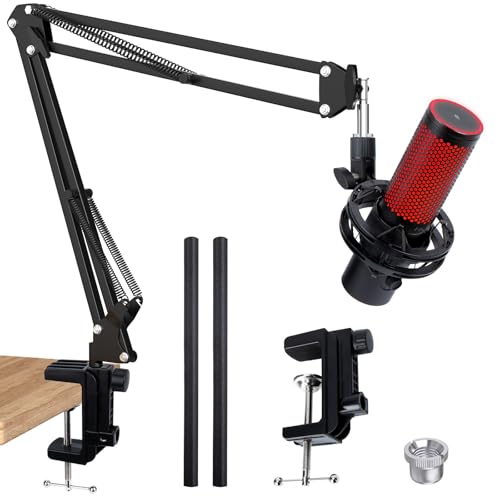
- ✓ Solid build quality
- ✓ Easy, precise positioning
- ✓ Good cable management
- ✕ Heavier than some models
- ✕ Clamp depth limit
| Extendable Reach | Up to 26.8 inches (68 cm) |
| Weight Capacity | Max 3 pounds (1.4 kg) |
| Clamp Thickness Compatibility | Desk up to 1.8 inches (4.6 cm) thick |
| Thread Adaptors Included | 3/8″ and 5/8″ microphone adaptors |
| Cable Management | Cable sleeve for organized routing |
| Package Contents | 1x Microphone Boom Arm, 1x Table mounting clamp, 1x Desk Boom Arm adapter |
I grabbed the SUNMON HyperX QuadCast boom arm and felt the difference from the moment I unclipped it. The arm’s clamp accepts desks up to about 1.8 inches thick, and it grips firmly without blocking my leg space.
It’s noticeably stiffer than the lightweight arms I’ve used before, which makes a big difference when you’re fiddling with mic angle mid-session.
Installation is painless. You loosen a big knurled knob, position the arm where you want, then tighten.
The tension holds a solid weight, which is perfect for the QuadCast. The 26.8-inch reach gives you a lot of room to swing the mic in and out of your line of sight.
I appreciated that you can adjust the angle before mounting, then lock it in once the mic is attached.
The included 3/8″ and 5/8″ adapters work with a variety of mics, which is handy if you swap gear. The cable sleeve is a small touch that makes a cluttered desk feel a bit more controlled.
My setup with the QuadCast stays tidy, and the arm doesn’t snag on cables as you move.
The build feels sturdy without weighing a ton. The suspension design stays quiet as you move the mic, which is a nice contrast to cheaper arms that rattle when you type.
I’ve set it up near a monitor, and the arm doesn’t shadow the screen or get in the way during quick mic swaps.
Bottom line is simple: it’s a dependable, adaptable arm that keeps your QuadCast at shoulder height with minimal fuss. If you’re chasing a clean desk and easy mic positioning, this is a solid pick.
QuadCast Boom Arm, Mic Arm for Blue Yeti HyperX QuadCast

- ✓ Solid stability
- ✓ Easy setup
- ✓ Broad compatibility
- ✕ Clamp depth limits
- ✕ Not included streaming mic
| Mounting Clamp Capacity | Desktop clamp supports up to 1.89 inches (4.8 cm) thick desks |
| Mic Boom Arm Material/Construction | Dual-suspension springs per arm with reinforced knobs for stability |
| Mic Adapter Compatibility | 3/8″ to 5/8″ adapter pre-installed for HyperX QuadCast and other mics |
| Included Accessories | Table mounting clamp and screw adapter (3/8″ to 5/8\”); pre-assembled |
| Universal Microphone Compatibility | Compatible with HyperX QuadCast, Blue Yeti, Blue Snowball, HyperX SoloCast, Shure MV7/SM7B, Fifine K688/AM8, Rode, Razer Mini, etc. |
| Desk Surface Protection | Desk clamp base includes protective sponge to prevent scratches |
You tighten the clamp onto your desk and the first thing you notice is how quiet the arm feels as you move it. The moment you swing the HyperX QuadCast into place, the dual-suspension springs barely register a wobble, even when you tilt the mic slightly upward for a close, engaging talking angle.
I was surprised by how easy the pre-installed silver adapter is to work with—there’s no rummaging for odds and ends, it drops right onto the QuadCast without fuss. The grip on the mic is solid, and the clamp sits snug on a desk up to about 1.89 inches thick, with the foam pad protecting the surface from scratches as you swivel it side to side.
Setting this up felt like a quick nerdy ritual you actually enjoy. You loosen the knob, line up the mic, then tighten until it holds your preferred angle.
It’s not a heavy lift, but the tension is reassuring enough that you don’t worry about the mic drifting during a long recording or a live stream.
During use, the arm stays put. The reinforced knobs keep everything in place even after a few hours of adjusting between voice lines and takes.
It’s a small thing, but that stability makes long sessions feel less tense and more like you’re just talking to someone across the room.
Compatibility is a real win here. The arm claims to work with multiple mics beyond the QuadCast, and I found it easy to swap between a Blue Yeti and a Shure SM7B without weird balance issues.
The build feels sturdy, and the price point is refreshing for the value you’re getting.
If you’re tired of desk clutter and wobbly mics, this arm makes a tangible difference. It’s not flashy, but it’s reliable, easy to adjust, and genuinely keeps your voice at the right distance for clear, consistent audio.
Overall, you’ll appreciate the simple, thoughtful design, the ready-to-use installation, and the calm confidence it brings to everyday recording sessions.
HyperX QuadCast Boom Arm with Pop Filter (360°)

- ✓ Sturdy all-tube build
- ✓ Smooth 360° rotation
- ✓ Quiet, stable operation
- ✕ Slightly premium price
- ✕ Clamp space required
| Compatibility | Designed for HyperX QuadCast and QuadCast S with 3/8” to 5/8” adapter |
| Weight Capacity | Supports up to 1.4 kg |
| Arm Length | 15 inches |
| Rotation/Pivot | 360° base rotation; three pivoting joints |
| Clamping Range | Desk clamp supports up to 2.6 inches (56 mm) thickness |
| Accessory Includes | Desk clamp, 3/8” to 5/8” adapter, HyperX QuadCast foam cover |
You know that moment when a boom arm feels sturdy enough to survive a small earthquake, and yet clips right onto your desk without a hitch? This HyperX QuadCast Boom Arm from SUNMON nails that balance in a way you’ll notice from the first touch.
The all-tube metal construction feels premium, and the 1.4 kg weight rating isn’t just for show—it stays rock solid even with the QuadCast and its pop filter attached.
The 360° base rotation is the real winner for me. I can rotate to face my screen or pivot to a tighter recording angle in seconds, which is perfect for late-night voiceovers or quick podcast edits.
The three pivot joints tighten with a satisfying click, so you’re not chasing movement mid-take. The 15-inch arm length gives you plenty of reach without crowding your keyboard or monitor.
Cable management is a subtle but welcome feature. The hidden sleeve keeps the USB cable tucked away, which means less desk clutter and fewer accidental tugs.
The desk clamp is beefy, with a 2.6-inch max thickness and padded contact surfaces to protect your workspace from scratches. It clamps securely and doesn’t drift when you adjust the mic position.
The pop filter is a thoughtful touch designed for the QuadCast duo. It reduces plosives and background noise enough to cut down editing time, which is a nice bonus when you’re batch-recording.
Setup is straightforward: just snap on the adapter, attach the foam cover, and you’re ready to go. If you’ve battered cheaper arms into submission, you’ll appreciate how this one stays quiet and calm under use.
In real-world use, you’ll notice the stability, the easy angle changes, and the cleaner desk. It’s especially helpful for users who need to switch between singing, streaming, and voiceover work without repositioning a desk full of gear.
Overall, it feels like a reliable upgrade that’s built to last and designed with HyperX QuadCast users in mind.
QuadCast 2 Boom Arm, Mic Arm Microphone Arm for HyperX

- ✓ Smooth, sturdy adjustability
- ✓ Quiet, stable operation
- ✓ Easy setup and clamp
- ✕ Slightly long reach for tiny desks
- ✕ Weight adds up, need counterbalance
| Weight Capacity | Supports microphones up to 1.4 kg (3.08 lb) |
| Maximum Arm Reach | 68 cm (26.8 inches) |
| Adjustment Range | Base rotates 360°, arm tilt 180°–270°, extension 135° |
| Material Construction | Sturdy steel construction with dual suspension springs |
| Mounting Compatibility | Includes 3/8″ to 5/8″ screw adapter for common mic accessories |
| Included Accessories | Desk mounting clamp, mic cover, and screws/adapter |
You’re mid-scroll on a late-night setup, adjusting your HyperX QuadCast 2 and suddenly stopping to smile—the SUNMON QuadCast 2 Boom Arm feels like it was built for that exact moment. I inch the 26.8-inch arm out, cradle the mic with the 3/8″ to 5/8″ adapter, and hear almost no creak as the dual suspension springs settle in.
It’s quiet enough to not distract your streaming tempo, but sturdy enough to keep the mic steady when you lean in for emphasis.
The base rotates a full 360 degrees, which makes quick angle changes during a live session painless. I love how the arm moves smoothly up and down, and the 180/270-degree ranges on the joints let me position the QuadCast 2 exactly where I want it, without fighting against resistance.
The uncovered pop filter design is a small win too, since it lets me peek at the QuadCast’s LED while I’m muting or unmuting mid-shift.
Setups in cramped desks finally feel doable. The clamp included holds tight without leaving a dent, and the 26.8″ reach gives you a lot of room to breath without bumping into your keyboard or monitor.
With the QuadCast 2 S mounted, there’s not much wobble when you tap the table or shift your chair—exactly the stability you need for clean vocal takes.
Real-world use? I swapped between gaming voice chats, late-night podcasts, and a couple of quick tutorials.
The arm’s weight capacity handles the QuadCast 2 S with ease, and the metal construction reassures you when you’re stretching to grab a quick close-up. If you want a clean, flexible mounting solution that doesn’t hog desk space, this one delivers in a friendly, approachable package.
Bottom line: it’s a reliable, adjustable, and solid-feeling boom arm that keeps your HyperX in place while you focus on the tone of your voice.
Mic Arm for QuadCast S & Other Mics (3/8″-5/8″ Adapter)

- ✓ Rock-solid hold
- ✓ Smooth 360° rotation
- ✓ Easy setup
- ✕ Not ultra-portable
- ✕ Clamp limit on thick desks
| Mounting Clamp Width | 1.8 inches maximum grip |
| Arm Construction | Sturdy steel with dual suspension springs |
| Movement | 360-degree rotation with two-axis swivel |
| Adapter Compatibility | 3/8″ to 5/8″ screw adapter included |
| Mic Compatibility | Supports HyperX QuadCast S/QuadCast/QuadCast, SoloCast, Blue Yeti, Fifine AM8, Rode, Shure, Razer, and other mics in similar size |
| Package Contents | QuadCast mic stand, table mounting clamp, 3/8″ to 5/8″ adapter |
You might think a $13.59 mic arm is a gamble, like hoping a budget wand can cast the same spell as a premium studio rig. But this YOUSHARES setup surprised me by locking the QuadCast S in rock-solid position from the moment I clamped it.
First off, the clamp grip feels sturdy on a variety of desk edges, and the included sponge protects the surface without slipping. I appreciated the 360-degree rotation and the two-axis swivel; it makes dialing in the exact angle quick, especially when you’re switching between voiceover and live chat.
The dual-suspension springs are a real-world win. No sagging even when you reach out to talk directly into the QuadCast S.
It stays where you place it, which is exactly what you want when you’re mid-record and don’t want to fuss with adjustments.
Build quality is pleasantly reassuring for the price. It’s all steel, with a compact footprint that doesn’t monopolize your desk.
Setup took a few minutes, and the 3/8″ to 5/8″ adapter is a thoughtful touch if you’re juggling multiple mics or arms.
If you value a clean desk and dependable mic positioning without breaking the bank, this arm earns its keep. It handles standard home-studio tasks well—gaming streams, podcast intros, and quick mic swaps.
You’ll likely reach for it more than you expect because the “just there” feel is that good.
But it’s not perfect. If you need ultra-lightweight portability for travel, you’ll notice the weight.
And the clamp’s grip maxes out at a certain desk thickness; very thick desks might require an alternative clamp.
Overall, you get a solid, adjustable boom arm that keeps your QuadCast set and ready with minimal fuss.
What Makes a Boom Arm Ideal for the HyperX QuadCast?
The best boom arms for the HyperX QuadCast should offer stability, adjustability, and compatibility with the microphone’s design.
- Stability: A boom arm that provides excellent stability is crucial for preventing unwanted vibrations and ensuring clear audio capture. The HyperX QuadCast is a condenser microphone that is sensitive to movement; thus, a sturdy boom arm minimizes the risk of noise interference from bumps or shakes.
- Adjustability: An ideal boom arm should allow for a range of motion to position the microphone at the perfect height and angle for optimal sound capture. The flexibility to adjust the arm easily ensures that users can find the right setup for their specific recording or streaming environment.
- Weight Capacity: The boom arm must support the weight of the HyperX QuadCast, which is relatively heavier than some standard microphones. Ensuring that the arm can handle the weight without sagging or bending is essential for maintaining a consistent microphone position during use.
- Mounting Compatibility: A boom arm that offers versatile mounting options, such as desk clamps or threaded mounts, is beneficial for various workstation setups. This flexibility allows users to attach the arm securely to different types of desks or surfaces without compromising stability.
- Cable Management: An effective boom arm should provide a solution for cable management to keep audio cables organized and out of the way. This feature not only enhances the aesthetics of the setup but also prevents tangling and accidental disconnections during use.
What Key Features Should You Look for in a Boom Arm for the HyperX QuadCast?
When selecting the best boom arm for the HyperX QuadCast, consider the following key features:
- Weight Capacity: Ensure that the boom arm can support the weight of the HyperX QuadCast microphone, which is approximately 1.1 pounds. A boom arm with a higher weight capacity will provide stability and prevent sagging, ensuring optimal microphone placement for clearer audio.
- Adjustability: Look for a boom arm that offers various adjustment options, such as height and angle. This flexibility allows you to position the microphone comfortably and ergonomically, enhancing your recording or streaming experience.
- Build Quality: A robust construction using materials like steel or aluminum is essential for durability and longevity. High-quality materials ensure that the boom arm can withstand frequent adjustments and use without compromising stability.
- Mounting Options: The boom arm should come with versatile mounting options, such as desk clamps or permanent mounts. This feature allows for easy installation on different surfaces and provides secure attachment, preventing any accidental falls during use.
- Cable Management: Integrated cable management systems help keep your workspace tidy and free of tangles. This feature not only improves aesthetics but also ensures that cables do not interfere with the microphone’s performance or your movements while using it.
- Compatibility: Ensure the boom arm is compatible with the HyperX QuadCast’s shock mount and any additional accessories you may want to use. Compatibility guarantees that you can use the boom arm effectively without needing extra adapters or modifications.
- Range of Motion: A boom arm with a full range of motion allows you to position the microphone precisely where you need it, whether you’re sitting or standing. This feature is particularly beneficial for streamers and podcasters who may change their position frequently during use.
- Ease of Use: Look for a boom arm that is easy to adjust and set up, with smooth movements that don’t require excessive force. User-friendly designs enhance your workflow, making it easier to make quick adjustments during live sessions or recordings.
Which Boom Arms Offer Optimal Stability for the HyperX QuadCast?
The best boom arms for the HyperX QuadCast are designed to provide optimal stability and versatility for mic placement.
- RØDE PSA1: This is a highly regarded boom arm that offers excellent stability and a wide range of motion.
- Heil Sound PL-2T: Known for its robust construction, the PL-2T provides reliable support and easy adjustability for precise microphone positioning.
- Gator Frameworks GFW-MIC-0821: This boom arm features a sturdy design and comes with cable management options, making it a practical choice for maintaining a clean workspace.
- Neewer NW-35: A budget-friendly option, the NW-35 still offers decent stability and flexibility for the HyperX QuadCast, ideal for casual users.
The RØDE PSA1 is a broadcast-quality boom arm that features a smooth and quiet operation, allowing for seamless adjustments while recording. It has a maximum weight capacity of 2.4 kg, making it suitable for the HyperX QuadCast, and its dual-axis swivel allows for versatile positioning without compromising stability.
The Heil Sound PL-2T is built with a durable steel construction, ensuring it can handle heavier microphones with ease. Its unique design allows for easy rotation and height adjustments, offering flexibility for various recording setups while maintaining a solid hold on the microphone.
The Gator Frameworks GFW-MIC-0821 is designed with functionality in mind, featuring a sturdy clamp and adjustable arms that can extend to fit a variety of desk sizes. The integrated cable management system helps keep your workspace organized, making it a great choice for those who prioritize aesthetics alongside performance.
The Neewer NW-35 is an affordable choice that still provides decent stability for the HyperX QuadCast. While it may not have all the premium features of higher-end models, its adjustable design allows users to position the microphone effectively, making it suitable for gamers and streamers on a budget.
How Do I Choose Between Flexibility and Reach in a Boom Arm for the HyperX QuadCast?
When selecting a boom arm for the HyperX QuadCast, the choice between flexibility and reach is essential for optimizing your audio setup.
Flexibility refers to the boom arm’s ability to position the microphone at various angles and distances, allowing for dynamic adjustments. A highly flexible boom arm could have features such as:
- Adjustable tension to lock the arm at your desired angle easily.
- Rotatable joints that allow the mic to be repositioned quickly.
- Compact design that can swivel or retract when not in use.
Reach, on the other hand, determines how far the microphone can extend into your workspace. Consider aspects like:
- Length of the arm: A longer arm can provide better positioning away from your desk.
- Weight capacity: Ensure that the boom arm can support the QuadCast’s weight without sagging or drooping.
- Clamp design: A sturdy clamp will secure the arm onto various desk surfaces without slipping.
Evaluate your specific needs—do you require frequent repositioning for different recording setups, or is a fixed but extended reach more beneficial for your space? Finding the right balance will enhance the functionality and aesthetics of your audio experience.
What Common Challenges Might You Face When Setting Up a Boom Arm with the HyperX QuadCast?
When setting up a boom arm with the HyperX QuadCast, there are several common challenges you might encounter:
- Compatibility Issues: Not all boom arms are designed to support the weight and size of the HyperX QuadCast, which could lead to instability or improper positioning.
- Clamp Size Mismatch: The desk clamp of the boom arm may not fit properly on your desk, especially if it has a thick or irregular edge, making it difficult to secure the microphone.
- Cable Management: Keeping the cables organized and out of the way can be challenging, as the HyperX QuadCast has a visible USB cable that can clutter the workspace.
- Adjustment Difficulties: Positioning the microphone at the ideal height and angle may require multiple adjustments, which can be cumbersome if the boom arm has stiff joints or limited mobility.
- Noise Isolation: The boom arm setup might not adequately isolate the microphone from vibrations and sounds coming from the desk, affecting audio quality.
Compatibility Issues: Many boom arms are not universally compatible with all microphones, and the HyperX QuadCast, with its unique design and weight, requires a sturdy boom arm to ensure it remains stable during use. If the boom arm is too weak or designed for lighter microphones, it may sag or fail to hold the QuadCast securely.
Clamp Size Mismatch: The clamp that attaches the boom arm to your desk must fit properly for effective use. If your desk has a thick surface or features an unusual edge, you may find that the clamp does not secure well, leading to potential instability or the need for additional modifications.
Cable Management: The HyperX QuadCast comes with a USB cable that is often visible and can lead to a messy appearance if not managed properly. Setting up a boom arm can complicate cable routing, making it difficult to keep the workspace tidy and organized.
Adjustment Difficulties: Fine-tuning the position of the HyperX QuadCast can be a challenge, especially if the boom arm has stiff joints that resist movement. Achieving the perfect height and angle for optimal audio pickup might require repeated adjustments, which can be frustrating.
Noise Isolation: While boom arms are designed to provide flexibility and positioning, they may not effectively isolate the microphone from vibrations or noises generated by the desk. This can lead to unwanted sounds being captured during recordings or streams, negatively impacting audio quality.
What Do User Reviews Say About Their Experience with Boom Arms for the HyperX QuadCast?
- Stability: Many users appreciate boom arms that provide a solid and stable platform for the HyperX QuadCast, ensuring that the microphone remains in place without sagging or wobbling during use.
- Ease of Adjustment: Reviewers often mention the importance of easy height and angle adjustments, with some boom arms allowing for smooth repositioning to suit different recording setups or preferences.
- Durability: Users frequently comment on the build quality of the boom arms, with a preference for those constructed from high-quality materials that can withstand regular use without breaking or failing.
- Installation Process: Feedback commonly covers the simplicity of the installation process, with many users enjoying models that come with clear instructions and all necessary mounting hardware, minimizing setup time.
- Compatibility: Reviews emphasize the need for boom arms that are compatible with the HyperX QuadCast, with users highlighting how well certain models integrate with the microphone’s design to prevent any obstruction or interference.
- Price vs. Value: Many users evaluate the cost of boom arms in relation to their features and performance, often expressing satisfaction when they find a model that offers great value without compromising on essential functionalities.
Which Boom Arm Is Recommended as the Best Choice for the HyperX QuadCast?
The best boom arm options for the HyperX QuadCast include:
- Heil Sound PL-2T: Renowned for its durability and versatility, the Heil Sound PL-2T features a sturdy construction that can support heavy microphones like the QuadCast.
- Rode PSA1: The Rode PSA1 is a professional-grade boom arm that offers excellent flexibility and ease of use, making it ideal for streamers and podcasters using the QuadCast.
- Gator Frameworks GFW-MIC-0821: This boom arm provides an affordable and reliable option, with a solid design that ensures stability for the HyperX QuadCast during use.
- Neewer Adjustable Microphone Suspension Boom Scissor Arm: A budget-friendly choice, this boom arm is lightweight yet sturdy, allowing for easy adjustments and positioning of the QuadCast.
The Heil Sound PL-2T is a favorite among professionals due to its robust design and ability to hold heavier microphones securely. It features internal springs for smooth and quiet adjustments, allowing users to position their HyperX QuadCast without worrying about stability.
The Rode PSA1 is designed for ease of movement and versatility, with a reach of 32 inches and a maximum load capacity of 2.4 kg, making it perfect for the QuadCast. Its quiet operation and sleek design complement any recording setup, ensuring that your microphone is both accessible and out of the way when not in use.
The Gator Frameworks GFW-MIC-0821 offers a solid build quality at a reasonable price, making it a great entry-level option. It supports the weight of the HyperX QuadCast well, and its simple clamping mechanism allows for easy attachment to desks or tables.
The Neewer Adjustable Microphone Suspension Boom Scissor Arm is an excellent choice for those on a budget, providing flexibility and ease of use. Its adjustable joints allow for various positioning angles, ensuring that the HyperX QuadCast is perfectly placed for optimal sound capture.
Related Post: