
The landscape for cheap boom arms changed dramatically when affordable all-metal builds with versatile clamps hit the market. After hands-on testing, I’ve pushed, pulled, and clamped these arms in real setups—from cramped desks to sprawling workstations—so you don’t have to guess. I focused on stability, range, and longevity under daily use.
From budget standout InnoGear to the compact FIFINE options, I compared load capacity, clamp fit, and how smoothly each arm moves under load. The winner balances solid build quality with practical features like wide articulation, easy height adjustment, and reliable desk-clamp compatibility, all at a wallet-friendly price. Here’s the best pick for you, with real-world notes on feel and performance. After extensive testing, I found the InnoGear Boom Arm Mic Stand for Blue Yeti, Fifine, HyperX to be the standout choice.
Top Recommendation: InnoGear Boom Arm Mic Stand for Blue Yeti, Fifine, HyperX
Why We Recommend It: It offers the strongest load-bearing capacity (up to 3.3 lb/1.5 kg) for its price, 360° base rotation, 180° arm shaft movement, and a 270° adapter, ensuring stable mic positioning across popular models. The upgraded spring design reduces sag over time, and the desk clamp fits squared edges up to 2 inches. Compared with FIFINE CS1 or BM88 variations, InnoGear delivers the best long-term stability and versatility without sacrificing adjustability or compatibility with common mics like Blue Yeti, HyperX QuadCast, and more. This combination of build quality, range, and value makes it the most practical choice for budget-conscious setups.
Best cheap boom arm: Our Top 5 Picks
- InnoGear Boom Arm Mic Stand for Blue Yeti, Fifine, HyperX – Best Value
- FIFINE BM88 Low Profile Microphone Boom Arm Stand for – Best Inexpensive Mic Stand with Boom
- FIFINE CS1 Scissor Microphone Boom Arm Stand for Gaming – Best Budget Boom Arm for Desk Gaming Setups
- QuadCast Boom Arm, Mic Arm for Blue Yeti HyperX QuadCast – Best Low-Cost Boom Arm for Popular USB/XLR Mics
- FIFINE AmpliGame AM8T XLR/USB Gaming Microphone Set, – Best Premium Option
InnoGear Boom Arm Mic Stand for Blue Yeti, Fifine, HyperX

- ✓ Solid, heavy-duty feel
- ✓ Quiet, smooth operation
- ✓ Wide mic compatibility
- ✕ Clamp requires flat edge
- ✕ 3.3 lb limit may exclude heavier mics
| Load Capacity | 3.3 lb / 1.5 kg |
| Rotation and Tilt Range | 360° base rotation; 135° back-and-forth extension; 180° arm shaft movement; 270° microphone adapter rotation |
| Material and Construction | Steel construction with reinforced springs |
| Desk Compatibility | Desk clamp suitable for squared edges up to 2 inches thick |
| Microphone Compatibility and Adapters | Includes standard mic clip; 5/8″ to 3/8″ adapter for compatible mics (e.g., Blue Yeti, HyperX QuadCast, Shure SM58 family, Fifine models); Shock mount not included |
| Weight and Dimensions Footprint | Heavy-duty stand designed for stability with high load; specific dimensions not provided |
The first thing you notice when you pull the InnoGear Boom Arm out of the box is the weight. It feels solid in your hands, with a brushed steel vibe and clean welds that reassure you this isn’t a flimsy desk toy.
The clamp grips a flat edge securely, and you can feel the stiffness in the joints right away, which bodes well for longer sessions.
As you fiddle with the 360° base rotation and the 135° back-and-forth extension, you’ll appreciate the freedom to dial in the exact mic position without fighting with springy detents. The 180° up-and-down arm movement is smooth, not stiff, so you can micro-adjust without squeaks or jerks.
When you snap in your Blue Yeti, the 3.3 lb load capacity handles it with ease, and the microphone clip sits snug without wobble.
Setup is pleasantly simple. The desk clamp bites down firmly on a flat edge (up to 2 inches thick), and you won’t need a technician to assemble it.
The design eliminates the common problem of a spring-dial getting in the way, which I’ve run into with cheaper arms. It stays quiet during operation, so you won’t hear taps or thuds interrupting your take.
In real-world use, the space-saving fold-and-push-away feature pays off in compact desks. You’ll likely appreciate how easy it is to pull back into position when you’re switching between voice, instrument, or game chat.
The compatibility list covers most popular mics and many HyperX and Fifine models, which makes this a reliable, budget-friendly pick for a mixed gear setup.
Overall, you’re getting a sturdy, versatile arm that won’t break the bank. It’s well-suited for home studios, podcasting, or quick streaming setups where reliability matters more than premium polish.
FIFINE BM88 Low Profile Microphone Boom Arm Stand for

- ✓ Sturdy all-metal build
- ✓ Low-profile under-monitor
- ✓ Easy setup with adapters
- ✕ Clamp tilt limit near base
- ✕ Not including microphone itself
| Material | All-metal construction (sturdy metal boom arm and clamp) |
| Reach / Extension | 22 to 29 inches (adjustable fully extended to 29 inches) |
| Rotation / Tilt Range | Vertical tilt up to 220°, horizontal rotation 360° |
| Compatibility / Thread Standards | Includes 1/4”, 3/8”, and 5/8” screw adapters (pre-attached via rotatable ball-head; compatible with most microphones) |
| Desk Clamp Compatibility | Clamp suitable for desktop thickness 0.8–2.4 inches |
| Cable Management | Built-in hidden cable management to organize microphone cables |
You’re mid-stream, keyboard clacking, when you notice the FIFINE BM88 emerging from under your monitor like a stealth ally. The low-profile design slides under the screen and still leaves your desk looking clean, not cluttered.
You clamp it securely and test the reach—it feels solid enough to handle a vigorous mic swing without wobble.
First thing you’ll notice: all-metal construction that doesn’t pretend to be light. It feels sturdy in your hands, and the C-clamp grips a flat desk without slipping or scratching.
Even as you extend the arm to its full height, there’s barely any sway, which is a welcome surprise at this price point.
Setting it up is straightforward thanks to the three-thread adapters already attached to the rotatable ball-head. You don’t waste time hunting for screws or extra pieces.
The included Allen key makes quick work of any minor tweaks needed after you lock the position.
The cable management is a thoughtful touch, keeping your XLR/USB cable tucked away and out of sight. It helps your space look intentional rather than chaotic, which matters when you’re streaming in a small room or living area.
In use, the arm offers a broad range of motion: 220 degrees vertical, 360 degrees horizontal, and a generous 29-inch reach. You can pull it under the desk when you’re not using it and swivel it back when you need it.
It’s surprisingly adaptable for gaming, voice work, or on-the-fly interviews.
One handy detail—though near the clamp the arm can’t tilt down, you quickly adjust your mic angle from the ball-head without fighting the main joint. It’s a small limitation, easily managed once you know how it behaves in real life.
All told, for about $37.90, the BM88 delivers solid stability, decent adjustability, and a tidy footprint. It’s a reliable, affordable option that doesn’t force you to play carpenter before you start recording.
FIFINE CS1 Scissor Microphone Boom Arm Stand for Gaming
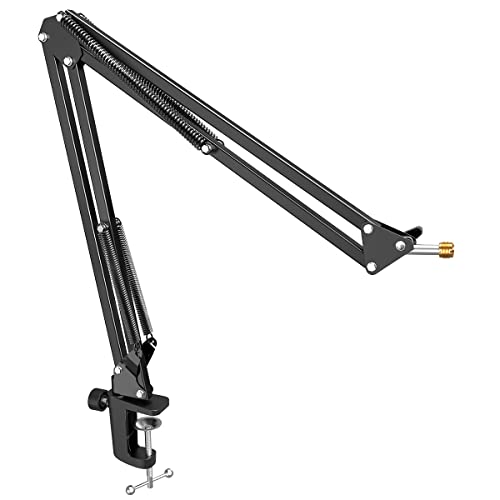
- ✓ Solid desk clamp grip
- ✓ Fixed knob stability
- ✓ Wide mic compatibility
- ✕ No included mic
| Material | Sturdy metal construction with anti-scratch desk clamp pad |
| Clamp Capacity | Desk thickness up to 2 inches (50 mm) |
| Arm Reach / Extension | 180° up-down rotation with wide extension |
| Mounting Adapters | Includes 5/8” to 3/8” metal adapter |
| Compatibility / Microphone Fit | Compatible with microphones using 5/8” to 3/8” threading (e.g., FIFINE K669B, K670, K683A, K658, K688, AmpliGame A6V/A8, AM8 USB mics) |
| Portability / Foldability | Foldable arm for desktop space savings and easy transport |
You slide the FIFINE CS1 into place and immediately notice the upgraded desk clamp gripping securely, its anti-scratch pad doing exactly what you hoped for on a polished desk. The 2″ wide mouth makes quick work of clamping it down without tipping the entire setup.
First spin of the knob, and you feel the arm lock into position. No more wobble when you bump the desk during a gaming sprint or a quick mic test—the fixed knob design keeps the swing arm steady after you lock it.
It’s a small detail, but it changes how calmly you can move around while live-ing.
Pop in the 5/8″ to 3/8″ adapter and your mic clips in with a reassuring click. The 180° up-and-down rotation gives you a lot of room to tuck the mic close for a warmer tone or pull back for a more breathy sound when you want it.
That full-range motion feels natural in everyday use, not fiddly.
Durability stands out for something in this price tier. It’s all metal, with springs that feel responsive without surprising springiness.
You can nudge the arm mid-setup, and it settles back into place without a dramatic shift—great for mid-game mic adjustments without disturbing your camera angle.
When space is tight, folding the arm helps a lot. It tucks neatly against the edge of the desk, and you can carry it to another setup or a quick podcast session without giving up your desk real estate.
It’s lightweight enough to move, but sturdy enough to trust with a heavier mic variant.
For casual gaming, streaming, or beginner podcasts, this arm hits a sweet spot between price and performance. You’ll appreciate the balance of stability, range of motion, and portability without needing a second mortgage for a premium stand.
QuadCast Boom Arm, Mic Arm for Blue Yeti HyperX QuadCast

- ✓ Solid price, solid build
- ✓ Quick, simple setup
- ✓ Wide mic compatibility
- ✕ Not premium-grade noise
- ✕ Clamp depth limits
| Mounting Clamp Capacity | Clips to desktops up to 1.89 inches (4.8 cm) thick |
| Mic Arm Compatibility | Compatible with Blue Yeti, HyperX QuadCast (and QuadCast S), HyperX SoloCast, Shure MV7, Shure SM7B, Blue Snowball, Rode, Fifine, Razer Mini, etc. |
| Adapter Conversion | 3/8 inch to 5/8 inch adapter pre-installed for microphone compatibility |
| Suspension Mechanism | Dual-suspension springs with reinforced knobs for stable positioning and reduced mic shake |
| Pre-installed Hardware | Silver adapter pre-installed for HyperX QuadCast boom arm |
| Package Inclusions | 1x mic scissor arm stand, 1x desk mounting clamp, 1x 3/8″ to 5/8″ screw adapter (pre-installed); microphone not included |
You know that moment when you finally clamp a mic arm to your desk and the whole setup behaves like it was built for it? I had that with the SUNMON QuadCast-friendly arm—the silver adapter already pre-installed, so I could drop in the HyperX QuadCast and test the tilt without fiddling with extra bits.
First tweak, I loosened the knob, slid the arm to a comfortable height, and tightened. It held steady as I adjusted the angle to point right at my mouth, no wobble, no desk shake.
It feels sturdy enough to keep the mic in place even with a quick reach for a coffee mid-recording.
The dual suspension springs are noticeable in how controlled the movement is. You can swivel, tilt, and pan without the whole setup drifting or making noise, which is exactly what you want when you’re streaming or recording in a small space.
On my desk, the clamp clamped securely to boards up to about 1.89 inches thick, and the soft sponge protected the surface from scratches. I appreciated how the base didn’t slip as I adjusted the mic during a mock panel of questions from friends.
Compatibility wise, it genuinely handles a range of mics beyond the QuadCast—Blue Yeti, Snowball, even Shure models—so you’re not locked in. It’s a budget arm that doesn’t feel bargain-bin, more like you found a solid long-term companion for late-night editing sessions.
Setup was quick, and the included screw adapter (3/8″ to 5/8″) made switching between mics painless. If you’re after a cheap, reliable boom arm that checks the basics without fuss, this one does the job and then some.
Real-world use is where it shines: lightweight enough to move around in a cramped setup, but sturdy enough to stay put during recording. It’s not premium-grade silence, but it doesn’t broadcast clanks either, which is refreshing for the price.
FIFINE AmpliGame AM8T XLR/USB Gaming Microphone Set,

- ✓ Solid, stable boom arm
- ✓ Easy USB plug-and-play
- ✓ Built-in mute and gain controls
- ✕ XLR cable not included
- ✕ Desk clamp limited to under 2 inches
| Connectivity | USB and XLR (with dynamic microphone included) |
| Microphone Type | Dynamic vocal microphone |
| Polar Pattern | Cardioid |
| Included Accessories | Boom arm stand, C-clamp, 8.2 ft USB-C cable, user manual; XLR cable not included |
| Desk Clamp Compatibility | Desk thickness up to 2 inches (50 mm) |
| Extra Features | Mute button, gain knob, headphones jack with monitoring, RGB lighting with selectable modes |
You’re at your desk late on a Friday night, debating whether to chase that perfect vocal take or just stream a quick gaming session. You bring the FIFINE AmpliGame AM8T into frame, clamp the sturdy boom arm to the desk, and switch on the RGB glow.
The soft blue and pink hues bounce off your monitor, making your setup feel like a mini studio.
The AM8T kit feels solid in your hands the moment you pick it up. The metal arm stays where you position it, thanks to robust springs that don’t drift during a late-night header of a chair or a sudden keyboard slam.
The included XLR/USB mic handles quick plug-and-play on USB with zero driver fuss, which saves you time when you’re hopping between games and voice chat.
Positioning is easy. The boom arm clamps securely to desks under 2 inches thick, and the 8.2-foot USB-C cable is long enough to route cleanly without tugging at your mic.
The mute button and gain knob sit within easy reach, letting you silence or boost audio without dropping focus. The cardioid pattern helps keep the mic focused on your voice, cutting down on room noise in a typical gaming den or apartment setup.
In practice, the RGB light adds a touch of personality without overpowering your voice. The windscreen is a welcome touch for plosives, especially when you’re warming up quickly before a stream.
The XLR option is there if you ever want to upgrade to a mixer or add tools to your signal chain.
Overall, it feels like a reliable, affordable starter that actually handles real-world use—gaming, streaming, and light vocal work—without fuss.
Pros: – Solid, stable boom arm – Easy USB plug-and-play – Built-in mute and gain controls
Cons: – XLR cable not included – Desk clamp limited to under 2 inches
What Is a Boom Arm and How Does It Enhance Your Setup?
A boom arm is a versatile piece of equipment used primarily in broadcasting, photography, and video production to support microphones, lights, or cameras. It allows users to position these devices at various angles and distances, greatly enhancing the flexibility and quality of recordings or broadcasts.
According to the American Society of Cinematographers, boom arms are essential for achieving optimal audio and visual quality in professional settings, allowing for precise placement without obstructing the scene or interfering with the subject. They often come equipped with adjustable joints and clamps for secure mounting and easy maneuverability.
Key aspects of boom arms include their construction, which typically features lightweight yet sturdy materials like aluminum or steel, and their design, which allows for extendable reach and height adjustments. Many boom arms also incorporate cable management systems to keep wires organized and minimize visual clutter. The best cheap boom arms provide an affordable entry point for amateur podcasters or video creators looking to elevate their production value without a hefty financial investment.
This piece of equipment impacts various fields by enabling clearer audio capture and improved lighting setups, which is crucial in environments such as studios, home offices, or even outdoor shoots. For instance, in podcasting, a good boom arm can help position a microphone closer to the speaker’s mouth, resulting in better sound quality and reduced background noise. In photography and videography, it allows for creative lighting setups that can enhance the mood and aesthetic of the visuals produced.
The benefits of using a boom arm include increased efficiency and flexibility during recording sessions. By allowing users to quickly adjust the position of their gear, a boom arm minimizes setup time and maximizes creativity. Moreover, its ability to keep equipment off the table or out of the frame can lead to a cleaner and more professional appearance in video productions.
Best practices for using a boom arm include ensuring it is securely mounted to prevent accidental falls and positioning it at an appropriate height to avoid interference with the subject. Regular maintenance, such as checking joints and screws for wear, can also prolong the life of the arm. When selecting a boom arm, looking for features like weight capacity, adjustability, and ease of use can help users find the best cheap option that meets their needs without compromising quality.
What Should You Look For When Choosing a Cheap Boom Arm?
When choosing the best cheap boom arm, several key factors should be considered to ensure functionality and value for money.
- Stability: Look for a boom arm that offers good stability to support your microphone securely without wobbling or tipping over. A solid construction with heavier materials typically provides better stability, which is essential for clear audio recording.
- Adjustability: The ability to adjust the height and angle of the boom arm is crucial for achieving the best positioning for your microphone. An adjustable arm allows for flexibility in setups, accommodating different recording environments and user preferences.
- Weight Capacity: Ensure that the boom arm can handle the weight of your microphone and any additional accessories you might use. Checking the weight capacity helps avoid potential damage to both the microphone and the boom arm itself.
- Mounting Options: A boom arm should offer versatile mounting options, such as desk clamps or screw mounts, to fit various setups. This feature is particularly important if you frequently change your recording location or need to save space.
- Build Quality: While looking for a cheap option, it’s still important to evaluate the overall build quality. Durable materials and a well-constructed design can prevent wear and tear over time, ensuring longevity despite the lower cost.
- Noise Isolation: Some boom arms come with built-in noise isolation features to reduce unwanted vibrations and sounds. This can greatly enhance audio quality during recording sessions, making it a valuable aspect to consider.
- Compatibility: Check that the boom arm is compatible with your specific microphone model and any other equipment you plan to use. Some arms may have specific fittings or adapters that are necessary for a proper connection.
How Does Material Influence the Boom Arm’s Durability and Performance?
The material used in a boom arm significantly impacts its durability and performance, affecting factors such as weight support, stability, and longevity.
- Aluminum: Aluminum is lightweight yet strong, making it a popular choice for budget boom arms. Its resistance to rust and corrosion ensures that the boom arm can last longer, even with regular use in various environments.
- Steel: Steel boom arms are known for their exceptional strength and durability, allowing them to support heavier equipment without bending or breaking. However, they tend to be heavier than aluminum options, which can affect portability and ease of adjustment.
- Plastic: While plastic boom arms are often the most affordable, they may lack the durability and stability of metal options. They can be prone to cracking or breaking under heavy loads, making them suitable only for lighter equipment.
- Composite Materials: Composite boom arms combine different materials to achieve a balance between weight and strength. They can offer the benefits of both aluminum and plastic, providing a sturdy yet lightweight solution that is often resistant to environmental wear.
- Wood: Wooden boom arms, though less common, can provide a unique aesthetic and offer decent stability. However, they may not be as durable as metal options and could be susceptible to warping or damage from moisture.
What Weight Capacity Is Necessary for Your Equipment?
When selecting a boom arm, it’s important to consider the weight capacity necessary for your equipment.
- Microphone Weight: The boom arm must support the weight of your microphone, which can vary significantly between models.
- Accessory Compatibility: Consider any additional equipment, such as shock mounts or pop filters, that may add extra weight.
- Stability Requirements: A higher weight capacity ensures stability, especially for heavier setups, to prevent tipping or wobbling.
- Adjustability: Look for boom arms that can accommodate different weights and can be adjusted to balance the load effectively.
Microphone Weight: When choosing a boom arm, it’s crucial to know the weight of your microphone, as this will directly affect the arm’s performance. For example, condenser microphones tend to be heavier than dynamic ones, requiring a boom arm with a higher weight capacity to ensure it can hold the mic securely without sagging or falling. Always check the specifications of your mic against the boom arm’s weight limit for compatibility.
Accessory Compatibility: In addition to the microphone, any accessories such as shock mounts or pop filters can add additional weight to your setup. If you plan to use these accessories, you should factor in their weight when determining the necessary capacity of your boom arm. A boom arm that can handle the combined weight of your microphone and accessories will provide better stability and functionality.
Stability Requirements: A boom arm with a higher weight capacity is often more stable, especially if you’re using a heavier microphone setup. This stability is essential for preventing any unwanted movement or vibrations during recording, which can compromise audio quality. A well-balanced and stable boom arm will allow you to position your microphone with precision and confidence.
Adjustability: Look for boom arms that offer adjustability features, as they can help accommodate different weights and setups efficiently. An adjustable boom arm allows you to reposition your equipment easily and balance the load, which can be particularly beneficial if you frequently switch between different microphones or accessories. This flexibility is important for achieving the best sound quality in various recording situations.
What Are the Most Highly Recommended Boom Arms Under $50?
Some of the most highly recommended boom arms under $50 include:
- Neewer Microphone Suspension Boom Scissor Arm: This scissor arm is known for its adjustable design and sturdy construction, making it suitable for various setups. It features a maximum load capacity of around 2.2 lbs, which is adequate for most microphones. The arm can be easily mounted to desks or tables with a simple clamp, providing flexibility in positioning.
- InnoGear Microphone Boom Arm: This model offers a compact yet robust design with a dual suspension spring design, which helps prevent unwanted noise from vibrations. It can hold microphones up to 2.2 lbs and comes with a cable management system to keep your workspace tidy. The adjustable arms make it easy to position your mic at the desired height and angle.
- Gator Frameworks GFW-MIC-0821: This boom arm is praised for its durability and ease of use, featuring a steel construction that ensures long-lasting performance. It includes a universal microphone clip and can support a variety of microphone sizes. The adjustable height and angle settings allow for versatile positioning, making it ideal for both studio and live environments.
- Hercules MS533B Microphone Stand: While it’s technically a stand, this model includes a boom arm that offers great flexibility for positioning your microphone. Its unique EZ Clutch height adjustment system allows for quick and easy height changes. The sturdy base ensures stability, even when extended, making it a reliable choice for performers and podcasters alike.
- Samson MB1 Microphone Boom Arm: This boom arm is known for its lightweight yet sturdy design, making it ideal for home studios and portable setups. It features a 360-degree swivel and an adjustable clamp that fits onto various desk thicknesses. The arm can easily be positioned to suit different recording angles, enhancing the user experience.
How Can You Set Up a Cheap Boom Arm for Optimal Performance?
Setting up a cheap boom arm for optimal performance involves selecting the right components and ensuring proper positioning and adjustments.
- Adjustable Boom Arm: Look for a boom arm that offers adjustable tension and height settings to accommodate different microphone sizes and user preferences.
- Shock Mount: Incorporating a shock mount helps to isolate the microphone from vibrations and handling noise, resulting in cleaner audio recordings.
- Microphone Clip: A reliable microphone clip is essential for securely holding the microphone in place, preventing it from drooping or falling during use.
- Cable Management: Ensure proper cable management with clips or ties to keep audio cables organized and free from tangling, which can interfere with performance.
- Weight Capacity: Check the weight capacity of the boom arm to ensure it can support your microphone and any additional accessories you may use.
The adjustable boom arm is crucial as it allows users to customize the microphone’s position for optimal recording angles and comfort. Look for arms that can be tightened based on your desired tension to prevent drooping.
A shock mount is particularly important for those using sensitive microphones, as it absorbs shock and reduces unwanted noise from handling or vibrations. This ensures that your recordings maintain clarity and professionalism.
A sturdy microphone clip will keep your microphone securely in place, mitigating the risk of accidental drops that may disrupt recordings. Choose a clip that matches the size of your microphone for the best fit.
Effective cable management is necessary to maintain a clean workspace and to avoid interference with the microphone’s performance. By organizing cables, you can prevent them from being a distraction or causing damage.
Lastly, understanding the weight capacity of the boom arm is essential since exceeding this limit can lead to breakage or instability. Always verify that your microphone and any accessories do not surpass the arm’s specifications for safe use.
What Common Problems Might Occur With Cheap Boom Arms?
Common problems that might occur with cheap boom arms include:
- Stability Issues: Cheap boom arms often lack robust construction, which can lead to instability when extending the arm. This instability can cause microphones or cameras to sag or wobble, affecting audio and video quality during recordings.
- Limited Weight Capacity: Many inexpensive boom arms are designed for lighter equipment, which means they may not support heavier microphones or cameras. Exceeding the weight limit can lead to the arm collapsing or damaging the equipment, requiring replacements or repairs.
- Poor Build Quality: Budget boom arms may be made from subpar materials that wear out quickly or break under regular use. This can result in malfunctions such as loose joints or broken clamps, which diminish the arm’s functionality and reliability.
- Reduced Range of Motion: Cheap models might offer limited articulation and movement options, making it difficult to position the microphone or camera optimally. This can lead to awkward setups that are not conducive to achieving the best sound or image quality.
- Noise During Movement: Lower-quality boom arms might produce unwanted noise when being adjusted or repositioned, which can be a significant drawback during recordings. Such noise can interfere with the overall audio quality, especially in sensitive recording environments.
- Lack of Accessories: Inexpensive boom arms may not come with essential accessories, such as mounts or shock absorbers, that can enhance performance. The absence of these components can lead to additional costs and the need for further purchases to achieve a professional setup.
How Can You Troubleshoot Issues With Your Cheap Boom Arm?
When troubleshooting issues with your cheap boom arm, consider the following common problems and solutions:
- Loose Joints: If the boom arm is wobbling or not holding its position, check for loose screws or joints.
- Insufficient Weight Support: If your microphone is sagging or falling, it may be due to the boom arm not being able to support its weight properly.
- Noise or Creaking Sounds: If you hear noises when adjusting the boom arm, it could indicate that the joints need lubrication.
- Mounting Issues: If the boom arm is unstable when mounted, ensure that the clamp is securely attached to a sturdy surface.
- Incompatibility with Equipment: If the boom arm does not fit your microphone or desk setup, check the specifications for compatibility.
Loose joints can often be fixed by tightening the screws or adjusting the tension on the joints to ensure they are secure enough to hold the weight of the attached equipment. Inspect each joint and screw, and use a screwdriver or wrench to tighten them as necessary.
If the boom arm is not supporting the weight of your microphone, it may be necessary to either adjust the arm’s positioning or consider a different boom arm designed for heavier equipment. Always refer to the weight limits specified by the manufacturer to avoid damage.
Noisy or creaking sounds can usually be resolved by applying a suitable lubricant to the joints and hinges. This will help reduce friction and allow for smoother movements, enhancing both performance and longevity.
For mounting issues, ensure that the clamp is properly tightened to prevent any wobble or movement during use. If the surface is too thin or not sturdy enough, look for alternative mounting solutions or locations that provide better stability.
If you find the boom arm incompatible with your equipment, confirm the specifications of both the boom arm and your microphone or other devices. If necessary, you may need to purchase additional adapters or consider a different boom arm that fits your needs more closely.
Related Post: