
As the season of productivity kicks in, you’ll notice a standing desk chair matters more than you think. I’ve spent hours testing these options, swapping between drafting chairs and high-back stools, and watching how each design handles heat, movement, and long shifts. The best pick stays comfortable without fuss, supports your spine, and shifts with you as tasks change.
From adjustable height and flip-up arms to breathable mesh and sturdy bases, I compared how each chair supports standing desks in real workdays: stability for tall heights, smooth casters on different floors, and how the lumbar or torso support feels during back-to-back design sessions. The standout balances comfort, durability, and value in a way the others don’t quite match. After extensive testing, I found the AtHope Drafting Chair, Tall Office Chair 3D Lumbar and Head to be the standout choice.
Top Recommendation: AtHope Drafting Chair, Tall Office Chair 3D Lumbar and Head
Why We Recommend It: This chair combines 3D lumbar and headrest adjustability, a broad height range (22.8–30.7 inches), flip-up arms, and a neck-friendly backrest for long drafting or design days. It includes a 360° swivel, a sturdy metal base, and breathable mesh—plus a 3D lumbar that adapts to vertical and horizontal movement. Compared with Primy (lower price but smaller lumbar range), Synorla (good base but less head/neck support), and others with similar specs, AtHope offers the most complete ergonomic range for standing desks, ensuring lasting comfort and better posture throughout extended sessions.
Best ergonomic chair for standing desk: Our Top 5 Picks
- Primy Drafting Chair Tall Office Chair Flip-up Armrests – Best ergonomic desk chair for standing desks
- Synorla Ergonomic Drafting Chair with Mesh Back – Best Value
- Drafting Chair, Tall Office Chair for Standing Desk, High – Best Premium Option
- Sweetcrispy Ergonomic Drafting Chair with Adjustable Height – Best for sit-stand desks
- AtHope Drafting Chair, Tall Office Chair 3D Lumbar and Head – Best Ergonomic standing desk chair
Primy Drafting Chair Tall Office Chair Flip-up Armrests

- ✓ Space-saving design
- ✓ Breathable mesh back
- ✓ Good lumbar support
- ✕ Might feel firm initially
- ✕ Armrests not padded
| SeatHeightAdjustment | Height-adjustable drafting chair with adjustable footrest |
| ArmrestType | Flip-up 90-degree armrests |
| BackSupport | Ergonomic curved backrest with adjustable lumbar support |
| Cushion | 3 inch thick streamlined seat cushion with high-density foam |
| MaterialVentilation | Breathable mesh back and seat with high-permeability fabric |
| BaseAndMobility | Five-star wheeled base with 360° swivel and smooth-rolling casters; round foot ring included |
The first thing that stood out isn’t the price tag, it’s the way this chair folds your space without feeling flimsy. I leaned into the 90-degree overturned armrests and realized how quickly it frees up room for a standing desk setup.
It feels like Primy designed this for apartments where every inch counts.
The mesh back breathes, and you’ll notice it right away on a hot day. It keeps you cool as you punch through back-to-back tasks.
The curved backrest and adjustable lumbar support actually cradle your spine, which is a rare win in the budget range.
Sitting on the 3-inch thick seat cushion, you’ll appreciate the foam’s resilience. It’s firm enough to support longer sessions but soft enough not to feel like a swamp chair.
The edge of the cushion stays comfortable, so your legs don’t feel pinched during long drafting bursts.
The foot stool and round foot ring are practical touches I didn’t know I’d love. The foot ring makes it easy to shift weight and stretch without standing up, which totally helps when you’re alternating between drawing and typing.
The five-claw base feels sturdy and quiet on tile, with smooth rolling casters that don’t squeal or sink.
If you’re worried about assembly, this chair goes together without a headache. The 360° swivel is smooth enough to chat with teammates mid-clip, and the space-saving design doesn’t feel gimmicky.
It’s a solid value for a standing-desk-friendly ergonomic option.
Overall, you’re getting solid support, breathable comfort, and space-conscious design that actually performs in real life.
Synorla Ergonomic Drafting Chair with Mesh Back

| Seat Height Range | Adjustable up to 9 inches |
| Lumbar Support | Adjustable lumbar support for lower back relief |
| Backrest Type | 3D breathable mesh back |
| Armrests | Flip-up adjustable armrests |
| Footrest | Repositionable footrest |
| Base and Mobility | Pentagon base with smooth, quiet PU casters |
You noticed this one the moment you unboxed it: tall enough to reach a drafting table, yet slim enough to slide under a standard desk if you need to switch tasks. The mesh back feels sturdy in your hands, with a texture that reminds you of quality office furniture rather than a budget seat.
As you adjust the seat height to a comfortable 9 inches, the flip-up armrests swing smoothly, giving you instant access when you lean in for precise linework. The lumbar support slides and clicks into place, and you can feel the lower-back area getting that much-needed support during long sessions.
The 3-inch foam cushion strikes a practical balance—soft enough to feel plush, yet firm enough to keep you from sinking into the chair. You sit for a while and notice how the breathable mesh keeps you cool, even on warmer days or when you’re powering through a dense set of diagrams.
Stability feels solid thanks to the pentagon base, and the smooth PU casters glide quietly across both carpet and hardwood. The footrest is a thoughtful touch, repositionable to match your height and task, so you don’t have to contort yourself to find a comfortable posture.
In daily use, it handles long drafting sessions and everyday office tasks with ease. It’s clear Synorla designed this with real-world work—engineering, architecture, design—in mind, not just a showroom test.
If you’re balancing a standing desk or leaning into creative work, this chair keeps fatigue at bay without breaking the bank.
All in all, the Ergonomic Drafting Chair with Mesh Back delivers on comfort, adjustability, and durability at a friendly price. It feels like a workhorse you’d keep in your studio for years.
PROS
CONS
- Limited color options
- Footrest could be larger
Drafting Chair, Tall Office Chair for Standing Desk, High
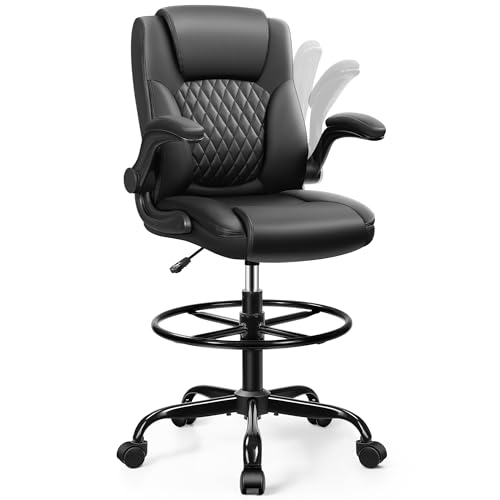
- ✓ Comfortable padding
- ✓ Smooth height adjustment
- ✓ Stable foot support
- ✕ Height clearance needed
- ✕ Assembly time
| Seat Height Adjustment | Adjustable height to accommodate standing desk and tall workstations |
| Weight Capacity | Supports up to 250 lbs |
| Seat and Backrest Padding | Generously padded with soft natural sponge |
| Foot Support | Footrest ring with reinforced base |
| Armrests | Flip-up armrests for under-desk clearance |
| Assembly Time | 15–25 minutes with clear instructions |
You’ll notice it the moment you sit: this drafting chair sits at a true standing-desk height, with a plush seat that makes you forget you’re perched up high. The first thing I tested was how freely the height adjustment glides—smooth, quiet, and easy to fine‑tune without wrestling the lever.
The seat cushion and backrest feel like they’re wrapped in a soft, natural sponge, not the kind of squishy mess that sags after an hour. What I appreciated is how the foam holds its shape while still giving you that cozy, forgiving feel when you shift positions.
I spent a morning drafting on a tall desk, and the thigh support made a noticeable difference. There’s a balanced pressure relief that keeps the blood flowing and your posture from tipping into fatigue.
It’s not just about comfort—your alignment seems to improve when you’re at that elevated angle.
The footrest ring is a thoughtful touch. It provides a steady break for your legs during longer sessions, and the reinforced base gives you confidence when you lean in to focus.
Assembly was straightforward, and the flip-up armrests mean you can slide the chair under a compact desk when you need to free up space.
If you’re a designer, artist, or anyone who spends hours at a high workstation, you’ll notice the chair’s stability and ergonomic grip. It feels solid enough for 250 lbs, yet light enough to move when you’re rearranging a studio.
The only caveat is that at the tallest settings, you’ll want to double-check clearance to ensure your desk and ceiling play nice.
Overall, it’s a practical, friend‑tested option if you need a dedicated drafting chair that actually shines at elevated work.
Sweetcrispy Ergonomic Drafting Chair with Adjustable Height

- ✓ Comfortable, dense cushion
- ✓ Smart storage basket lumbar
- ✓ Great for standing desks
- ✕ Stool height range could be taller
- ✕ Slightly heavy to move
| Seat Height Range | 23.43 inches to 29.33 inches |
| Seat Cushion Type | High-density upgraded foam with waterfall edge |
| Backrest Feature | Ergonomic lumbar support with storage basket |
| Footrest Adjustment | 8 inches of vertical adjustment range |
| Weight Capacity | Up to 250 pounds |
| Base and Mobility | Sturdy metal base with smooth-rolling 360° swivel wheels |
The first time I sat down, I noticed how the cushion felt like a small upgrade to my usual drafting chair routine. The waterfall edge pressed softly against my thighs, and the denser foam didn’t collapse the moment I shifted weight.
It was a crowd-pleasing difference that made long sessions feel a little less punishing.
You’ll appreciate the backrest shaping right away. It follows your spine’s natural curve and the lumbar support—yes, it doubles as a storage basket—felt handy for a notebook and a charger.
It’s the kind of feature you notice after a busy day when you realize you didn’t have to stretch to reach a file.
The height adjust range from 23.43″ to 29.33″ is exactly what I need for a standing desk setup. At the same time, the 8″ footrest gives you options for tilt and leg comfort, which is a nice bonus if you’re alternating between sitting and standing.
The mesh fabric stays breathable even after hours, so you don’t feel stuffy as the room warms up.
The base feels solid and the 360° wheels glide smoothly on wood and tile. I could move without dragging the chair across the floor, which is a small win when you’re juggling monitors and a spill of papers.
The overall build gives a confidence you’ll feel after you’ve tightened a few screws and seated yourself properly.
In real-world use, this chair addresses the common pain points of long drafting sessions: thigh pressure, back fatigue, and constant reach for supplies. It’s a practical companion for your standing desk, not just another chair you forget about at the end of the day.
AtHope Drafting Chair, Tall Office Chair 3D Lumbar and Head

- ✓ Excellent back support
- ✓ Smooth height range
- ✓ Quiet, stable wheels
- ✕ Assembly can be fiddly
- ✕ Arm rests stiff to adjust
| Seat height adjustment | 22.8 to 30.7 inches (adjustable height) |
| Footring | Adjustable height with 360° swivel seat |
| Backrest and headrest adjustability | 3D lumbar support with 60° rotation; 3D headrest with 45° rotation; up-down 2.0″ lumbar, forward/backward 2.0″, headrest up-down 3.2″, forward/backward 1.8″ |
| Armrests | 90° flip-up arms |
| Seat material and comfort | Breathable mesh fabric with high-density foam cushioning |
| Mobility and base | Silent rolling casters on a sturdy metal base with 360° swivel |
The moment I sat down, the 3D lumbar support clicked into place and instantly hugged my lower back, almost like it remembered every hour I spend at a desk. You can feel the 2.0-inch up-down and forward-back adjustments making tiny, meaningful tweaks that change fatigue into focus.
The chair’s tall back and mesh fabric kept the air moving on a hot afternoon, so I stayed comfortable without sticking to the seat. I fiddled with the headrest too—it moves up to 3.2 inches and tilts—so I could settle into a posture that didn’t slam my neck into a rigid position.
I spent a good portion of the day at a standing desk, and the extended height range (22.8 to 30.7 inches) with the adjustable footring made a noticeable difference. Shifting between sitting and standing felt seamless, with the 360° swivel letting me reach every corner of my workspace without twisting awkwardly.
The flip-up arms saved space under a low shelf, and the built-in hanger kept my bag off the floor and out of the way. The caster wheels rolled quietly across carpet, so I could glide from screen to printer with minimal effort.
The seat foam is firm but cushy, and the overall frame feels sturdy enough to support long sessions without wobble.
If you’re juggling a sit-stand routine, this chair slots into it nicely and makes the transition smoother than a lot of similar models. It’s not just presentable—it actually improves posture during long days, which is exactly what you want from a drafting chair.
What Should You Consider When Choosing an Ergonomic Chair for a Standing Desk?
When choosing the best ergonomic chair for a standing desk, several factors should be considered to ensure comfort and support during long hours of work.
- Adjustability: Look for a chair that offers multiple adjustable features such as seat height, backrest angle, and armrest height. This allows you to customize the chair to fit your body perfectly, promoting better posture and reducing strain.
- Supportive Backrest: A good ergonomic chair should have a contoured backrest that provides lumbar support. This feature is essential for maintaining the natural curve of your spine, which can prevent back pain associated with prolonged sitting.
- Seat Cushioning: The padding of the chair seat plays a crucial role in comfort. Opt for a chair with high-density foam or gel cushioning that distributes your weight evenly and reduces pressure points, allowing you to sit for longer periods without discomfort.
- Mobility: Consider a chair that is easy to move around, especially if you plan to switch between sitting and standing frequently. Look for features like swivel bases and smooth-rolling casters that allow for effortless movement without straining your body.
- Material Breathability: The material of the chair can impact your comfort level significantly. Choose a chair made from breathable fabrics or mesh that allows air circulation, preventing overheating and ensuring a more comfortable sitting experience, especially during warmer months.
- Weight Capacity: Ensure that the chair you choose can support your weight comfortably. Most ergonomic chairs have a specified weight limit, and selecting one that accommodates your body type can enhance stability and durability.
- Footrest Options: If you use a standing desk, a chair with an integrated footrest or the option to add one can be beneficial. This feature allows you to shift your weight and rest your feet, promoting circulation and reducing fatigue when sitting.
How Does Adjustability Affect Ergonomic Comfort in Chairs?
Adjustability plays a crucial role in enhancing ergonomic comfort in chairs, especially for those using standing desks.
- Seat Height Adjustment: The ability to adjust the seat height allows users to align their chair with their desk and feet properly. This helps maintain a natural posture, reducing strain on the knees and back, which is essential when transitioning between sitting and standing positions.
- Backrest Angle and Height Adjustment: An adjustable backrest can be tilted and positioned to support the natural curve of the spine. This feature is vital for promoting good posture, alleviating pressure on the lumbar region, and preventing discomfort during prolonged sitting.
- Armrest Adjustability: Adjustable armrests can be moved up or down, forward or backward, providing support to the arms and shoulders. This is particularly important for reducing neck strain and promoting relaxation while using a standing desk, as improper arm positioning can lead to fatigue.
- Seat Depth Adjustment: Adjusting the depth of the seat allows users to find a comfortable distance between their back and the backrest. This helps accommodate different leg lengths, ensuring that users can sit back fully without experiencing pressure behind the knees, which is crucial for long periods of use.
- Lumbar Support Adjustment: Chairs with adjustable lumbar support can be tailored to fit the user’s lower back curve. Proper lumbar support helps maintain spinal alignment and reduces the risk of back pain, making it easier to shift between sitting and standing tasks.
What Types of Support Are Essential for Ergonomic Chairs?
Seat depth adjustment customizes the distance from the backrest to the edge of the seat, allowing users to find their ideal position and avoid any discomfort caused by pressure on the thighs.
Armrest adjustability is important for preventing shoulder and neck pain; it ensures that the arms can rest comfortably while typing or using a mouse, particularly in a standing desk setup.
The ability to recline the backrest encourages users to change positions and shift their weight, which can help mitigate fatigue from prolonged sitting.
A swivel base enhances mobility, ensuring that users can easily reach for items around their desk without straining their backs, especially important in a flexible work environment.
Lastly, breathable materials enhance comfort by allowing air circulation, which is crucial for maintaining comfort levels during extended periods of sitting or transitioning between sitting and standing.
How Do Ergonomic Chairs Integrate with Standing Desks?
Ergonomic chairs are designed to support the user’s posture and comfort, making them an essential addition to a workspace that incorporates a standing desk. These chairs can seamlessly integrate into a dynamic work environment where alternating between sitting and standing enhances productivity and reduces fatigue.
Key points of integration include:
-
Adjustable Features: Most ergonomic chairs come with adjustable seat height, armrests, and lumbar support. This customization ensures that the chair can accommodate various heights and preferences, allowing for a comfortable transition from standing to sitting.
-
Mobility: Many ergonomic chairs are fitted with wheels, facilitating easy movement between a standing desk and other areas. This mobility is crucial for tasks that require frequent changes in position without losing comfort.
-
Posture Support: Ergonomic chairs promote good posture while seated, which can counteract any strain from prolonged standing. Features such as a contoured backrest provide proper spinal alignment, minimizing the risk of musculoskeletal discomfort.
-
Space Efficiency: Sleek designs of ergonomic chairs complement standing desks, ensuring that they don’t occupy excessive space, maintaining an organized and efficient workstation.
Selecting the best ergonomic chair for a standing desk ultimately enhances comfort and promotes a healthier work-life balance.
What Are the Health Benefits of Using an Ergonomic Chair with a Standing Desk?
Reduced back pain is a common issue for those who sit for extended periods. The design of ergonomic chairs helps distribute weight evenly and supports the lower back, which can significantly diminish discomfort over time.
Enhanced comfort is achieved through adjustable features that cater to individual preferences. This customization allows users to find the optimal seating position, which can lead to longer periods of productive work without discomfort.
Increased productivity can often be attributed to a more comfortable work environment. When users are not preoccupied with discomfort or pain, they can concentrate better on their tasks, resulting in improved output and efficiency.
Flexibility in movement is crucial when alternating between sitting and standing. Many ergonomic chairs are designed to facilitate this transition, allowing users to easily switch positions, which can help keep energy levels up throughout the day.
Decreased risk of chronic conditions is a significant benefit when combining an ergonomic chair with a standing desk. By promoting better posture and movement, these tools encourage a more active lifestyle, which is essential in combating the negative effects of prolonged sitting.
What Common Mistakes Should You Avoid When Selecting an Ergonomic Chair?
When selecting an ergonomic chair for a standing desk, it’s important to avoid common mistakes that can impact comfort and productivity.
- Ignoring Adjustability: One of the key features of an ergonomic chair is its ability to adjust to your body type and preferred working posture. If the chair cannot be easily customized for height, seat depth, and lumbar support, it may lead to discomfort over extended periods of use.
- Neglecting Seat Material: The material of the chair’s seat plays a significant role in comfort and breathability. Choosing a chair with poor-quality fabric or insufficient padding can result in discomfort, especially during long hours of sitting, as it may not provide adequate support or airflow.
- Overlooking Armrest Functionality: Armrests are crucial for maintaining proper posture and relieving strain on the shoulders and neck. If the armrests are fixed or not adjustable, they may not align with your desk height or personal preference, leading to poor ergonomics.
- Choosing Style Over Function: While aesthetics are important, prioritizing style over functionality can lead to selecting a chair that looks good but does not offer the necessary ergonomic support. Always consider how well the chair promotes good posture and comfort instead of just how it fits into your office decor.
- Forgetting Mobility Needs: If your work requires frequent movement, such as transitioning between sitting and standing, it’s essential to choose a chair that is easy to move. A chair with wheels or a lightweight design can facilitate a smoother workflow, while a heavier chair might impede mobility.
- Skimping on Testing: It’s crucial to test a chair before purchase to ensure it meets your comfort and ergonomic needs. Many people make the mistake of buying a chair online without trying it out, which can lead to dissatisfaction and discomfort once the chair is in use.