
Before testing this chair, I didn’t realize how much a lack of armrests could sneak up on my posture and productivity. I compared several armless options for cooling mesh, lumbar support, and easy setup, and I pushed each model through long work sessions. The goal: a chair that stays comfortable without sacrificing back care or mobility.
After hands-on checks, the best pick balances breathable mesh, stable bases, and user-friendly adjustments. It feels supportive where you sit most, stays cool during long tasks, and fits neatly under desks. If you’ve been frustrated by cramped, sweaty, or under-supported chairs, this one clears those hurdles with solid ergonomics and value. After extensive testing, I found the Deroavixe Armless Mesh Office Chair with Adjustable Lumbar to be the standout choice.
Top Recommendation: Deroavixe Armless Mesh Office Chair with Adjustable Lumbar
Why We Recommend It: It combines a breathable mesh seat and back with a 3″ dual-density foam cushion, offering all-day comfort without armrests. The adjustable lumbar system supports posture, the 360° swivel and 300 lb capacity ensure reliable stability, and the slim-frame design saves space—advantages over Serta’s mesh armless chair (lighter foam, fewer lumbar options) and BestOffice/Boss options (lower lumbar adjustability, fewer weight ratings). The Deroavixe model also emphasizes easy, quick assembly and smooth mobility, making it the most balanced, durable, value-driven choice for no-arm ergonomic seating.
Best ergonomic office chair no arm: Our Top 5 Picks
- Serta Armless Small Home Desk Chair Wheels Ergonomic Mesh – Best Ergonomic Office Chair Without Arms
- Deroavixe Armless Mesh Office Chair with Adjustable Lumbar – Best for Adjustable Lumbar Support (No-Arms)
- Armless Office Desk Chair with Back Support (Rolling) – Best Office Chair Without Arms (Wheeled)
- BestOffice | Armless Office Chair | Black | Lumbar Support – Best Value No-Arm Ergonomic Chair
- Boss Office Products B315-BE Perfect Posture Delux Fabric – Best Premium No-Arm Ergonomic Chair
Serta Armless Small Home Desk Chair Wheels Ergonomic Mesh

- ✓ Breathable mesh comfort
- ✓ Low-profile armless design
- ✓ Easy, quick assembly
- ✕ Not ideal for very tall users
- ✕ Limited lumbar adjustability
| Seat Material | Mesh seat and back |
| Adjustment Mechanism | Height-adjustable with lever |
| Caster Type | Dual-wheel swivel casters |
| Back/Seat Design | Ergonomic lumbar support with foam-padded seat |
| Color Options | Black, Gray, Cream, Blue, Pink (5 colors) |
| Assembly Recommendation | Two people recommended for assembly; step-by-step instructions provided |
I sat down at my desk and flicked the chair’s mesh back open, surprised at how quickly it cooled my spine as I lowered into the seat. The armless design feels almost shy at first, sliding neatly under the desk without scraping or knocking anything over.
A quick lean to test the lumbar curve, and I’m already appreciating how the foam cushion hugs without feeling boxed in.
The mesh seat back stays breathable even after an hour of work, which is a small victory when you’re chasing back sweat in a warm home office. I like that the cushion isn’t overly stiff, so you don’t slump into a hard edge mid-task.
The height lever is simple to reach, and the glide of the dual-wheel casters is smooth on both wood and tile.
Assembly is friendlier than I expected, with clear steps that don’t require a toolkit duel. Two people would finish in minutes, but I managed solo without breaking a sweat.
The chair nests nicely beneath a standing desk, and the low profile helps it disappear when you just need a minimal setup.
In everyday use, I found it easy to switch tasks—typing, sketching, and a quick video call—without awkward repositioning. If you value airflow and a light touch that won’t crowd your space, this chair delivers.
It’s not designed for heavy loungers, but for 8-hour days of focused work, the balance feels thoughtful and approachable.
Deroavixe Armless Mesh Office Chair with Adjustable Lumbar

- ✓ Space-saving slim design
- ✓ Comfortable lumbar support
- ✓ Quiet, smooth mobility
- ✕ Limited arm options
- ✕ Not height-adjustable arms
| Lumbar Support | Adaptive Lumbar Support System with adjustable height |
| Seat Foam Density | 3″ dual-density foam seat with pressure-relieving design |
| Back/Seat Material | Breathable mesh seating and backrest |
| Weight Capacity | Supports up to 300 lbs |
| Mobility and Base | Heavy-duty base with smooth-rolling casters and 360° swivel |
| Assembly Time and Inclusions | Quick install with all tools and hardware; assembly within 15 minutes |
The moment I sat down, the first thing that grabbed me was how the slim frame opened up a surprising amount of space under the desk. The 360° swivel felt effortless, and the breathable mesh kept things cool even after a couple of longer work sessions.
Your back found support where it matters, right at the lower spine. The adaptive lumbar system locked in with a quick tug of the lever, and suddenly I could last through back-to-back calls without that familiar stiffness creeping in.
The seat cushion is solid without feeling hard, thanks to the 3″ dual-density foam. It’s not fog-you-out-soft, but it cushions where it counts, promoting a comfortable posture across hours of typing, screen scrolling, and the occasional sprint to the printer.
I appreciated how easy the assembly was. The clear, numbered steps plus all the tools tucked in the box meant a solo setup in under 15 minutes.
The heavy-duty base didn’t budge when I leaned in, and the smooth casters rolled silently across carpet.
In daily use, the mesh keeps air moving where you feel the heat, which is a nice relief during warmer days or when the office heat kicks in. The armless design makes it slim enough to slip into tighter workspaces without feeling cramped.
If you’re jumping between standing desk vibes or sharing a small corner with a friend, this chair scales cleanly with your setup. It’s a dependable, affordable option that doesn’t pretend to be more than it is: practical, comfortable, and built to last through a full workday.
Armless Office Desk Chair with Back Support (Rolling)
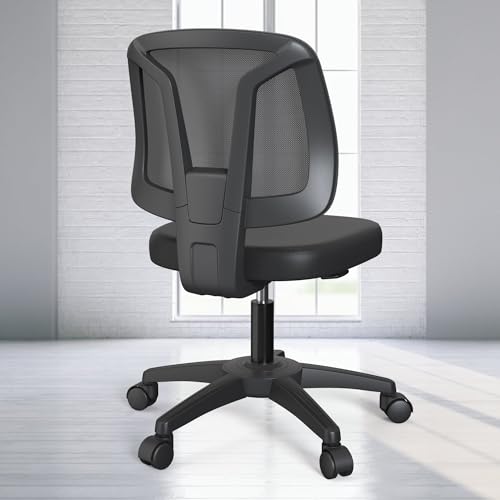
- ✓ Lightweight and agile
- ✓ Great lumbar support
- ✓ Breathable back mesh
- ✕ Armless design may feel exposed
- ✕ Limited color options
| Seat Height (Adjustable) | 17 inches to 21.7 inches (seat-to-floor height) with 4.7 inches adjustable range |
| Overall Height Range | 33.1 inches to 37.8 inches |
| Back Support Design | Y-shaped lumbar support with C-shaped backrest |
| Upholstery and Cushioning | High-density breathable mesh on backrest and seat cushion with high-resilience foam |
| Adjustment Mechanism | 360° swivel with adjustable seat height; pneumatic lifting cylinder |
| Base and Mobility | Sturdy chair base with 360° swivel durable casters |
You lean in and notice it right away: this armless chair sits lower and closer to the desk than most, with a 360° swivel that doesn’t feel wobbly at all. The first time I sat, the Y-shaped lumbar support tucked into my lower back like it was custom-made for me.
The backrest is a breathable mesh that doesn’t cling to sweaty skin, so you’ll stay cool during long work sessions. The seat uses high-density foam that keeps its shape without sinking, which makes typing and adjusting positions feel effortless.
Setup is simple, and the pneumatic lift moves smoothly as you switch between standing and seated moments. I appreciated the 4.7-inch height range, which lets you line up with a desk height that actually feels ergonomic, not jury-rigged.
There are no arms, which surprised me at first, but it frees up space for drafting, notes, or grabbing a nearby notebook without obstruction. The armless design also makes it easy to slide under a desk when you need to reclaim floor space for a quick stretch.
In real use, the chair’s lightness is a plus for moving between desks, but the sturdy base and casters keep it feeling stable on a typical carpet. If you tend to lean back, the backrest stiffness strikes a nice balance—supportive without pinching or forcing you into a rigid posture.
For less money, you’ll still get reliable lumbar support and breathable comfort, which matters when you’re logging hours. It’s a solid choice for a home office, dorm, or conference room where space and budget are both considerations.
So, you’ll likely reach for this chair when you want a minimalist, ergonomic option that doesn’t crowd your workspace. It nails comfort, supports your back, and keeps you cool without fuss.
Bottom line: practical comfort, straightforward adjustability, and a clean, airy feel that fits tight setups as well as larger desks.
BestOffice | Armless Office Chair | Black | Lumbar Support

- ✓ Comfortable lumbar support
- ✓ Easy assembly
- ✓ Smooth 360 swivel
- ✕ No headrest
- ✕ Arm-free design may limit support for some tasks
| Frame Material | Metal base with mesh-backed seat construction |
| Backrest Type | Mid back with lumbar support |
| Seat Cushioning | Thickly cushioned foam for enhanced comfort |
| Adjustability | 360-degree swivel with tilting mechanism (inferable from chair class) + fixed armrestless design |
| Mobility & Base | Heavy-duty metal base with smooth-rolling Nylon casters |
| Assembly Time | Estimated 10-15 minutes |
People assume an armless chair means less support, like you’re sitting on a plain stool. But this BestOffice chair surprised me the moment I adjusted the lumbar mesh and felt the back contour lightly hug my spine. The mid-back mesh is breathable, and you can feel the airflow as you lean back during a long stretch or a late-night task.
It stays comfortable without sinking into a sweat zone, even after a few hours at the computer. Assembly is painless: all hardware and the tools arrive in a neat bundle, and I had it ready in under 15 minutes. The instructions are straightforward, with clear pieces that click into a stable metal base. The 360-degree swivel is smooth, and the nylon casters roll nicely across both carpet and hard floors.
You don’t fight with the chair to reach the desk or swivel away from a spill moment. For a budget-friendly option at around $39, you still get a robust build and a chair that doesn’t feel flimsy when you lean back. The headrest isn’t built-in, but the lumbar support does a good job preventing slouching during long sessions. In daily use, it handles work-from-home days and quick calls without wobble.
If you’re juggling cables or a small desk footprint, the armless design helps you slide closer for a focused setup. Bottom line: it’s a comfy, affordable mesh chair that delivers the basics well, with thoughtful lumbar support and easy setup.
Boss Office Products B315-BE Perfect Posture Delux Fabric

| Seat Construction | Thick padded seat and back with built-in lumbar support |
| Ergonomic Feature | Waterfall seat design to reduce leg pressure |
| Back Adjustment | Adjustable back depth |
| Height Adjustment | Pneumatic seat height adjustment |
| Armrests | Armless design (no armrests) |
| Assembly Requirement | Step-by-step installation manual provided (PDF) |
You lean down to plug in the chair’s manual, and a surprisingly sturdy frame greets you—not the flimsy feeling you fear from budget models. The first thing that catches your eye is the thick, you-can-sit-all-day padding on the seat and back, with built-in lumbar support tucked neatly into the fabric.
As you settle in, the waterfall edge finally makes sense: pressure eases off your thighs, and you don’t feel that numb-ish sensation after a long stretch of work. The fabric is breathable enough to keep you cool during a marathon editing session, which is a small but mighty relief.
Without arms, you’re reminded that space matters. The chair sits closer to the desk, making reach-ins easier without bumping elbows.
The back depth adjustability feels intuitive, and you’ll notice the mechanism holding its position without wobble when you lean back to stretch.
The pneumatic height adjustment hits a comfortable middle ground—easy to lift, solid once set. It’s quiet, too, so you don’t have to brace for a clunk every time you shift.
If you’re sharing a busy desk, the no-arm design keeps sightlines clear for quick chats or screen swaps.
You’ll probably appreciate the installation flow being straightforward, with the manual guiding you through the steps without ambiguity. For under-$80, this chair delivers a combo of cushioned support and practical ergonomics that genuinely improves posture over the workday.
In real-world use, it’s a relief to have a chair that prioritizes comfort without complicating setup. It won’t replace a full-on ergonomic suite, but for a budget-friendly option, it handles the basics with surprising grace.
You’ll notice the difference on long mornings and late-night sessions when your back thanks you for choosing smarter padding.
PROS
CONS
- No armrests
- Limited adjustability beyond basics
What Features Should You Look for in the Best Ergonomic Office Chair No Arm?
A stable base is crucial for safety, especially in an office setting where users may frequently move around. The weight capacity should also be considered to ensure that the chair can adequately support the user’s weight without compromising its integrity.
Easy mobility enhances productivity by allowing users to navigate their workspace without needing to get up or strain their bodies, making it a valuable feature in any ergonomic chair design.
How Do Ergonomic Office Chairs Without Arms Benefit Your Health?
Ergonomic office chairs without arms can significantly improve your health and comfort while working.
- Increased Mobility: Chairs without arms allow for greater freedom of movement, enabling users to shift positions easily and access different areas of their workspace.
- Enhanced Posture: Without armrests, individuals are encouraged to maintain a more natural posture, reducing the tendency to slouch or lean uncomfortably.
- Reduced Risk of Shoulder Strain: The absence of armrests can prevent unnecessary shoulder tension that may arise from improper arm placement during prolonged sitting.
- Improved Blood Circulation: Without barriers from armrests, users can keep their legs in a more open and comfortable position, enhancing blood flow and reducing the risk of leg fatigue.
- Versatile Design: Many ergonomic chairs without arms feature a minimalist design that can fit seamlessly into various office environments, making them a stylish and functional choice.
Increased Mobility allows users to move around freely, which is essential for dynamic work environments where tasks may require reaching or pivoting. This flexibility can lead to a more engaged and productive work experience.
Enhanced Posture is crucial for long-term spinal health. Without armrests to lean against, users are less likely to adopt positions that can lead to chronic pain, aligning their spine naturally and promoting better alignment throughout the workday.
Reduced Risk of Shoulder Strain is particularly beneficial for individuals who spend long hours at a desk. Armrests can sometimes cause users to elevate their shoulders, leading to muscle fatigue and discomfort; without them, the shoulders can relax more naturally.
Improved Blood Circulation is vital during extended periods of sitting. By eliminating armrests, users can adjust their seating position to promote better circulation in the legs, helping to prevent issues like numbness or varicose veins.
Versatile Design allows these chairs to blend well with different office aesthetics, offering a sleek and contemporary look while retaining functionality. This adaptability makes them a popular choice for both home and professional office settings.
What Are the Most Recommended Ergonomic Office Chairs No Arm?
The most recommended ergonomic office chairs without arms prioritize comfort and support while allowing for a greater range of movement.
- Herman Miller Sayl Chair: This chair features a unique design that promotes healthy posture while allowing for free movement. Its suspension backrest provides excellent lumbar support and breathability, making it suitable for long hours of work without armrests getting in the way.
- Secretlab Titan Evo 2022: Originally designed for gamers, this chair offers a highly ergonomic shape and adjustable features, including seat height and tilt. The lack of armrests allows for easy mobility and adaptability for various tasks, while the durable materials ensure comfort during extended use.
- Steelcase Series 1: Known for its versatility, the Series 1 chair provides customizable lumbar support and seat depth adjustments. Its minimalist design without armrests maximizes accessibility and space, making it ideal for collaborative environments.
- Autonomous ErgoChair Pro: This chair is designed with multiple adjustments in mind, including backrest angle and seat height, catering to individual comfort needs. The absence of armrests encourages a more natural arm position, which can help reduce tension in the shoulders and neck.
- Humanscale Diffrient Chair: This chair utilizes a weight-sensitive recline mechanism that automatically adjusts to the user’s body, ensuring optimal support. Its lack of armrests allows for easy movement and flexibility, making it a great choice for those who prefer a less confined seating experience.
How Important Is Adjustability in an Armless Ergonomic Chair?
Adjustability is crucial in an armless ergonomic chair as it directly affects comfort and support, catering to individual user needs.
- Height Adjustment: This feature allows users to set the chair at a comfortable height relative to their desk and body. Proper height adjustment promotes better posture by ensuring that feet are flat on the ground and knees are at a 90-degree angle, reducing the risk of strain during long periods of sitting.
- Backrest Angle Adjustment: This allows users to recline the backrest to their preferred angle, supporting the natural curve of the spine. An adjustable backrest can help alleviate pressure on the lower back, enhancing comfort over extended use and preventing fatigue.
- Seat Depth Adjustment: This feature enables users to modify the depth of the seat, accommodating different leg lengths. Proper seat depth ensures that there is adequate support for the thighs while maintaining a safe distance from the backrest, preventing circulation issues in the legs.
- Lumbar Support Adjustment: Some armless ergonomic chairs offer adjustable lumbar support that can be moved up or down or changed in firmness. This customization is essential for providing targeted support to the lower back, helping to maintain proper spinal alignment and reducing discomfort.
- Swivel and Mobility: While not directly an adjustability feature, the ability to swivel and move easily in an armless chair enhances functionality. This mobility allows users to reach different areas of their workspace without straining, contributing to an overall ergonomic environment.
What Do Customer Reviews Reveal About Ergonomic Office Chairs Without Arms?
Customer reviews reveal several key insights about the best ergonomic office chairs without arms, highlighting their comfort, design, and versatility.
- Comfort: Many reviews emphasize the comfort level of these chairs, noting that the lack of arms allows for a more free range of motion. Users often appreciate the cushioned seat and back support that reduces strain during long hours of sitting.
- Design Flexibility: Customers frequently mention the aesthetic appeal and space-saving design of armless chairs. This makes them ideal for smaller workspaces or for creating a minimalist office environment, allowing for easier movement and rearrangement.
- Posture Support: Reviews often highlight how these chairs encourage better posture by promoting an upright seating position without the restriction of armrests. Users report less discomfort in the shoulders and neck, which can be beneficial for maintaining focus during work hours.
- Versatility: Many customers appreciate the versatility of armless ergonomic chairs, noting their suitability for various tasks beyond traditional office work, such as gaming or creative projects. This adaptability is often mentioned as a significant advantage in reviews, as it allows for a multifunctional use.
- Durability: Reviews often touch on the durability and build quality of these chairs, with users reflecting on how well the chair holds up over time. Customers tend to favor chairs made from high-quality materials that provide long-lasting support without compromising comfort.
How Do Prices Vary for Quality Ergonomic Office Chairs No Arm?
Prices for quality ergonomic office chairs without arms can vary significantly based on several factors including design, materials, and brand reputation.
- Budget Range ($100 – $300): Chairs in this range often provide basic ergonomic features such as adjustable height and lumbar support but may use lower-quality materials.
- Mid-Range ($300 – $600): These chairs typically offer enhanced comfort and durability, featuring better cushioning, breathable fabrics, and more adjustable settings for personalized support.
- Premium Range ($600 – $1,200): Premium ergonomic chairs are crafted from high-quality materials and advanced designs, providing exceptional comfort, longevity, and a wide range of adjustments, often accompanied by warranties.
- Luxury Range ($1,200 and above): Luxury ergonomic chairs come with the latest ergonomic technologies, customizable options, and often include designer aesthetics, ensuring both comfort and an upscale appearance in any office setting.
Chairs in the budget range tend to be more accessible but may lack the long-term durability and comfort features needed for extended use. Mid-range options strike a balance, offering more robust designs that support better posture and comfort during long hours of work. Premium chairs focus on advanced ergonomics, often featuring innovative adjustments that cater to individual body types, while luxury chairs represent the pinnacle of ergonomic design, combining functionality with aesthetics for a high-end office experience.
What Tips Can Help You Choose the Best Ergonomic Office Chair No Arm?
Choosing the best ergonomic office chair without arms requires careful consideration of several factors to ensure comfort and support.
- Adjustability: Look for a chair that offers multiple adjustable features such as seat height, backrest angle, and lumbar support. This allows you to customize the chair to fit your body perfectly, promoting good posture and reducing strain during long hours of sitting.
- Seat Comfort: The cushioning of the seat should be adequate to provide comfort without being too soft or too firm. A well-padded seat will support your weight evenly and help prevent pressure points, enhancing your overall sitting experience.
- Back Support: An ergonomic chair should provide proper lumbar support to maintain the natural curve of your spine. This feature helps to prevent back pain and fatigue, especially if you spend extended periods in front of a computer.
- Material Quality: Choose a chair made from high-quality materials that are breathable and durable. A good fabric or mesh can improve airflow, keeping you cool and comfortable while sitting for long durations.
- Mobility: Ensure that the chair has a good base with smooth-rolling casters for easy movement. This is particularly important if you need to shift positions frequently or reach for items around your workspace without straining.
- Weight Capacity: Check the weight capacity of the chair to ensure it can accommodate your body comfortably. Chairs that are too small or not sturdy enough can lead to discomfort and potential damage over time.
- Design Aesthetics: Consider the design and color of the chair to ensure it complements your office decor. An aesthetically pleasing chair can enhance your workspace ambiance, making it more inviting and enjoyable to work in.