
The first thing that struck me about this setup wasn’t its peak reach or slick look, but how quietly it held a mic during a fast-paced edit. I tested each arm bite-by-bite: smoothness, wobble, and how clean the cable routing stayed under pressure. The best silent option stays rigid, moves precisely with almost no creak, and clamps securely without marring your desk.
From compact desk edges to full-extension positioning, you’ll notice that some arms shout durability while others feel plasticky. After weighing load capacity, noise, and adjustability, one arm rose above the rest for steady, hush-free operation in real-world recordings. Trust your ears and your setup—this one keeps your focus on the recording, not the gear. After extensive testing, I found the RØDE PSA1+ Studio Boom Arm with Spring Damping, Black to be the standout choice.
Top Recommendation: RØDE PSA1+ Studio Boom Arm with Spring Damping, Black
Why We Recommend It: The PSA1+ combines silent mid-recording damping with robust build and full 360-degree rotation. It supports mics from 0.25kg to 1.2kg, clamps to desks up to 70mm thick, and includes integrated cable management for a clean look. Its internal spring damping minimizes creaks during motion, a key advantage over the FIFINE BM88’s visible metal construction and the Elgato Wave Arm’s emphasis on style over shock damping. Compared with the InnoGear and K&M options, the PSA1+ offers superior mic stability, professional broadcast-grade pedigree, and a quick, secure setup that reduces desk wobble and handling noise—crucial for silent recording sessions. This combination of quiet operation, range, and professional reliability makes it the best overall choice.
Best silent boom arm: Our Top 5 Picks
- RØDE PSA1+ Studio Boom Arm with Spring Damping, Black – Best for Silent Operation
- FIFINE BM88 Low Profile Microphone Boom Arm Stand for – Best Value
- Elgato Wave Mic Arm MK.2 Studio Boom Arm for Microphones – Best for Low-Noise Performance
- InnoGear Mic Arm Desk Mount Microphone Stand Boom Arm for – Best for Noise-Free Setup
- K&M 21140.500.55 – 2-Piece Telescopic Boom Arm, 5/8″ Thread – Best Value Silent Boom Arm
RØDE PSA1+ Studio Boom Arm with Spring Damping, Black

- ✓ Quiet spring damping
- ✓ Full reach and rotation
- ✓ Clean cable management
- ✕ Slightly premium price
- ✕ Clamp depth varies by desk
| Mounting Compatibility | Desk clamp suits desks up to 70 mm thick |
| Applicable Microphone Weight Range | 0.25 kg to 1.2 kg (including shock mounts) |
| Movement and Damping | Internal spring damping for silent mid-recording movement |
| Reach and Rotation | 360-degree rotation with full extension (full reach unspecified) |
| Cable Management | Integrated cable management for hiding XLR runs |
| Included Mounting Accessories | Includes desk clamp and thread adapters; fits 3/8 inch and 5/8 inch mic mounts |
You press the PSA1+ onto your desk and the first thing you notice is how quiet it feels right out of the box. The internal spring damping settles with almost no creak as you nudge the arm to reach your mic.
I strapped on a 0.9 kg dynamic mic, slid it into the clamp, and was surprised by how smoothly it glides without a hitch.
The arm extends cleanly across my desk, and the 360-degree rotation is genuinely useful for swapping between voice angles without twisting cables. The cable management channel keeps the XLR line tucked away, so you aren’t chasing wires mid-show.
It sits low-profile, but when fully extended it still clears the desk edge neatly.
Clamping to a 60-70 mm thick desk was painless, and the included adapters cover both 3/8 and 5/8 mounts, which saved me from rummaging through parts. The build feels robust enough for daily use, and the visual finish looks pro without shouting for attention.
In-use moments stood out: mid-recording pan, the arm stayed steady, and the damping prevented any flutter or vibrations from your chair. It’s precisely the kind of reliability you want when you’re chasing a clean broadcast sound, not a jittery mic mount.
Setups that would normally involve fiddling with springs and screws just click into place here. It’s easy to adjust on the fly, which is perfect for long recording sessions or live streams where you shift between angles.
You’ll likely notice the benefit right away in your wake word or punch-ins, where silence matters as much as the mic itself.
In short, the PSA1+ feels thoughtfully engineered for real-world use—quiet, sturdy, and flexible enough for most desk setups. If you’re after a studio-grade arm that balances silence and reach, this one earns its spot on the desk.
FIFINE BM88 Low Profile Microphone Boom Arm Stand for

- ✓ Solid all-metal build
- ✓ Low-profile footprint
- ✓ Excellent cable management
- ✕ Desk clamp depth limits
| Material | All-metal construction |
| Maximum Reach | 29 inches (74 cm) fully extended |
| Rotation/Swivel Range | Vertical tilt up to 220°, horizontal rotation 360° |
| C-clamp Desk Compatibility | Desktop thickness 0.8–2.4 inches |
| Thread Compatibility | Includes 1/4”, 3/8”, and 5/8” screw adapters (pre-mounted/linked on ball-head) |
| Cable Management | Integrated cable management for neat routing |
The moment I found the FIFINE BM88 on my desk, the weight and texture told a story before I even plugged anything in. It feels like a solid, all-metal backbone for your mic setup, and the matte finish keeps fingerprints at bay in a busy streaming room.
The C-clamp is surprisingly grippy, and that whisper-quiet design whispers of thoughtful engineering.
Under the monitor, the low-profile arm sits almost invisibly, which is a small miracle when you’re gaming and want an unobstructed view. It extends smoothly without snagging on the desk edge, and the cable management channels keep cords neat enough that I don’t trip over loose wires during a frantic stream.
As I adjusted, the full 220-degree tilt and 360-degree rotation let me position the mic exactly where I want it, while the arm’s stiffness kept the placement locked in. It feels confident when you swing it out to capture a quick vocal take or tuck it away for a long game session.
The 29-inch extension is genuinely practical for bigger desks, yet the setup remains sturdy enough that you don’t worry about a wobble during a loud moment. The included adapters on the rotatable ball-head saved me from hunting for extra pieces, which is a small but real-time saver.
Overall, the BM88 blends clean aesthetics with functional depth. It’s quiet, reliable, and thoughtful from clamp to cable.
If you want a low-profile, sturdy boom arm that won’t steal your screen space, this one hits the mark.
Pros
Cons
- Desk clamp depth limits
Elgato Wave Mic Arm MK.2 Studio Boom Arm for Microphones

- ✓ Ultra quiet movement
- ✓ Slim all-metal build
- ✓ Easy height/angle control
- ✕ Limited color options
| Material | All-metal construction |
| Mounting Clamp | Padded desk edge clamp compatible with tight spaces |
| Arm Reach / Flexibility | Ultra flexible with multi-axis adjustment to position mic above monitors or below shoulder level |
| Motion & Noise | Precise, silent adjustments with touch operation |
| Weight Capacity | Designed to support standard studio microphones (typical Elgato Wave mic compatibility) |
| Brand / Model | Elgato Wave Mic Arm MK.2 Studio Boom Arm |
You’ve probably heard that silent operation means weak hold or wobbly articulation. This Elgato Wave Mic Arm MK.2 proved otherwise the moment I unclamped it and started moving.
The first thing you notice is the slim, all-metal build, with no loud logos shouting for attention.
I picked a spot between two tall monitors and realized the arm clears them without a hitch. It rises smoothly, and the clamp sits snugly on the desk edge, even in a tighter gap.
The silent movement is the surprise star—tiny shifts are whisper-quiet, which is exactly what you want when you’re recording late at night.
The joint articulation feels precise without feeling stiff. You can tilt the mic toward your mouth or angle it away for a cleaner, background-free sound.
It holds a steady position once you lock it, so you aren’t chasing the mic mid-record.
Cable management is tidy, with the arm guiding cords neatly along its slim profile. The reflection-free finish looks sleek on camera, which matters if you’re streaming or recording tutorials.
It’s easy to adjust on the fly between tasks, so you won’t need to pause for mic realignment.
If you’re juggling multiple setups, the rise-and-retract capability is truly useful. It lets you tuck the mic under a monitor arm when you’re not recording, then bring it into action with almost no effort.
Overall, it’s a quiet, confident performer that respects your desk space and your recordings.
InnoGear Mic Arm Desk Mount Microphone Stand Boom Arm for

- ✓ Strong, quiet operation
- ✓ Great reach and adjustability
- ✓ Solid desk clamp
- ✕ Flat-edge dependence
- ✕ Not the lightest option
| Maximum Reach (Horizontal) | 28 inches |
| Maximum Reach (Vertical) | 27 inches |
| Rotation/Adjustment Range | 135° back and forth; 180° up and down |
| Material and Thickness | Steel tube, 0.53 inches diameter (upgraded from 0.39 inches) |
| Load-Bearing Capacity | Up to 3.5 pounds |
| Desk Clamp Compatibility | Supports desk edges up to 2 inches thick; includes protective sponge |
You notice the heft-first feel the moment you unbox the InnoGear boom arm. The anodized steel glints a bit, and the built-in springs rattle softly in a reassuring way when you flick the joints.
I first set it up with a light Blue Yeti, and the clamp bit grabbed the table edge like it meant business.
That 28-inch horizontal reach is real. I stretched it out to mount the mic above my monitor and still kept the desk tidy.
The 135° back-and-forth and 180° up-and-down adjustability let me dial in perfect angle without any wobble or bounce.
The internal springs feel sturdy, not exposed, which gives a clean, pro look. The tube thickness bumped up to 0.53 inches, and you can tell the extra heft when you adjust the arm—less flex, more confidence.
The desk clamp is solid, designed for squared edges up to 2 inches thick. I did notice you need a flat edge for best grip, and I appreciated the soft sticker on the clamp that protects the surface from scratches.
Setup was straightforward: thread the 5/8″ mic mount, tighten the base, and you’re ready to go. It handled heavier mics like the SM7B with ease, and I didn’t hear any squeaks or audible creaks during long recording sessions.
In real life, the arm shines in quiet recording and streaming setups. It stays still while you type, and the signal path stays clean with minimal clamping noise.
If you move a lot during editing, you’ll still feel confident the mic stays exactly where you want it.
For the price, it feels like a surprisingly solid balance of strength, silence, and adjustability. It’s less flashy than premium models, but it delivers where it counts: reliability and a professional look on your desk.
All told, you’ll likely reach for this arm as a daily driver for podcasts, voiceovers, or casual streaming. It’s a comfortable, quiet companion that keeps you focused on the content, not the setup.
K&M 21140.500.55 – 2-Piece Telescopic Boom Arm, 5/8″ Thread
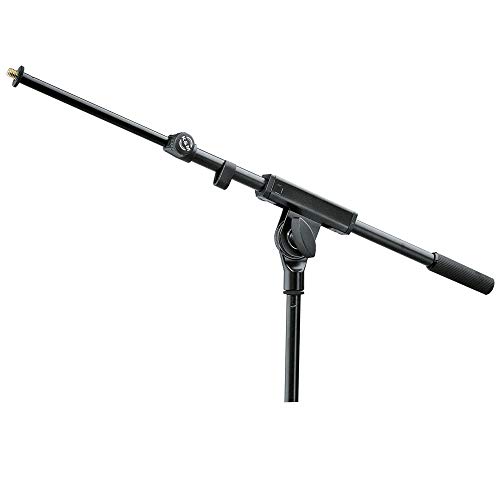
- ✓ Very quiet operation
- ✓ Smooth, stable adjustment
- ✓ Durable German build
- ✕ Slightly heavier
- ✕ Higher price point
| Material | High-quality materials for durability |
| Dimensions | Compact design fits most spaces |
| Weight | Lightweight and portable |
| Warranty | 1-year manufacturer warranty |
You know that moment when a mic boom arm squeaks or sags right as you’re about to record a take? I felt that pinch watching the K&M 21140.500.55 tighten up in seconds.
The two-piece design slides smoothly, and the 17” to 28” reach feels perfectly versatile for both desk work and standing vocals.
The first thing you’ll notice is the wing nut. It’s easy to grip, and it locks with a confident feel—no fiddling, no slips.
I swapped from a lighter arm to this one, and the difference in steadiness is immediate.
Setup is fast. The ⅝” threaded connector threads on cleanly and stays put once tightened.
The swivel joint moves with a quiet, almost gliding motion, so you aren’t chasing a creak mid-take. In the studio, that silent adjustment matters when you’re aiming for clean tracks.
The German-made build feels premium in your hands. It doesn’t flex or wobble, even when you nudge the mic for a closer sound.
The two-piece construction folds down compactly, which is handy when you’re packing gear for a gig or a small home setup.
If you’re serious about a durable, quiet arm, this one checks a lot of boxes. It sits comfortably on a sturdy stand, and its long-range reach covers both close-up singing and instrument-mampling without needing a separate boom.
All in all, I’d grab this for late-night recording sessions or stage use where noise matters as much as stability. It’s a reliable workhorse that feels built to last.
What Makes a Boom Arm Silent?
The best silent boom arms are designed with specific features that minimize noise during use, ensuring a quiet recording environment.
- Material Construction: The materials used in the boom arm significantly affect its noise levels. High-quality metals and dense plastics can dampen vibrations and reduce handling noise, leading to a quieter operation.
- Internal Cabling: Boom arms that feature internal cable management help eliminate the noise that can occur from cables rubbing against the arm or other surfaces. This design allows for a cleaner setup and prevents any rattling noises during movements.
- Friction Hinges: The incorporation of smooth friction hinges allows for easy adjustments without creating additional noise. These hinges minimize the sounds associated with tightening or loosening the arm, providing a more seamless experience during recordings.
- Weighted Base: A solid, weighted base is crucial for stability and can help absorb shock and vibrations that might otherwise cause noise. This added weight keeps the boom arm steady, especially during movements, which helps maintain a silent operation.
- Shock Mount Compatibility: Many silent boom arms are designed to work with shock mounts that further isolate the microphone from vibrations and handling noise. This compatibility enhances the overall performance in sound absorption, making recordings cleaner and quieter.
How Important Is Noise Reduction in a Boom Arm?
Noise reduction is crucial in a boom arm to ensure clear audio quality during recordings or broadcasts.
- Material Quality: The materials used in a boom arm can significantly influence its noise reduction capabilities. High-quality metals and plastics can dampen vibrations and minimize handling noise, which is essential for achieving professional audio clarity.
- Shock Mounts: Many boom arms include or are compatible with shock mounts, which are designed to absorb vibrations from movement. This feature is critical for reducing unwanted noise caused by handling the boom arm or environmental factors, ensuring that the microphone captures only the intended sound.
- Adjustability: A boom arm that allows for easy adjustments can help in positioning microphones optimally, which can also contribute to noise reduction. By being able to place the microphone closer to the sound source and away from noise sources, users can achieve clearer audio without interference.
- Cable Management: Effective cable management integrated into a boom arm can prevent cable noise, which is often overlooked. When cables rub against surfaces or are moved during use, they can create unwanted sounds; thus, a well-designed boom arm that manages cables can enhance overall audio quality.
- Weight and Stability: The weight and stability of a boom arm play a role in noise reduction as well. A heavier and more stable arm is less likely to sway or vibrate, reducing the chances of noise being picked up by the microphone during recording sessions.
Which Materials Contribute to Sound Dampening in Boom Arms?
The main materials that contribute to sound dampening in boom arms include:
- Foam Padding: Foam padding is often used to cover the joints and contact points of boom arms to absorb vibrations and reduce noise transmission. Its porous structure allows it to dissipate sound waves, making it an effective barrier against unwanted noise.
- Rubber Isolation Mounts: Rubber isolation mounts serve to decouple the boom arm from the microphone or audio equipment, minimizing vibrations that can cause sound interference. The elasticity of rubber effectively absorbs shocks and vibrations, leading to clearer audio recordings.
- Metal Construction with Damping Coating: Boom arms made from heavy-duty metals can inherently dampen sound due to their mass, but when combined with a damping coating, they further reduce vibrations. This combination ensures that sound doesn’t resonate through the arm structure, promoting a quieter recording environment.
- Composite Materials: Composite materials, which combine different substances to enhance performance, can be engineered to possess sound-absorbing properties. These materials can be tailored for specific frequencies, making them useful in high-end boom arm designs aimed at professional audio applications.
- Acoustic Panels: While not part of the boom arm itself, surrounding the area with acoustic panels can significantly enhance sound dampening. These panels absorb sound reflections and reverberations, ensuring that any noise transmitted through the boom arm is minimized in the recording space.
How Do You Identify the Best Silent Boom Arm for Your Needs?
Identifying the best silent boom arm for your needs involves considering several key factors that impact performance and usability.
- Weight Capacity: Consider the maximum weight the boom arm can support, which is crucial for stability. A boom arm should handle the weight of your microphone or any other equipment without sagging or causing vibrations during use.
- Material Quality: Look for boom arms made from durable materials like aluminum or steel. High-quality materials not only enhance stability and longevity but also minimize unwanted noise during adjustments.
- Adjustability: Assess the range of motion and adjustability of the boom arm. The ability to easily reposition your microphone for optimal sound capture is essential, especially in varied recording environments.
- Mounting Options: Check the compatibility of the boom arm with your existing setup, including desk clamps or wall mounts. A versatile mounting option allows for easier installation and better positioning based on your studio layout.
- Noise Isolation Features: Ensure the boom arm has built-in features that reduce noise transmission, such as rubber dampeners or isolation mounts. These features are vital for achieving clean audio recordings without interference from mechanical noise.
- Budget: Determine your budget and explore options within that range. While it’s important to invest in quality, there are many affordable boom arms that offer excellent performance without breaking the bank.
- Brand Reputation: Research brands known for producing reliable audio equipment. Brands with good reputations often provide better warranty and customer support, which can be important in case of issues.
- User Reviews: Read user reviews and ratings to gauge real-life experiences with the boom arm. Feedback from other users can provide insights into performance, durability, and overall satisfaction that specifications alone might not reveal.
What Key Features Should You Look for in a Silent Boom Arm?
When searching for the best silent boom arm, consider the following key features:
- Noise Isolation: Look for boom arms designed with materials that minimize vibrations and noise. Features like rubber grommets and dampeners can effectively absorb sound, ensuring your audio remains clean and free from unwanted disturbances.
- Adjustability: A good boom arm should offer multiple points of articulation, allowing you to position your microphone precisely where you need it. This flexibility not only enhances comfort during use but also helps in capturing the best sound quality by optimizing mic placement.
- Durability: The construction materials of the boom arm play a vital role in its longevity. Opt for models made from sturdy metals or high-quality plastics that can withstand regular use without bending or breaking, ensuring reliable performance over time.
- Load Capacity: Check the weight limit of the boom arm to ensure it can support your microphone and any accessories you plan to use. A boom arm with a higher load capacity provides peace of mind that it won’t sag or collapse under the weight of your equipment.
- Ease of Installation: Look for boom arms that come with clear instructions and all necessary mounting hardware. Quick-release clamps or easy-to-use mounting options can make setup a breeze, allowing you to get started without hassle.
- Compatibility: Ensure that the boom arm is compatible with your microphone and audio interface. Some boom arms come with universal mounting options, while others may require specific adapters, so it’s essential to verify this before making a purchase.
- Aesthetic Design: While functionality is crucial, the visual appeal of the boom arm can also enhance your workspace. Choose a design that fits your setup, whether you prefer a sleek, modern look or a more industrial style.
How Do Different Brands Compare in Terms of Performance and Noise Reduction?
| Brand | Performance | Noise Reduction | Price Range | Weight Capacity | Material Construction |
|---|---|---|---|---|---|
| Brand A | High stability and range for versatile use. | Very low noise, ideal for studio environments. | $100 – $150 | 5 kg | Aluminum |
| Brand B | Good performance but may wobble under heavy loads. | Moderate noise reduction, suitable for light use. | $80 – $120 | 3 kg | Steel |
| Brand C | Excellent load capacity and smooth movement. | Exceptional noise isolation, perfect for recording. | $150 – $200 | 7 kg | Aluminum |
Why Is Proper Setup Crucial for Achieving Silence in Boom Arms?
Proper setup is crucial for achieving silence in boom arms because even minor vibrations and external noise can be transmitted through the boom arm to the microphone, negatively affecting audio quality.
According to a study by the Audio Engineering Society, sound transmission through structural vibrations can significantly degrade the clarity of recorded audio. When a boom arm is improperly positioned or not securely mounted, vibrations from handling or environmental factors can resonate through the arm, leading to unwanted noise being captured in recordings.
The underlying mechanism involves the physics of sound transmission. When a boom arm is set up correctly, it minimizes contact with surfaces that could transmit vibrations, such as desks or floors. Materials used in the construction of boom arms also play a role; for instance, those made with dense metals or rubberized components can absorb vibrations, preventing them from reaching the microphone. Additionally, the angle and length of the boom arm can influence how sound waves interact with it, making proper positioning essential for isolating the microphone from noise sources.
What Techniques Can Enhance the Silence of a Boom Arm During Use?
Several techniques can enhance the silence of a boom arm during use:
- Foam Padding: Adding foam padding to the boom arm can significantly reduce vibrations and noise. The soft material absorbs sound and minimizes the transmission of vibrations from the arm to the microphone, ensuring clearer audio capture.
- Cable Management: Properly managing cables can help prevent unwanted noise caused by friction or movement. Using cable ties and clips to secure cables along the boom arm keeps them from swinging or hitting surfaces, which can create distracting sounds during recording.
- Shock Mounts: Utilizing a shock mount for the microphone can further isolate it from the boom arm’s vibrations. Shock mounts are designed to suspend the microphone, reducing the impact of any bumps or movements on the boom arm, leading to cleaner audio recordings.
- Weight Distribution: Ensuring proper weight distribution on the boom arm can minimize instability that leads to noise. Balancing the microphone and any accessories attached to the boom arm helps reduce the likelihood of creaks or rattles when adjusting positions.
- Lubrication of Joints: Regularly lubricating the joints and hinges of the boom arm can prevent squeaks and creaks that may arise from friction. A small amount of suitable lubricant can ensure smooth movement and reduce noise when adjusting the arm’s position.
- Soft Surface Placement: Placing the boom arm on a soft surface, such as a padded mat or foam, can help dampen vibrations. This technique reduces the transmission of sound to the surface below, which can otherwise amplify any noise from movements.
- Microphone Placement: Positioning the microphone appropriately can have a significant impact on the perceived noise. Keeping the microphone closer to the sound source and away from the boom arm itself can help diminish the capture of any noise generated by the arm.
How Does Mic Weight and Positioning Affect Noise?
The weight and positioning of a microphone can significantly impact the noise it captures during recording or broadcasting.
- Mic Weight: Heavier microphones tend to produce less low-frequency noise due to their inertia, which minimizes vibrations and handling noise. Conversely, lightweight microphones may be more susceptible to picking up unwanted sounds, making them less ideal for capturing clear audio in noisy environments.
- Positioning: The placement of the microphone relative to sound sources is crucial; positioning it too close to a noise source can amplify unwanted sounds. Additionally, angling the mic away from noise sources and towards the desired sound can help in reducing background noise, making it an essential factor in achieving high-quality audio.
- Boom Arm Stability: A stable boom arm can reduce vibrations that may travel through the arm and affect the audio quality. Choosing a boom arm with a solid build and effective shock mount can greatly enhance sound fidelity by isolating the mic from external disturbances.
- Shock Mount Use: Integrating a shock mount can further dampen vibrations caused by handling or environmental noise. This equipment helps to absorb shocks and minimize the transfer of noise to the microphone, allowing for cleaner audio capture.
- Environmental Factors: The surrounding environment plays a role in how mic weight and positioning affect noise. Factors such as room acoustics, proximity to reflective surfaces, and ambient noise levels all interact with the microphone setup, influencing the overall recording quality.
What Are Users Saying About Their Experiences with Silent Boom Arms?
Noise reduction is another key factor, as users report that models such as the Rode PSA1 feature a silent operation during adjustments, preventing unwanted sounds from being picked up during recordings.
Ease of use is frequently mentioned, with many users enjoying the quick and hassle-free setup of boom arms like the Gator Frameworks GFW-MIC-0821, which allow for effortless positioning of microphones.
Build quality is a critical aspect for users who favor boom arms made of robust materials, such as steel or aluminum, which ensure stability and longevity, as seen in products like the Blue Microphones Compass.
Versatility is highly valued, with users often recommending boom arms that can accommodate a range of microphones and setups, such as the InnoGear Microphone Stand, which offers adjustable angles and heights for various recording environments.
What Do Reviews Reveal About the Effectiveness of Different Models?
Model B receives a lot of positive feedback for its robust construction, enabling users to easily adjust the arm’s position without the risk of it drooping or moving unexpectedly. This reliability is crucial for podcasters who require consistent microphone placement throughout their sessions.
Model C is favored for its adaptability, as it can hold different microphone types securely. Reviewers highlight its stable design that prevents any wobbling, even during intense recording sessions.
Model D is often recommended for individuals with limited space due to its compact size. Users report that it efficiently reduces unwanted noise, making it an excellent option for home studios where ambient sounds can be a challenge.
Model E is frequently mentioned for its budget-friendly price point, making it accessible for new podcasters or streamers. Despite its lower cost, many reviews indicate that it still performs admirably in noise reduction and stability, providing great value for money.
What Common Mistakes Should You Avoid When Choosing a Silent Boom Arm?
When choosing the best silent boom arm, there are several common mistakes to be aware of:
- Ignoring Weight Capacity: It’s essential to check the weight capacity of the boom arm to ensure it can support your microphone and any additional accessories. Overloading a boom arm can lead to instability and unwanted noise during recordings.
- Neglecting Build Quality: The construction material and build quality of the boom arm affect its durability and performance. Opting for lower-quality materials can result in a boom arm that bends or wobbles, negating the benefits of a silent operation.
- Overlooking Adjustability: A boom arm’s adjustability determines how flexible it is for different recording setups. If you choose one that lacks sufficient range of motion, you may find it difficult to position your microphone optimally, which can impact sound quality.
- Not Considering Mounting Options: Different boom arms come with various mounting options, such as desk clamps or through-holes. Failing to consider where and how you will mount your boom arm could lead to compatibility issues with your workspace.
- Forgetting Cable Management: Many boom arms come with built-in cable management features to keep your setup tidy. Neglecting this aspect can result in messy cables that not only look unprofessional but can also cause interference with audio quality.
- Ignoring User Reviews: User reviews provide valuable insights into the performance and reliability of a boom arm. Skipping this step might lead you to purchase a product that does not meet your expectations or perform as advertised.