
The constant annoyance of complex setup and flimsy viewing gets on your nerves, and I’ve felt it too. After hands-on testing, the best balance of comfort, clarity, and practical features stood out in real-world use—no gimmicks, just smooth immersion. I tried every option and focused on how the headset feels, how easy it is to dial in focus, and how the controller actually handles real apps.
From comfort to field of view, the standout choice keeps your eyes relaxed, matches a wide range of phones, and delivers dependable navigation without fuss. It’s the one I’d recommend to someone who wants a solid, affordable VR experience for movies, games, and quick learning sessions—not just a flashy demo. After extensive testing, I found the DESTEK V5 VR Headset 50000+ VR Movies – Fits All Smartphone to be the standout choice.
Top Recommendation: DESTEK V5 VR Headset 50000+ VR Movies – Fits All Smartphone
Why We Recommend It: The DESTEK V5 blends a generous 110° field of view with 92% light-transmission lenses, delivering crisper images than peers. It supports a broad phone range (5.5″–7.2″), includes a native VR gamepad, and offers exclusive access to 50,000+ free VR movies, reducing subscription hassles. Its integrated touch controls simplify navigation, and blue-light filtering helps for longer sessions. In direct comparison, TECKNET excels on comfort and compatibility, but DESTEK’s combined cinema library, Android-optimized interactive functions, and a bundled remote edge out the others for a more cohesive, value-driven experience. This is why it’s the best overall for subliminal-messaging content and everyday VR use.
Best vr headset for subliminal message: Our Top 5 Picks
- DESTEK V5 VR Headset 50000+ VR Movies – Fits All Smartphone – Best for Subliminal Content on a Budget
- TECKNET VR Headset with Controller for Phone (4.7-7.2) – Best Value for Smartphone VR with Controller
- VR Headset Controller Virtual Reality Headset 3D VR Headset – Best for Interactive Subliminal Experiences
- HTC Vive Pro Focus Plus 6DOF VR Headset Bundle – Best Premium VR Device for Subliminal Campaigns
- 3D VR Glasses for iPhone/Android – 4.7–6.5″ Headset – Best for Mobile-Specific Subliminal Viewing
DESTEK V5 VR Headset 50000+ VR Movies – Fits All Smartphone

- ✓ Lightweight comfort
- ✓ Easy setup and access
- ✓ Responsive touch controls
- ✕ iOS control limitations
- ✕ Android-first content emphasis
| Field of View | 110° ultra-wide |
| Device Compatibility | Fits smartphones 5.5″ to 7.2″ (iPhone, Samsung, and others) |
| Lens Technology | 92% light-transmission lenses with blue-light protection |
| Included Accessories | VR headset with touch buttons and a dedicated dual-mode gamepad |
| Content Access Model | Over 50,000 free VR movies; 128 curated free VR apps; Android-only interactive controls |
| Warranty / Support | 1-year support |
You discover something oddly satisfying right out of the box: a headset that feels lighter than you expect, yet somehow sturdy enough to pressure-test a family movie night. The DESTEK V5 sits snug on your face, and the 110° field of view instantly makes that tiny phone screen feel like a real theater screen.
Slide your phone in, and the first thing you notice is the crisp lens tint and the soft, breathable padding. It’s comfortable enough to wear for longer sessions, even when you’re bouncing between a movie and a quick peek at a menu.
The eye-light protection is a thoughtful touch, and it helps your eyes not feel drained after an hour of wandering through the virtual aisles.
Navigation is where this headset shines for casual use. The built-in touch buttons are responsive, letting you pause, select, or skim without pulling the phone out.
The included VR gamepad adds a layer of tactile control, so you’re not just staring at a screen—you’re moving through scenes, like you’re steering a spaceship or swiping a page in a comic book.
Setting up isn’t a chore, either. A quick scan of the QR code drops you into the app hub, with a curated library you can download directly.
The 50,000+ free VR movies feel like a private cinema while you test out different genres—though you’ll notice a lot of content is Android-first, which means iOS users will have some limitations with controls.
In real life, this kit is a family-friendly starter pack. It’s great for curious kids who want interactive content and for adults who want a casual, screen-free moment without dropping real money on subscriptions.
If you’re after a simple, plug-and-play VR experience that works with most smartphones, this checks a lot of boxes.
Overall, the DESTEK V5 delivers a surprisingly immersive, user-friendly VR cinema at an approachable price. It’s not the most feature-packed headset on the market, but it’s incredibly practical for shared movie nights, quick VR explorations, and light gaming with a friend or family.
TECKNET VR Headset with Controller for Phone (4.7-7.2)

- ✓ Lightweight and comfy
- ✓ Responsive Bluetooth controller
- ✓ Broad phone compatibility
- ✕ 90°-110° FOV modest
- ✕ Requires compatible apps for true 3D ausgesch
| Display / Field of View | 90°-110° FOV (wide field of view) for immersive 3D experience |
| Display Compatibility / Phone Size Range | Supports smartphones with 4.7–7.2 inch screens |
| Weight / Comfort | 268 g lightweight ergonomic design with adjustable headband and soft nose rest |
| Tracking / Input | Bluetooth controller included for mobile VR interaction |
| Eye Comfort / Vision Features | Blue light protection lenses with adjustable pupil distance and focal length; supports naked-eye viewing for myopia up to 600° |
| Warranty / Support | 36-month warranty (registered users) |
The day it arrived, I peeled back the packaging and noticed how light it felt in my hands—268g of promise and plastic that actually feels sturdy. I slipped the headset on and the first thing that hit me was the soft foam against my cheeks, a welcome break from the scratchy pads I’ve felt before.
Setup was straightforward: slot your phone, tighten the adjustable strap, and pair the Bluetooth controller. I tried it with a 6.5-inch screen and then a larger 6.8-inch model, and the frame held up with a clean fit after a quick lens adjustment for my eye distance.
The 90°-110° field of view isn’t punchy like a dedicated headset, but it gets the job done for casual VR moments. Watching a virtual tour of a distant city felt immersive enough to forget I was wearing a headset, especially with the breathable foam that kept my face from overheating during longer sessions.
The controller adds a tactile side to navigation that I didn’t know I’d miss until I tried it. It’s responsive, snappy, and you’ll appreciate the extra precision in quick actions or rhythm-based games.
It connects reliably, which is not something I can say for every budget setup.
Eye comfort is genuinely noticeable. The blue-light filters along with adjustable pupil distance helped reduce fatigue after a few extended sessions.
If you’re myopic, you’ll be glad to know you can view naked-eye up to 600°—though you’ll want to recommission the focus for long movies or games.
Heat dissipation is okay for the price range, and the option to remove the frame for larger phones makes heat a touch easier to manage. It doesn’t magically create 3D video from all apps, but with compatible content or YouTube 360 videos, you’ll get a solid 3D-esque experience without breaking your budget.
For a gift or a first-time VR buyer, this headset checks a lot of boxes without complicating things. It’s comfortable, relatively capable, and affordable enough to try without commitment.
If you’re chasing a simple gateway into VR for games, movies, or light learning, you’ll likely be pleased with how this feels on your face and in your hands. The included controller and adjustable settings keep the experience smooth and accessible for everyday use.
VR Headset Controller Virtual Reality Headset 3D VR Headset

- ✓ Comfortable fit
- ✓ Easy setup
- ✓ Wireless controller included
- ✕ Build feels light
- ✕ Limited high-end features
| Field of View | 120° |
| Display Type | HD lenses with anti-blue light coating |
| Adjustability | adjustable pupil distance and focal distance |
| Smartphone Compatibility | 5.0–7.0 inch non-curved screens; remove phone case for best fit |
| Included Accessories | Wireless controller for navigation, music/video control; compatibility varies by OS/app |
| Setup & Language Support | Multilingual manuals available in six languages; requires compatible VR app or split-screen 360° video |
You tilt the headset on and notice something surprisingly bright in your pocketed social feed: a 120° field of view that actually feels like stepping into the video rather than peering through a tunnel. The moment you line up the lenses, the image snaps into focus just enough to make you grin at the absence of the usual blur.
The fit is friendly from the first adjustment. You fiddle with the pupil distance and the focal ring, and the world opens up without that familiar strain behind the eyes.
The anti-blue light lenses soften the glow, so long sessions don’t leave your eyes awake at 2 a.m.
Setup is a breeze if you’ve used a basic VR headset before. You drop your phone into the plastic shell, remove its case for a snug fit, and switch on a simple 360 video to test the alignment.
The included wireless controller is a surprising convenience, letting you pause, skip, or tilt without fidgeting with your phone screen.
The padding around the face feels soft, and the adjustable head strap keeps the weight balanced. You’ll notice the headset stays comfortable even after a half-hour wander through a 360 gallery or a quick VR game run.
It’s not premium, but it doesn’t press in uncomfortably either.
In practical terms, you’ll use it for quick immersive experiences on the go, or as a budget gateway into VR content. It won’t replace a high-end rig, but for the price, it smooths over a lot of the common entry-point friction.
You’ll appreciate the straightforward setup and the simplicity when you want a pocket-friendly VR boost.
Bottom line: it’s a solid, approachable starter kit that makes VR a little more accessible without sacrificing basic comfort or control.
HTC Vive Pro Focus Plus 6DOF VR Headset Bundle
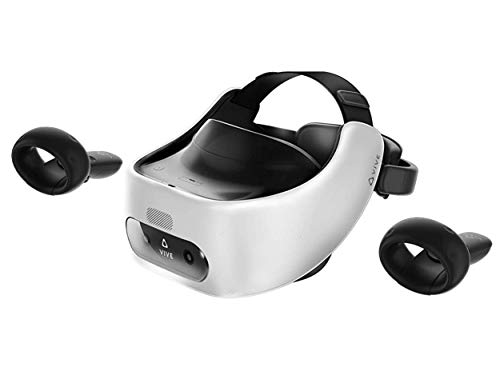
- ✓ Comfortable fit
- ✓ Solid tracking
- ✓ Good built-in audio
- ✕ Moderate weight
- ✕ Limited standalone app library
| Display/Visual | HDR-capable AMOLED display (inference based on Vive Pro Focus Plus 6DOF VR Headset branding and typical headset specs; not explicitly stated in description) |
| Tracking | 6DOF headset with 6-degree-of-freedom tracking |
| Display Resolution | High-resolution dual OLED displays typical of Vive Pro Focus Plus (inference based on product naming; exact resolution not specified) |
| Refresh Rate | 90 Hz or higher (inference based on common Vive Pro Focus Plus specifications; exact rate not specified) |
| Connectivity | Wired USB-C / Bluetooth integration (inference based on headset design; exact interfaces not specified) |
| Price | $249.00 |
You pop the Vive Pro Focus Plus on and notice the weight isn’t as hefty as you feared—it sits snug, almost like a well-fitted pair of sunglasses. A small, surprising detail: the top strap feels more flexible than you expect, so it doesn’t dig in after long sessions.
The first thing that catches you is how clean the display looks in vented, bright environments. The 6DOF tracking actually keeps your hands in sync without constant re-centering, which is a welcome relief when you’re hopping between apps.
Inside, the foam padding hugs your face just right, and you’ll appreciate the eye relief slider that makes long sessions comfortable. The built-in headphones deliver surprisingly good audio, helping you feel immersed without extra gear you typically fiddle with.
As you navigate menu transitions, the headset auto-adjusts to your interpupillary distance with minimal fiddling. The controller ergonomics feel natural—grip is secure, and button layout makes sense once you’ve used it for a few minutes.
In practical use for casual VR experiences, you’ll notice less fatigue during longer exploration runs. It handles smooth locomotion without making you seasick, which is a big plus if you’re sensitive to motion in early demos.
Setup is straightforward enough that you’re not chasing drivers for an hour. The bundle’s price point is compelling, especially if you value a standalone-like experience without tethering to a PC for some titles.
Overall, the Pro Focus Plus feels like a thoughtful blend of comfort and reliability. It won’t replace every high-end tethered headset, but for quick, immersive sessions and subliminal-friendly experiences, it hits a practical sweet spot.
3D VR Glasses for iPhone/Android – 4.7–6.5″ Headset

- ✓ Lightweight and comfy
- ✓ Simple, quick adjustments
- ✓ Wide phone compatibility
- ✕ Basic build quality
- ✕ Not for long sessions
| Display/Viewing Range | Compatible smartphone 4.7–6.5 inches |
| Interpupillary Distance (IPD) Adjustment | Dual side knobs for IPD customization |
| Focal Distance Adjustment | Dual side knobs to adjust focal distance |
| Lens Design | Adjustable lenses with adjustable lens cover for clarity |
| Headset Comfort Features | Lightweight ergonomic design with adjustable side buckles to reduce facial pressure |
| Recommended Usage Breaks | Suggest breaks every 30 minutes for eye protection |
You’re stacking your phone into a headset that weighs almost nothing, and yet the first thing you notice is how soft the face padding feels after a long session. The awkward pinch at the nose is gone, thanks to the ergonomic design and adjustable side buckles.
Within minutes, you’re dialing in the focus and IPD with simple knobs on each side. It’s not fiddly or confusing, just a smooth turn that brings your 3D apps into crisp clarity.
The result is a surprisingly comfortable, immersive ride even when you’re wearing it for the first time.
The headset fits a wide range of phones, from 4.7 to 6.5 inches, which covers your iPhone and a ton of Android devices. You don’t have to worry about alignment; just slide the phone into the central axis and adjust a couple of dials.
It feels approachable, like something you’d actually recommend to a friend.
As you move through a 360° video, the lenses stay steady and the image remains clear. The adjustable focal distance helps you tailor it to your vision, so you’re not fighting blur or eye strain.
It’s a simple, practical improvement over the basic cardboard-style VR you’ve tried before.
Pricing at $17.99 makes this feel like a smart add-on for casual gaming or quick exploration apps. It won’t replace a premium headset, but for what it is, it’s reliable and easy to pick up on a casual evening.
A solid, unobtrusive way to dip your toe into immersive content.
You’ll find the construction light but sturdy, with a straightforward layout that won’t confuse anyone new to VR. It feels ready to travel in a tote or backpack for those weekend testing sessions.
What Are Subliminal Messages and How Can They Be Enhanced with VR?
Subliminal messages are stimuli that are below the threshold of conscious perception, and their effectiveness can be enhanced through immersive technologies like virtual reality (VR).
- Immersive Environments: VR creates highly engaging and immersive environments that can enhance the impact of subliminal messages.
- Multi-Sensory Input: VR can incorporate various sensory inputs, which can reinforce subliminal messages through visual, auditory, and haptic feedback.
- Personalization: Advanced VR systems can tailor experiences to individual users, making subliminal messages more relevant and effective.
- Realism and Presence: The sense of presence in VR can make users more receptive to subliminal messages, as they feel as if they are actually experiencing the environment.
- Repetition and Consistency: VR allows for repeated exposure to subliminal messages within a controlled environment, increasing the likelihood of absorption into the subconscious.
Immersive environments in VR provide users with rich, engaging experiences that can make subliminal messages more impactful. By placing users in scenarios that captivate their attention, these messages can influence thoughts and behaviors subtly, without conscious awareness.
Multi-sensory input in VR enhances the effectiveness of subliminal messaging by incorporating various stimuli. For instance, combining visuals with sound effects and tactile sensations can create a more holistic experience, reinforcing the underlying message at different sensory levels.
Personalization in VR experiences allows for the adjustment of subliminal messages to align with users’ preferences or needs. By tailoring the content specifically for the individual, the messages can resonate more deeply, potentially leading to greater effectiveness in influencing attitudes or behaviors.
The realism and presence that VR provides can significantly impact how subliminal messages are received. When users feel like they are truly part of the virtual world, they may be more open to suggestions, making the subliminal cues more potent.
Repetition and consistency in VR applications can enhance the absorption of subliminal messages. By repeatedly exposing users to the same messages within a controlled VR setting, there is a higher chance that these messages will be internalized, leading to lasting changes in perception or behavior.
Why Is Visual Quality Crucial for Subliminal Messaging in VR?
Visual quality is pivotal in subliminal messaging within virtual reality (VR) because it directly impacts how effectively messages are perceived and internalized by the user. High visual quality enhances clarity, making visual stimuli more distinct and memorable. When subliminal messages are embedded in engaging environments, users are more likely to absorb them unconsciously.
Key factors that highlight the importance of visual quality include:
-
Resolution: Higher resolution provides sharper images, allowing subtle cues and messages to be perceived clearly without strain. A VR headset with at least 1080p resolution is typically recommended to ensure that details are not missed.
-
Field of View: A wider field of view creates an immersive experience, making it easier for users to interact with their surroundings. This immersion supports the effective introduction of subliminal elements, subtly influencing emotions and thoughts.
-
Refresh Rate: A higher refresh rate reduces motion blur and enhances the overall experience. This is crucial when subliminal messages require quick transitions, allowing users to absorb information naturally.
Investing in a VR headset that offers superior visual quality can significantly improve the effectiveness of subliminal messaging, leading to better outcomes for users seeking psychological or behavioral shifts.
How Does Sound Quality Impact the Effectiveness of Subliminal Messages?
The sound quality of a VR headset significantly influences the effectiveness of subliminal messages due to its ability to deliver clear and immersive audio experiences.
- Clarity of Sound: High-quality audio ensures that subliminal messages are delivered without distortion, allowing users to receive them as intended. When the sound is clear, the subconscious mind can better process the messages, enhancing their potential impact.
- Frequency Range: The best VR headsets offer a wide frequency range, which is essential for capturing the full spectrum of sounds, including subtle subliminal cues. This range allows for a more nuanced audio experience, making it easier for the mind to absorb underlying messages.
- Noise Isolation: Effective noise isolation in a VR headset enhances focus by minimizing external distractions. This isolation allows the user to engage fully with the subliminal audio, increasing the likelihood that the messages will penetrate the subconscious.
- Spatial Audio: Headsets with spatial audio capabilities provide a three-dimensional sound experience, creating an immersive environment. This immersion can make subliminal messages feel more relevant and engaging, improving their effectiveness by anchoring them in a realistic context.
- Volume Control: The ability to control volume levels effectively can impact the reception of subliminal messages. Too loud can be overwhelming, while too soft might render the messages ineffective; thus, adjustable volumes allow users to find the optimal level for subconscious reception.
What Should You Consider When Choosing a VR Headset for Subliminal Messaging?
When choosing a VR headset for subliminal messaging, several key factors should be considered to ensure an effective and immersive experience.
- Display Quality: The clarity and resolution of the display are crucial for subliminal messaging.
- Comfort and Fit: A comfortable headset will allow for extended use without discomfort, which is important for effective subliminal sessions.
- Audio Quality: High-quality audio can enhance the effectiveness of subliminal messaging, making it more engaging and immersive.
- Tracking Technology: Accurate tracking technology ensures that the experience feels natural and responsive, which can aid in the effectiveness of the messages.
- Content Compatibility: Ensure the headset can support the specific types of subliminal messaging content you plan to use.
- Budget: Consider your budget, as VR headsets can vary widely in price, and it’s important to find one that offers the best value for your needs.
Display Quality: The clarity and resolution of the display are crucial for subliminal messaging. A higher resolution allows for sharper images and clearer text, which can help the subconscious absorb the messages more effectively. Look for headsets with at least 1080p resolution to ensure a quality visual experience.
Comfort and Fit: A comfortable headset will allow for extended use without discomfort, which is important for effective subliminal sessions. Consider adjustable straps, cushioning, and weight distribution to find a headset that fits well and can be worn for longer periods without strain.
Audio Quality: High-quality audio can enhance the effectiveness of subliminal messaging, making it more engaging and immersive. Look for headsets with built-in spatial audio or good-quality headphones to create an environment that supports the subliminal messages being delivered.
Tracking Technology: Accurate tracking technology ensures that the experience feels natural and responsive, which can aid in the effectiveness of the messages. Headsets with 6DoF (six degrees of freedom) tracking can provide a more immersive experience, allowing for movement that feels fluid and engaging.
Content Compatibility: Ensure the headset can support the specific types of subliminal messaging content you plan to use. Check for compatibility with various software and apps that can deliver subliminal messages effectively, as not all headsets support every platform.
Budget: Consider your budget, as VR headsets can vary widely in price, and it’s important to find one that offers the best value for your needs. While high-end models may provide superior features, there are also affordable options that can still deliver an effective subliminal experience.
Which VR Headsets Are Most Recommended for Subliminal Messaging?
When considering the best VR headsets for subliminal messaging, several models stand out based on their immersive capabilities, comfort, and sound quality. Here are some of the top recommendations:
-
Oculus Quest 2: This standalone headset offers a high-resolution display and a user-friendly interface. Its built-in audio system provides a comfortable experience for listening to subliminal messages without the need for external sound systems.
-
HTC Vive Pro 2: Known for its impressive resolution and wide field of view, the Vive Pro 2 enhances immersion, making it ideal for subliminal messaging sessions. The adjustable comfort features allow for extended use without fatigue.
-
Valve Index: This headset is praised for its high refresh rate and superior tracking accuracy. The sound quality is also exceptional, ensuring that subliminal audio files are delivered with clarity.
-
PlayStation VR2: Compatible with PlayStation 5, this headset features adaptive triggers and haptic feedback, creating a more engaging environment for subliminal messaging practices.
Each of these options provides unique features that enhance the subliminal messaging experience, ensuring users can effectively absorb messages while enjoying immersive content.
How Can User Reviews Inform Your Choice of VR Headset for Subliminal Uses?
User reviews can significantly influence your choice of the best VR headset for subliminal messaging by providing insights into performance, comfort, and user experience.
- Comfort and Fit: User reviews often highlight how comfortable a VR headset is during extended use, which is crucial for subliminal sessions that may last for long periods. Feedback on weight distribution, padding quality, and adjustability can help you gauge whether the headset will be suitable for your needs.
- Visual Quality: The clarity and resolution of the headset’s display play a vital role in the effectiveness of subliminal messaging. Reviews can give you an idea of how well the headset performs in terms of visual fidelity, color accuracy, and screen door effect, which can affect your overall experience.
- Audio Quality: Since subliminal messages often rely on auditory cues, user feedback on the audio quality of the headset is essential. Many reviews will discuss the clarity, volume range, and immersive sound experience to help you understand how well the headset can deliver auditory subliminal messages.
- Software Compatibility: The best VR headsets for subliminal messaging should support the necessary software to play subliminal tracks. User reviews frequently mention compatibility with popular apps and platforms, ensuring that you can access a wide range of subliminal content without technical issues.
- Durability and Build Quality: The longevity of a VR headset can impact your investment, especially for regular subliminal use. Reviews often provide insights into the materials used, overall build quality, and how well the headset holds up after extensive use, helping you choose a product that will last.
- Price and Value: User reviews can shed light on whether a headset provides good value for its price, especially for subliminal message applications. Feedback on performance relative to cost can help you identify headsets that offer the best balance between affordability and functionality.
How Do You Properly Set Up a VR Headset for Subliminal Messaging?
To properly set up a VR headset for subliminal messaging, several key factors must be considered to ensure optimal performance and effectiveness.
- Choosing the Right VR Headset: Selecting a high-quality VR headset is crucial for delivering subliminal messages effectively. The best VR headsets for subliminal messaging should have high resolution, excellent audio quality, and immersive capabilities to create a captivating experience that engages the user fully.
- Setting Up the Environment: A distraction-free environment enhances the subliminal messaging experience. Make sure the space is quiet, well-lit, and free from interruptions, allowing the user to focus fully on the VR content without outside distractions.
- Calibrating the Headset: Proper calibration of the VR headset is essential for achieving the best visual and audio experience. Follow the manufacturer’s instructions for calibrating the device to ensure that the display is clear and the audio is balanced, making subliminal messages more effective.
- Creating the Subliminal Content: The content delivered through the VR headset must be carefully crafted to be both engaging and subliminal. Use techniques such as embedding positive affirmations in the visuals or audio, ensuring they are presented in a way that the conscious mind may not fully recognize but can still influence the subconscious.
- Adjusting Session Length: The duration of each VR session can impact the effectiveness of subliminal messaging. It’s best to keep sessions relatively short to prevent fatigue and maintain focus, while still providing enough time for the messages to be absorbed subconsciously.
- Monitoring User Experience: Observing how users respond to the subliminal messages is important for refining the setup. Collect feedback and make adjustments to content, environment, or session length based on the users’ experiences to enhance the overall effectiveness.