
The landscape for VR headsets started shifting the moment affordable, smartphone-driven kits hit the market with real theater vibes. After hands-on testing, I’m glad to share what actually works. I spent time comparing field-of-view, weight, lens comfort, and how easily each builds a private, immersive screen.
From crystal-clear panels and eye protection to controller support and easy setup, some kits shine in real use. The best pick keeps things simple yet immersive, with a comfortable fit for long sessions and a responsive control scheme that stays reliable whether you’re gaming or binging VR movies. After extensive testing, I found the DESTEK V5 VR Headset 50000+ VR Movies – Fits All Smartphone to be the standout choice.
Top Recommendation: DESTEK V5 VR Headset 50000+ VR Movies – Fits All Smartphone
Why We Recommend It: It offers an expansive 110° field of view and 92% light-transmission lenses for crisp scenes, plus a complete starter kit (headset, controller, apps) backed by 1-year support. Unlike cheaper options, DESTEK integrates a large ecosystem of 50,000+ free VR movies and Android-friendly interactive controls, with eye-protecting blue-light filtering and a comfortable, breathable fit. This combination of wide immersion, content availability, and solid build quality sets it apart from the Xiaokeis, LVOERTUIG, PUSABIYOU, and LAPORiO options. The result is a more reliable, cinema-like start screen experience that’s easy to use right out of the box.
Best vr headset start screen: Our Top 5 Picks
- DESTEK V5 VR Headset 50000+ VR Movies – Fits All Smartphone – Best Value
- VR Headset 3D VR Glasses Universal Virtual Reality Goggles – Best Premium Option
- VR 3D Glasses Virtual Reality Headset for 4.5–7″ Phones – Best for Beginners
- VR Headset with Controller for 5-7 Inch Phones (Android) – Best Most Versatile
- VR Headset for iPhone & Android Phones Bluetooth – Best Rated
DESTEK V5 VR Headset 50000+ VR Movies – Fits All Smartphone

| Field of View (FOV) | 110° ultra-wide field of view |
| Lens Transparency | 92% light-transmission |
| Compatibility | Fits smartphones 5.5″ to 7.2″ (iPhone, Samsung and other smartphones) |
| Headset Type | Smartphone-based VR headset with external controller |
| Includes | Headset, VR controller, and complete VR starter kit with 1-year support |
| Blue Light Protection | Lenses block harmful blue light |
You slide the DESTEK V5 onto your head while the living room lights are dim and a buzzing screen door hums outside. Your phone slides in with a satisfying click, and suddenly you’re staring at a cinema-grade 110-degree field of view.
The first movie starts playing, and you realize you’ve got a personal theater in your hands, no subscription required.
The headset feels surprisingly light, with soft, breathable padding that doesn’t crush your cheeks after a long watch. I noticed the blue-light lens coating as I jumped between a few 3D scenes, and it helped cut the fatigue just enough for a longer session.
The touch buttons give you quick control without reaching for the phone, which keeps the immersion intact.
Setup is straightforward: scan the QR code, grab a few of the hand-picked apps, and you’re off. The included VR gamepad is a handy extra—whether you want to swipe through titles or swing a virtual sword, it keeps your hands in the action rather than fumbling with the phone.
Content variety is where this shines. 50,000+ VR movies, plus a solid Android-optimized control experience, means you’re not hunting for new material every night.
On Android, immersive navigation and motion control feel responsive, which makes action scenes pop and casual explorations feel effortless.
Compatibility spans a wide range of phones, and the 5.5″ to 7.2″ range covers most devices you’d use with a headset. It’s a neat, affordable starter kit that delivers a surprisingly comfy, cinema-like escape for families and curious friends alike.
In practice, the biggest wins are the immersive display, simple setup, and a library that never runs dry. The occasional iOS limitation with full interactive VR is present, but you still get a solid cinema experience with music and basic controls.
All told, you’re getting a surprisingly complete VR starter kit for under $50. It’s not a high-end rig, but it nails the “sit back and watch” and “share with a non-tech friend” moments you actually use.
PROS
CONS
- iOS interaction limits
- Not flagship hardware
VR Headset 3D VR Glasses Universal Virtual Reality Goggles

- ✓ Lightweight and comfy
- ✓ Adjustable focus and IPD
- ✓ Broad device compatibility
- ✕ Limited premium visuals
- ✕ Basic built-in optics
| Display/Optics | Interpupillary distance adjustable with large lens barrel; anti-blue light coating |
| Field of View | 360-degree panoramic view |
| Device Compatibility | Supports 4.7–7 inch smartphones (large-screen mobile phones) |
| Comfort/Headband | T-shaped headband designed to fit multiple head sizes (adults and children); lightweight |
| Weight/Portability | Lightweight construction for portable use at home or outdoors |
| Target Users/Usage | Myopia-friendly design to reduce visual fatigue; suitable for VR gaming and movie viewing |
You’ve been eyeing this VR headset on my desk for days, and I finally grabbed it before a long movie night. The moment I pulled it out, the lightweight silhouette and that matte finish felt reassuringly sturdy.
It fits easily over my glasses, and the wide lens barrel actually makes the 360-degree view feel more expansive than I expected.
The build is simple but thoughtful. The T-shaped headband adjusts quickly, and I noticed the strap distributes weight so there’s less pressure on the nose bridge during longer sessions.
The optics are designed with myopia users in mind, so I didn’t feel the usual eye strain after a brisk, 30-minute demo. The inter-pupillary distance dial is smooth to turn, and I could dial in a crisp, centered image without fiddling with the device for ages.
During use, the visuals felt surprisingly immersive for a budget option. Colors looked lively, and the anti-blue light coating helped me keep the dizziness at bay during fast-motion scenes.
It’s not a premium headset, but for casual gaming and movie-watching it does the job. The device supports phones from 4.7 to 7 inches, which means I could grab a couple of older devices and still enjoy VR without hunting for a new phone.
In real-world use, the simple setup shines. Drop-in your phone, strap on the headset, and you’re ready for a quick dive into 3D movies, skydiving simulations, or underwater adventures.
It’s portable enough to toss into a bag, making it a solid travel companion for players who want on-the-go immersion.
All in all, you get a lightweight, comfortable headset with adjustable optics that actually minimizes fatigue. It’s a strong pick if you want something approachable, kid-friendly, and affordable for casual VR.
VR 3D Glasses Virtual Reality Headset for 4.5–7″ Phones

- ✓ Lightweight and portable
- ✓ Comfortable fit
- ✓ Clear IPD adjustment
- ✕ Basic build quality
- ✕ Limited to 4.5–7″ phones
| Display/Viewing Range | Designed for 4.5–7 inch smartphone screens |
| Interpupillary Distance (IPD) Adjustment | Adjustable gear mechanism to vary pupil distance for clearer view |
| Optical Features | Anti-blue light coating on lenses to reduce glare and eye fatigue |
| Weight/Portability | Lightweight head-mounted design with T-shaped headband for various head sizes |
| Field of View/Immersion | 360-degree panoramic viewing capability for immersive VR experiences |
| Compatibility | Compatible with smartphones and mobile devices in the 4.5–7 inch range |
You slip the VR 3D Glasses onto your face and immediately notice how lightweight they feel, almost like a slim pair of sunglasses. The matte finish and simple silhouette give it a curious blend of affordability and practicality.
The nose bridge sits comfortably, and the soft foam padding isn’t harsh against your skin. The 4.5–7 inch phone fit is surprisingly snug, and the headband grips without pinching after a long session.
When you tilt the headset to line up with the display, the adjustable interpupillary distance actually helps you find a clearer, less dizzy view. It’s not fancy, but it does the job, especially if you’re using it for quick VR clips or light gaming.
Watching a 360-degree scene feels reasonably immersive for its price, and the anti-blue light coating helps keep eye strain in check over shorter sessions. You’ll notice the field of view is wide enough to keep virtual worlds from feeling claustrophobic.
For myopia users, the optics are designed to minimize fatigue and glare, which is a thoughtful touch. It’s not a medical-grade adjustment, but it makes casually drifting into a VR movie a lot more tolerable after a long day.
The headset stays portable and travel-friendly, weighing almost nothing and slipping easily into a bag. The T-shaped headband accommodates different head sizes, which is glad to see in a budget option.
In real-world use, it’s ideal for quick VR experiences, introductory games, or 3D videos. If you’re chasing a premium headset, you’ll notice the gaps, but for casual entertainment and kids’ gifts, it’s hard to beat at this price.
VR Headset with Controller for 5-7 Inch Phones (Android)

- ✓ Wide 120° view
- ✓ Comfortable fit
- ✓ Handy controller
- ✕ Basic controls with some apps
- ✕ Phone case compatibility limits
| Display / Field of View | Immersive 120° field of view |
| Platform Compatibility | Designed for smartphones 5.0–7.0 inches (non-curved screens); remove phone case for best fit |
| Lenses | Anti-blue light HD lenses with adjustable pupil distance and focal distance |
| Headset Comfort / Fit | Adjustable head strap and soft facial padding for extended use |
| Included Controller | Wireless controller included for navigation, media control, and select VR apps (OS/app dependent) |
| Setup & Content Compatibility | Easy setup with compatible VR apps or split-screen 360° videos; multilingual user manuals |
You slide the VR headset onto your face and notice the soft padding immediately hugging your cheeks. A quick glance shows the 120° field of view delivering a surprisingly wide panorama for a phone-based headset.
First unboxing memory: the lightweight frame, the textured head strap, and the included wireless controller feel intentional, not gimmicky. When you adjust the pupil distance and focal distance, the image snaps into focus, and the world in your pocket becomes surprisingly immersive.
Setup is forgiving. You pop a compatible VR app or a split-screen 360° video into play, slot your 5.0–7.0 inch phone into the cradle (no case, removed), and you’re off.
The sterilized, anti-blue light lenses help with longer sessions, which is a small but meaningful win after a busy day.
The controller is handy for quick navigation, music, and video control. It’s not a precision gamepad, but it fills the gap you often miss in phone VR.
Depending on your phone and app, some controls stay basic, but you’ll appreciate the added convenience for menus and scrubbing through content.
Comfort remains solid during longer sessions thanks to the soft padding and adjustable strap. You’ll notice the weight sits well-balanced, which helps when you’re lying back to catch a 360° concert or a virtual tour.
Just be mindful of your phone’s dimensions and gyroscope support for the best fit.
In everyday use, this headset shines as a budget-friendly gateway to VR. It’s simple enough for first-timers but capable enough to feel genuinely immersive with the right content.
You’ll likely reach for it for quick VR breaks or curious explorations rather than marathon gaming.
Overall, the PUSABIYOU headset nails the essentials: broad view, comfortable fit, and practical wireless control, all at a friendly price. It’s a practical starter setup that can spark your curiosity without a big investment.
VR Headset for iPhone & Android Phones Bluetooth
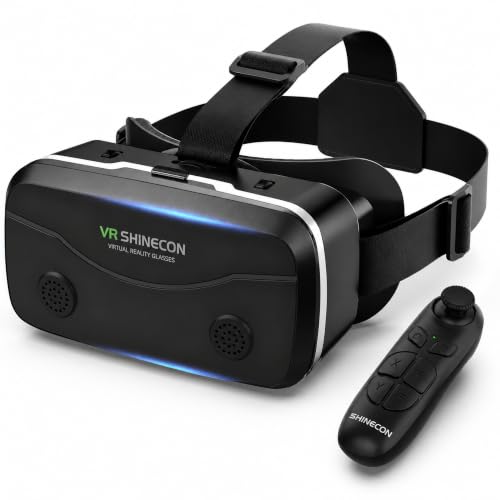
- ✓ Comfortable fit
- ✓ Easy setup
- ✓ Handy controller
- ✕ Limited brightness
- ✕ Phone compatibility varies
| Display Technology | Smartphone-based VR viewer with enclosed viewing design |
| Compatibility | Designed for both iPhone and Android smartphones |
| Included Accessories | Bluetooth wireless controller for game/app navigation |
| Adjustability & Comfort | Adjustable head strap with balanced wearable design |
| Usage Scenarios | Immersive 3D VR experience, movies, VR videos, and compatible mobile games |
| Portability & Use Cases | Portable for home and travel viewing with smartphone integration |
You slip the LAPORiO VR headset on, and the first thing that catches your eye is how snug the enclosed viewing design feels, almost like a tiny theater for your phone. The moment you snap in your iPhone or Android, you notice the balance shift—the weight sits evenly, and the strap hugs just right without squeezing.
Initially, I was curious about the Bluetooth controller, and it proves handy for navigating menus without peeling the headset off. It’s small enough to pocket, yet responsive enough that you don’t miss a beat when selecting a movie or pausing a game.
As you boot up a compatible VR video, the 3D effect lands with a quiet, immersive punch. It isn’t a high-end cinema, but the sense of depth and the theater-like enclosure make you forget you’re staring at a phone screen.
Comfort stays solid during longer sessions thanks to the adjustable head strap. I found the balance stable for seated viewing and light movement, which matters when you’re bouncing between a VR movie and a quick game break.
Setup is simple: pop in your phone, launch a supported app, and you’re ready to go. The headset works with a wide range of phones, which is a real win if you swap devices often for work or travel.
For travel or a casual night in, it delivers a relaxed intro to smartphone VR without the burden of more complex gear. It won’t replace dedicated PC VR, but for a quick, portable escape, you’ll find it surprisingly capable.
If you’re shopping on a budget and want something you can share with friends, this is a practical entry point. It’s not flashy, but it gets the job done with a warm, approachable vibe that’s easy to recommend.
What Features Make a VR Headset Start Screen the Best?
The best VR headset start screen features several key elements that enhance user experience and accessibility.
- User-Friendly Interface: A user-friendly interface is crucial for ensuring that users can navigate easily without prior experience. Intuitive icons and clear instructions help new users quickly understand how to start using the headset and access various applications.
Customization options allow users to personalize their start screen according to their preferences. This can include changing the background, rearranging icons, or selecting favorite applications, making the experience more enjoyable and tailored to individual needs. Quick access to settings directly from the start screen streamlines the user experience. Users can adjust volume, change display settings, and manage connectivity options without having to navigate through multiple menus, thus saving time and effort. Seamless integration with popular applications is essential for a versatile start screen. This feature allows users to jump directly into their most-used VR experiences, reducing the friction between the start screen and actual content, which can enhance overall engagement. A visually appealing start screen can enhance the immersive experience of VR. Engaging graphics and animations can create an inviting atmosphere, making users more excited to enter the virtual world and explore what it has to offer. Multi-user support on the start screen is beneficial for shared headsets. This feature enables different users to have personalized profiles, making it easy to switch between accounts and ensuring that each user’s preferences and settings are remembered. Incorporating notifications and updates on the start screen keeps users informed about new content, system updates, or important alerts. This feature ensures users are always aware of the latest developments, enhancing their engagement and satisfaction with the VR system.
How Do Different VR Headset Start Screens Enhance User Experience?
Audio Feedback: Sound cues accompanying the start screen can improve user orientation and enhance immersion, making the experience feel more realistic. Subtle audio prompts can guide users through the interface, creating a seamless connection between visual elements and auditory feedback.
Which Popular VR Headsets Have the Most Engaging Start Screens?
The best VR headsets known for their engaging start screens include:
- Oculus Quest 2: The Oculus Quest 2 features a vibrant and immersive start screen that showcases a 3D environment filled with colorful elements. Users can navigate through a virtual home space that feels personal and inviting, enhancing the overall experience of entering VR.
- Valve Index: The Valve Index presents a sleek start screen that emphasizes its high-fidelity graphics and immersive capabilities. It offers a customizable interface where users can access their library of games and applications while also providing stunning visuals that highlight the headset’s capabilities.
- HTC Vive Pro 2: The HTC Vive Pro 2 features a visually striking start screen that transports users to a detailed virtual environment. The start screen is designed to showcase the headset’s superior resolution and field of view, making it a captivating entry point into the VR experience.
- PlayStation VR: PlayStation VR’s start screen is user-friendly and visually appealing, integrating with the PlayStation ecosystem seamlessly. It offers a dynamic interface that allows users to quickly access their games and settings while providing a familiar feel for PlayStation users.
- Pimax 8K X: The Pimax 8K X boasts a start screen that emphasizes its expansive field of view and high-resolution capabilities. Users are greeted with stunning visuals that reflect the headset’s performance, creating an engaging entry into the VR world.
How Can Users Customize Their VR Headset Start Screens for Better Experience?
Users can customize their VR headset start screens to enhance their experience by utilizing various features and settings.
- Background Images: Users can select personalized images or themes for their start screen, making it visually appealing and more reflective of their interests.
- App Shortcuts: Customizing the layout of app shortcuts allows users to prioritize their favorite or most-used applications, providing quicker access to desired content.
- Widget Integration: Some VR headsets allow users to add widgets that display information such as time, notifications, or weather, enhancing functionality right from the start screen.
- Voice Commands: Setting up voice commands can enable users to navigate their start screen hands-free, making it easier to launch apps or change settings while immersed in VR.
- User Profiles: Many headsets offer the option to create multiple user profiles, allowing different users to have their own customized start screens tailored to their preferences and usage habits.
Background Images: By customizing the background of their VR start screen, users can create an immersive environment that resonates with their personal style. This feature often includes options to upload custom images or select from pre-installed themes, enabling a unique visual experience each time they access their headset.
App Shortcuts: Organizing app shortcuts on the start screen is crucial for efficiency in navigating VR content. Users can rearrange or remove apps based on their frequency of use, ensuring that their most beloved games and applications are easily accessible without unnecessary scrolling or searching.
Widget Integration: Widgets can significantly enhance the utility of a VR start screen by providing at-a-glance information. Users can integrate tools that display notifications, calendar events, or even quick access controls, creating a more functional and personalized experience.
Voice Commands: Implementing voice command functionality allows users to control their VR environment with ease. This feature supports a hands-free approach, enabling quick app launches and adjustments to settings without the need to remove the headset or struggle with controllers.
User Profiles: The option to set up individual user profiles is particularly beneficial for shared VR headsets. Each user can create a tailored start screen with their preferred apps, backgrounds, and settings, ensuring a personalized experience that meets individual gaming or usage preferences.
What Do Users Say About the Start Screens of Leading VR Headsets?
- Oculus Quest 2: Users appreciate the clean and intuitive layout of the start screen, which provides easy access to games and settings. The vibrant graphics and user-friendly interface create an immersive experience right from the start, making it easy for both newcomers and seasoned users to navigate quickly.
- Valve Index: The start screen of the Valve Index is praised for its simplicity and effectiveness in delivering necessary information. Users find the design minimalist yet functional, allowing them to focus on their VR experience without distractions, while still providing quick access to their library and system settings.
- HTC Vive Pro 2: The start screen is noted for its customizable options, allowing users to tailor their experience based on their preferences. Many users enjoy the ability to personalize their interface, which enhances their overall engagement with the headset and makes it feel more like their own.
- PlayStation VR: The start screen is recognized for its straightforward navigation, which is particularly beneficial for console gamers transitioning into VR. Users appreciate how it integrates seamlessly with the PlayStation ecosystem, providing quick access to both VR and non-VR content, which enhances the overall usability for casual players.
- Pico Neo 3: Users enjoy the modern aesthetic of the start screen, which features a visually appealing interface that aligns with contemporary design trends. The effective organization of apps and games allows for effortless browsing, making it a favorable option for those who value both style and functionality.
What Trends Are Shaping the Future of VR Headset Start Screens?
Several trends are shaping the future of VR headset start screens, enhancing user experience and engagement.
- Customization and Personalization: Users are increasingly looking for personalized experiences that reflect their preferences and interests. This trend allows users to customize their start screens by choosing backgrounds, icons, and shortcuts to their favorite applications, making the VR environment feel more personal and inviting.
- Integration of Social Features: Social connectivity is becoming a prominent feature in VR, with start screens incorporating social elements. Users can see friends online, join virtual hangouts, or access social media feeds directly from their start screens, fostering a sense of community and encouraging social interaction within the VR space.
- Augmented Reality Overlays: The blending of augmented reality (AR) with virtual reality (VR) is gaining traction. Start screens may feature AR overlays that provide useful information, notifications, or interactive elements that enhance the user experience without compromising immersion, allowing users to interact with their surroundings in new ways.
- Minimalistic Design: A shift towards minimalistic design is evident, focusing on clean interfaces that reduce visual clutter. This trend aims to enhance usability by allowing users to easily navigate their start screens and access content quickly, promoting a more streamlined and efficient VR experience.
- Dynamic Content Updates: Start screens are evolving to showcase dynamic content that updates in real-time, such as news feeds, event notifications, or game updates. This feature keeps users engaged by providing fresh content every time they enter their VR environment, making the experience more interactive and informative.
- Gamification Elements: Incorporating gamification elements into start screens is becoming popular, encouraging users to engage more with their VR experiences. Features like achievement displays, progress tracking, and reward notifications can motivate users to explore more content and spend longer in the VR environment.